The device does not have an on-screen configuration interface. However, it does have settings the host can change using commands. These settings are documented as Properties in iDynamo 5 Gen III Programmers Manual Commands
User Manuals
This page provides user manuals for the iDynamo 5 Gen III secure card reader, including comprehensive installation and operation guides as well as documentation for the Windows-based demo utility software.
User Manuals
Need Help?
For additional support, please contact MagTek Support:
Information in this publication is subject to change without notice and may contain technical inaccuracies or graphical discrepancies. Changes or improvements made to this product will be updated in the next publication release. No part of this document may be reproduced or transmitted in any form or by any means, electronic or mechanical, for any purpose, without the express written permission of MagTek, Inc.
MagTek® is a registered trademark of MagTek, Inc. MagnePrint® is a registered trademark of MagTek, Inc. MagneSafe® is a registered trademark of MagTek, Inc. Magensa™ is a trademark of MagTek, Inc.
iDynamo™ is a trademark of MagTek, Inc.
ANSI®, the ANSI logo, and numerous other identifiers containing "ANSI" are registered trademarks, service marks, and accreditation marks of the American National Standards Institute (ANSI).
ISO® is a registered trademark of the International Organization for Standardization. UL™ and the UL logo are trademarks of UL LLC.
PCI Security Standards Council® is a registered trademark of the PCI Security Standards Council, LLC.
Apple Pay®, Apple Wallet®, iPhone®, iPod®, Mac®, and OS X® are registered trademarks of Apple Inc., registered in the U.S. and other countries. iPad™ is a trademark of Apple. Inc. App StoreSM is a service mark of Apple Inc., registered in the U.S. and other countries. Apple and MFi are registered trademarks of Apple Inc. IOS is a trademark or registered trademark of Cisco in the U.S. and other countries and is used by Apple Inc. under license.
Google Play™ store, Google Wallet™ payment service, and Android™ platform are trademarks of Google LLC.
Microsoft®, Windows®, and .NET® are registered trademarks of Microsoft Corporation. All other system names and product names are the property of their respective owners
Quick Installation Guide
iDynamo 5 (Gen III) is a compact secure card reader authenticator (SCRA) that reads magnetic stripe cards that conform to ISO standards. iDynamo 5 (Gen III) is made for iOS, Android, and Windows devices equipped with a
USB-C interface. When a cardholder swipes a card, the device encrypts card data before they leave the encapsulated magnetic stripe reader head using the Triple Data Encryption Algorithm (TDEA, also known as Triple DES) and DUKPT key management.
During normal operation, iDynamo 5 (Gen III) is powered through its connection to the host. iDynamo 5 (Gen III) does not come equipped with a battery, if it does not receive adequate power from the host the device powers off.
Installing iDynamo 5 (Gen III) is a straightforward process. It is important to thoroughly inspect a new device before deployment, and regularly inspect devices in live usage (including its immediate surroundings) to make sure
Maintenance
Periodic cleaning of iDynamo’s exterior may be required. To clean the outside of iDynamo, wipe it down with a soft, damp, lint-free cloth and then wipe it dry.
MagTek’s double-sided cleaning card 96700004 is designed to clean the magnetic read head in the MSR swipe path. Keeping the head clean is essential to the device’s functioning. MagTek recommends swiping a cleaning card once per week to avoid card misreads.
Status Codes and Responses
For SCRA V5 devices please refer to respective command reference:
D998200115 (eDyanmo)
D998200176 (Dynamag)
D998200175 (DynaMAX)
Handling and Storage
Upon receiving the device, inspect it to make sure it originated from an authentic source and has not been tampered with. For details, see iDynamo 5 Gen III SRED, Device Inspection Manual, available from MagTek.
From device delivery through assembly, shipping, installation, usage, and maintenance, the device must not be exposed to conditions outside the ratings in Appendix A Technical Specifications.
If the device is exposed to cold temperatures, adjust it to warmer temperatures gradually to avoid condensation, which can interfere with the operation of the device or cause permanent damage.
Do not drop or shake the device.
For information about ongoing maintenance of the device, such as cleaning, see section 7 Maintenance.
iDynamo 5 products that are PCI certified implement an active tamper detection, which uses a small amount of electricity even when the device is completely powered off. To avoid accidental tamper events follow these precautions:
D99875483 (iDynamo)
D99875466 (MicrSafe)
For PINPAD devices please refer to the respective command reference:
D99875585 (DynaPro)
D99875629 (DynaPro Mini)
D998200136 (DynaPro Go)
To avoid damaging the read head, only clean the card path with approved cleaning cards. DO NOT use liquid cleaning products or insert any other objects into the device.
Store the device at the lowest reasonable temperatures within its specified storage temperature range (see Appendix A Technical Specifications). Storing at temperatures between -4°F to 113°F (-20°C to 45°C).
Do not drop or shake the device.
Do not attempt to disassemble the device.
Proper handling of the device throughout delivery, assembly, shipping, installation, usage, and maintenance is very important. Not following the guidelines in this document could damage the device, render it inoperable, and/or violate the conditions of the warranty.
This guide offers concise, step-by-step instructions for physically connecting the iDynamo 5 Gen III to a host device via USB-C and establishing basic communication.
A comprehensive guide covering physical setup, mounting procedures, host connections via USB-C for Windows and Android, and secure operational practices for the iDynamo 5 Gen III.
A step-by-step guide to using the iDynamo 5 Gen III Utility software on Windows, including instructions for configuring interface types, testing card reading, and managing device settings.
This is a full-function HTML browser application for Windows that integrates with device drivers to control MagTek payment devices, including the iDynamo 5 Gen III, via HTML over HTTP(S).
Before connecting iDynamo 5 (Gen III) device, be sure it is configured
to use the correct USB configuration (USB HID, USB KB, iAP).
In order to change configuration, you must use the current configured
setting and HOST type to change.
If the device is accidentally configured to use the iAP connection type,
you must use an iAP connection HOST to change the configuration.
Connecting to Android Host
Ensure Android HOST supports USB On-The-Go. Ensure connection is set to USB HID. This setting may be specified on a sales order, or configured using sample tools, sample code, or custom software.
Install any mounting brackets or adapters.
Power on the HOST.
On the HOST, install and configure the HOST SOFTWARE.
Connect READER to the HOST.
To Disconnect
Ensure HOST SOFTWARE is closed.
Carefully disconnect the READER.
Ensure READER is configured to use the correct USB configuration (iAP, USB)
as the primary host interface.
Install any mounting brackets or adapters.
Power on the HOST.
Ensure READER is configured to use the correct USB configuration as the
primary host interface.
Install any mounting brackets or adapters.
Power on the HOST.
Use the cable shipped with the READER to connect from the USB-C receptacle to the HOST device.
The steps for reading a card may be different depending on READER configuration and on the design of the HOST SOFTWARE. Cardholders should swipe magnetic stripe cards in the MSR swipe path with the magnetic stripe facing away from the cardholder and into the READER. Cardholders may swipe in either direction along the path.
The READER does not have an on-screen configuration interface. The READER is HOST driven by the HOST SOFTWARE.
iDynamo 5 (Gen III) has a single RGB LED acting as the user interface. The LED will be used to indicate various states of the reader. See the installation and operation manual found at
Periodic cleaning of iDynamo 5 (Gen III)’s exterior may be required. To clean the outside of iDynamo 5 (Gen III), wipe it down with a soft, damp, lint-free cloth and then wipe it dry. MagTek’s double-sided cleaning card 96700004 is designed to clean the magnetic read head in the MSR swipe path.
Keeping the head clean is essential to the device’s functioning. MagTek recommends swiping and inserting a cleaning card once per week to avoid card misreads.
FCC INFORMATION
This device complies with Part 15 of the FCC Rules. Operation is subject to the following two conditions: (1) This device may not cause harmful interference, and (2) This device must accept any interference received, including interference that may cause undesired operation.
Note: This equipment has been tested and found to comply with the limits for a Class B digital device, pursuant to part 15 of the FCC Rules. These limits are designed to provide reasonable protection against harmful interference in a residential installation. This equipment generates, uses and can radiate radio frequency energy and, if not installed and used in accordance with the instructions, may cause harmful interference to radio communications. However, there is no guarantee that interference will not occur in a particular installation. If this equipment does cause harmful interference to radio or television reception, which can be determined by turning the equipment off and on, the user is encouraged to try to correct the interference by one or more of the following measures:
Reorient or relocate the receiving antenna.
Increase the separation between the equipment and receiver.
Connect the equipment into an outlet on a circuit different from that to which the receiver is connected.
Consult the dealer or an experienced radio/TV technician for help.
Testing for compliance with CE requirements was performed by an independent laboratory. The unit under test was found compliant with standards established for Class B devices.
This product is recognized per UL 60950 1, 2nd Edition, 2011 12 19 (Information Technology Equipment - Safety - Part 1: General Requirements), CSA C22.2 No. 60950 1 07, 2nd Edition, 2011 12 (Information Technology Equipment - Safety - Part 1: General Requirements).
When ordered as RoHS compliant, this product meets the Electrical and Electronic Equipment (EEE) Reduction of Hazardous Substances (RoHS) European Directive 2002/95/EC. The marking is clearly recognizable, either as written words like “Pb-free,” “lead-free,” or as another clear symbol (Pb).
Product Overview
Major Components
Power
How to connect
Operating Systems
Cable Connection
Accepting Payments
Commands
LEDs
Maintenance
Compliance
Caution: Changes or modifications not expressly approved by MagTek could void the user’s authority to operate this equipment.
CE STANDARDS
UL/CSA
ROHS STATEMENT
Appendix B Troubleshooting
A.1 App Does Not Detect iDynamo
If the app you are using won’t detect or connect to the device, check the following:
· Check the electromechanical connection:
o Make sure the host’s case is not interfering with the connection.
o Make sure iDynamo in its adapter sleeve does not shift on the host when gently wiggled.
o Make sure the device’s connector is not damaged or dirty.
o Connect another device to the host’s connector to make sure it is functioning correctly.
· For an app to interface with iDynamo, it must use the same Bundle Identifier as the device. iDynamo can also be configured with a different Bundle Identifier, in which case the app must use that Bundle Identifier instead. For details, see section 8 Developing Custom Host Software.
If card swipes are not being registered correctly, check the following:
Card orientation. Make sure the card is oriented so the magnetic stripe is inside iDynamo and facing toward the thicker side of iDynamo (away from the MagTek lock logo). See section 6.3.2 How to Swipe Magnetic Stripe Cards.
Damaged card. The magnetic stripe on the card may be damaged. Try another card.
Excessive buildup on the read head. Clean the read head by swiping a cleaning card through iDynamo several times in different orientations until the card comes out clean. Cleaning card 96700025 is available from MagTek. If the operating environment is dusty, use compressed air to blow dust or other residue out of iDynamo.
If iDynamo still does not register swipes after following these steps, contact your supplier for assistance.
Installation
Installing iDynamo is a straightforward process: The acquirer or manufacturer configures the encryption keys before deployment. Operators need only set up a host with appropriate software, configure the software, and connect the device to the host. This section provides general information about setting up solutions that incorporate iDynamo, including installing host software and connecting the device.
About Inspection
Before unpacking the device, it is important to inspect its secure packaging to make sure it has not been tampered with in storage or in transit. MagTek provides details for inspecting the integrity of the device’s secure packaging in iDynamo 5 Gen III SRED, Package Inspection Manual
It is important to thoroughly inspect a new device before deployment, and regularly inspect devices in live usage (including its immediate surroundings) to make sure malicious individuals have not tampered with it. MagTek recommends conducting inspection training for all device operators, and an inspection schedule with checkpoints in place to make sure operators are performing inspections as specified and as scheduled. MagTek provides an easy-to-follow device inspection reference iDynamo 5 Gen III SRED, Device Inspection Manual.
About Host Software
In any solution, iDynamo is connected to a host, which must have software installed that can communicate with the device, and perform the actions intended to be carried out when a cardholder swipes a card. To set up the host software to work with iDynamo, follow the installation and configuration instructions provided by the vendor of the host or the host software. For details about developing host software, see section 8 Developing Custom Host Software.
Connecting to an Android Host
To connect iDynamo 5 to an Android host that supports USB-C, follow these steps:
If you will be using a mounting sleeve, install it.
Connect iDynamo 5 via USB-C
Power on the host.
On the host, install and configure the host software you intend to use with iDynamo 5. If you do not yet have that software, you can download a test tool from the Google Play store called MagTek Test, published by MagTek to perform simple tests:
Make sure the host software is configured to look for the device on the right connection.
Make sure the host software knows which device(s) it should interface with.
Make sure the host software is configured to properly interpret incoming data from the device. For direct USB-C connections, iDynamo 5 transmits data as a vendor-defined HID device.
Connect iDynamo 5 to the host. Make sure all components are seated firmly. If you are using the mounting bracket, press the suction cup onto the rear of the host.
Use the host software or the MagTek test app to connect to the device and to test swiping a card.
For details about reading each payment type, see Card Reading.
Open the MagTek test app to connect to the device and to test swiping a card.
Introduction
About iDynamo 5 Gen III
iDynamo 5 Gen III is a compact secure card reader (SCR) that reads magnetic stripe cards that conform to ISO standards. iDynamo models are made to work with multiple host operating systems including Windows and Android devices connecting via USB-C. iDynamo can also connect to iOS host devices via a USB-C to Lightning adaptor, see Table 2-2 - iDynamo Accessories.
In addition to reading multiple tracks of data from a card, iDynamo models incorporate MagnePrint technology, so a card’s unique MagnePrint fingerprint is included with the track data in each transaction.
To maximize card security, when a cardholder swipes a card, the device encrypts card data and MagnePrint data before they leave the encapsulated magnetic stripe reader head using the Triple Data Encryption Algorithm (TDEA, also known as Triple DES).
iDynamo models manage encryption keys using DUKPT (Derived Unique Key Per Transaction) key management. DUKPT uses a base derivation key to encrypt a key serial number that produces an initial encryption key which is injected into the device prior to deployment. After each transaction, the encryption key is modified per the DUKPT algorithm, so each transaction uses a unique key. The data is encrypted with a different key for each transaction.
Key Features
Uses USB-C Receptacle compatible with Android, iOS, and Windows Devices.
Bi-directional card reading.
Reads encoded data that meets ANSI/ISO/AAMVA standards.
Reads up to three tracks of card data.
Non-volatile memory for storage of protected and settable properties (such as unit serial number).
MagnePrint supports Extended MP 198 bytes.
Contains a unique, permanent serial number for tracking.
Encrypts track data MagnePrint values before they leave the magnetic stripe reader head.
Provides no clear text confirmation for cardholder Name, Expiration Date, Service Code, and a portion of the PAN as part of the masked track data.
Supports mutual authentication mode for use with Magensa.net.
Qwantum card supported.
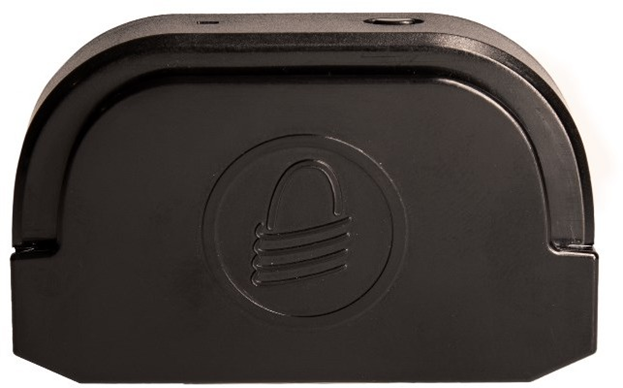
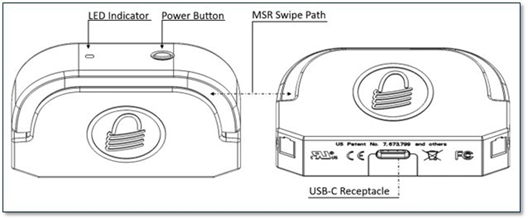
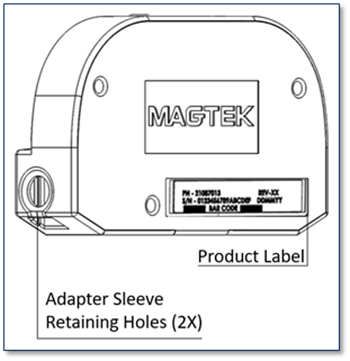
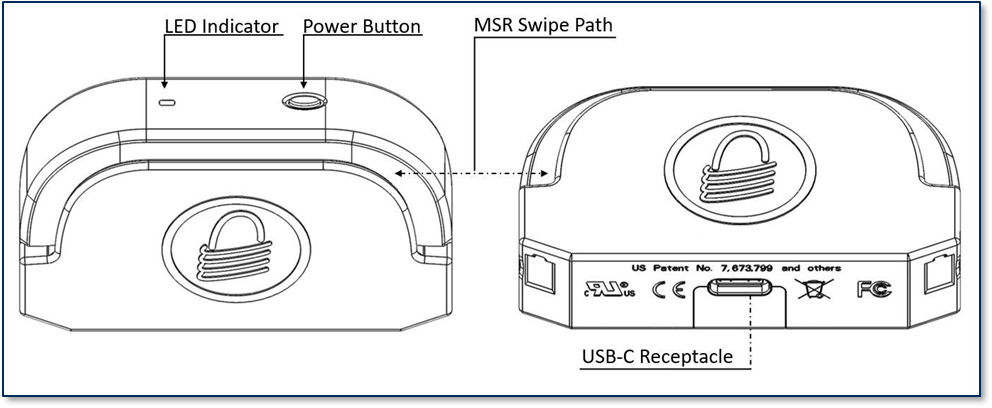
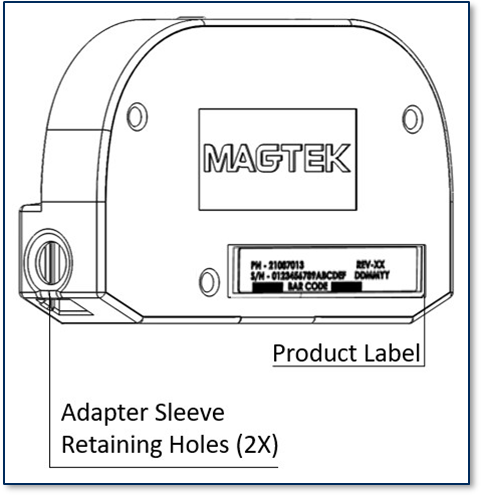
Major components for iDynamo 5 Gen III are shown below.
Figure 1-1 - iDynamo 5 Gen III Major Components (Front)
Figure 1-2 - iDynamo 5 Gen III Major Components (Back)
In this document, iDynamo 5 models are referred to as the device. It is designed to be connected to a host, which is a piece of general-purpose electronic equipment that can send commands and data to, and receive data from, the device. Host types for iDynamo 5 include a variety of Android, Windows, and iOS devices. Generally, the host must have softwareinstalled that communicates with the device and is capable of processing transactions. During a transaction, the host and its software interact with the operator, such as a cashier or bank teller, while the device interacts with the cardholder.
Developing Custom Host Software
Custom host software uses the same underlying device command set to communicate with all available iDynamo models. This section provides high-level information about communicating with the device and provides pointers to select API references and sample code.
Android and Windows Custom Software
MagTek produces software development kits (SDKs) with API libraries that provide higher-level functions wrapped around USB HID communication protocols. These libraries simplify the development of custom host software that interfaces with iDynamo 5. See:
In addition to MagTek’s SDKs, custom software on any operating system can communicate directly with the device using the operating system’s native USB libraries and protocols. For details see iDynamo 5 Gen III Programmer’s Manual COMMANDS.
MagTek produces software development kits (SDKs) with API libraries that provide higher-level functions wrapped around Lightning communication protocols. These libraries simplify the development of custom host software that interfaces with iDynamo.
See DYNAMAX / EDYNAMO / UDYNAMO / ADYNAMO / IDYNAMO / KDYNAMO / SDYNAMO / TDYNAMO SDK FOR IOS .
All product software and documentation is available from
In addition to MagTek’s SDK API libraries, custom host software can communicate directly with the device using Apple’s ExternalAccessory Framework, with sample code available in the form of Apple’s EADemo app. For details, see:
iDynamo 5 Gen III Programmer’s Manual COMMANDS, available from MagTek.
For more information about developing custom host software that integrates with iDynamo, see the MagTek website or contact your reseller or MagTek Support Services.
Solution Planning
Smooth deployment of an iDynamo 5 solution requires some up-front planning and decision-making:
Determine the overall functional requirements and desired user experience of the solution iDynamo will be integrated into. For example, how iDynamo 5 and its host will be physically presented to the cardholder. This includes whether the solution will be handheld or permanently mounted in a stand or enclosure, and whether the solution is intended to be used in portrait or landscape orientation. When planning placement, be sure to consider:
Manual Part Number: D998200207-30
REGISTERED TO ISO 9001:2015
Information in this publication is subject to change without notice and may contain technical inaccuracies or graphical discrepancies. Changes or improvements made to this product will be updated in the next publication release. No part of this document may be reproduced or transmitted in any form or by any means, electronic or mechanical, for any purpose, without the express written permission of MagTek, Inc.
MagTek® is a registered trademark of MagTek, Inc. MagnePrint® is a registered trademark of MagTek, Inc. Magensa™ is a trademark of MagTek, Inc.
MagneSafe® is a registered trademark of MagTek, Inc. iDynamo™, and uDynamo are trademarks of MagTek, Inc.
Swipe mechanics. A good read depends on the magnetic stripe moving straight over the read head and above a certain speed. Try swiping more quickly and straight through the guide path of iDynamo. The range of working swipe speeds is listed in Appendix A Technical Specifications.
Ergonomics. Make sure there are no mechanical hindrances (such as an accessory case or stand for the host) or ergonomic factors (such as awkward mounting angle) that make it difficult to swipe smoothly and straight through the device.
A.2 Bad Reads / Swipe Not Detected
Permanently mounted solutions should be within reasonable cabling distance from the power source; handheld solutions need a designated secure location with charging power available.
2
Ergonomics
Make sure there is adequate clearance for operators or cardholders to easily find the critical components of the device, and swipe a card.
Determine what documentation and training will be required from solution design through testing and field deployment. For example, it may be necessary to develop a solution-specific installation procedure for technicians, and training materials for operators.
Determine what type of host iDynamo 5 will connect to. Use Table 2-1 to determine which model of iDynamo is appropriate for your solution, and use Table 2-2 to determine which adapters and accessories you need. When planning, include any additional support or devices required by the host, such as physical locations, mounting, and power connections.
Determine how the host and iDynamo 5 will be mounted.
Determine what software will be installed on the host and how it will be configured. Software can include operating system, transaction processing software, security software, and so on. Include any additional support required by the software, such as network connections.
Determine how iDynamo should be configured and specify when you order devices. MagTek or your reseller can advise. For deep detail about configuration options and how they affect device behavior, see iDynamo 5 Gen III Programmer’s Manual (COMMANDS)
Determine how iDynamo 5 will be branded. In large quantities, MagTek can accommodate custom branding colors and trade dress. Contact a representative for details.
Determine how the solution will be tested and, if appropriate, how it will be certified.
Determine how the solution will be maintained. See Maintenance for guidance on maintaining the iDynamo 5 portion of the solution.
Determine how the solution will be regularly inspected for tampering, unauthorized added components such as eavesdropping or skimming devices, and so on. Proper inspection requires additional solution-specific training, instructions, and visual references.
eDynamo™, Dynamag, and DynaMAX are trademarks of MagTek, Inc.
DynaPro Mini™, DynaPro™, and DynaPro Go™ are trademarks of MagTek, Inc.
The Bluetooth® word mark and logos are registered trademarks owned by Bluetooth SIG, Inc. and any use of such marks by MagTek is under license
Microsoft® and Windows® are registered trademarks of Microsoft Corporation.
All other system names and product names are the property of their respective owners.
IMPORTANT: YOU SHOULD CAREFULLY READ ALL THE TERMS, CONDITIONS AND RESTRICTIONS OF THIS LICENSE AGREEMENT BEFORE INSTALLING THE SOFTWARE PACKAGE. YOUR INSTALLATION OF THE SOFTWARE PACKAGE PRESUMES YOUR ACCEPTANCE OF THE TERMS, CONDITIONS, AND RESTRICTIONS CONTAINED IN THIS AGREEMENT. IF YOU DO NOT AGREE WITH THESE TERMS, CONDITIONS, AND RESTRICTIONS, PROMPTLY RETURN THE SOFTWARE PACKAGE AND ASSOCIATED DOCUMENTATION TO THE ADDRESS ON THE FRONT PAGE OF THIS DOCUMENT, ATTENTION: CUSTOMER SUPPORT.
MagTek, Incorporated (the "Licensor") owns and has the right to distribute the described software and documentation, collectively referred to as the "Software."
LICENSE: Licensor grants you (the "Licensee") the right to use the Software in conjunction with MagTek products. LICENSEE MAY NOT COPY, MODIFY, OR TRANSFER THE SOFTWARE IN WHOLE OR IN PART EXCEPT AS EXPRESSLY PROVIDED IN THIS AGREEMENT. Licensee may not decompile, disassemble, or in any other manner attempt to reverse engineer the Software. Licensee shall not tamper with, bypass, or alter any security features of the software or attempt to do so.
TRANSFER: Licensee may not transfer the Software or license to the Software to another party without the prior written authorization of the Licensor. If Licensee transfers the Software without authorization, all rights granted under this Agreement are automatically terminated.
COPYRIGHT: The Software is copyrighted. Licensee may not copy the Software except for archival purposes or to load for execution purposes. All other copies of the Software are in violation of this Agreement.
TERM: This Agreement is in effect as long as Licensee continues the use of the Software. The Licensor also reserves the right to terminate this Agreement if Licensee fails to comply with any of the terms, conditions, or restrictions contained herein. Should Licensor terminate this Agreement due to Licensee's failure to comply, Licensee agrees to return the Software to Licensor. Receipt of returned Software by the Licensor shall mark the termination.
LIMITED WARRANTY: Licensor warrants to the Licensee that the disk(s) or other media on which the Software is recorded are free from defects in material or workmanship under normal use.
THE SOFTWARE IS PROVIDED AS IS. LICENSOR MAKES NO OTHER WARRANTY OF ANY KIND, EITHER EXPRESS OR IMPLIED, INCLUDING, BUT NOT LIMITED TO, THE IMPLIED WARRANTIES OF MERCHANTABILITY AND FITNESS FOR A PARTICULAR PURPOSE.
Because of the diversity of conditions and PC hardware under which the Software may be used, Licensor does not warrant that the Software will meet Licensee specifications or that the operation of the Software will be uninterrupted or free of errors.
IN NO EVENT WILL LICENSOR BE LIABLE FOR ANY DAMAGES, INCLUDING ANY LOST PROFITS, LOST SAVINGS, OR OTHER INCIDENTAL OR CONSEQUENTIAL DAMAGES ARISING OUT OF THE USE, OR INABILITY TO USE, THE SOFTWARE. Licensee's sole remedy in the event of a defect in material or workmanship is expressly limited to replacement of the Software disk(s) if applicable.
GOVERNING LAW: If any provision of this Agreement is found to be unlawful, void, or unenforceable, that provision shall be removed from consideration under this Agreement and will not affect the enforceability of any of the remaining provisions. This Agreement shall be governed by the laws of the State of California and shall inure to the benefit of MagTek, Incorporated, its successors or assigns.
ACKNOWLEDGMENT: LICENSEE ACKNOWLEDGES THAT HE HAS READ THIS AGREEMENT, UNDERSTANDS ALL OF ITS TERMS, CONDITIONS, AND RESTRICTIONS, AND AGREES TO BE BOUND BY THEM. LICENSEE ALSO AGREES THAT THIS AGREEMENT SUPERSEDES ANY AND ALL VERBAL AND WRITTEN COMMUNICATIONS BETWEEN LICENSOR AND LICENSEE OR THEIR ASSIGNS RELATING TO THE SUBJECT MATTER OF THIS AGREEMENT.
QUESTIONS REGARDING THIS AGREEMENT SHOULD BE ADDRESSED IN WRITING TO MAGTEK, INCORPORATED, ATTENTION: CUSTOMER SUPPORT, AT THE ADDRESS LISTED IN THIS DOCUMENT, OR E-MAILED TO SUPPORT@MAGTEK.COM.
SOFTWARE LICENSE AGREEMENT
TERMS, CONDITIONS, AND RESTRICTIONS
Connect the READER through the USB-C.
After a few seconds, the iOS host will pop up “App Not Installed”
Go to the APP STORE to install the app.
If “App Not Installed” does not appear: On the iOS HOST go to
SETTINGS > GENERAL > ABOUT > select iDynamo 5 (Gen III) to show
reader’s ABOUT page
In the READER ABOUT page select FIND APP FOR ACCESSORY
Install and configure the HOST SOFTWARE.
The HOST SOFTWARE should recognize the READER.
To Disconnect
Ensure HOST SOFTWARE is closed.
Carefully disconnect the READER.
On the HOST, install and configure the HOST SOFTWARE.
Connect the READER to the HOST.
Use the HOST SOFTWARE to connect to the READER.
To Disconnect
Ensure HOST SOFTWARE is closed or disconnected.
Turn off HOST display.
Carefully disconnect the READER.
Connecting to an iOS Host
Connecting to a Windows Host
For details about reading each payment type, see section 6.3 Card Reading
Press the MaTek pp on the Android host.
button in the top menu bar. The app should report the USB Connection State is Disconnected.
a) Press the
button in the top menu bar.
should report Connected
Introduction
This document provides instructions on how to interact with the MagneFlex Browser.
About the MagneFlex Browser WEB API
The MagneFlex Browser, available from MagTek, is a full-function HTML browser application that is integrated with driver applications that allow the control of a set of MagTek payment card readers.
Nomenclature
In this document, the following nomenclature are used strictly as follows:
Device refers to the MagTek device (eg. Dynamag, DynaPro, MICRSafe) that receives and responds to the command set specified in this document.
Host refers to the piece of general-purpose electronic equipment the device is connected. Host types include PC and Mac computers/laptops, tablets, and smartphones.
User refers to the cardholder.
Web App refers to the application provided by the integrator of MagneFlex Browser. The web app will communicate with the MagneFlex browser via query strings. MagneFlex then controls and obtains data from the MagTek device.
Query string refers to the web app’s interface to MagneFlex WEB API sent as an HTTP request. The query string is added to the base URL. This string contains field-value pairs referred to as parameters and begins after the question mark character “?” at the end of the base URL. Each parameter is defined in the parameter table for each resource of the MagneFlex WEB API. In the following example, the place holder for field will be listed in the parameter column of the table and value will be explained in the description column.
Example query:
Postback refers to the response from a request or command from the device. The web app shall consume the postback. MagneFlex sends the postback in two forms.
HTTP GET - returns the response data in the form of a query string.
HTTP POST - returns the response data in the form of a body message. POST is recommended for EVM related transactions or commands of lengthy response to accommodate limits on query string lengths.
Tested operating systems:
iOS 8 to iOS 10
Windows 7, 8.1, 10
Device
Interface
Operating System
Appendix C Warranty, Standards, and Certifications
LIMITED WARRANTY
MagTek warrants that the products sold pursuant to this Agreement will perform in accordance with MagTek’s published specifications. This warranty shall be provided only for a period of one year from the date of the shipment of the product from MagTek (the “Warranty Period”). This warranty shall apply only to the “Buyer” (the original purchaser, unless that entity resells the product as authorized by MagTek, in which event this warranty shall apply only to the first repurchaser).
During the Warranty Period, should this product fail to conform to MagTek’s specifications, MagTek will, at its option, repair or replace this product at no additional charge except as set forth below. Repair parts and replacement products will be furnished on an exchange basis and will be either reconditioned or new. All replaced parts and products become the property of MagTek. This limited warranty does not include service to repair damage to the product resulting from accident, disaster, unreasonable use, misuse, abuse, negligence, or modification of the product not authorized by MagTek. MagTek reserves the right to examine the alleged defective goods to determine whether the warranty is applicable.
Without limiting the generality of the foregoing, MagTek specifically disclaims any liability or warranty for goods resold in other than MagTek’s original packages, and for goods modified, altered, or treated without authorization by MagTek.
Service may be obtained by delivering the product during the warranty period to MagTek (1710 Apollo Court, Seal Beach, CA 90740). If this product is delivered by mail or by an equivalent shipping carrier, the customer agrees to insure the product or assume the risk of loss or damage in transit, to prepay shipping charges to the warranty service location, and to use the original shipping container or equivalent. MagTek will return the product, prepaid, via a three (3) day shipping service. A Return Material Authorization (“RMA”) number must accompany all returns. Buyers may obtain an RMA number by contacting MagTek Support Services at (888) 624-8350.
EACH BUYER UNDERSTANDS THAT THIS MAGTEK PRODUCT IS OFFERED AS-IS. MAGTEK MAKES NO OTHER WARRANTY, EXPRESS OR IMPLIED, AND MAGTEK DISCLAIMS ANY WARRANTY OF ANY OTHER KIND, INCLUDING ANY WARRANTY OF MERCHANTABILITY OR FITNESS FOR A PARTICULAR PURPOSE.
IF THIS PRODUCT DOES NOT CONFORM TO MAGTEK’S SPECIFICATIONS, THE SOLE REMEDY SHALL BE REPAIR OR REPLACEMENT AS PROVIDED ABOVE. MAGTEK’S LIABILITY, IF ANY, SHALL IN NO EVENT EXCEED THE TOTAL AMOUNT PAID TO MAGTEK UNDER THIS AGREEMENT. IN NO EVENT WILL MAGTEK BE LIABLE TO THE BUYER FOR ANY DAMAGES, INCLUDING ANY LOST PROFITS, LOST SAVINGS, OR OTHER INCIDENTAL OR CONSEQUENTIAL DAMAGES ARISING OUT OF THE USE OF, OR INABILITY TO USE, SUCH PRODUCT, EVEN IF MAGTEK HAS BEEN ADVISED OF THE POSSIBILITY OF SUCH DAMAGES, OR FOR ANY CLAIM BY ANY OTHER PARTY.
LIMITATION ON LIABILITY
EXCEPT AS PROVIDED IN THE SECTIONS RELATING TO MAGTEK’S LIMITED WARRANTY, MAGTEK’S LIABILITY UNDER THIS AGREEMENT IS LIMITED TO THE CONTRACT PRICE OF THIS PRODUCT.
MAGTEK MAKES NO OTHER WARRANTIES WITH RESPECT TO THE PRODUCT, EXPRESSED OR IMPLIED, EXCEPT AS MAY BE STATED IN THIS AGREEMENT, AND MAGTEK DISCLAIMS ANY IMPLIED WARRANTY, INCLUDING WITHOUT LIMITATION ANY IMPLIED WARRANTY OF MERCHANTABILITY OR FITNESS FOR A PARTICULAR PURPOSE.
MAGTEK SHALL NOT BE LIABLE FOR CONTINGENT, INCIDENTAL, OR CONSEQUENTIAL DAMAGES TO PERSONS OR PROPERTY. MAGTEK FURTHER LIMITS ITS LIABILITY OF ANY KIND WITH RESPECT TO THE PRODUCT, INCLUDING NEGLIGENCE ON ITS PART, TO THE CONTRACT PRICE FOR THE GOODS.
MAGTEK’S SOLE LIABILITY AND BUYER’S EXCLUSIVE REMEDIES ARE STATED IN THIS SECTION AND IN THE SECTION RELATING TO MAGTEK’S LIMITED WARRANTY.
This device complies with Part 15 of the FCC Rules. Operation is subject to the following two conditions: (1) This device may not cause harmful interference, and (2) This device must accept any interference received, including interference that may cause undesired operation.
Note: This equipment has been tested and found to comply with the limits for a Class B digital device, pursuant to part 15 of the FCC Rules. These limits are designed to provide reasonable protection against harmful interference in a residential installation. This equipment generates, uses and can radiate radio frequency energy and, if not installed and used in accordance with the instructions, may cause harmful interference to radio communications. However, there is no guarantee that interference will not occur in a particular installation. If this equipment does cause harmful interference to radio or television reception, which can be determined by turning the equipment off and on, the user is encouraged to try to correct the interference by one or more of the following measures:
Reorient or relocate the receiving antenna.
Increase the separation between the equipment and receiver.
Connect the equipment into an outlet on a circuit different from that to which the receiver is connected.
Testing for compliance with CE requirements was performed by an independent laboratory. The unit under test was found compliant with standards established for Class B devices.
This product is recognized per UL 60950-1, 2nd Edition, 2011-12-19 (Information Technology Equipment - Safety - Part 1: General Requirements), CSA C22.2 No. 60950-1-07, 2nd Edition, 2011-12 (Information Technology Equipment - Safety - Part 1: General Requirements).
When ordered as RoHS compliant, this product meets the Electrical and Electronic Equipment (EEE) Reduction of Hazardous Substances (RoHS) European Directive 2002/95/EC. The marking is clearly recognizable, either as written words like “Pb-free,” “lead-free,” or as another clear symbol ( ).
INFORMATION IN THIS PUBLICATION IS SUBJECT TO CHANGE WITHOUT NOTICE AND MAY CONTAIN TECHNICAL INACCURACIES OR GRAPHICAL DISCREPANCIES. CHANGES OR IMPROVEMENTS MADE TO THIS PRODUCT WILL BE UPDATED IN THE NEXT PUBLICATION RELEASE. NO PART OF THIS DOCUMENT MAY BE REPRODUCED OR TRANSMITTED IN ANY FORM OR BY ANY MEANS, ELECTRONIC OR MECHANICAL, FOR ANY PURPOSE, WITHOUT THE EXPRESS WRITTEN PERMISSION OF MAGTEK, INC.
MagTek®, MagnePrint®, and MagneSafe® are registered trademarks of MagTek, Inc. Magensa™ is a trademark of MagTek, Inc.
iDynamo 5 Gen III™ is a trademark of MagTek, Inc.
AAMVA™ is a trademark of AAMVA.
American Express® and EXPRESSPAY FROM AMERICAN EXPRESS® are registered trademarks of American Express Marketing & Development Corp.
D-PAYMENT APPLICATION SPECIFICATION® is a registered trademark to Discover Financial Services CORPORATION
MasterCard® is a registered trademark and PayPass™ and Tap & Go™ are trademarks of MasterCard International Incorporated.
Visa® and Visa payWave® are registered trademarks of Visa International Service Association.
ANSI®, the ANSI logo, and numerous other identifiers containing "ANSI" are registered trademarks, service marks, and accreditation marks of the American National Standards Institute (ANSI).
ISO® is a registered trademark of the International Organization for Standardization. UL™ and the UL logo are trademarks of UL LLC.
PCI Security Standards Council® is a registered trademark of the PCI Security Standards Council, LLC. EMV® is a registered trademark in the U.S. and other countries and an unregistered trademark elsewhere. The EMV trademark is owned by EMVCo, LLC. The Contactless Indicator mark, consisting of four graduating arcs, is a trademark owned by and used with permission of EMVCo, LLC.
The Bluetooth® word mark and logos are registered trademarks owned by Bluetooth SIG, Inc. and any use of such marks by MagTek is under license.
Google Play™ store, Google Wallet™ payment service, and Android™ platform are trademarks of Google Inc.
Apple Pay®, iPhone®, iPod®, Mac®, and OS X® are registered trademarks of Apple Inc., registered in the U.S. and other countries. iPad™ is a trademark of Apple. Inc. App StoreSM is a service mark of Apple Inc., registered in the U.S. and other countries. IOS is a trademark or registered trademark of Cisco in the U.S. and other countries and is used by Apple Inc. under license.
Microsoft®, Windows®, and .NET® are registered trademarks of Microsoft Corporation. NFC is governed by The NFC Forum.
All other system names and product names are the property of their respective owners.
MagTek warrants that the products sold pursuant to this Agreement will perform in accordance with
MagTek’s published specifications. This warranty shall be provided only for a period of one year from the date of the shipment of the product from MagTek (the “Warranty Period”). This warranty shall apply only to the “Buyer” (the original purchaser, unless that entity resells the product as authorized by MagTek, in which event this warranty shall apply only to the first repurchaser).
During the Warranty Period, should this product fail to conform to MagTek’s specifications, MagTek will, at its option, repair or replace this product at no additional charge except as set forth below. Repair parts and replacement products will be furnished on an exchange basis and will be either reconditioned or new. All replaced parts and products become the property of MagTek. This limited warranty does not include service to repair damage to the product resulting from accident, disaster, unreasonable use, misuse, abuse, negligence, or modification of the product not authorized by MagTek. MagTek reserves the right to examine the alleged defective goods to determine whether the warranty is applicable.
Without limiting the generality of the foregoing, MagTek specifically disclaims any liability or warranty for goods resold in other than MagTek’s original packages, and for goods modified, altered, or treated without authorization by MagTek.
Service may be obtained by delivering the product during the warranty period to MagTek (1710 Apollo Court, Seal Beach, CA 90740). If this product is delivered by mail or by an equivalent shipping carrier, the customer agrees to insure the product or assume the risk of loss or damage in transit, to prepay shipping charges to the warranty service location, and to use the original shipping container or equivalent. MagTek will return the product, prepaid, via a three (3) day shipping service. A Return Material
Authorization (“RMA”) number must accompany all returns. Buyers may obtain an RMA number by contacting MagTek Support Services at (888) 624-8350.
EACH BUYER UNDERSTANDS THAT THIS MAGTEK PRODUCT IS OFFERED AS-IS. MAGTEK MAKES NO OTHER WARRANTY, EXPRESS OR IMPLIED, AND MAGTEK DISCLAIMS ANY WARRANTY OF ANY OTHER KIND, INCLUDING ANY WARRANTY OF MERCHANTABILITY OR FITNESS FOR A PARTICULAR PURPOSE.
IF THIS PRODUCT DOES NOT CONFORM TO MAGTEK’S SPECIFICATIONS, THE SOLE REMEDY SHALL BE REPAIR OR REPLACEMENT AS PROVIDED ABOVE. MAGTEK’S LIABILITY, IF ANY, SHALL IN NO EVENT EXCEED THE TOTAL AMOUNT PAID TO MAGTEK UNDER THIS AGREEMENT. IN NO EVENT WILL MAGTEK BE LIABLE TO THE BUYER FOR ANY DAMAGES, INCLUDING ANY LOST PROFITS, LOST SAVINGS, OR OTHER INCIDENTAL OR CONSEQUENTIAL DAMAGES ARISING OUT OF THE USE OF, OR INABILITY TO USE, SUCH PRODUCT, EVEN IF MAGTEK HAS BEEN ADVISED OF THE POSSIBILITY OF SUCH DAMAGES, OR FOR ANY CLAIM BY ANY OTHER PARTY.
LIMITATION ON LIABILITY
EXCEPT AS PROVIDED IN THE SECTIONS RELATING TO MAGTEK’S LIMITED WARRANTY, MAGTEK’S LIABILITY UNDER THIS AGREEMENT IS LIMITED TO THE CONTRACT PRICE OF THIS PRODUCT.
MAGTEK MAKES NO OTHER WARRANTIES WITH RESPECT TO THE PRODUCT, EXPRESSED OR IMPLIED, EXCEPT AS MAY BE STATED IN THIS AGREEMENT, AND MAGTEK DISCLAIMS ANY IMPLIED WARRANTY, INCLUDING WITHOUT LIMITATION ANY IMPLIED WARRANTY OF MERCHANTABILITY OR FITNESS FOR A PARTICULAR PURPOSE.
MAGTEK SHALL NOT BE LIABLE FOR CONTINGENT, INCIDENTAL, OR CONSEQUENTIAL DAMAGES TO PERSONS OR PROPERTY. MAGTEK FURTHER LIMITS ITS LIABILITY OF ANY KIND WITH RESPECT TO THE PRODUCT, INCLUDING NEGLIGENCE ON ITS PART, TO THE CONTRACT PRICE FOR THE GOODS.
MAGTEK’S SOLE LIABILITY AND BUYER’S EXCLUSIVE REMEDIES ARE STATED IN THIS SECTION AND IN THE SECTION RELATING TO MAGTEK’S LIMITED WARRANTY.
IMPORTANT: YOU SHOULD CAREFULLY READ ALL THE TERMS, CONDITIONS AND RESTRICTIONS OF THIS LICENSE AGREEMENT BEFORE INSTALLING THE SOFTWARE PACKAGE. YOUR INSTALLATION OF THE SOFTWARE PACKAGE PRESUMES YOUR ACCEPTANCE OF THE TERMS, CONDITIONS, AND RESTRICTIONS CONTAINED IN THIS AGREEMENT. IF YOU DO NOT AGREE WITH THESE TERMS, CONDITIONS, AND RESTRICTIONS, PROMPTLY RETURN THE SOFTWARE PACKAGE AND ASSOCIATED DOCUMENTATION TO THE ADDRESS ON THE FRONT PAGE OF THIS DOCUMENT, ATTENTION: CUSTOMER SUPPORT.
TERMS, CONDITIONS, AND RESTRICTIONS
MagTek, Incorporated (the "Licensor") owns and has the right to distribute the described software and documentation, collectively referred to as the "Software."
LICENSE: Licensor grants you (the "Licensee") the right to use the Software in conjunction with MagTek products. LICENSEE MAY NOT COPY, MODIFY, OR TRANSFER THE SOFTWARE IN WHOLE OR IN PART EXCEPT AS EXPRESSLY PROVIDED IN THIS AGREEMENT. Licensee
may not decompile, disassemble, or in any other manner attempt to reverse engineer the Software. Licensee shall not tamper with, bypass, or alter any security features of the software or attempt to do so.
TRANSFER: Licensee may not transfer the Software or license to the Software to another party without the prior written authorization of the Licensor. If Licensee transfers the Software without authorization, all rights granted under this Agreement are automatically terminated.
COPYRIGHT: The Software is copyrighted. Licensee may not copy the Software except for archival purposes or to load for execution purposes. All other copies of the Software are in violation of this Agreement.
TERM: This Agreement is in effect as long as Licensee continues the use of the Software. The Licensor also reserves the right to terminate this Agreement if Licensee fails to comply with any of the terms, conditions, or restrictions contained herein. Should Licensor terminate this Agreement due to Licensee's failure to comply, Licensee agrees to return the Software to Licensor. Receipt of returned Software by the Licensor shall mark the termination.
LIMITED WARRANTY: Licensor warrants to the Licensee that the disk(s) or other media on which the Software is recorded are free from defects in material or workmanship under normal use.
THE SOFTWARE IS PROVIDED AS IS. LICENSOR MAKES NO OTHER WARRANTY OF ANY KIND, EITHER EXPRESS OR IMPLIED, INCLUDING, BUT NOT LIMITED TO, THE IMPLIED WARRANTIES OF MERCHANTABILITY AND FITNESS FOR A PARTICULAR PURPOSE.
Because of the diversity of conditions and PC hardware under which the Software may be used, Licensor does not warrant that the Software will meet Licensee specifications or that the operation of the Software will be uninterrupted or free of errors.
IN NO EVENT WILL LICENSOR BE LIABLE FOR ANY DAMAGES, INCLUDING ANY LOST PROFITS, LOST SAVINGS, OR OTHER INCIDENTAL OR CONSEQUENTIAL DAMAGES ARISING OUT OF THE USE, OR INABILITY TO USE, THE SOFTWARE. Licensee's sole remedy in
the event of a defect in material or workmanship is expressly limited to replacement of the Software disk(s) if applicable.
GOVERNING LAW: If any provision of this Agreement is found to be unlawful, void, or unenforceable, that provision shall be removed from consideration under this Agreement and will not affect the enforceability of any of the remaining provisions. This Agreement shall be governed by the laws of the State of California and shall inure to the benefit of MagTek, Incorporated, its successors or assigns.
ACKNOWLEDGMENT: LICENSEE ACKNOWLEDGES THAT HE HAS READ THIS AGREEMENT, UNDERSTANDS ALL OF ITS TERMS, CONDITIONS, AND RESTRICTIONS, AND AGREES TO BE BOUND BY THEM. LICENSEE ALSO AGREES THAT THIS AGREEMENT SUPERSEDES ANY AND ALL VERBAL AND WRITTEN COMMUNICATIONS BETWEEN LICENSOR AND LICENSEE OR THEIR ASSIGNS RELATING TO THE SUBJECT MATTER OF THIS AGREEMENT.
QUESTIONS REGARDING THIS AGREEMENT SHOULD BE ADDRESSED IN WRITING TO MAGTEK, INCORPORATED, ATTENTION: CUSTOMER SUPPORT, AT THE ADDRESS LISTED IN THIS DOCUMENT, OR E-MAILED TO SUPPORT@MAGTEK.COM.
DEMO SOFTWARE / SAMPLE CODE: Unless otherwise stated, all demo software and sample code are to be used by Licensee for demonstration purposes only and MAY NOT BE incorporated into any production or live environment. The PIN Pad sample implementation is for software PIN Pad test purposes only and is not PCI compliant. To meet PCI compliance in production or live environments, a third-party PCI compliant component (hardware or software-based) must be used.
Consult the dealer or an experienced radio/TV technician for help.
FCC INFORMATION
Caution: Changes or modifications not expressly approved by MagTek could void the user’s authority to operate this equipment.
CE STANDARDS
UL/CSA
ROHS STATEMENT
Operation
User Interface
iDynamo5 Gen III has a single RGB LED acting as the user interface. If the hardware does not support color mixing (e.g., red+green=amber) then a combination of LED states such as color, blinking speed (slow, fast), blink on-off, blink color A-B can be configured. This can be done easily by using a set of bits to represent the LED status over 4 time periods. A timer would rotate through one of the 4 time periods.
Examples: GGGG – Green on, RRGG – red/green blink slow, RGRG – red/green blink fast, GGOO – blink green slow
The LED will be used to indicate various states of the reader.
Table 6-1 - Device State LED UI
Device State
LED pattern
Tampered
During normal operation, iDynamo is powered either from its connection to the host or from a connection to a USB power source. While the host charges this way, the device consumes more power from the USB connection than when the host’s battery is fully charged.
To save power, iDynamo enters low power mode when an app does not have an active session with it and will remain in low power mode until the app restarts or re-initiates a session. While an app has an open session, a cardholder may swipe a card through the magnetic stripe reader slot. When the device is not connected to USB power, the host would generally open a session with the device to process a transaction, then close the session after the transaction is complete to transition the device to low power mode and conserve power. When the device is powered by the USB-C connector, the host software may choose to always keep a session open with the device.
iDynamo does not come equipped with a battery, if it does not receive adequate power from the host the device powers off.
The device also draws a trickle of power from the connected host to power the magnetic stripe reader head. The host’s operating system manages this power flow when the device is not in use to save power.
The steps for reading a card may be different depending on iDynamo’s configuration and on the design of the host software. Host software developers should see Developing Custom Host Software for implementation references. The solution developer should provide solution-specific instructions for operators to follow. A transaction generally follows this essential flow:
1
An advanced operator makes sure iDynamo has been installed and configured, appropriate host software has been installed and configured, and the connection between iDynamo and the host is working properly (see Installation). After the host identifies and authenticates iDynamo, apps may open a session with it.
2
The operator uses the host user interface to finalize a transaction amount, then initiates a transaction.
3
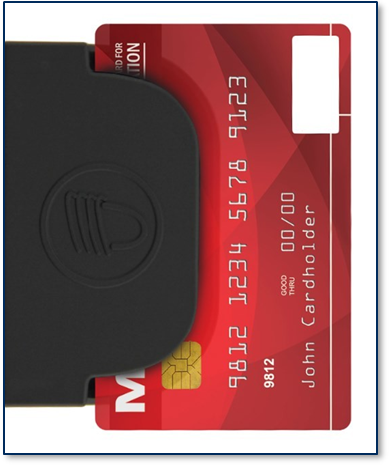
Cardholders should swipe magnetic stripe cards in the MSR swipe path with the magnetic stripe facing away from the cardholder and into the device, as shown in Figure 6-1. Cardholders may swipe in either direction along the path.
Figure 6-1 - Swiping a Card Through iDynamo
The host communicates with the device, and reports to the operator when the device is ready.
4
Direct the cardholder
The operator directs the cardholder in presenting payment.
5
Cardholder presents payment
The cardholder interacts with the device to present payment.
6
Host displays device prompts
Because the device does not have its own display, the device may send messages to the host prompting the cardholder to perform certain actions; the host software should process these requests by displaying the requested messages and depending on the placement of the host display(s), the operator may need to relay the messages to the cardholder. For example, if the device cannot read the card, it may prompt the cardholder to swipe again.
7
Device reports transaction result
The device reports the success or failure of the transaction to the host, which should report the results to the operator.
Solid Red
Offline
Blinking Red (Maybe split offline into ‘must RMA’ vs ‘Field fix possible’
Bootloader running
Solid Blue
Programming FW update into flash
Blinking Blue
Idle
Green
Card being read
Off
Card read error
Blink Red for 2 seconds
Qwantum Mode, Button enabled
Blinking Green
FW being downloaded
Provided by device or progress provided by host app
Power Management
About Power
Card Reading
About Reading Cards
Installation, configuration, and session open
Finalize transaction amount on host
Host notifies device readiness
How to Swipe Magnetic Stripe Cards
Appendix A Technical Specifications
Reference Standards and Certifications
Identification Cards Financial Transaction Cards (ISO 7813) AAMVA
Encryption: TDEA (3DES)-CBC using DUKPT FCC Title 47 Part 15 Class B
CE Level B EMC UR/CUR UL Recognized
California Proposition 65 (California)
EU Directive Waste Electrical and Electronic Equipment (WEEE) EU Directive Restriction of Hazardous Substances (RoHS) Universal Serial Bus Specification 2.0, compatible with 1.1
Physical Characteristics
Dimensions (H x W x T)
2.47 in. x 1.50 in. x 0.58 in. (62.7 mm x 38.1 mm x 14.7 mm)
User Manual
Introduction
About This Document
This document provides instructions to use the iDynamo 5 Gen III Utilitysoftware for demonstrating card swipe, configuration, and firmware updating. Supported devices are iDynamo 5 Gen III in HID or Keyboard mode. It is part of a larger library of documents designed to assist implementers. For details, see the product Support pages on www.magtek.com.
The following documents are essential:
iDynamo 5 Gen III Secure Card Reader Programmers Manual Commands
System Requirements
A Windows 10 or above host with available USB port
Microsoft .NET 4.6.1 and above installed on the host
USB-C cable with USB Type-A or USB-C for host connection
Software 1000009588 iDynamo 5 Gen III Utility, provided by MagTek
To download iDynamo 5 Gen III Utilitysoftware, follow these steps.
Download the software with the name 1000009588.zip (iDynamo 5 Gen III Utility) from MagTek.
Extract the .zip file on the host’s hard drive.
Download and install Microsoft .NET 4.6.1 or above from
Make sure the device is configured in USB HID or Keyboard mode.
To connect via USB interface listed in the Connection Type box, follow these steps:
For best results, use the cable that is included with the device.
Connect the USB-C end of the cable to iDynamo 5 Gen III device.
If you plan to route the cable out the back of the device, route the cable through the cable management clip to change its direction. Even if you are not routing out the back, you may use the cable clip for strain relief to help stabilize the mechanical connection when cardholders or operators move the device or the cable.
The log shows the information of the device and interface type.
Device Information
To disconnect the device, press Disconnect button.
To switch interface type, follow these steps:
Select the desired interface type under the Interface Type list box, then press the Set button to change the interface type.
After the interface type is changed, this message will show, please unplug then plug in the device.
To update firmware, follow these steps.
Before you update the firmware, please obtain the latest firmware from MagTek support team, and then save it to local storage.
Please make sure the device is in HID mode, if not, please follow the instructions in step 3 to switch device to HID mode.
Press the Update Firmware button.
Check the status displayed in the software.
The following instructions detail how to perform MSR transactions using USB.
To perform an MSR transaction if your device is in HID mode, follow these steps.
Select the MSR tab, then swipe an MSR card.
To perform an MSR transaction if your device is in Keyboard mode, follow these steps.
Select the MSR tab, swipe an MSR card, and then observe the Keyboard Mode Output data.
Press Parse Data to parse the data.
To send commands to device, follow these steps.
Select Command Tools tab, then enter command to the Input text box.
Select Command Type, Extended, then press Send button, and then observe the response in the output text box.
Battery Charge Time
Not Applicable
Battery Time, Powered Off
Not Applicable
Battery Time, Idle
Not Applicable
Battery Time, Sleep Mode
Not Applicable
Battery Time, Transactions
Not Applicable
Voltage Requirements
2.85 to 3.47 VDC from the attached host 5 VDC on USB-C power
Average Current Draw
From USB-C Connector:
270 mA (connected mode with swipe/contact/contactless enabled) Additional draw (~1A, depends on host) when charging host’s battery
From host:
85 mA from the attached host when magnetic read head is on; 0mA otherwise
Data Storage
Not Applicable
Host Connection Characteristics
Wired Connection Types
USB-C
Wireless Connection Types
Not Applicable
Wireless Connection Frequency
Not Applicable
Software Characteristics
Tested Operating System(s)
iOS / Android / Windows
Environmental Tolerance
Operating Temperature
32°F to 95°F (0°C to 35°C)
Operating Relative Humidity
5% to 90% without condensation
Storage Temperature
-4°F to 113°F (-20°C to 45°C)
Storage Relative Humidity
10% to 90% without condensation
Vibration Resistance
Not Applicable
Shock Resistance
No separation of covers or damage to internal components after six surface drops and four corner drops 3 feet onto concrete surface
Maximum operating altitude:
3000 m (10,000 ft.)
Battery Shelf Life
Not Applicable
Battery Cycle Life
Not Applicable
Weight
Approximately 1 oz. (28g)
Supported Mounting Options
Direct to host, adapter sleeves available
Card Read Characteristics
Magnetic Stripe Reader
Bidirectional 3 track encrypting IntelliHead magnetic stripe reader (MSR) with MagnePrint
Magnetic Stripe Decoding
Financial (ISO Type B), AAMVA, or Other ISO 7810, 7811
Acceptable Swipe Speeds
6 in./s to 60 in./s (15 cm/s to 152 cm/s)
Chip Card Reader
Not Applicable
Contactless Reader
Not Applicable
User Interface Characteristics
Status Indicators
Host-driven
Display Type
Not Applicable
Display Size (viewable area)
Not Applicable
Display Resolution
Not Applicable
Keypad
Not Applicable
Security Characteristics
Ingress Protection
Not Applicable
Tamper Protection
Not Applicable
Code Protection
Signed firmware. The device will not allow a host to install firmware that is not properly signed by an authorized source.
Eavesdrop Protection
Not Applicable
Electrical Characteristics
Power Inputs
USB-C connector
Battery Type
Not Applicable
Battery Capacity
Not Applicable
Reliability
Shelf Life
Minimum 4 years
Magnetic Read Head Life
100,000 card swipes
ICC Read Head Life
Not Applicable
Launch iDynamo5Gen3Utility.exe.
See the steps in the sections below to connect to a device.
Route the cable in the desired direction (e.g., out the back, left, right, or down into the countertop).
Connect the other end of the USB cable to the host’s USB port.
As soon as the device starts receiving power through USB, it automatically powers on.
Launch the iDynamo 5 Gen III Utility and select USB device in the USB Type list, then press the connect button.
Browse to the folder that contains the new firmware from MagTek, select the firmware file, and press the Open button.
How to Download, Install, and Launch the Software
Device Requirements
How to Connect to Devices Using iDynamo 5 Gen III Utility
Operation to request from MagneFlex. Use: requestCardSwipe
httpMethod
Each input parameter supplied in the request is delimited by an ampersand character &, and the value for a parameter begins after an equal character =. Where ever a parameter contains multiple values, each are delimited by a comma character ,.
Example query:
Return Value:
The CardSwipe output in TVL format.
Parameter
Description
Example:
This query string sends a command to the device and returns the raw response from the device.
Parameter
Description
Each input parameter supplied in the request is delimited by an ampersand character &, and the value for a parameter begins after an equal character =. Where ever a parameter contains multiple values, each are delimited by a comma character ,.
Example query:
Return Value:
The Command response output in Hex string format of device raw response for this command.
Parameter
Description
Example:
This query string sends an extended command to the device and returns the raw response from the device.
Parameter
Description
Each input parameter supplied in the request is delimited by an ampersand character &, and the value for a parameter begins after an equal character =. Where ever a parameter contains multiple values, each are delimited by a comma character ,.
Example query:
Return Value:
The Extended Command response output in Hex string format of device raw response for this command.
Parameter
Description
Example:
This query string sends a batch of commands to the device and returns the raw response from the device.
Parameter
Description
Each input parameter supplied in the request is delimited by an ampersand character &, and the value for a parameter begins after an equal character =. Where ever a parameter contains multiple values, each are delimited by a comma character ,.
Return Value:
The Batch Command response output in Hex string format of device raw response for this command.
Parameter
Description
This query string begins an EMV transaction.
Parameter
Description
Each input parameter supplied in the request is delimited by an ampersand character &, and the value for a parameter begins after an equal character =. Where ever a parameter contains multiple values, each are delimited by a comma character ,.
Example query:
Return Value:
The EMV ARQC response output in Hex string format of device raw response for this command.
Parameter
Description
Example:
This query string sends the ARPC to the device during an EMV transaction.
Parameter
Description
Each input parameter supplied in the request is delimited by an ampersand character &, and the value for a parameter begins after an equal character =. Where ever a parameter contains multiple values, each are delimited by a comma character ,.
Example query:
Return Value:
The EMV ARPC response output in Hex string format of device raw response for this command.
Parameter
Description
Example:
This query string instructs the device to prompt for a PIN.
Parameter
Description
Each input parameter supplied in the request is delimited by an ampersand character &, and the value for a parameter begins after an equal character =. Where ever a parameter contains multiple values, each are delimited by a comma character ,.
Example query:
Return Value:
The Response output in Hex string format of device raw response for this command.
Parameter
Description
Example:
This query string instructions the device to prompt for a manual card entry.
Parameter
Description
Each input parameter supplied in the request is delimited by an ampersand character &, and the value for a parameter begins after an equal character =. Where ever a parameter contains multiple values, each are delimited by a comma character ,.
Example query:
Return Value:
The CardSwipe output in TVL format.
Parameter
Description
Example:
This query string sends a command to the device and returns the raw response from the device.
Parameter
Description
Each input parameter supplied in the request is delimited by an ampersand character &, and the value for a parameter begins after an equal character =. Where ever a parameter contains multiple values, each are delimited by a comma character ,.
Example query:
Return Value:
The Command response output in TVL format.
Parameter
Description
Example:
This query string instructions the device to prompt for a Signature.
Parameter
Description
Each input parameter supplied in the request is delimited by an ampersand character &, and the value for a parameter begins after an equal character =. Where ever a parameter contains multiple values, each are delimited by a comma character ,.
Example query:
Return Value:
The Signature capture output in TVL format.
Parameter
Description
Example:
This query string retrieves data from user interaction with the device.
Parameter
Description
Each input parameter supplied in the request is delimited by an ampersand character &, and the value for a parameter begins after an equal character =. Where ever a parameter contains multiple values, each are delimited by a comma character ,.
Example query:
Return Value:
The Command response output in TVL format.
Parameter
Description
Example:
cardDataIn
Magnetic swipe card data in TLV format. FA (Container for generic data) DFDF25 (Device serial number) F4 (Container for Encrypted MSR data) DFDF30 (Masked T1 status) DFDF31 (Masked T1) DFDF32 (Masked T2 status) DFDF33 (Masked T2) DFDF34 (Masked T3 status) DFDF35 (Masked T3) DFDF37 (Encrypted T1) DFDF39 (Encrypted T2) DFDF3B (Encrypted T3) DFDF3C (Encrypted MagnePrint) DFDF43 (MagnePrint Status) DFDF50 (MSR KSN)
passInData
Optional data to send to MagneFlex. This data will be passed back to the web app.
readerArgument
Comma delimited list of arguments to be passed to MagneFlex. Arguments: timeLimit:, command:, endSession: Argument details: timeLimit - Seconds to wait before the operation times out. Value is in hexadecimal format. (00 - FF) command - The command to send to the device. endSession - Flag to end the session for the device. Default value is true. “true” = End the session after the request is processed. “false” = Do not end the session after the request is processed.
destinationURL
MagneFlex will send the postback to this URL.
requestLocation
Flag to send GPS location of the device from which Magneflex (iOS only) is hosted. Use: true – send location false – do not send location
passInData
Optional data to send to MagneFlex. This data will be passed back to the web app.
commandID
Command that was sent.
commandResult
Data returned from the command sent to the device.
passInData
Optional data to send to MagneFlex. This data will be passed back to the web app.
readerArgument
Extended command to send to reader.
destinationURL
MagneFlex will send the postback to this URL.
requestLocation
Flag to send GPS location of the device from which Magneflex (iOS only) is hosted. Use: true – send location false – do not send location
passInData
Optional data to send to MagneFlex. This data will be passed back to the web app.
commandID
Command that was sent.
commandResult
Result of a command sent to the device.
passInData
Optional data to send to MagneFlex. This data will be passed back to the web app.
destinationURL
MagneFlex will send the postback to this URL.
requestLocation
Flag to send GPS location of the device from which Magneflex (iOS only) is hosted. Use: true – send location false – do not send location
passInData
Optional data to send to MagneFlex. This data will be passed back to the web app.
commandResult
Result of a command sent to the device formatted as: [command]-[result] For each command sent in a batch is returned a separate commandResult. Example: &commandResult=0900-000A9010010B355414000099 &commandResult=000100-000D31303030303033333534433033 &commandResult=1500-000103
passInData
Optional data to send to MagneFlex. This data will be passed back to the web app.
readerArgument
Comma delimited list of arguments to be passed to MagneFlex. Arguments: timeLimit:, cardType:, option:, amount:, transactionType:, cashBack:, currencyCode:, endSession:, quickChipMode:, reserved: Argument details: timeLimit - Seconds the operation times out. Value is in hexadecimal format. (00 - FF) transactionType - Type of transaction to be used in hexadecimal: 00 = Purchase (listed as “Payment” on ICS) 01 = Cash Advance (not supported for this reader) 02 or 09 = Cash back (09 not supported, contactless) 04 = Goods (Purchase) 08 = Services (Purchase) 10 = International Goods (Purchase) 20 = Refund 40 = International Cash Advance or Cash Back 80 = Domestic Cash Advance or Cash Back cardType - Card type that can be used for the transaction: 1 = Magnetic stripe 2 = Contact smart card 3 = Magnetic stripe or contact smart card amount - The amount to be used and authorized, EMV Tag 9F02. Format in decimal. cashBack - Amount of cash back to be used, EMV Tag 9F02. Format in decimal. currencyCode - Transaction Currency Code (EMV Tag 5F2A, format n4 string) Sample valid values: 0840 = US Dollar 0978 = Euro 0826 = UK Pound endSession - Flag to end the session for the device. Default value is true. quickChipMode - Flag to start the transaction to accommodate qwick Chip mode. “true” = Accommodate qwick chip mode. “false” = Do not accommodate qwick chip mode. reserved - These are the reserved bytes beginning at index 20 of the 0xA2 command. Reference device manual D99875585 for more details. Example: 0000000000000000000000000840000100 – QuickDip Mode 0000000000000000000000000840000003 – PIN Verify 0000000000000000000000000840000004 – PIN Set
destinationURL
MagneFlex will send the postback to this URL.
requestLocation
Flag to send GPS location of the device from which Magneflex (iOS only) is hosted. Use: true – send location false – do not send location
passInData
Optional data to send to MagneFlex. This data will be passed back to the web app.
arqcData
ARQC data from the device.
passInData
Optional data to send to MagneFlex. This data will be passed back to the web app.
readerArgument
ARPC data to send to the device. issuerAuthenticationData:, endSession: Argument details: issuerAuthenticationData – ARPC response to send to the device. endSession - Flag to end the session for the device. Default value is true. “true” = End the session after the request is processed. “false” = Do not end the session after the request is processed.
destinationURL
MagneFlex will send the postback to this URL.
requestLocation
Flag to send GPS location of the device from which Magneflex (iOS only) is hosted. Use: true – send location false – do not send location
passInData
Optional data to send to MagneFlex. This data will be passed back to the web app.
batchData
Batch data from the device to be passed to MagneFlex.
passInData
Optional data to send to MagneFlex. This data will be passed back to the web app.
readerArgument
Data to send for the device to be passed to MagneFlex. Arguments: timeLimit:, fieldseparator:, pinOption:, maxpinlength:, minpinlength:, tone:, pinmode:, endSession: Argument details: timeLimit - Seconds to wait before the operation times out. Value is in hexadecimal format. (1 - 255) fieldseparator - Delimiter to separate the output data. pinOption - PIN verification and format: 0 = ISO0 Format, No verify PIN 1 = ISO3 Format, No verify PIN 2 = ISO0 Format, Verify PIN 3 = ISO3 Format, Verify PIN maxpinlength – Max PIN length in hexadecimal format. (<= 0C) minpinlength – Min PIN length in hexadecimal format. (>= 04) tone – Beep behavior of prompt: 0 = None 1 = Single beep 2 = Double beep pinmode - Message to display as a user prompt: 0 = PINMsgEnterPIN 1 = PINMsgEnterPINAmt 2 = PINMsgReenterPINAmt 3 = PINMsgReenterPIN 4 = PINMsgVerifyPIN endSession - Flag to end the session for the device. Default value is true. “true” = End the session after the request is processed. “false” = Do not end the session after the request is processed.
destinationURL
MagneFlex will send the postback to this URL.
requestLocation
Flag to send GPS location of the device from which Magneflex (iOS only) is hosted. Use: true – send location false – do not send location
passInData
Optional data to send to MagneFlex. This data will be passed back to the web app.
operationStatus
Status of the operation.
pinEPB
Encrypted PIN block.
pinKSN
PIN KSN.
passInData
Optional data to send to MagneFlex. This data will be passed back to the web app.
readerArgument
Data to send for the device to be passed to MagneFlex. Arguments: timeLimit:, option:, tone:, endSession: Argument details: timeLimit - Seconds the device will wait for the user to complete the operation in hexadecimal: (1 - 255) option - This is an ORed combination of flags that changes the device’s data entry request behavior. Value is decimal equivalent of the binary value. Bits 0 and 1 0 = Acct,Date,CVC 1 = Acct,Date 2 = Acct,CVC 3 = Acct Bit 2 1=Use Qwick Codes entry Bit 3 1=Use PAN in PIN block creation Bit 4 0=Use PAN min 9, max 19 1=Use PAN min 14, max 21 tone – Beep behavior of prompt: 0 = None 1 = Single beep 2 = Double beep endSession - Flag to end the session for the device. Default value is true. “true” = End the session after the request is processed. “false” = Do not end the session after the request is processed.
destinationURL
MagneFlex will send the postback to this URL.
requestLocation
Flag to send GPS location of the device from which Magneflex (iOS only) is hosted. Use: true – send location false – do not send location
passInData
Optional data to send to MagneFlex. This data will be passed back to the web app.
cardDataIn
Manual card entry data in TLV format.
passInData
Optional data to send to MagneFlex. This data will be passed back to the web app.
readerArgument
Comma delimited list of arguments to be passed to MagneFlex. Arguments: timeLimit:, command:, commandType:, waitForReport:, endSession: Argument details: timeLimit - Seconds to wait before the operation times out. Value is in hexadecimal format. (1 - 255) command – Command to be sent in hexadecimal. commandType – Type of command to be sent. “SET” = For commands where the ACK status is to be returned. “GET” = For commands where the data is to be returned. waitForReport - The report number to wait for before returning the response. Example: Command 30 00 (Set KSN) will respond with an ACK (01) or with data in Get Mode (30). “01” = will return the response for ACK report (01). “30” = will return the data report (30). endSession - Flag to end the session for the device. Default value is true. “true” = End the session after the request is processed. “false” = Do not end the session after the request is processed.
destinationURL
MagneFlex will send the postback to this URL.
requestLocation
Flag to send GPS location of the device hosting Magneflex (iOS only). Use: true – send location false – do not send location
passInData
Optional data to send to MagneFlex. This data will be passed back to the web app.
commandID
Command that was sent.
commandResult
Data returned from the command sent to the device.
passInData
Optional data to send to MagneFlex. This data will be passed back to the web app.
readerArgument
Comma delimited list of arguments to be passed to MagneFlex. Arguments: timeLimit:, option:, tone:, endSession: Argument details: timeLimit - Seconds the device will wait for the user to complete the operation in hexadecimal. (1 - 255) option: 0 = Timeout clears any signature data 1 = Timeout returns timeout status plus length collected. Sig Data can be requested. tone – Type of prompt tone: 0 = No sound 1 = One beep 2 = Two beeps endSession - Flag to end the session for the device. Default value is true. “true” = End the session after the request is processed. “false” = Do not end the session after the request is processed.
destinationURL
MagneFlex will send the postback to this URL.
requestLocation
Flag to send GPS location of the device from which Magneflex (iOS only) is hosted. Use: true – send location false – do not send location
passInData
Optional data to send to MagneFlex. This data will be passed back to the web app.
signatureDataIn
Signature data from the device in hexadecimal format.
signatureResult
Result of the signature capture.
passInData
Optional data to send to MagneFlex. This data will be passed back to the web app.
closeDeviceAfter
Flag to close the device after the request. Use: true – close device false – do not close the device
readerArgument
Comma delimited list of arguments to be passed to MagneFlex. Arguments: timeLimit: Argument details: timeLimit - Seconds the device will wait for the user to complete the operation in hexadecimal. (1 - 255)
destinationURL
MagneFlex will send the postback to this URL.
requestLocation
Flag to send GPS location of the device from which Magneflex (iOS only) is hosted. Use: true – send location false – do not send location
passInData
Optional data to send to MagneFlex. This data will be passed back to the web app.
dataResponse
Data received from the device.
passInData
Optional data to send to MagneFlex. This data will be passed back to the web app.
HTTP method to be used for the HTTP postback from MagneFlex. Use: GET - returns the response data in the form of a query string. POST – recommended for EVM related transactions to accommodate limits on query string lengths.
closeDeviceAfter
Flag to close the device after the request. Use: true – close device false – do not close the device
readerArgument
Comma delimited list of arguments to be passed to MagneFlex. requestCardSwipe requires no arguments.
destinationURL
MagneFlex will send the postback to this URL.
requestLocation
Flag to send GPS location of the device from which Magneflex (iOS only) is hosted. Use: true – send location false – do not send location
passInData
Optional data to send to MagneFlex. This data will be passed back to the web application.
errorCode
Error status. 0 is Success. Non-Zero is an error.
errorMessage
Description of the errorCode.
opType
The type of operation. For this command the value is: CARD_SWIPE_RESULT
operation
Operation to request from MagneFlex. Use: requestSendCommand
httpMethod
HTTP method to be used for the HTTP postback from MagneFlex. Use: GET - returns the response data in the form of a query string. POST – recommended for EVM related transactions to accommodate limits on query string lengths.
closeDeviceAfter
Flag to close the device after the request. Use: true – close device false – do not close the device
errorCode
Error status. 0 is Success. Non-Zero is an error.
errorMessage
Description of the errorCode.
opType
The type of operation. For this command the value is: SEND_COMMAND_RESULT
operation
Operation to request from MagneFlex. Use: requestSendExtendedCommand
httpMethod
HTTP method to be used for the HTTP postback from MagneFlex. Use: GET - returns the response data in the form of a query string. POST – recommended for EVM related transactions to accommodate limits on query string lengths.
closeDeviceAfter
Flag to close the device after the request. Use: true – close device false – do not close the device
errorCode
Error status. 0 is Success. Non-Zero is an error.
errorMessage
Description of the errorCode.
opType
The type of operation. For this command the value is: SEND_EXTENDED_COMMAND_RESULT
operation
Operation to request from MagneFlex. Use: requestSendBatchCommand
httpMethod
HTTP method to be used for the HTTP postback from MagneFlex. Use: GET - returns the response data in the form of a query string. POST – recommended for EVM related transactions to accommodate limits on query string lengths.
readerArgument
Batch of commands that should be sent to reader. Commands are delimited by the bar character |. Example: readerArgument=0900|000100|1500
errorCode
Error status. 0 is Success. Non-Zero is an error.
errorMessage
Description of the errorCode.
opType
The type of operation. For this command the value is: SEND_BATCH_COMMAND_RESULT
operation
Operation to request from MagneFlex. Use: requestStartEMVTransaction
httpMethod
HTTP method to be used for the HTTP postback from MagneFlex. Use: GET - returns the response data in the form of a query string. POST – recommended for EVM related transactions to accommodate limits on query string lengths.
closeDeviceAfter
Flag to close the device after the request. For requestStartEMVTransaction use: false – do not close the device
errorCode
Error status. This parameter is only available when the status is not successful.
errorMessage
Description of the errorCode. This parameter is only available when the status is not successful.
opType
The type of operation. For this command the value is: EMV_ARQC_RESULT
operation
Operation to request from MagneFlex. Use: sendARPC
httpMethod
HTTP method to be used for the HTTP postback from MagneFlex. Use: GET - returns the response data in the form of a query string. POST – recommended for EVM related transactions to accommodate limits on query string length.
closeDeviceAfter
Flag to close the device after the request. Use: true – close device false – do not close the device
errorCode
Error status. 0 is Success. Non-Zero is an error.
errorMessage
Description of the errorCode.
opType
The type of operation. For this command the value is: EMV_TRANS_RESULT
operation
Operation to request from MagneFlex. Use: requestPIN
httpMethod
HTTP method to be used for the HTTP postback from MagneFlex. Use: GET - returns the response data in the form of a query string. POST – recommended for EVM related transactions to accommodate limits on query string lengths.
closeDeviceAfter
Flag to close the device after the request. Use: true – close device false – do not close the device
errorCode
Error status. 0 is Success. Non-Zero is an error.
errorMessage
Description of the errorCode.
opType
The type of operation. For this command the value is: PIN_RESULT
operation
Operation to request from MagneFlex. Use: requestManualCard
httpMethod
HTTP method to be used for the HTTP postback from MagneFlex. Use: GET - returns the response data in the form of a query string. POST – recommended for EVM related transactions to accommodate limits on query string lengths.
closeDeviceAfter
Flag to close the device after the request. Use: true – close device false – do not close the device
errorCode
Error status. 0 is Success. Non-Zero is an error.
errorMessage
Description of the errorCode.
opType
The type of operation. For this command the value is: CARD_MANUAL_SWIPE
operation
Operation to request from MagneFlex. Use: requestSendCommand
httpMethod
HTTP method to be used for the HTTP postback from MagneFlex. Use: GET - returns the response data in the form of a query string. POST – recommended for EVM related transactions to accommodate limits on query string lengths.
closeDeviceAfter
Flag to close the device after the request. Use: true – close device false – do not close the device
errorCode
Error status. 0 is Success. Non-Zero is an error.
errorMessage
Description of the errorCode.
opType
The type of operation. For this command the value is: SEND_COMMAND_RESULT
operation
Operation to request from MagneFlex. Use: requestSignature
httpMethod
HTTP method to be used for the HTTP postback from MagneFlex. Use: GET - returns the response data in the form of a query string. POST – recommended for EVM related transactions to accommodate limits on query string lengths.
closeDeviceAfter
Flag to close the device after the request. Use: true – close device false – do not close the device
errorCode
Error status. 0 is Success. Non-Zero is an error.
errorMessage
Description of the errorCode.
opType
The type of operation. For this command the value is: SIGNATURE_RESULT
operation
Operation to request from MagneFlex. Use: requestData
httpMethod
HTTP method to be used for the HTTP postback from MagneFlex. Use: GET - returns the response data in the form of a query string. POST – recommended for EVM related transactions to accommodate limits on query string lengths.
customDisplayMessage
Message to display within the browser to instruct user interaction (iOS only).
errorCode
Error status. 0 is Success. Non-Zero is an error.
errorMessage
Description of the errorCode.
opType
The type of operation. For this command the value is: REQUEST_DATA_RESULT