
Loading...
Loading...
Loading...
Loading...
Loading...
Loading...
Loading...
Loading...
Loading...
Loading...
Loading...
Loading...
Loading...
Loading...
Loading...
Loading...
Loading...
Loading...
Loading...
Loading...
Loading...
Loading...
Loading...
Loading...
Loading...
Loading...
Loading...
Loading...
Loading...
Loading...
Loading...
Loading...
Loading...
Loading...
Loading...
Loading...
Loading...
Loading...
Loading...
Loading...
Loading...
Loading...
Loading...
Loading...
Loading...
Loading...
Loading...
Loading...
Loading...
Loading...
Loading...
Loading...
Loading...
Loading...
Loading...
Loading...
Loading...
Loading...
Loading...
Loading...
Loading...
Loading...
Loading...
Loading...
Loading...
Loading...
Loading...
Loading...
Loading...
Loading...
Loading...
Loading...
Loading...
Loading...
Loading...
Loading...
Loading...
Loading...
Loading...
Loading...
Loading...
Loading...
Loading...
Loading...
Loading...
Loading...
Loading...
Loading...
Loading...
Loading...
Loading...
Loading...
Loading...
Loading...
Loading...
Loading...
Loading...
Loading...
Loading...
Loading...
The API & Command Reference is where you look up the exact programming details of the ) command sets that MagTek products use — every command, notification, data object, configuration property, and status code. Where the Guides walk you through accomplishing a task end to end, this is where you look up a specific detail while you build.
Section
Information
The complete MMS command set, documented once for the whole Dyna family: message format, data types, commands, notifications, configuration, and status codes.
Which commands each reader supports, so you can confirm availability before building against a specific device.
Magensa is MagTek's cloud-based payment protection gateway that secures sensitive data and processes transactions across in-person, online, and mobile channels using advanced tokenization, dynamic encryption, and authentication services.
Operation This contains an instance of an structure specifying the operation to be performed.
B
R
84
var
Data Reserved for future use. Do not include this parameter. It is reserved for Initialization Vector or nonce, if needed.
B
O
85
var
Extra Data Item Reserved for future use. Do not include.
B
O
A8
var
Key Information This specifies the key used in the operation. Populate with a TLV data object. For ECDSA operations, do not include this parameter.
T
O
A9
var
Second Key Information (Reserved, do not include) This specifies a second key used in the operation. If needed, populate with a TLV data object.
T
O
After the NFC Type A or Type B card is activated, the host uses this command to send application-level APDUs to a PICC that supports ISO 14443-4 Protocol. The device sends the PICC response back to the host.
Tag
Len
Value / Description
Typ
Req
Example (Hex)
3003 = Command 0x3003 - APDU Pass-Through Commands
81
02
Tag Response (SW1 SW2)
Should follow ISO 7816-4 APDU format
· SW1 and SW2 of R-APDU
If card is not able to respond:
SW1 = 0x64, SW2 = 0x00
B
R
N/A
82
Var
Tag Data
· Data of R-APDU
B
O
N/A
End of any wrappers, at minimum including Request Message
Default
Beginning of any wrappers, at minimum including Request Message
3003 = ISO 14443-4 APDU Pass-Through Commands
81
var
Command to Send.
Should follow ISO 7816-4 APDU format
C-APDU
CLA INS P1 P2 Lc Data Le
R
End of any wrappers, at minimum including Request Message
Tag
Len
Value / Description
Typ
Req
Default
Beginning of any wrappers, at minimum including Request Message
AA 00 81 04 01 A1 30 03 84 09 30 03 81 05 90 60 00 00 00AA 00 81 04 82 A1 30 03 82 04 01 00 00 00 84 14 30 03 81 02 91 AF 82 0C FC 0A DF
7A 07 04 01 01 33 00 18 05The host can use this command to erase all Bluetooth® LE bonds. The user should then forget the device and re-pair the device on any host that it was previously paired with if that host needs to communicate with the device again.
The sequence of events is as follows:
The host constructs the command request for Command 0x1F01 - Reset Device in the format below.
The device sends a response in the format below to the host.
The device erases all Bluetooth® LE bonds within around 500ms.
Beginning of any wrappers, at minimum including Request Message
Beginning of any wrappers, at minimum including Response Message
AA 00 81 04 01 55 1F 05 84 02 1F 05AA 00 81 04 82 55 1F 05 82 04 00 00 00 00 84 02 1F 051F05 = Command 0x1F05 - Erase All Bluetooth® LE Bonds
No parameters.
End of any wrappers, at minimum including Request Message
1F05 = Command 0x1F05 - Erase All Bluetooth LE Bonds
No parameters.
End of any wrappers, at minimum including Response Message
GPO Response
B
R
The host can use this command to change the device’s lock passcode. The value of the device lock passcode is stored in non-volatile memory so changes made to it will persist after the device is reset or power cycled. To change the device lock passcode using MagTek security or to see its default value see Property 1.2.5.2.1.3- Device Lock Passcode. See Device Lock Feature for more information.
EF07 = Change Device Lock Passcode - Command 0xEF07
No parameters.
End of any wrappers, at minimum including Response Message
Beginning of any wrappers, at minimum including Request Message
EF07 = Change Device Lock Passcode - Command 0xEF07
81
4–63
Current Passcode. The current passcode in the clear. This must match the value of the current passcode or the command will fail.
B
M
82
04–63
New Passcode. The new passcode in the clear. It can only contain printable ASCII characters or the command will fail.
B
M
End of any wrappers, at minimum including Request Message
Beginning of any wrappers, at minimum including Response Message
AA00 81 04 0155EF07 84 0E EF07 810434333231 820434333231AA00 81048255EF07 820400000000 8402EF07After entering the Pass-Through Mode, the host use this command to request the device to start polling for a Type A and Type B PICC until it detects a PICC or times out. This command automatically turns on the RF Antenna.
After NFC Type A card is detected, the device will stop the polling, activate the card and
Send a notification that identifies the ISO 14443 Type A (Supports ISO 14443-4 protocol). See Notification 0x0301 – Pass-Through Mode Information Update.
Send another notification with the UID as a payload.
After NFC Type B card is detected, the device will stop the polling, activate the card and
Send a notification that identifies the ISO 14443 Type B (Supports l). See .
Send another notification with the UID as a payload.
If the card is not supported, the device will send error notification and stop the polling.
Tag
Len
Value / Description
Typ
Req
Default
Beginning of any wrappers, at minimum including Request Message
Tag
Len
Value / Description
Typ
Req
Default
Beginning of any wrappers, at minimum including Response Message
Example (Hex)
A 00 81 04 01 A0 30 02 84 08 30 02 81 01 00 82 01 01
Example (Hex)
AA 00 81 04 82 A0 30 02 82 04 01 00 00 00
3002 = Start/Top Polling
81
01
This parameter defines how long the device to poll for the PICC
· 0x00 = No timeout
· 0x01 to 0xFF = 1 to 255 seconds
R
82
01
Polling Mode
· 0x00 = Stop Polling Mode. This mode can only be used when the device is in polling state.
· 0x01 = Start Polling Mode
B
R
End of any wrappers, at minimum including Request Message
No parameters.
End of any wrappers, at minimum including Response Message
The host uses this option to display a maximum of 5 lines of host-provided text, and 1 optional green functional button, Middle – label with a String ID that associates it with a configured String message. See Default User Interface String IDs and Strings.
When the user presses this button, the device sends a notification to the host to indicate this button is pressed. See Notification 0x1803 - User Interface Host Action Request. After that, the host will decide what to do next.
Recommend maximum number of characters setting for this page:
Each text line can fit about:
18 Upper case wide size characters (example: “WM”)
23 Upper case regular size characters (example: “ABC”)
21 lower case wide size characters (example: “wm”)
30 lower case regular size characters (example: “abc”)
Button text can fit about:
5 Upper case wide size characters (example: “WM”)
8 Upper case regular size characters (example: “ABC”)
6 lower case wide size characters (example: “wm”)
Each text line can fit about:
13 Upper case wide size characters (example: “WM”)
17 Upper case regular size characters (example: “ABC”)
14 lower case wide size characters (example: “wm”)
9 lower case regular size characters (example: “abc”)
20 lower case regular size characters (example: abc)
Button text can fit about:
4 Upper case wide size characters (example: “WM”)
6 Upper case regular size characters (example: “ABC”)
5 lower case wide size characters (example: “wm”)
7 lower case regular size characters (example: “abc”)
The host uses this command to reset the device.
The device sends a response in the format below to the host.
The device starts an automatic reset within 500ms.
Beginning of any wrappers, at minimum including Request Message
Beginning of any wrappers, at minimum including Response Message
AA 00 81 04 01 12 1F 01 84 02 1F 01AA 00 81 04 82 12 1F 01 82 04 00 00 00 001F01 = Command 0x1F01 - Reset Device
81
01
Power Off Option
0x00 = Reset
0x01 = Power Off
Power off only works while a device is running on its battery. If a device is powered off while it is powered by USB, the device will immediately turn back on.
B
O
0x00
End of any wrappers, at minimum including Request Message
1F01 = Command 0x1F01 - Reset Device
No parameters.
End of any wrappers, at minimum including Response Message
A TR-31(X9.143) key block consists of three parts:
The Key Block Header(KBH) which contains attribute information about the key and the key block and is not encrypted. It is always treated as ASCII.
The first section is 16 bytes with a fixed format defined below.
The second section is optional within the standard, but required for current products.
The Confidential Data, which is encrypted and always binary.
Two bytes indicating the key length (in bits, AES-128 is 128 bits, so length will be 0080).
The secret key and/or sensitive data.
Padding as required (random bytes 0x00 to 0xFF).
The MAC, which is of varying length as follows:
64 bits if the TDEA key derivation method is used (typically not used for this device).
128 bits if the AES key derivation method is used.
Symmetric keys are padded with Block Padding to the maximum length for the algorithm, 192 bits for TDEA or 256 bits for AES, to hide the true length of short keys.
The data to be encrypted and the MAC are always binary for calculation purposes. The encrypted data and the MAC are converted to ASCII hex as the last step.
Date and time strings specified within the TR-31 block are represented according to the rules described in ISO 8601 and TR-31. Year is 4 digits. Time uses UTC 24 hour clock. Some functions like ‘toISOString()’ will produce a string of format yyyy-mm-ddThh:mm:ss.fffZwhere fff is a decimal fraction of a second, Z is UTC time zone. The device ignores ‘Z’ and ‘.fff’ if they are present. Seconds ‘:ss’ are optional. Date, hours, and minutes are required. For example, March 23, 2020 4:19PM is encoded as 2020-03-23T16:19at minimum, but could also be 2020-03-23T16:19:00.000Z.
DUKPT – Derived Unique Key Per Transaction OID– Object Identifier
SRED- Secure Reading and Exchange of Data
There are 7 new OIDs defined for these 7 SRED Data IDs.
Each OID value contains a two-byte DUKPT slot ID and a one-byte transformation ID.
The existing TR31 Module supports 32 MagTek DUKPT Slot IDs, from 0x2000 to 0x201F. The Key Injection Software Tool shall inject DUKPT keys through these DUKPT Slot IDs.
This is the list of DUKPT transformations defined in both the Legacy and AES specifications.
During TR31 Key Injection, each DUKPT Slot ID contains a parameter indicates the purpose of a Key Set.
Example 1: The restriction value is 0x3F
This Key Set can be used for all purposes.
Example 2: The restriction value is 0x3E
This Key Set can be used for all purposes, except PIN Encryption.
Example 3: The restriction value is 0x01
This Key Set can be used for PIN Encryption only.
SRED Data ID map configuration values (Slot ID and Transformation ID) must be checked and rejected if they don’t meet the following conditions.
The DUKPT Slot ID must be loaded. ()
The loaded DUKPT Slot ID must allows this type of SRED Data ID. ()
The transformation must be allowed by ().
Here is the list of parameters of 4 DUKPT Slot IDs based on the existing Key Injection Tool.
Note: If SRED Data ID 2 and 4 are mapped to the same Key Set, then they must have the same Transformation ID. If the Transformation ID of the latest key mapping request is different, then the original OID setting of the other SRED Data ID will be forced to match the latest OID setting. For example, SRED Data ID 2 has been mapped to 0x2007 0x04, user wants to map SRED Data ID 4 to 0x2007 0x05, then the OID setting of SRED Data ID 2 will be forced to 0x2007 0x05.
The following OID Values indicate that:
200701: Map PIN-TDES to DKPTM7-2007 PIN Encryption Variant.
20020B: Map Account Data to DKPTM2-2002 Data Encryption Usage.
200702: Map MAC to DKPTM7-2007 MAC Generate/Verify Variant.
20030B: Map MangePrint to DKPTM3-2003 Data Encryption Usage.
Figure 1 - Configuration Usage Values
000004: MagTek Token is RFU, 0000 ID does not exist (this is default value).
000004: User Data is RFU, 0000 ID does not exist (this is default value).
200207: Map PIN-AES to DKPTM2-2002 PIN Encryption Usage.
0
Key Block V ID
‘D’
Transport (KBPK)
‘K1’
‘A’ / ‘T’
‘D’
‘IK’
DUKPT KSID
‘KS’
Key Set Identifier (e.g. data used by host to find and/or derive this key).
‘KC’
0.1
Block ID
'21'
MagTek Added Key Info Block
‘10’
‘01’
Key Environment
T = Test
P = Production
0 = Erase Key
‘11’
‘04’
10xx
Transport Keys (KBPK)
1081
MKIFTK
MagTek KIF Financial Transport Keys
FINTK
SRED Data ID
OID
OID Size
0: Not assigned
N/A
N/A
1: PIN-TDES (supported on PED devices Only)
Transformation ID #
Usage Name
Type
Data for calculation
0
Reserved
Bit #
5
4
3
2
1
0
Data Type
DKPTM0-2000
TDES
0x3E
DKPTM2-2002
AES-128
0
Not assigned
-
-
<-----------
Encrypted
--------------
------------>
<--------
------------
MAC
--------------
--------------
------------>
1..4
Key Block Length
Calculated (in decimal, e.g. 138 bytes shown as ‘0138’
5..6
Usage
Look up the desired Key Type in the Usage/Algorithm/Mode table below and select this value from the Usage column.
7
Algorithm
Look up the desired Key Type in the Usage/Algorithm/Mode table below and select this value from the Algorithm column.
8
Mode of Use
Look up the desired Key Type inthe Usage/Algorithm/Mode table belowand select this value from the Mode of Use column.
9..10
Key Version #
‘00’
Always ‘00’
11
Exportability
‘N’
Always no export allowed
12..13
# option blocks
Calculated
14..15
Reserved
‘00’
Initial DUKPT Key
‘B1’
‘A’ / ‘T’
‘X’
Fixed MAC (CMAC)
‘M6’
‘A’ / ‘T’
(‘C’, ’G’, ’V’)
Fixed Encrypt
‘D0’
‘A’ / ‘T’
(‘B’, ‘E’, ‘D’)
Key Check Value (KCV) (Legacy or CMAC)
‘PB’
Padding Field
‘TS’
Current Time Stamp (optional) see description in previous section.
‘KP’
KCV of KBPK that created this Key Block (optional-preferred)
‘21’
MagTek Additional Key Info From the MagTek Custom TR-31 Small Optional Block table below.
2..3
Block Length
var
ASCII Hex (Length 01-FF from offset 0)
4..7
Owner Tag
‘MGTK’
Avoid collision with others using Block ID ‘21’
8..9
Data Tag
‘10’
Field ID
10..11
Data Len
‘01’
Field Length (ASCII Hex 00-FF)
12
Data
‘T’,’P’, or ‘0’
Field Data for Key Environment
T = Test
P = Production
0 = Erase Key
13…
Added elements
More Fields (Tags, Lengths, and Data)
Key Slot ID See.
‘12’
‘04’
Key Slot ID of Transport Key
‘20’
--
Reserved
‘21’
‘04’
DUKPT Data Type Restriction Bitmask This is for Transport Keys and DUKPT keys. Default to 0.
‘31’
‘07’
Device Serial Number
‘32’
‘10’
Challenge Token 10h = 16 characters
‘33’
‘10’ ..‘18’
Expiration Date/Time This is in UTC format, use short form if possible. Reserved.
1000
TMPTK
Temporary KBPK
Key agreement process from
N/A
1001
MTK
Master Transport Key
TMPTK
K1AD
1002
DEVTK
Device Master Transport Key
MTK
K1AD
1003
FINTK
Financial Master Transport Key
MTK
K1AD
K1AD
1101
FREQMK
Factory Request MAC Key
PRODTK
M6AV
1102
MREQMK
Manufacturer Device Request MAC Key
MFGTK
M6AV
1111
MFRQMK
Manufacturer Financial Request MAC (Configuration) Key
MKIFTK
M6AV
0x2000 to 0x201F
DKPTM0 to DKPTM1F
DUKPT Initial Keys,
MKIFTK
B1TX
0x010102040101
3
2: Account Data
0x010102040102
3
3: MAC
0x010102040103
3
4: Magneprint (supported on devices with MSR Only)
0x010102040104
3
5: MagTek Token
0x010102040105
3
6: User Data 1
0x010102040106
3
7: PIN-AES (supported on PED devices Only)
0x010102040107
3
1
PIN Encryption
Legacy
00 00 00 00 00 00 00 FF
2
MAC Generate/Verify
Legacy
00 00 00 00 00 00 FF 00
3
MAC Verify
Legacy
00 00 00 00 FF 00 00 00
4
Data Enc/Decryption
Legacy
00 00 00 00 00 FF 00 00
5
Data Encryption
Legacy
00 00 00 FF 00 00 00 00
6
Reserved
7
PIN Encryption
AES
0x1000
8
MAC Generate
AES
0x2000
9
MAC Verify
AES
0x2001
A
MAC Generate/Verify
AES
0x2002
B
Data Encryption
AES
0x3000
C
Data Decryption
AES
0x3001
D
Data Enc/Decryption
AES
0x3002
User Data (RFU)
Token (RFU)
Magneprint
MAC
Account Data
PIN
0x3F
DKPTM3-2003
AES-256
0x3F
DKPTM7-2007
TDES
0x3F
1
PIN-TDES (supported on PED devices Only)
01
Not allowed
2
Account Data
01, 04, 05
0B, 0D
3
Transaction MAC
02
08, 0A
4
MagnePrint (supported on devices with MSR Only)
01, 04, 05
0B, 0D
5
MagTek Token (RFU)
RFU
RFU
6
User Data #1 (RFU)
RFU
RFU
7
PIN-AES (supported on PED devices Only)
Not allowed
07
…
RFU
-
-
Device refers to the Secure Card Reader Authenticator (SCRA) or PIN Entry Device (PED) that receives and responds to the command set specified in this document. Not all devices support PIN entry. Devices include DynaFlex, DynaProx, DynaFlex II, and so on.
Host refers to the piece of general-purpose electronic equipment the device is connected or paired to, which can send data to and receive data from the device. Host types include PC and Mac computers/laptops, tablets, smartphones, teletype terminals, and even test harnesses. In many cases the host may have custom software installed on it that communicates with the device. When “host” must be used differently, it is qualified as something specific, such as “acquirer host” or “USB host.”
Similarly, the word “user” is used in different ways in different contexts. This document separates users into more descriptive categories:
The cardholder
The operator (such as a cashier, bank teller, customer service representative, or server)
The developer or the administrator (such as an integrator configuring the device for the first time)
Because some connection types, payment brands, and other vocabulary name spaces (notably Bluetooth® LE, EMV, smart phones, and more recent versions of Windows) use very specific meanings for the term “Application,” this document favors the term host software to refer to software on the host that provides a user interface for the operator.
The combination of device(s), host(s), host software, device firmware, device configuration settings, physical mounting and environment, user experience, and documentation is referred to as the solution.
The host uses this command to generate a key pair to be used for a certificate signing request (CSR). The key pair generated will be 256 bit elliptic-curve (EC) keys. The key pair generated will be saved to non-volatile memory in the device and will overwrite any existing CSR key pair. The key pair will persist in non-volatile memory associated with a CSR until it is either overwritten or until a leaf certificate is loaded into the device with Command 0xD811 - Start Send File to Device (Secured) that contains a public key that matches the key pair at which point the key pair will be associated with that certificate instead of a CSR.
The sequence of events is as follows:
Once the device finishes generating the key pair, it will send with the category set to key management and the reason set to CSR keys generated to indicate that the key pair generation process has completed.
The device typically takes around a second or two to generate a 256 bit EC key pair. If this command is extended in the future to support 2048 bit RSA keys, then it will take an average of 30 seconds and sometimes much longer to generate the RSA keys. That is why a notification is used to indicate that the key pair has been generated instead of a command response that indicates that it is complete.
The host will typically send as the next step. See that command for more detail and more potential steps.
Example (Hex):
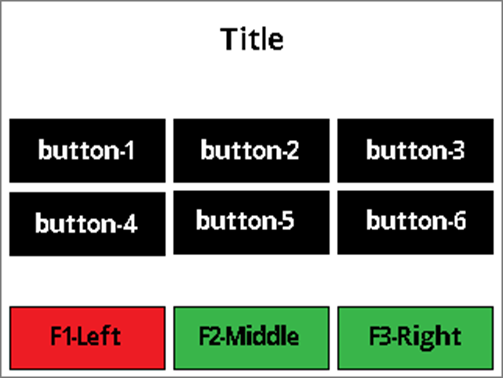
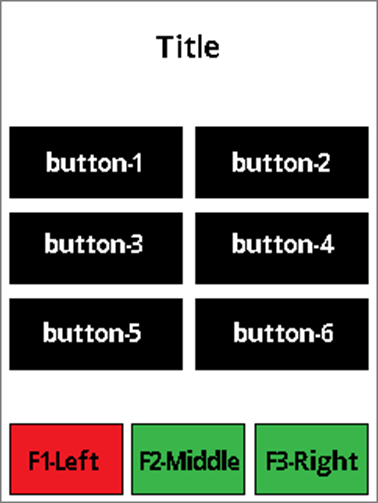
The host uses UI Page Option 0x01 to display a page with a title, a maximum of 6 data buttons (2 rows and 3 columns in Landscape Screen Orientation, 3 rows and 2 columns in Portrait Screen Orientation) with text, and maximum 3 functional buttons with a color option of red, green, or yellow.
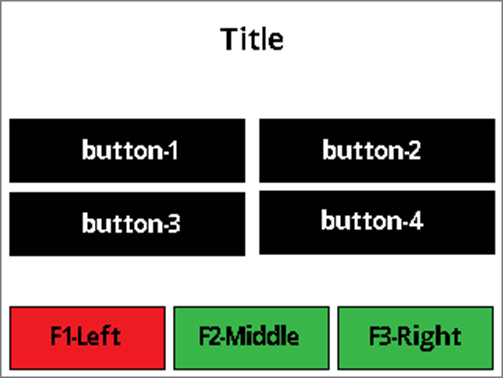
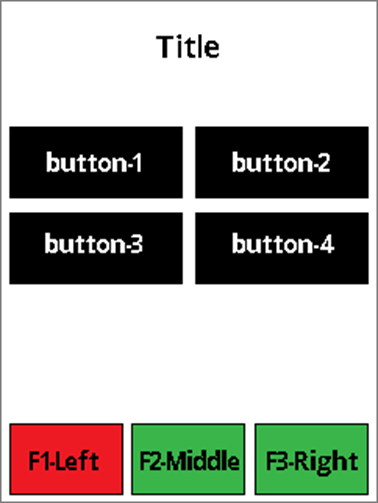
The host uses UI Page Option 0x01 to display a page with a title, maximum of 4 data buttons (2 rows and 2 columns in Landscape Screen Orientation, 2 rows and 2 columns in Portrait Screen Orientation) with text, and maximum 3 functional buttons with a color option of red, green, or yellow.
The host uses UI Page Option 0x02 to display a page with a title, maximum of 6 data buttons (2 rows and 3 columns in Landscape Screen Orientation, 3 rows and 2 columns in Portrait Screen Orientation) with $Amount, and maximum 3 functional buttons with a color option of red, green, or yellow.
The host uses UI Page Option 0x02 to display a page with a title, maximum of 4 data buttons (2 rows and 2 columns in Landscape Screen Orientation, 2 rows and 2 columns in Portrait Screen Orientation) with $Amount, and maximum 3 functional buttons with a color option of red, green, or yellow.
The button with **$**Amount value is host provided. The title, data buttons text, and functional buttons are labeled with String IDs associated with configured String messages. See . When the user presses any button, the device sends a notification to the host to indicate the corresponding button is pressed. See
EF02 = Generate CSR keys (WLAN Only) - Command 0xEF02
No parameters.
End of any wrappers, at minimum including Request Message
EF02 = Generate CSR keys (WLAN Only) - Command 0xEF02
No parameters.
End of any wrappers, at minimum including Response Message
Beginning of any wrappers, at minimum including Request Message
Beginning of any wrappers, at minimum including Response Message
AA00 81 04 0155EF02 84 02 EF02AA00 81 04 8205EF02 82 04 01000000 84 02 EF02Landscape Screen Orientation:
Title text:
~18 Upper case wide size characters (example: “WM”)
~23 Upper case regular size characters (example: “ABC”)
~21 lower case wide size characters (example: “wm”)
~30 lower case regular size characters (example: “abc”)
3-columns data button text:
~5 Upper case wide size characters (example: “WM”)
~8 Upper case regular size characters (example: “ABC”)
~6 lower case wide size characters (example: “wm”)
2-columns data button text:
~9 Upper case wide size characters (example: “WM”)
~13 Upper case regular size characters (example: “ABC”)
~9 lower case wide size characters (example: “wm”)
Functional button text:
~5 Upper case wide size characters (example: “WM”)
~8 Upper case regular size characters (example: “ABC”)
~6 lower case wide size characters (example: “wm”)
Portrait Screen Orientation:
Title text:
~13 Upper case wide size characters (example: “WM”)
~17 Upper case regular size characters (example: “ABC”)
The host uses this command to start a buzzer for playing a sequence of tones. Each sequence can have a minimum of 1 to maximum of 10 tones.
The sequence of events is as follows:
The host ensures the device is not currently running another command, for example, that it is not running a transaction using .
The host uses this command to request that the device display a message for the cardholder.
The sequence of events is as follows:
The host ensures the device is not currently running another command, for example, that it is not running a transaction using .
The host selects the message it wants to display from the list of available pre-determined strings.
The host uses this command to provide the device with additional/modified data to resume a transaction that is currently paused.
Container for non-MAC ARPC
T
R
/DFDF25
var
Device Serial Number (IFD Serial Number)
B
R
/FA
var
Container for generic data
T
R
//70
var
Container for ARPC
T
R
///8A
02
Authorization Response Code
‘00’ = Approved
‘01’ = Issuer Referral
‘05’ = Declined
‘12’ = Switch Interface
‘13’ = Request Online PIN
AN
R
///91
var
Issuer Authentication Data As defined in EMV Integrated Circuit Card Specifications for Payment Systems 4.3.
B
O
///71
var
Issuer Script Template 1 As defined in EMV Integrated Circuit Card Specifications for Payment Systems 4.3. The host may include as many instances of this parameter as needed, up to a maximum length of 128 bytes including Tags and Lengths.
B
O
///72
var
Issuer Script Template 2 As defined in EMV Integrated Circuit Card Specifications for Payment Systems 4.3. The host may include as many instances of this parameter as needed, up to a maximum length of 128 bytes including Tags and Lengths.
B
O
81
08
Miniature Certificate Info and ID
B
R
81 08 50 01 01 00 C2 C2 C2 C2
83
02
Public Key Info
B
R
83 02 10 04
84
40
Public Key, 64 bytes for ECDSA Curve P-256
B
R
84 40 then 64 bytes
86
00
Reserved for RSA cipher
B
O
86 00
90
04
Signing Miniature Certificate ID Signed by Base Miniature Certificate
B
R
90 04 CA CA CA CA
91
01
Signing Algorithm SHA-256, ECDSA Curve P-256
B
R
91 01 01
9E
40
Signature (64 bytes for ECDSA P-256)
B
R
9E 40 then 64 bytes
Padding Pad with 0xCA to make the total length of the data object 512 bytes.
~9 lower case regular size characters (example: “abc”)
~15 lower case regular size characters (example: “abc”)
~9 lower case regular size characters (example: “abc”)
~14 lower case wide size characters (example: “wm”)
~20 lower case regular size characters (example: “abc”)
2-columns data button text:
~6 Upper case wide size characters (example: “WM”)
~10 Upper case regular size characters (example: “ABC”)
~7 lower case wide size characters (example: “wm”)
~11 lower case regular size characters (example: “abc”)
Functional button text:
~4 Upper case wide size characters (example: “WM”)
~6 Upper case regular size characters (example: “ABC”)
~5 lower case wide size characters (example: “wm”)
~7 lower case regular size characters (example: “abc”)
The host composes a command request in the format below and sends it to the device.
The device plays a specific tone sequence as the command specified. After finish, the device sends 0x1805 - User Interface Operation Complete to report Buzzer/Buzzer Result.
The host should wait for 0x1805 - User Interface Operation Complete before sending another command.
Beginning of any wrappers, at minimum including Request Message
Beginning of any wrappers, at minimum including Response Message
AA00 810401031805 8418 1805 8114 00C8 01F4 0190 01F4 0258 01F4 0190 01F4 00C8 01F4AA00 810482031805 820401000000The host composes a command request in the format below, and sends it to the device.
The device displays the requested message.
If the Timeout parameter is set to Infinite, the device returns a command response message with Response Status, Operation Status Summary byte set to 0x00 (OK, Done) after which the host is free to send further commands.
If the Timeout parameter is not set to Infinite:
The device returns a command response message with its Response Status, Operation Status Summary byte set to 0x01 (OK, Started / Running).
While the host is waiting for the timeout to expire, it should not send any commands to the device, because the device is busy processing the current command.
After the timeout period expires, the device blanks the display and sends to inform the host.
Beginning of any wrappers, at minimum including Request Message
Beginning of any wrappers, at minimum including Response Message
Example (Hex):
AA00 810401551803 8408 1803 810102 820116AA00 810482551803 820401000000 840218031004 = Command 0x1004 - Resume Transaction
81
01
Resume Code. Indicates the pause state the transaction will resume from:
0x00 = Waiting for ARPC
B
R
83
var
Reserved
B
O
84
var
ARPC Data. This contains an
B
R
86
var
Transaction TLV Update. Not applicable when Resume Code = Waiting for ARPC
B
O
End of any wrappers, at minimum including Request Message
Beginning of any wrappers, at minimum including Response Message
Beginning of any wrappers, at minimum including Request Message
AA 00 81 04 01 00 10 04 84 21 10 04 81 01 00 82 01 78 84 17 FF 74 14 DF DF 25 08 99 26 90 E1 16
12 07 10 FA 06 70 04 8A 02 30 30AA 00 81 04 82 06 10 04 82 04 00 00 00 00 84 02 10 04The host uses this command to generate a certificate signing request (CSR) in PEM format. The CSR generated will be saved to volatile memory in the device and will overwrite any existing CSR. The CSR will persist in volatile memory until it is overwritten, fetched with Command 0xD821 - Start Get File from Device or the device is power cycled or reset.
The sequence of events is as follows:
The host will use Command 0xEF02 - Generate CSR keys (WLAN Only) if it wants generate a CSR using a new CSR key pair.
The device sends a response in the format below to the host to indicate that CSR generation has completed.
The host fetches the CSR with .
The CSR is used to create a certificate.
The host loads the certificate into the device with
The host uses this command to request challenge data from the device, which the host can then use to perform a specific sensitive operation / modify a specific type of device setting. Information about how the host should pass the required challenge data to the device is included in the documentation for all commands that use this security mechanism.
The sequence of events is as follows:
The host already wants to perform a secured operation that requires a challenge (for example Command 0xEEEE - Send Secured Command to Device).
The host constructs the command request for in the format below.
The host sends the command request to the device.
The device generates a random number for the challenge, stores it locally, and sends a response in the format below to the host.
The device starts a 5-minute countdown timer during which the challenge is valid. If the host takes no action within 5 minutes, the timer expires, the device erases the challenge data, and the device must retrieve a fresh challenge to perform the operation it wants to perform. This binding of the command to a specific time period allows the device to detect and reject commands that have been captured/intercepted at one point in time and replayed later.
The host can load this file type to control the behavior of the device’s EMV contact and contactless kernels when the device should support Offline Data Authentication (ODA). Populate all values from information provided by each payment brand that should be supported by the device. The host can load this file using 0xD812 - Start Send File to Device (Unsecured).
MagTek provides tools that allow these settings to be loaded using a Microsoft Excel spreadsheet in xlsx format for more convenient authoring, review, and change tracking. For a reference sample spreadsheet, contact MagTek Support Services. The MagTek tools expect the spreadsheet to be formatted as shown in the table below. Each CA Key to be supported is defined in a tab of the Excel file.
The MagTek tool converts the spreadsheet data into the format shown in CA Keys Raw Format.
The host uses this command to request the deletion of a file stored on the device.
The sequence of events is as follows:
If the file read or the file erase fails, a response of failure will be sent to the host.
Card emulation enables a DynaFlex/DynaProx device to simulate a Type 4 smart card. The emulated card has the following characteristics:
Compliance: Card emulation conforms to ISO/IEC 14443 Type-A and NFC Forum Type 4 standards.
Passive Operation: The emulated card functions in passive mode. The phone is responsible for generating the magnetic field required to activate the simulated card.
Read-Only: The emulated card is read-only and does not support writing.
Supported Data Type: Supports the URI (URL) data type.
iPhone Support: NFC card reading was introduced on Apple iPhones starting with the iPhone 7.
Android Support: Android added NFC support in 2012; however, compatibility depends on the specific phone model and hardware capabilities. Most Android phones released since 2016 support NFC. Verify with the phone’s manufacturer to confirm compatibility.
Google Pay Indicator: If a phone supports Google Pay, it is likely capable of reading NFC tags.
The host uses this command to prompt a cardholder for customer information.
The host ensures the device is not currently running another command (for example, it is not running a transaction using .
If the host determines it should request customer information, it composes a command request in the format described below.
1805 = Command 0x1805
81
N*4
N = Number of tones
0x01 – Min (1 tone)
0x0A – Max (10 tones)
4 = 4 bytes data parameter for each tone in the sequence Byte0-Byte1 – Frequency in units of 1 Hz
0x0000..0x0031 (< 50 Hz, Silent)
0x0032 - Min (50 Hz)
0x0FA0 - Max (4000 Hz)
0x0FA1..0xFFFF (> 4000 Hz, Error)
Byte 2-Byte3 – Duration of tone in units of 1 millisecond
B
R
0x0001 – Min (1 ms)
0xFFFF – Max (65535 ms)
End of any wrappers, at minimum including Request Message
1805 = Buzzer - Command 0x1805
No parameters.
End of any wrappers, at minimum including Response Message
1803 = Command 0x1803 - Display Message (Display Only)
81
01
Timeout - 0x00 = Infinite. Device leaves the requested message on the display until the host initiates a change.
B
O
0x00
- All other values = Timeout in seconds for the device to display the message.
82
01
Message ID. Specify a Display String ID from Display Strings.
B
O
0x14
End of any wrappers, at minimum including Request Message
1803 = Command 0x1803 - Display Message (Display Only)
No parameters.
End of any wrappers, at minimum including Response Message
1004 = Command 0x1004 - Resume Transaction
No parameters.
End of any wrappers, at minimum including Response Message
TLV data objects use the following primitive data types:
A = Alphabetic (string, no numbers).
AN = Alphanumeric (string).
B = Binary value, which includes bit combinations (“OR” types).
CN = Compressed numeric.
N = Numeric.
T = TLV Constructed data object (TLV Value contains additional layers of TLV-encoded data the parser should continue to process).
05
DFDF7B
var
CA Public key Modulus
B
R
B8 04 8A … D5 97
DFDF7C
01 or 03
CA Public Key Exponent
B
R
03
DFDF7D
14
CA Public Key Checksum
B
R
EB FA 0D 5D 06 D8 CE 70 2D A3 EA E8 90 70 1D 45 E2 74 C8 45
Modulus As defined by the payment brand.
Additional CA Keys, repeating from RID through Modulus, as needed.
SHA-1 hash of all data in the file
DFDF79
05
Registered Application ID (RID)
B
R
A0 00 00 00 04
DFDF7A
01
CA Public Key Index
B
RID (5 Bytes) As defined by the payment brand.
Index (1 Byte) As defined by the payment brand.
Exponent Length (1 Byte)
0x01
0x03
Key Length (1 Byte), Max of 248 bytes per EMVCo specifications
Exponent (1 or 3 Bytes)
0x03
0x010001
R
E001 = Get Challenge - Command 0xE001
81
02
Request ID to be protected
B
R
End of any wrappers, at minimum including Request Message
E001 = Get Challenge - Command 0xE001
81
02
Request ID to be protected
B
R
82
04
Device Serial Number
B
R
83
08
Challenge Token A challenge token includes 8-byte random numbers and must be used within 5 minutes of being issued. Only one token can be active at a time. Attempts to use a token for requests other than the one specified will cause the token to be revoked/erased
B
R
End of any wrappers, at minimum including Response Message
Beginning of any wrappers, at minimum including Request Message
Beginning of any wrappers, at minimum including Response Message
AA 00 81 04 01 13 E0 01 84 06 E0 01 81 02 F0 12AA 00 81 04 82 13 E0 01 82 04 00 00 00 00 84 16 A2 14 81 02 E0 01 82 04 B5 03 3D A0 83 08
3B 4F A0 62 69 BB 73 38EF03 = Generate CSR (WLAN Only) - Command 0xEF03
81
1
Key Identifier The key identifier to use to generate the CSR. The key pair associated with the identifier must already be present in the device for the command to succeed.
0 = CSR keys
1 = Apollo server cert keys
2 = Customer server cert keys
3 = Commercial server cert keys 4 = Apollo client cert keys
B
O
0
82
var
Subject
Including this optional parameter will override the default subject. This parameter should contain a null terminated string. This string should contain a list of attributes separated by commas. If an attribute’s value contains a comma, the comma should be replaced with “\,” Each attribute value should be prefixed with its attribute name followed by “=”. The following is a list of valid attribute names.
"CN" "commonName" "C" "countryName” "O" "organizationName" “L” “locality” "R" “OU” "organizationalUnitName" “ST” "stateOrProvinceName" "emailAddress" "serialNumber" “postalAddress” "postalCode" “dnQualifier” "title" “surname” "SN" “givenName” "GN" “initials” "pseudonym" "generationQualifier" “domainComponent” "DC" “O=MagTek Inc,CN= test1.com” is an example with two attributes.
“serialNum ber=XXXX XXX,CN= df- xxxxxxx” where XXXXXX X is and so is xxxxxxx but in lower case
83
var
Subject Alternative Names
Including this optional parameter will override the default subject alternative names. This parameter should contain a null terminated string. Only DNS names and IP addresses are supported and only a maximum of two each. DNS names must be prefixed with “DNS=” and IP addresses must be prefixed with “IPA=”. All Subject Alternative Names
Must be separated with a comma and not spaces. Subject Alternative Names may not be ordered in the CSR the same as they are ordered here.
"DNS=test1.com,DNS=test2.,IPA=1.10.16.255,IPA=2.10.16.25
4" is an example.
B
O
“DNS=df-
xxxxxxx,IP A=192.168
.0.1” where xxxxxxx is
but in lower case
End of any wrappers, at minimum including Request Message
EF03 = Generate CSR (WLAN Only) - Command 0xEF03
No parameters.
End of any wrappers, at minimum including Response Message
Beginning of any wrappers, at minimum including Request Message
Beginning of any wrappers, at minimum including Response Message
AA00 81 04 0155EF03 84 02 EF03AA00 81 04 8255EF03 82 04 00000000 84 02 EF03D831 = Command 0xD831 - Delete File from Device
81
04
File ID from
B
R
End of any wrappers, at minimum including Request Message
D831 = Delete File from Device- Command 0xD831
No parameters.
End of any wrappers, at minimum including Response Message
Beginning of any wrappers, at minimum including Request Message
Beginning of any wrappers, at minimum including Response Message
AA 00 81 04 01 05 D8 31 84 08 D8 31 81 04 02 00 00 00AA 00 81 04 82 05 D8 31 82 04 00 00 00 00The device sends 0x1805 - User Interface Operation Complete to the host to report data available, or hardware failure.
If the device reported data available, the host can retrieve the data as defined in Notification Detail Codes and Notification Payload for Personal Info Entry.
Beginning of any wrappers, at minimum including Request Message
Beginning of any wrappers, at minimum including Response Message
If the request started successfully, the Request Status in the message wrapper is: OK, Started / Running, All good / requested operation was successful.
AA00 810401031806 8405 1806 8101 01AA00 810482031806 8204 01000000The host can use this command to change the device’s lock state. To get the device’s lock state or to set it using MagTek security see . The value of the device lock state will revert to the value of after a reset or a power cycle. See for more information.
Card emulation is initiated by receiving a 0x1840 command from the host. The device will prepare card emulation with the parameters provided in the command and start card emulation.
The sequence of events is as follows:
The host ensures the device is not currently running another command, for example, that it is not running a transaction or PIN entry.
The host composes a command request in the format described below and sends it to the device.
Some files types conform to the common file structure format that follows. The following is a list of file types that conform to this format.
EMV file types
Certificate File Types
Certificate Signing Request (CSR) File Types
Pass-Through Mode is independent and separate from EMVCo Payment functions. This mode provides no access to any EMV payment kernels, and is out of scope from EMVCo certifications.
This mode is typically used by developers that require the need for non-payment low-level APDU communications with NFC cards, tokens, and devices.
The commands in this section provide the basic capability to communicate directly with the non-payment Contactless Card. They provide control of the polling process, and exchange of application protocol data units (APDU).
Typical Use Case examples of overall sequence:
ENTER Pass-Through Mode.
Turn ON Polling
Set/Use LEDs / Buzzer
“Tap” card/device on reader.
Engage APDU transmit/ receive activities
Set/Use LEDs/ Buzzer
When transaction is completed:
Turn OFF Polling
EXIT Pass-Through Mode.
The host uses this command to enter or exit Pass-Through Mode.
The Host must “Enter Pass-Through Mode” prior to using any other commands in this section. Otherwise, subsequent commands will be “ignored” / “rejected”. When finished, the Host should “Exit Pass-Through Mode”. Once exited, the reader returns to its “normal state” and will accept traditional commands.
1806 = Command 0x1806 – Personal Info Entry
81
01
Capture Type
0x01 = Phone Number: Capture the phone number 0x02 = Social: Capture the social security number
0x03 = Zip code: Capture the zip code 0x04 = Employee ID: Capture Employee ID number 0x05 = Birth Date: Capture birth date in USA format 0xFF = Cancel Capture: Cancel any of the capture commands
B
R
82
01
Encryption for user data (Optional) 00 – No Encrypt
01 - Encrypt
B
R
Beginning of any wrappers, at minimum including Request Message
1806 = Command 0x1806 – Personal Info Entry
No parameters.
Beginning of any wrappers, at minimum including Response Message
These file types conform to the Common File Structure format. The File Payload of these files contain a certificate in PEM format.
Certificates must be loaded into the device in the order of trust starting with the root CA, next intermediate CA(s) and ending with the leaf (server or client for example) so that the device can verify the signature of each certificate. If the certificates are not loaded in order, they will be rejected.
When loading a server cert, the associated key pair must already exist in the device as the CSR keys or as the existing server or client cert and will be used to verify that the public key contained in the certificate is correct. If the keys don’t match the certificate will be rejected. If the certificate is associated with the CSR keys, the CSR keys will be associated with the certificate and will no longer be available for other certificates until re-generated.
Initial server or client certificates can not be loaded until the respective CSR keys and CSR is generated. To generate a CSR see 0xEF03 - Generate CSR (WLAN Only).
Beginning of any wrappers, at minimum including Request Message
-
-
EF06 = Change Device Lock State - Command 0xEF06
-
81
01
Device Lock State - 0x00 = Unlocked - 0x01 = Locked
B
M
82
01
Passcode Format - 0x00 = Clear - 0x01 = Fixed SHA-256 - 0x02 = Variable SHA-256
B
M
83
04-63
Passcode — The value of the passcode depends on the value of the passcode format parameter.
If the passcode format is set to Clear (0x00), then the value of the passcode is the passcode in the clear and can have a length of 4–63 bytes.
If the passcode format is set to Fixed SHA-256 (0x01), then the value of the passcode is the 32-byte SHA-256 hash value of the passcode
If the passcode format is set to Variable SHA-256 (0x02), then the value of the passcode is the 32-byte SHA-256 hash value of: an 8-byte random challenge token followed by the 4–63 byte passcode. The challenge token must have been retrieved from the device within the last 5 minutes using
B
M
-
-
End of any wrappers, at minimum including Request Message
Beginning of any wrappers, at minimum including Response Message
-
AA00 81 04 0155EF06 84 0E EF06 810100 820100 8304 34333231AA00 81048255EF06 820400000000 8402EF06After the timeout expires, host cancel or the card is read, the device sends a 0x1805 notification to inform the host.
/81
01
Start/Cancel
0x00 = Cancel (See the example of 0x1840 cancel command below)
0x01 = Start
R
AA 00 81 04 01 01 18 40 84 21 18 40 81 01 01 82 01 00 83 17 68 74 74 70 73 3A 2F 2F 77 77 77
2E 6D 61 67 74 65 6B 2E 63 6F 6D 2F
AA 00 81 04 82 01 18 40 82 04 01 00 00 00AA 00 81 04 01 01 18 40 84 05 18 40 81 01 00MGTKAP10= Start Of File Marker
Operation Type
0x01 = Key Agreement
0x02 = Command Authorization Using Signature
0x03 = Command Authorization Using MAC
0x05 = Data Authentication Using MAC
0x07 = Data Encryption
0x10 = Data Signature
B
R
1
Operation Algorithm If Operation Type is Key Agreement type:
0x01 = ECDHE
If Operation Type is a Signature type:
0x01 = ECDSA (indeterministic)
If Operation Type is a MAC type:
0x01 = HMAC
0x02 = CBC-MAC
0x03 = CMAC
If Operation Type is an Encryption type:
0x01 = DEA
0x02 = 2TDEA
0x03 = 3TDEA
0x04 = AES-128
B
R
2
Operation Curve/Mode/Hash/Cipher If Operation Type is a Key Agreement type, this specifies the Curve:
0x01 = P192
0x02 = P224
0x03 = P256
0x04 = P384
0x05 = P521
If Operation Type is a Signature type, this specifies the Hash:
0x01 = MD5
0x02 = SHA-1
0x03 = SHA-224
0x04 = SHA-256
If Operation Type is a MAC type, this specifies the Encryption Algorithm:
0x01 = DEA
0x02 = 2TDEA
0x03 = 3TDEA
0x04 = AES-128
If Operation Type is an Encryption type, this specifies the Mode:
0x01 = ECB (Block)
0x02 = CBC (Block)
0x03 = CFB (Stream)
0x04 = OFB (Stream)
B
R
3
KDF/Curve/Padding If Operation Type is a Key Agreement type, this specifies the KDF:
0x01 = SP800-56A / X9.63
If Operation Type is a Signature type, this specifies the Curve:
0x01 = P192
0x02 = P224
0x03 = P256
0x04 = P384
0x05 = P521
If Operation Type is a MAC type, this specifies the Padding:
0x00 = None (for streaming modes)
0x01 = Zeros (ISO 9797 Padding Method 1)
0x02 = One and zeros (ISO 9797 Method 2)
0x03 = Length + zeros (ISO 9797 Method 3)
If Operation Type is an Encryption type, this specifies the Padding:
0x00 = None (for streaming modes)
0x01 = Zeros (ISO 9797 Padding Method 1)
0x02 = One and zeros (ISO 9797 Method 2)
0x03 = Length + zeros (ISO 9797 Method 3)
B
R
4
MAC Block Size If Operation Type is a MAC type, this specifies the data to be MACed must be padded to a multiple of this many bytes. For all other Operation Types, do not include this byte.
B
O
The host can load this file type to control the behavior of the device’s American Express contactless kernel when the card sends tag 9F70 and one or more DRL is defined.
The host can load it using 0xD812 - Start Send File to Device (Unsecured). See the Expresspay 4.0.2 specification for functional details.
MagTek provides tools that allow these settings to be loaded using a Microsoft Excel spreadsheet in xlsx format for more convenient authoring, review, and change tracking. For a reference sample spreadsheet, contact MagTek Support Services. The MagTek tools expect the spreadsheet to be formatted as shown in the table below. Each DRL to be supported is defined in a tab of the Excel file.
The MagTek tool converts the spreadsheet data into the raw format shown in the table below
The host and the device communicate with each other by exchanging blocks of data called messages, which are standardized wrappers containing a payload. This section will detail everything you need to know about using messages.
This section of the DynaFamily Programmer's Manual lists available commands to initiate various ransactions in the device.
The host uses this command to set device configuration / settings securely. Properties that require security should specify that they do in their documentation. This command can also be used for properties that do not require security.
The details, request data and response data of this command are identical to what is documented in , however, the command must be structured and sent according to what is documented in sequence of events 1-5 of .
0x06 = AES-256
0x06 = SHA-512
0x07 = SHA-512/224
0x08 = SHA-512/256
0x09 = SHA3-224
0x0A = SHA3-256
0x0B = SHA3-384
0x0C = SHA3-512
0x06 = AES-256
0x10 = PKCS7 (pad # = pad length)
0x11 = X9.23 (random + pad length)
0x20 = Random (when length is known)
0x10 = PKCS7 (pad # = pad length)
0x11 = X9.23 (random + pad length)
0x20 = Random (when length is known)
/82
01
Timeout in seconds
0x00 = No timeout
0x01 to 0xFF = 1 to 255 seconds
O
0x00
/83
<= 254
URL
URL to use as card data. Required when starting card emulation. Optional and ignored if canceling emulation. Example: https://www.magtek.com/
O/R
C1
4
File Type See Table 206
B
R
N/A
CE
var
File Payload See the “File Type” subsections of section - Data Types and Shared TLV Data Objects.
B
R
N/A
NFC UID
B
R
EF06 = Change Device Lock State - Command 0xEF06
-
-
-
No parameters.
-
-
End of any wrappers, at minimum including Response Message
00 00 00 00 05 00
DF26
06
Reader CVM Required Limit
B
R
00 00 00 00 10 00
SHA-1 Hash 20 byte hash of all values that follow
FF37
var
DRL Configuration Container
T
R
/FF36
var
DRL Set Container
T
R
//DF23
06
Reader Contactless Floor Limit
B
R
00 00 00 00 15 00
//DF24
06
Reader Contactless Transaction Limit
B
R
00 00 00 00 05 00
//DF26
06
Reader CVM Required Limit
B
R
00 00 00 00 10 00
Additional instances of DRL Set Container as needed
DF23
06
Reader Contactless Floor Limit
B
R
00 00 00 00 15 00
DF24
06
Reader Contactless Transaction Limit
B
File Type Version One byte indicating the version of the file type format being used.
0xAA
R
B
O
DFDFDF41
var
MIFARE Card Data in Binary
O
DFDFDF40
var
MIFARE Card Data in ASCII terminated with NULL character
Learn about the TLV encoding that make messages work.
.Each message type follows a specific structure described in this section.
Section
Information
The basics on messages, what they are, and how they work.
The host can use this command to cancel a transaction in progress that it initiated using Start Transaction.
Section
Information
The host uses this command to start a payment transaction.
The host uses this command to provide the device with additional/modified data to resume a transaction that is currently paused.
Properties are stored in flash memory, which inherently has a limited number of read- write cycles before it begins to wear. For this reason, MagTek recommends setting properties as few times as possible over the lifecycle of the device.
The host uses this command to start sending unsecured files to the device for storage or processing. It is similar to Command 0xD811 - Start Send File to Device (Secured) but is used to send a different subset of file types that do not impact device security. Refer to the About Files to determine which file type can use unsecure command. This command is paired with Start Get File from Device - Command 0xD821, which the host can use to retrieve files. However, some file types are “one way only” and cannot be retrieved using that command after the host sends them to the device.
The sequence of events is as follows:
The host constructs Command 0xD812 - per .
The host sends that command to the device as a Request Message to start the process of uploading a file.
The device sends a Response Message so the host knows it can begin sending the file.
The host sends a Data File Message to the device. If the device does not receive file data within a reasonable period of time, it times out and stops listening for the data file.
The device checks to make sure the File ID and the length and hash of the File Payload match with the values the host specified in this command.
The device repeats the same Response Message, this time with the Message Reference Number set to the same value the host used in the Data File Message.
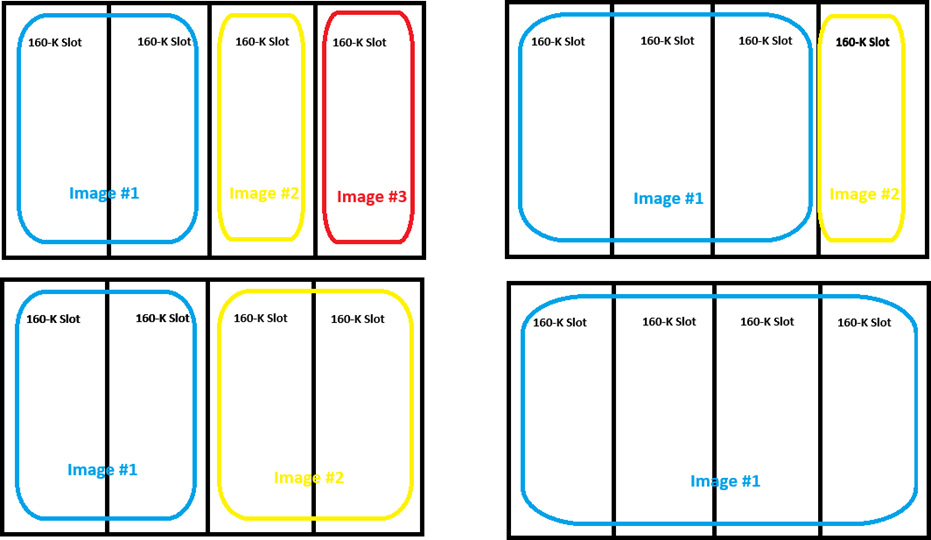
For image data, the file must be either BMP format or Magtek signed image format, maximum 320px by 240px, with color depth 16 color, 256 color, 16-bit color, or 24-bit color. Images smaller than the maximum size are centered on the display. Maximum size is 160KB per slot, but images can span multiple slots as shown below. The maximum sizes for each slot are 640KB for slot 1, 480KB for slot 2, 320KB for slot 3, and 160KB for slot 4. Loading an image that overwrites any portion of an existing image will delete that image.
If the request started successfully, the Request Status in the message wrapper is OK, Started / Running, All good / requested operation was successful.
The host uses 0xD812 - Start Send File to Device (Unsecured) to load this file type to control the behavior of the device’s EMV contact kernel. The configuration loaded using this file type must be designed to work together with all instances of EMV Processing Configuration File Type and EMV Entry Point Configuration File Type the host loads into the device.
MagTek provides tools that allow these settings to be loaded using a Microsoft Excel spreadsheet for more convenient authoring, review, and change tracking. For a reference sample spreadsheet that contains EMVCo approved configurations, contact MagTek Support Services.
This document shows one example of the available Contact Level 2 certified configurations (DynaFlex C01, Merchant, Attended, ODA). To see which configurations are supported on the devices you are using, see the list of Vendor Config IDs in the device’s Letter of Approval for Contact Level 2 posted in the list of Approved / Evaluated products on the EMVCo web site. For detailed descriptions of the tags included in this file type, including possible valid values and their effects on device behavior, see EMV Integrated Circuit Card Specifications for Payment Systems v4.3.
The host uses this command to request the file information of a file stored on the device. File types include standard files (images and certificates), MagTek custom files (configuration, firmware), and in some cases even large data blob output (such as signature capture data). In many cases, the file information retrieved by this command have been sent by a host previously using Command 0xD811 - Start Send File to Device (Secured) or Command 0xD812 - Start Send File to Device (Unsecured). In other cases, such as retrieving file information of signature capture data, the data may originate with the device and the host uses this command to retrieve the information. Such information is not persistent, in the sense that the device does not retain it through power cycles.
The sequence of events is as follows:
The device sends a response in the format below. The response contains the file information.
If the file cannot be found, then a response of failure will be sent to the host.
If the request started successfully, the Request Status in the message wrapper is OK, Started / Running, All good / requested operation was successful.
The host uses this command to provide a cardholder selection to the device when the device itself does not have a display or inputs to prompt the cardholder for a selection.
Sequence of events:
During the transaction, if the device does not have a display or touchscreen but needs to show information to the cardholder or needs the cardholder to make a selection, it sends the host Notification 0x1803 - User Interface Host Action Request to report Display / Cardholder Selection and supporting information.
The host uses its user interface to request a selection from the cardholder based on the information and selectable items provided by the notification message.
The host sends the user selection to the device by sending Command 0x1802 in the format described below.
Beginning of any wrappers, at minimum including Request Message.
If the request started successfully, the Request Status in the message wrapper is OK, Started / Running, All good / requested operation was successful.
Response Data for
Beginning of any wrappers, at minimum including Response Message.
This command directs the device to prompt the cardholder to enter a PIN when a card is not present or is not presented. The host is aware of the account information and the device is not. To prompt the cardholder to present a card before prompting for a PIN, use Request PIN with instead.
When the host calls this command, the device enters PIN Entry Mode, meaning it starts a “PIN Entry session.” While in PIN Entry Mode:
The device ignores most other commands from the host, similar to the way it behaves while is running: Only essential commands and those that are relevant to the current PIN entry session are allowed.
When the device is waiting for the host to take action, it resets the timeout clock and shows an interstitial page until one of the following occurs: PLEASE WAIT
The host uses this command to direct the device to immediately show a QR code on the display, provided the device is not in a mode that has exclusive use of the display (such as during a transaction).
Ensure the device is not currently running another command (for example, not running a transaction such as .
Select the data for the QR code to display.
The host can use this command to terminate a Bluetooth® LE connection. The host may also be able to terminate a Bluetooth® LE connection directly without using this command.
The sequence of events is as follows:
The host constructs the command request for Device in the format below.
The host sends the command request to the device.
The Encryption Type provides the key type, variant, and other information the host can use to decrypt encrypted data included in various payloads. The possible values are an ORed bitmask using the following elements:
0xxx xxxx = Fixed Key (Not used)
1xxx xxxx = DUKPT Key
xx00 xxxx = TDES
xx01 xxxx = AES128
xx10 xxxx = AES256
xxxx 0000 = Data Encrypt/Decrypt Variant
xxxx 0001 = PIN Variant
xxxx 0010 = MAC Variant
xxxx 0011 = Data, Encrypt Variant
xxxx 0100 = MAC Verify Variant
xxxx 0101 = RESERVED
xxxx 0110 = RESERVED
xxxx 0111 = AES PIN Encrypt
xxxx 1000 = AES MAC Generate
xxxx 1001 = AES MAC Verify
xxxx 1010 = AES MAC Generate/Verify
xxxx 1011 = AES Data Encrypt
xxxx 1100 = AES Data Decrypt
xxxx 1101 = AES Data Encrypt/Decrypt
xxxx 1110 = RESERVED
xxxx 1111 = RESERVED
🕐 Hours: Monday-Friday, 5:30 AM - 5:00 PM PST
Online Resources:
🌐 Support Portal: developer.magtek.com
Documentation Feedback:
Help us improve this documentation! feedback@magtek.com
🕐 Hours: Monday-Friday, 5:30 AM - 5:00 PM PST
Online Resources:
🌐 Support Portal: developer.magtek.com
Documentation Feedback:
Help us improve this documentation! feedback@magtek.com
0xAA
SHA-1 Hash
20-byte hash of all values that follow.
9F1A
02
Terminal Country Code
B
R
08 40
DF79
01
Cardholder Confirmation
B
R
01
9F35
01
Terminal Type
B
R
21
DF0A
01
EMV Contact Supported
B
R
01
9F33
03
Terminal Capabilities
B
R
E0 28 C8
9F40
05
Additional Terminal Capabilities
B
R
EF 80 F0 A0 01
DF55
01
EMV Contactless Supported
B
R
01
DF0B
01
Magnetic Stripe Supported
B
R
01
DF27
01
Time allocated to enter a PIN
B
R
0A
DF06
01
Batch / Online Data Capture managed
B
R
01
DF08
00
Advice Managed
B
R
00
DF7A
01
PSE Supported
B
R
01
DF0D
00
AutoRun Mode
B
R
00
DF10
03
Predefined amount for AutoRun mode
B
R
00 00 00
DF7B
01
PIN Bypass Supported
B
R
00
DF07
01
Referral Managed
B
R
01
DF09
01
Default TAC supported when regular TACs are not present
B
R
01
DF73
05
Default TAC default
B
R
00 00 00 00 00
DF74
05
Default TAC denial
B
R
00 00 00 00 00
DF75
05
Default TAC online
B
R
00 00 00 00 00
DF53
01
Random Transaction Selection not supported
B
R
00
DF54
01
Velocity Checking not supported
B
R
00
DF7C
01
CDA Mode
B
R
01
File Type Version
One byte indicating the version of the file type format being used.
81
01
Cardholder Selection Request Status - 0x00 = Cardholder Selection Request completed, see Selection Result parameter. - 0x01 = Cardholder Selection Request canceled by cardholder, Transaction Aborted. - 0x02 = Cardholder Selection Request timed out, Transaction Aborted.
B
R
82
01
Selection Result — Menu item index the cardholder selected. If the cardholder made no selection or the operation terminated abnormally, the device does not include this parameter.
B
O
End of any wrappers, at minimum including Request Message.
No parameters.
End of any wrappers, at minimum including Response Message.
1802
Report Cardholder Selection = Command 0x1802
1802
AA 00 81 04 01 00 18 02 84 08 18 02 81 01 00 82 01 00AA 00 81 04 82 00 18 02 82 04 01 00 00 00D812 = Start Send File to Device (Unsecured) - Command 0xD812
81
04
File ID from
B
R
A2
var
File transfer properties
T
R
/81
var
Length of File Payload. This is the length of the File Payload parameter in the Data File Message the host sends to the device.
B
R
/82
01
Hash Checksum Type
0x04 = SHA-256
B
R
/83
20
Hash Checksum
Anticipated checksum calculated against the File Payload, according to the standard specified in Hash Checksum Type.
B
R
A3
var
File Description
The host should populate this value to help identify the file using .
T
R
/81
var
File Name
Maximum length 32 bytes
Reserved for future use. Leave empty.
B
O
Null
/83
var
File Version
Maximum length 7 bytes
Reserved for future use. Leave empty.
B
O
Null
/84
var
File Date
Maximum length 20 bytes
Reserved for future use. Leave empty.
B
O
Null
87
01
Reserved for future use. Leave empty.
B
O
Null
End of any wrappers, at minimum including Request Message
D812 = Start Send File to Device (Unsecured)- Command 0xD812
No parameters.
End of any wrappers, at minimum including Response Message #
Beginning of any wrappers, at minimum including Request Message
Beginning of any wrappers, at minimum including Response Message
AA 00 81 04 01 07 D8 12 84 44 D8 12 81 04 02 00 00 00 A2 2B 81 04 00 02 58 38 82 01 04 83 20 D5 B8 BF 2F 3A 15 D9 EE 1D 0D E5 8E DD 68 37 73 18 51 C7 3C 3D 79 58 2B A6 07 90 5C 2B 86 3C E5 A3 0A 81 08 30 32 30 30 30 30 30 30 87 01 01
AA 00 81 04 82 07 D8 12 82 04 00 00 00 00
D825 = Get File Info from Device - Command 0xD825
81
04
File ID from
B
R
End of any wrappers, at minimum including Request Message
D825 = Get File Info from Device - Command 0xD825
81
04
File ID from
B
R
A2
var
File transfer properties
T
R
/81
var
Length of File — This is the length of the file.
B
R
/82
01
Hash Checksum Type
0x04 = SHA-256
B
R
/83
20
Hash Checksum — Anticipated checksum calculated against the file, according to the standard specified in Hash Checksum Type.
B
R
A3
var
File Description — The values the host populated for convenience when it sent the file to help identify the file. Not all values are required.
T
R
/81
var
File Name — Maximum length 32 bytes. Reserved for future use.
B
O
Null
/82
var
File Label — Maximum length 16 bytes. Reserved for future use.
B
O
Null
/83
var
File Version — Maximum length 7 bytes. Reserved for future use.
B
O
Null
/84
var
File Date — Maximum length 20 bytes. Reserved for future use.
B
O
Null
End of any wrappers, at minimum including Response Message
Beginning of any wrappers, at minimum including Request Message
Beginning of any wrappers, at minimum including Response Message
AA 00 81 04 01 08 D8 21 84 08 D8 25 81 04 00 00 00 01AA 00 81 04 82 08 D8 25 82 04 00 00 00 00 84 54 D8 25 81 04 00 00 00 01 A2 2B 81 04 00 00 00
40 82 01 04 83 20 FD EA B9 AC F3 71 03 62 BD 26 58 CD C9 A2 9E 8F 9C 75 7F CF 98 11 60 3A 8C
44 7C D1 D9 15 11 08 A3 1D 81 0B 54 45 53 54 5F 31 4B 2E 62 69 6E 82 05 4C 61 62 65 6C 83 07
31 2E 30 2E 30 2E 31The host calls the same PIN entry command again to show another UI sequence or to end the PIN entry session, or
The host calls another allowed command (ending the PIN entry session), or
The device has shown until the Timeout the host specified in the command has expired (ending the PIN entry session).
The host can call this command repeatedly as needed, to invoke any number and any combination of available PIN Entry User Interface Sequences. This allows the host to determine the number of retries, and to exercise flexible fine-grained control over the end-to-end “sequence of sequences.”
The host may cancel the PIN entry session by calling this command again with User Interface Sequence = Cancel PIN Session. In response, the device shows an interstitial page: PIN Entry Canceled for 2 seconds, then returns to idle.
Typical flow and behaviors are described below.
The host invokes this command using the format in Request Data for Request PIN with Host Supplied Account Data (Banking Functions Only).
If an error occurs, the device returns a command response message as shown in Request Data for Request PIN with Host Supplied Account Data (Banking Functions Only) with Response Status, Operation Status Summary byte set to 0x80 (Failed to start operation), and terminates the command.
If no error occurs, the device returns a command response message as shown in Request Data for Request PIN with Host Supplied Account Data (Banking Functions Only) with Response Status, Operation Status Summary byte set to 0x01 (OK, Started / Running), and enters PIN Entry Mode.
The device shows one of the predefined messages specified by the User Interface Sequence parameter and waits up to the specified Timeout for the cardholder to enter a PIN.
If the host has specified User Interface Sequence = Enter PIN / Enter PIN Again, the device automatically prompts the cardholder to enter the PIN a second time.
When the command completes (PIN entry done, cardholder or operator canceled, or Wait Time timeout), the device sends Banking Functions Operation Complete to report Touchscreen / PIN Entry - Notification 0x0205. If PIN entry is successful, the report also contains a payload as shown in . The EPB format the device uses depends on the parameters the host specified in the command:
If the host provided the Account Number data in the command, the device creates the EPB using the PIN Block Format the host specified in the command.
If the host did not provide the Account Number data in the command, the device creates the EPB using ISO format 1.
If the host is performing a PIN Verification function (such as User Interface Sequence = Enter PIN), the host software uses the financial institution’s backend systems to compare the EPB to the account information on file, receives a result as to whether the entered PIN was correct, and reports the results to the teller and to the device.
If the PIN is correct, the host calls the same command again with parameter User Interface Sequence = PIN Entry Successful to indicate success and exit PIN Entry Mode. The device responds by showing an interstitial page for 2 seconds, then returns to idle. The device sounds the EMV success tone to audibly report the result and call the cardholder’s attention to the display.
If the PIN is incorrect, depending on host-driven retry rules and the history of the session:
If the host is performing a PIN Entry / Re-PIN function (such as User Interface Sequence = Enter PIN / Enter PIN Again), after the cardholder enters the PIN a second time:
If the PINs match:
The device sends the Encrypted PIN block to the host by sending - to report Touchscreen / PIN Entry / Success / Data Attached. The host may pass this PIN block to backend systems for processing and storage.
Beginning of any wrappers, at minimum including Request Message
Beginning of any wrappers, at minimum including Response Message
If the request started successfully, the Response Status in the message wrapper is OK, Started/Running.
AA 00 81 04 01 09 20 01 84 1C 20 01 81 01 3C 82 01 00 83 02 08 04 85 01 00 A1 0B 81 01 0C
82 06 12 34 56 78 90 12AA 00 81 04 82 09 20 01 82 04 01 00 00 00Compose a command request in the format described below and send it to the device.
The device generates and displays the QR code.
If the Display Time parameter is set to Indefinite:
The device returns a command response message with Response Status, Operation Status Summary byte set to 0x00 (OK, Done). After this response the host is free to send further commands.
If the Display Time parameter is set to a number of seconds:
The device returns a command response message with its Response Status, Operation Status Summary byte set to 0x01 (OK, Started / Running).
While the host is waiting for the timeout to expire, it should not send any commands to the device because the device is busy processing the current command.
After the timeout period expires, the device unlocks to allow other commands and sends User Interface Operation Complete - Notification 0x1805 to report Display / Display Message / Timed Out / Reserved.
Beginning of any wrappers, at minimum including Request Message.
Beginning of any wrappers, at minimum including Request Message.
If the request started successfully, the Request Status in the message wrapper is All Good, Requested Operation Was Successful.
AA 00 81 04 01 05 18 22 84 41 18 22 81 01 3C 82 0F 54 68 69 73 20 69 73 20 61 20 74 65
73 74 21 83 01 00 84 01 FF 85 01 01 86 01 28 87 03 00 00 00 88 03 FF FF FF 89 13 50 6c
65 61 73 65 20 73 63 61 6e 20 51 52 20 63 6f 64 65AA 00 81 04 82 2C 18 22 82 04 00 00 00 00AA 00 81 04 83 00 18 05 82 04 02 01 00 00The device sends a response in the format below to the host.
The device terminates the Bluetooth® LE connection within around 500 ms.
Beginning of any wrappers, at minimum including Request Message
Beginning of any wrappers, at minimum including Response Message
AA 00 81 04 01 55 1F 04 84 02 1F 04AA 00 81 04 82 55 1F 04 82 04 00 00 00 00 84 02 1F 04After a MIFARE DESFire Light/EV1/EV2/EV3 Tag is activated, the host uses this command to send commands and receive responses to and from a MIFARE DESFire Tag.
There will be a fixed 30 second timeout for commands that require multiple command/responses.
If the request started successfully, the Request Status in the message wrapper is: OK, Started / Running, All good / requested operation was successful.
The host and the device communicate with each other by exchanging blocks of data called Messages, which are standardized wrappers containing a payload that is either a command Request, a command Response, an unsolicited Notification, or a File. For example, the host may send a command request message to the device to change a configuration setting, and the device may send a command response message to indicate the command was successful; when a cardholder inserts a card, the device may send a notification message to the host that a cardholder has initiated a transaction; the host may send the device a file message to load firmware.
Messages can be nested. For example, a top-level secure wrapper request from the host to the device may contain an encrypted or signed command request for the device to unpack, validate, and execute.
Requests and responses are two of the message payload types the host and device exchange inside messages. The combination of a message that contains a request payload and a message that contains the corresponding response payload is referred to generally in this document as a .
The device can only service one command request at a time, and sends each command response within a pre-determined finite amount of time after receiving the request.
After sending a command request, the host must wait until the device returns a response before sending another request, or until the request is unanswered after a reasonable host-defined timeout period passes.
are a message payload type the host and device exchange inside messages. The device sends notification messages to the host if the device’s state changes or if an external event occurs, such as a cardholder inserting a card.
The device can send a notification at any time, and does not expect a response or any specific action from the host.
By default, the device sends all notifications to the USB interface. To configure the device to send notifications on additional connections, use .
Data Files are a message payload type the host and device exchange inside messages. The device handles them as a stream: it begins storing the payload of the message before it has received the final packet of the message, allowing for much larger payloads than standard requests.
This streaming behavior is possible because the message is restricted to transferring a file and thus the message payload is primitive data only; it cannot contain composed TLV data objects.
Regardless of connection type, all MMS devices use the same schema for sending and receiving messages, which is documented inMessage Format. For information about transmitting and receiving messages using specific connection types (which involves following connection-specific rules for breaking messages down into transmittable Message Streams), see .
The host uses this command to request a file stored on the device. File types include standard files (images and certificates), MagTek custom files (configuration, firmware), and in some cases even large data blob output (such as signature capture data). In many cases, the files retrieved by this command have been sent by a host previously using or ). In other cases, such as retrieving signature capture data, the data may originate with the device and the host uses this command to retrieve it. Such data is not persistent, in the sense that the device does not retain it through power cycles.
The sequence of events is as follows:
The host composes a command request in the format below and sends it to the device.
The host uses this command to send a firmware image file, signed by MagTek, to the device as the first step in updating firmware. If the battery charge is five percent or less, a response is returned indicating that the command has not been executed. See .
The sequence of events is as follows:
The host is assumed to have access to a binary file containing a firmware image signed by MagTek, which contains a complete instance of Firmware File Type.
The host composes a command request using the binary file as the Payload and sends it to the device in the format described below.
The host uses this command to specify which notifications the device should send on each of its available interfaces. By default, the device sends notifications to the host on all interfaces.
The sequence of events is as follows:
The host constructs the command request in the format below.
The host sends the command request to the device.
The host uses this command to commit a file previously uploaded using into the device’s permanent memory after the device has authenticated the file.
Sequence of events:
The host composes a command request in the format below, and sends it to the device.
The device sends a response in the format below.
This section of the DynaFamily Programmer's Manual lists banking functions commands.
After an NTag/MIFARE Ultralight is activated, the host uses this command to send commands and receive responses to and from a NTag/MIFARE Ultralight.
These pages detail how to communicate with Secure Card Reader Authenticator devices which implement MagTek Messaging Schema (MMS) and the DynaFlex family, DynaFlex II Go and DynaProx system architecture.
These pages also describe how to communicate with PIN Entry Devices (PED) which implement MagTek Messaging Schema (MMS) and the DynaFlex/DynaProx family system architecture. (PED ONLY)
These pages use bold face to:
Highlight terms / concepts being formally defined in the current sentence / paragraph
Highlight important distinguishing keywords in sentences
1822 = Show QR Code (Display Only) - Command 0x1822
81
01
Display Time - 0x00 = Indefinite - 0x01 to 0xFF = 1 to 255 seconds
B
O
0x00
82
var
Data to Encode — See ISO/IEC 18004:2015
B
R
83
01
Error Correction - 0x00 = Low - 0x01 = Medium - 0x02 = Quartile - 0x03 = High See ISO/IEC 18004:2015
B
O
0x00
84
01
Mask Pattern - 0x00 to 0x07 = Mask Pattern - 0xFF = Device Select Optimal Mask Pattern See ISO/IEC 18004:2015
B
O
0xFF
85
01
Minimum Version — Must be less than or equal to Maximum Version - 0x01 to 0x28 = Version 1 to Version 40 — See ISO/IEC 18004:2015
B
O
0x01
86
01
Maximum Version — Must be greater than or equal to Minimum Version - 0x01 to 0x28 = Version 1 to Version 40
B
O
0x28
87
03
Block Color — Use RRGGBB format.
B
O
0x000000 (Black)
88
03
Background Color — Use RRGGBB format.
B
O
0xFFFFFF (White)
89
var
Prompt
Text for the device to display below the QR code. Because the device shows the Prompt using a proportional font, the maximum length that fits the display depends on the text and the device’s orientation set by Property 1.2.3.1.1.2 - Custom Idle Page Image Device Locked (Display Only). In Landscape orientation, the upper limit is approximately 30 characters. In Portrait orientation, the limit is approximately 22 characters.
B
)
No prompt
End of any wrappers, at minimum including Request Message
1822 = Show QR Code (Display Only) - Command 0x1822
No parameters
End of any wrappers, at minimum including Request Message
1F04 = Command 0x1F04 - Terminate Bluetooth® LE Connection
No parameters.
End of any wrappers, at minimum including Request Message
1F04 = Command 0x1F04 - Terminate Bluetooth® LE Connection
No parameters.
End of any wrappers, at minimum including Response Message
The host may call the same command again with parameter User Interface Sequence = PIN Incorrect, Try Again to show the prompt. The device sounds the EMV failure tone to audibly report the result and call the cardholder’s attention to the display.
The host may call the same command again with other User Interface Sequences as desired.
The host must eventually finalize by calling the same command again with parameters to end the PIN entry session. If the host calls the command with User Interface Sequence = PIN Entry Failed to trigger final failure, the device shows an interstitial page for 2 seconds, then returns to idle. The device also sounds the EMV failure tone.
The host calls the same command again with parameter User Interface Sequence = PIN Entry Successful to indicate success and exit PIN Entry Mode. The device shows an interstitial page for 2 seconds, then returns to idle mode. The device also sounds the EMV success tone.
If the PINs do not match, the device sends Banking Functions Operation Complete to report Touchscreen / PIN Entry / Operation Failed / PIN Verify Failed - Notification 0x0205. Depending on host-driven retry rules and the history of the session:
The host may call the same command again with parameter User Interface Sequence = Enter PIN / Enter PIN Again to prompt the cardholder to enter a PIN twice again.
The host must eventually finalize by calling the same command again with parameters to end the PIN entry session. If the host calls the command with User Interface Sequence = PIN Entry Failed to trigger final failure, the device shows an interstitial page for 2 seconds, then returns to idle. The device also sounds the EMV failure tone.
2001 = Command 0x2001 - Request PIN with Host Supplied Account Data (Banking Functions Only)
81
01
Timeout
B
B
Timeout in seconds that the device should wait for the cardholder to enter PIN and confirm completion.
0x00 = Reserved, Not Allowed
0x01 to 0xFF = 1 to 255 seconds
82
01
User Interface Sequence
0x00 = Enter PIN (start session)
0x02 = PIN Incorrect, Try Again (continue session)
0x03 = Enter PIN / Enter PIN Again (start session)
0x05 = Enter PIN Again (continue session)
0xFD = Cancel PIN Session (end session)
0xFE = PIN Entry Failed (end session)
0xFF = PIN Entry Successful (end session)
B
R
83
02
PIN Length Limits Byte 1 Maximum PIN Length (<= 0x0C) Byte 2 Minimum PIN Length (>=0x04)
B
R
A1
var
Account Number Options
T
R
/81
01
Account Number Length When host specifies PIN Block Format parameter = ISO Format 1the Account Number length must be 0 When host specifies PIN Block Format parameter = ISO Format 0 or 3the Account Number length must be 12 When host specifies PIN Block Format parameter = ISO Format 4 the Account Number length must be between 12 and 19 , if this length is not an even number, the device ignores the rightmost nibble, which the host should generally set to zero.
B
R
/82
var
Account Number If the host does provide an account number, it must provide it in Compressed Numeric (CN) format as defined by EMV - Data Element Format Conventions
CN
O
85
01
PIN Block Format
0x00 = ISO Format 0
0x01 = ISO Format 1
0x03 = ISO Format 3
0x04 = ISO Format 4
B
R
End of any wrappers, at minimum including Request Message
2001 = Command 0x2001 - Request PIN with Host Supplied Account Data (Banking Functions Only)
No parameters.
End of any wrappers, at minimum including Response Message
These file types conform to the Common File Structure format.
The File Payload of these files contain a certificate signing request in PEM format. To generate a CSR see 0xEF03 - Generate CSR (WLAN Only).
The device will erase the CSR file from volatile memory after the host fetches it with 0xD821 - Start Get File from Device. After fetching the CSR, the keys used to generate the CSR will still exist in non-volatile memory associated with a CSR and can be used to generate a new CSR if needed.
1102
Pass Through Command for MIFARE DESFire, Type 4 - Command 0x1102
81
02
Tag Response (SW1 SW2). See DESFire Data Sheet (MF2DLHX0). Should follow ISO 7816-4 APDU format:
SW1 and SW2 of R-APDU
If card is not able to respond:
SW1 = 0x64, SW2 = 0x00
B
R
N/A
82
var
Tag Data:
Data of R-APDU
Encryption Control: If encrypted, see . If unencrypted, see nencrypted NFC/MIFARE Data.
B
O
N/A
End of any wrappers, at minimum including Response Message
R
/DFDF50
var
Encrypted Data KSN
B
R
/DFDF51
01
Encrypted Data Encryption Type. See for a list of valid values.
B
R
End of Notification Message
R
/DF7A
var
NFC/MIFARE Data
B
O
Beginning of any wrappers, at minimum including Request Message
1102
Command 0x1102 - Pass Through Command for MIFARE DESFire, Type 4
81
var
Command to Send. See DESFire Data Sheet (MF2DLHX0). Should follow ISO 7816-4 APDU format:
C-APDU
CLA INS P1 P2 Lc Data Le
B
R
82
01
00 – No Encrypt 01 - Encrypt
83
01
00 – Expect More Commands 01 – FF (Last Command). If last command, Device will provide a single beep after receiving a successful response from tag; otherwise, device will provide a double beep.
B
R
End of any wrappers, at minimum including Request Message
Beginning of any wrappers, at minimum including Response Message
AA 00 81 04 01 13 11 02 84 0F 11 02 81 05 90 60 00 00 00 82 01 00 83 01 00AA 00 81 04 82 13 11 02 82 04 01 00 00 00 84 14 11 02 81 02 91 AF 82 0C FC 0A DF 7A 07 04 08 01
30 00 13 05/DFDF59
var
Encrypted Data Primitive. Decrypt the value of this TLV data object using the algorithm and variant specified in the Encrypted Data KSN parameter and the Encrypted Data Encryption Type parameter to read its contents. The format of the decrypted data is shown in the below table
FC
var
NFC/MIFARE Data Container
B
T
Beginning of any wrappers, at minimum including Request Message
Beginning of any wrappers, at minimum including Response Message
If the request started successfully, the Request Status in the message wrapper is OK, Done.
Example (Hex):
Example (Hex):
AA 00 81 04 01 08 D8 21 84 0B D8 21 81 04 00 00 00 01 87 01 01AA 00 81 04 82 08 D8 21 82 04 00 00 00 00 84 54 D8 21 81 04 00 00 00 01 A2 2B
81 04 00 00 00 40 82 01 04 83 20 FD EA B9 AC F3 71 03 62 BD 26 58 CD C9 A2 9E
8F 9C 75 7F CF 98 11 60 3A 8C 44 7C D1 D9 15 11 08 A3 1D 81 0B 54 45 53 54 5F
31 4B 2E 62 69 6E 82 05 4C 61 62 65 6C 83 07 31 2E 30 2E 30 2E 31If the upload was not successful, then go to the next step. If the upload was successful and auto-commit was disabled, then go to the next step. Else, the device will commit the image automatically.
If commit was successful, the device sends Notification 0x0905 - Firmware Update Successful to the host.
If commit was unsuccessful, the device sends Notification 0x0906 - Firmware Update Failed to the host.
Commit Firmware Notification Detail Codes are used for auto-commit mode. In both cases, the device automatically resets.
Beginning of any wrappers, at minimum including Request Message
Beginning of any wrappers, at minimum including Response Message
Example (Hex):
Example (Hex):
Example (Hex):
Beginning of any wrappers, at minimum including Request Message
AA 00 81 04 82 01 D8 01 82 04 80 02 03 16AA 00 81 04 01 01 D8 01 84 83 0C 76 58 D8 01 81 01 03 85 02 00 01 86 20 DF C7 1E 09 A3 CE 8E 86 B0 F5 B6 75 BE B7 7A 0E 82 33 BF F1 8A CD 8F 38 34 B0 DB 20 D9 40 4B 28 87 83 0C 76 28
Plus 0C7628 bytes of firmware Payload, excluded here for brevity.AA 00 81 04 82 01 D8 01 82 04 00 00 00 00The device sends a response in the format below to the host.
The device immediately begins routing notifications per the request.
If the device restarts or loses power, the device resets its notification subscriptions to defaults, and the host must call this command again to change them.
Beginning of any wrappers, at minimum including Request Message
Beginning of any wrappers, at minimum including Response Message
AA00 810401551F02 8402 1F02AA00 810482551F02 820400000000 8402 1F02If the commit operation was successful, the device sends Firmware Update Successful - Notification 0x0905 to the host. If the commit operation was not successful, the device sends Firmware Update Failed - Notification 0x0906 to the host. In both cases, the device automatically resets.
Beginning of any wrappers, at minimum including Request Message
—
—
Beginning of any wrappers, at minimum including Response Message
—
—
If the request started successfully, the Request Status in the message wrapper is: OK, Started / Running, All good / requested operation was successful.
AA 00 81 04 01 02 D9 01 84 2E D9 01 81 01 03 82 01 00 85 02 00 01 86 20 DF C7 1E 09
A3 CE 8E 86 B0 F5 B6 75 BE B7 7A 0E 82 33 BF F1 8A CD 8F 38 34 B0 DB 20 D9 40 4B 28AA 00 81 04 82 02 D9 01 82 04 00 00 00 00AA 00 81 04 83 00 09 05 82 04 08 01 0A 03B
R
82
var
Key Label The label that indicates the key type. For example, DEVTK.
AN
O
86
var
Key Derivation Details Use ) in requests, Key Derivation Information in responses.
B
O
88
var
Additional Information Reserved for future use. Do not include.
B
O
81
02
Key Slot ID Identifies the key being used for operation. See .
Section
Information
This command directs the device to prompt the cardholder to enter a PIN when a card is not present or is not presented.
This command directs the device to prompt the cardholder to present their card by swiping, dipping or tapping, and to enter a PIN.
After a MIFARE DESFire Light/EV1/EV2/EV3 Tag is activated, the host uses this command to send commands and receive responses to and from a MIFARE DESFire Tag.
After a MIFARE Plus EV1/EV2/SE/X Tag is activated, the Host uses this command to send commands and receive responses to and from a MIFARE Plus tag.
Section
Information
After an NTag/MIFARE Ultralight is activated, the host uses this command to send commands and receive responses to and from a NTag/MIFARE Ultralight.
After a MIFARE Tag is activated, the host uses this command to send commands and receive responses to and from a MIFARE tag.
Indicate hyperlinks to other sections / tables
These pages use a small number of annotation standards that are important to understand:
Hexadecimal values are prefixed with 0x unless the context clearly indicates an un-prefixed number is hexadecimal (for example, TLV tags, lengths, and values are always assumed to be hex).
Binary values are prefixed with 0b unless the context clearly indicates the value is binary.
Decimal values are not prefixed unless required for clarity, in which case the prefix is 0d.
The standard documented by these pages makes extensive use of Tag-Length-Value encoding. Tag-Length-Value (TLV) Encoding describes how to encode and decode TLV, and how to read the tables in this document that describe TLV data objects.
The SCRA DynaFamily Programmer's Manual is the complete reference for the Multi-Interface Card Reader Platform (MMS) command set. It's written once for the whole family — DynaFlex, DynaProx, and DynaFlex II Go share the same commands, responses, and notifications — so this manual is device-agnostic. To confirm which commands a specific reader supports, use the DynaFamily Command Matrix.
New to the platform? Start with About The DynaFamily Programmer's Manual for scope and conventions, and About Terminology for the vocabulary used throughout.
Section
Information
After the host receives and decrypts EMV ARQC Type data or Merchant Data Container data from the device, it may need to parse each track into individual values embedded in the tracks. The device can read multiple card formats, which vary even between different issuers and payment brands using the same underlying standards. Describing all possible formats is beyond the scope of this document, but this section describes how to parse data from tracks 1, 2, and 3 in a generic ISO/ABA compliant format as an example.
The table below shows an example of ISO/ABA track data the device sends to the host, using unmasked placeholder numbers to make it easier to see the relative positions of the values embedded in the track data. It is important to note that some cards do not include Track 3 data. Manually entered data does not include Track 3.
The example track data in the above table can be interpreted as follows:
The %, ?, and ; are sentinels / delimiters, and are taken directly from the data on the card.
The first character at the beginning of Track 1 data is the card format code. For swiped credit / debit cards, this comes from the card and is generally B. Manually entered data uses M.
The string of 5s is the Account Number / License Number / PAN.
This section of the DynaFamily Programmer's Manual lists commands to process firmware file.
Section
Information
The host uses this command to commit a file previously uploaded using Command 0xD801 into the device’s permanent memory after the device has authenticated the file.
The host uses this command to prompt a cardholder for a signature.
The sequence of events is as follows:
The device completes a transaction after the host invokes . At the end of the transaction, the device has provided data to the host in. The host may send to the device to get a signature file without doing a transaction. The signature file can be encrypted if enabled.
The host decides whether to request a signature from the cardholder. For example:
The host uses this command to trigger the device to immediately show a pre-loaded image on the display, provided the device is not in a mode that has exclusive use of the display (such as during a transaction). This is an immediate and temporary directive. For a solution that affects the device’s idle page behavior on a more permanent basis, see . This command is different from in that the bitmaps are pre-loaded and persistently stored in the device and can not be composited with each other.
The sequence of events is as follows:
The host makes sure it has loaded the image into at least one of the device’s Custom Idle Page Image slots using .
This section of the DynaFamily Programmer's Manual lists available Device Control commands to initiate various functions in the device.
Pass-Through Mode is independent and separate from EMVCo Payment functions. This mode is typically used by developers that require the need for non-payment low-level APDU communications with NFC cards, tokens, and devices.
This command allows the host to bring up standalone pages. A page is considered standalone if it’s stateless, meaning it will be:
Shown on the display.
Can allow user input.
Returns user input result to the host.
D821 = Start Get File from Device - Command 0xD821
81
04
File ID from About Files
B
R
87
01
Progress indicator behavior (Reserved for future use / Subject to change)
0x00 = None
0x01 = LED
B
O
Null
End of any wrappers, at minimum including Request Message
D821 = Start Get File from Device - Command 0xD821
81
04
File ID from About Files
B
R
A2
var
File transfer properties
T
R
/81
var
Length of File Payload — This is the length of the File Payload parameter in the Data File Message the device sends to the host.
B
R
/82
01
Hash Checksum Type
0x04 = SHA-256
B
R
/83
20
Hash Checksum
Anticipated checksum calculated against the File Payload, according to the standard specified in Hash Checksum Type.
B
R
A3
var
File Description
The values the host populated for convenience when it sent the file to help identify the file. Not all values are required.
T
R
/81
var
File Description
The values the host populated for convenience when it sent the file to help identify the file. Not all values are required.
B
O
Null
/82
var
File Label
Maximum length 16 bytes Reserved for future use.
B
O
Null
/83
var
File Version
Maximum length 7 bytes Reserved for future use.
B
O
Null
/84
var
File Date
Maximum length 20 bytes Reserved for future use.
B
O
Null
End of any wrappers, at minimum including Response Message
D801 =Load Firmware File - Command 0xD801
81
01
Progress Indicator Reserved for future use. Populate with 0x03.
B
R
85
02
Image Type - 0x0000 = Boot Loader 1 image - 0x0001 = Main App image - 0x0002 = WiFi Module image - 0x0003 = BLE Module image
B
R
86
20
Hash Checksum
B
R/O
87
var
Payload
B
R
88
01
Load Options
0x00 = Default mode
0x01 = Auto Commit
B
O
0x00
End of any wrappers, at minimum including Request Message
D801 = Load Firmware File - Command 0xD801
No parameters.
End of any wrappers, at minimum including Response Message
D801 = Load Firmware File - Command 0xD801
81
01
Progress Indicator Reserved for future use. Populate with 0x03.
B
R
85
02
Image Type - 0x0000 = Boot Loader 1 image - 0x0001 = Main App image - 0x0002 = WiFi Module image - 0x0003 = BLE Module image
B
R
86
20
Hash Checksum This is a SHA-256 hash of the entire object Firmware File Type being uploaded. For backward compatibility, this TLV is required in Default Mode, it is Optional in Auto-Commit Mode.
B
R/O
87
var
Payload This is the binary file or Firmware File Type object being loaded into the device.
B
R
88
01
Load Options 0x00 = Default mode 0x01 = Auto Commit
B
O
0x00
End of any wrappers, at minimum including Request Message
1F02 = Command 0x1F02 - Set Notification Subscriptions
81
01
Subscribe
0x00 = Unsubscribe
0x01 = Subscribe
B
O
0x01
82
01
Notifications Affected
0x00 = Only subscribe or unsubscribe to notification messages in the Notification Message ID List parameter
0x01 = Subscribe or unsubscribe to all notifications
B
O
0x01
83
var
Notification Message ID List List of two-byte Notification Message IDs (MSB first) from section 7 Notifications to be subscribed / unsubscribed by this command. For example, to subscribe to Notification 0x0105 - Transaction Operation Complete on the interface being used to send this command, the host would include 0x0105 as two bytes in the list. The device ignores any Notification Message IDs in the list that do not exist.
B
O
Null
A4
var
Interfaces
List of interfaces this command should change the subscription settings for. If the host does not specify any interfaces here, the command applies only to the interface the host is using to send the command.
B
)
Null
/81
00
Apply changes to the USB interface
O
/82
00
Apply changes to the WLAN interface
O
/83
00
Apply changes to the Bluetooth® LE interface
O
/84
00
Apply changes to the UART interface
O
End of any wrappers, at minimum including Request Message
1F02 = Command 0x1F02 - Set Notification Subscriptions
No parameters.
End of any wrappers, at minimum including Response Message
—
—
—
D901
—
Command 0xD901 - Commit Firmware from File
—
—
—
81
01
Progress Indicator. Reserved for future use. Populate with 0x03.
B
R
82
01
Operation Options. Reserved for future use. Populate with 0x00.
B
R
85
02
Image Type
0x0000 = Boot Loader 1 image
0x0001 = Main App image
0x0002 = WiFi Module image
0x0003 = BLE Module image
B
R
86
20
Hash Checksum
This is a SHA-256 hash of the entire Firmware File Type object being uploaded.
B
R
End of any wrappers, at minimum including Request Message
—
—
—
D901
—
Commit Firmware from File - Command 0xD901
—
—
—
No parameters
End of any wrappers, at minimum including Response Message
The string labeled CARDHOLDER NAME/ is the Cardholder Name. Manually entered data uses string literal MANUAL.
The string of 3s is the Expiration Date (YYMM).
The string of 8s is the Service Code. For swiped credit / debit cards, this comes from the card. Manually entered data uses 000.
The remaining characters ( 0s, 4s, and 6) are Discretionary Data. For swiped debit / credit cards this data is of varying length and content and comes from the card, and must be interpreted according to the standards established by issuers, payment brands, and so on. Manually entered track data uses a MagTek standard for Discretionary Data as follows:
The string of 4s is the CVV2 a cardholder or operator entered on the keypad. This may be 3 or 4 characters long and is not padded, so the host software must find it by using the fixed-length padding and sentinels that surround it.
The strings of 0s are literals of fixed length: Track 1 has three zeroes after the Service Code, and five zeroes after the CVV2; Track 2 has three zeroes after the Service Code, and two zeroes after CVV2.
The field option contains either a 0 or a 1. This Field Option tells what data is included in the track data, where:
0 = Acct, Date, CVV
1 = Name on Card, Acct, Date, CVV
Track 1 Data %75555555555555555^CARDHOLDER NAME/^33338880004444000006?
Track 2 Data ;5555555555555555=33338880004444006?
Track 3 Data ;5555555555555555=333388800044440000006?
🕐 Hours: Monday-Friday, 5:30 AM - 5:00 PM PST
Online Resources:
🌐 Support Portal: developer.magtek.com
Documentation Feedback:
Help us improve this documentation! feedback@magtek.com
🕐 Hours: Monday-Friday, 5:30 AM - 5:00 PM PST
Online Resources:
🌐 Support Portal: developer.magtek.com
Documentation Feedback:
Help us improve this documentation! feedback@magtek.com
🕐 Hours: Monday-Friday, 5:30 AM - 5:00 PM PST
Online Resources:
🌐 Support Portal: developer.magtek.com
Documentation Feedback:
Help us improve this documentation! feedback@magtek.com
🕐 Hours: Monday-Friday, 5:30 AM - 5:00 PM PST
Online Resources:
🌐 Support Portal: developer.magtek.com
Documentation Feedback:
Help us improve this documentation! feedback@magtek.com
🕐 Hours: Monday-Friday, 6:00 AM - 5:00 PM PST
Online Resources:
🌐 Official Site: https://www.magtek.com
💬 Developer Forum: https://forum.magtek.com
Documentation Feedback:
Help us improve this documentation!
If the Notification Detail in 0x0105 - Transaction Operation Complete indicates Signature Capture Requested.
If an application-specific rule requires requesting a signature.
The device sends 0x1805 - User Interface Operation Complete to the host to report data available, timeout, or hardware failure.
If the device reported data available, the host uses 0xD821 - Start Get File from Device to request file type Signature Capture File to retrieve the data as a Signature Capture File Type.
Beginning of any wrappers, at minimum including Request Message
Beginning of any wrappers, at minimum including Response Message
If the request started successfully, the Request Status in the message wrapper is OK, Started / Running, All good / requested operation was successful.
AA 00 81 04 01 00 18 01 84 05 18 01 81 01 1EAA 00 81 04 82 00 18 01 82 04 01 00 00 00The host makes sure the device is in Active/Idle state (meaning the display is fully powered on and is not in a mode that has exclusive use of the display, such as processing a transaction).
Beginning of any wrappers, at minimum including Request Message
Beginning of any wrappers, at minimum including Response Message
If the request started successfully, the Request Status in the message wrapper is All Good, Requested Operation Was Successful.
AA 00 81 04 01 2C 18 21 84 08 18 21 81 01 03 83 01 00AA 00 81 04 82 2C 18 21 82 04 00 00 00 00The host can use this command to extend a session for open protocol interfaces, such as the WLAN interface, which require session management to meet PCI requirements.
The host can use this command to terminate a Bluetooth LE connection.
The host can use this command to erase all Bluetooth® LE bonds.
Section
Information
The host uses this command to reset the device.
The host uses this command to specify which notifications the device should send on each of its available interfaces.
The host uses this command to enter or exit Pass-Through Mode.
After entering the Pass-Through Mode, the host use this command to request the device to start polling for a Type A and Type B PICC until it detects a PICC or times out.
After the NFC Type A or Type B card is activated, the host uses this command to send application-level APDUs to a PICC that supports ISO 14443-4 Protocol.
Section
Information
Basic information about generic pass-through commands
Operation ends.
1830 = Display Flexible UI Pages (Display Only) - Command 0x1830
AA 00 81 04 01 2C 18 31 84 08 18 31 81 01 00 82 01 00
AA 00 81 04 82 2C 18 31 82 04 00 00 00 00
The host sends the 0x1830 command with UI Page Option set to 0x06 (Flexible UI Gen. 2 page), which displays a bitmap. The device sends User Event Notifications for each tap on the touchscreen (requires signed image).
The host uses this command to display Flexible UI pages in the following layout:
An introductory section that covers scope and conventions
the vocabulary used throughout.
How MMS requests, responses, and notifications are framed and parsed.
The shared TLV and EMV objects the commands carry.
The full command set, grouped by family.
the asynchronous messages a device sends during transactions, device events, and firmware updates.
The configurable properties and parameters.
Status and response codes, plus supporting reference material.
The host can use this command to extend a session for open protocol interfaces, such as the WLAN interface, which require session management to meet PCI requirements.
The sequence of events is as follows:
Five minutes before the session timeout period expires, the device starts repeatedly (every minute) sending to report Session Management / Session Expiring Soon.
The host may extend the session multiple times, until the device automatically resets to meet PCI’s 24 hour self-test requirement, by sending any command request using the same interface before the timeout occurs. Upon receiving the command, the device resets the session countdown timer to 30 minutes. This helps prevent the session from expiring while the host is actively using the device, including when the device is performing a transaction.
If the host wants to extend the session but does not need to send another command, it may follow these steps at any time during the session:
The host constructs the command request in the format below.
When the session expires, the device closes the websocket connection.
For the WLAN interface, if the device is configured to allow connections to more than one client at the same time with and more than one client is connected, then the following applies. There is always only a single session and it applies to all clients. There is not a separate session for each client. The session starts when the first client connects. Only one client needs to send a command on its connection to extend the session. The other clients do not need to send any commands. When the session expires, all clients will be disconnected.
This section of the DynaFamily Programmer's Manual lists commands to move, save, and manipulate files.
Section
Information
Large blobs of data uploaded to / downloaded from the device are referred to as “files” and share a common set of commands documented here, and special message type Data File Message.
This section of the DynaFamily Programmer's Manual lists available security commands to utilize various functions in the device.
Section
Information
The host uses this command to request challenge data from the device, which the host can then use to perform a specific sensitive operation / modify a specific type of device setting.
The host uses this command to trigger the device to immediately show a bitmap file the host includes as a parameter, provided the device is not in a mode that has exclusive use of the display (such as during a transaction).
This is an immediate and temporary directive. For a solution that affects the device’s idle page behavior on a more permanent basis, see .
This command is different from .
The host uses to prompt a cardholder for customer information.
The sequence of events for 6 is:
The host ensures the device is not currently running another command, for example, that it is not running a transaction using
The host uses this command to control the 4 LEDs of the device when the device is not in non-User Control LED states. If the host sets an LED timer, the device reports completion via , after the LED operation finishes.
Non-User Control LED state is when the device is in tamper, or currently running transaction with these commands:
The host can use this command to cancel a transaction in progress that it initiated using .
Sequence of events:
The host has already called and the transaction is still in process.
The host constructs the command request in the format below.
The host uses this command to enter or exit Pass-Through Mode.
The Host must “Enter Pass-Through Mode” prior to using any other commands in this section. Otherwise, subsequent commands will be “ignored” / “rejected”. When finished, the Host should “Exit Pass-Through Mode”. Once exited, the reader returns to its “normal state” and will accept traditional commands.
This section of the DynaFamily Programmer's Manual lists settings and information commands.
1801 = Request Cardholder Signature (Touch Only) - Command 0x1801
81
01
Timeout — Timeout in seconds that the device should wait for the cardholder to sign and confirm completion.
B
R
82
01
Encryption on signature and user data. 0=disabled, 1=enabled.
B
O
0
A3
var
User data parameters for item #0 to item #3. The maximum total size of 0xA3 TLV is 4,000 bytes. This TLV may be present only if encryption is enabled.
T
O
/81
var
User data item #0, optional
B
O
/82
var
User data item #1, optional
B
O
/83
var
User data item #2, optional
B
O
/84
var
User data item #3, optional
B
O
End of any wrappers, at minimum including Request Message
1801 = Request Cardholder Signature (Touch Only) - Command 0x1801
No parameters.
End of any wrappers, at minimum including Response Message
1821 = Show Image (Display Only) - Command 0x1821
81
01
Custom Idle Page Image Number
0x01 = Show custom image 1
0x02 = Show custom image 2
0x03 = Show custom image 3
0x04 = Show custom image 4
B
R
82
01
Display Option
0x00 = Default to cover/uncover the top status bar depends on the current status of the display. If the current display shows the top status bar, the Show Image command won’t cover the top status bar. If the current display doesn’t show the top status bar, the Show Image command will cover the top status bar.
0x01 = Cover the top status bar regardless of the current status of the display.
0x02 = Not cover the top status bar regardless of the current status of the display.
B
O
0
83
01
Display Time
0x00 = Show image until device changes state
B
O
0
End of any wrappers, at minimum including Request Message
1821 = Show Image (Display Only) - Command 0x1821
No parameters.
End of any wrappers, at minimum including Response Message
🕐 Hours: Monday-Friday, 5:30 AM - 5:00 PM PST
Online Resources:
🌐 Support Portal: developer.magtek.com
Documentation Feedback:
Help us improve this documentation! feedback@magtek.com
🕐 Hours: Monday-Friday, 5:30 AM - 5:00 PM PST
Online Resources:
🌐 Support Portal: developer.magtek.com
Documentation Feedback:
Help us improve this documentation! feedback@magtek.com
1F03 = Command 0x1F03 - Extend Session (Session Management Only)
End of any wrappers, at minimum including Request Message
1F03 = Command 0x1F03 - Extend Session (Session Management Only)
No parameters.
End of any wrappers, at minimum including Response Message
Beginning of any wrappers, at minimum including Request Message
Beginning of any wrappers, at minimum including Response Message
AA00 810401551F03 8402 1F03AA00 810482551F03 820400000000 8402 1F03If the host determines it should request customer information, it composes a command request in the format below.
The device presents a keypad interface to the cardholder on the display.
The device sends Notification 0x1805 - User Interface Operation Complete to the host to report data available, or hardware failure.
If the device reported data available, the host can retrieve the data as defined in the Notification Detail Codes and Notification Payload for Personal Info Entry.
Beginning of any wrappers, at minimum including Request Message (see message wrapper definition)
Beginning of any wrappers, at minimum including Response Message (see message wrapper definition)
If the request started successfully, the Request Status in the message wrapper is OK, Started / Running (All good / requested operation was successful).
Command 0x1823 - Show Bitmap Image (Display Only) differs from Command 0x1821 - Show Image (Display Only) in that the host sends bitmaps as parameters instead of pre-loading them, and the host can call this command multiple times without clearing the display to show multiple bitmaps on the display at the same time.
The sequence of events for Command 0x1823 is:
The host ensures the device is not currently running another command, for example, that it is not running a transaction using Command 0x1001 - Start Transaction.
If the host includes the Background Color parameter, the device clears the display using the specified color. If the host does not include that parameter, the device does not clear the display.
The device shows the bitmap with the upper left corner at the specified X Position and Y Position. If the host omits either parameter, the device centers the bitmap along the unspecified axis.
If the Display Time parameter is Indefinite or is not included, the device returns a command response message with Response Status, Operation Status Summary byte set to 0x00 (OK, Done) after which the host is free to send further commands.
If the timeout parameter is set to a specific number of seconds:
Beginning of any wrappers, at minimum including Request Message
Beginning of any wrappers, at minimum including Response Message
If the request started successfully, the Request Status in the message wrapper is All Good, Requested Operation Was Successful.
AA00 810401031806 8405 1806 8101 01AA00 810482031806 8204 01000000AA 00 81 04 01 05 18 22 84 41 18 22 81 01 3C 82 0F 54 68 69 73 20 69 73 20 61 20 74
65 73 74 21 83 01 00 84 01 FF 85 01 01 86 01 28 87 03 00 00 00 88 03 FF FF FF 89 13
50 6c 65 61 73 65 20 73 63 61 6e 20 51 52 20 63 6f 64 65AA 00 81 04 82 2C 18 22 82 04 00 00 00 00AA 00 81 04 83 00 18 05 82 04 02 01 00 00When the device is in non-User Control LED states, it will return error if the host sends this command.
When the device is in the User Control LED state, and if there is any transaction that uses LEDs for the transaction status, the device will stop the User Control LEDs for that transaction to take over, and resume to the current system’s LED status after finishing that transaction.
The host is responsible for stopping the User Control LEDs so the device can get back to the system’s LEDs status if the device is in the User Control LEDs.
Tag
Len
Value / Description
Typ
Req
Default
Beginning of any wrappers, at minimum including Request Message
Tag
Len
Value / Description
Typ
Req
Default
Beginning of any wrappers, at minimum including Response Message
AA 00 81 04 82 8D 18 07 82 04 01 00 00 00AA 00 81 04 82 8D 18 07 82 04 01 00 00 00The device sends a response in the format below to the host:
If the transaction is in a state where it cannot be canceled, the device’s response returns operation status detail: Failed, Device State Issue, Cannot Cancel.
If there is no transaction in progress, the device’s response returns operation status detail: Failed, Device State Issue, No Transaction.
If the device successfully cancels the transaction, the device’s response returns operation status detail: All Good, Requested Operation Was Successful, shows "CANCELED" and returns to the idle state. The display (if any) shows "CANCELED".
Beginning of any wrappers, at minimum including Request Message
Beginning of any wrappers, at minimum including Response Message
Example (Hex)
Example (Hex)
AA 00 81 04 01 13 10 08 84 02 10 08AA 00 81 04 82 13 10 08 82 04 00 00 00 00Default
Beginning of any wrappers, at minimum including Request Message
3001 = Pass-Through Mode Start/Stop - Command 0x3001
81
01
This parameter defines how long the device to stay in the Pass-Through Mode
· 0x00 = No timeout
· 0x01 to 0xFF = 1 to 255 seconds
R
82
01
Pass-Through Mode
· 0x00 = Stop Pass-Through Mode. This mode can only be used after the device in the Pass-Through Mode. The device automatically turn off the RF Antenna after exit the Pass-Through Mode. Device returns error if it is not in the Pass-Through Mode.
· 0x01 = Start Pass-Through Mode. This mode can only be used when the device is in Idle state.
B
R
End of any wrappers, at minimum including Request Message
Tag
Len
Value / Description
Typ
Req
Default
Beginning of any wrappers, at minimum including Response Message
Example (Hex)
AA 00 81 04 01 9F 30 01 84 08 30 01 81 01 00 82 01 01
Example (Hex)
AA 00 81 04 82 9F 30 01 82 04 01 00 00 00
Tag
Len
Value / Description
Typ
Req
The host uses this command to set device configuration / settings securely. Properties that require security should specify that they do in their documentation.
Section
Information
The host uses this command to get information about the device or its configuration / settings.
The host uses this command to set device configuration / settings that do not require security.
81
01
Display Time
0x00 – Infinite. Device leaves the requested page on the display until the host initiates a change.
B
R
82
01
UI page option
0x00 – Enter Sale Amount page. Device responds with User Interface Host Action Request with ‘Touchscreen, $Amount button selected’ content - Notification 0x1803.
B
R
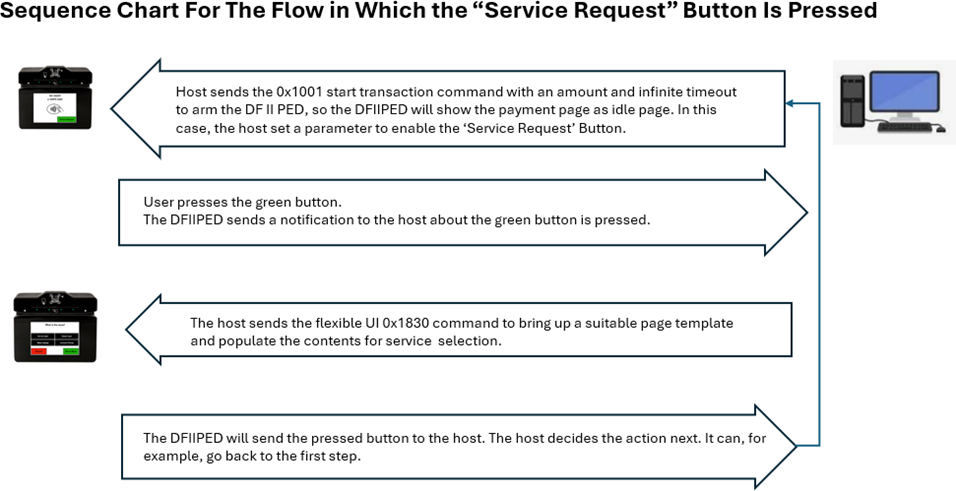
The host uses this command to provide a cardholder selection to the device when the device itself does not have a display or inputs to prompt the cardholder for a selection.
The host uses this command to request that the device display a message for the cardholder.
The host uses this command to direct the device to arm or disarm the barcode reader for reading a barcode outside the scope of a transaction.
The host uses this command to start a buzzer for playing a sequence of tones.
The host uses this command to prompt a cardholder for customer information.
The host uses this command to control the 4 LEDs of the device when the device is not in non-User Control LED states.
The host uses this command to trigger the device to immediately show a pre-loaded image on the display, provided the device is not in a mode that has exclusive use of the display (such as during a transaction).
The host uses this command to direct the device to immediately show a QR code on the display, provided the device is not in a mode that has exclusive use of the display (such as during a transaction).
The host uses this command to trigger the device to immediately show a bitmap file the host includes as a parameter, provided the device is not in a mode that has exclusive use of the display (such as during a transaction).
This command allows the host to bring up standalone pages.
Card emulation is initiated by receiving a 0x1840 command from the host.
The host uses this command to send a firmware image file, signed by MagTek, to the device as the first step in updating firmware.
The host uses this command to start sending secured files to the device for storage or processing. It is similar to Start Send File to Device (Unsecured), but is used to send a different subset of file types that impact device security and require some form of authentication from the host.
The host uses this command to start sending unsecured files to the device for storage or processing. It is similar to Start Send File to Device (Secured) but is used to send a different subset of file types that do not impact device security.
The host uses this command to request a file stored on the device. File types include standard files (images and certificates), MagTek custom files (configuration, firmware), and in some cases even large data blob output (such as signature capture data).
The host uses this command to request the file information of a file stored on the device. File types include standard files (images and certificates), MagTek custom files (configuration, firmware), and in some cases even large data blob output (such as signature capture data).
The host uses this command to request the deletion of a file stored on the device.
The host uses this command to transmit another command securely. T
The host uses this command to load a key into one of several available slots in the device’s secure memory.
The host uses this command to generate a key pair to be used for a certificate signing request (CSR).
The host uses this command to generate a certificate signing request (CSR) in PEM format.
The host can use this command to change the device’s lock state.
The host uses this command to request that the device encrypt a block of user data embedded in the command string.
The host uses this command to retrieve information about a key slot, including details about the key stored in that slot.
The host uses this command to set device configuration / settings that do not require security. For setting properties that require security see Command 0xD112 - Set Property (Secured).
Each data element representing device configuration is part of a tree of values and is uniquely identified by an Object Identifier (also known as an Object ID or OID) as defined in ITU-T X.660 | ISO/IEC 9834-1, which can be found by searching for X.660 in the publications on www.itu.int. This document refers to these data elements collectively as Properties. The list of all properties and their corresponding OIDs and other characteristics is provided in Notifications.
This command can be used in multiple ways. For simplicity, this document describes one possible way that does not require detailed knowledge of the X.660 specification.
To set a property, follow these steps:
The host composes a command request in the format described below and sends it to the device.
The device sends a response in the format described below. If the request succeeded, the response payload is identical to the request payload. If it did not succeed, the device returns a failure response with no command-specific parameters.
All messages exchanged between the host and the device are formatted using the tag-length-value Distinguished Encoding Rules (DER) defined in ITU-T X.680 | ISO/IEC 8824-1 and ITU-T X.690 | ISO/IEC 8825-1. A subset of these standards is also used in EMV Integrated Circuit Card Specifications for Payment Systems 4.3, Part IV, Annex B Rules for BER-TLV Data Objects, so the latter can serve as a useful point of reference.
Summarizing those specifications, each TLV data object follows these basic rules:
The DER standard designates the least significant bit of a byte as bit 1, and the most significant bit of a byte as bit 8. This is different from the remainder of the MMS standard, which indexes bit numbers starting at 0 to be consistent with each bit position number representing that bit’s power of 2.
The Tag or Identifier portion of a TLV data object identifies the TLV data object. DER assigns the tag portion as follows:
Bits 8 and 7 specify whether the TLV data object is universal, application-defined, context-specific, or private. Most messages in this standard contain context-specific tags (bits 8 and 7 = 10), meaning different messages reuse the same tags, and the tags represent sequentially numbered parameters passed in any message.
Bit 6 specifies whether the tag is (bit 6 = 0), meaning it contains its values directly, or constructed (bit 6 = 1), meaning the TLV data object contains more TLV data objects.
The Length portion is the total length of the Data portion that follows it. Lengths can be either short form or long form:
Short form: one byte long in the range 0x00 to 0x7F.
Long form: multiple bytes long, starting with one byte 0x80 or greater, where the lower 7 bits specify how many subsequent bytes are used to indicate the length. Example: length 8201C3 — 0x82 indicates two subsequent bytes (0x01C3) giving the total length of the data block (451 bytes).
The Value or Data portion is the actual payload of the TLV data object.
This document provides message definitions in hexadecimal format; when the host constructs or interprets a message, if no additional encode/decode filtering or translation is in place at the platform layer, it should expect each hexadecimal value shown in this document to be represented as binary bytes in the message stream, not as string literals. For example, FF is a single byte with all bits set to 1, not the two-byte string literal "FF."
Below is an example of a TLV-encoded request and response for , wrapped in the standard message format.
Host sends the device the binary byte stream:
Breakdown:
AA00 = Standard Start of Message / API Framework Version (not TLV)
81, 04, 0101DF01
Tag 81 = Request Message Parameter 1, Message Information
Length 04
Device responds with the binary byte stream:
Breakdown:
AA00 = Standard Start of Message / API Framework Version (not TLV)
81, 04, 8201DF01
Tag 81 = Response Message Parameter 1, Message Information
Length 04
Tables that show TLV data objects use slashes in front of the Tag identifier to indicate that object’s relative level of nesting/containment within other TLV data objects in the same table. These levels are relative and not absolute: a given TLV object may be nested within other TLV objects at any level.
Example of slash notation:
Earth contains
/North America, which contains
//United States, which contains
///California
In TLV tables, a Length of var means the length is variable and must be calculated based on nested objects.
See Table MFT-1 below for an example.
The host uses this command to prompt the device for a response that contains the same payload it sent.
The host constructs the command request for Echo - Command 0xDF01 in the format below, populating any of the available parameters with any data. The total length of data to be echoed across all parameters must not exceed 128 bytes.
The host sends the command request to the device.
The device sends a command response in the format below to the host, echoing back the exact parameters the host sent in the command request.
The Display Strings type provides a pre-defined set of messages by string ID that the host and device use for various user interface features.
1008 = Command 0x1008 - Cancel Transaction
No parameters.
End of any wrappers, at minimum including Request Message
1008 = Cancel Transaction - Command 0x1008
No parameters.
End of any wrappers, at minimum including Response Message
No parameters.
End of any wrappers, at minimum including Response Message
The device returns a command response message with its Response Status, Operation Status Summary byte set to 0x01 (OK, Started / Running).
While the host is waiting for the timeout to expire, it should not send any commands to the device, because the device is busy processing the current command.
After the timeout period expires, the device unlocks to allow other commands and sends Notification 0x1805 - User Interface Operation Complete to inform the host.
1806 = Personal Info Entry - Command 0x1806
81
01
Capture Type:
0x01 = Phone Number;
0x02 = Social;
0x03 = Zip code;
0x04 = Employee ID;
0x05 = Birth Date (USA format);
0xFF = Cancel Capture
B
R
Beginning of any wrappers, at minimum including Request Message
1806 = Personal Info Entry - Command 0x1806
No parameters.
Beginning of any wrappers, at minimum including Response Message
1823 = Show Bitmap Image (Display Only) - Command 0x1823
81
01
Display Time: 0x00 = Indefinite; 0x01 to 0xFF = 1 to 255 seconds
B
O
0x00
82
03
Background Color. Use RRGGBB format.
B
O
N/A
83
02
X Position.
The device places the left edge of the image at this pixel position relative to the left edge of the display, which is position 0x0000. This parameter plus the pixel width of the image must be less than the pixel width of the display. The display’s pixel width depends on the device’s orientation set by Property 1.2.3.1.1.2. - Custom Idle Page Image Device Locked (Display Only). For information about the resolution of the display, see the specifications in the device’s Installation and Operation Manual.
B
O
Centered
84
02
Y Position.
The device places the top edge of the image at this pixel position relative to the top edge of the display, which is position 0x0000. This parameter plus the pixel height of the image must be less than the pixel height of the display. The display’s pixel height depends on the device’s orientation set by Property 1.2.3.1.1.2 - Custom Idle Page Image Device Locked (Display Only). For information about the resolution of the display, see the specifications in the device’s Installation and Operation Manual.
B
O
Centered
85
var
Bitmap
Image encoded in full BMP file format as defined by Microsoft (e.g., starting with “BM”) or Magtek signed image file format
B
R
86
01
Display Option:
0x00 = Default (cover/uncover the top status bar depends on the current status of the display). If the current display shows the top status bar, the Show Bitmap Image command won’t cover the top status bar. If the current display doesn’t show the top status bar, the Show Bitmap Image command will cover the top status bar.
0x01 = Cover the top status bar regardless of the current status of the display.
0x02 = Not cover the top status bar regardless of the current status of the display.
B
O
0
End of any wrappers, at minimum including Request Message
1823 = Show Bitmap Image (Display Only) - Command 0x1823
No parameters.
End of any wrappers, at minimum including Response Message
🕐 Hours: Monday-Friday, 5:30 AM - 5:00 PM PST
Online Resources:
🌐 Support Portal: developer.magtek.com
Documentation Feedback:
Help us improve this documentation! feedback@magtek.com
Reserved, do not use.
0x01
“AMOUNT”
0x02
“AMOUNT OK?”
0x03
“APPROVED”
0x04
“CALL YOUR BANK”
0x05
“CANCEL OR ENTER”
0x06
“CARD ERROR”
0x07
“DECLINED”
0x08
“ENTER AMOUNT”
0x09
Reserved, do not use.
0x0A
Reserved, do not use.
0x0B
“INSERT CARD”
0x0C
“NOT ACCEPTED”
0x0D
Reserved, do not use.
0x0E
“PLEASE WAIT”
0x0F
“PROCESSING ERROR”
0x10
“REMOVE CARD”
0x11
“USE CHIP READER”
0x12
“USE MAGSTRIPE”
0x13
“TRY AGAIN”
0x14
“WELCOME”
0x15
“PRESENT CARD”
0x16
“PROCESSING”
0x17
“CARD READ OK - REMOVE CARD”
0x18
“INSERT OR SWIPE CARD”
0x19
“PRESENT ONE CARD ONLY”
0x1A
“APPROVED PLEASE SIGN”
0x1B
“AUTHORIZING PLEASE WAIT”
0x1C
“INSERT, SWIPE, OR TRY ANOTHER CARD”
0x1D
“PLEASE INSERT CARD”
0x1E
Null prompt (empty screen)
0x1F
Reserved, do not use.
0x20
“SEE PHONE”
0x21
“PRESENT CARD AGAIN”
0x22
“INSERT/SWIPE/TRY OTHER CARD”
0x23
“TAP or SWIPE CARD”
0x24
“TAP or INSERT CARD”
0x25
“TAP, INSERT or SWIPE CARD”
0x26
“TAP CARD”
0x27
“TIMEOUT”
0x28
“TRANSACTION TERMINATED”
0x29
“USE CHIP READER or MAGSTRIPE”
0x2A
“SCAN BARCODE”
0x2B
“BARCODE READ SUCCESSFULLY”
0x2C
“CANCELED”
0x2D
“SWIPE CARD or SCAN BARCODE”
0x2E
“INSERT CARD or SCAN BARCODE”
0x2F
“INSERT, SWIPE or SCAN BARCODE”
0x30
“TAP CARD or SCAN BARCODE”
0x31
“TAP, SWIPE or SCAN BARCODE”
0x32
“TAP, INSERT or SCAN BARCODE”
0x33
“TAP, INSERT, SWIPE or SCAN BARCODE”
0x34
“TRY ANOTHER INTERFACE”
0x35
“NFC TAG DETECTED”
0x36
“ERROR REMOVE CARD”
0x37
“MIFARE CLASSIC 1K DETECTED”
0x38
“MIFARE CLASSIC 4K DETECTED”
0x39
“MIFARE DESFIRE DETECTED”
0x00
DF01 = Echo - Command 0xDF01
81
var
Data to be echoed
B
O
82
var
Data to be echoed
B
O
End of any wrappers, at minimum including Request Message
DF01 = Echo - Command 0xDF01
81
var
Data being echoed
B
O
82
var
Data being echoed
B
O
End of any wrappers, at minimum including Response Message
Beginning of any wrappers, at minimum including Request Message
Beginning of any wrappers, at minimum including Response Message
AA 00 81 04 01 01 DF 01 84 07 DF 01 81 03 01 02 03AA 00 81 04 82 01 DF 01 82 04 00 00 00 00 84 07 DF 01 81 03 01 02 03D111 = Set Property (Unsecured) - Command 0xD111
81
var
Company ID This value is the root of the “long form” of the Property OID, and is the same for all MagTek devices. Leave this parameter empty and use the default.
B
O
2B 06 01 04 01 F6 09
82
03
Device Family ID This value is the second portion of the “long form” of the Property OID, and is the same for all similar MagTek devices within the same product family. Unless you have a specific use case that uses this parameter, leave this parameter empty and use the default otherwise your software may not work with multiple products.
Byte 1 Platform
0x02 = Apollo Platform
Byte 2 Product
0x01 = DynaFlex, 0x02 = DynaProx, 0x03 = DynaFlex II PED, 0x04 = DynaFlex II, 0x05 = DynaFlex II Go
Byte 3 Device Variant - 0x00 = Standard
B
O
Product dependent
85
01
Property Type This parameter contains the first number of the Property OID as documented in . - 0x01 = Device Settings - 0x02 = Device Information
B
R
87
var
Property OID Tree Prefix This optional parameter contains subsequent numbers of the Property’s OID as documented in but can not include the final number. For simplicity, populate this with the 2nd through the second-to-last number in the property’s OID.
This can also be populated with fewer numbers from the OID, in which case the remaining numbers of the OID must be included in the Property OID Remainder.
B
O
Null
89
var
Property OID Remainder This contains the remaining numbers of the Property’s OID, BER TLV encoded per X.660 section 8 Basic encoding rules. For details about TLV encoding an OID.
For simplicity, include all numbers except the final number of the property’s OID in Property Type and Property OID Tree Prefix, and include the final number of the OID OR 0xC0 here, then append a length corresponding to one of the following, then append the value to set the property to:
If the length of the value you are setting is 0x7F or shorter, include one byte equal to the length of the value.
If the length of the value you are setting is greater than 0x7F but less than 0xFFFF, append 82, then two bytes equal to the length of the value.
B
R
End of any wrappers, at minimum including Request Message
D111 = Set Property (Unsecured) - Command 0xD111
81
var
Company ID This contains the Company ID the host included in the request message. If this parameter is not included in the request, the response does not include it.
B
O
N/A
82
03
Device Family ID This contains the Device Family ID the host included in the request message. If this parameter is not included in the request, the response does not include it.
B
O
N/A
85
01
Property Type This contains the Property Type the host included in the request message.
B
R
N/A
87
var
Property OID Tree Prefix This contains the Property OID Tree Prefix the host included in the request message. If this parameter is not included in the request, the response does not include it.
B
O
N/A
89
var
Property OID Remainder This contains the same TLV-encoded portion of the OID the host included in the Property OID Remainder of the request message.
B
R
N/A
End of any wrappers, at minimum including Response Message
Beginning of any wrappers, at minimum including Request Message
Beginning of any wrappers, at minimum including Response Message
Set Property 1.2.7.1.1.1 Device Reset Occurred Notification Control
AA 00 81 04 01 55 D1 11 84 10 D1 11 85 01 01 87 04 02 07 01 01 89 03 C1 01 00Set Property 1.2.7.1.1.1 Device Reset Occurred Notification Control
AA 00 81 04 01 55 D1 11 84 10 D1 11 85 01 01 87 04 02 07 01 01 89 03 C1 01 00=Bits 5 to 1 specify a unique tag number, with 11111 reserved to mean the tag is not a single byte long. In that multi-byte case:
Bits 7 to 1 of subsequent bytes with bit 8 set to 1 are also part of the tag identifier with the most significant of the whole tag number in bit 7.
Bits 7 to 1 of the final byte with bit 8 set to 0 are also part of the tag identifier.
Value 01 01 DF 01
01 = Request from host to device
01 = Message reference number
DF01 = 0xDF01 - Echo.
84, 07, DF018103010203
Tag 84 = Request Message Parameter 4, Request Payload
Length 07
Value DF01 81 03 01 02 03
DF01 = Payload format is for Request , (not TLV)
Tag 81 = Payload Parameter 1, Value to Echo
Length 03
Value 01 02 03 = Value to Echo
Value 82 01 DF 01
82 = Response from device to host
01 = Message reference number
DF01 = 0xDF01 - Echo
82, 04, 00000000
Tag 82 = Response Message Parameter 2, Response Status (one byte Operation Status Summary, three bytes Operation Status Detail)
Length 04
Value 00 00 00 00 = OK / Done, General / All Good / Requested operation was successful
84, 07, DF018103010203
Tag 84 = Response Message Parameter 4 for Response Payload
Length 07
Value DF01 81 03 01 02 03
DF01 = Payload format is for Response , (not TLV)
Tag 81 = Payload Parameter 1, Value to Echo
Length 03
Value 01 02 03 = Value to Echo
R
/81
01
TLV data object A1/81 contains one byte and is required. It has no default value because it must be explicitly included.
B
R
/82
03
TLV data object A1/82 contains three bytes but is optional. If not included, the device assumes the default value 0x4D6F6D.
B
O
0x4D6F6D
/A3
08
TLV data object A1/A3 contains two TLV data objects: 81 and 82 (A1/A3/81 and A1/A3/82). Its length is the combined length of its two nested objects.
T
R
//81
03
TLV data object A1/A3/81 contains three bytes and is required.
B
R
//82
01
TLV data object A1/A3/82 contains one byte and is required.
B
R
/84
03
TLV data object A1/84 contains three bytes that represent distinct values stored directly inside A1/84 instead of separate nested TLVs.
B
R
//null
(1)
Raw byte inside 84 (no TLV). Tag shown as /null, length in parentheses.
B
R
//null
(1)
Another raw byte inside 84.
B
R
//null
(1)
Another raw byte inside 84.
B
R
AA0081040101DF018407DF018103010203AA0081048201DF018204000000008407DF018103010203A1
var
TLV data object A1 contains four directly nested TLV data objects: 81, 82, A3, and 84 (A1/81, A1/82, A1/A3, and A1/84). A1/82 is optional (Req = O), so the length of A1 will vary depending on whether or not A1/82 is included (Len = var).
T
1807 = LED Control - Command 0x1807 –
81
02
Byte 1 - User Control LED
0x00 – Stop User Control LED. This will stop User control LED and resume the current system’s LED status.
0x01 – Start User Control LED.
Byte 2 – Duration in unit of second
0x00 – Continuous
0x01 to 0xFF = 1 to 255 seconds
B
R
82
02
Byte 1 - LED number
Bit 1 = LED 1
Bit 2 = LED 2
Bit 3 = LED 3
Bit 4 = LED 4
Where the LEDs are numbered 1, 2, 3, 4 counting from the left.
Example: 0x01 = LED 1, 0x03 = LED 1 and LED 2.
Byte 2 - LED Status
0x00 = OFF
0x01 = GREEN ON
0x02 = GREEN BLINK FAST (1/4 second on, 1/4 second off)
0x03 = GREEN BLINK SLOW (1/2 second on, 1/2 second off)
0x11 = RED ON
0x12 = RED BLINK FAST (1/4 second on, 1/4 second off)
0x13 = RED BLINK SLOW (1/2 second on, 1/2 second off)
0x14 = RED FLASH (1/4 second on, 3/4 second off)
0x21 = AMBER ON
0x22 = AMBER BLINK FAST (1/4 second on, 1/4 second off)
0x23 = AMBER BLINK SLOW (1/2 second on, 1/4 second off)
0x24 = AMBER FLASH (1/4 second on, 3/4 second off)
B
R
End of any wrappers, at minimum including Request Message
No parameters.
End of any wrappers, at minimum including Response Message
This command directs the device to prompt the cardholder to present their card by swiping, dipping or tapping, or enter card data manually, and to enter a PIN. To prompt the cardholder for a PIN without presenting a card when the host knows the account number already, use Command 0x2001 - Request PIN with Host Supplied Account instead.
When the host calls this command, the device enters PIN Entry Mode, meaning it starts a “PIN Entry session.” While in PIN Entry Mode:
The device ignores most other commands from the host, similar to the way it behaves while Command 0x1001 - Start Transaction is running: Only essential commands and those that are relevant to the current PIN Entry session are allowed.
When the device is waiting for the host to take action, it resets the timeout clock and shows an interstitial page until one of the following occurs:
The host calls the same PIN entry command again to show another UI sequence or to end the PIN entry session, or
The host calls another allowed command (ending the PIN entry session), or
The device has shown the interstitial until the Timeout the host specified in the command has expired (ending the PIN entry session).
The host can call this command again and again as needed, to invoke any number and any combination of available PIN Entry User Interface Sequences. This allows the host to determine number of retries, and to exercise flexible fine-grained control over the end-to-end “sequence of sequences.”
The host may cancel the PIN entry session by calling this command again with User Interface Sequence = Cancel PIN Session. In response, the device shows an interstitial page "PIN Entry Canceled" for 2 seconds, then returns to idle.
The usual sequence is as follows:
The host invokes this command using the format in .
If an error occurs, the device returns a command response message as shown in with Response Status, Operation Status Summary byte set to 0x80 (Failed to start operation), and terminates the command.
If no error occurs, the device returns a command response message as shown in with Response Status, Operation Status Summary byte set to 0x01 (OK, Started / Running), and enters PIN Entry Mode.
If the request started successfully, the Request Status in the message wrapper is OK / Operation Started.
The host uses this command to direct the device to arm or disarm the barcode reader for reading a barcode outside the scope of a transaction. This is an immediate directive. To read barcodes within the scope of a transaction, use 0x1001 - Start Transaction and its barcode reader parameters instead.
The sequence of events is as follows:
The host ensures the device is not currently running another command, for example, that it is not running a transaction using 0x1001 - Start Transaction.
The host composes a command request in the format below and sends it to the device.
If the device has a display, it shows a prompt SCAN BARCODE.
The device enables the barcode reader.
The device returns a command response message with Response Status, Operation Status Summary byte set to 0x00 (OK, Done) after which the host is free to send further commands.
The host may end the barcode reading session by calling this command again with the Enable parameter set to Disable.
0x04 = GREEN FLASH (1/4 second on, 3/4 second off)
0x05 = GREEN FLASH QUICK (1/8 second on, 7/8 second off)
0x15 = RED FLASH QUICK (1/8 second on, 7/8 second off)
0x25 = AMBER FLASH QUICK (1/8 second on, 7/8 second off)
0x31 = BLUE ON
0x32 = BLUE BLINK FAST (1/4 second on, 1/4 second off)
0x33 = BLUE BLINK SLOW (1/2 second on, 1/4 second off)
0x34 = BLUE FLASH (1/4 second on, 3/4 second off)
0x35 = BLUE FLASH QUICK (1/8 second on, 7/8 second off)
After the cardholder presents a card or manually enters card data, the device sends Notification 0x0201 - Banking Functions Information Update to report the payment technology being used / Card Event / Detected.
If the cardholder swiped a magnetic stripe card, the device reads Track 2 data.
If the cardholder inserts an ICC or taps a PICC, the device reads records from the card and attempts to retrieve tags 57 (Track 2 Equivalent Data) and 5A (Primary Account number). It then powers off the card without performing the first Generate Application Cryptogram, so the card does not increment its transaction counters.
If an error occurs, the device terminates the command and PIN entry session and sends to report Touchscreen / PIN Entry / Operation Failed / Account Data Capture Failed.
The device shows one of the predefined messages specified by the User Interface Sequence parameter, and waits up to the specified Timeout for the cardholder to enter a PIN.
If the host specified User Interface Sequence = Enter PIN / Enter PIN Again, the device automatically prompts the cardholder to enter the PIN a second time.
When the command completes (PIN entry done, cardholder or operator canceled, or Wait Time timeout), the device sends Notification 0x0205 - Banking Functions Operation Complete to report Touchscreen PIN Entry.
If PIN entry is successful, the report also contains a payload as shown in Notification Payload for Touchscreen, PIN Entry, Success, Data Attached with Account Data (Banking Functions Only). The device creates the EPB using the PIN Block Format the host specified in the command.
If the host is performing a PIN Verification function (such as User Interface Sequence = Enter PIN), the host software uses the financial institution’s backend systems to compare the EPB to the account information on file, receives a result as to whether the entered PIN was correct, and reports the results to the teller and to the device.
If the PIN is correct:
The host calls the same command again with parameter User Interface Sequence = PIN Entry Successful to indicate success and exit PIN Entry Mode.
The device responds by showing an interstitial page for 2 seconds, then returns to idle.
The device sounds the EMV success tone to audibly report the result and call the cardholder’s attention to the display.
If the PIN is incorrect, depending on host-driven retry rules and the history of the session:
The host may call the same command again with parameter User Interface Sequence = PIN Incorrect, Try Again to show the prompt. The device sounds the EMV failure tone to audibly report the result and call the cardholder’s attention to the display.
The host may call the same command again with other User Interface Sequences as desired.
The host must eventually finalize by calling the same command again with parameters to end the PIN entry session. If the host calls the command with User Interface Sequence = PIN Entry Failed to trigger final failure, the device shows an interstitial page for 2 seconds, then returns to idle. The device also sounds the EMV failure tone.
If the host is performing a PIN Entry / Re-PIN function (such as User Interface Sequence = Enter PIN / Enter PIN Again), after the cardholder enters the PIN a second time:
If the PINs match:
The device sends the Encrypted PIN block to the host by sending to report Touchscreen / PIN Entry / Success / Data Attached. The host may pass this PIN block to backend systems for processing and storage.
The host calls the same command again with parameter User Interface Sequence = PIN Entry Successful to indicate success and exit PIN Entry Mode. The device shows an interstitial page for 2 seconds, then returns to idle mode and sounds the EMV success tone.
If the PINs do not match:
The device sends to report Touchscreen / PIN Entry / Operation Failed / PIN Verify Failed.
Depending on host-driven retry rules and the history of the session:
The host may call the same command again with parameter User Interface Sequence = Enter PIN / Enter PIN Again to prompt the cardholder to enter a PIN twice again.
2002 = Command 0x2002 - Request PIN with Card Supplied Account Data (Banking Functions Only)
81
01
Timeout — Timeout in seconds that the device should wait for the cardholder to present card, enter PIN and confirm completion.
B
R
A3
09
Reader Options:
The parameters inside this TLV data object allow the host to enable and disable the various payment method interfaces
TC
R
/81
01
Magnetic Stripe Reader Mode — 0x00 = Disabled; 0x01 = Enabled
B
R
/82
01
Contact Reader Mode — 0x00 = Disabled; 0x01 = Enabled
B
R
/83
01
Contactless Reader Mode — 0x00 = Disabled; 0x01 = Enabled
B
R
/84
01
Manual Card Entry Mode
0x00 = Disabled
0x01 = Enabled
When this option is enabled, all card types must be disabled (/81 MSR, /82 Contact, and /83).
B
O
A4
0A
PIN Entry Options
B
R
/82
01
User Interface Sequence —
0x00 = Reserved
0x01 = Present Card / Enter PIN (start session)
0x02 = PIN Incorrect, Try Again (continue session)
0x03 = Enter PIN / Enter PIN Again (continue session)
B
R
/83
02
PIN Length Limits (Only when PIN is requested) — Byte 1 Maximum PIN Length (<= 0x0C); Byte 2 Minimum PIN Length (>=0x04)
B
R
/85
01
PIN Block Format (Only when PIN is requested) —
0x00 = ISO Format 0
0x01 = Reserved / Invalid
0x03 = ISO Format 3
0x04 = ISO Format 4
B
R
End of any wrappers, at minimum including Request Message
2002 = Command 0x2002 - Request PIN with Card Supplied Account Data (Banking Functions Only)
No parameters.
End of any wrappers, at minimum including Response Message
Beginning of any wrappers, at minimum including Request Message
Beginning of any wrappers, at minimum including Response Message
AA 00 81 04 01 0C 20 02 84 1C 20 02 81 01 3C A3 09 81 01 01 82 01 01 83 01 01 A4 0A 82 01 01 83 02 08 04 85 01 00
AA 00 81 04 82 0C 20 02 82 04 01 00 00 00
While the host is waiting for the timeout to expire, it should not send any commands to the device, because the device is busy processing the current command.
After the device reads a barcode or the timeout period expires, the device sends 0x1805 - User Interface Operation Complete to report Barcode Reader / Read Barcode Result and additional supporting information.
1804 = Command 0x1804 -
81
01
Enable - 0x00 = Disable. The device disables the barcode reader. In this case, the device ignores all other parameters. - 0x01 = Enable. The device enables the barcode reader.
B
R
0x00
82
01
Timeout - 0x00 = Infinite. The device leaves the barcode reader enabled until it reads a barcode, or until the host sends this command again to disable the barcode reader. - All other values = Timeout in seconds for the device to leave the barcode reader enabled without reading a barcode.
B
O
0x00
83
01
Encrypt Barcode Data - 0x00 = Do Not Encrypt. The device does not encrypt the barcode data when it sends - 0x01 = Encrypt. The device encrypts the barcode data when it sends
B
O
0x00
End of any wrappers, at minimum including Request Message
1804 = Read Barcode (BCR Only) - Command 0x1804
No parameters.
84
01
Enable batch programming of parameters in the embedded barcode scanner module. With this enabled, scan a barcode consisting of a valid batch programming command for the Newland NLS-N1 scan engine to program the module. Documentation for NLS-N1 commands can be found at .
B
O
0x00
End of any wrappers, at minimum including Response Message
Beginning of any wrappers, at minimum including Request Message
Beginning of any wrappers, at minimum including Response Message
AA00 810401031804 840B 1804 810101 82010F 840101AA00 810482031804 820401000000The host uses this command to start sending secured files to the device for storage or processing. It is similar to Command 0xD812 - Start Send File to Device (Unsecured), but is used to send a different subset of file types that impact device security and require some form of authentication from the host. Refer to Table 206 to determine which file type requires a secure command. All files require the command to be authorized via a secure wrapper. In some cases, files include additional signatures within the file structure itself. This command is paired with Command 0xD821 - Start Get File from Device, which the host can use to retrieve files. However, some file types are “one way only” and cannot be retrieved using that command after the host sends them to the device.
The host uses Command 0xE001 - Get Challenge to establish a secure session with the device.
The host constructs - per
The host constructs using the previously constructed command as the payload, and sends that command to the device as a Request Message to start the process of uploading a file.
Sub-steps and notes for building the secured wrapper:
Use to gather information about the key to use to secure the message payload(s). Because this command requires a MAC, use key slot 1111.
Build the portion of the wrapper with:
The device sends a Response Message so the host knows it can begin sending the file.
The host sends a Data File Message to the device. If the device does not receive file data within a reasonable period of time, it times out and stops listening for the data file.
The device checks to make sure the File ID and the length and hash of the File Payload match with the values the host specified in this command.
The device repeats the same Response Message, this time with the Message Reference Number set to the same value the host used in the Data File Message.
If the request started successfully, the Request Status in the message wrapper is OK, Started / Running, All good / requested operation was successful.
The host uses 0xD812 - Start Send File to Device (Unsecured) to load this file type to control the behavior of the device’s EMV kernels. The host must compile a single instance of this file type containing multiple instances of the AID Delimiter Container, one for each contact or contactless AID the device should support. For each instance of the AID Delimiter Container where tag 9F01 is set to a contactless AID, the host must load a corresponding instance of an Entry Point Table when it loads the EMV Entry Point Configuration File Type.
File Type Version
One byte indicating the version of the file type format being used. 0xAA
SHA-1 Hash
This section defines the primitive and composed data types, TLV (Tag-Length-Value) data objects, file structures, and cryptographic key formats used throughout the device command set, including track data, display strings, EMV configuration file types (ARQC, ARPC, Batch, CA Public Keys), security parameters, TR‑31 key blocks, certificate and CSR file structures, and card emulation.
Section
Information available
--> The basics on messages, what they are, and how they work.
--> Information on device-level commands
--> Information on notices your device my send and the circumstances under which they send them.
-->
After an NTag/MIFARE Ultralight is activated, the host uses this command to send commands and receive responses to and from a NTag/MIFARE Ultralight. Do not change the address 0x00 for read protection of Ultralight C/AES card because the device will fail to access the card if the address 0x00 is read protected.
DUKPT – Derived Unique Key Per Transaction
OID – Object Identifier
SRED - Secure Reading and Exchange of Data
There are 7 OIDs defined for these 7 SRED Data IDs.
Each OID value contains a two-byte DUKPT slot ID and a one-byte transformation ID.
The host uses this command to load a key into one of several available slots in the device’s secure memory.
The host uses this command to get information about the device or its configuration / settings.
Each data element representing device information or device configuration is part of a tree of values and is uniquely identified by an Object Identifier (also known as an Object ID or OID) as defined in | , which can be found by searching for X.660 in the publications on http://www.itu.int/. This document refers to these data elements collectively as . The list of all properties and their corresponding OIDs and other characteristics is provided in .
This command can be used in multiple ways. For simplicity, this document describes one possible way that does not require detailed knowledge of the X.660 specification.
To get a property, the sequence of events is as follows:
The host must eventually finalize by calling the same command again with parameters to end the PIN entry session. If the host calls the command with User Interface Sequence = PIN Entry Failed to trigger final failure, the device shows an interstitial page for 2 seconds, then returns to idle and sounds the EMV failure tone.
0x04 = Present Card / Enter PIN / Enter PIN Again (start session)
0xFD = Cancel PIN Session (end session)
0xFE = PIN Entry Failed (end session)
0xFF = PIN Entry Successful (end session)
Security Operation Type populated with the following values:
Operation Type = Command Authorization Using MAC
Operation Algorithm = CMAC
Operation Cipher = AES-256
Padding = One and zeros
MAC Block Size with any number
Key Information Type populated with the key information gathered earlier.
D811 = Start Send File to Device (Secured) - Command 0xD811
81
04
File ID from Table 206
B
R
A2
var
File transfer properties
T
R
/81
Var
Length of File Payload
This is the length of the File Payload parameter in the Data File Message the host sends to the device.
B
R
/82
01
Hash Checksum Type
0x04 = SHA-256
B
R
/83
20
Hash Checksum Anticipated checksum calculated against the File Payload, according to the standard specified in Hash Checksum Type.
B
R
A3
var
File Description The host should populate this value to help identify the file using .
T
R
/81
var
File Name Maximum length 32 bytes Reserved for future use. Leave empty.
B
O
Null
/82
var
File Label Maximum length 16 bytes Reserved for future use. Leave empty.
B
O
Null
/83
var
File Version Maximum length 7 bytes Reserved for future use. Leave empty.
B
O
Null
/84
var
File Date Maximum length 20 bytes Reserved for future use. Leave empty.
B
O
Null
87
01
Reserved for future use. Leave empty.
B
O
Null
End of any wrappers, at minimum including Request Message
D811 = Start Send File to Device (Secured) - Command 0xD811
No parameters.
End of any wrappers, at minimum including Response Message
Beginning of any wrappers, at minimum including Request Message
Beginning of any wrappers, at minimum including Response Message
AA 00 81 04 01 04 D8 11 84 81 8F EE EE A1 19 81 05 03 03 06 02 08 84 00 85 00 A8 0A 81 02 11 02 82 00 86 00 88 00 A9 00 82 04 FF FF FF F0 83 08 C9 65 45 F2 97 69 85 B1 84 4E D8 11 81 04 00 00 03 00 A2 2B 81 04 00 00 02 99 82 01 04 83 20 87 A4 B3 54 61 C5 CB D3 1D DC BA 9D 65 25 5A D4 6A 22 FA 51 5E FD 65 87 AF AC A8 8C 4F AF 80 9B A3 14 38 31 30 38 33 30 33 30 33 30 33 30 33 33 33 30 33 30 87 01 01 9E 10 7D E4 27 C8 A0 70 72 08 19 0A 1E 0A 3F 48 BB F1
AA 00 81 04 82 0C D8 11 82 04 00 00 00 00
B
R
F2 00 00 00 00 00
/4F
0..16
Application Identifier (AID)
B
R
A0 00 00 00 04 10 10
/DF7E
01
ASI
B
R
01
/9F09
02
Application Version Only applies when Payment Brand Identifier indicates Contact.
B
R
00 00
/DF11
01
Skip TAC/IAC default supported Only applies when Payment Brand Identifier indicates Contact.
B
R
00
/DF12
01
Random transaction selection supported Only applies when Payment Brand Identifier indicates Contact.
B
R
00
/DF13
01
Velocity checking supported Only applies when Payment Brand Identifier indicates Contact.
B
R
00
/DF14
01
Floor limit checking supported Only applies when Payment Brand Identifier indicates Contact.
B
R
00
/DF15
01
TAC supported Only applies when Payment Brand Identifier indicates Contact.
B
R
00
/DF20
05
TAC default Only applies when Payment Brand Identifier indicates Contact.
B
R
00 00 00 00 00
/DF21
05
TAC denial Only applies when Payment Brand Identifier indicates Contact.
B
R
00 00 00 00 00
/DF22
05
TAC online Only applies when Payment Brand Identifier indicates Contact.
B
R
00 00 00 00 00
/9F1B
04
Floor limit Only applies when Payment Brand Identifier indicates Contact.
B
R
00 00 00 00
/DF70
01
Target percentage Only applies when Payment Brand Identifier indicates Contact.
B
R
00
/DF6E
03
Threshold value Only applies when Payment Brand Identifier indicates Contact.
B
R
00 00 00
/DF6F
01
Maximum target percentage Only applies when Payment Brand Identifier indicates Contact.
B
R
00
/DF01
01
Default DDOL supported Only applies when Payment Brand Identifier indicates Contact.
B
R
00
/DF71
0..FC
DDOL Only applies when Payment Brand Identifier indicates Contact.
B
R
/DF02
01
Default TDOL supported Only applies when Payment Brand Identifier indicates Contact.
B
R
00
/DF72
0..252
TDOL Only applies when Payment Brand Identifier indicates Contact.
B
R
/5F2A
02
Currency Code Only applies when Payment Brand Identifier indicates Contact.
B
R
00 00
/5F36
01
Transaction currency exponent Only applies when Payment Brand Identifier indicates Contact.
B
R
00
Additional instances of the AID Delimiter Container parameter, one per Application Identifier (AID) the device should support.
20-byte hash of all values that follow.
FF33
var
/9F01
06
Payment Brand Identifier This serves as supporting information to clarify whether this instance of the AID Delimiter Container is for Contact or Contactless. Byte 1 upper nibble must be set to a value flagging that it corresponds to a Contactless AID, generally by using 0xC0 or 0xF0. For Contact AID, the value of Byte 1 is 00. Byte 1 lower nibble:
0 = Contact
1 = Interac (Common Kernel Only)
2 = Mastercard Contactless
A list of primitive data types used by TLV data objects.
Information about parsing EMV ARQC Type or Merchant Data Container data for each track into individual values embedded in the tracks.
A pre-defined set of messages by string ID that the host and device use for various user interface features.
Information on the key type, variant, and other information the host can use to decrypt encrypted data included in various payloads.
Information on how the device formats ARQC messages.
Information on how the device formats ARPC messages
Information on the device formats EMV batch data, such as merchant data and pre-defined EMV batch data tags.
Information on loading this file type to control the behavior of the device’s EMV contact kernel.
Information on loading this file type to control the behavior of the device’s EMV kernel.
Information on loading this file type to control the behavior of the device’s EMV kernels.
Information on loading this file type to control the behavior of the device’s EMV contact and contactless kernels when the device should support Offline Data Authentication (ODA).
Information on loading this file type to control the behavior of the device’s American Express contactless kernel when the card sends tag 9F70 and one or more DRL is defined. (Not supported on Expresspay 4.x)
The signature capture file type produced when the host invokes Request Cardholder Signature - Command 0x1801 (Touch Only)
This non-TLV data structure consists of four or five bytes that describes a security operation, including the algorithms and methods to be used in that operation.
Information on tags used with security parameters.
Information on tags used to identify key types.
Information on tags used with NFC UID Types. (EMV Contactless Only)
Information on tags used with GPORT-1 Types. (EMV Contactless Only)
Information on tags used with MIFARE Card Data. (EMV Contactless Only).
Information on tags used with TR-31 Key Blocks.
Information on tags used with DUKPT Keys.
Information on tags used with miniature certificates.
Information on file types that conform to the common file structure format.
These file types conform to the Common File Structure format. The File Payload of these files contain a certificate in PEM format.
Information on CSR File Types.
Card emulation enables a DynaFlex/DynaProx device to simulate a Type 4 smart card.
Beginning of any wrappers, at minimum including Request Message
1100
0x1100 - Pass Through Command For NTag/MIFARE Ultralight, Type 2
81
var
Command to Send.
See
See
See ds
See
B
R
82
01
00 – No Encrypt
01 - Encrypt
B
R
83
01
00 – Expect More Commands
01 – FF (Last Command).
If the pass-through command is the last successful command, the device will end the transaction with a single beep, indicating success.
If an error arises, the device will end the transaction but will sound two beeps to indicate the error. The user should then remove the card.
B
R
End of any wrappers, at minimum including Request Message
Get Version
1
The GET_VERSION command is used to retrieve information on the NTAG family, the product version, storage size and other product data required to identify the specific NTAG21x. Byte 0 = 0x60
Read
2-3
Get Version
1
The GET_VERSION command is used to retrieve information on the MIFARE family, product version, storage size and other product data required to identify the MF0ULx1. Byte 0 = 0x60
Read
2-3
Read
2-3
The READ command takes the page address as a parameter. Only addresses 00h to 2Bh are decoded. For higher addresses the MF0ICU2 returns a NAK. The MF0ICU2 responds to the READ command by sending 16 bytes starting from the page address defined in the command (e.g. if ADR is 03h, pages 03h, 04h, 05h, 06h are returned) A roll-over mechanism is implemented to continue reading from page 00h once the end of the accessible memory is reached. For example, reading from address 29h on a MF0ICU2 results in pages 29h, 2Ah, 2Bh and 00h being returned. The following conditions apply if part of the memory is protected by the 3DES authentication for read access:
if the MF0ICU2 is in the ACTIVE state – addressing a page which is equal or higher than AUTH0 results in a NAK response – addressing a page lower than AUTH0 results in data being returned with the roll-over mechanism occurring just before the AUTH0 defined page
if the MF0ICU2 is in the AUTHENTICATED state – the READ command behaves like on a MF0ICU2 without access protection. The READ command with an option of end page address returns the all n*4 bytes of the addressed pages. For example if the start address is 03h and the end address is 07h then pages 03h, 04h, 05h, 06h and 07h are returned. Byte 0 = 0x30 Byte 1 = Start Page Address Byte 2 = (optional) End Page Address
Write
6
Get Version
1
The GET_VERSION command is used to retrieve information on the MIFARE family, product version, storage size and other product data required to identify the MIFARE Ultralight AES.
Byte 0 = 0x60
Read
2-3
Beginning of any wrappers, at minimum including Response Message
If the request started successfully, the Request Status in the message wrapper is OK, Started / Running, All good / requested operation was successful.
/DFDF59
var
Encrypted Data Primitive.
Decrypt the value of this TLV data object using the algorithm and variant specified in the Encrypted Data KSN parameter and the Encrypted Data Encryption Type parameter to read its contents. The format of the decrypted data is shown in .
FC
var
NFC Data Container
AA 00 81 04 01 39 11 00 84 0B 11 00 81 01 60 82 01 00 83 01 00AA 00 81 04 82 39 11 00 82 04 01 00 00 00 84 14 11 00 81 01 00 82 0D FC 0B DF 7A
08 01 02 03 04 05 06 07 08SRED Data ID
OID
OID Size
0: Not assigned
N/A
N/A
1: PIN-TDES (supported on PED devices Only)
0x010102040101
DUKPT Slot IDs
The existing TR31 Module supports 32 MagTek DUKPT Slot IDs, from 0x2000 to 0x201F.
The Key Injection Software Tool shall inject DUKPT keys through these DUKPT Slot IDs.
Transformation IDs
This is the list of DUKPT transformations defined in both the Legacy and AES specifications.
Transformation
ID #
Usage Name
Type
Data for calculation
0
Reserved
Bit #
5
4
3
2
1
0
Data Type
During TR31 Key Injection, each DUKPT Slot ID contains a parameter indicates the purpose of a Key Set.
Example 1: The restriction value is 0x3F
This Key Set can be used for all purposes.
Example 2: The restriction value is 0x3E
This Key Set can be used for all purposes, except PIN Encryption.
Example 3: The restriction value is 0x01
This Key Set can be used for PIN Encryption only.
SRED Data ID map configuration values (Slot ID and Transformation ID) must be checked and rejected if they don’t meet the following conditions.
The DUKPT Slot ID must be loaded. (Table - Settings of Injected DUKPT Slot IDs)
The loaded DUKPT Slot ID must allows this type of SRED Data ID. (Table - The Definition of Restriction Bitmap).
The transformation must be allowed by Table - Allowed Key Mapping Table.
Here is the list of parameters of 4 DUKPT Slot IDs based on the existing Key Injection Tool.
DUKPT Slot ID
Key Type
Restrictions
DKPTM0-2000
TDES
0x3E
DKPTM2-2002
SRED
Data ID
Data Type
(Working Key Purpose)
Allowed Legacy
DUKPT
Transforms
Allowed AES
DUKPT
Transforms
0
Not assigned
-
-
If the Transformation ID of the latest key mapping request is different, then the original OID setting of the other SRED Data ID will be forced to match the latest OID setting. For example, SRED Data ID 2 has been mapped to 0x2007 0x04, user wants to map SRED Data ID 4 to 0x2007 0x05, then the OID setting of SRED Data ID 2 will be forced to 0x2007 0x05.
The following OID Values indicate that:
200701: Map PIN-TDES to DKPTM7-2007 PIN Encryption Variant.
20020B: Map Account Data to DKPTM2-2002 Data Encryption Usage.
200702: Map MAC to DKPTM7-2007 MAC Generate/Verify Variant.
20030B: Map MangePrint to DKPTM3-2003 Data Encryption Usage.
000004: MagTek Token is RFU, 0000 ID does not exist (this is default value).
000004: User Data is RFU, 0000 ID does not exist (this is default value).
200207: Map PIN-AES to DKPTM2-2002 PIN Encryption Usage.
Figure 1 - Configuration Usage Values
agree
1001
MTK
Master Transport
TMPTK
1002
DEVTK
Device Master
MTK
1003
FINTK
Financial Master
MTK
1021
PRODTK
Production - MagTek Internal Only
DEVTK
1022
MFGTK
MagTek Only Internal/External
DEVTK
1081
MKIFTK
MagTek KIF Financial Keys
FINTK
1101
FREQMK
Factory Request MAC
PRODTK
1102
MREQMK
Mfg Device Request MAC
MFGTK
1111
MFRQMK
Mfg Financial Request MAC
MKIFTK
20xx
DKPTM0-1F
MagTek DUKPT Initial Key
MKIFTK
To inject a specific key in the above table, the corresponding Load TK shall be injected previously.
As shown in the table, MTK injection requires that a TMPTK has been created. See Command 0xF017 - Establish Ephemeral KBPK.
After MTK has been injected successfully, the sequence of injecting other keys is as follows:
The host uses Command 0xE001 - Get Challenge to establish a secure session with the device.
The host constructs the command request for Command 0xEF01 - Load Key Using TR-31 in the format below.
The host sends the command request to the device.
The device sends a response in the format below to the host.
Beginning of any wrappers, at minimum including Request Message
Beginning of any wrappers, at minimum including Response Message
1000
TMPTK
Temporary KBPK
AA 00 81 04 01 1A EF 01 84 82 01 36 EF 01 84 82 01 30 44 30 33 30 34 42 31 54 58 30 30
4E 30 36 30 30 49 4B 31 38 46 46 46 46 39 38 37 36 35 34 33 32 31 30 33 30 30 30 30 30
32 31 35 38 4D 47 54 4B 31 30 30 31 54 31 31 30 34 32 30 30 37 31 32 30 34 31 30 38 31
32 31 30 34 30 30 33 46 33 31 30 37 42 35 30 41 46 44 32 33 32 31 30 43 39 33 36 31 39
44 44 41 41 32 31 33 36 43 37 33 33 31 30 32 30 32 30 31 32 30 34 54 31 37 31 36 33 30
5A 4B 50 30 45 30 31 39 33 36 46 41 33 32 45 4B 43 30 41 30 30 34 35 30 30 54 53 31 34
32 30 32 30 30 39 30 32 54 31 35 35 38 30 32 5A 50 42 30 34 35 37 32 31 37 46 33 34 37
31 34 43 32 42 38 38 46 33 39 35 35 32 32 32 46 46 35 39 41 41 30 35 37 44 39 39 41 46
38 32 41 37 35 37 32 46 39 33 38 46 38 33 38 42 43 36 35 45 45 35 34 46 39 34 37 46 35
39 41 30 36 43 44 34 35 35 31 39 32 32 37 41 32 35 35 43 37 44 35 44 37 43 38 36 37 34
35 30 33 46 41 43 36 46 41 37 31 33 32 43 38 46 41 39 39 36 42 34 45 42 36 41 41 31 31
34 46 45AA 00 81 04 82 1A EF 01 82 04 00 00 00 00Beginning of any wrappers, at minimum including Request Message
Beginning of any wrappers, at minimum including Response Message
If the request started successfully, the Request Status in the message wrapper is OK, Started / Running, All good / requested operation was successful.
Get Property - Device Reset Occurred Notification Control using “simple” form: AA00 8104 0155D101 840F D101 8501 01 8704 02070101 8902 C100
Get Property - Device Reset Occurred Notification Control using “simple” form: AA00 8104 8255D101 8204 00000000 84820010 D101 8501 01 8704 02070101 8903 C101 00
Get Property - Device Reset Occurred Notification Control using longer Property OID Remainder: AA00 8104 0155D101 8411 D101 8501 01 890A E208 E706 E104 E102 C100
Get Property - Device Reset Occurred Notification Control using longer Property OID Remainder: AA00 8104 8255D101 8204 00000000 84820012 D101 8501 01 890B E209 E707 E105 E103 C101 00
Get Property Subgroup - Core Firmware Information using “simple” form: AA00 8104 0155D101 840D D101 8501 02 8702 0102 8902 C200
Get Property Subgroup - Core Firmware Information using “simple” form:
AA00 81 04 8255D101 82 04 00000000 84 820056 D101 85 01 02 87 02 0102 89 820049 E2 820045 E1 820004 C1 00 C2 00 E2 820039 C1 0D 44796E61466C65782050726F00 C2 13 313030303030373138332D41352D5043490000 C3 00 C4 0B 3130303030303731383300 C5 00 C6 02 FF00
Large blobs of data uploaded to / downloaded from the device are referred to as “files” and share a common set of commands documented here, and special message type Data File Message. Some file types can be sent in the File Payload fields in “raw” form (e.g. certificates and images) with metadata coming from the command request and response. Other file types require the addition of MagTek metadata included inside the File Payload blob; these are documented in the “File Type” subsections of section: Data Types and Shared TLV Data Objects.
Files Types that may come from the host include:
EMV configuration
Firmware updates
Public Key Infrastructure (PKI) Certificates
User interface images and prompts
EMV kernels
SRED BIN tables
File Types that may come from the device include:
Read back of the above file types
Signature Capture
Logs
Certificate Requests
The commands in this section share a common list of 4-byte file types, listed in the table below. File types marked as Secured = Yes must be loaded using ; file types that are marked as Secured = No can be loaded using
4 = Expresspay
5 = JCB (Common Kernel Only)
6 = Discover D-PAS
7 = China UnionPay (Common Kernel Only)
Bytes 2..5 Reserved for future use
D101 = Get Property - Command 0xD101
81
var
Company ID This value is the root of the “long form” of the Property OID and is the same for all MagTek devices. Leave this parameter empty and use the default.
B
O
2B 06 01 04 01 F6 09
82
03
This value is the second portion of the “long form” of the Property OID and is the same for all similar MagTek devices within the same product family. Unless you have a specific use case that uses this parameter, leave this parameter empty and use the default otherwise your software may not work with multiple products. Byte 1 Platform
0x02 = Apollo Platform
Byte 2 Product
0x01 = DynaFlex
0x02 = DynaProx
0x03 = DynaFlex II PED
0x04 = DynaFlex II
0x05 = DynaFlex II Go
Byte 3 Device Variant
0x00 = Standard
B
O
Product dependent
85
01
Property Type This parameter contains the first number of the Property OID as documented in Notifications.
0x01 = Device Settings
0x02 = Device Information
B
R
87
var
Property OID Tree Prefix This optional parameter contains subsequent numbers of the Property’s OID as documented in Notifications but can not include the final number. This can also be populated with fewer numbers from the OID, in which case the remaining numbers of the OID of the Property or set of Properties you wish to retrieve must be included in the Property OID Remainder. For simplicity, populate this with the 2nd through the second-to-last number in the property’s OID.
B
O
Null
89
var
Property OID Remainder This contains the remaining numbers of the Property’s OID, BER TLV encoded per X.660 section 8 Basic encoding rules. For details about TLV encoding an OID. To request a set of properties in a branch of the Property OID structure, the host should pass a partial Property OID, and the device returns the value of all properties from the specified tree level downward. For simplicity, include all numbers except the final number of the property’s OID in Property Type and Property OID Tree Prefix, and include the final number of the OID OR 0xC0 here, then append constant byte 0x00. These two bytes represent a single empty BER TLV primitive data object.
B
R
End of any wrappers, at minimum including Request Message
81
var
Company ID This contains the Company ID the host included in the request message. If this parameter is not included in the request, the response does not include it.
B
O
N/A
82
03
Device Family ID This contains the Device Family ID the host included in the request message. If this parameter is not included in the request, the response does not include it.
B
O
N/A
85
01
Property Type This contains the Property Type the host included in the request message.
B
R
N/A
87
var
Property OID Tree Prefix This contains the Property OID Tree Prefix the host included in the request message. If this parameter is not included in the request, the response does not include it.
B
O
N/A
89
var
Property OID Remainder This contains the same TLV-encoded portion of the OID the host included in the Property OID Remainder of the request message, with leaf nodes populated with actual values. If the host requested a set of properties in a branch of the Property OID structure, this contains the set of requested branches, including branch OIDs, leaf node IDs, and values. If the host follows the “for simplicity” recommendation in the request message to request a single property, it can retrieve the value of the requested property by stripping off the first few bytes, which represent the TLV-encoded last number in the OID and the length of the property’s value, as follows; the remaining bytes are the value of the property:
If the second byte is 7F or less, strip off the first two bytes.
If the second byte is 81, strip off the first three bytes.
If the second byte is 82, strip off the first four bytes.
B
R
N/A
End of any wrappers, at minimum including Response Message
EF01 = Load Key Using TR-31 - Command 0xEF01
84
var
Key Block — This is a populated, secured MIFARE Card Data Type (EMV Contactless Only)
B
R
DFDFDF40
var
MIFARE Card Data in ASCII terminated with NULL character
DFDFDF41
var
MIFARE Card Data in Binary (optional)
O
TR-31 Key Block Type.
End of any wrappers, at minimum including Request Message
EF01 = Load Key Using TR-31 - Command 0xEF01
No parameters.
End of any wrappers, at minimum including Response Message
Byte 0 = 0x30
Byte 1 = Start Page Address
Byte 2 = (optional) End Page Address
The READ command requires a start page address, and returns the 16 bytes of four NTAG21x pages. For example, if address is 03h then pages 03h, 04h, 05h, 06h are returned. Special conditions apply if the READ command address is near the end of the accessible memory area. The special conditions also apply if at least part of the addressed pages is within a password protected area. The READ command with an option of end page address returns the all n*4 bytes of the addressed pages. For example if the start address is 03h and the end address is 07h then pages 03h, 04h, 05h, 06h and 07h are returned. Byte 0 = 0x30 Byte 1 = Start Page Address Byte 2 = (optional) End Page Address
Fast Read
3
The FAST_READ command requires a start page address and an end page address and returns the all n*4 bytes of the addressed pages. For example, if the start address is 03h and the end address is 07h then pages 03h, 04h, 05h, 06h and 07h are returned. Byte 0 = 0x3A Byte 2 = Start Page Address Byte 3 = End Page Address
Write
6
The WRITE command requires a block address, and writes 4 bytes of data into the addressed NTAG21x page. Byte 0 = 0xA2 Byte 1 = Address to Write Byte 2 to 5 = 4 Bytes of Data to Write
Compatibility Write
18
The COMPATIBILITY_WRITE command is implemented to guarantee interoperability with the established MIFARE Classic PCD infrastructure, in case of coexistence of ticketing and NFC applications. Even though 16 bytes are transferred to NTAG21x, only the least significant 4 bytes (bytes 0 to 3) are written to the specified address. Set all the remaining bytes, 04h to 0Fh, to logic 00h. Byte 0 = 0xA0 Byte 1 = Address to Write Byte 2 to 17 = 16 Bytes of Data to Write (only least significant 4 bytes are written) Note: This command is sent in 2 steps, which the Firmware will handle
READ_CNT
2
The READ_CNT command is used to read out the current value of the NFC one-way counter of the NTAG213, NTAG215 and NTAG216. The command has a single argument specifying the counter number and returns the 24-bit counter value of the corresponding counter. If the NFC_CNT_PWD_PROT bit is set to 1b the counter is password protected and can only be read with the READ_CNT command after a previous valid password authentication Byte 0 = 0x39 Byte 1 = 0x02 (NFC Counter Address)
PWD_AUTH
5
A protected memory area can be accessed only after a successful password verification using the PWD_AUTH command. The AUTH0 configuration byte defines the protected area. It specifies the first page that the password mechanism protects. The level of protection can be configured using the PROT bit either for write protection or read/write protection. The PWD_AUTH command takes the password as parameter and, if successful, returns the password authentication acknowledge, PACK. By setting the AUTHLIM configuration bits to a value larger than 000b, the number of unsuccessful password verifications can be limited. Each unsuccessful authentication is then counted in a counter featuring anti-tearing support. After reaching the limit of unsuccessful attempts, the memory access specified in PROT, is no longer possible. Byte 0 = 0x1B Byte 1..4 = password (4 bytes)
READ_SIG
2
The READ_SIG command returns an IC specific, 32-byte ECC signature, to verify NXP Semiconductors as the silicon vendor. The signature is programmed at chip production and cannot be changed afterwards. Byte 0 = 0x3C Byte 1 = 0x00, RFU
The READ command requires a start page address, and returns the 16 bytes of four MIFARE Ultralight pages. For example if address (Addr) is 03h then pages 03h, 04h, 05h, 06h are returned. A rollover mechanism is implemented if the READ command address is near the end of the accessible memory area. This rollover mechanism is also used when at least part of the addressed pages is within a password protected area. The READ command with an option of end page address returns the all n*4 bytes of the addressed pages. For example if the start address is 03h and the end address is 07h then pages 03h, 04h, 05h, 06h and 07h are returned. Byte 0 = 0x30 Byte 1 = Start Page Address Byte 2 = (optional) End Page Address
Fast Read
3
The FAST_READ command requires a start page address and an end page address and returns the all n*4 bytes of the addressed pages. For example, if the start address is 03h and the end address is 07h then pages 03h, 04h, 05h, 06h and 07h are returned. Byte 0 = 0x3A Byte 2 = Start Page Address Byte 3 = End Page Address
Write
6
The WRITE command requires a block address, and writes 4 bytes of data into the addressed MIFARE Ultralight EV1 page. Byte 0 = 0xA2 Byte 1 = Address to Write Byte 2 to 5 = 4 Bytes of Data to Write
Compatibility Write
18
The COMPATIBILITY_WRITE command is implemented to accommodate the established MIFARE Classic PCD infrastructure. Even though 16 bytes are transferred to the MF0ULx1, only the least significant 4 bytes (bytes 0 to 3) are written to the specified address. Set all the remaining bytes, 04h to 0Fh, to logic 00h Byte 0 = 0xA0 Byte 1 = Address to Write Byte 2 to 17 = 16 Bytes of Data to Write (only least significant 4 bytes are written) Note: This command is sent in 2 steps, which the Firmware will handle
READ_CNT
2
The READ_CNT command is used to read out the current value of one of the 3 one-way counters of the MF0ULx1. The command has a single argument specifying the counter number and returns the 24-bit counter value of the corresponding counter. The counters are always readable, independent on the password protection settings. Byte 0 = 0x39 Byte 1 = 0x00..0x02 (counter number from 0x00 to 0x02)
INCR_CNT
6
The INCR_CNT command is used to increment one of the 3 one-way counters of the MF0ULx1. The two arguments are the counter number and the increment value. Byte 0 = 0xA5 Byte 1 = 0x00..0x02 (counter number from 0x00 to 0x02) Byte 2 to 5 = 4 bytes increment value (only the 3 least significant bytes are relevant)
PWD_AUTH
5
A protected memory area can be accessed only after a successful password verification using the PWD_AUTH command. The AUTH0 configuration byte defines the protected area. It specifies the first page that the password mechanism protects. The level of protection can be configured using the PROT bit either for write protection or read/ write protection. The PWD_AUTH command takes the password as parameter and, if successful, returns the password authentication acknowledge, PACK. By setting the AUTHLIM configuration bits to a value larger than 000b, the number of unsuccessful password verifications can be limited. Each unsuccessful authentication is then counted in a counter featuring anti-tearing support. After reaching the limit of unsuccessful attempts, the memory access specified in PROT, is no longer possible. Byte 0 = 0x1B Byte 1..4 = password (4 bytes)
READ_SIG
2
The READ_SIG command returns an IC specific, 32-byte ECC signature, to verify NXP Semiconductors as the silicon vendor. The signature is programmed at chip production and cannot be changed afterwards. Byte 0 = 0x3C Byte 1 = 0x00, RFU
CHECK TEARING_EVENT
2
The CHECK_TEARING_EVENT command enables the application to identify if a tearing event happened on a specified counter element. It takes the counter number as single argument and returns a specified valid flag for this counter. If the returned valid flag is not equal to the predefined value, a tearing event happened. Note, although a tearing event might have happened on the counter, a valid value corresponding to the last valid counter status is still available using the READ_CNT command. Byte 0 = 0x3E Byte 1 = 0x00..0x02 (counter number from 0x00 to 0x02)
VCSL
21
The VCSL command is used to enable a unique identification and selection process across different MIFARE product-based cards and card implementations on mobile devices. The command requires a 16-byte installation identifier IID and a 4-byte PCD capability value as parameters. The parameters are present to support compatibility to other MIFARE product-based devices but are not used or checked inside the MF0ULx1. Nevertheless, the number of bytes is checked for correctness. The answer to the VCSL command is the virtual card type identifier VCTID. This identifier indicates the type of card or ticket. Using this information, the reader can decide whether the ticket belongs to the installation or not. Byte 0 = 0x4B Byte 1 to 16 = 16-byte IID (installation identifier, can be any number) Byte 17 to 20 = 4-byte PCDCAPS (PCD capabilities, can be any number)
The WRITE command is used to program the lock bytes in page 02h, the OTP bytes in page 03h, data bytes in pages 04h to 27h, configuration data from page 28h to 2B and keys from page 2Ch to 2Fh. A WRITE command is performed page-wise, programming 4 bytes in a page.
Byte 0 = 0xA2
Byte 1 = Address to Write
Byte 2 to 5 = 4 Bytes of Data to Write
Compatibility Write
18
The COMPATIBILITY_WRITE command was implemented to accommodate the established MIFARE PCD infrastructure. Even though 16 bytes are transferred to the MF0ICU2, only the least significant 4 bytes (bytes 0 to 3) will be written to the specified address. It is recommended to set the remaining bytes 4 to 15 to all 0.
Byte 0 = 0xA0
Byte 1 = Address to Write
Byte 2 to 17 = 16 Bytes of Data to Write (only least significant 4 bytes are written)
Note: This command is sent in 2 steps, which the Firmware will handle
<CMD><Address to Write><CRCH><CRCL>
<16 Bytes of Data to Write><CRCH><CRCL>
AUTHENTICATE
2
The AUTHENTICATE command is used to authenticate the MF0ICU2 using 2 keys 3DES encryption in Cipher-Block Chaining (CBC) mode as described in ISO/IEC 10116.
The 16-byte of the 2keys 3DES are programmed to card memory pages from 2Ch to 2Fh. The key itself can be written during personalization or at any later stage using the WRITE or COMPATIBILITY WRITE with Byte 0 is always sent first. On example of Key1 = 0001020304050607h and Key2 = 08090A0B0C0D0E0Fh, the command sequence needed for key programming with WRITE command is:
• A2 2C 07 06 05 04
• A2 2D 03 02 01 00
• A2 2E 0F 0E 0D 0C
• A2 2F 0B 0A 09 08
The 16-byte of the same 2keys 3DES are programed to the Device using Property 1.2.1.1.4.1 MIFARE Ultralight C 2keys3DES
Byte 0 = 0x1A
Byte 1 = 0x00
The READ command requires a start page address, and returns the 16 bytes of four pages. For example, if address (Addr) is 03h then pages 03h, 04h, 05h, 06h are returned. So called roll-over mechanism (described later) applies if the READ command address is near the end of the accessible memory area. Same mechanism applies if at least part of the addressed pages is within an authentication protected area.
In the default state of MIFARE Ultralight AES, all memory pages in the range from 00h to 3Bh are allowed as Addr parameter to the READ command. Addressing a memory page above the limit results in a NAK response. A roll-over mechanism is implemented to continue reading from page 00h once the end of the accessible memory is reached if at least first addressed page is within allowed limit.
Remark: AES key values can never be directly read out of the memory. When reading from the pages holding key values, all 00h bytes are returned.
The READ command with an option of end page address returns the all n*4 bytes of the addressed pages. For example if the start address is 03h and the end address is 07h then pages 03h, 04h, 05h, 06h and 07h are returned.
Byte 0 = 0x30
Byte 1 = Start Page Address
Byte 2 = (optional) End Page Address
Fast Read
3
The FAST_READ command requires a start page address and an end page address and returns bytes of addressed pages. For example if the start address is 03h and the end address is 07h then pages 03h, 04h, 05h, 06h, and 07h are returned. If either start or end address is outside accessible area, then MIFARE Ultralight AES replies with a NAK.
Byte 0 = 0x3A
Byte 2 = Start Page Address
Byte 3 = End Page Address
Write
6
The WRITE command requires a block address, and writes 4 bytes of data into the addressed MIFARE Ultralight AES page.
Byte 0 = 0xA2
Byte 1 = Address to Write Byte
2 to 5 = 4 Bytes of Data to Write
READ_CNT
2
The READ_CNT command is used to read out the current value of one of the 3 one-way counters of MIFARE Ultralight AES. The command has a single argument specifying the counter number and returns the 24-bit counter value of the corresponding counter. Counters are always readable, except in case of the counter "0x02" with the optional AES authentication protection enabled. In that case, the counter 0x02 is readable only in the AUTHENTICATE state.
Byte 0 = 0x39
Byte 1 = 0x00..0x02 (counter number from 0x00 to 0x02)
INCR_CNT
6
The INCR_CNT command is used to increment one of the 3x one-way counters of the MIFARE Ultralight AES. Two arguments are the counter number and the increment value. Counters are always incrementable, except in case of the counter "0x02" with the optional AES authentication protection enabled. In that case, the counter 0x02 can be incremented only in the AUTHENTICATE state.
Byte 0 = 0xA5
Byte 1 = 0x00..0x02 (counter number from 0x00 to 0x02)
READ_SIG
2
The READ_SIG command returns an IC-specific, 48-byte ECC signature. The originality signature can be changed if it has been unlocked with the LOCK_SIG command.
Byte 0 = 0x3C
Byte 1 = 0x00, RFU
WRITE_SIG
6
The WRITE_SIG command allows the writing of a customized originality signature into the dedicated originality signature memory. The WRITE_SIG command requires an originality signature block address, and writes 4 bytes of data into the addressed originality signature block.
In the initial state of MIFARE Ultralight AES, the following originality signature blocks 00h to 0Bh are valid Addr parameters to the WRITE_SIG command. Addressing a memory block beyond the limits above results in a NAK response from MIFARE Ultralight AES.
If the originality signature is locked or permanently locked, a WRITE_SIG command results in a NAK response from the MIFARE Ultralight AES.
Byte 0 = 0xA9
Byte 1 = signature block address
Byte 2 to 5 = signature bytes to be written
LOCK_SIG
2
The LOCK_SIG command allows the user to unlock, lock or permanently lock the dedicated originality signature memory.
The originality signature can only be unlocked, if the originality signature is not permanently locked.
There is no command to unlock the originality signature, if the originality signature is permanently locked.
Byte 0 = 0xAC
Byte 1 = lock option
0x00 = unlock
0x01 = lock
0x02 = permanently lock
VCSL
21
The VCSL command is used to enable a unique identification and selection process across different physical MIFARE product-based cards and virtual MIFARE implementations. The command requires a 16-byte installation identifier IID and a 4-byte PCD capability value as parameters. The parameters are present to support compatibility to other MIFARE product-based devices, but are not used or checked inside the MIFARE Ultralight AES. Nevertheless, the number of bytes is checked for correctness. The answer to the VCSL command is the VCTID value stored in the user configuration segment. This identifier indicates the type of card or ticket. Using this information, the contactless reader can decide whether the ticket belongs to the installation or not.
Byte 0 = 0x4B
Byte 1 to 16 = 16-byte IID (installation identifier, can be any number) Byte 17 to 20 = 4-byte PCDCAPS (PCD capabilities, can be any number)
AUTHENTICATE
2
The AUTHENTICATE command is used to authenticate with a 3-pass mutual authentication the MIFARE Ultralight AES and PCD. The cryptographic method is based on AES in Cipher-Block chaining (CBC) mode according to NIST Special Publication 800-38A. The used key is a 128-bit AES Key. Remark: To reduce the risk on card- only side channel attack to the AES keys, a failed authentication limit (AUTH_LIM) can be set.
The 16 bytes of the AES [DataProtKey] are programmed to memory pages from 30h to 33h. Keys themselves can be written during personalization or at any later stage in a secure environment, as long as the key is not locked for update in the user configuration segment. AES [UIDRetrKey] is stored in memory addresses from 34h until 37h. In case keys are not locked, MIFARE Ultralight AES allows to change AES-keys without authentication as long as AUTH0 is not set to a page address before or at page address where keys bytes are stored. Otherwise MIFARE Ultralight AES requires to be in the AUTHENTICATED state to allow to write AES keys.
The key itself can be written using the WRITE with Byte 0 is always sent first.
On example of AES [DataProtKey] = 000102030405060708090A0B0C0D0E0Fh, the command
sequence needed for key programming with WRITE command is:
• A2 30 0F 0E 0D 0C
• A2 31 0B 0A 09 08
• A2 32 07 06 05 04
• A2 33 03 02 01 00
On example of AES [UIDRetrKey] = 000102030405060708090A0B0C0D0E0Fh, the command
sequence needed for key programming with WRITE command is:
• A2 34 0F 0E 0D 0C
• A2 35 0B 0A 09 08
• A2 36 07 06 05 04
• A2 37 03 02 01 00
The 16-byte of the same AES [DataProtKey] are programed to the Device using Property 1.2.1.1.4.2 MIFARE Ultralight AES DataProtKey.
The 16-byte of the same AES [UIDRetrKey] are programed to the Device using Property 1.2.1.1.4.3 MIFARE Ultralight AES UIDRetrKey.
The 16-byte of the AES [OriginalityKey] are programed to the Device using Property 1.2.1.1.4.4 MIFARE Ultralight AES OriginalityKey. This key value is only known by NXP.
Byte 0 = 0x1A
Byte 1 = Key option
0x00 = DataProtKey
0x01 = UIDRetrKey
0x02 = OriginalityKey
1100
Command 0x1100 - Pass Through Command For NTag/MIFARE Ultralight, Type 2 Command For NFC Tag
81
01
Tag Response Code 0x00 = Success 0x01 = Failed
B
R
N/A
82
var
Encryption Control. If encrypted, see Payload for Encrypted NFC/MIFARE Data. If unencrypted see Unencrypted NFC/MIFARE Data.
B
O
N/A
End of any wrappers, at minimum including Response Message
B
R
/DFDF50
var
Encrypted Data KSN
B
R
/DFDF51
01
Encrypted Data Encryption Type. See Encryption Type for a list of valid values.
B
R
End of Notification Message
T
R
/DF7A
var
NFC Data
B
O
3
2: Account Data
0x010102040102
3
3: MAC
0x010102040103
3
4: Magneprint (supported on devices with MSR Only)
0x010102040104
3
5: MagTek Token
0x010102040105
3
6: User Data 1
0x010102040106
3
7: PIN-AES (supported on PED devices Only)
0x010102040107
3
1
PIN Encryption
Legacy
00 00 00 00 00 00 00 FF
2
MAC Generate/Verify
Legacy
00 00 00 00 00 00 FF 00
3
MAC Verify
Legacy
00 00 00 00 FF 00 00 00
4
Data Enc/Decryption
Legacy
00 00 00 00 00 FF 00 00
5
Data Encryption
Legacy
00 00 00 FF 00 00 00 00
6
Reserved
7
PIN Encryption
AES
0x1000
8
MAC Generate
AES
0x2000
9
MAC Verify
AES
0x2001
A
MAC Generate/Verify
AES
0x2002
B
Data Encryption
AES
0x3000
C
Data Decryption
AES
0x3001
D
Data Enc/Decryption
AES
0x3002
User Data
(RFU)
Token
(RFU)
Magneprint
MAC
Account Data
PIN
AES-128
0x3F
DKPTM3-2003
AES-256
0x3F
DKPTM7-2007
TDES
0x3F
1
PIN-TDES (supported on PED devices Only)
01
Not allowed
2
Account Data
01, 04, 05
0B, 0D
3
Transaction MAC
02
08, 0A
4
MagnePrint (supported on devices with MSR Only)
01, 04, 05
0B, 0D
5
MagTek Token (RFU)
RFU
RFU
6
User Data #1 (RFU)
RFU
RFU
7
PIN-AES (supported on PED devices Only)
Not allowed
07
…
RFU
-
-
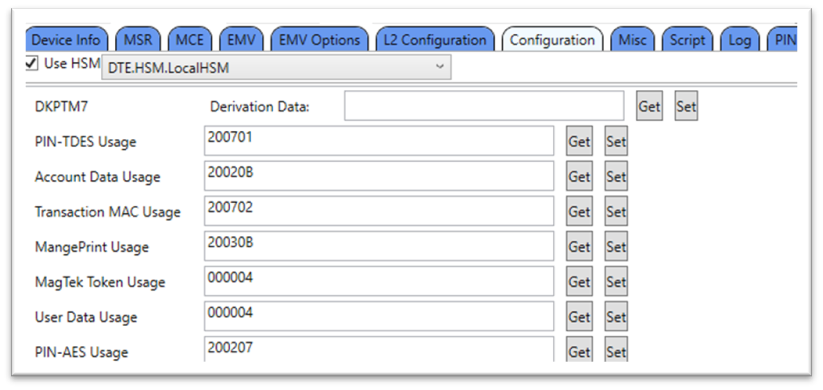
0x00
0x00
0x00
0x00
Get: No Set: No
0x00
0x00
0x01
0x00
EMV configuration, entry point file
Get: No Set: No
0x00
0x00
0x02
0x00
Get: No Set: No
0x00
0x00
0x03
0x00
EMV configuration, Visa DRL set. Reserved for future use.
Get: No Set: No
0x00
0x00
0x04
0x00
Get: No Set: No
0x00
0x00
0x05
0x00
EMV configuration, MasterCard update conditions. Reserved for future use.
Get: No Set: No
0x00
0x00
0x06
0x00
EMV configuration, American Express update conditions. Reserved for future use.
Get: No Set: No
0x00
0x00
0x08
0x00
EMV configuration, Discover update conditions. Reserved for future use.
Get: No Set: No
0x00
0x00
0x09
0x00
EMV configuration, CA revocation list. Reserved for future use.
Get: No Set: No
0x00
0x00
0x0A
0x00
EMV configuration, exception file list. Reserved for future use.
Get: No Set: No
0x00
0x00
0x0B
0x00
EMV configuration, DPAS data storage. Reserved for future use.
Get: No Set: No
0x00
0x00
0x0C
0x00
Get: No Set: NA
0x01
0x00
0x00
0x00
(Display Only) Custom Idle Page Image 1. For details, see .
Get: NA Set: No
0x02
0x00
0x00
0x00
(Display Only) Custom Idle Page Image 2. For details, see .1.1.1 - Custom Idle Page Image
Get: NA Set: No
0x02
0x00
0x00
0x01
(Display Only) Custom Idle Page Image 3. For details, see
Get: NA Set: No
0x02
0x00
0x00
0x02
(Display Only) Custom Idle Page Image 4. For details, see .
Get: NA Set: No
0x02
0x00
0x00
0x03
(WLAN Only) Apollo root CA certificate See .
Get: No Set: Yes
0x03
0x00
0x00
0x00
(WLAN Only) Apollo intermediate CA certificate See .
Get: No Set: Yes
0x03
0x00
0x01
0x00
(WLAN Only) Apollo server certificate See .
Get: No Set: No
0x03
0x00
0x02
0x00
(WLAN Only) Customer root CA certificate See .
Get: No Set: Yes
0x03
0x00
0x03
0x00
(WLAN Only) Customer intermediate CA certificate See .
Get: No Set: Yes
0x03
0x00
0x04
0x00
(WLAN Only) Customer server certificate See
Get: No Set: No
0x03
0x00
0x05
0x00
(WLAN Only) Commercial root CA certificate See
Get: No Set: Yes
0x03
0x00
0x06
0x00
(WLAN Only) Commercial intermediate CA certificate See .
Get: No Set: Yes
0x03
0x00
0x07
0x00
(WLAN Only) Commercial server certificate See .
Get: No Set: No
0x03
0x00
0x08
0x00
(WLAN Only) Apollo trust certificate See .
Get: No Set: No
0x03
0x00
0x09
0x00
(WLAN Only) Customer trust certificate See .
Get: No Set: No
0x03
0x00
0x0A
0x00
(WLAN Only) Apollo client certificate See .
Get: No Set: No
0x03
0x00
0x0B
0x00
(WLAN Only) Certificate signing request (CSR) See .
Get: No Set: N/A
0x04
0x00
0x00
0x00
(WLAN Only) WebSocket Trust configuration file, Request file from MagTek.
Get: N/A Set: No
0x05
0x00
0x00
0x00
(WLAN Only) MQTT Trust configuration file, Request file from MagTek.
Get: N/A Set: No
0x05
0x00
0x01
0x00
UI configuration file. See file definition in
Get: No Set: No
0x06
0x00
0x00
0x00
(Display Only) Magtek signed image file type
Get: N/A Set: No
0x07
0x00
0x00
0x00
User File, users may send a file to or fetch a file from the device with this File ID. The maximum file size is 10,000 bytes.
Get: No Set: No
0x08
0x00
0x00
0x00
Get: No Set: No
Every MMS command is documented once in this reference. This matrix shows which commands each DynaFamily reader supports, so you can confirm availability before building against a device. A command marked — is not available on that device's current firmware; some commands depend on a hardware option (noted below the table).
Legend: ✓ supported · — not supported
PIN / banking (Request PIN) require a PIN-entry device — PED only.
Bluetooth LE commands (Terminate Connection, Erase Bonds) require a BLE radio — DynaFlex II Go only among these; corded devices omit them.
Full-display UI commands (Display Message, Show Image / QR / Bitmap, Flexible UI Pages, Request Cardholder Signature) require the full touch display — DynaFlex II PED only.
After a MIFARE Tag is activated, the host uses this command to send commands and receive responses to and from a MIFARE tag.
For MIFARE Plus EV1/EV2/SE/X at SL1 (Security Level 1), the tag is discovered as MIFARE Classic, and can use the same functionality as MIFARE Classic 1K/4K commands in . Furthermore, an additional optional AES authentication is available in this level without affecting the MIFARE Classic 1K/4K functionality. The authenticity of the card can be proven using strong cryptographic means with this additional functionality. In addition to the backwards compatibility mode, MIFARE Plus card can be switched to higher security levels. After MIFARE Plus is authenticated with AES Security Level 1 Key, the Device doesn’t auto detect an error from the MIFARE Tag has been removed to end the pass-through session. To end the pass-through session, the Host application can send the last command, the CANCEL command (0xFF), or receive an error response from the MIFARE Tag.
The DynaFamily card readers accept the Multi-Interface Card Reader Platform (MMS) command set — the messages you send to run transactions, read cards, drive the display and prompts, manage keys and files, and query or configure the reader. Full syntax, parameters, responses, and examples are maintained in the shared reference.
✓
✓
✓
✓
✓
✓
✓
✓
NFC / MIFARE pass-through
✓
✓
✓
✓
✓
✓
✓
✓
✓
✓
✓
✓
✓
✓
✓
✓
User interface
✓
—
—
—
✓
—
✓
✓
✓
—
—
—
✓
✓
✓
✓
✓
✓
✓
✓
✓
✓
—
✓
✓
—
—
—
✓
—
—
—
✓
—
—
—
✓
—
—
—
✓
✓
✓
✓
✓
✓
✓
✓
Generic pass-through
✓
✓
✓
✓
✓
✓
✓
✓
✓
✓
✓
✓
Device control
✓
✓
✓
✓✓
✓
✓
✓
—
✓
—
—
—
—
✓
—
—
—
✓
—
—
Banking functions
✓
—
—
—
✓
—
—
—
Settings & information
✓
✓
✓
✓
✓
✓
✓
✓
✓
✓
✓
✓
File operations
✓
✓
✓
✓
✓
✓
✓
✓
✓
✓
✓
✓
✓
✓
✓
✓
✓
✓
✓
✓
✓
✓
✓
✓
✓
✓
✓
✓
Diagnostics & utilities
✓
✓
✓
✓
Security
—
✓
✓
✓
✓
✓
✓
✓
✓
✓
✓
✓
✓
—
—
—
—
—
✓
—
✓
✓
✓
✓
✓
✓
✓
✓
✓
Manufacturing
✓
✓
✓
✓
Establish Ephemeral KBPK is a provisioning/manufacturing command — confirm whether it should be publicly listed or kept to an internal space.
Transactions
✓
✓
✓
✓
Beginning of any wrappers, at minimum including Request Message
1101 = Command 0x1101 – Pass Through Command for MIFARE Classic/MINI®/Plus SL1 (Security Level 1), Type 2
MIFARE Read
Byte 0 – 0x30 – Read Command Byte 1 – Sector Number to Read Byte 2 – Start Block Number Byte 3 – End Block Number Byte 4 – Key Type, 0 = A, 1 = B Byte 5 to 10 = 6 Byte Key
MIFARE Write
First Authenticate (part1 and part2)
3
Beginning of any wrappers, at minimum including Response Message
/DFDF59
var
Encrypted Data Primitive. Decrypt the value of this TLV data object using the algorithm and variant specified in the Encrypted Data KSN parameter and the Encrypted Data Encryption Type parameter to read its contents. The format of the decrypted data is shown in the table below.
FC
var
NFC/MIFARE Data Container
AA 00 81 04 01 19 11 01 84 15 11 01 81 0B 30 00 00 00 00 FF FF FF FF FF FF 82 01 00 83 01 00AA 00 81 04 82 19 11 01 82 04 01 00 00 00 84 1C 11 01 81 01 00 82 15 FC 13 DF 7A 10 A4 FB 0D 3E
6C 08 04 00 03 0D C0 90 EE BF BB 1D
Send native card commands to read and write NFC tags and MIFARE cards (Ultralight, Classic, Plus, DESFire). Used for non-payment contactless applications such as loyalty, access, and ticketing. (Contactless Only)
Control the device's cardholder- and operator-facing features: prompts and messages, LEDs, the buzzer, barcode scanning, personal-info entry, and card emulation. Use these to guide the user through a transaction and capture input.
Manage the device's operational and connection state: reset the device, set notification subscriptions, and manage Bluetooth LE sessions and bonds. These govern how the device runs and communicates rather than how it processes cards.
Prompt the cardholder for a PIN and generate the encrypted PIN block for online-PIN debit and banking, using host-supplied or card-supplied account data. Available only on devices with a PIN-entry surface. (Touch/Display Only)
Open a direct channel to a contactless card and exchange raw ISO 14443-4 APDUs, with control over card polling. Use this for custom or proprietary contactless schemes not covered by the dedicated command groups.
Read and change the device's configuration by getting and setting individual properties, in both secured and unsecured forms. This is how you query device state and adjust its behavior.
Transfer files to and from the device: send firmware, configuration, and certificate files, retrieve them, query file info, and delete them. Handles moving files; applying them is covered under Process Files.
Act on files already loaded onto the device, such as committing a transferred firmware file to activate it. These commands complete operations that begin as a transfer in File Operations.
General-purpose troubleshooting utilities, such as Echo to verify host-to-device communication. Use these to test connectivity and confirm the device is responding.
Perform cryptographic and device-security operations: challenge/response authentication, sending secured commands, loading keys via TR-31, retrieving key information, and managing the device lock. These establish and maintain the device's secure state.
Provisioning and production-time operations, such as establishing an ephemeral key block protection key (KBPK) for secure key injection. Typically used during manufacturing and key loading rather than day-to-day integration.
Section
Information
The host uses this command to start a payment transaction.
The host uses this command to provide the device with additional/modified data to resume a transaction that is currently paused.
Section
Information
After an NTag/MIFARE Ultralight is activated, the host uses this command to send commands and receive responses to and from a NTag/MIFARE Ultralight.
After a MIFARE Tag is activated, the host uses this command to send commands and receive responses to and from a MIFARE tag.
Section
Information
The host uses this command to prompt a cardholder for a signature.
The host uses this command to provide a cardholder selection to the device when the device itself does not have a display or inputs to prompt the cardholder for a selection.
Section
Information
The host uses this command to reset the device.
The host uses this command to specify which notifications the device should send on each of its available interfaces.
Section
Information
This command directs the device to prompt the cardholder to enter a PIN when a card is not present or is not presented.
This command directs the device to prompt the cardholder to present their card by swiping, dipping or tapping, and to enter a PIN.
Section
Information
Basic information about generic pass-through commands
The host uses this command to enter or exit Pass-Through Mode.
Section
Information
The host uses this command to get information about the device or its configuration / settings.
The host uses this command to set device configuration / settings that do not require security.
Section
Information
Large blobs of data uploaded to / downloaded from the device are referred to as “files” and share a common set of commands documented here, and special message type Data File Message.
The host uses this command to send a firmware image file, signed by MagTek, to the device as the first step in updating firmware.
Section
Information
The host uses this command to commit a file previously uploaded using Command 0xD801 into the device’s permanent memory after the device has authenticated the file.
Section
Information
The host uses this command to prompt the device for a response that contains the same payload it sent.
Section
Information
The host uses this command to request challenge data from the device, which the host can then use to perform a specific sensitive operation / modify a specific type of device setting.
The host uses this command to transmit another command securely. T
Section
Information
The host uses this command to complete the ECDHE-ECDSA Key Exchange protocol, which enables the host and the device to generate the same TEMP KBPK key to use with Load Key Using TR-31 to load the Master Transport Key (MTK).
Section
Information
Start, resume, and cancel EMV, contactless, and magnetic-stripe payment transactions. This is the core command group for running a sale or authorization on the device.
The signature capture file type produced when the host invokes is a TLV data object in the format below. If the encryption is enabled in , please refer to Encrypted Signature Capture File Type below.
🕐 Hours: Monday-Friday, 5:30 AM - 5:00 PM PST
Online Resources:
🌐 Support Portal: developer.magtek.com
Documentation Feedback:
Help us improve this documentation! feedback@magtek.com
The host can use this command to cancel a transaction in progress that it initiated using Start Transaction.
After a MIFARE DESFire Light/EV1/EV2/EV3 Tag is activated, the host uses this command to send commands and receive responses to and from a MIFARE DESFire Tag.
After a MIFARE Plus EV1/EV2/SE/X Tag is activated, the Host uses this command to send commands and receive responses to and from a MIFARE Plus tag.
The host uses this command to request that the device display a message for the cardholder.
The host uses this command to direct the device to arm or disarm the barcode reader for reading a barcode outside the scope of a transaction.
The host uses this command to start a buzzer for playing a sequence of tones.
The host uses this command to prompt a cardholder for customer information.
The host uses this command to control the 4 LEDs of the device when the device is not in non-User Control LED states.
The host uses this command to trigger the device to immediately show a pre-loaded image on the display, provided the device is not in a mode that has exclusive use of the display (such as during a transaction).
The host uses this command to direct the device to immediately show a QR code on the display, provided the device is not in a mode that has exclusive use of the display (such as during a transaction).
The host uses this command to trigger the device to immediately show a bitmap file the host includes as a parameter, provided the device is not in a mode that has exclusive use of the display (such as during a transaction).
This command allows the host to bring up standalone pages.
Card emulation is initiated by receiving a 0x1840 command from the host.
The host can use this command to extend a session for open protocol interfaces, such as the WLAN interface, which require session management to meet PCI requirements.
The host can use this command to terminate a Bluetooth LE connection.
The host can use this command to erase all Bluetooth® LE bonds.
After entering the Pass-Through Mode, the host use this command to request the device to start polling for a Type A and Type B PICC until it detects a PICC or times out.
After the NFC Type A or Type B card is activated, the host uses this command to send application-level APDUs to a PICC that supports ISO 14443-4 Protocol.
The host uses this command to set device configuration / settings securely. Properties that require security should specify that they do in their documentation.
The host uses this command to start sending secured files to the device for storage or processing. It is similar to Start Send File to Device (Unsecured), but is used to send a different subset of file types that impact device security and require some form of authentication from the host.
The host uses this command to start sending unsecured files to the device for storage or processing. It is similar to Start Send File to Device (Secured) but is used to send a different subset of file types that do not impact device security.
The host uses this command to request a file stored on the device. File types include standard files (images and certificates), MagTek custom files (configuration, firmware), and in some cases even large data blob output (such as signature capture data).
The host uses this command to request the file information of a file stored on the device. File types include standard files (images and certificates), MagTek custom files (configuration, firmware), and in some cases even large data blob output (such as signature capture data).
The host uses this command to request the deletion of a file stored on the device.
The host uses this command to load a key into one of several available slots in the device’s secure memory.
The host uses this command to generate a key pair to be used for a certificate signing request (CSR).
The host uses this command to generate a certificate signing request (CSR) in PEM format.
The host can use this command to change the device’s lock state.
The host uses this command to request that the device encrypt a block of user data embedded in the command string.
The host uses this command to retrieve information about a key slot, including details about the key stored in that slot.
Request Access Right: Submit a formal request to qualify for authorized resources tied to specific NXP parts or technologies.
Access Secure Files: Once approved, navigate to My NXP Account > Secure Resources (or Secure Files) to download NXP Doc DS206234.
Note: It may take seven to ten days to get approval.
81
var
Command to Send. See MIFARE Classic/MINI® Commands See MIFARE Plus EV1/EV2/SE/X SL1 (Security Level 1) Commands
B
R
82
01
00 – No Encrypt 01 - Encrypt
83
01
00 – Expect More Commands 01 – FF (Last Command). If last command, Device will provide a single beep after receiving a successful response from tag, otherwise, device will provide a double beep.
B
R
End of any wrappers, at minimum including Request Message
Byte 0 – 0xA0 – Write Command Byte 1 – Sector Number to Write Byte 2 – Start Block Number Byte 3 – End Block Number Byte 4 – Key Type 0 = A, 1 = B Byte 5 to 10 = 6 Byte Key Byte 11 to x = Variable length Byte Data (16 bytes per block)
MIFARE Increment
Byte 0 – 0xC1 – Increment Command Byte 1 – Source Sector Number Byte 2 – Source Block Number Byte 3 – Key Type 0 = A, 1 = B Byte 4 to 9 = 6 Byte Key Byte 10 to 13 = 4 Byte Operand
MIFARE Decrement
Byte 0 – 0xC0 – Decrement Command Byte 1 – Source Sector Number Byte 2 – Source Block Number Byte 3 – Key Type 0 = A, 1 = B Byte 4 to 9 = 6 Byte Key Byte 10 to 13 = 4 Byte Operand
MIFARE Restore
Byte 0 – 0xC2 – Restore Command Byte 1 – Source Sector Number Byte 2 – Source Block Number Byte 3 – Key Type 0 = A, 1 = B Byte 4 to 9 = 6 Byte Key
MIFARE Transfer
Byte 0 – 0xB0 – Write the value from the Transfer Buffer into destination block number Byte 1 – Destination Sector Number Byte 2 – Destination Block Number Byte 3 – Key Type 0 = A, 1 = B Byte 4 to 9 = 6 Byte Key
First Authenticate. Use this command to switch to higher security levels. This command is behaved as the last command. Device will provide a single beep after receiving a successful response from a card, otherwise, device will provide a double beep.
Byte 0 = 0x70
Byte 1-2 = Level 2 Switch Key (MIFARE Plus X only), or Level 3 Switch Key. See NXP doc ds206234
Byte 3 = MIFARE Plus AES_Key#
- 0x01 = AES_Key1 = 16 bytes value stored in Property 1.2.1.1.4.5 MIFARE Plus AES_Key1.
- 0x02 = AES_Key2 = 16 bytes value stored in Property 1.2.1.1.4.6 MIFARE Plus AES_Key2.
- 0x03 = AES_Key3 = 16 bytes value stored in Property 1.2.1.1.4.7 MIFARE Plus AES_Key3.
- 0x04 = AES_Key4 = 16 bytes values stored in Property 1.2.1.1.4.8 MIFARE Plus AES_Key4.
- 0x05 = AES_Key5 = 16 bytes values stored in Property 1.2.1.1.4.9 MIFARE Plus AES_Key5.
- 0x06 = AES_Key6 = 16 bytes values stored in Property 1.2.1.1.4.A MIFARE Plus AES_Key6.
Y
Y
Y
Y
Following Authenticate (part 1 and part 2)
3
Following Authenticate. Use this command for an option to put the NFC tag in Security Level 1 AES Authenticated before sending MIFARE Classic commands.
Byte 0 = 0x76
Byte 1-2 = Security Level 1 Card Authentication Key. See NXP doc ds206234,
Byte 3 = MIFARE Plus AES_Key# (same key numbering as First Authenticate)
Y
Y
Y
Y
READ_SIG
2
The READ_SIG command returns an IC-specific, 48-byte ECC originality check signature.
Byte 0 = 0x3C
Byte 1 = 0x00, RF
Y
Y
N
N
Personalize UID
2
Set anti-collision, selection and authentication behavior. The execution of this command requires an authentication to MF Classic sector 0 (use MIFARE Read command sector 0 from MIFARE Classic/MINI® Commands.
Once this command has been issued and accepted by the PICC, the configuration is automatically locked. A subsequently issued ‘Personalize UID Usage’ command is not executed and fails.
Byte 0 = 0x40
Byte 1 = Encoded type of UID usage:
- 0x00 = UIDF0 = anti-collision and selection with the double size UID (7-byte) according to ISO/IEC14443-3
- 0x40 = UIDF1 = anti-collision and selection with the double size UID (7-byte) according to ISO/IEC14443-3 and optional usage of a selection process shortcut
- 0x20 = UIDF2 = anti-collision and selection with a single size random ID (4-byte) according to ISO/IEC14443-3. After the card is configured with random ID, it won’t be able to perform any MF Classic authentication since MF Classic authentication requires UID.
- 0x60 = UIDF3 = anti-collision and selection with a single size NUID (4-byte) according to ISO/IEC14443-3 where the NUID is calculated out of the 7-byte UID
Y
Y
N
N
CANCEL
1
This command is used to terminate the pass-through command session.
Byte 0 = 0xFF
Y
Y
Y
Y
1101 = Command 0x1101 – Pass Through Command for MIFARE Classic/MINI®/Plus SL1 (Security Level 1), Type 2
81
var
Tag Response Code
Byte 0 = 0x00 = Success
Byte 0 = 0x01 = I/O Failed
Byte 0 = 0x02 = Authentication Failed
Byte 1 = 0x01 = Block that Failed (optional)
B
R
N/A
82
var
Encryption Control. If encrypted, see Payload for Encrypted NFC/MIFARE Data. If unencrypted see Unencrypted NFC/MIFARE Data.
B
O
N/A
End of any wrappers, at minimum including Response Message
B
R
/DFDF50
var
Encrypted Data KSN
B
R
/DFDF51
01
Encrypted Data Encryption Type. See Encryption Type for a list of valid values.
B
R
End of any wrappers, at minimum including Response Message
T
R
/DF7A
var
NFC/MIFARE Data
B
O
08
Signature Window Width and Height Bytes 0..1 = Left edge (minimum value of all X coordinates) Bytes 2..3 = Right edge (maximum value of all X coordinates) Bytes 4..5 = Top edge (minimum value of all Y coordinates) Bytes 6..7 = Bottom edge (maximum value of all Y coordinates)
B
R
0000 00FD 0000 0078 (landscape) 0000 00C8 0000 00B9 (portrait)
82
var
Signature Coordinate Values List This is a blob that consists of a raw list of point coordinates representing the signature. Each coordinate is 4 bytes long, where the first 2 bytes are the X coordinate of that point and the second 2 bytes are the Y coordinate of that point.
B
O
F9
var
Container for MAC structure and generic data, length excludes MAC padding and MAC checksum
F9
var
81
T
R
/DFDF54
var
MAC KSN
B
R
/DFDF55
var
MAC Encryption Type
B
R
/F8
var
Container for Encrypted Data
T
R
//DFDF59
var
Encrypted Data Primitive (length includes padding) Decrypt the value of this TLV data object using the algorithm and variant specified in the Encrypted Data KSN parameter and the Encryption Type parameter below to read its contents.
B
R
//DFDF56
var
Encrypted Data KSN
B
R
//DFDF57
01
Encrypted Data Encryption Type See for a list of valid values.
B
R
PKCS7 padding for MAC calculation, maximum 16 bytes, minimum 1 byte
Four-byte MAC checksum. The host should calculate the MAC and verify that it matches.
Container for MAC structure and generic data, length excludes MAC padding and MAC checksum
T
R
/DFDF55
var
MAC Encryption Type
B
R
/F8
var
Container for Encrypted Data
T
R
//DFDF59
var
Encrypted Data Primitive, length includes padding
T
R
///FC
var
Decrypted Data Container, length excludes padding
T
R
////A1
var
Signature file container, maximum 4,000 bytes
T
R
/////81
08
Signature Window Width and Height, refer to .
B
R
/////82
var
Signature Coordinate Values List, refer to
B
R
////81
04
Real Time Clock, Epoch Time in seconds, unsigned 32 bits. The date and time shall be Universal Time Coordinated (UTC).
B
R
////82
04
Device Serial Number
B
R
////A3
var
User data parameters for item #0 to item #3. The maximum total size of 0xA3 TLV is 4,000 bytes.
T
O
/////81
var
User data item #0, optional
B
O
/////82
var
User data item #1, optional
B
O
/////83
var
User data item #2, optional
B
O
/////84
var
User data item #3, optional
B
O
PKCS7 padding for encryption, maximum 16 bytes, minimum 1 byte
//DFDF56
var
Encrypted Data KSN
B
R
//DFDF57
01
Encrypted Data Encryption Type See for a list of valid values.
B
R
PKCS7 padding for MAC calculation, maximum 16 bytes, minimum 1 byte
Four-byte MAC checksum. The host should calculate the MAC and verify that it matches.
The host uses this option to display a page with the following elements: a title, a section for uploading a custom image, an option at the bottom-left corner to display either the Device Serial Number or host-provided text, and a maximum of one functional green button positioned on the right.
The title and functional button are labeled with String IDs associated with configured String messages. See Default User Interface String IDs and Strings.
When the user presses this button, the device sends a notification to the host to indicate the corresponding button is pressed. See Notification 0x1803 - User Interface Host Action Request. After that, the host will decide what to do next.
Recommend maximum number of characters and bitmap image setting for this page:
Title text can fit about:
18 Upper case wide size characters like “WM”
23 Upper case regular size characters like “ABC”
21 lower case wide size characters like “wm”
30 lower case regular size characters like “abc”
Bottom left corner text can fit about:
8 Upper case wide size characters like “WM”
12 Upper case regular size characters like “ABC”
9 lower case wide size characters like “wm”
Functional button text can fit about:
5 Upper case wide size characters like “WM”
8 Upper case regular size characters like “ABC”
6 lower case wide size characters like “wm”
Bitmap image
Maximum width: 320px
Maximum height: 140px
Color depth: 24-bit (True Color, RGB), 16-bit (5:5:5:1, RGB Hi Color), 8-bit (256 Color), 4-bit (16 Color), or 1-bit (monochrome)
Title text can fit about:
13 Upper case wide size characters like “WM”
17 Upper case regular size characters like “ABC”
If the request started successfully, the Request Status in the message wrapper is All good / requested operation was successful.
15 lower case regular size characters like “abc”
9 lower case regular size characters like “abc”
14 lower case wide size characters like “wm”
20 lower case regular size characters like “abc”
Bottom left corner text can fit about:
8 Upper case wide size characters like “WM”
12 Upper case regular size characters like “ABC”
9 lower case wide size characters like “wm”
15 lower case regular size characters like “abc”
Functional button text can fit about:
4 Upper case wide size characters like “WM”
6 Upper case regular size characters like “ABC”
5 lower case wide size characters like “wm”
7 lower case regular size characters like “abc”
Bitmap image
Maximum width: 240px
Maximum height: 220px
Color depth: 24-bit (True Color, RGB), 16-bit (5:5:5:1, RGB Hi Color), 8-bit (256 Color), 4-bit (16 Color), or 1-bit (monochrome)
1830 = Display Flexible UI Pages (Display Only) - Command 0x1830
81
01
Display Time
0x00 – Infinitive. Device leaves the requested page on the display until the host initiates a change.
0x01 to 0xFF = RFU
B
R
82
01
UI page option
0x00 – Page with up to 5 lines of text and up to 1 functional button Middle. See Tag A1.
0x01 – Page with a title, up to 6 buttons with text, and up to 3 functional buttons. See Tag 83, A2 and A4.
0x02 – Page with a title, up to 6 buttons with $Amount, and up to 3 functional buttons. See Tag 83, A3 and A4.
B
R
83
02
Text String ID for a tile of UI page option: 0x01, 0x02, 0x03 See Default User Interface String IDs and Strings If host wants to disable this title, do not include this tag.
B
O
Text string parameters for UI page option: 0x00 The parameter in this TLV data object allow the host to enable and disable the data base for UI page option 0x00
B
O
/81
var
Text string (<= 30 characters) for line 1, end with NULL char. If host wants to disable this line, do not include this tag.
B
O
/82
var
Text string (<= 30 characters) for line 2, end with NULL char. If host wants to disable this line, do not include this tag.
B
O
/83
var
Text string (<= 30 characters) for line 3, end with NULL char. If host wants to disable this line, do not include this tag.
B
O
/84
var
Text string (<= 30 characters) for line 4, end with NULL char. If host wants to disable this line, do not include this tag.
B
O
/85
var
Text string (<= 30 characters) for line 5, end with NULL char. If host wants to disable this line, do not include this tag.
B
O
/86
02
Function button Middle option. String ID = Enable functional button Middle with a String ID associated with a configured String message. See s When user presses this button, device sends notification to the host to indicate the functional button Middle is pressed. See If host wants to disable this button, do not include this tag
B
O
A2
var
Button text String ID parameters for UI page option: 0x01 and 0x02. The parameter in this TLV data object allows the host to enable and disable the data base. When user presses any button, device sends notification to the host to indicate which button is pressed. See .
B
O
/81
02
Text String ID for button 1. See . If host wants to disable this button, don’t include this tag.
B
O
/82
02
Text String ID for button 2. See . If host wants to disable this button, don’t include this tag.
B
O
/83
02
Text String ID for button 3. See . If host wants to disable this button, don’t include this tag.
B
O
/84
02
Text String ID for button 4. See . If host wants to disable this button, don’t include this tag.
B
O
/85
02
Text String ID for button 5. See . If host wants to disable this button, don’t include this tag.
B
O
/86
02
Text String ID for button 6. See . If host wants to disable this button, don’t include this tag.
B
O
A3
var
Button $Amount parameters for UI page option: 0x01, 0x02 The parameter in this TLV data object allows the host to enable and disable the data base for UI page option 0x01 and 0x02 When user presses any button, device sends notification to the host to indicate which amount button is pressed. See .
B
O
/81
04
Value $Amount for button 1. If host wants to disable this button, don’t include this tag.
B
O
/82
04
Value $Amount for button 2. If host wants to disable this button, don’t include this tag.
B
O
/83
04
Value $Amount for button 3. If host wants to disable this button, don’t include this tag.
B
O
/84
04
Value $Amount for button 4. If host wants to disable this button, don’t include this tag.
B
O
/85
04
Value $Amount for button 5. If host wants to disable this button, don’t include this tag.
B
O
/86
04
Value $Amount for button 6. If host wants to disable this button, don’t include this tag.
B
O
A4
var
Functional buttons parameters for UI page option: 0x01 and 0x02. The parameter in this TLV data object allows the host to enable and disable the data base. When user presses any button, the device sends notification to the host to indicate which functional button is pressed. See .
B
O
/81
03
Text String ID and color option for functional button Left. See .
Byte 0-1: String ID
Byte 2: color option
0x00 = red
B
O
/82
03
Text String ID and color option for functional button Middle. See .
Byte 0-1: String ID
Byte 2: color option
0x00 = red
B
O
/83
03
Text String ID and color option for functional button Right. See .
Byte 0-1: String ID
Byte 2: color option
0x00 = red
B
O
A5
var
Parameters for UI page option 0x03 The parameter in this TLV data object allow the host to enable and disable the data base
B
O
/81
02
Text String ID for green functional button Right. See . When user presses this button, device sends notification to the host to indicate the functional button Right is pressed. See If host wants to disable this button, don’t include this tag.
B
O
/82
02
X Position. If host wants device to display the image in the center of the loading image area, don’t include this tag.
B
O
/83
02
Y Position. If host want device to display the image in the center of the loading image area, don’t include this tag Note: Y pos >= 50px Y pos + Image Height <= 190px Landscape Screen Orientation Y pos + Image Height <= 270px Portrait Screen Orientation
B
O
/84
var
Bitmap Image encoded in full BMP file format as defined by Microsoft (e.g, starting with “BM”) Image Width Max = 320px Landscape Screen Orientation Image Height Max = 140px Landscape Screen Orientation Image Width Max = 240px Portrait Screen Orientation Image Height Max = 220px Portrait Screen Orientation
B
O
/85
var
Bottom left corner option Byte 0 = option
0x00 = Disable
0x01 = show Device Serial Number
0x02 = show text
0x03..0x0F = invalid
B
0
A8
Var
Parameters for UI page option 0x06
B
O
/81
2
Image X position (omit for default centered position)
B
O
/82
2
Image Y position (omit for default centered position)
B
O
/83
1
Image ID (for image stored on device). Value is 0-3 for the 4 available image ‘slots’. Must be signed image for touch notifications to be sent. Cannot be used in the same command as /84.
B
O
/84
var
Image data. Image encoded in full BMP file format as defined by Microsoft (e.g, starting with “BM”) OR contents of .bin file for Magtek signed image file. Must be signed .bin data for touch notifications to be sent. Cannot be used in the same command as /83.
B
O
End of any wrappers, at minimum Response Message
1830 = Command 0x1830 - Display Flexible UI Pages (Display Only) -
No parameters
End of any wrappers, at minimum including Response Message
Beginning of any wrappers, at minimum including Response Message
A1
Beginning of any wrappers, at minimum including Response Message
AA 00 81 04 01 2C 18 30 84 1A 18 30 81 01 00 82 01 00 83 02 00 05 A1 0C 83 0A 54 48 41
4E 4B 20 59 4F 55 00AA008104822C1830820400000000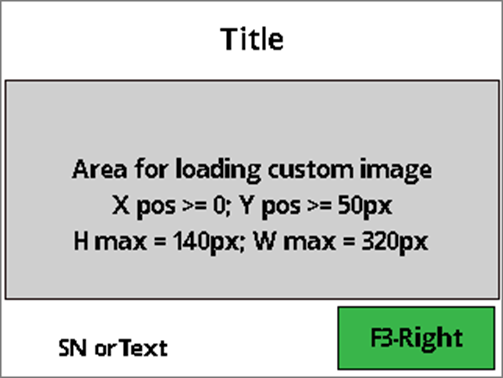
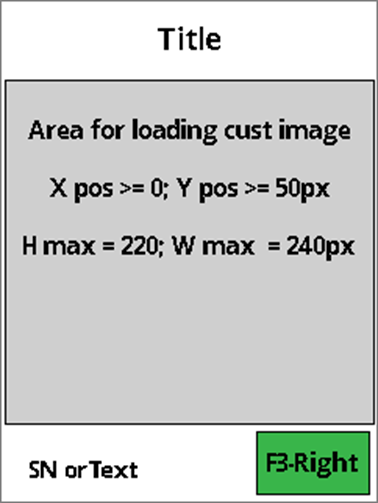
var
Each message type follows a specific structure described below.
0x06 – Flexible UI Gen. 2 page. Displays an image and sends touch notifications. See tag 83, A8.
0x02 = yellow
If host wants to disable this button, don’t include this tag.
0x02 = yellow
If host wants to disable this button, don’t include this tag.
0x02 = yellow
If host wants to disable this button, don’t include this tag.
-
One byte standard Start of Message constant, not in TLV format. 0xAA = Standard start of message byte.
-
-
-
-
-
One-byte standard API Framework Version, not TLV. Values: 0x00 = Pre-production, 0x01 = First production release, 0x02 = Second production release, etc.
-
-
-
81
var
Message Information
B
R
/null
(1)
Message Type & Direction:
0x01 = Request from host to device.
0x81 = Request from device to host (Reserved).
B
R
/null
(1)
Message Reference Number
B
R
/null
(2)
Command ID — fully qualified Command number (Command Group, Command within that group). If the Request Payload contains wrappers, the host should specify the command invoked at the core after wrappers are removed.
B
R
/null
(var)
Reserved
O
84
var
Request Payload — as documented in the message’s Request table in section .
B
R
9E
var
Reserved
B
O
Notes:
Message Reference Number: host can use any value to match responses; device echoes it in responses. Recommended: incrementing counter per request within a session.
The tables below list operation status detail codes grouped by source and code. (Only a representative subset is shown here; see the full document for all codes.)
Grp
Sub
Cde
Meaning
Error Codes
00
00
00
Grp
Sub
Cde
Meaning
Error Codes
01
01
01
Grp
Sub
Cde
Meaning
-
-
One byte standard Start of Message constant, not TLV. 0xAA = Standard start of message byte.
This message type is used exclusively for transferring larger blocks of data treated as files. It is valid only after successful invocation of the appropriate file operation commands (for example, 0xD811 - Start Send File to Device (Secured), 0xD821 Start Send File to Device (Unsecured), or S0xD821 - Start Get File from Device .
-
-
One byte standard Start of Message constant, not TLV. 0xAA = Standard start of message byte.
Example (Hex)
02
05
01
Invalid TR31 parameter
-
AA 00 81 08 84 08 D8 21 00 00 00 01 84 40 00 01 02 03 04 05 06 07 08 09 0A 0B 0C 0D 0E 0F 10
11 12 13 14 15 16 17 18 19 1A 1B 1C 1D 1E 1F 20 21 22 23 24 25 26 27 28 29 2A 2B 2C 2D 2E 2F 30
31 32 33 34 35 36 37 38 39 3A 3B 3C 3D 3E 3FSubgroup 0x04 = Device issues (missing hardware or features)
Subgroup 0x05 = TR31 Errors
All good / requested operation was successful.
000000
00
00
02
Requested Operation Failed
000002
00
00
10
Setting up RTC data and time failure
000010
00
00
11
Setting up RTC alarm failure
000011
00
00
12
Key generation failure
000012
00
00
13
Tamper setting is locked, can’t be changed
000013
00
00
14
Tamper setting requires system reset to continue
000014
00
00
15
Tamper status can’t be cleared, failure
000015
00
00
16
Device has been tampered, need attention
000016
00
00
17
Tamper module failed for other cases
000017
00
00
18
Setting WLAN SoftAP password failure
000018
Generic Failure.
010101
01
01
02
Bad message parameter. The host has sent a message to the device that is not constructed properly.
010102
01
01
09
Device offline, can not process messages. For example, the device returns this detail code when it does not have keys injected or has registered a tamper.
010109
01
01
10
PIN Key Not Mapped.
010110
01
01
13
Feature Not Available
010113
Error Codes
02
00
00
Reserved
020000
02
01
00
Reserved
020100
02
01
01
Generic Failure
020101
02
01
02
Bad Message Parameter
020102
02
01
03
Response Payload too big
020103
02
01
07
Internal FW Failure
020107
02
01
0A
Image Failure
02010A
02
01
19
Key does not exist
020119
02
01
1A
Not Secured
02011A
02
01
1B
Passcode validation failed
02011B
02
01
1C
Device is locked
02011C
02
01
1D
Device in Restricted mode
02011D
02
02
00
Reserved
020200
02
03
04
Failed, device state issue, no transaction.
020304
02
03
05
Failed, device state issue, cannot cancel.
020305
02
03
08
Failed, device state, Transaction in Progress.
020308
02
03
0C
Failed, device state, Signature Not allowed
02030C
02
03
0D
Failed, device state, Wrong Transaction State
02030D
02
03
0E
Failed, device state, Invalid PIN Entry State
02030E
02
03
0F
Failed, device state, PIN Entry in Session.
02030F
02
03
11
Failed, device state, Barcode Read in Progress.
020311
02
03
12
Failed, device state, Pass-through command Not Activated.
020314
02
03
14
Failed, device state, UI Settings in Progress.
020314
02
03
15
Failed, device state, Buzzer in Progress
020315
02
03
16
Failed, device state, Low Battery (5% or less)
020316
02
03
18
Request is invalid while card emulation is in progress
020318
02
03
1E
Failed, device state, pass-through mode started
02031E
02
03
1F
Failed, device state, pass-through mode is not started
02031F
02
03
20
Failed, device state, pass-through mode APDU is in progress
020320
02
04
13
Failed, BCR hardware not found.
020413
02
05
01
Invalid TR31parameter
020501
02
05
02
Invalid AES length
020502
02
05
03
Invalid 16-Byte Boundary
020503
02
05
04
Invalid Length in Message
020504
02
05
05
Invalid number of optional KBH
020505
02
05
06
Error in conversion of data type
020506
02
05
07
Invalid KCV algorithm
020506
02
05
08
Invalid KCV length
020508
02
05
09
Invalid Optional KBH ID
020509
02
05
0A
Invalid KBH ID
02050A
02
05
0B
Invalid algorithm used in KBH
02050B
02
05
0C
Invalid KBH usage
02050C
02
05
0D
Invalid KBH length
02050D
02
05
0E
Invalid version ID for key derivation
02050E
02
05
0F
Invalid KBH mode of use
02050F
02
05
10
TR31 engine not installed
020510
02
05
11
Invalid Cryptographic operation
020511
02
05
12
MAC Verification Failed
020512
02
05
13
Error in Decrypting Key data
020513
02
05
14
Error in computing MAC over entire message
020514
02
05
15
Invalid MAC length
020515
02
05
16
KDF Error
020516
02
05
17
Buffer Insufficient
020517
02
05
18
Invalid Storage KPM
020518
02
05
19
Invalid Storage Secure RAM
020519
02
05
1A
Invalid Key ID specified in option block
02051A
02
05
1B
Unsupported Key ID specified in option block
02051B
02
05
1C
Invalid Key ID Relationship
02051C
02
05
1D
Protection Key ID not loaded
02051D
02
05
1E
Invalid Data Tag MagTek Custom option block
02051E
02
05
1F
Invalid Kcv
02051F
02
05
20
Invalid Data
020520
02
05
21
Invalid DUKPT key derivation
020521
02
05
22
Invalid Exportability
020522
02
05
23
Invalid Key Class
020523
02
05
24
Invalid DSN
020524
02
05
25
Invalid Challenge
020525
02
05
26
Key Undeletable
020526
02
05
27
Key not present
020527
02
05
28
Unsupported Keyset ID
020528
02
05
29
KPM Error
020529
02
05
2A
Secure RAM Error
02052A
02
05
2B
Duplicated Key
02052B
02
05
2C
Invalid Key Usage Rule
02052C
02
05
2D
Selftest Key Corrupted
02052D
02
05
2E
Selftest System Key Bitmap Corrupted
02052E
02
05
2F
Selftest System Key Missing
02052F
02
05
30
Selftest System Key Not Loaded
020530
02
05
31
Invalid Key Storage Limit
020531
02
05
32
Duplicated Key set
020532
02
05
33
Key Restriction
020533
02
05
34
Key Transported by Weaker key
020534
02
05
35
Repeat Key Agreement
020535
02
05
36
Security not activated
020536
02
05
37
Selftest key relocated
020537
02
05
38
Invalid Selftest Scanned Versus Saved Bitmap
020538
-
-
-
-
-
One-byte standard API Framework Version, not TLV. Values as in requests/responses.
-
-
-
81
4
Message Information
B
R
/null
(1)
Message Type & Direction:
0x03 = Notification from host to device (Reserved).
0x83 = Notification from device to host.
R
/null
(1)
Reserved, set to 0x00
R
/null
(1)
Notification Source — this byte and Notification Type form the first two bytes of a six-byte Notification ID. Use this byte to look up the Notification Group in Notifications. Example values:
0x01 = Transaction.
0x09 = Firmware Update.
0x10 = Device.
0x18 = User Interface.
R
/null
(1)
Notification Type — append to Notification Source to identify specific notification (e.g.,
0x01 = Information Update.
0x02 = Warning.
0x03 = Action Request.
0x04 = Callback.
0x05 = Operation Complete).
R
/null
(var)
Reserved
O
82
(4)
Notification Detail Code — combined with Notification Source and Notification Type to form a unique six-byte Notification ID. See Notifications for notification-specific detail codes.
B
R
/null
1
Category — e.g., 0x00 = Power/Reset
B
R
/null
1
Reason — e.g., 0x02 = Battery
B
R
/null
1
Reason Detail (Subgroup) — e.g., 0x01 = Power Down Imminent
B
R
/null
1
Reserved, set to 0x00
B
R
83
var
Additional Detail — see notification definition in Notifications.
O
84
var
Notification Payload — as documented in the notification’s table in Notifications.
B
O
9E
var
Reserved
B
O
-
-
-
-
-
One-byte standard API Framework Version, not TLV. Values as in requests/responses.
-
-
-
81
08
Message Information
B
R
/null
(1)
Message Type & Direction:
0x04 = Data file from host to device.
0x84 = Data file from device to host.
B
R
/null
(1)
Message Reference Number — host value to match responses.
B
R
/null
(2)
Command Number that prompted this message (see Command Group 0xD8nn - File Operations).
B
R
/null
(4)
File Type — the file type as defined in 0xD8nn - File Operations.
B
R
84
var
File Payload — as documented in About Files.
B
R
020501
02
05
02
Invalid AES length
020502
02
05
0F
Invalid KBH mode of use
02050F
02
05
12
MAC Verification Failed
020512
02
05
16
KDF Error
020516
02
05
21
Invalid DUKPT key derivation
020521
02
05
2B
Duplicated Key
02052B
The host uses this command to start a payment transaction.
The sequence of events for transactions with card readers enabled is roughly as follows.
(MCE Only) The sequence for Manual Entry Mode is provided further below.
If the device is configured to enable user action event notifications using , the cardholder may present a card or payment device before the host calls this command. In that case the device sends Device Information Update - Notification 0x1001 to the host to indicate it should call this command to start a transaction.
The device formats EMV batch data, such as merchant data and pre-defined EMV batch data tags, using the format shown in Table . The default is an EMV standard list of batch data message tags. The host may also customize the contents of batch data messages by setting
(EMV Contact Only) For unsuccessful transactions, this data object can contain additional pre-defined reversal data. It is normally used by the host for data capture. The default is an EMV standard list of reversal data message tags. The host may also customize the contents of reversal data messages by setting .
As part of successful completion of , this data structure contains the results of the transaction. The set of tags used during a given EMV transaction is a combination of the tags defined in the EMV specification and the tags that are specific to the kernel being used for the transaction.
(MSR Only) If the cardholder swiped before the transaction started, the device temporarily stores the card swipe data for the period specified by Property 1.2.7.1.2.2 - User Event Notification MSR Data Timeout (MSR Only) to make it available during the transaction. Later, when the device would ordinarily prompt the cardholder to swipe/insert/tap, the device briefly shows the same prompt and then proceeds automatically using the stored card data.
(EMV Contact Only | EMV Contactless Only) If the cardholder inserted or tapped before the transaction started, the host should call this command as quickly as possible while the card is still in the slot or within tap range. The device does not begin contact or contactless reads until the host invokes this command and does not store any data from the pre-start action.
The host composes a command request in the format defined for Command 0x1001 and sends it to the device.
The host may cancel the transaction in process by calling 0x1008 - Cancel Transaction.
(BCR Only) If the cardholder scans a barcode, the device sends Notification 0x0101 - Transaction Information Update to report Barcode / Barcode Event / Type / Data Attached with the barcode data attached and terminates the transaction.
After the cardholder presents payment, the device sends Notification 0x0101 - Transaction Information Update to report the payment technology being used / Card Event.
If Property 1.2.1.1.1.1 - Device-Driven Fallback Behavior (MSR Only) is configured so the device automatically performs fallback operations, it performs them at this time (device-driven fallback occurs within one iteration of this command).
(EMV Contact Only) If the cardholder inserted a chip card and there is more than one application the device and card mutually support:
(Display Only) The device prompts the cardholder to select the application to use.
(No Display Only) The device sends Notification 0x1803 - User Interface Host Action Request to report Command 0x1802 - Cardholder Selection Request / Notification Payload. The host should show the prompt, receive input from the cardholder, and call Report Cardholder Selection - to report the selection result to the device.
If the host specified Quick Chip Transaction Flow in the Transaction Flow parameter:
The device immediately constructs its own internal ARPC Response (with tag 8A set to 'Z3') and sends Notification 0x0105 - Transaction Operation Complete to report the payment technology being used / Kernel Outcome / Quick Chip Deferred / outcome detail. A Transaction Option parameter can be set to display on amount or not.
The device notifies the cardholder that the card can be removed:
(Display Only) The device shows the message "REMOVE CARD".
(No Display Only) The device sends to report Display / Display Message / Data Attached with message to notify the cardholder the card can be removed.
The host should then process the ARQC message data, replace the default amount with the final transaction amount as needed, and coordinate with the transaction processor to retrieve a final transaction result. Because the device is not involved in determining the final transaction result, it does not send a notification to the host to show APPROVED or DECLINED.
(Display Only) The host should call ) to show APPROVED or DECLINED based on the final transaction result.
(No Display Only) The host should use its local display to show the appropriate APPROVED or DECLINED message to the cardholder.
If the host specified EMV Transaction Flow in the Transaction Flow parameter:
The host processes the ARQC message data and uses it to coordinate with the transaction processor to receive an ARPC Response, which it processes and sends to the device using Command 0x1004 - Resume Transaction.
The device waits up to the period specified in Property 1.1.1.1.1.5 - ARPC Receive Timeout. If an ARPC timeout occurs, the device will send the ARQC again based on .
(EMV Contact Only) If the cardholder inserted a contact chip card, the device communicates with the card to determine whether to approve or decline the transaction.
The device sends Transaction Operation Complete - Notification 0x0105 to report the payment technology being used / Kernel Outcome / Approved or Declined / outcome.
(Display Only) The device shows the transaction result to notify the cardholder (APPROVED or DECLINED).
(No Display Only) The device sends to report Display / Display Message / Data Attached with the message to notify the cardholder of the transaction result.
(Touch Only) If the card requires a signature and Property 1.2.1.1.2.1 - Signature Capture Control is set to Device-driven Signature Capture (and if Signature Capture Control (MSR Only) command parameter does not apply), the device prompts the cardholder to sign.
The device sends Notification 0x0101 - Transaction Information Update to report the payment technology used / Data Update / Batch Data / Data Attached. (Touch Only) Depending on Include Signature Data in Property 1.2.1.1.2.2 - EMV Batch Data (Touch Only) the device includes any acquired signature data with the batch data.
The device sends Transaction Operation Complete - Notification 0x0105 to report the payment technology used / Outcome / the final result of the transaction.
(MSR Only) If Property 1.2.1.1.1.1 - Device-Driven Fallback Behavior (MSR Only) is configured so the device does not perform fallback operations, and if the solution design requires payment brand fallback logic, the host may implement fallback flow using the contents of notifications above. The rules below mimic automatic fallback; the primary difference is the host must track its own final Fallback Indicator instead of receiving it from the device in the EMV ARQC Type.
If the transaction was successful and notification indicates Payment Technology is EMV Contact or EMV Contactless: no fallback required.
If successful and notification indicates Payment Technology is Magnetic Stripe Reader:
Check Card Type (tag DFDF52 in EMV ARQC Type):
If Card Type is NOT "MSR Financial and Contact Chip Card (ICC)", continue with the current transaction using magnetic stripe data.
If Card Type is "MSR Financial and Contact Chip Card (ICC)" and the host has restarted the same transaction because a previous attempt failed with notification indicating MSR Fallback, the chip card and device already communicated and determined they are not compatible — the host may continue current transaction using magnetic stripe data.
If the transaction failed and notification indicates Payment Technology is None: something failed at the very beginning (e.g., host canceled). The host may end attempts or repeat the original transaction with the same payment technologies enabled.
If the transaction failed and notification indicates Payment Technology is EMV Contact:
If notification indicates MSR Fallback: the chip card and the device have determined they are not compatible. The host should guide the cardholder to use the magnetic stripe interface by sending , then repeat and arm the device with MSR interface enabled (optionally arm contactless).
If the host has NOT restarted the same transaction three times and failed with notification indicating a Technical Fallback: the host should guide the cardholder to re-insert the chip card by sending - to display "AGAIN", then repeat and arm the device with the contact interface enabled (optionally arm contactless).
If Property 1.2.1.1.2.1 - Signature Capture Control is set to Host-driven Signature Capture and the card requires a signature, the host should perform host-driven signature capture at this time.
The device waits for the time specified by Property 1.2.1.1.2.3 - Signature Timing Window (Touch Only), providing a window for the host to end the transaction by sending Command 0x1801 - Request Cardholder Signature. If the host does not call that command before the window ends, the device returns to idle.
For NFC Tag:
Use Start Transaction command with NFC enabled in Contactless Reader Mode.
If an NFC Tag is detected:
The terminal sends a notification that identifies the NFC card type (.
The terminal sends another notification with the UID as payload (see , Data Attached). If a card is configured with a random ID, its value will change each detection; the host is responsible to retrieve the real UID.
No ARQC or BATCH data will be sent for NFC Tag interactions.
The host application can continue interfacing with the NFC tag by sending pass-through commands.
When the NFC Tag leaves the field, the terminal sends 20 05 00 00 (PICC, NFC Tag, Tag Removed, Reserved) - indicating the tag has been removed.
(MCE Only) For manual card entry:
The host composes a command request with Manual Entry Mode parameters defined and other reader modes empty and sends it to the device. The host may cancel the transaction by calling Cancel Transaction - Command 0x1008.
The device creates Track 1 and Track 2 data based on entered values.
The device sends instances of to report each of the following:
Manual Card Entry, Card Event, Data Entered, Reserved
Manual Card Entry, Data Update, ARQC Update, Data Attached
Manual Card Entry, Data Update, Batch Update, Data Attached
The device sends to report Manual Card Entry, Transaction Completed, Reserved, Reserved.
Tip operations have multiple use cases and modes.
Use Tag A4 for Tip and Tax Options.
Use Byte 1 of Tag 81 under A4 to specify Tip mode:
0x01 = Use % mode
0x02 = Use Amount mode
Bytes 2 through 31 of Tag 81 specify the % or $ values to show for Buttons 1 thru 6. There is a button mode to control whether the button will show $/%, CUSTOM, NO TIP, or is disabled.
Tag 82 is the Tax Amount to display.
DF5D = Tip Amount, DF5E = Tax Amount are used for reporting back to the host application.
If available, tags DF5D and DF5E will be sent in the ARQC Data (see ).
The value of Tag 9F02 provided in will be updated by the Device by adding TIP and TAX before passing that value to the kernels.
See for display limitations.
If ONLINE PIN Support Disable is Enabled, and there is a socket connection with the host, the device will show the START SALE button.
When the cardholder touches the button, the device will automatically start a START SALE transaction by asking the cardholder to enter the transaction amount. The device will show the CUSTOM AMOUNT screen. Press ENTER to set transaction amount. The Start Transaction ENTER parameters are taken from the settings of these properties.
Flow summary (Touch Only):
The device automatically sends a Notification – Transaction Information Update when a transaction has started (Notification Detail Codes).
If the button is touched, the device automatically sends a Notification – Transaction Information Update that a transaction is canceled (Notification Detail Codes).
After amount is entered, the device checks Property 1.1.1.1.2.2 - Tip Mode (Touch Only) to determine if TIP mode is enabled and the TIP parameters. The device will show TIP / CUSTOM AMT / SUBMIT or SUMMARY SCREEN per cardholder selection.
The device checks to determine if taxes need to be calculated. If enabled, device calculates Taxes per the tax rate specified.
If tax function is enabled, the device checks to determine whether to label it tax or surcharge in the SUMMARY SCREEN.
Tax is calculated only on the entered amount (excluding TIP).
Total Amount = Amount + Tip + Tax. Total Amount is used for Tag 9F02 of the transaction flow.
See Tip & Tax Display Limits (Touch Only) for display limitations.
Upon NFC tag detection, notify host.
Host sends 0x1001 to Start Transaction.
After NFC is activated - No beep.
Host goes through several pass-through commands to read/write NFC.
A parameter will be added to the Pass-Through command API to indicate if this is the last command.
If this is the last command, Device -> Single Beep to indicate "CARD CAN BE REMOVED" and Turn-Off RF to shut down card.
If an error condition is detected, the device will end session, double-beep, Turn-Off RF to shut down the card.
The host uses this command to start a payment transaction with an option to display a page and a green functional button Right (e.g. Service Request button).
When the cardholder presses the button, the device will send a notification, show:
Service Request, and await the next command from the host.
PLEASE WAIT
If the battery charge is five percent or less, a response is returned indicating that the command has not been executed. See Response Example for Command 0x1001 – Start Transaction Command not executed due to Battery Charge State.
— wrappers —
— wrappers —
Beginning of any wrappers, at minimum including Request Message
If the request started successfully, the Request Status in the message wrapper is: OK, Started / Running, All good / requested operation was successful
Example (Hex):
AA 00 81 04 82 01 10 01 82 04 80 02 03 16AA 00 81 04 01 00 10 01 84 3D 10 01 82 01 3C A3 09 81 01 01 82 01 01 83 01 01 84 02 00 03 86 27 9C 01 00 9F 02 06 00 00 00 00 01 00 9F 03 06 00 00 00 00 00 00 5F 2A 02 08 40 5F 36 01 02 9F 15 02 00 00 9F 53 01 00AA 00 81 04 01 00 10 01 84 3D 10 01 82 01 3C A3 09 81 01 00 82 01 00 83 01 01 84 02 00 03 86 27 9C 01 00 9F 02 06 00 00 00 00 01 00 9F 03 06 00 00 00 00 00 00 5F 2A 02 08 40 5F 36 01 02 9F 15 02 00 00 9F 53 01 00AA 00 81 04 82 01 10 01 82 04 01 00 00 002-byte MSB message length excluding padding and CBC-MAC
F9
var
Container for MAC structure and generic data
T
FC
var
FC
var
Decrypted Data Container
Merchant Data is normally used by the host for receipt printing. The contents of this container are not customizable.
2-byte MSB message length excluding padding and CBC-MAC
After a MIFARE Plus EV1/EV2/SE/X Tag is activated, the Host uses this command to send commands and receive responses to and from a MIFARE Plus tag.
For MIFARE Plus SE/X, the Device will not auto detect an error from the MIFARE Tag that has been removed to end the pass-through session. To end the pass-through session, the Host application can send the last command, CANCEL command (0xFF), or receive error response from the MIFARE Tag.
For MIFARE Plus EV1/EV2 at Security Level 3, after the first Read/Write/Value operation, the Device will not auto detect an error from the MIFARE Tag that has been removed to end the pass-through session. To end the pass-through session, the Host application can send the last command, CANCEL command (0xFF), or receive error response from the MIFARE Tag.
After the card is configured to successfully switch to Security Level 1, the card will be discovered as MIFARE Classic 1K/4K and can use the same functionality as MIFARE Classic 1K/4K commands.
If Card Type is "MSR Financial and Contact Chip Card (ICC)" and the host has NOT restarted the same transaction three times and failed with notification indicating Technical Fallback, the host should guide the cardholder to use the chip reader: send Command 0x1803 - Display Message to display "USE CHIP READER", then repeat Command 0x1001 - Start Transaction and arm the device with contact interface enabled (optionally arm contactless).
If Card Type is "MSR Financial and Contact Chip Card (ICC)" and the host has restarted the same transaction three times and failed with notification indicating Technical Fallback, the host may continue current transaction using magnetic stripe data.
If the host has restarted the same transaction three times and failed with notification reporting Technical Fallback: guide the cardholder to use the magnetic stripe reader by sending Display Message to display "MAGSTRIPE" - Command 0x1803, then repeat Start Transaction - Command 0x1001 and arm the device with MSR interface enabled (optionally arm contactless).
Beginning of any wrappers, at minimum including Request Message
1001
81
01
Reserved
O
82
01
Transaction Timeout, in seconds. This parameter defines how long the device waits for the cardholder to take action on any cardholder input, for example, when waiting for the cardholder to present payment after the host starts the transaction.
0x00 = No timeout
0x01 to 0xFF = 1 to 255 seconds
B
R
A3
var
Reader Options. The parameters inside this TLV data object allow the host to enable and disable the various payment method interfaces.
T
O
/82
01
Contact Reader Mode (EMV Contact Only)
0x00 = Disabled
0x01 = EMV
B
O
0x01
/83
01
Contactless Reader Mode (EMV Contactless Only)
0x00 = Disabled
0x01 = EMV
0x02 = NFC
0x03 = EMV and NFC
B
O
0x01
/84
03
Manual Entry Mode (Touch Only). Populate this parameter to enable manual card entry. When using this feature, all other Reader Mode parameters must be set to Disabled. Byte 1 Card Number Valid Format
0x00 = PAN min 8, max 21 digits
Byte 2 User Interface Sequence
0x00 = Based on the setting of Property 1.2.1.1.5.1 - MCE Mode Setting
Byte 3 Beeper Feedback
0x00 = On keypress sound disabled
0x01 = On keypress sound enabled
B
O
/85
02
Barcode Reader Mode (BCR Only). Populate this parameter to enable the device’s barcode reader. This feature can be enabled alongside all other reader modes except Manual Entry Mode. Byte 1 Barcode Reader Enable
0x00 = Disabled
0x01 = Enabled
Byte 2 Encrypt Non-EMV Barcode Data
0x00 = Disabled
0x01 = Enabled
B
O
0x0000
A4
var
Tip and Tax Options
B
O
/81
1F
Byte 1 Tip Mode
0x00 – Disable Tip Mode
0x01 – Show Tip GUI immediately using % value
0x02 – Show Tip GUI immediately using $ amount
0x11 - Enable Read Channel(s), with +Tip Button, %value
0x12 - Enable Read Channel(s), with +Tip Button, $ Amount
Other bytes define display modes and values for up to 6 buttons. See for suggested defaults.
B
O
/82
06
Tax or Surcharge Amount to Display. See Property 1.1.1.1.2.4 - Display Tax or Surcharge (Touch Only) to configure display Tax or Surcharge.
B
O
A5
var
Customer Options.
/81
2
Transact transaction flow. Do not configure this tag if the Host wants to run NFC passthrough commands. Byte 1 Transaction Mode bits:
Bit 0 = Enable Mifare Classic (1K/4K) Physical Card
Bit 1 = Enable Mifare DESFire EV1/EV2/EV3 Physical Card
Bit 2 = Enable Apple Wallet Mobile DESfire Card (when set, set Transaction Option Tag 84 to Apple ECP2 Mode)
Bit 3 = Enable Mifare2Go Mobile DESFire Card
Byte 2 Read Data Mode
0x00 = Read ASCII Number
0x01 = Read Binary Card Number
B
O
0x0000
84
02
Bitmask that sets device behaviors affecting transaction flow and result reporting. Details include Apple/Google VAS modes, wallet modes, protocol mode, and transaction flow control (e.g., Quick Chip). See table content for full bit definitions. Byte 1 Apple VAS Mode (Apple / Google VAS Only, set to 0 if not supported) Bits 0, 1, 2 ,3
0x00 = Apple/Google VAS Support Disabled
0x01 = VAS App OR Payment Mode (Single Mode). The device reads only Apple/Google VAS data from a tapped smartphone, or reads EMV payment data from a tapped card. When the device sends ARQC to conclude the transaction, it only includes either EMV payment data in container FC for cards, or includes VAS data in container FE for smartphones
0x02 = VAS App and Payment Mode (Dual Mode). The device reads both Apple/Google VAS data and EMV payment data from a tapped smartphone, or reads EMV payment data from a tapped card. When device sends ARQC to the host to conclude the transaction, it includes EMV payment data in container FC and includes VAS data, if available, in container FE
0x03 = VAS App Only Mode (VAS Mode). The device reads only Apple/Google VAS data from a tapped smartphone, and does not read data from a tapped card. If the tapped smartphone does not support VAS, the device does not detect or read from the smartphone. When the device send ARQC to conclude the transaction, it includes VAS data in container FE and does not include EMV payment data in container FC
0x04 = Payment Only Mode (Payment Mode). The device operates the same as EMV mode (01). It reads only EMV payment data from a tapped smartphone or a tapped card. When the device sends ARQC to conclude the transaction, it includes EMV payment data in container FC and does not include VAS data in container FE.
0x05=Apple ECP2 Mode. When in this mode, the host can configure the ECP2 frame using Tag 85. Bits 4, 5, 6 Wallet Mode 4 -Apple 5 - Google 6 - Reserved • 0x000 = Wallet Support Disabled • 0x001 = Apple VAS Enable • 0x002 = Google VAS Enabled • 0x003 = –Apple and Google VAS Enabled Bit 7 Apple VAS Protocol Mode o Value 0 – URL VAS Protocol o Value 1 – FULL VAS Protocol Byte 2 Transaction Flow Control • Bit 0 Transaction Flow o Value 1 = Quick Chip Transaction Flow o Value 0 = EMV Transaction Flow • Bit 1 Response Format o Value 1 = DynaPro Response Format. For sending ARQC data and batch data, the device uses EMV ARQC (DynaPro Format) Type and EMV Batch Data (DynaPro Format) Type. o Value 0 = Reserved. • Bit 3 Display Amount for Quick Chip Transaction Flow o Value 1 = Display Amount o Value 0 = Do not Display Amount
B
O
0x0003
85
var
Apple ECP2 frame from Byte 2 to Byte N (Min N = 4, Max N = 19). By default Byte 2-N = 0xC3020003FFFF. Host can configure this parameter to set Apple ECP2 frame. See Apple ECP2.0 spec.
B
O
86
var
Transaction TLV. A list of TLV data objects defining basic transaction parameters. May contain EMV tags; at minimum must contain 9C and 9F02 (and 9F03 if cash back). Optional for Manual Entry; include 9F02 and 5F2A to show transaction amount for Manual Entry. Common tags:
9C Transaction Type
9F02 Amount Authorized
9F03 Amount Other
9F7C Merchant Custom Data
5F2A Transaction Currency Code
5F36 Transaction Currency Exponent
9F53 Transaction Category Code
9F15 Merchant Category Code
9F16 Merchant ID
B
R/O
AC
var
User Interface Options
T
O
null
/81
00
Suppress Thank You Message. By default devices with a display show “THANK YOU,” then “WELCOME.” Include this to suppress “THANK YOU” for this transaction.
T
O
null
/82
01
Override Final Transaction Message. Choose a Display String ID (see Display Strings). Overrides idle page behavior until next transaction, power cycle, or similar state change.
B
O
null
/83
02
Functional button Right option. String ID = enable the present card page with a green functional Right button (label is a String ID, ~15 chars). When user presses this button, device sends notification to host: Notification 0x1803 - User Interface Host Action Request. If host wants to disable this button, do not include this tag.
B
O
null
— wrappers —
End of any wrappers, at minimum including Response Message
1001
—
—
No parameters.
— wrappers —
End of any wrappers, at minimum including Response Message
Beginning of any wrappers, at minimum including Request Message
1103 = Pass Through Command for MIFARE Plus, Type 2 - Command 0x1103 –
GET_VERSION
1
MIFARE Plus Authenticate commands
Beginning of any wrappers, at minimum including Response Message
If the request started successfully, the Request Status in the message wrapper is OK, Started / Running, All good / requested operation was successful.
/DFDF59
var
Encrypted Data Primitive. Decrypt the value of this TLV data object using the algorithm and variant specified in the Encrypted Data KSN parameter and the Encrypted Data Encryption Type parameter to read its contents. The format of the decrypted data is shown in the Unencrypted NFC/MIFARE Data below .
FC
var
NFC/MIFARE Data Container
AA 00 81 04 01 DA 11 03 84 0B 11 03 81 01 60 82 01 00 83 01 00AA 00 81 04 82 DA 11 03 82 04 01 00 00 00 84 28 11 03 81 01 00 82 21 FC 1F DF
7A 1C 04 02 01 11 00 16 04 04 02 01 01 01 16 04 04 4D 59 5A 3E 18 90 CF 8D 15
61 51 21 23R
/DFDF54
var
MAC KSN
B
R
/DFDF55
01
MAC Encryption Type See Encryption Type for a list of valid values.
B
R
/DFDF25
var
Device Serial Number (IFD Serial Number)
B
R
/FA
var
Container for Generic Data
T
R
//F0
var
Transaction Results
T
R
///F1
var
Container for Status Data
T
R
////DFDF1A
01
Transaction Status
0x00 = Accept
0x01 = Decline
0x02 = Error
B
R
////DFDF1B
01
Additional Transaction Information 0x00
B
R
///F8
var
Container for Encrypted Data
T
R
////DFDF59
var
Encrypted Data Primitive Decrypt the value of this TLV data object according to the Encrypted Transaction Data KSN parameter and the Encrypted Transaction Data Encryption Type parameter to read its contents. See EMV Batch Data (DynaPro Format) DFDF59 Decrypted Content for the data structure as it should appear after decryption. Use the data variant of the current MSR DUKPT working key used in the relevant transaction.
B
R
////DFDF56
var
Encrypted Transaction Data KSN
B
R
////DFDF57
01
Encrypted Transaction Data Encryption Type See Encryption Type for a list of valid values.
B
R
////DFDF58
01
Number of padding bytes added to DFDF59 value to force length to a multiple of 8 bytes
B
R
///F7
var
Merchant Data This contains an instance of Merchant Data Container.
T
R
/FE
Var
VAS Data Container See VAS Data Container Payload
T
O
Padding to ensure the length of data, starting with the message length at the very beginning, and ending with any additional padding, is a multiple of 8 bytes for TDES, or 16 bytes for AES. This is a requirement of using the CBC-MAC algorithm.
Four-byte CBC-MAC. The host should calculate the CBC-MAC and verify that it matches. For details about calculating a CBC-MAC, see About Message Authentication Codes (MAC).
Decrypted Data Container
T
/F2
var
Container for Batch Data This data object contains the set of EMV TLV data objects specified in Property 1.1.1.1.1.3 - EMV Batch Data Tag List.
T
//DF29
08
Only if tag DF29 is included in Property 1.1.1.1.1.3 - EMV Batch Data Tag List.
Outcome Parameter Set Byte 1 -
Outcome 0x10 = Approved
0x20 = Declined
0x30 = Online Request
0x40 = End Application
0x50 = Select Next Application
0x60 = Try Another Interface
0x70 = Try Again
0xF0 = N/A
Byte 2 – Entry Point Start
0x00 = Start A
0x10 = Start B
0x20 = Start C
0x30 = Start D
Byte 3 – Entry Point Online Response
0x00 = EMV Data
0x10 = Any
0xF0 = N/A
Byte 4 – CVM
0x00 = No CVM
0x10 = Obtain Signature
0x20 = Online PIN
0x30 = Confirmation Code Verified
Byte 5 – UI/Data/Receipt
0x80 = UI Request on Outcome Present
0x40 = UI Request on Restart Present
0x20 = Data Record Present
0x10 = Discretionary Data Present
Byte 6 – Alternate Interface Preference
0x10 = Contact
0x20 = MSR
0xF0 = N/A
Byte 7 – Field Off Request
FF = N/A
Byte 8 – Removal Timeout
B
O
/F3
var
(EMV Contact Only) Container for Reversal Data, if any This data object contains the set of EMV TLV data objects specified in Property 1.1.1.1.1.4 - EMV Reversal Data Tag List.
T
O
null
/F4
var
Container for encrypted MSR data (MSR Only)
T
O
//DFDF36
01
Encrypted Track 1 Status (MSR Only)
0x00 = OK
0x01 = Empty
0x02 = Error
0x03 = Disabled [Property 1.1.2.5.1.2 - Track 1 Enable (MSR Only) set to Disabled]
B
O
//DFDF37
var
Encrypted Track 1 Data (MSR Only)
B
O
//DFDF38
01
Encrypted Track 2 Status (MSR Only)
0x00 = OK
0x01 = Empty
0x02 = Error
0x03 = Disabled [Property 1.1.2.5.1.3 - Track 2 Enable (MSR Only) set to Disabled]
B
O
//DFDF39
var
Encrypted Track 2 Data (MSR Only)
B
O
//DFDF3A
01
Encrypted Track 3 Status (MSR Only)
0x00 = OK
0x01 = Empty
0x02 = Error
0x03 = Disabled [Property 1.1.2.5.1.4 - Track 3 Enable (MSR Only) set to Disabled]
B
O
//DFDF3B
var
Encrypted Track 3 Data (MSR Only)
B
O
//DFDF3C
var
Encrypted MagnePrint Data (MSR Only) Only included for MSR swipe transactions and when Track Data and Magneprint are using the same KSN.
B
O
//DFDF43
04
MagnePrint Status Data (MSR Only) Only included for MSR swipe transactions and when Track Data and Magneprint are using the same KSN.
B
O
//DFDF50
var
MSR KSN Data (MSR Only)
B
O
//DFDF51
01
MSR Encryption Type (MSR Only) See Encryption Type for a list of valid values.
B
O
/FF73
var
Container for Encrypted MagnePrint Data (MSR Only) Only included when Track Data and MagnePrint encryption keys are using different KSN
T
O
//DFDF3C
var
Encrypted MagnePrint Data (MSR Only) Only included for MSR swipe transactions.
B
O
//DFDF43
04
MagnePrint Status Data (MSR Only) Only included for MSR swipe transactions.
B
O
//DFDF50
var
MSR KSN Data (MSR Only) Key Serial Number for the key the host should use to decrypt Encrypted MagnePrint Data.
B
O
//DFDF51
01
MSR Encryption Type (MSR Only) See Encryption Type for a list of valid values.
B
O
/F5
00
Container for Encrypted PIN Data (Touch Only)
T
O
//DF71
00
PIN Block Format (Touch Only)
0x00 = ISO Format 0
0x01 = ISO Format 1
0x03 = ISO Format 3
0x04 = ISO Format 4
B
O
//99
00
Encrypted PIN Data (Touch Only)
B
O
//DFDF41
00
PIN KSN Data (Touch Only)
B
O
//DFDF42
00
PIN Encryption Type (Touch Only) See Encryption Type for a list of valid values.
B
O
null
(var)
Padding to force DFDF59 plus padding to be a multiple of 8 bytes
B
T
/F2
var
Container for Batch Data This data object contains the set of EMV TLV data objects specified in Property 1.1.1.1.1.3 - EMV Batch Data Tag List.
T
/F3
var
Container for Reversal Data, if any This data object contains the set of EMV TLV data objects specified in Property 1.1.1.1.1.4 - EMV Reversal Data Tag List.
T
O
null
null
(var)
Padding to force DFDF59 plus padding to be a multiple of 8 bytes or 16 bytes depending on the cipher block size of the algorithm being used.
B
/FE
Var
VAS Data Container See VAS Data Container Payload
T
O
/FE
F9
var
Container for MAC structure and generic data
T
R
/DFDF54
var
MAC KSN
B
R
/DFDF55
01
MAC Encryption Type See Encryption Type for a list of valid values.
B
R
/DFDF25
var
Device Serial Number (IFD Serial Number)
B
R
/FA
var
Container for Generic Data
T
R
//F0
var
Transaction Results
T
R
///F1
var
Container for Status Data
T
R
////DFDF1A
01
Transaction Status
0x00 = Accept
0x01 = Decline
0x02 = Error
B
R
///F8
var
Container for Encrypted Data
T
R
////DFDF59
var
Encrypted Data Primitive Decrypt the value of this TLV data object according to the Encrypted Transaction Data KSN parameter and the Encrypted Transaction Data Encryption Type parameter to read its contents. See the Decrypted Contents Table A for the data structure as it should appear after decryption. Use the data variant of the current MSR DUKPT working key used in the relevant transaction.
B
R
////DFDF56
var
Encrypted Transaction Data KSN
B
R
////DFDF57
01
Encrypted Transaction Data Encryption Type See Encryption Type for a list of valid values.
B
R
////DFDF58
01
Number of padding bytes added to DFDF59 value to force length to a multiple of 8 bytes
B
R
///F7
var
Merchant Data This contains an instance of Merchant Data Container.
T
R
/FE
Var
VAS Data Container See VAS Data Container Payload.
T
O
Padding to ensure the length of data, starting with the message length at the very beginning, and ending with any additional padding, is a multiple of 8 bytes for TDES, or 16 bytes for AES. This is a requirement of using the CBC-MAC algorithm.
Four-byte CBC-MAC. The host should calculate the CBC-MAC and verify that it matches. For details about calculating a CBC-MAC, see Message Authentication Codes (MAC).
0xF0 = N/A
0x08 = Provide Receipt
81
var
B
R
82
01
00 – No Encrypt 01 - Encrypt
83
01
00 – Expect More Commands 01 – FF (Last Command) If this is the last command, the Device will provide a single beep after receiving a successful response from the tag, otherwise, the device will provide a double beep
B
R
End of any wrappers, at minimum including Request Message
The GET_VERSION command is used to retrieve manufacturing related data of the MIFARE Plus EV1/EV2 cards Byte 0 = 0x60
Y
Y
N
N
READ_SIG
2
The READ_SIG command returns an IC-specific, 48-byte ECC originality check signature of MIFARE Plus EV1/EV2 cards.
Byte 0 = 0x3C
Byte 1 = 0x00, RFU
Y
Y
N
N
WRITE_PERSO
19
The WRITE_PERSO command is used to pre-personalize AES keys and data from the initial delivery configuration to a customer specific value.
Byte 0 = 0xA8
Byte 1-2 = Number of Block or Key to be written to (MSB first). See NXP doc ds206234
Byte 3 to 18 = 16 bytes value of the key or data which shall be written (in plain)
Y
Y
Y
Y
COMMIT_PERSO
2
The COMMIT_PERSO command is used to finalize the personalization and switch up to security level 1 or security level 3.
For MIFARE Plus EV1/EV2, the following mandatory AES keys must be written using the WRITE_PERSO command before it can be switched to security level 1 or security level 3.
Card Configuration Key
Card Master Key
Level 2 Switch Key
Level 3 Switch Key
For MIFARE Plus SE, the following mandatory AES keys must be written using the WRITE_PERSO command before it can be switched to security level 1 (for L1 card) or security level 3 (for L3 card).
Card Configuration Key
Card Master Key
Level 3 Switch Key
For MIFARE Plus X, the following mandatory AES keys must be written using the WRITE_PERSO command before it can be switched to security level 1 (for L1 card) or security level 3 (for L3 card).
Card Configuration Key
Card Master Key
Level 2 Switch Key (for L1 card)
Level 3 Switch Key (for L1 card)
Byte 0 = 0xAA
Byte 1 = Security Level Option for EV1 and EV2 cards
0x01 = Security Level 1
0x03 = Security Level 3
Other values = Invalid. Device will return error.
Byte 1 = 0x00 for SE and X cards. The Device will return error for other values.
It is also highly recommended to change all sector AES keys as well as the data within this security level in a secure environment.
This command is behaved as the last command. The Device will provide a single beep after receiving a successful response from a card, otherwise, device will provide a double beep.
Y
Y
Y
Y
CANCEL
1
This command is used to terminate the pass-through command session.
Byte 0 = 0xFF
Y
Y
Y
Y
First Authenticate (part1 and part2)
3
First Authenticate
Byte 0 = 0x70
Byte 1-2 = Key Number of the key to be authenticated (MSB first). See NXP doc ds206234
Byte 3 = MIFARE Plus AES_Key#
0x01 = AES_Key1 = 16 bytes value stored in Property 1.2.1.1.4.5 MIFARE Plus AES_Key1.
0x02 = AES_Key2 = 16 bytes value stored in Property 1.2.1.1.4.6 MIFARE Plus AES_Key2.
0x03 = AES_Key3 = 16 bytes value stored in Property 1.2.1.1.4.7 MIFARE Plus AES_Key3.
0x04 = AES_Key4 = 16 bytes values stored in Property 1.2.1.1.4.8 MIFARE Plus AES_Key4.
0x05 = AES_Key5 = 16 bytes values stored in Property 1.2.1.1.4.9 MIFARE Plus AES_Key5.
0x06 = AES_Key6 = 16 bytes values stored in Property 1.2.1.1.4.A MIFARE Plus AES_Key6.
Y
Y
Y
Y
Following Authenticate (part 1 and part 2)
3
Following Authenticate
Byte 0 = 0x76
Byte 1-2 = Key Number of the key to be authenticated (MSB first). See NXP doc ds206234 alert on this page.
Byte 3 = MIFARE Plus AES_Key# (same AES_Key# options as First Authenticate)
Y
Y
Y
Y
ResetAuth
1
Reset the authentication
Byte 0 = 0x78
Y
Y
Y
Y
READ commands
Read
4
Reading encrypted, no MAC on response, MAC on command. This command offers the possibility to read the data from one or multiple blocks in an encrypted way. A MAC is only used on the command sent to the PICC, no MAC is attached to the response.
Byte 0 = 0x30
Byte 1-2 = Block number of the 1st block to be read (MSB first). See NXP doc ds206234 alert on this page.
Byte 3 = 0x01 – 0x0F = Number of blocks to be read. Sector Trailers do not count if Byte 3 > 1.
Use Byte 3 = 1 for reading Sector Trailer.
Y
Y
Y
Y
Read MACed
4
Reading encrypted, MAC on response, MAC on Command. This command offers the possibility to read the data from one or multiple blocks in an encrypted way. A MAC is used on the command sent to the PICC and on the response received.
Byte 0 = 0x31
Byte 1-2 = Block number of the 1st block to be read (MSB first). See NXP doc ds206234 alert on this page.
Byte 3 = 0x01 – 0x0F = Number of blocks to be read. Sector Trailers do not count if Byte 3 > 1. Use Byte 3 = 1 for reading Sector Trailer.
Y
Y
Y
Y
Read Plain
4
Reading in plain, no MAC on response, MAC on command. This command offers the possibility to read the data in plain from one or multiple blocks. A MAC is used on the command and not on the response.
Byte 0 = 0x32
Byte 1-2 = Block number of the 1st block to be read (MSB first). See NXP doc ds206234 alert on this page.
Byte 3 = 0x01 – 0x0F = Number of blocks to be read. Sector Trailers do not count if Byte 3 > 1. Use Byte 3 = 1 for reading Sector Trailer.
Y
Y
Y
Y
Read Plain MACed
4
Reading in plain, MAC on response, MAC on command. This command offers the possibility to read the data in plain from one or multiple blocks. A MAC is used on the command sent to the PICC as well as on the response from the PICC
Byte 0 = 0x33
Byte 1-2 = Block number of the 1st block to be read (MSB first). See NXP doc ds206234 alert on this page.
Byte 3 = 0x01 – 0x0F = Number of blocks to be read. Sector Trailers do not count if Byte 3 > 1. Use Byte 3 = 1 for reading Sector Trailer.
Y
Y
Y
Y
Read UnMACed
4
Reading encrypted, no MAC on response, no MAC on command. This command offers the possibility to read the data from one or multiple blocks in an encrypted way. By default, Read with MAC on command is required. To Read with no MAC on command, needs to modify the card MFP Configuration Block.
Byte 0 = 0x34
Byte 1-2 = Block number of the 1st block to be read (MSB first). See NXP doc ds206234 alert on this page.
Byte 3 = 0x01 – 0x0F = Number of blocks to be read. Sector Trailers do not count if Byte 3 > 1. Use Byte 3 = 1 for reading Sector Trailer.
Y
Y
Y
Y
Read UnMACed, Response MACed
4
Reading encrypted, MAC on response, no MAC on command. This command offers the possibility to read the data from one or multiple blocks in an encrypted way. A MAC is used only on the response received. By default, Read with MAC on command is required. To Read with no MAC on command, needs to modify the card MFP Configuration Block.
Byte 0 = 0x35
Byte 1-2 = Block number of the 1st block to be read (MSB first). See NXP doc ds206234 alert on this page.
Byte 3 = 0x01 – 0x0F = Number of blocks to be read. Sector Trailers do not count if Byte 3 > 1. Use Byte 3 = 1 for reading Sector Trailer.
Y
Y
Y
Y
Read Plain UnMACed
4
Reading in plain, no MAC on response, no MAC on command. This command offers the possibility to read the data in plain from one or multiple blocks. A MAC is not used on the response and not on the command. By default, Read with MAC on command is required. To Read with no MAC on command, needs to modify the card MFP Configuration Block.
Byte 0 = 0x36
Byte 1-2 = Block number of the 1st block to be read (MSB first). See NXP doc ds206234 alert on this page.
Byte 3 = 0x01 – 0x0F = Number of blocks to be read. Sector Trailers do not count if Byte 3 > 1. Use Byte 3 = 1 for reading Sector Trailer.
Y
Y
Y
Y
Read Plain UnMACed, Response MACed
4
Reading in plain, MAC on response, no MAC on command. This command offers the possibility to read the data in plain from one or multiple blocks. A MAC is used on the response and not on the command. By default, Read with MAC on command is required. To Read with no MAC on command, needs to modify the card MFP Configuration Block.
Byte 0 = 0x37
Byte 1-2 = Block number of the 1st block to be read (MSB first). See NXP doc ds206234 alert on this page.
Byte 3 = 0x01 – 0x0F = Number of blocks to be read. Sector Trailers do not count if Byte 3 > 1. Use Byte 3 = 1 for reading Sector Trailer.
Y
Y
Y
Y
WRITE commands
Y
Y
Y
Y
Write
20/36/52
Writing encrypted, no MAC on response, MAC on Command. This command offers the possibility to write the data to up to three blocks in an encrypted way. MAC is only used on the command sent to the PICC.
Byte 0 = 0xA0
Byte 1-2 = Block number of the 1st to be written block (MSB first). See NXP doc ds206234 alert on this page.
Byte 3 = 0x01/0x02/0x03 = number of blocks (16 byte) of the data to be written
Byte 4 – n = Data to be written, equal to number of blocks * 16.
Y
Y
Y
Y
Write MACed
20/36/52
Writing encrypted, MAC on response, MAC on command. This command offers the possibility to write the data to up to three blocks in an encrypted way. A MAC is used on the command sent to the PICC and on the response received from the PICC.
Byte 0 = 0xA1
Byte 1-2 = Block number of the 1st to be written block (MSB first). See NXP doc ds206234 alert on t his page.
Byte 3 = 0x01/0x02/0x03 = number of blocks (16 byte) of the data to be written
Byte 4 – n = Data to be written, equal to number of blocks * 16.
Y
Y
Y
Y
Write Plain
20/36/52
Writing in plain, no MAC on response, MAC on command. This command offers the possibility to write the data to up to three blocks in plain. A MAC is only used on the command sent to the PICC.
Byte 0 = 0xA2
Byte 1-2 = Block number of the 1st to be written block (MSB first). See NXP doc ds206234 alert on this page.
Byte 3 = 0x01/0x02/0x03 = number of blocks (16 byte) of the data to be written
Byte 4 – n = Data to be written, equal to number of blocks * 16.
Y
Y
Y
Y
Write Plain MACed
20/36/52
Writing in plain, MAC on response, MAC on command. This command offers the possibility to write the data to up to three blocks in plain. A MAC is used on the command sent to the PICC as well as on the response from the PICC
Byte 0 = 0xA3
Byte 1-2 = Block number of the 1st to be written block (MSB first). See NXP doc ds206234 alert on this page.
Byte 3 = 0x01/0x02/0x03 = number of blocks (16 byte) of the data to be written
Byte 4 – n = Data to be written, equal to number of blocks * 16.
Y
Y
Y
Y
VALUE operations
Increment
7
Increment encrypted, no MAC on response, MAC on command. This command offers the possibility to increment a value block where the command is secured by a MAC calculated, but not on the response.
Byte 0 = 0xB0
Byte 1-2 = Source Block number (MSB first).
Byte 3-6 = The 4 bytes value to be incremented in LSB order. Example for increment by 1: 0x01 00 00 00
Y
Y
Y
Y
Increment MACed
7
Increment encrypted, MAC on response, MAC on command. Byte 0 = 0xB1 Byte 1-2 = Source Block number (MSB first). Byte 3-6 = The 4 bytes value to be incremented in LSB order. Example for increment by 1: 0x01 00 00 00
Y
Y
Y
Y
Decrement
7
Decrement encrypted, no MAC on response, MAC on command.
Byte 0 = 0xB2
Byte 1-2 = Source Block number (MSB first).
Byte 3-6 = The 4 bytes value to be decremented in LSB order. Example for decrement by 1: 0x01 00 00 00
Y
Y
Y
Y
Decrement MACed
7
Decrement encrypted, MAC on response, MAC on command.
Byte 0 = 0xB3
Byte 1-2 = Source Block number (MSB first).
Byte 3-6 = The 4 bytes value to be decremented in LSB order. Example for decrement by 1: 0x01 00 00 00
Y
Y
Y
Y
Transfer
3
Transfer, no MAC on response, MAC on command. The Transfer command stores the content of the Transfer Buffer to the specified address. The Transfer command can be applied to any block. The Transfer command can only be executed after an Increment, Decrement, IncrementTransfer, DecrementTransfer or Restore command has been successfully executed since the latest authentication. The command is secured by a MAC on a command. No MAC is calculated on the response.
Byte 0 = 0xB4
Byte 1-2 = Destination Block number (MSB first).
Y
Y
Y
Y
Transfer MACed
3
Transfer, MAC on response, MAC on command.
Byte 0 = 0xB5
Byte 1-2 = Destination Block number (MSB first).
Y
Y
Y
Y
Increment Transfer
9
Increment Transfer encrypted, no MAC on response, MAC on Command. Combined increment and transfer.
Byte 0 = 0xB6
Byte 1-2 = Source Block number (MSB first).
Byte 3-4 = Destination Block number (MSB first).
Byte 5-8 = The 4 bytes value to be incremented in LSB order. Example for increment by 1: 0x01 00 00 00
Y
Y
Y
Y
Increment Transfer MACed
9
Increment Transfer encrypted, MAC on response, MAC on command.
Byte 0 = 0xB7
Byte 1-2 = Source Block number (MSB first).
Byte 3-4 = Destination Block number (MSB first).
Byte 5-8 = The 4 bytes value to be incremented in LSB order.
Y
Y
Y
Y
Decrement Transfer
9
Decrement Transfer encrypted, no MAC on response, MAC on command.
Byte 0 = 0xB8
Byte 1-2 = Source Block number (MSB first).
Byte 3-4 = Destination Block number (MSB first).
Byte 5-8 = The 4 bytes value to be decremented in LSB order. Example for decrement by 1: 0x01 00 00 00
Y
Y
Y
Y
Decrement Transfer MACed
9
Decrement Transfer encrypted, MAC on response, MAC on command.
Byte 0 = 0xB9
Byte 1-2 = Source Block number (MSB first).
Byte 3-4 = Destination Block number (MSB first).
Byte 5-8 = The 4 bytes value to be decremented in LSB order. Example for decrement by 1: 0x01 00 00 00
Y
Y
Y
Y
Restore
3
Restore encrypted, no MAC on response, MAC on command. The Restore command copies the Content found in the Value Block at the given address to the Transfer Buffer. The Restore command can only be applied to value blocks.
Byte 0 = 0xC2
Byte 1-2 = Source Block number (MSB first).
Y
Y
Y
Y
Restore MACed
3
Restore encrypted, MAC on response, MAC on command.
Byte 0 = 0xC3
Byte 1-2 = Source Block number (MSB first).
Y
Y
Y
Y
Others
GET_VERSION
1
The GET_VERSION command is used to retrieve manufacturing related data of the MIFARE Plus EV1/EV2 cards. This command can be sent before Read/Write/Value commands.
Byte 0 = 0x60
Y
Y
N
N
READ_SIG
2
The READ_SIG command returns an IC-specific, 48-byte ECC originality check signature of MIFARE Plus EV1/EV2 cards. This command can be sent before Read/Write/Value commands.
Byte 0 = 0x3C
Byte 1 = 0x00, RFU
Y
Y
N
N
CANCEL
1
This command is used to terminate the pass-through command session.
Byte 0 = 0xFF
Y
Y
Y
Y
1103 = Command 0x1103 – Pass Through Command for MIFARE Plus, Type 2
81
01
Tag Response Code 0x00 = Success 0x01 = Failed
B
R
N/A
82
Var
Encryption Control If encrypted, see Payload for Encrypted NFC/MIFARE Data. If unencrypted see Unencrypted NFC/MIFARE Data.
B
O
N/A
End of any wrappers, at minimum including Response Message
B
R
/DFDF50
var
Encrypted Data KSN
B
R
/DFDF51
01
Encrypted Data Encryption Type. See Encryption Type for a list of valid values.
B
R
End of Notification Message
T
R
/DF7A
var
NFC/MIFARE Data
B
O
The host uses 0xD812 - Start Send File to Device (Unsecured) to load this file type to control the behavior of the device’s EMV kernels.
File Type Version
One byte indicating the version of the file type format being used.
0xAA
SHA-1 Hash
20-byte hash of all values that follow
One or more instances of the following entry point tables for supported contactless payment brands. The host should include an Entry Point Table for each transaction type to be supported by each contactless payment brand AID listed in the loaded EMV Processing Configuration File Type.
FF35
FF35
var
FF35
var
FF35
var
AID Delimiter Container There can be multiple instances of this in sequence. The contents of the first instance are loaded into Entry Point Table Slot 1, the contents of the second are loaded into Entry Point Table Slot 2, etc.
FF35
var
FF35
var
FF35
var
var
AID Delimiter Container There can be multiple instances of this in sequence. The contents of the first instance are loaded into Entry Point Table Slot 1, the contents of the second are loaded into Entry Point Table Slot 2, etc.
T
R
/DF0E
03
Kernel ID, Processing Slot, Transaction Type Byte 1 Kernel ID
0x02 = MasterCard Contactless (MCL)
Byte 2 Processing Slot to Use See the AID Delimiter Container parameter in EMV Processing Configuration File Type for information about how to identify slots. Byte 3 Transaction Type
0x00 = Purchase
0x01 = Cash
0x02 = Purchase with cashback
0x03 = Refund
B
R
02 01 00
/DF0F
var
Payload Delimiter Container Include only one of these containers inside each AID Delimiter Container.
T
R
//9F1A
02
Terminal Country Code
B
R
08 40
//9F35
01
Terminal Type
B
R
21
//9F40
05
Additional Terminal Capabilities
B
R
00 00 00 00 00
//9F7E
01
Mobile Support Indicator
B
R
01
//DF0C
01
Kernel ID
B
R
02
//DF1B
01
Kernel Configuration
Bit 8 = MSD Mode Not Supported
Bit 7 = EMV Mode contactless transaction not supported
Bit 6 = On-Device-CVM Supported
Bit 5 = Relay Resistance Protocol Supported
Bit 4..1 = Reserved for future use
B
R
20
//DF2D
03
Message Hold Time (100 of ms)
B
R
00 00 0D
//9F6D
02
Magnetic Stripe Application Version Number This value only applies when the Kernel Configuration parameter is set to support MSD. The device ignores this value.
B
R
00 01
//DF1A
03
Magnetic Stripe Default UDOL This value only applies when the Kernel Configuration parameter is set to support MSD. The device ignores this value.
B
R
9F 6A 04
//DF1E
01
CVM Capability - CVM Required This value only applies when the Kernel Configuration parameter is set to support MSD. The device ignores this value.
B
R
00
//DF2C
01
CVM Capability - No CVM Required This value only applies when the Kernel Configuration parameter is set to support MSD. The device ignores this value.
B
R
00
//9F09
02
EMV Application Version Number
B
R
00 02
//DF03
01
Security Capabilities
Bit 8 = SDA
Bit 7 = DDA
Bit 6 = Card Capture
Bit 5 = Reserved for future use
Bit 4 = CDA
Bits 3..1 = Reserved for future use
B
R
08
//DF17
01
Card Data Input Capabilities
Bit 8 = Manual Key Entry
Bit 7 = MSR
Bit 6 = ICC
Bits 5..1 = Reserved for future use
B
R
60
//DF18
01
CVM Capability - CVM Required
Bit 8 = Offline Plaintext PIN
Bit 7 = Enciphered Online PIN
Bit 6 = Signature
Bit 5 = Enciphered Offline PIN
Bit 4 = No CVM
Bits 3..1 = Reserved for future use
B
R
28
//DF19
01
CVM Capability - No CVM Required
Bit 8 = Offline Plaintext PIN
Bit 7 = Enciphered Online PIN
Bit 6 = Signature
Bit 5 = Enciphered Offline PIN
Bit 4 = No CVM
Bits 3..1 = Reserved for future use
B
R
08
//DF1C
02
Max Lifetime Torn Transaction(s)
B
R
01 2C
//DF1D
01
Max Number Torn Transaction
B
R
00
//DF20
05
Terminal Action Code - Default
B
R
00 00 00 00 00
//DF21
05
Terminal Action Code - Denial
B
R
00 00 00 00 00
//DF22
05
Terminal Action Code - Online
B
R
00 00 00 00 00
//DF04
0
Balance Read Before GenAC
B
R
//DF05
0
Balance Read After GenAC
B
R
//DF23
06
Reader Contactless Floor Limit
B
R
00 00 00 01 00 00
//DF24
06
Reader Contactless Transaction Limit (No On-Device CVM)
B
R
00 00 00 03 00 00
//DF25
06
Reader Contactless Transaction Limit (On-Device CVM)
B
R
00 00 00 05 00 00
//DF26
06
Reader CVM Required Limit
B
R
00 00 00 00 10 00
//DF27
02
Timeout Value (ms)
B
R
13 88
//DF30
01
Hold time value before field off (100 of ms)
B
R
0D
//DF32
02
Minimum Relay Resistance Grace Period (100 of micro sec)
B
R
00 14
//DF33
02
Maximum Relay Resistance Grace Period (100 of micro seconds)
B
R
00 32
//DF34
02
Terminal Expected Transmission Time for Relay Resistance C-APDU (100 of micro seconds)
B
R
00 12
//DF35
02
Terminal Expected Transmission Time for Relay Resistance R-APDU (100 of micro seconds)
B
R
00 18
//DF36
02
Relay Resistance Accuracy Threshold (100 of micro seconds)
B
R
01 2C
//DF37
01
Relay Resistance Transmission Time Mismatch Threshold (%)
B
R
32
AID Delimiter Container There can be multiple instances of this in sequence. The contents of the first instance are loaded into Entry Point Table Slot 1, the contents of the second are loaded into Entry Point Table Slot 2, etc.
T
R
/DF0E
03
Kernel ID, Processing Slot, Transaction Type Byte 1 Kernel ID
0x03 = Visa payWave
Byte 2 Processing Slot to Use See the AID Delimiter Container parameter in EMV Processing Configuration File Type for information about how to identify slots. Byte 3 Transaction Type
0x00 = Purchase
0x01 = Cash
0x02 = Purchase with cashback
0x03 = Refund
B
R
03 05 00
/DF0F
var
Payload Delimiter Container Include only one of these containers inside each AID Delimiter Container.
T
R
//9F35
01
Terminal Type
B
R
21
//9F1A
02
Terminal Country Code
B
R
08 40
//9F33
03
Terminal Capabilities
B
R
00 00 00
//9F40
05
Additional Terminal Capabilities
B
R
00 00 00 00 00
//9F66
04
Terminal Transaction Qualifier
B
R
22 00 40 00
//DF1B
03
Kernel Configuration Byte 1 and further bytes as documented.
B
R
00 00 06
//DF2D
03
Message Hold Time (100 of ms)
B
R
00 00 0F
//9F09
02
EMV Application Version Number
B
R
00 01
//DF30
01
Bitmap Entry Point
Bit 8 = Status Check Support Flag
Bit 7 = Zero Amount Allowed Flag
Bit 6 = Reader Contactless Transaction Limit
Bit 5 = Reader Contactless Floor Limit
Bit 4 = Reader CVM Required Limit
B
R
F8
//DF32
01
Status Zero Amount Allowed Flag
0x01 = Option 1, Online Cryptogram Request
0x02 = Option 2, Not Allowed
B
R
02
//9F1B
04
Terminal Floor Limit
B
R
00 00 00 00
//DF23
06
Reader Contactless Floor Limit
B
R
00 00 00 00 20 00
//DF24
06
Reader Contactless Transaction Limit
B
R
00 00 00 00 50 00
//DF26
06
Reader CVM Required Limit
B
R
00 00 00 00 10 00
AID Delimiter Container
There can be multiple instances of this in sequence. The contents of the first instance are loaded into Entry Point Table Slot 1, the contents of the second are loaded into Entry Point Table Slot 2, etc.
T
R
/DF0E
03
Kernel ID, Processing Slot, Transaction Type Byte 1 Kernel ID
0x04 = Expresspay
Byte 2 Processing Slot to Use See the AID Delimiter Container parameter in EMV Processing Configuration File Type for information about how to identify slots. Byte 3 Transaction Type
0x00 = Purchase
0x01 = Cash
0x02 = Purchase with cashback
0x03 = Refund
B
R
04 04 00
/DF0F
var
Payload Delimiter Container Include only one of these containers inside each AID Delimiter Container.
T
R
//9F09
02
EMV Application Version Number
B
R
00 01
//9F1A
02
Terminal Country Code
B
R
08 40
//9F33
03
Terminal Capabilities
B
R
60 28 00
//9F35
01
Terminal Type
B
R
21
//9F40
05
Additional Terminal Capabilities
B
R
00 00 00 00 00
//9F6D
01
Contactless Reader Capability Bits 8..7
00 = Expresspay 1.0
01 = Expresspay 2.0 and Expresspay >= 3.x (MSD)
11 = Expresspay >= 3.x(MSD)
Bits 6..1 = 0 (Reserved, not to be configured)
B
R
C0
//DF1B
06
Kernel Configuration (detailed bit definitions)
B
R
31 01 00 00 00 00
//DF27
01
Timeout, Field off request (100 of ms)
B
R
20
//DF2D
03
Message Hold Time (100 of ms)
B
R
00 00 0F
//DF30
01
Bitmap Entry Point
B
R
F8
//DF32
01
Status Zero Amount Allowed
B
R
01
//DF20
05
Terminal Action Code - Default
B
R
00 00 00 00 00
//DF21
05
Terminal Action Code - Denial
B
R
00 00 00 00 00
//DF22
05
Terminal Action Code - Online
B
R
00 00 00 00 00
//DF23
06
Reader Contactless Floor Limit
B
R
00 00 00 00 20 00
//DF24
06
Reader Contactless Transaction Limit
B
R
00 00 00 01 00 00
//DF26
06
Reader CVM Required Limit
B
R
00 00 00 01 00 00
T
R
/DF0E
03
Kernel ID, Processing Slot, Transaction Type Byte 1 Kernel ID
0x06 = Discover D-PAS
Byte 2 Processing Slot to Use See the AID Delimiter Container parameter in EMV Processing Configuration File Type for information about how to identify slots. Byte 3 Transaction Type
0x00 = Purchase
0x01 = Cash
0x02 = Purchase with cashback
0x03 = Refund
B
R
06 06 00
/DF0F
var
Payload Delimiter Container Include only one of these containers inside each AID Delimiter Container.
T
R
//9F09
02
EMV Application Version Number
B
R
00 01
//9F1A
02
Terminal Country Code
B
R
08 40
//9F33
03
Terminal Capabilities
B
R
00 00 00
//9F35
01
Terminal Type
B
R
21
//9F66
04
Terminal Transaction Qualifier
B
R
B6 00 C0 00
//DF1B
01
Kernel Configuration (bit definitions)
B
R
60
//DF1B
02
Kernel Configuration (Common Kernel Only)
B
R
60 00
//DF30
02
Bitmap Entry Point
B
R
F8
//DF32
01
Status Zero Amount Allowed Flag
B
R
01
//9F1B
06
Terminal Floor Limit
B
R
00 00 00 00
//DF23
06
Reader Contactless Floor Limit
B
R
00 00 00 01 50 00
//DF24
06
Reader Contactless Transaction Limit
B
R
00 00 00 03 00 00
//DF26
06
Reader CVM Required Limit
B
R
00 00 00 00 20 00
AID Delimiter Container There can be multiple instances of this in sequence. The contents of the first instance are loaded into Entry Point Table Slot 1, the contents of the second are loaded into Entry Point Table Slot 2, etc.
T
R
/DF0E
03
Kernel ID, Processing Slot, Transaction Type Byte 1 Kernel ID
0x07 = China Unionpay
Byte 2 Processing Slot to Use See the AID Delimiter Container parameter in EMV Processing Configuration File Type for information about how to identify slots. Byte 3 Transaction Type
0x00 = Purchase
0x01 = Cash
0x02 = Purchase with cashback
0x03 = Refund
B
R
07 05 00
/DF0F
var
Payload Delimiter Container Include only one of these containers inside each AID Delimiter Container.
T
R
//9F09
02
EMV Application Version Number
B
R
00 30
//9F1A
02
Terminal Country Code
B
R
01 56
//9F33
03
Terminal Capabilities
B
R
60 08 00
//9F35
01
Terminal Type
B
R
21
//9F66
04
Terminal Transaction Qualifier
B
R
36 00 00 80
//DF1B
02
Kernel Configuration Byte1 and Byte2 (bit definitions)
B
R
00 00
//DF20
05
Terminal Action Code - Default
B
R
00 00 00 00 00
//DF21
05
Terminal Action Code - Denial
B
R
00 00 00 00 00
//DF22
05
Terminal Action Code - Online
B
R
00 00 00 00 00
//DF23
06
Reader Contactless Floor Limit
B
R
00 00 00 01 50 00
//DF24
06
Reader Contactless Transaction Limit
B
R
00 00 00 03 00 00
//DF26
06
Reader CVM Required Limit
B
R
00 00 00 01 20 00
//DF30
01
Bitmap Entry Point
B
R
78
9F1B
04
Terminal Floor Limit
B
R
00 00 3a 98
AID Delimiter Container There can be multiple instances of this in sequence. The contents of the first instance are loaded into Entry Point Table Slot 1, the contents of the second are loaded into Entry Point Table Slot 2, etc.
T
R
/DF0E
03
Kernel ID, Processing Slot, Transaction Type Byte 1 Kernel ID
0x05 = JCB
Byte 2 Processing Slot to Use See the AID Delimiter Container parameter in EMV Processing Configuration File Type for information about how to identify slots. Byte 3 Transaction Type
0x00 = Purchase
0x01 = Cash
0x02 = Purchase with cashback
0x03 = Refund
B
R
05 06 00
/DF0F
var
Payload Delimiter Container Include only one of these containers inside each AID Delimiter Container.
T
R
//9F01
06
Acquirer Identifier
B
R
00 00 00 00 00 01
//9F15
02
Merchant Category Code
B
R
70 32
//9F09
02
EMV Application Version Number
B
R
00 01
//9F1A
02
Terminal Country Code
B
R
03 92
//9F33
03
Terminal Capability
B
R
60 68 08
//9F35
01
Terminal Type
B
R
21
//9F4E
var
Merchant Name and Location
B
R
(example hex provided)
//DF1B
03
Kernel Configuration Byte1..Byte3 (bit definitions)
B
R
7B 00 80
//DF20
05
Terminal Action Code - Default
B
R
90 40 20 80 20
//DF21
05
Terminal Action Code - Denial
B
R
04 10 20 20 20
//DF22
05
Terminal Action Code - Online
B
R
90 60 20 90 20
//DF23
06
Reader Contactless Floor Limit
B
R
00 00 00 01 50 00
//DF24
06
Reader Contactless Transaction Limit
B
R
00 00 00 03 00 00
//DF25
06
On Device CVM Contactless Transaction Limit
B
R
00 00 00 02 50 00
//DF26
06
Reader CVM Required Limit
B
R
00 00 00 01 20 00
//9F1B
04
Terminal Floor Limit
B
R
00 00 3a 98
AID Delimiter Container There can be multiple instances of this in sequence. The contents of the first instance are loaded into Entry Point Table Slot 1, the contents of the second are loaded into Entry Point Table Slot 2, etc.
T
R
/DF0E
03
Kernel ID, Processing Slot, Transaction Type Byte 1 Kernel ID
0x41 = Interac Flash
Byte 2 Processing Slot to Use See the AID Delimiter Container parameter in EMV Processing Configuration File Type for information about how to identify slots. Byte 3 Transaction Type
0x00 = Purchase
0x01 = Cash
0x02 = Purchase with cashback
0x03 = Refund
B
R
41 05 00
/DF0F
var
Payload Delimiter Container Include only one of these containers inside each AID Delimiter Container.
T
R
//9F09
02
EMV Application Version Number
B
R
00 02
//9F1A
02
Terminal Country Code
B
R
01 24
//9F33
03
Terminal Capabilities
B
R
60 68 08
//9F35
01
Terminal Type
B
R
21
//9F40
05
Additional Terminal Capabilities
B
R
E0 00 E0 F0 01
//9F58
01
Merchant Type Indicator
B
R
03
//9F5D
06
Receipt Limit
B
R
00 00 00 00 50 00
//9F5E
02
Terminal Option Status Byte1/Byte2 (bit definitions)
B
R
E0 00
//9F5F
06
Reader Contactless Floor Limit
B
R
00 00 00 01 00 00
//DF1B
02
Kernel Configuration Byte1/Byte2 (bit definitions)
B
R
02 34
//DF20
05
Terminal Action Code - Default
B
R
00 00 00 00 00
//DF21
05
Terminal Action Code - Denial
B
R
00 00 00 00 00
//DF22
05
Terminal Action Code - Online
B
R
00 00 00 00 00
//9F1B
04
Terminal Floor Limit
B
R
00 00 1F 40
The device formats ARQC messages as shown in the EMV ARQC (DynaPro Format) Type table below. The default is an EMV standard list of ARQC message tags. The host may also customize the contents of ARQC messages by setting 1.1.1.1.1.2 - EMV ARQC Message Tag List.
Tag
Len
Value / Description
Typ
Req
The device encrypts the value inside the Encrypted Data Primitive container using the Encrypted Transaction Data Encryption Type parameter and working key associated with the keyset number currently active in the device’s configuration. As a requirement for using DUKPT encryption algorithms, the device pads it so the length of its value is a multiple of 8 bytes for TDES, or 16 bytes for AES. The device uses container DFDF58 to report how many bytes of data object DFDF59 are padding. Data object DFDF59 itself is formatted like the table below after the host decrypts it.
Container for Data Set Up OID to enable this container.
T
O
////DFDFDF37
var
Selectable Encrypted Data Primitive
Decrypt the value of this TLV data object using the algorithm and variant specified in the Selectable Encrypted Data KSN parameter and the Selectable Encrypted Data Encryption Type parameter. See for the data structure as it should appear after decryption.
(This item will be present if 0xFF42 is enabled)
B
O
////DFDFDF38
0C
Selectable Encrypted Data KSN
(This item will be present if 0xFF42 is enabled)
B
O
////DFDFDF39
01
Selectable Encrypted Data Encryption Type (This item will be present if 0xFF42 is enabled)
B
O
///DF2A
06
Tip Mode Sale Amount Entered
B
O
///DF2B
06
Tip Mode Total Amount
B
O
///DF5D
06
Tip Amount
B
O
///DF5E
06
Tax Amount
B
O
///F8
var
Container for Encrypted Data
T
R
////DFDF59
var
Encrypted Data Primitive
Decrypt the value of this TLV data object using the algorithm and variant specified in the Encrypted Transaction Data KSN parameter and the Encrypted Transaction Data Encryption Type parameter to read its contents. See the for the data structure as it should appear after decryption.
B
R
////DFDF56
var
Encrypted Transaction Data KSN
B
R
////DFDF57
01
Encrypted Transaction Data Encryption Type
See for a list of valid values.
B
R
////DFDF58
01
Number of Padding Bytes
Number of bytes added to DFDF59 value to force its length to a multiple of 8 bytes for TDES, or 16 bytes for AES.
B
R
/FE
Var
VAS Data Container
See
T
O
/FF40
Var
Fleet Data Container (Common Kernel Only)
See
T
O
Four-byte CBC-MAC. The host should calculate the CBC-MAC and verify that it matches. For details about calculating a CBC-MAC, see About Message Authentication Codes (MAC).
T
R
/DF29
08
Only if tag DF29 is included in Property .
Outcome Parameter Set Byte 1 - Outcome
0x10 = Approved
0x20 = Declined
B
O
T
O
//DFDF36
01
Encrypted Track 1 Status (MSR Only)
· 0x00 = OK
· 0x01 = Empty
· 0x02 = Error
· 0x03 = Disabled
B
O
//DFDF37
var
Encrypted Track 1 Data (MSR Only)
B
O
//DFDF38
01
Encrypted Track 2 Status (MSR Only)
· 0x00 = OK
· 0x01 = Empty
· 0x02 = Error
· 0x03 = Disabled
B
O
//DFDF39
var
Encrypted Track 2 Data (MSR Only)
B
O
//DFDF3A
01
Encrypted Track 3 Status (MSR Only)
· 0x00 = OK
· 0x01 = Empty
· 0x02 = Error
· 0x03 = Disabled
B
O
B
O
//DFDF3C
var
Encrypted MagnePrint Data (MSR Only)
Only included for MSR swipe transactions and when Track Data and Magneprint are using the same KSN.
B
O
//DFDF43
04
MagnePrint Status Data (MSR Only)
Only included for MSR swipe transactions and when Track Data and Magneprint are using the same KSN.
Bit 0 = MagnePrint Capable Flag
0 = Device is not MagnePrint capable
B
O
//DFDF50
var
MSR KSN Data (MSR Only)
Key Serial Number for the key the host should use to decrypt Encrypted Track 1 Data, Encrypted Track 2 Data, Encrypted Track 3 Data and Encrypted MagnePrint Data.
B
O
//DFDF51
01
MSR Encryption Type (MSR Only)
See for a list of valid values.
B
O
/FF73
var
Container for Encrypted
MagnePrint Data (MSR Only) Only included when Track Data and MagnePrint encryption keys are using different KSN
T
O
//DFDF3C
var
Encrypted MagnePrint Data (MSR Only) Only included for MSR swipe transactions.
B
O
//DFDF43
04
MagnePrint Status Data (MSR Only)
Only included for MSR swipe transactions.
Bit 0 = MagnePrint Capable Flag
0 = Device is not MagnePrint capable
1 = Device is MagnePrint capable
B
O
B
O
//DFDF51
01
MSR Encryption Type (MSR Only)
See for a list of valid values.
B
O
/F5
var
Container for Encrypted PIN Data (Touch Only) Contains ISO PIN Block formatted data in the nested Encrypted PIN Data object, plus supporting information
to decrypt it. The host should use the current PIN DUKPT working key specified in the supporting information.
T
O
//DF71
01
PIN Block Format (Touch Only)
· 0x00 = ISO Format 0
· 0x01 = ISO Format 1
· 0x03 = ISO Format 3
· 0x04 = ISO Format 4
B
O
//99
08
Encrypted PIN Data (Touch Only)
B
O
//DFDF41
var
PIN KSN Data (Touch Only)
B
O
//DFDF42
01
PIN Encryption Type (Touch Only)
See for a list of valid values.
B
O
Padding to force DFDF59 plus padding to be a multiple of 8 bytes
T
R
/5F20
var
Only if Byte 0 – Bit 0 is set in .
Cardholder Name
an
O
/5A
var
Only if Byte 0 – Bit 1 is set in .
n15/ n16
O
/5F24
02/
03
Only if Byte 0 – Bit 2 is set in ..
Expiration Date, YYMM or YYMMDD
n4/ n6
O
/5F30
02
Only if Byte 0 – Bit 3 is set in ..
Service Code
n3
O
/9F1F
var
Only if Byte 0 – Bit 4 is set in ..
T1 Discretionary Data
an
O
/9F20
var
Only if Byte 0 – Bit 5 is set in ..
T2 Discretionary Data
cn
O
Padding to force DFDFDF37 plus padding to be a multiple of 16 bytes for AES encryption.
T
R
/FE
Var
VAS Data Container
See
T
O
Padding to ensure the length of data, starting with the message length at the very beginning, and ending with any additional padding, is a multiple of 8 bytes for TDES, or 16 bytes for AES. This is a requirement of using the CBC-MAC algorithm.
T
R
/9F41
04
Transaction Counter
B
R
/DFDF36
01
MSR Track 1 Status
· 0x00 = OK
· 0x01 = Empty
· 0x02 = Error
· 0x03 = Disabled
B
O
/DF41
var
MSR Track 1 Clear Text
AN
O
/DFDF38
01
MSR Track 2 Status
· 0x00 = OK
· 0x01 = Empty
· 0x02 = Error
· 0x03 = Disabled
B
O
/DF42
var
MSR Track 2 Clear Text
AN
O
/DFDF3A
01
MSR Track 3 Status
· 0x00 = OK
· 0x01 = Empty
· 0x02 = Error
· 0x03 = Disabled
B
O
/DF43
var
MSR Track 3 Clear Text
AN
O
/DFDF43
04
MagnePrint Status
The device only includes this if MSR and MagnePrint data are both included in the transaction and the device is configured to encrypt them using the same key, to avoid consuming two DUKPT keys encrypting separate containers. If the device is configured to encrypt MSR and MagnePrint data using different keys, it provides MagnePrint data in the Container for Encrypted MagnePrint Data instead.
Bit 0 = MagnePrint Capable Flag
0 = Device is not MagnePrint capable
B
O
B
O
/FE
Var
VAS Data Container
See
T
O
T
R
/DFDF43
var
MagnePrint Status
The device only includes this when MSR and MagnePrint data are included in the transaction, but the device is configured to encrypt them using a different key.
Bit 0 = MagnePrint Capable Flag
0 = Device is not MagnePrint capable
1 = Device is MagnePrint capable
B
R
/DF44
var
MagnePrint Data
The host can use this data in conjunction with Magensa services to determine whether the swiped card is authentic.
B
R
/DF4B
var
MSR PAN
B
R
/FE
Var
VAS Data Container
See
T
O
VAS Data Container
T
O
//FF01
var
Apple VAS Container Slot 1 Container
B
O
///9F27
var
VAS Data
Up to 128 bytes.
B
O
///9F2A
var
Mobile Token Up to 36 bytes.
B
O
//FF02
var
Apple VAS Container Slot 2 Container
B
O
///9F27
var
VAS Data
Up to 128 bytes.
B
O
///9F2A
var
Mobile Token Up to 36 bytes.
B
O
//FF03
var
Apple VAS Container Slot 3 Container
B
O
///9F27
var
VAS Data
Up to 128 bytes.
B
O
///9F2A
var
Mobile Token Up to 36 bytes.
B
O
//FF04
var
Apple VAS Container Slot 4 Container
B
O
///9F27
var
VAS Data
Up to 128 bytes.
B
O
///9F2A
var
Mobile Token Up to 36 bytes.
B
O
//FF05
var
Apple VAS Container Slot 5 Container
B
O
///9F27
var
VAS Data
Up to 128 bytes.
B
O
///9F2A
var
Mobile Token Up to 36 bytes.
B
O
//FF06
var
Apple VAS Container Slot 6 Container
B
O
///9F27
var
VAS Data
Up to 128 bytes.
B
O
///9F2A
var
Mobile Token Up to 36 bytes.
B
O
//FF41
var
Google Smart Tap Container
B
O
///FF01
var
Collector ID Slot 1 Container
B
O
////DF7B
var
Service Response NDEF Record
B
O
///FF02
var
Collector ID Slot 2 Container
B
O
////DF7B
var
Service Response NDEF Record
B
O
B
O
////DF7B
var
Service Response NDEF Record
B
O
///FF04
var
Collector ID Slot 4 Container
B
O
////DF7B
var
Service Response NDEF Record
B
O
///FF05
var
Collector ID Slot 5 Container
B
O
////DF7B
var
Service Response NDEF Record
B
O
///FF06
var
Collector ID Slot 6 Container
B
O
////DF7B
var
Service Response NDEF Record
B
O
var
Fleet Data Container
T
O
//DF30
var
Prompting
B
O
//DF32
var
Purchase Restrictions
B
O
//DF33
var
B
O
//DF34
var
Chip Offline purchase Restrictions for Fuel
B
O
//DF35
var
Chip Offline purchase Restrictions for Non-fuel
B
O
//DF36
var
Relationship Codes
B
O
//DF37
var
3rd Party Reference Data Generation 2
B
O
//DF38
var
Loyalty ID
B
O
//DF39
var
Purchase Device Sequence Number
B
O
//DF40
var
Generic Tag
B
O
//DF41
var
Vehicle/Trailer Number
B
O
//DF42
var
Vehicle Tag
B
O
//DF43
var
Driver ID
B
O
//DF44
var
Driver’s License Number
B
O
//DF45
var
Driver’s License State/Province Abbreviation
B
O
//DF46
var
Driver’s License Name Abbreviation
B
O
//DF47
var
Date of Birth
B
O
//DF48
var
Zip/Postal Code
B
O
//DF49 –
//DF51
var
IFSR Reserved for Future Use
B
O
//DF52
var
Trailer Number
B
O
var
Employee Number
B
O
//DF54
var
Work Order / Purchase Order Number
B
O
//DF55
var
Additional Prompted Data 1
B
O
//DF56
var
Additional Prompted Data 2
B
O
//DF57
var
Proprietary Data
B
O
//9F5A
var
B
O
//9F0A
var
ASRPD
B
O
//9F6E
var
M/C Fleet
B
O
//9FD4
var
B
O
//9F50
var
B
O
Default
2-byte MSB message length excluding padding and CBC-MAC
F9
var
Container for MAC structure and generic data
T
R
/DFDF54
var
MAC KSN
B
R
/DFDF55
01
MAC Encryption Type
See Encryption Type for a list of valid values.
B
R
/DFDF25
var
Device Serial Number (IFD Serial Number)
B
R
/FA
var
Container for generic data
T
R
//70
var
Container for ARQC
T
R
///82
02
Application Interchange Profile
Available on:
DynaFlex I FW Ver CA1 or newer DynaProx FW Ver A8 or newer DynaFlex II FW Ver A6 or newer
B
O
///9F6E
var
Third Party Data
Available on:
DynaFlex I FW Ver CA1 or newer DynaProx FW Ver A8 or newer DynaFlex II FW Ver A6 or newer
B
O
///DFDF53
01
Fallback Indicator
0x00 = No Fallback
0x01 = Technical Fallback
0x81 = MSR Fallback
B
R
///DFDF33
var
Masked Track 2 MSR Data
If the payment method presented by the cardholder provides it
AN
O
///DFDF4D
var
Masked Track 2 ICC Data
If the payment method presented by the cardholder provides it
AN
O
///DFDF52
01
Card Type
0x00 = Other
0x01 = Magnetic Stripe ISO/ABA Financial (MSR)
0x02 = Magnetic Stripe AAMVA (MSR)
0x03 = Manual Entry
0x04 = Unknown
0x05 = Contact Chip Card (ICC)
x06 = Contactless Chip Card (PICC), EMV
0x07 = MSR Financial and Contact Chip Card (ICC)
0x08 = Contactless PICC, Magnetic Stripe Data (MSD)
B
R
Tag
Len
Value / Description
Typ
Req
Default
///FF42
Tag
Len
Value / Description
Typ
Req
Default
Padding to ensure the length of data, starting with the message length at the very beginning, and ending with any additional padding, is a multiple of 8 bytes for TDES, or 16 bytes for AES. This is a requirement of using the CBC-MAC algorithm.
Tag
Len
Value / Description
Typ
Req
Default
FC
var
Tag
Len
Value / Description
Typ
Req
Default
/F4
var
Tag
Len
Value / Description
Typ
Req
Default
//DFDF3B
var
Tag
Len
Value / Description
Typ
Req
Default
//DFDF50
var
Tag
Len
Value / Description
Typ
Req
Default
FC
var
Tag
Len
Value / Description
Typ
Req
Default
Tag
Len
Value / Description
Typ
Req
Default
FC
var
Tag
Len
Value / Description
Typ
Req
Default
FC
var
Tag
Len
Value / Description
Typ
Req
Default
Tag
Len
Value / Description
Typ
Req
Default
/DF44
var
Tag
Len
Value / Description
Typ
Req
Default
FC
var
Tag
Len
Value / Description
Typ
Req
Default
/FE
Tag
Len
Value / Description
Typ
Req
Default
///FF03
var
Tag
Len
Value / Description
Typ
Req
Default
Tag
Len
Value / Description
Typ
Req
Default
//DF53
var
Decrypted Data Container
Inside this container, the device inserts all EMV TLV data objects specified by the setting in Property . The remainder of this table shows the basic structure and content of MagTek custom tags. For definitions of all other standard EMV tags that can be included directly under container FC.
Container for encrypted MSR data (MSR Only)
Encrypted Track 3 Data (MSR Only)
Key Serial Number for the key the host should use to decrypt Encrypted MagnePrint Data.
Decrypted Data Container
Inside this container, if the data is not available for a given selected card data, the tag will still get transmitted with a length of ‘1’ and value = ‘*’.
Primary Account Number
Decrypted Data Container
This contains all EMV TLV data objects specified in
Decrypted Data Container
Inside this container, the device inserts all EMV TLV data objects specified by the setting in . The remainder of this table shows the basic structure and content of MagTek custom tags. For definitions of all other standard EMV tags that can be included directly under container FC, see
Starts at 00000000 each time the device powers up or resets, increments for each transaction.
MagnePrint Data
The device only includes this if MSR and MagnePrint data are both included in the transaction and the device is configured to encrypt them using the same key. The host can use this data in conjunction with Magensa services to determine whether the swiped card is authentic.
Decrypted Data Container
var
Collector ID Slot 3 Container
/FF40
0x50 = Select Next Application 0x60 = Try Another Interface 0x70 = Try Again
0xF0 = N/A
Byte 2 – Entry Point Start 0x00 = Start A
0x10 = Start
B 0x20 = Start
C 0x30 = Start
D 0xF0 = N/A
Byte 3 – Entry Point Online Response
0x00 = EMV Data
0x10 = Any
0xF0 = N/A
Byte 4 – CVM
0x00 = No CVM
0x10 = Obtain Signature
0x20 = Online PIN
0x30 = Confirmation Code Verified
0xF0 = N/A
Byte 5 – UI/Data/Receipt
0x80 = UI Request on Outcome Present
0x40 = UI Request on Restart Present
0x20 = Data Record Present
0x10 = Discretionary Data Present
0x08 = Provide Receipt
Byte 6 – Alternate Interface Preference
0x10 = Contact
0x20 = MSR
0xF0 = N/A
Byte 8 – Removal Timeout
Bits 1 through 3 = Mode
0 = Standard MagnePrint
1 = Extended MagnePrint
Bits 4 through 15 = ASIC Revision
Bit 16 = Reserved
Bit 17 = Reserved
Bit 18 = Swipe too slow
Bit 19 = Swipe too fast
Bit 20 = Reserved
Bit 21 = Card swipe direction
0 = Forward
1 = Reverse Bits 22..31 = Reserved
Bits 1 through 3 = Mode
0 = Standard MagnePrint
1 = Extended MagnePrint
Bits 4 through 15 = ASIC Revision
Bit 16 = Reserved
Bit 17 = Reserved
Bit 18 = Swipe too slow
Bit 19 = Swipe too fast
Bit 20 = Reserved
Bit 21 = Card swipe direction
0 = Forward
1 = Reverse Bits 22..31 = Reserved
Bits 1 through 3 = Mode
0 = Standard MagnePrint
1 = Extended MagnePrint
Bits 4 through 15 = ASIC Revision
Bit 16 = Reserved
Bit 17 = Reserved
Bit 18 = Swipe too slow
Bit 19 = Swipe too fast
Bit 20 = Reserved
Bit 21 = Card swipe direction
0 = Forward
1 = Reverse
Bits 22..31 = Reserved
Bits 1..15 = Product revision & mode
Bit 16 = Reserved
Bit 17 = Reserved for noise measurement
Bit 18 = Swipe too slow
Bit 19 = Swipe too fast
Bit 20 = Reserved
Bit 21 = Card swipe direction
0 = Forward
1 = Reverse
Bits 22..31 = Reserved
The host uses this command to transmit another command securely. This “secure wrapper” mechanism provides the device a means to ensure the wrapped command originated from an authentic, authorized host. In addition, its implementation includes an operation that starts a countdown timer, which ensures the command is current and is not an unauthorized replay of a previously intercepted / stored command. This command can use multiple authentication methods, including MAC or ECDSA Signature. The method and parameters to use are specific to the command being wrapped, and are specified in the documentation for that command.
The sequence of events is as follows:
The host determines what command it wants to call from Commands, determines the command must be secured, and uses the Request Data table for that command to compose Message Payload.
The host uses to retrieve a Challenge Token and unlock the device for receiving the desired command for a limited period of time. When the time expires, the device will no longer accept the Challenge Token and the host will have to retrieve another one.
The host creates an instance of in the format below and includes the Message Payload and Challenge Token inside it. In the Request Message, it fills in Command ID as the command number of the wrapped Message Payload, instead of 0xEEEE. Some parameters are command-specific; see the documentation for the command that is being wrapped to determine what values to use.
The host sends the resulting composite command request to the device.
The device validates the serial number and challenge token, then examines the parameters to determine which authentication method is being used and authenticates the command accordingly.
If the device determines the command request is authentic, it will start executing the secure command defined by the Message Payload.
The device sends a response to the host reporting success or failure. In both cases, the response uses the format that corresponds to the command invoked by the Message Payload. See the documentation for that command to determine the format of the response.
This example wraps [**Command 0xD811 - Start Send File to Device (Secured)
Example (Hex):
Beginning of any wrappers, at minimum including Request Message
AA 00 81 04 01 04 D8 11 84 81 8F EE EE A1 19 81 05 03 03 06 02 08 84 00 85 00 A8 0A 81 02 11 02 82 00 86 00 88 00 A9 00 82 04 FF FF FF F0 83 08 C9 65 45 F2 97 69 85 B1 84 4E D8 11 81 04 00 00 03 00 A2 2B 81 04 00 00 02 99 82 01 04 83 20 87 A4 B3 54 61 C5 CB D3 1D DC BA 9D 65 25 5A D4 6A 22 FA 51 5E FD 65 87 AF AC A8 8C 4F AF 80 9B A3 14 38 31 30 38 33 30 33 30 33 30 33 30 33 33 33 30 33 30 87 01 01 9E 10 7D E4 27 C8 A0 70 72 08 19 0A 1E 0A 3F 48 BB F1AA 00 // Marker
81 04 01 0F F0 15 // Message Information
84 81 C8 // Request Payload
EE EE // 0xEEEE, Secure Wrapper
A1 24 // P4-A1, Security Parameters
81 04 02 01 04 05 // 02=Cmd Auth-sign, 01=ECDSA, 04=SHA-256, 05=P-521
84 00 // Data (for IV, nonce, as needed)
85 00 // Extra data item (reserved for future use)
A8 16 // Key Info
81 02 00 00 // Key Slot ID
82 07 45 43 43 53 49 47 4E // Key Label, “ECCSIGN”
86 05 45 43 44 53 41 // KSN or derive info, ECDSA
88 00 // Added Info
A9 00 // 2nd Key Info (reserved for future use)
82 04 B5 03 3D A0 // P4-P2, Device Serial Number
83 08 5B 6B 45 4B 00 5B CE 31 // P4-P3, Challenge Token
84 02 F0 15 // P4-P4, Payload Command 0xF015
9E 81 89 // P4-P30, Signature for Secure Wrapper
30 81 86 02 41 // Sig->R
52 5B 04 9A C7 CC 56 DE 5A EA 89 62 47 BB B8 0D 93 80 CE C8 AD 6E 16 F7 6E DA 08 42 0B 9C 69 77 61 B0 99 FC 05 7D AE AF 75 79 9C 7B B3 81 72 5C 4E 5B 92 DC F3 B6 85 5E B3 A2 71 0D 1D 93 B5 0D 0C
02 41 // Sig->S
46 47 0A EF 6F D5 97 ED 4F 41 E8 3C FD 20 A1 CE 7D E5 CA D3 E8 22 3B ED BC 2A 8A A0 BF 73 72 81 35 4F CB 52 B6 A9 07 6F 36 7F 5D 35 D5 29 3D 5D 78 17 0E B2 D6 AA A5 0D B3 4D B9 04 2C 03 6A AC A5EEEE = Send Secured Command to Device - Command 0xEEEE
A1
var
Security Parameters — This parameter describes how the Signature parameter in this data object is calculated, and is a TLV data object. To determine which values to use in that TLV data object, see the documentation for the command being wrapped.
T
R
82
04
Serial Number
B
R
83
08
Challenge Token — The token the device returned when the host called
B
R
84
var
Message Payload
B
R
9E
var
MAC or Signature
B
R
End of any wrappers, at minimum including Request Message