
Loading...
Loading...
Loading...
Loading...
Loading...
Loading...
Loading...
Loading...
Loading...
Loading...
Loading...
Loading...
Loading...
Loading...
Loading...
This is an example of how to manually convert a property OID in decimal format into a constructed TLV command data.
ConfigType is the first number (node 6) to the left of the OID.
    [2] . 1 . 2 . 2 . 2 . 1
node(6)                  node(1)
To construct the remaining nodes, logical OR as follows.
OR node 1 with C0
OR nodes 2 - 5 with E0
Result:
        1 . 2 . 2 . 2 . 1
OR E0   E0   E0   E0   C0
= E1   E2   E2   E2   C1
Add Lengths to each node to include all lower nodes and data.
The fully Constructed TLV command data:
Use the configType and command data for the SDK APIs.
Example Get: Device Model Name
API – Application Programming Interface
EMV –Europay, MasterCard® and Visa®
FAQs – Frequently Asked Questions
KSN - Key Serial Number
MUT - MagTek Update Token
SDK – Software Developer’s Kit
SN - Serial Number
UIK - Unique Identifier Key
->
All TLVs to the right
Cn
Converted tag for the first node
Notation
Description
CT
Configuration type
En
Converted tag for a node
LL
TLV Length for that node
->08 ->06 ->04 ->02 ->00E108 E206 E204 E202 C100 (E108E206E204E202C100)byte configType = 02;
byte[] data = {0xE1,0x08,0xE2,0x06,0xE2,0x04,0xE2,0x02,0xC1,0x00};
byte[] response = devConfig.getConfigInfo(configType, data);[1] . 2 . 3 . 1 . 1 . 1 = 03000000
CT En En En En Cn = 03000000 CT EnLL->EnLL->EnLL->EnLL->CnLLValue
01 E20C->E30A->E108->E106->C10403000000
ConfigType = 01
Command data = E20CE30AE108E106C10403000000This document is intended to describe onboarding for Selectable Card Data Encryption (SCDE) available on DynaFlex II GO devices. This feature is intended to allow the user to view card data outside of a transaction scenario. It is accessible using the MagTek Reader Management System (RMS) Application available in the Apple App Store.
The feature will work only with the RMS iOS app compatible with iPhone, iPad, and iPod touch, iPad OS.
iOS Application (PN 1000009755)
Compatible with Bluetooth Low Energy (BLE) connected readers, as well as WLAN enabled readers.
SCDE is supported for MagTek DynaFlex II GO devices only.
Refer to D998200681 MagTek Reader Management System (RMS) iOS Application Installation and Operation Manual for detailed instructions on how to install the RMS app and how to use it.
MagTek warrants that the products sold pursuant to this Agreement will perform in accordance with
MagTek’s published specifications. This warranty shall be provided only for a period of one year from the date of the shipment of the product from MagTek (the “Warranty Period”). This warranty shall apply only to the “Buyer” (the original purchaser, unless that entity resells the product as authorized by MagTek, in which event this warranty shall apply only to the first repurchaser).
During the Warranty Period, should this product fail to conform to MagTek’s specifications, MagTek will, at its option, repair or replace this product at no additional charge except as set forth below. Repair parts and replacement products will be furnished on an exchange basis and will be either reconditioned or new. All replaced parts and products become the property of MagTek. This limited warranty does not include service to repair damage to the product resulting from accident, disaster, unreasonable use, misuse, abuse, negligence, or modification of the product not authorized by MagTek. MagTek reserves the right to examine the alleged defective goods to determine whether the warranty is applicable.
Without limiting the generality of the foregoing, MagTek specifically disclaims any liability or warranty for goods resold in other than MagTek’s original packages, and for goods modified, altered, or treated without authorization by MagTek.
Service may be obtained by delivering the product during the warranty period to MagTek (1710 Apollo Court, Seal Beach, CA 90740). If this product is delivered by mail or by an equivalent shipping carrier, the customer agrees to insure the product or assume the risk of loss or damage in transit, to prepay shipping charges to the warranty service location, and to use the original shipping container or equivalent. MagTek will return the product, prepaid, via a three (3) day shipping service. A Return Material
Authorization (“RMA”) number must accompany all returns. Buyers may obtain an RMA number by contacting MagTek Support Services at
EACH BUYER UNDERSTANDS THAT THIS MAGTEK PRODUCT IS OFFERED AS-IS. MAGTEK MAKES NO OTHER WARRANTY, EXPRESS OR IMPLIED, AND MAGTEK DISCLAIMS ANY WARRANTY OF ANY OTHER KIND, INCLUDING ANY WARRANTY OF MERCHANTABILITY OR FITNESS FOR A PARTICULAR PURPOSE.
IF THIS PRODUCT DOES NOT CONFORM TO MAGTEK’S SPECIFICATIONS, THE SOLE REMEDY SHALL BE REPAIR OR REPLACEMENT AS PROVIDED ABOVE. MAGTEK’S LIABILITY, IF ANY, SHALL IN NO EVENT EXCEED THE TOTAL AMOUNT PAID TO MAGTEK UNDER THIS AGREEMENT. IN NO EVENT WILL MAGTEK BE LIABLE TO THE BUYER FOR ANY DAMAGES, INCLUDING ANY LOST PROFITS, LOST SAVINGS, OR OTHER INCIDENTAL OR CONSEQUENTIAL DAMAGES ARISING OUT OF THE USE OF, OR INABILITY TO USE, SUCH PRODUCT, EVEN IF MAGTEK HAS BEEN ADVISED OF THE POSSIBILITY OF SUCH DAMAGES, OR FOR ANY CLAIM BY ANY OTHER PARTY.
EXCEPT AS PROVIDED IN THE SECTIONS RELATING TO MAGTEK’S LIMITED WARRANTY, MAGTEK’S LIABILITY UNDER THIS AGREEMENT IS LIMITED TO THE CONTRACT PRICE OF THIS PRODUCT.
MAGTEK MAKES NO OTHER WARRANTIES WITH RESPECT TO THE PRODUCT, EXPRESSED OR IMPLIED, EXCEPT AS MAY BE STATED IN THIS AGREEMENT, AND MAGTEK DISCLAIMS ANY IMPLIED WARRANTY, INCLUDING WITHOUT LIMITATION ANY IMPLIED WARRANTY OF MERCHANTABILITY OR FITNESS FOR A PARTICULAR PURPOSE.
MAGTEK SHALL NOT BE LIABLE FOR CONTINGENT, INCIDENTAL, OR CONSEQUENTIAL DAMAGES TO PERSONS OR PROPERTY. MAGTEK FURTHER LIMITS ITS LIABILITY OF ANY KIND WITH RESPECT TO THE PRODUCT, INCLUDING NEGLIGENCE ON ITS PART, TO THE CONTRACT PRICE FOR THE GOODS.
MAGTEK’S SOLE LIABILITY AND BUYER’S EXCLUSIVE REMEDIES ARE STATED IN THIS SECTION AND IN THE SECTION RELATING TO MAGTEK’S LIMITED WARRANTY.
IMPORTANT: YOU SHOULD CAREFULLY READ ALL THE TERMS, CONDITIONS AND RESTRICTIONS OF THIS LICENSE AGREEMENT BEFORE INSTALLING THE SOFTWARE PACKAGE. YOUR INSTALLATION OF THE SOFTWARE PACKAGE PRESUMES YOUR ACCEPTANCE OF THE TERMS, CONDITIONS, AND RESTRICTIONS CONTAINED IN THIS AGREEMENT. IF YOU DO NOT AGREE WITH THESE TERMS, CONDITIONS, AND RESTRICTIONS, PROMPTLY RETURN THE SOFTWARE PACKAGE AND ASSOCIATED DOCUMENTATION TO THE ADDRESS IN THIS DOCUMENT, ATTENTION: CUSTOMER SUPPORT.
MagTek, Incorporated (the "Licensor") owns and has the right to distribute the described software and documentation, collectively referred to as the "Software."
LICENSE: Licensor grants you (the "Licensee") the right to use the Software in conjunction with MagTek products. LICENSEE MAY NOT COPY, MODIFY, OR TRANSFER THE SOFTWARE IN WHOLE OR IN PART EXCEPT AS EXPRESSLY PROVIDED IN THIS AGREEMENT. Licensee
may not decompile, disassemble, or in any other manner attempt to reverse engineer the Software. Licensee shall not tamper with, bypass, or alter any security features of the software or attempt to do so.
TRANSFER: Licensee may not transfer the Software or license to the Software to another party without the prior written authorization of the Licensor. If Licensee transfers the Software without authorization, all rights granted under this Agreement are automatically terminated.
COPYRIGHT: The Software is copyrighted. Licensee may not copy the Software except for archival purposes or to load for execution purposes. All other copies of the Software are in violation of this Agreement.
TERM: This Agreement is in effect as long as Licensee continues the use of the Software. The Licensor also reserves the right to terminate this Agreement if Licensee fails to comply with any of the terms, conditions, or restrictions contained herein. Should Licensor terminate this Agreement due to Licensee's failure to comply, Licensee agrees to return the Software to Licensor. Receipt of returned Software by the Licensor shall mark the termination.
LIMITED WARRANTY: Licensor warrants to the Licensee that the disk(s) or other media on which the Software is recorded are free from defects in material or workmanship under normal use.
THE SOFTWARE IS PROVIDED AS IS. LICENSOR MAKES NO OTHER WARRANTY OF ANY KIND, EITHER EXPRESS OR IMPLIED, INCLUDING, BUT NOT LIMITED TO, THE IMPLIED WARRANTIES OF MERCHANTABILITY AND FITNESS FOR A PARTICULAR PURPOSE.
Because of the diversity of conditions and hardware under which the Software may be used, Licensor does not warrant that the Software will meet Licensee specifications or that the operation of the Software will be uninterrupted or free of errors.
IN NO EVENT WILL LICENSOR BE LIABLE FOR ANY DAMAGES, INCLUDING ANY LOST PROFITS, LOST SAVINGS, OR OTHER INCIDENTAL OR CONSEQUENTIAL DAMAGES ARISING OUT OF THE USE, OR INABILITY TO USE THE SOFTWARE. Licensee's sole remedy in
the event of a defect in material or workmanship is expressly limited to replacement of the Software disk(s) if applicable.
GOVERNING LAW: If any provision of this Agreement is found to be unlawful, void, or unenforceable, that provision shall be removed from consideration under this Agreement and will not affect the enforceability of any of the remaining provisions. This Agreement shall be governed by the laws of the State of California and shall inure to the benefit of MagTek, Incorporated, its successors or assigns.
ACKNOWLEDGMENT: LICENSEE ACKNOWLEDGES THAT LICENSEE HAS READ THIS AGREEMENT, UNDERSTANDS ALL OF ITS TERMS, CONDITIONS, AND RESTRICTIONS, AND AGREES TO BE BOUND BY THEM. LICENSEE ALSO AGREES THAT THIS AGREEMENT SUPERSEDES ANY AND ALL VERBAL AND WRITTEN COMMUNICATIONS BETWEEN LICENSOR AND LICENSEE OR THEIR ASSIGNS RELATING TO THE SUBJECT MATTER OF THIS AGREEMENT.
QUESTIONS REGARDING THIS AGREEMENT SHOULD BE ADDRESSED IN WRITING TO MAGTEK, INCORPORATED, ATTENTION: CUSTOMER SUPPORT, AT THE ADDRESS LISTED IN THIS DOCUMENT, OR E-MAILED TO .
DEMO SOFTWARE / SAMPLE CODE: Unless otherwise stated, all demo software and sample code are to be used by Licensee for demonstration purposes only and MAY NOT BE incorporated into any production or live environment. The PIN Pad sample implementation is for software PIN Pad test purposes only and is not PCI compliant. To meet PCI compliance in production or live environments, a third-party PCI compliant component (hardware or software-based) must be used.
Copyright © 2018 – 2020 MagTek, Inc.
Information in this publication is subject to change without notice and may contain technical inaccuracies or graphical discrepancies. Changes or improvements made to this product will be updated in the next publication release. No part of this document may be reproduced or transmitted in any form or by any means, electronic or mechanical, for any purpose, without the express written permission of MagTek, Inc.
MagTek® is a registered trademark of MagTek, Inc. MagneSafe® is a registered trademark of MagTek, Inc. DynaFlex, DynaProx are trademarks of MagTek, Inc.
Microsoft®, Windows® and .NET® are registered trademarks of Microsoft Corporation.
EMV® is a registered trademark in the U.S. and other countries and an unregistered trademark elsewhere. The EMV trademark is owned by EMVCo, LLC. The Contactless Indicator mark, consisting of four graduating arcs, is a trademark owned by and used with permission of EMVCo, LLC.
All other system names and product names are the property of their respective owners.
This document provides the instructions to update firmware into a MagTek DynaFlex or DynaProx device on a Windows PC via USB connection.
A Windows 10 host with available USB port
Microsoft .NET 4.6.1 and above.
This document provides instructions to use the MTUSDK EMVConfiguration Console. The console sends either a .BIN file or contents of an Excel file to the device. BIN files are directly send to the device. Excel files are processed by Magensa Remote Services web service. The resulting BIN data is sent to the device.
This document is part of a larger library of documents designed to assist Secure Card Readers implementers, which includes the following documents available from MagTek:
D998200570 MAGTEK UNIVERSAL SDK PROGRAMMER'S MANUAL ( LINUX )
D998200489 DYNAPROX PROGRAMMER'S MANUAL ( COMMANDS )
The following instructions are for using the MTUSDK Test console on a Linux operating system. In these examples, lines are removed and replaced with “. . .” for brevity.
To send an individual BIN configuration file to the device follow these steps.
After the name of the console, enter:
Example: Terminal configuration bin file
Standalone tools that help you configure, test, and maintain MagTek readers outside your application code — for tasks like preparing EMV configuration files, converting object IDs, and updating firmware.
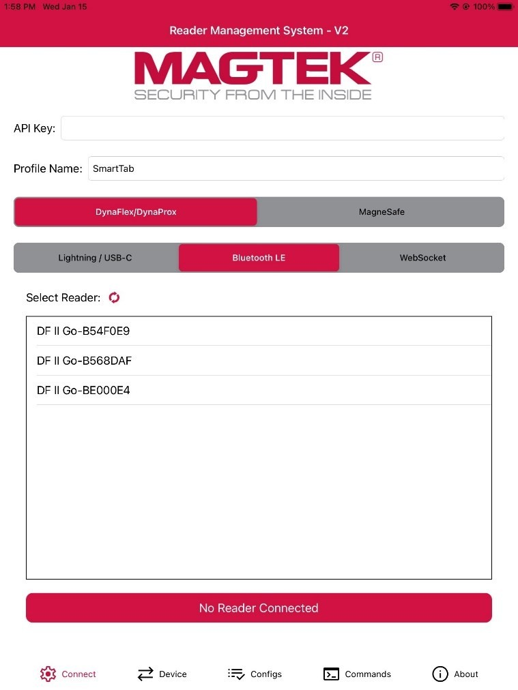
The user must load the most current DynaFlex II GO firmware before beginning. Follow these steps to update your DynaFlex II GO Firmware:
From the Connect tab, ensure the Profile Name is set to SmartTab and Tap on the Device you want to connect to.
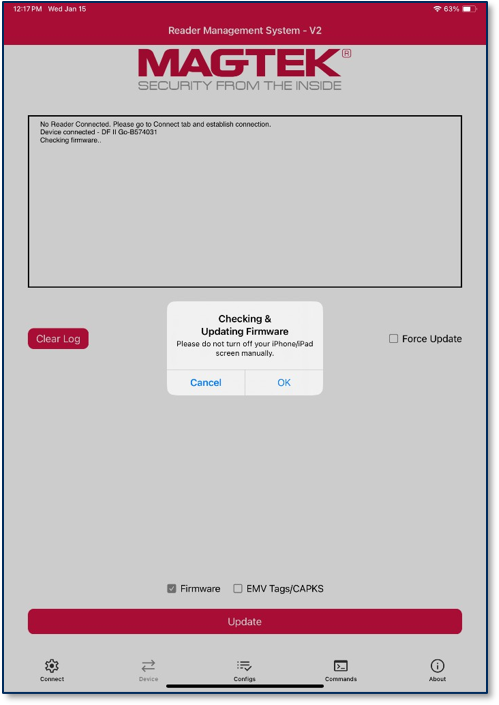
After Connecting a DynaFlex II GO to RMS, press the Device tab. To update device firmware, check the Firmware option only, and press the Update button. Only the updates that are checked will be loaded to the device. A prompt will appear asking the user not to manually turn off the screen, press OK .
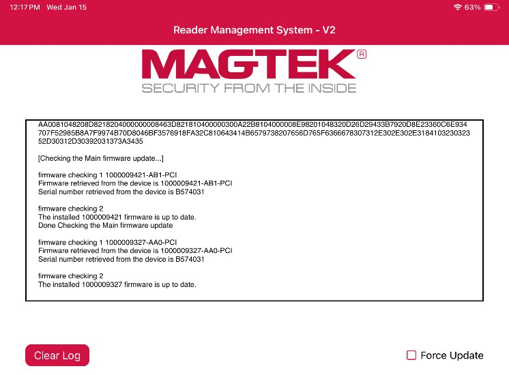
The log will indicate:
Document Number: D998200695-100
REGISTERED TO ISO 9001:2015
Copyright © 2006 - 2025 MagTek, Inc.
INFORMATION IN THIS PUBLICATION IS SUBJECT TO CHANGE WITHOUT NOTICE. MAGTEK CANNOT BE HELD LIABLE FOR ANY USE OF THE CONTENTS OF THIS DOCUMENT. ANY CHANGES OR IMPROVEMENTS MADE TO THIS PRODUCT WILL BE INCLUDED IN THE NEXT PUBLICATION RELEASE. IF YOU HAVE QUESTIONS ABOUT SPECIFIC FEATURES AND FUNCTIONS OR WHEN THEY WILL BECOME AVAILABLE, PLEASE CONTACT YOUR MAGTEK REPRESENTATIVE.
MagTek®, MagnePrint®, and MagneSafe® are registered trademarks of MagTek, Inc. Magensa™ is a trademark of MagTek, Inc.
DynaPro™ and DynaPro Mini™, are trademarks of MagTek, Inc.
To view or download any of the documents mentioned in this manual, visit
D998200595 - DYNAFLEX II GO SECURE CARD READER AUTHENTICATOR INSTALLATION AND OPERATION MANUAL
D998200681 - MAGTEK READER MANAGEMENT SYSTEM (RMS), IOS APPLICATION, INSTALLATION AND OPERATION MANUAL
D998200383-DYNAFLEX PRODUCTS THREE-WAY SECURE CARD READER AUTHENTICATORS PROGRAMMER'S MANUAL (COMMANDS)
Table 0.1 – Revisions
Rev Number
Date
Notes
10
October 5, 2020
Initial release
IMPORTANT: YOU SHOULD CAREFULLY READ ALL THE TERMS, CONDITIONS AND RESTRICTIONS OF THIS LICENSE AGREEMENT BEFORE INSTALLING THE SOFTWARE PACKAGE. YOUR INSTALLATION OF THE SOFTWARE PACKAGE PRESUMES YOUR ACCEPTANCE OF THE TERMS, CONDITIONS, AND RESTRICTIONS CONTAINED IN THIS AGREEMENT. IF YOU DO NOT AGREE WITH THESE TERMS, CONDITIONS, AND RESTRICTIONS, PROMPTLY RETURN THE SOFTWARE PACKAGE AND ASSOCIATED DOCUMENTATION TO THE ADDRESS ON THE FRONT PAGE OF THIS DOCUMENT, ATTENTION: CUSTOMER SUPPORT.
MagTek, Incorporated (the "Licensor") owns and has the right to distribute the described software and documentation, collectively referred to as the "Software."
LICENSE: Licensor grants you (the "Licensee") the right to use the Software in conjunction with MagTek products. LICENSEE MAY NOT COPY, MODIFY, OR TRANSFER THE SOFTWARE IN WHOLE OR IN PART EXCEPT AS EXPRESSLY PROVIDED IN THIS AGREEMENT. Licensee
may not decompile, disassemble, or in any other manner attempt to reverse engineer the Software. Licensee shall not tamper with, bypass, or alter any security features of the software or attempt to do so.
TRANSFER: Licensee may not transfer the Software or license to the Software to another party without the prior written authorization of the Licensor. If Licensee transfers the Software without authorization, all rights granted under this Agreement are automatically terminated.
COPYRIGHT: The Software is copyrighted. Licensee may not copy the Software except for archival purposes or to load for execution purposes. All other copies of the Software are in violation of this Agreement.
TERM: This Agreement is in effect as long as Licensee continues the use of the Software. The Licensor also reserves the right to terminate this Agreement if Licensee fails to comply with any of the terms, conditions, or restrictions contained herein. Should Licensor terminate this Agreement due to Licensee's failure to comply, Licensee agrees to return the Software to Licensor. Receipt of returned Software by the Licensor shall mark the termination.
LIMITED WARRANTY: Licensor warrants to the Licensee that the disk(s) or other media on which the Software is recorded are free from defects in material or workmanship under normal use.
THE SOFTWARE IS PROVIDED AS IS. LICENSOR MAKES NO OTHER WARRANTY OF ANY KIND, EITHER EXPRESS OR IMPLIED, INCLUDING, BUT NOT LIMITED TO, THE IMPLIED WARRANTIES OF MERCHANTABILITY AND FITNESS FOR A PARTICULAR PURPOSE.
Because of the diversity of conditions and PC hardware under which the Software may be used, Licensor does not warrant that the Software will meet Licensee specifications or that the operation of the Software will be uninterrupted or free of errors.
IN NO EVENT WILL LICENSOR BE LIABLE FOR ANY DAMAGES, INCLUDING ANY LOST PROFITS, LOST SAVINGS, OR OTHER INCIDENTAL OR CONSEQUENTIAL DAMAGES ARISING OUT OF THE USE, OR INABILITY TO USE, THE SOFTWARE. Licensee's sole remedy in
the event of a defect in material or workmanship is expressly limited to replacement of the Software disk(s) if applicable.
GOVERNING LAW: If any provision of this Agreement is found to be unlawful, void, or unenforceable, that provision shall be removed from consideration under this Agreement and will not affect the enforceability of any of the remaining provisions. This Agreement shall be governed by the laws of the State of California and shall inure to the benefit of MagTek, Incorporated, its successors or assigns.
ACKNOWLEDGMENT: LICENSEE ACKNOWLEDGES THAT HE HAS READ THIS AGREEMENT, UNDERSTANDS ALL OF ITS TERMS, CONDITIONS, AND RESTRICTIONS, AND AGREES TO BE BOUND BY THEM. LICENSEE ALSO AGREES THAT THIS AGREEMENT SUPERSEDES ANY AND ALL VERBAL AND WRITTEN COMMUNICATIONS BETWEEN LICENSOR AND LICENSEE OR THEIR ASSIGNS RELATING TO THE SUBJECT MATTER OF THIS AGREEMENT.
QUESTIONS REGARDING THIS AGREEMENT SHOULD BE ADDRESSED IN WRITING TO MAGTEK, INCORPORATED, ATTENTION: CUSTOMER SUPPORT, AT THE ADDRESS LISTED IN THIS DOCUMENT, OR E-MAILED TO SUPPORT@MAGTEK.COM.
American Express® and EXPRESSPAY FROM AMERICAN EXPRESS® are registered trademarks of American Express Marketing & Development Corp.
D-PAYMENT APPLICATION SPECIFICATION® is a registered trademark to Discover Financial Services CORPORATION MasterCard® is a registered trademark and PayPass™ and Tap & Go™ are trademarks of MasterCard International Incorporated. Visa® and Visa payWave® are registered trademarks of Visa International Service Association.
ANSI®, the ANSI logo, and numerous other identifiers containing "ANSI" are registered trademarks, service marks, and accreditation marks of the American National Standards Institute (ANSI).
ISO® is a registered trademark of the International Organization for Standardization. UL™ and the UL logo are trademarks of UL LLC.
PCI Security Standards Council® is a registered trademark of the PCI Security Standards Council, LLC.
EMV® is a registered trademark in the U.S. and other countries and an unregistered trademark elsewhere. The EMV trademark is owned by EMVCo, LLC. The Contactless Indicator mark, consisting of four graduating arcs, is a trademark owned by and used with permission of EMVCo, LLC.
The Bluetooth® word mark and logos are registered trademarks owned by Bluetooth SIG, Inc. and any use of such marks by MagTek is under license.
Google Play™ store, Google Wallet™ payment service, and Android™ platform are trademarks of Google Inc.
Apple Pay®, iPhone®, iPod®, Mac®, and OS X® are registered trademarks of Apple Inc., registered in the U.S. and other countries. iPad™ is a trademark of Apple. Inc. App StoreSM is a service mark of Apple Inc., registered in the U.S. and other countries. IOS is a trademark or registered trademark of Cisco in the U.S. and other countries and is used by Apple Inc. under license.
Microsoft®, Windows®, and .NET® are registered trademarks of Microsoft Corporation. All other system names and product names are the property of their respective owners.
Rev Number
Date
Notes
100
January 2025
Initial Release
D998200383 DYNAFLEX PRODUCTS PROGRAMMER'S MANUAL ( COMMANDS )
Connect the device to the USB port of the Linux computer.
The first time, allow a moment for the host to recognize the device.
The console automatically connects to the first USB DynaProx it finds. If specified used as below.
Connect the device to the Serial port of the Linux computer.
The EMVConfiguration console accepts a device path of either usb or serial. Serial may be in one of the following formats pending on the system hardware.
Set the appropriate device path when specifying –d in the command line.
Then press Enter key. The result is shown similar as below.
The console exits afterwards.
To send an Excel configuration file to the device follow these steps. Excel may contain one or multiple configurations.
After the name of the console, enter:
Example: Excel configuration file
Then press Enter key. The EMVConfiguration console will connect to Magensa Remote Services, send the excel content for conversion into .bin format, and then send each .bin file to the device.
The result is shown similar as below.
The console exits afterwards.
-d serial://port=/dev/ttyS1
-d serial://port=/dev/serial0
-d serial://port=/dev/ttyUSB0[cfg.bin] Name of the .bin file
-t File type (excel or bin)
-i File Id number. 8 digit file id.
00000000 TERMINAL
00000100 PROCESSING
00000200 ENTRYPOINT
00000300 CA KEYS
00000500 AMEXDRL
-d Device path. Optional if using USB. $ sudo ./emvconfiguration cfg00000000.bin –t bin –i 0000000000Connect to usb progress (33)
progress (66)
progress (100)
result (0)
send file – 00000000 successfully[cfg.xlsx] Name of the .excel file
-t File type (excel or bin)
-d Device path. Optional if using USB. $ sudo ./emvconfiguration cfg.xlsx –t excelConnect to usb
progress (33)
progress (66)
progress (100)
result (0)
update config – 00000000 successfully
progress (4)
progress (9)
progress (14)
. . .
result (0)
update config – 00000100 successfully
progress (4)
progress (9)
progress (14)
. . .
result (0)
update config – 00000200 successfully
progress (4)
progress (9)
progress (14)
. . .
result (0)
update config – 00000300 successfully progress (4)
progress (9)
progress (14)
. . .
result (0)
update config – 00000500 successfullyUSB-C cable with USB Type-A or USB-C for host connection
Software 1000007405 DynaFlex, DynaProx Firmware Update Utility
Firmware files provided by MagTek
To connect to the device follow these steps.
Connect a DynaFlex or DynaProx to the USB port of the Windows PC.
Launch the DynaFlex, DynaProx Firmware Update Utility.
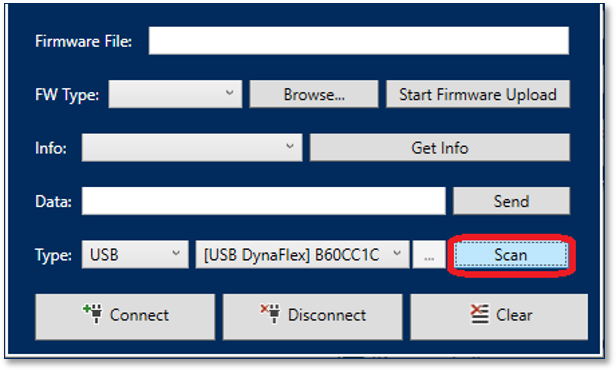
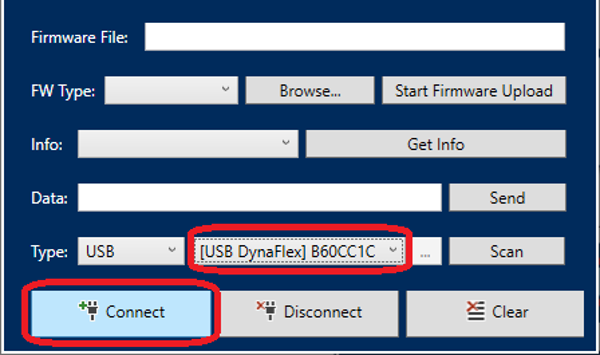
Press the Scan button to update the list of devices.
Select a device from the list, then press the Connect button to connect to the device.
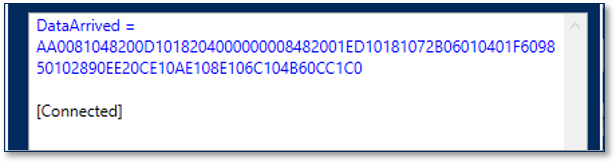
The status will display Connected .
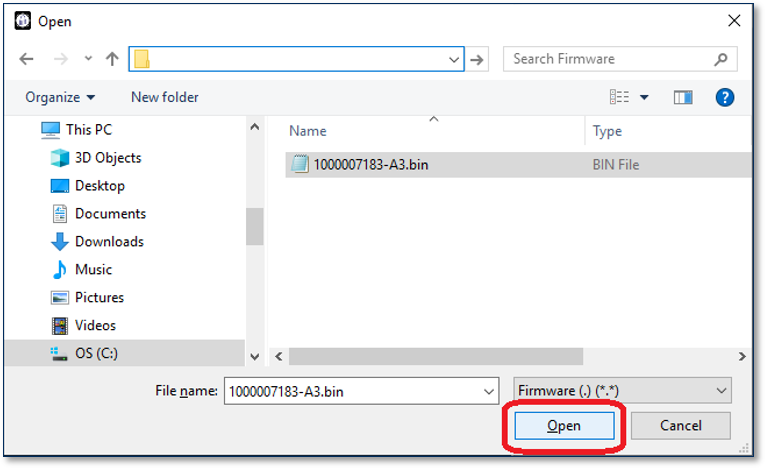
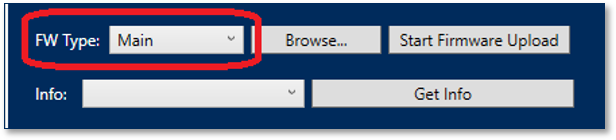
Press the Browse button, select the firmware file, and then press the Open button.
The software will automatically detect the firmware type.
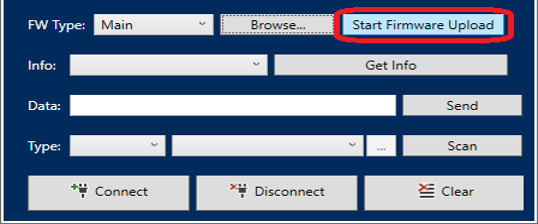
Press the Start Firmwre Upload button to begin the upload.
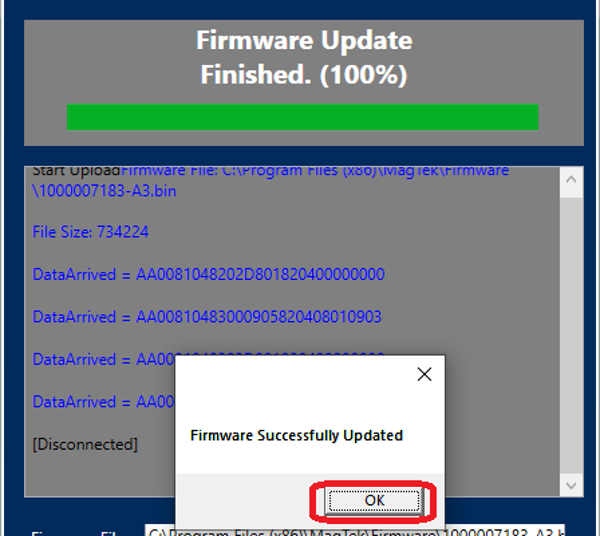
Wait until the Firmware Upload is complete. The progress of the upload will change to prepare, downloading, and updating.
After uploading, the DynaFlex, DynaProx Firmware Update Utility will display Firmware Successfully Updated . Press the OK button. The device will automatically reboot after a completed firmware update.
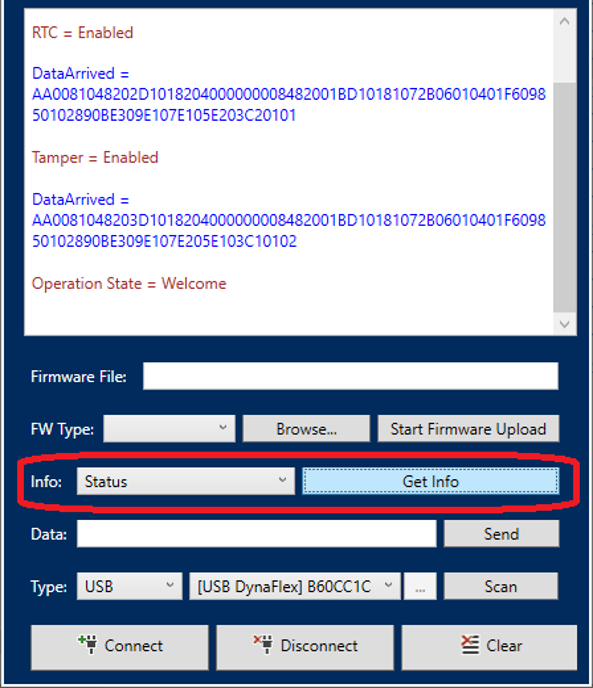
If you want to get current information about the device such as firmware version, firmware hash, select the desired information under the Info drop down and press the Get Info button.
DO NOT power off or disconnect during the upload.
Update device firmware without writing code.
Onboarding for Selectable Card Data Encryption (SCDE) available on DynaFlex II GO devices.
Reference Section
Information Available
Convert and work with object identifiers (OIDs).
Build and manage EMV configuration files.
Need Help?
For additional support, please contact MagTek Support:
Technical Support:
📧 Email:
If updates have succeeded,
If updates have failed
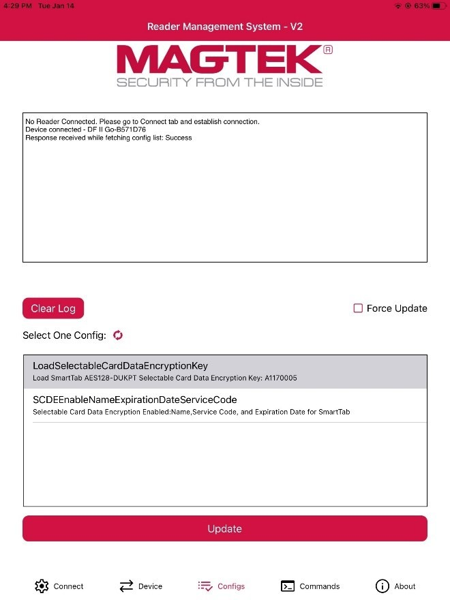
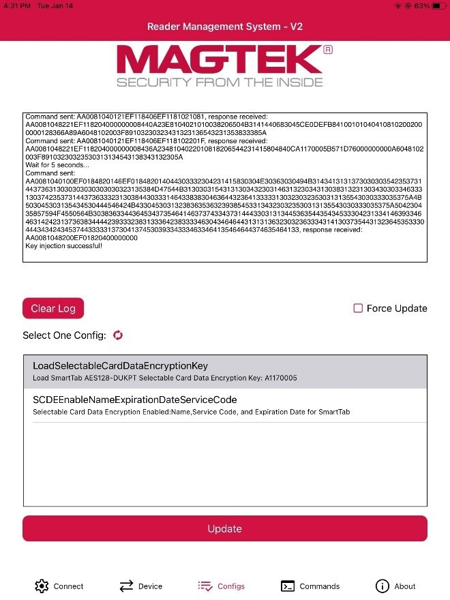
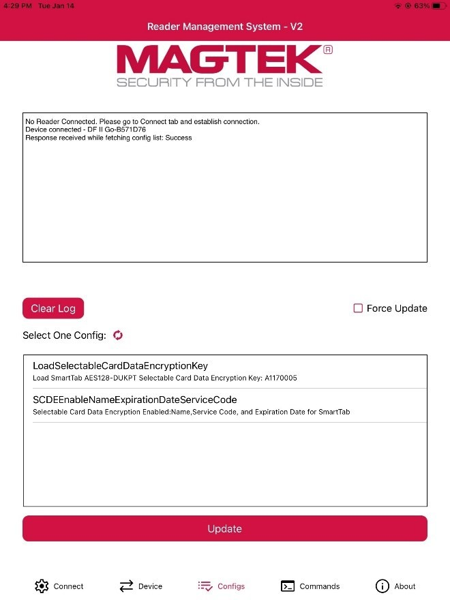
To update or change your device’s configurations to include SCDE, begin by loading the SCDE Key:
Tap on LoadSelectableCardDataEncryptionKey first.
Press the Refresh button to refresh the list of available configurations if LoadSelectableCardDataEncryptionKey does not appear.
Press the Update button to load the key.
The log will indicate if the configuration update is successful or if it has failed.
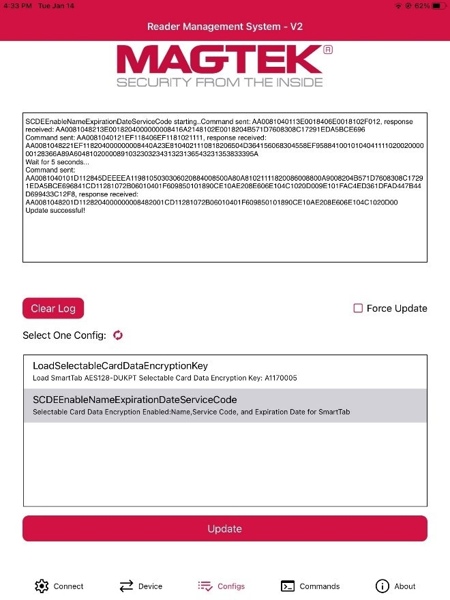
To load SCDE Enable Name Expiration Date Service Code:
Tap on LoadSelectableCardDataEncryptionKey first.
Press the Refresh button to refresh the list of available device updates if LoadSelectableCardDataEncryptionKey does not appear.·
Press the Update button to load the key.
The log will indicate if the configuration update is successful or if it has failed
After completing the steps, the device will support Selectable Card Data Encryption, allowing the user to view card data outside of a transaction scenario.
Manual Part Number: D998200557-10
REGISTERED TO ISO 9001:2015
Copyright © 2006 – 2023 MagTek, Inc.
Information in this publication is subject to change without notice and may contain technical inaccuracies or graphical discrepancies. Changes or improvements made to this product will be updated in the next publication release. No part of this document may be reproduced or transmitted in any form or by any means, electronic or mechanical, for any purpose, without the express written permission of MagTek, Inc.
MagTek® is a registered trademark of MagTek, Inc. MagneSafe® is a registered trademark of MagTek, Inc. iDynamo™, and uDynamo are trademarks of MagTek, Inc.
eDynamo™, Dynamag, and DynaMAX are trademarks of MagTek, Inc. DynaFlex™, DynaFlex Pro™, and DynaProx™ are trademarks of MagTek, Inc.
Microsoft®, Windows® and .NET® are registered trademarks of Microsoft Corporation.
EMV® is a registered trademark in the U.S. and other countries and an unregistered trademark elsewhere. The EMV trademark is owned by EMVCo, LLC. The Contactless Indicator mark, consisting of four graduating arcs, is a trademark owned by and used with permission of EMVCo, LLC.
All other system names and product names are the property of their respective owners.
Table 0.1 – Revisions
SOFTWARE LICENSE AGREEMENT
IMPORTANT: YOU SHOULD CAREFULLY READ ALL THE TERMS, CONDITIONS AND RESTRICTIONS OF THIS LICENSE AGREEMENT BEFORE INSTALLING THE SOFTWARE PACKAGE. YOUR INSTALLATION OF THE SOFTWARE PACKAGE PRESUMES YOUR ACCEPTANCE OF THE TERMS, CONDITIONS, AND RESTRICTIONS CONTAINED IN THIS AGREEMENT. IF YOU DO NOT AGREE WITH THESE TERMS, CONDITIONS, AND RESTRICTIONS, PROMPTLY RETURN THE SOFTWARE PACKAGE AND ASSOCIATED DOCUMENTATION TO THE ADDRESS ON THE FRONT PAGE OF THIS DOCUMENT, ATTENTION: CUSTOMER SUPPORT.
MagTek, Incorporated (the "Licensor") owns and has the right to distribute the described software and documentation, collectively referred to as the "Software."
LICENSE: Licensor grants you (the "Licensee") the right to use the Software in conjunction with MagTek products. LICENSEE MAY NOT COPY, MODIFY, OR TRANSFER THE SOFTWARE IN WHOLE OR IN PART EXCEPT AS EXPRESSLY PROVIDED IN THIS AGREEMENT. Licensee
may not decompile, disassemble, or in any other manner attempt to reverse engineer the Software. Licensee shall not tamper with, bypass, or alter any security features of the software or attempt to do so.
TRANSFER: Licensee may not transfer the Software or license to the Software to another party without the prior written authorization of the Licensor. If Licensee transfers the Software without authorization, all rights granted under this Agreement are automatically terminated.
COPYRIGHT: The Software is copyrighted. Licensee may not copy the Software except for archival purposes or to load for execution purposes. All other copies of the Software are in violation of this Agreement.
TERM: This Agreement is in effect as long as Licensee continues the use of the Software. The Licensor also reserves the right to terminate this Agreement if Licensee fails to comply with any of the terms, conditions, or restrictions contained herein. Should Licensor terminate this Agreement due to Licensee's failure to comply, Licensee agrees to return the Software to Licensor. Receipt of returned Software by the Licensor shall mark the termination.
LIMITED WARRANTY: Licensor warrants to the Licensee that the disk(s) or other media on which the Software is recorded are free from defects in material or workmanship under normal use.
THE SOFTWARE IS PROVIDED AS IS. LICENSOR MAKES NO OTHER WARRANTY OF ANY KIND, EITHER EXPRESS OR IMPLIED, INCLUDING, BUT NOT LIMITED TO, THE IMPLIED WARRANTIES OF MERCHANTABILITY AND FITNESS FOR A PARTICULAR PURPOSE.
Because of the diversity of conditions and PC hardware under which the Software may be used, Licensor does not warrant that the Software will meet Licensee specifications or that the operation of the Software will be uninterrupted or free of errors.
IN NO EVENT WILL LICENSOR BE LIABLE FOR ANY DAMAGES, INCLUDING ANY LOST PROFITS, LOST SAVINGS, OR OTHER INCIDENTAL OR CONSEQUENTIAL DAMAGES ARISING OUT OF THE USE, OR INABILITY TO USE, THE SOFTWARE. Licensee's sole remedy in
the event of a defect in material or workmanship is expressly limited to replacement of the Software disk(s) if applicable.
GOVERNING LAW: If any provision of this Agreement is found to be unlawful, void, or unenforceable, that provision shall be removed from consideration under this Agreement and will not affect the enforceability of any of the remaining provisions. This Agreement shall be governed by the laws of the State of California and shall inure to the benefit of MagTek, Incorporated, its successors or assigns.
ACKNOWLEDGMENT: LICENSEE ACKNOWLEDGES THAT HE HAS READ THIS AGREEMENT, UNDERSTANDS ALL OF ITS TERMS, CONDITIONS, AND RESTRICTIONS, AND AGREES TO BE BOUND BY THEM. LICENSEE ALSO AGREES THAT THIS AGREEMENT SUPERSEDES ANY AND ALL VERBAL AND WRITTEN COMMUNICATIONS BETWEEN LICENSOR AND LICENSEE OR THEIR ASSIGNS RELATING TO THE SUBJECT MATTER OF THIS AGREEMENT.
QUESTIONS REGARDING THIS AGREEMENT SHOULD BE ADDRESSED IN WRITING TO MAGTEK, INCORPORATED, ATTENTION: CUSTOMER SUPPORT, AT THE ADDRESS LISTED IN THIS DOCUMENT, OR E-MAILED TO
DEMO SOFTWARE / SAMPLE CODE: Unless otherwise stated, all demo software and sample code are to be used by Licensee for demonstration purposes only and MAY NOT BE incorporated into any production or live environment. The PIN Pad sample implementation is for software PIN Pad test purposes only and is not PCI compliant. To meet PCI compliance in production or live environments, a third-party PCI compliant component (hardware or software-based) must be used.
Manual Part Number: DD998200579-100
REGISTERED TO ISO 9001:2015
Copyright © 2006 – 2024 MagTek, Inc.
Information in this publication is subject to change without notice and may contain technical inaccuracies or graphical discrepancies. Changes or improvements made to this product will be updated in the next publication release. No part of this document may be reproduced or transmitted in any form or by any means, electronic or mechanical, for any purpose, without the express written permission of MagTek, Inc.
MagTek® is a registered trademark of MagTek, Inc. MagneSafe® is a registered trademark of MagTek, Inc. iDynamo™, and uDynamo are trademarks of MagTek, Inc.
eDynamo™, Dynamag, and DynaMAX are trademarks of MagTek, Inc.
This document provides instructions to use the OID Converter Console. It is part of a larger library of documents designed to assist Secure Card Readers implementers, which includes the following documents available from MagTek:
D998200380 MAGTEK UNIVERSAL SDK PROGRAMMER'S MANUAL (MICROSOFT.NET)
D998200383 DynaFlex Family Programmer’s Manual (COMMANDS)
The following instructions are for using the DynaFlex, DynaProx OID Converter Console on a Windows operating system.
Rev Number
Date
Notes
10
January 9, 2023
Initial release
📞 Phone: 1-562-546-6800 (US)
🕐 Hours: Monday-Friday, 5:30 AM - 5:00 PM PST
Online Resources:
🌐 Support Portal: developer.magtek.com
Documentation Feedback:
Help us improve this documentation! feedback@magtek.com


The Bluetooth® word mark and logos are registered trademarks owned by Bluetooth SIG, Inc. and any use of such marks by MagTek is under license.
Linux® is the registered trademark of Linus Torvalds in the U.S. and other countries. Ubuntu® is a registered trademark of Canonical Ltd.
Microsoft®, Windows® and .NET® are registered trademarks of Microsoft Corporation.
EMV® is a registered trademark in the U.S. and other countries and an unregistered trademark elsewhere. The EMV trademark is owned by EMVCo, LLC. The Contactless Indicator mark, consisting of four graduating arcs, is a trademark owned by and used with permission of EMVCo, LLC.
All other system names and product names are the property of their respective owners.
Rev Number
Date
Notes
100
February 1, 2024
Initial release
IMPORTANT: YOU SHOULD CAREFULLY READ ALL THE TERMS, CONDITIONS AND RESTRICTIONS OF THIS LICENSE AGREEMENT BEFORE INSTALLING THE SOFTWARE PACKAGE. YOUR INSTALLATION OF THE SOFTWARE PACKAGE PRESUMES YOUR ACCEPTANCE OF THE TERMS, CONDITIONS, AND RESTRICTIONS CONTAINED IN THIS AGREEMENT. IF YOU DO NOT AGREE WITH THESE TERMS, CONDITIONS, AND RESTRICTIONS, PROMPTLY RETURN THE SOFTWARE PACKAGE AND ASSOCIATED DOCUMENTATION TO THE ADDRESS ON THE FRONT PAGE OF THIS DOCUMENT, ATTENTION: CUSTOMER SUPPORT.
TERMS, CONDITIONS, AND RESTRICTIONS
MagTek, Incorporated (the "Licensor") owns and has the right to distribute the described software and documentation, collectively referred to as the "Software."
LICENSE: Licensor grants you (the "Licensee") the right to use the Software in conjunction with MagTek products. LICENSEE MAY NOT COPY, MODIFY, OR TRANSFER THE SOFTWARE IN WHOLE OR IN PART EXCEPT AS EXPRESSLY PROVIDED IN THIS AGREEMENT. Licensee
may not decompile, disassemble, or in any other manner attempt to reverse engineer the Software. Licensee shall not tamper with, bypass, or alter any security features of the software or attempt to do so.
TRANSFER: Licensee may not transfer the Software or license to the Software to another party without the prior written authorization of the Licensor. If Licensee transfers the Software without authorization, all rights granted under this Agreement are automatically terminated.
COPYRIGHT: The Software is copyrighted. Licensee may not copy the Software except for archival purposes or to load for execution purposes. All other copies of the Software are in violation of this Agreement.
TERM: This Agreement is in effect as long as Licensee continues the use of the Software. The Licensor also reserves the right to terminate this Agreement if Licensee fails to comply with any of the terms, conditions, or restrictions contained herein. Should Licensor terminate this Agreement due to Licensee's failure to comply, Licensee agrees to return the Software to Licensor. Receipt of returned Software by the Licensor shall mark the termination.
LIMITED WARRANTY: Licensor warrants to the Licensee that the disk(s) or other media on which the Software is recorded are free from defects in material or workmanship under normal use.
THE SOFTWARE IS PROVIDED AS IS. LICENSOR MAKES NO OTHER WARRANTY OF ANY KIND, EITHER EXPRESS OR IMPLIED, INCLUDING, BUT NOT LIMITED TO, THE IMPLIED WARRANTIES OF MERCHANTABILITY AND FITNESS FOR A PARTICULAR PURPOSE.
Because of the diversity of conditions and PC hardware under which the Software may be used, Licensor does not warrant that the Software will meet Licensee specifications or that the operation of the Software will be uninterrupted or free of errors.
IN NO EVENT WILL LICENSOR BE LIABLE FOR ANY DAMAGES, INCLUDING ANY LOST PROFITS, LOST SAVINGS, OR OTHER INCIDENTAL OR CONSEQUENTIAL DAMAGES ARISING OUT OF THE USE, OR INABILITY TO USE, THE SOFTWARE. Licensee's sole remedy in
the event of a defect in material or workmanship is expressly limited to replacement of the Software disk(s) if applicable.
GOVERNING LAW: If any provision of this Agreement is found to be unlawful, void, or unenforceable, that provision shall be removed from consideration under this Agreement and will not affect the enforceability of any of the remaining provisions. This Agreement shall be governed by the laws of the State of California and shall inure to the benefit of MagTek, Incorporated, its successors or assigns.
ACKNOWLEDGMENT: LICENSEE ACKNOWLEDGES THAT HE HAS READ THIS AGREEMENT, UNDERSTANDS ALL OF ITS TERMS, CONDITIONS, AND RESTRICTIONS, AND AGREES TO BE BOUND BY THEM. LICENSEE ALSO AGREES THAT THIS AGREEMENT SUPERSEDES ANY AND ALL VERBAL AND WRITTEN COMMUNICATIONS BETWEEN LICENSOR AND LICENSEE OR THEIR ASSIGNS RELATING TO THE SUBJECT MATTER OF THIS AGREEMENT.
QUESTIONS REGARDING THIS AGREEMENT SHOULD BE ADDRESSED IN WRITING TO MAGTEK, INCORPORATED, ATTENTION: CUSTOMER SUPPORT, AT THE ADDRESS LISTED IN THIS DOCUMENT, OR E-MAILED TO SUPPORT@MAGTEK.COM.
DEMO SOFTWARE / SAMPLE CODE: Unless otherwise stated, all demo software and sample code are to be used by Licensee for demonstration purposes only and MAY NOT BE incorporated into any production or live environment. The PIN Pad sample implementation is for software PIN Pad test purposes only and is not PCI compliant. To meet PCI compliance in production or live environments, a third-party PCI compliant component (hardware or software-based) must be used.
When getting a configuration, only input the OID.
Launch a command terminal where the oidconverter.exe is located.
Type oidconverter and an OID in decimal format as shown below, then ENTER. The OID may also be typed in hexadecimal as commented out below.
The console app displays the Input OID and Converted OID as shown below.
Use the Converted OID when getting a property value with the MTUSDK API getConfigInfo().
When calling the function getConfigInfo, parameter configType is the first number of the OID. 2.1.2.2.2.1
When setting a configuration, input the OID and the Command Data.
Launch a command terminal where the oidconverter.exe is located.
Type oidconverter, an OID, in decimal format, and a Value in hexadecimal as shown below, then ENTER.
The OID may also be typed in hexadecimal as commented out below.
The console app displays the Input OID and Converted OID as shown below.
Use the Converted OID when setting a property value with the MTUSDK API setConfigInfo().
When calling the function getConfigInfo, parameter configType is the first number of the OID. 1.2.3.1.1.1
c:\temp\oidconverter 2.1.2.2.2.1

//When using hexadecimal OID
//c:\temp\oidconverter 020102020201C:\temp>oidconverter 2.1.2.2.2.1
Input OID: 2.1.2.2.2.1
Converted OID string: E108E206E204E202C100Input OID: 2.1.2.2.2.1
Converted OID string: E108E206E204E202C100byte[] getConfigInfo(
byte configType,
byte[] data);
byte configType = 0x02;
byte[] data = {0xE1,0x08,0xE2,0x06,0xE2,0x04,0xE2,0x02,0xC1,0x00};
byte[] response = devConfig.getConfigInfo(configType, data);C:\temp>oidconverter 1.2.3.1.1.1 03000000
//When typed in hexadecimal.
//C:\temp>oidconverter 010203010101 03000000C:\temp>oidconverter 1.2.3.1.1.1 03000000
Input OID: 1.2.3.1.1.1
Input Command Data: 03000000
Converted OID string: E20CE30AE108E106C10403000000Input OID: 1.2.3.1.1.1
Input Command Data: 03000000
Converted OID string: E20CE30AE108E106C10403000000
byte[] setConfigInfo(
        byte configType,
        byte[] data,
IConfigurationCallback callback);byte configType = 0x01;
byte[] data = {0xE2,0x0C,0xE3,0x0A,0Xe1,0x08,0xE1,
0x06,0xC1,0x04,0x03,0x00,0x00,0x00};
int response = devConfig.setConfigInfo(configType, data, this);