Loading...
Loading...
Loading...
Loading...
Loading...
Loading...
Loading...
Loading...
Loading...
Loading...
Loading...
Loading...
Loading...
Loading...
Loading...
Loading...
Loading...
Loading...
Loading...
Loading...
Loading...
Loading...
Reserved
Some of the commands and notifications described in this application group are designed to support an external Cryptera Encrypting PIN Pad (EPP). To use these functions, the host software must first serve as a broker to pair oDynamo with the Encrypting PIN Pad.
Be aware that dismounting the EPP erases all pairing information.
Pairing can happen in the field, usually after installation or replacement of the EPP or SCR. Pairing always starts at Step 1.
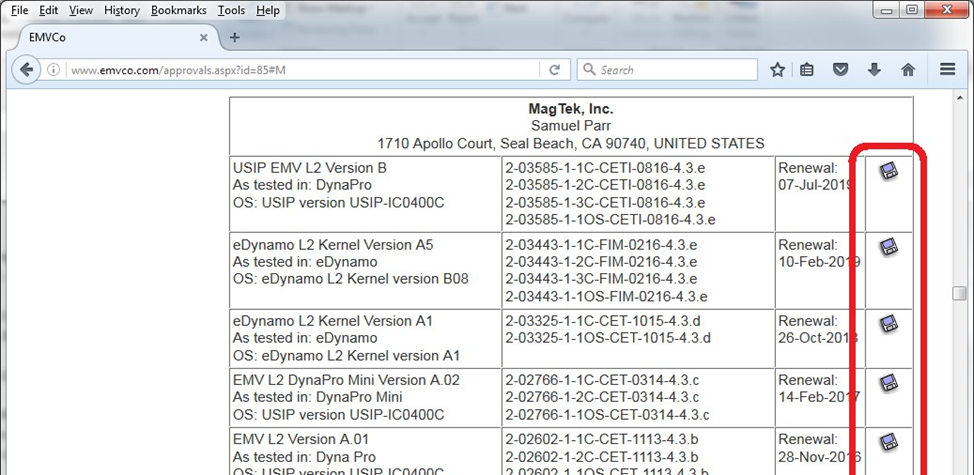
For the most up-to-date information about the device’s EMV Terminal Configuration, EMV Terminal Type, EMV Terminal Capabilities, and Additional EMV Terminal Capabilities, see the EMVCo Letter Of Approval (LOA) for the device:
In a web browser, open
Follow the Approvals and Certifications link.
For additional detail, see the EPP documentation provided by Cryptera.
To pair oDynamo with a Cryptera Encrypting PIN Pad, follow these steps:
The operator puts the EPP into the Pre-Activated or Activated state.
The host starts the pairing process by sending the EPP Command START_EXCHANGE (no parameters), Response = P1 P2 P3. If P1=OK, use the entire response (P1P2P3) in the next step.
The host sends oDynamo Command = Command 0x02::0x0A - EPP Pairing Certificate Exchange (C4 = P1P2P3). Make sure C3 value=0 in the response to confirm success. Use the data in C4 (excluding the tag and length) in the next step.
The host sends the EPP Command GENERATE_KEK using the data from the previous step as the parameters. Response = P1 P2 P3. If P1=OK, use the entire response (P1P2P3) for the next step.
The host sends oDynamo Command 0x02::0x0C - EPP Pairing Load KEK (C4 = data from the previous step). Check the oDynamo response to make sure C3 value is 0x00 = OK before proceeding.
The host sends the EPP Command FETCH_KEY (P1 = “LINK_KGK”) and receives a response P1 P2. If P1 = OK, use the data in P2 for the next step.
The host sends oDynamo Command 0x02::0x0D - EPP Pairing Load Derivation Key (C4 = the data from the previous step). Check the oDynamo response to verify C3 value is zero. C4 data is a 3 byte Key Check Value. Save this for the final step.
The host sends the EPP Command GET_KCV (“LINK_KGK”). The EPP responds with parameters = Status, KCVZERO, KCVSELF.
The host compares the 3 byte Key Check Value from oDynamo with the 3-byte KCVZERO value from the previous step. If they match, pairing is complete.
The host can re-check the pairing status at any time by comparing key check values (KCV). The host retrieves the KCV from oDynamo by sending Command 0x02::0x0E - Get Key / Certificate Information with info ID=7, and retrieves a corresponding KCV from the EPP using GET_KCV (“LINK_KGK”) like the steps above. If the values match, pairing is confirmed. If they don’t match, repeat the full pairing process described above.
Italy
0724
Spain
0276
Germany
656E
English (en)
6465
German (de)
Alternatively you may try this direct table link to the M section of tables.
Find the table for products made by MagTek, Inc. and locate the table row for the device you are working with.
Click the attachment icon at the end of the row to open the Letter of Approval for that device.
Command 0x05::0x01 - Read PAN
The host uses this command to retrieve the Primary Account Number (PAN) of the last card it successfully read, regardless of the interface used to read the card. Generally the host would use this command in solutions that use an external Encrypting PIN Pad (EPP), to retrieve the PAN and provide it to the EPP so it can create a PIN block.
For the host to successfully retrieve the plaintext PAN using this command, the device must have determined the card matched one or more entries in the device’s PAN Whitelist (see Command 0x03::0x80 - Read PAN Whitelist / Account Data Whitelist). If the card does not match an entry in the whitelist, the PAN will be available in encrypted form, but only if oDynamo is currently paired with a Cryptera EPP. The EPP decrypts the PAN and uses it to form the encrypted PIN block. Otherwise the device returns 0x0000 in parameter C4 to indicate the PAN is not available.
After successful return of the PAN to the host or a timeout, the device erases the PAN from memory. For MSR transactions, the timeout for the host to follow up with the device to retrieve the PAN is 3 seconds. Because EMV transactions may require more time for the cardholder and operator to complete, the timeout for EMV transactions is 255 seconds. If a timeout occurred, the device returns 0x0000 in parameter C4 to indicate the requested item is not available.
Table 1-1 in section 1.4 includes a list of connection types available for each device. The following subsections provide details developers will need to communicate with the device using each connection type.
How to Use Ethernet Connections (Ethernet Only)
When the device is connected to a network via a 10/100 Ethernet port, it will attempt to contact a DHCP server to acquire a dynamic IP address during power-up. See the network administrator to determine the IP address the DHCP server assigned to the device. After determining the IP address, use port 5000 to communicate with the device.
How to Send Commands Using the Network Connection
The messages exchanged between the host and the device on the TCP/IP connection do not require any wrappers or encoding: The binary data flowing through the connection is identical to the message format defined in section 2 Messages, Commands, Responses, and Notifications and in section 4 Command Set. A C0 at the beginning of a message’s usage table means that without any preparation other than binding to the port, the host begins sending the command by sending a single binary byte 0xC0.
Application ID Data Object (Tag C1) = 0x05 PAN Messages
C2
01
01
Command ID Data Object (Tag C2) = 0x01 Request PAN
01
05
Application ID Data Object (Tag C1) = 0x05 PAN Messages
C2
01
01
Command ID Data Object (Tag C2) = 0x01 Request PAN
C3
01
00
Result Code Data Object (Tag C3) = 0x00 OK / Done or 0x11 = Timeout occurred.
C4
Calculated
Byte 0 PAN Status
0x00 = PAN is not in PAN Whitelist, can not be transferred 0x01 = PAN is in PAN whitelist, full PAN is available
0x02 = PAN is in PAN whitelist, 12 digits of PAN are available 0x03 = PAN is encrypted for use with paired Cryptera EPP
Byte 1 PAN Length
Bytes 2..n PAN Value (if available)
If the PAN is encrypted, the value will be 16 bytes and can be used as the data portion of parameter P2 for the EPP command READPIN_EXT.
Tag
Len
Value(s) / Description
C0
01
01
Message Type Data Object (Tag C0) = 0x01 Command
C1
01
Tag
Len
Value(s) / Description
C0
01
02
Message Type Data Object (Tag C0) = 0x02 Response
05
C1
The messages exchanged between the host and the device on the RS-232 connection require a small wrapper and must be ASCII encoded hexadecimal (‘0’ through ‘F’ only). The message format is defined in section 2 Messages, Commands, Responses, and Notifications and in section 4 Command Set. ASCII encoding means when the device intends to send C0 at the beginning of a message’s usage table, it should send two ASCII bytes, where ‘C’ is ASCII 0x43 and ‘0’ is ASCII 0x30. When the device is using default settings, the host should send a line feed (0x0A) to signal the end of the message. The device’s responses and notifications will be wrapped and encoded the same way.
For example, to send Command 0x00:0x10 - Get Product ID to the device over the RS-232 connection, the host should send a stream consisting of ASCII ‘C’ (0x43), ASCII ‘0’ (0x30), ASCII ‘0’ (0x30), ASCII ‘1’ (0x31), ASCII ‘0’ (0x30), ASCII ‘1’ (0x31), ASCII ‘C’ (0x43), ASCII ‘1’ (0x31), and so on following the sequence in Table 4-1, then a line feed (0x0A). The device will then send a response over the same connection according to the sequence in Table 4-2, then a line feed (0x0A).
The devices only use TXD and RXD; hardware handshaking is not available. The default serial settings are 9600 bps, No parity, 8 data bits, and 1 stop bit.
The device can optionally be configured by the manufacturer to expect / transmit a Starting Byte and an ASCII CRC checksum in this order: <Starting Byte> <Message in ASCII> <CRC in ASCII> <Ending Byte>. The device’s default setting is “raw mode,” where the device only expects / transmits the Ending Byte, which is set to Line Feed (0x0A). Other popular choices when ordering a device may include Starting Byte=STX (0x02); Ending Byte=ETX (0x03) or CR (0x0D).
The device conforms to the USB specification revision 2.0, and is compatible with revision 1.1. It also conforms to the Human Interface Device (HID) class specification version 1.1, and communicates as a vendor-defined HID device. This document assumes the reader is familiar with USB HID class specifications, which are available at www.usb.org.
Developers can easily create custom software to communicate with the device using any framework that can communicate with a USB port. For example, developers can use the standard Windows USB HID driver with Visual Basic or Visual C++. MagTek has developed demonstration software that communicates with the device via this method, and developers can use it to test the device and to provide a starting point for developing other software. Because the device’s USB implementation is operating system agnostic, the device can be used with other platforms as well, such as Linux. For more information, see the MagTek web site, or contact your reseller or MagTek Support Services.
The device is a full speed high-powered USB device that identifies itself with vendor ID 0x0801 and product ID 0x001B. The device does not draw power from the USB port, and does not support USB Suspend or remote wakeup.
USB HID devices send and receive data using reports. Each report can contain several sections, called usages, each of which has its own unique four-byte identifier. The two most significant bytes of a usage are called the usage page, and the least two significant bytes are called the usage ID. Vendor-defined usages must have a usage page in the range 0xFF00 - 0xFFFF, and it is common practice for related usage IDs to share the same usage page. For these reasons, all usages for this device uses vendor-defined usage page 0xFF20.
HID reports used by the host can be divided into three types:
Feature Reports, which can be further divided into Get types and Set types. The host exclusively uses this type of report to send messages to the device.
Input Reports are used by the device to send asynchronous responses or notifications to the host when a related feature report completes, or automatically when the device’s state changes. This is common when an operation depends on cardholder action.
Output Reports. Output reports are part of the USB HID standard, but are not used by this device.
The list of the device’s available reports and their structure is sent to the host in a report descriptor, usually just after the device is connected to the USB port. Generally the details of the report descriptor are abstracted by the developer’s HID API; however, should it become necessary to examine a report descriptor byte-by-byte, a full inventory of the report descriptor for these devices is provided in Table 3-1.
Item Tag (Value)
Raw Data
Usage Page (Vendor-Defined 33)
06 20 FF
Usage (Vendor-Defined 1)
09 01
Collection (Application)
A1 01
How to Send Commands Using USB HID
The general sequence the host should use to send a message to the device is as follows:
The host sends a Set Feature Report with Report ID 0x05, containing the command message in binary format (bytes) as data.
The device asynchronously sends an Input Report with Report ID 0x02, containing the defined response to the originating command in binary format (bytes) as data. Depending on the command, the response may or may not contain a Data Field Data Object (Tag C4 or E0).
The general sequence the device uses to send a message to the host is as follows:
The device’s state changes, a cardholder or operator takes action, or new information becomes available.
The device asynchronously sends an Input Report with Report ID 0x02, containing the notification message in binary format (bytes) as data.
The information in this section requires no action on the part of the consumer, and is included to comply with various disclosure requirements governing the use of components used in the development of this device’s firmware.
From
GNU GENERAL PUBLIC LICENSE
Version 2, June 1991
Copyright (C) 1989, 1991 Free Software Foundation, Inc., 51 Franklin Street, Fifth Floor, Boston, MA 02110-1301 USA Everyone is permitted to copy and distribute verbatim copies of this license document, but changing it is not allowed.
Preamble
The licenses for most software are designed to take away your freedom to share and change it. By contrast, the GNU General Public License is intended to guarantee your freedom to share and change free software--to make sure the software is free for all its users. This General Public License applies to most of the Free Software Foundation's software and to any other program whose authors commit to using it. (Some other Free Software Foundation software is covered by the GNU Lesser General Public License instead.) You can apply it to your programs, too.
Report Size (8)
75 08
Logical Minimum (0)
15 00
Logical Maximum (255)
26 FF 00
Report ID (5)
85 05
Usage (Vendor-Defined 5)
09 05
Report Count (63)
95 3F
Feature (Data,Var,Abs,NWrp,Lin,Pref,NNul,NVol,Buf)
B2 02 01
Report ID (2)
85 02
Usage (Vendor-Defined 32)
09 20
Report Count (63)
95 3F
Input (Data,Var,Abs,NWrp,Lin,Pref,NNul,Buf)
82 02 01
Report ID (3)
85 03
Usage (Vendor-Defined 33)
09 21
Report Count (5)
95 05
Output (Data,Var,Abs,NWrp,Lin,Pref,NNul,NVol,Bit)
91 02
End Collection
C0
When we speak of free software, we are referring to freedom, not price. Our General Public Licenses are designed to make sure that you have the freedom to distribute copies of free software (and charge for this service if you wish), that you receive source code or can get it if you want it, that you can change the software or use pieces of it in new free programs; and that you know you can do these things.
To protect your rights, we need to make restrictions that forbid anyone to deny you these rights or to ask you to surrender the rights. These restrictions translate to certain responsibilities for you if you distribute copies of the software, or if you modify it.
For example, if you distribute copies of such a program, whether gratis or for a fee, you must give the recipients all the rights that you have. You must make sure that they, too, receive or can get the source code. And you must show them these terms so they know their rights.
We protect your rights with two steps: (1) copyright the software, and (2) offer you this license which gives you legal permission to copy, distribute and/or modify the software.
Also, for each author's protection and ours, we want to make certain that everyone understands that there is no warranty for this free software. If the software is modified by someone else and passed on, we want its recipients to know that what they have is not the original, so that any problems introduced by others will not reflect on the original authors' reputations.
Finally, any free program is threatened constantly by software patents. We wish to avoid the danger that redistributors of a free program will individually obtain patent licenses, in effect making the program proprietary.
To prevent this, we have made it clear that any patent must be licensed for everyone's free use or not licensed at all. The precise terms and conditions for copying, distribution and modification follow.
GNU GENERAL PUBLIC LICENSE
TERMS AND CONDITIONS FOR COPYING, DISTRIBUTION AND MODIFICATION
0. This License applies to any program or other work which contains a notice placed by the copyright holder saying it may be distributed under the terms of this General Public License. The "Program", below, refers to any such program or work, and a "work based on the Program" means either the Program or any derivative work under copyright law: that is to say, a work containing the Program or a portion of it, either verbatim or with modifications and/or translated into another language. (Hereinafter, translation is included without limitation in the term "modification".) Each licensee is addressed as "you".
Activities other than copying, distribution and modification are not covered by this License; they are outside its scope. The act of running the Program is not restricted, and the output from the Program is covered only if its contents constitute a work based on the Program (independent of having been made by running the Program). Whether that is true depends on what the Program does.
1. You may copy and distribute verbatim copies of the Program's source code as you receive it, in any medium, provided that you conspicuously and appropriately publish on each copy an appropriate copyright notice and disclaimer of warranty; keep intact all the notices that refer to this License and to the absence of any warranty; and give any other recipients of the Program a copy of this License along with the Program.
You may charge a fee for the physical act of transferring a copy, and you may at your option offer warranty protection in exchange for a fee.
2. You may modify your copy or copies of the Program or any portion of it, thus forming a work based on the Program, and copy and distribute such modifications or work under the terms of Section 1 above, provided that you also meet all of these conditions:
a) You must cause the modified files to carry prominent notices stating that you changed the files and the date of any change.
b) You must cause any work that you distribute or publish, that in whole or in part contains or is derived from the Program or any part thereof, to be licensed as a whole at no charge to all third parties under the terms of this License.
c) If the modified program normally reads commands interactively when run, you must cause it, when started running for such interactive use in the most ordinary way, to print or display an announcement including an appropriate copyright notice and a notice that there is no warranty (or else, saying that you provide a warranty) and that users may redistribute the program under these conditions, and telling the user how to view a copy of this License. (Exception: if the Program itself is interactive but does not normally print such an announcement, your work based on the Program is not required to print an announcement.)
These requirements apply to the modified work as a whole. If identifiable sections of that work are not derived from the Program, and can be reasonably considered independent and separate works in themselves, then this License, and its terms, do not apply to those sections when you distribute them as separate works. But when you distribute the same sections as part of a whole which is a work based on the Program, the distribution of the whole must be on the terms of this License, whose permissions for other licensees extend to the entire whole, and thus to each and every part regardless of who wrote it.
Thus, it is not the intent of this section to claim rights or contest your rights to work written entirely by you; rather, the intent is to exercise the right to control the distribution of derivative or collective works based on the Program.
In addition, mere aggregation of another work not based on the Program with the Program (or with a work based on the Program) on a volume of a storage or distribution medium does not bring the other work under the scope of this License.
3. You may copy and distribute the Program (or a work based on it, under Section 2) in object code or executable form under the terms of Sections 1 and 2 above provided that you also do one of the following:
a) Accompany it with the complete corresponding machine-readable source code, which must be distributed under the terms of Sections 1 and 2 above on a medium customarily used for software interchange; or,
b) Accompany it with a written offer, valid for at least three years, to give any third party, for a charge no more than your cost of physically performing source distribution, a complete machine-readable copy of the corresponding source code, to be distributed under the terms of Sections 1 and 2 above on a medium customarily used for software interchange; or,
c) Accompany it with the information you received as to the offer to distribute corresponding source code. (This alternative is allowed only for noncommercial distribution and only if you received the program in object code or executable form with such an offer, in accord with Subsection b above.)
The source code for a work means the preferred form of the work for making modifications to it. For an executable work, complete source code means all the source code for all modules it contains, plus any associated interface definition files, plus the scripts used to control compilation and installation executable. However, as a special exception, the source code distributed need not include anything that is normally distributed (in either source or binary form) with the major components (compiler, kernel, and so on) of the operating system on which the executable runs, unless that component itself accompanies the executable.
If distribution of executable or object code is made by offering access to copy from a designated place, then offering equivalent access to copy the source code from the same place counts as distribution of the source code, even though third parties are not compelled to copy the source along with the object code.
4. You may not copy, modify, sublicense, or distribute the Program except as expressly provided under this License. Any attempt otherwise to copy, modify, sublicense or distribute the Program is void, and will automatically terminate your rights under this License. However, parties who have received copies, or rights, from you under this License will not have their licenses terminated so long as such parties remain in full compliance.
5. You are not required to accept this License, since you have not signed it. However, nothing else grants you permission to modify or distribute the Program or its derivative works. These actions are prohibited by law if you do not accept this License. Therefore, by modifying or distributing the Program (or any work based on the Program), you indicate your acceptance of this License to do so, and all its terms and conditions for copying, distributing or modifying the Program or works based on it.
6. Each time you redistribute the Program (or any work based on the Program), the recipient automatically receives a license from the original licensor to copy, distribute or modify the Program subject to these terms and conditions. You may not impose any further restrictions on the recipients' exercise of the rights granted herein. You are not responsible for enforcing compliance by third parties to this License.
7. If, as a consequence of a court judgment or allegation of patent infringement or for any other reason (not limited to patent issues), conditions are imposed on you (whether by court order, agreement or otherwise) that contradict the conditions of this License, they do not excuse you from the conditions of this License. If you cannot distribute so as to satisfy simultaneously your obligations under this License and any other pertinent obligations, then as a consequence you may not distribute the Program at all. For example, if a patent license would not permit royalty-free redistribution of the Program by all those who receive copies directly or indirectly through you, then the only way you could satisfy both it and this License would be to refrain entirely from distribution of the Program.
If any portion of this section is held invalid or unenforceable under any particular circumstance, the balance of the section is intended to apply and the section as a whole is intended to apply in other circumstances.
It is not the purpose of this section to induce you to infringe any patents or other property right claims or to contest validity of any such claims; this section has the sole purpose of protecting the integrity of the free software distribution system, which is implemented by public license practices. Many people have made generous contributions to the wide range of software distributed through that system in reliance on consistent application of that system; it is up to the author/donor to decide if he or she is willing to distribute software through any other system and a licensee cannot impose that choice.
This section is intended to make thoroughly clear what is believed to be a consequence of the rest of this License.
8. If the distribution and/or use of the Program is restricted in certain countries either by patents or by copyrighted interfaces, the original copyright holder who places the Program under this License may add an explicit geographical distribution limitation excluding those countries, so that distribution is permitted only in or among countries not thus excluded. In such case, this License incorporates the limitation as if written in the body of this License.
9. The Free Software Foundation may publish revised and/or new versions of the General Public License from time to time. Such new versions will be similar in spirit to the present version, but may differ in detail to address new problems or concerns.
Each version is given a distinguishing version number. If the Program specifies a version number of this License which applies to it and "any later version", you have the option of following the terms and conditions either of that version or of any later version published by the Free Software Foundation. If the Program does not specify a version number of this License, you may choose any version ever published by the Free Software Foundation.
10. If you wish to incorporate parts of the Program into other free programs whose distribution conditions are different, write to the author to ask for permission. For software which is copyrighted by the Free Software Foundation, write to the Free Software Foundation; we sometimes make exceptions for this. Our decision will be guided by the two goals of preserving the free status of all derivatives of our free software and of promoting the sharing and reuse of software generally.
NO WARRANTY
11. BECAUSE THE PROGRAM IS LICENSED FREE OF CHARGE, THERE IS NO WARRANTY FOR THE PROGRAM, TO THE EXTENT PERMITTED BY APPLICABLE LAW. EXCEPT WHEN OTHERWISE STATED IN WRITING THE COPYRIGHT HOLDERS AND/OR OTHER PARTIES PROVIDE THE PROGRAM "AS IS" WITHOUT WARRANTY OF ANY KIND, EITHER EXPRESSED OR IMPLIED, INCLUDING, BUT NOT LIMITED TO, THE IMPLIED WARRANTIES OF MERCHANTABILITY AND FITNESS FOR A PARTICULAR PURPOSE. THE ENTIRE RISK AS TO THE QUALITY AND PERFORMANCE OF THE PROGRAM IS WITH YOU. SHOULD THE PROGRAM PROVE DEFECTIVE, YOU ASSUME THE COST OF ALL NECESSARY SERVICING, REPAIR OR CORRECTION.
12. IN NO EVENT UNLESS REQUIRED BY APPLICABLE LAW OR AGREED TO IN WRITING WILL ANY COPYRIGHT HOLDER, OR ANY OTHER PARTY WHO MAY MODIFY AND/OR REDISTRIBUTE THE PROGRAM AS PERMITTED ABOVE, BE LIABLE TO YOU FOR DAMAGES, INCLUDING ANY GENERAL, SPECIAL, INCIDENTAL OR CONSEQUENTIAL DAMAGES ARISING OUT OF THE USE OR INABILITY TO USE THE PROGRAM (INCLUDING BUT NOT LIMITED TO LOSS OF DATA OR DATA BEING RENDERED INACCURATE OR LOSSES SUSTAINED BY YOU OR THIRD PARTIES OR A FAILURE OF THE PROGRAM TO OPERATE WITH ANY OTHER PROGRAMS), EVEN IF SUCH HOLDER OR OTHER PARTY HAS BEEN ADVISED OF THE POSSIBILITY OF SUCH DAMAGES.
END OF TERMS AND CONDITIONS
How to Apply These Terms to Your New Programs
If you develop a new program, and you want it to be of the greatest possible use to the public, the best way to achieve this is to make it free software which everyone can redistribute and change under these terms. To do so, attach the following notices to the program. It is safest to attach them to the start of each source file to most effectively convey the exclusion of warranty; and each file should have at least the "copyright" line and a pointer to where the full notice is found.
<one line to give the program's name and a brief idea of what it does.> Copyright (C) <year> <name of author>
This program is free software; you can redistribute it and/or modify it under the terms of the GNU General Public License as published by the Free Software Foundation; either version 2 of the License, or (at your option) any later version.
This program is distributed in the hope that it will be useful, but WITHOUT ANY WARRANTY; without even the implied warranty of MERCHANTABILITY or FITNESS FOR A PARTICULAR PURPOSE. See the GNU General Public License for more details.
You should have received a copy of the GNU General Public License along with this program; if not, write to the Free Software Foundation, Inc., 51 Franklin Street, Fifth Floor, Boston, MA 02110-1301 USA.
Also add information on how to contact you by electronic and paper mail.
If the program is interactive, make it output a short notice like this when it starts in an interactive mode: Gnomovision version 69, Copyright (C) year name of author
Gnomovision comes with ABSOLUTELY NO WARRANTY; for details type `show w'.
This is free software, and you are welcome to redistribute it under certain conditions; type `show c' for details.
The hypothetical commands `show w' and `show c' should show the appropriate parts of the General Public License. Of course, the commands you use may be called something other than `show w' and `show c'; they could even be mouse-clicks or menu items--whatever suits your program.
You should also get your employer (if you work as a programmer) or your school, if any, to sign a "copyright disclaimer" for the program, if necessary. Here is a sample; alter the names:
Yoyodyne, Inc., hereby disclaims all copyright interest in the program `Gnomovision' (which makes passes at compilers) written by James Hacker.
<signature of Ty Coon>, 1 April 1989 Ty Coon, President of Vice
This General Public License does not permit incorporating your program into proprietary programs. If your program is a subroutine library, you may consider it more useful to permit linking proprietary applications with the library. If this is what you want to do, use the GNU Lesser General Public License instead of this License.
Command 0x04::0x09 - Read MSR Data
The host uses this command to arm the device’s MSR to read magnetic stripe data after the device reports an EMV transaction using a chip card has failed. The command is intended to be used to implement fallback when Command 0x07::0x80 - EMV L2 Transaction Status or Notification 0x07::0x8A - EMV L2 Transaction Status report statuses EMV Error - Card Blocked or Empty Candidate List. If the host wishes to fall back to reading MSR data upon receiving those status reports, it must invoke this command while the card is still inserted, and the device will read the magnetic stripe when the cardholder removes the card from the slot, then send its response to the host to return the requested data.
Although this command is intended to be used after EMV transaction failure, if the host calls it outside the context of an EMV transaction, the command will function the same: The MSR reader will continue to be armed, and the device will return MSR card data in the response upon card removal.
Notification 0x04::0x11 - MSR Card Data Available
When a cardholder swipes a magnetic stripe card, the device sends this notification to inform the host that card data is available. After receiving this notification, the host should call Command 0x04::0x12 - Request MSR Card Data to get the data.
Command 0x04::0x12 - Request MSR Card Data
The host uses this command to request MSR data after receiving Notification 0x04::0x11 - MSR Card Data Available.
This section gives the format of the data for Command 0x07::0x03 - EMV L2 Online Processing Result. The host sends this command to the device in response to Notification 0x07::0x83 - EMV L2 ARQC Message. The data is a TLV object with the following contents:
Tag
Len
Value / Description
Typ
Req
Default
F9
var
Container for MAC structure and generic data
T
R
/DFDF54
var
MAC KSN
B
R
/DFDF55
01
MAC Encryption Type
B
R
/DFDF25
var
Device Serial Number (IFD Serial Number)
B
R
/FA
var
Container for generic data
T
R
//70
var
Container for ARPC Response
T
R
///8A
02
Authorization Response Code
· “00” = Approved
· “10” = Approved
· “11” = Approved
· “05” = Declined
· “51” = Declined
· “Z3” = Declined
AN
R
///91
var
Issuer Authentication Data
B
O
///71
var
Issuer Script Template 1
As defined in EMV Integrated Circuit Card Specifications for Payment Systems 4.3. The host may include as many instances of this parameter as needed.
B
O
///72
var
Issuer Script Template 2
As defined in EMV Integrated Circuit Card Specifications for Payment Systems 4.3. The host may include as many instances of this parameter as needed.
B
O
Padding to ensure the length of data, starting at the first byte (F9), and ending with any additional padding, is a multiple of 8 bytes. This is a requirement of using the CBC-MAC algorithm.
Four byte CBC-MAC. Currently the device does not check this value. The host should set the value to 0x00000000.
01
04
Application ID Data Object (Tag C1) = 0x04 MSR Messages
C2
01
09
Command ID Data Object (Tag C2) = 0x09 Read MSR Data
C3
01
00
Result Code Data Object (Tag C3) = 0x00 OK / Done
C4
Calculated
Data Field Data Object (Tag C4 or E0) =
If Result Code is OK / Done, this contains magnetic stripe data as documented in Data Object F4 - Magnetic Stripe Reader Card Data, otherwise the response will not include data object C4.
01
04
Application ID Data Object (Tag C1) = 0x04 MSR Messages
C2
01
11
Command ID Data Object (Tag C2) = 0x11 MSR Card Data Available
Data Field Data Object (Tag C4 or E0) = Byte 0 Card type
0x00 = Other 0x01 = ISO
0x02 = AAMVA
0x99 = MSR_OPERATION_ERROR
Byte 1 Account Data whitelist comparison result (see Command 0x03::0x80 - Read PAN Whitelist / Account Data Whitelist)
0x00 = The card does not match any rule in the Account Data whitelist, device will send data encrypted.
0x01 = The card matches one or more rules in the Account Data whitelist, device will send data unencrypted.
01
04
Application ID Data Object (Tag C1) = 0x04 MSR Messages
C2
01
12
Command ID Data Object (Tag C2) = 0x12 Request MSR Card Data
01
04
Application ID Data Object (Tag C1) = 0x04 MSR Messages
C2
01
12
Command ID Data Object (Tag C2) = 0x12 Request MSR Card Data
C3
01
00
Result Code Data Object (Tag C3) = 0x00 OK / Done
C4
Calculated
Data Field Data Object (Tag C4 or E0) =
If Result Code is OK / Done (0x00), this contains magnetic stripe data as documented in Data Object F4 - Magnetic Stripe Reader Card Data, otherwise the response includes a 1-byte error code.
Tag
Len
Value(s) / Description
C0
01
01
Message Type Data Object (Tag C0) = 0x01 Command
C1
01
04
Application ID Data Object (Tag C1) = 0x04 MSR Messages
C2
01
09
Command ID Data Object (Tag C2) = 0x09 Read MSR Data
Tag
Len
Value(s) / Description
C0
01
02
Message Type Data Object (Tag C0) = 0x02 Response
Tag
Len
Value(s) / Description
C0
01
03
Message Type Data Object (Tag C0) = 0x03 Notification
Tag
Len
Value(s) / Description
C0
01
01
Message Type Data Object (Tag C0) = 0x01 Command
Tag
Len
Value(s) / Description
C0
01
02
Message Type Data Object (Tag C0) = 0x02 Response
C1
C1
C1
C1
This document describes the master set of messages a host can send and receive via byte-by-byte direct communication with secure card reader authenticator devices that implement MagTek Common Message Format (MCMF), such as oDynamo (referred to in this document as “the device”).
The general terms “device” and “host” are used in different, often incompatible ways in a multitude of specifications and contexts. For example, “host” may have different a meaning in the context of USB communication than in the context of networked financial transaction processing. In this document, “device” and “host” are used strictly as follows:
Device refers to the MagTek product that receives and responds to the command set specified in this document. Devices include oDynamo.
C4
03
Byte 2 PAN status (see Command 0x03::0x80 - Read PAN Whitelist / Account Data Whitelist)
0x00 = The card does not match any rule in the PAN whitelist. No PAN is available.
0x01 = The card matches one or more rules in the PAN whitelist. Full cleartext PAN for PIN block construction is available.
0x02 = The card matches one or more rules in the PAN whitelist. Partial cleartext PAN for PIN block construction is available.
0x03 = The card does not match any rule in the PAN whitelist, but an encrypted PAN is available for use with a paired Cryptera EPP.
0x99 = MSR_OPERATION_ERROR
Similarly, the word “user” is used in different ways in different contexts. This document separates users
into more descriptive categories:
The cardholder
The operator (such as a cashier, bank teller, customer service representative, or server), and The developer or the administrator (such as an integrator configuring the device for the first time).
Because some connection types, payment brands, and other vocabulary name spaces (notably Bluetooth, EMV, smart phones, and more recent versions of Windows) use very specific meanings for the term “Application,” this document favors the term software to refer to software on the host that provides a user interface for the operator.
The word terminal uses the EMV definition, which may mean a stationary interface for a cashier or teller at a point of sale or bank, an ATM or other unattended device, a handheld service interface on an air or water craft, and so on. In some situations the terminal interacts with the operator, though in self-service situations the terminal might interact with a cardholder directly.
The combination of device(s), host(s), software, firmware, configuration settings, physical mounting and environment, user experience, and documentation is referred to as the solution.
This device and related products use a common communication protocol across a variety of physical connection layers, which can include universal serial bus (USB), Ethernet, RS-232, and Bluetooth Low Energy (“Bluetooth LE”). The set of available connection layers depends on the device. Details for communicating with devices via each physical connection type are provided in section 3 Connection Types.
The information in this document applies to multiple devices. When developing solutions that use a specific device or set of devices, integrators must be aware of each device’s communication interfaces, features, and configuration options, which affect the availability and behavior of some messages. Table 1-1 provides a list of device features that may impact message availability and behavior.
Feature
oDynamo
Reserved
Reserved
Reserved
Reserved
Reserved
General Features
Feature
oDynamo
Reserved
Reserved
Reserved
Reserved
Reserved
Chip card contactless
No
MagTek provides convenient Software Development Kits (SDKs) that include libraries for some connection types and development frameworks. These SDKs wrap the details of the connection in an interface that conceptually parallels the device’s internal operation, freeing developers from dealing with the details of the connection, and allowing them to focus on software business logic. In cases where SDK libraries are available, developers also have the option to revert to direct communication with the device using libraries available in the chosen development framework. This document provides information and support for the latter method. Information about using MagTek SDKs is available in separate documentation.
Signature Capture (“SC”)
No
Custom messages
No
Bitmaps
No
Clear text user data
No
Capacitive Keypad (“Cap Keypad”)
No
Power management
No
PCI 4.x Key Block
Yes
IntelliHead
No
Max financial card PAN length
19
MagneSafe 2.0 (MS 2.0)
No
Communication Interfaces
USB Connection to peripherals
No
USB Connection to host
Yes
TCP/IP over 802.11 wireless connection
No
Ethernet connection
Yes
Apple 30-pin connection
No
RS-232 connection
Yes
Bluetooth LE connection
No
EMV Features
Chip card contact
Yes
Chip card L1 mode
No
Chip card L2 mode
Yes
RID CAPK Key Slots
Yes
Multiple payment brand defaults
Yes
PayPass support
No
payWave support
No
Expresspay support
No
D-PAS support
No
Configurable EMV Support
No
REGISTERED TO ISO 9001:2015
MagTek I 1710 Apollo Court I Seal Beach, CA 90740 I Phone: (562) 546-6400 I Technical Support: (888) 624-8350 www.magtek.com
Copyright © 2006 - 2025 MagTek, Inc. Printed in the United States of America
INFORMATION IN THIS PUBLICATION IS SUBJECT TO CHANGE WITHOUT NOTICE AND MAY CONTAIN TECHNICAL INACCURACIES OR GRAPHICAL DISCREPANCIES. CHANGES OR IMPROVEMENTS MADE TO THIS PRODUCT WILL BE UPDATED IN THE NEXT PUBLICATION RELEASE. NO PART OF THIS DOCUMENT MAY BE REPRODUCED OR TRANSMITTED IN ANY FORM OR BY ANY MEANS, ELECTRONIC OR MECHANICAL, FOR ANY PURPOSE, WITHOUT THE EXPRESS WRITTEN PERMISSION OF MAGTEK, INC. SOME FEATURES AND FUNCTIONS MAY BE DOCUMENTED, BUT NOT AVAILABLE WITH THE CURRENT RELEASE OF THE PRODUCT. PLEASE CONTACT YOUR MAGTEK REPRESENTATIVE FOR QUESTIONS ABOUT SPECIFIC FEATURES AND FUNCTIONS AND WHEN THEY ARE SCHEDULED TO BECOME AVAILABLE.
MagTek® is a registered trademark of MagTek, Inc. MagnePrint® is a registered trademark of MagTek, Inc. MagneSafe® is a registered trademark of MagTek, Inc. Magensa™ is a trademark of MagTek, Inc.
AAMVA™ is a trademark of AAMVA.
American Express® and EXPRESSPAY FROM AMERICAN EXPRESS® are registered trademarks of American Express Marketing & Development Corp.
Apple Pay® is a registered trademark to Apple Inc.
D-PAYMENT APPLICATION SPECIFICATION® is a registered trademark to Discover Financial Services CORPORATION
MasterCard® is a registered trademark and PayPass™ and Tap & Go™ are trademarks of MasterCard International Incorporated.
Visa® and Visa payWave® are registered trademarks of Visa International Service Association.
ANSI®, the ANSI logo, and numerous other identifiers containing "ANSI" are registered trademarks, service marks, and accreditation marks of the American National Standards Institute (ANSI).
ISO® is a registered trademark of the International Organization for Standardization.
PCI Security Standards Council® is a registered trademark of the PCI Security Standards Council, LLC. EMVCo™ and EMV™ are trademarks of EMVCo and its licensors.
UL™ and the UL logo are trademarks of UL LLC.
Bluetooth® is a registered trademark of Bluetooth SIG.
iPhone®, iPod®, and Mac® are registered trademarks of Apple Inc., registered in the U.S. and other countries. App StoreSM is a service mark of Apple Inc., registered in the U.S. and other countries. iPad™ is a trademark of Apple, Inc. IOS is a trademark or registered trademark of Cisco in the U.S. and other countries and is used by Apple Inc. under license.
CRYPTERA® is a registered trademark of CRYPTERA A/S.
Microsoft® and Windows® are registered trademarks of Microsoft Corporation.
All other system names and product names are the property of their respective owners.
MagTek warrants that the products sold pursuant to this Agreement will perform in accordance with MagTek’s published specifications. This warranty shall be provided only for a period of one year from the date of the shipment of the product from MagTek (the “Warranty Period”). This warranty shall apply only to the “Buyer” (the original purchaser, unless that entity resells the product as authorized by MagTek, in which event this warranty shall apply only to the first repurchaser).
During the Warranty Period, should this product fail to conform to MagTek’s specifications, MagTek will, at its option, repair or replace this product at no additional charge except as set forth below. Repair parts and replacement products will be furnished on an exchange basis and will be either reconditioned or new. All replaced parts and products become the property of MagTek. This limited warranty does not include service to repair damage to the product resulting from accident, disaster, unreasonable use, misuse, abuse, negligence, or modification of the product not authorized by MagTek. MagTek reserves the right to examine the alleged defective goods to determine whether the warranty is applicable.
Without limiting the generality of the foregoing, MagTek specifically disclaims any liability or warranty for goods resold in other than MagTek’s original packages, and for goods modified, altered, or treated without authorization by MagTek.
Service may be obtained by delivering the product during the warranty period to MagTek (1710 Apollo Court, Seal Beach, CA 90740). If this product is delivered by mail or by an equivalent shipping carrier, the customer agrees to insure the product or assume the risk of loss or damage in transit, to prepay shipping charges to the warranty service location, and to use the original shipping container or equivalent. MagTek will return the product, prepaid, via a three (3) day shipping service. A Return Material Authorization (“RMA”) number must accompany all returns. Buyers may obtain an RMA number by contacting Technical Support at (888) 624-8350.
EACH BUYER UNDERSTANDS THAT THIS MAGTEK PRODUCT IS OFFERED AS IS. MAGTEK MAKES NO OTHER WARRANTY, EXPRESS OR IMPLIED, AND MAGTEK DISCLAIMS ANY WARRANTY OF ANY OTHER KIND, INCLUDING ANY WARRANTY OF MERCHANTABILITY OR FITNESS FOR A PARTICULAR PURPOSE.
IF THIS PRODUCT DOES NOT CONFORM TO MAGTEK’S SPECIFICATIONS, THE SOLE REMEDY SHALL BE REPAIR OR REPLACEMENT AS PROVIDED ABOVE. MAGTEK’S LIABILITY, IF ANY, SHALL IN NO EVENT EXCEED THE TOTAL AMOUNT PAID TO MAGTEK UNDER THIS AGREEMENT. IN NO EVENT WILL MAGTEK BE LIABLE TO THE BUYER FOR ANY DAMAGES, INCLUDING ANY LOST PROFITS, LOST SAVINGS, OR OTHER INCIDENTAL OR CONSEQUENTIAL DAMAGES ARISING OUT OF THE USE OF, OR INABILITY TO USE, SUCH PRODUCT, EVEN IF MAGTEK HAS BEEN ADVISED OF THE POSSIBILITY OF SUCH DAMAGES, OR FOR ANY CLAIM BY ANY OTHER PARTY.
LIMITATION ON LIABILITY
EXCEPT AS PROVIDED IN THE SECTIONS RELATING TO MAGTEK’S LIMITED WARRANTY, MAGTEK’S LIABILITY UNDER THIS AGREEMENT IS LIMITED TO THE CONTRACT PRICE OF THIS PRODUCT.
MAGTEK MAKES NO OTHER WARRANTIES WITH RESPECT TO THE PRODUCT, EXPRESSED OR IMPLIED, EXCEPT AS MAY BE STATED IN THIS AGREEMENT, AND MAGTEK DISCLAIMS ANY IMPLIED WARRANTY, INCLUDING WITHOUT LIMITATION ANY IMPLIED WARRANTY OF MERCHANTABILITY OR FITNESS FOR A PARTICULAR PURPOSE.
MAGTEK SHALL NOT BE LIABLE FOR CONTINGENT, INCIDENTAL, OR CONSEQUENTIAL DAMAGES TO PERSONS OR PROPERTY. MAGTEK FURTHER LIMITS ITS LIABILITY OF ANY KIND WITH RESPECT TO THE PRODUCT, INCLUDING ANY NEGLIGENCE ON ITS PART, TO THE CONTRACT PRICE FOR THE GOODS.
MAGTEK’S SOLE LIABILITY AND BUYER’S EXCLUSIVE REMEDIES ARE STATED IN THIS SECTION AND IN THE SECTION RELATING TO MAGTEK’S LIMITED WARRANTY.
This device complies with Part 15 of the FCC Rules. Operation is subject to the following two conditions: (1) This device may not cause harmful interference, and (2) This device must accept any interference received, including interference that may cause undesired operation.
Note: This equipment has been tested and found to comply with the limits for a Class B digital device, pursuant to part 15 of the FCC Rules. These limits are designed to provide reasonable protection against harmful interference in a residential installation. This equipment generates, uses and can radiate radio frequency energy and, if not installed and used in accordance with the instructions, may cause harmful interference to radio communications. However, there is no guarantee that interference will not occur in a particular installation. If this equipment does cause harmful interference to radio or television reception, which can be determined by turning the equipment off and on, the user is encouraged to try to correct the interference by one or more of the following measures:
· Reorient or relocate the receiving antenna.
· Increase the separation between the equipment and receiver.
· Connect the equipment into an outlet on a circuit different from that to which the receiver is connected.
· Consult the dealer or an experienced radio/TV technician for help.
Caution: Any changes or modifications not expressly approved by the party responsible for compliance could void the user’s authority to operate this equipment. RF Exposure: A distance of 20 cm shall be maintained between the antenna and users, and the transmitter may not be co-located with any other transmitter or antenna.
This product is recognized per Underwriter Laboratories and Canadian Underwriter Laboratories 1950.
This digital apparatus does not exceed the Class B limits for radio noise from digital apparatus set out in the Radio Interference Regulations of the Canadian Department of Communications.
Le présent appareil numérique n’émet pas de bruits radioélectriques dépassant les limites applicables aux appareils numériques de la classe B prescrites dans le Réglement sur le brouillage radioélectrique édicté par le ministère des Communications du Canada.
This Class B digital apparatus complies with Canadian ICES-003.
Cet appareil numérique de la classe B est conformé à la norme NMB-003 du Canada.
Testing for compliance with CE requirements was performed by an independent laboratory. The unit under test was found compliant with standards established for Class B devices.
This product is recognized per UL 60950-1, 2nd Edition, 2011-12-19 (Information Technology Equipment - Safety - Part 1: General Requirements), CSA C22.2 No. 60950-1-07, 2nd Edition, 2011-12 (Information Technology Equipment - Safety - Part 1: General Requirements).
When ordered as RoHS compliant, this product meets the Electrical and Electronic Equipment (EEE) Reduction of Hazardous Substances (RoHS) Directive (EU) 2015/863 amending Annex II to Directive 2011/65/EU. The marking is clearly recognizable, either as written words like “Pb-free,” “lead-free,” or as another clear symbol ( ).
IMPORTANT: YOU SHOULD CAREFULLY READ ALL THE TERMS, CONDITIONS AND RESTRICTIONS OF THIS LICENSE AGREEMENT BEFORE INSTALLING THE SOFTWARE PACKAGE. YOUR INSTALLATION OF THE SOFTWARE PACKAGE PRESUMES YOUR ACCEPTANCE OF THE TERMS, CONDITIONS, AND RESTRICTIONS CONTAINED IN THIS AGREEMENT. IF YOU DO NOT AGREE WITH THESE TERMS, CONDITIONS, AND RESTRICTIONS, PROMPTLY RETURN THE SOFTWARE PACKAGE AND ASSOCIATED DOCUMENTATION TO THE ADDRESS IN THIS DOCUMENT, ATTENTION: CUSTOMER SUPPORT.
TERMS, CONDITIONS, AND RESTRICTIONS
MagTek, Incorporated (the "Licensor") owns and has the right to distribute the described software and documentation, collectively referred to as the "Software."
LICENSE: Licensor grants you (the "Licensee") the right to use the Software in conjunction with MagTek products. LICENSEE MAY NOT COPY, MODIFY, OR TRANSFER THE SOFTWARE IN WHOLE OR IN PART EXCEPT AS EXPRESSLY PROVIDED IN THIS AGREEMENT. Licensee
may not decompile, disassemble, or in any other manner attempt to reverse engineer the Software. Licensee shall not tamper with, bypass, or alter any security features of the software or attempt to do so.
TRANSFER: Licensee may not transfer the Software or license to the Software to another party without the prior written authorization of the Licensor. If Licensee transfers the Software without authorization, all rights granted under this Agreement are automatically terminated.
COPYRIGHT: The Software is copyrighted. Licensee may not copy the Software except for archival purposes or to load for execution purposes. All other copies of the Software are in violation of this Agreement.
TERM: This Agreement is in effect as long as Licensee continues the use of the Software. The Licensor also reserves the right to terminate this Agreement if Licensee fails to comply with any of the terms, conditions, or restrictions contained herein. Should Licensor terminate this Agreement due to Licensee's failure to comply, Licensee agrees to return the Software to Licensor. Receipt of returned Software by the Licensor shall mark the termination.
LIMITED WARRANTY: Licensor warrants to the Licensee that the disk(s) or other media on which the Software is recorded are free from defects in material or workmanship under normal use.
THE SOFTWARE IS PROVIDED AS IS. LICENSOR MAKES NO OTHER WARRANTY OF ANY KIND, EITHER EXPRESS OR IMPLIED, INCLUDING, BUT NOT LIMITED TO, THE IMPLIED WARRANTIES OF MERCHANTABILITY AND FITNESS FOR A PARTICULAR PURPOSE.
Because of the diversity of conditions and hardware under which the Software may be used, Licensor does not warrant that the Software will meet Licensee specifications or that the operation of the Software will be uninterrupted or free of errors.
IN NO EVENT WILL LICENSOR BE LIABLE FOR ANY DAMAGES, INCLUDING ANY LOST PROFITS, LOST SAVINGS, OR OTHER INCIDENTAL OR CONSEQUENTIAL DAMAGES ARISING OUT OF THE USE, OR INABILITY TO USE THE SOFTWARE. Licensee's sole remedy in
the event of a defect in material or workmanship is expressly limited to replacement of the Software disk(s) if applicable.
GOVERNING LAW: If any provision of this Agreement is found to be unlawful, void, or unenforceable, that provision shall be removed from consideration under this Agreement and will not affect the enforceability of any of the remaining provisions. This Agreement shall be governed by the laws of the State of California and shall inure to the benefit of MagTek, Incorporated, its successors or assigns.
ACKNOWLEDGMENT: LICENSEE ACKNOWLEDGES THAT LICENSEE HAS READ THIS AGREEMENT, UNDERSTANDS ALL OF ITS TERMS, CONDITIONS, AND RESTRICTIONS, AND AGREES TO BE BOUND BY THEM. LICENSEE ALSO AGREES THAT THIS AGREEMENT SUPERSEDES ANY AND ALL VERBAL AND WRITTEN COMMUNICATIONS BETWEEN LICENSOR AND LICENSEE OR THEIR ASSIGNS RELATING TO THE SUBJECT MATTER OF THIS AGREEMENT.
QUESTIONS REGARDING THIS AGREEMENT SHOULD BE ADDRESSED IN WRITING TO MAGTEK, INCORPORATED, ATTENTION: CUSTOMER SUPPORT, AT THE ADDRESS LISTED IN THIS DOCUMENT, OR E-MAILED TO
DEMO SOFTWARE / SAMPLE CODE: Unless otherwise stated, all demo software and sample code are to be used by Licensee for demonstration purposes only and MAY NOT BE incorporated into any production or live environment. The PIN Pad sample implementation is for software PIN Pad test purposes only and is not PCI compliant. To meet PCI compliance in production or live environments, a third-party PCI compliant component (hardware or software-based) must be used.
12
Aug 31, 2017
Refresh from master rev 12 version 36 draft:
Add (sections removed in Rev 20); Update key IDs in response of Command 0x02::0x0B - Get Challenge; Remove DF50 Device State from Data Object F1 - Device Status and update Data Object DF51 Device Status; Deprecate Application Group 0x09 and move activation commands to (section removed in Rev 20); Misc. clarifications and corrections
13
Jun 14, 2018
Refresh from master rev 12 release:
Remove placeholder information about EMV L1, which device doesn’t support; Remove Command 0x08::0x01 - Pre-Activate Device; Remove Command 0x08::0x03 - Re-Activate Device; Complete rewrite of Command 0x02::0x58 - Request Device Certificate; Add Command 0x03::0x70 - Set Chip Card Support; Remove mention of fixed PIN keys, mutual authentication key, login / logout; Remove all reference to being able to read PCI Hardware ID; Clarify MSR and EMV data behavior based on device MSR Whitelist; Add Data Object DFDF0B Primitive - Message Data Information throughout; Misc. clarifications and corrections.
14
Aug 6, 2018
Refresh from master rev 13 release:
Clarify whitelist and encryption / clear text behavior throughout; Remove MagTek Custom EMV Tags Appendix and roll into complete rewrite of Appendix E; Clarify purpose / usage of Command 0x05::0x01 - Read PAN; Clean up result code list in Result Code Data Object (Tag C3); Clarify Byte 8 of Data Object F1 - Device Status; Add Appendix H Licenses and Copyright Disclosures; Misc. clarifications and corrections
Rev Number
Date
Notes
10
May 10, 2017
Initial release derived from master rev 10 release
11
Jul 5, 2017
Rev Number
Date
Notes
15
Mar 22, 2019
Refresh from master rev 15 release:
Add Notification 0x01::0x10 - Big Block Device Data, clarify response to Command 0x02::0x0E - Get Key / Certificate Information is wrapped in that construct; Add supporting details about Quick Chip function in Command 0x07::0x00 - EMV L2 Start Transaction; Add
Notification 0x07::0x8A - EMV L2 Transaction Status and clarify status reporting behavior throughout document; Add Command 0x04::0x09 - Read MSR Data; Update Command 0x07::0x10 - Modify EMV L2 Terminal Capabilities Configuration and Command 0x07::0x11 - Read EMV L2 Terminal Capabilities Configuration; Update tags 9F40 and DFDF20 in EMV Contact Terminal Settings and Defaults; Update supported languages in Terminal Language Codes; Update Notification 0x07::0x82 - EMV L2 User Selection Request; Document Command 0x07::0x0B - EMV L2 Get Kernel Base Checksum; Add EMV Configuration Security setting, MSR Unmask Service Code setting to (section removed in Rev 20); Add several customer-facing commands in Application Group 0x07 - EMV L2 Contact Messages (Chip Card L2 Mode Only); Misc. clarifications and corrections.
16
Sep 3, 2020
Rev Number
Date
Notes
20
Nov 11, 2021
Refresh from master rev 20 release:
FIRMWARE REVISION C CHANGES:
Update copyright page; Add Software License Agreement; Delete commands and other information about removal detection feature and activation, including Command 01:53 Activate Device, Command 01:60 Read Activation Log, and change byte 8 Dismount Switch status of Data Object DF51 Device Status to always show Activated; Appendix E.2.2 Table 4-145 increase number of application slots to 32; Make Command 0x00::0x16 - Get Firmware Version, Command 0x00::0x23 - Get Boot Loader Version, and Command 0x07::0x09 - EMV L2 Modify CA Public Key public; Add new Device Signing CSR/certificate options; Add Command 0x07::0x13 - EMV L2 Continue Action and Notification 0x07::0x8C - EMV L2 Continue Notification; Add Enhanced Application Selection behavior to Notification 0x07::0x82 - EMV L2 User Selection Request; Add Command 0x07::0x12
- Read EMV L2 Configuration Check Values; Migrate EMV transaction flow to stand-alone section 4.7.1; Update RoHS Statement; Throughout, add definitions for MAC calculations; Change Command 0x07::0x00 - EMV L2 Start Transaction Byte 1 definition to Reserved.
FIRMWARE REVISION D CHANGES:
Add certified EMV configurations and update configuration identifier descriptions in Command 0x07::0x10 - Modify EMV L2 Terminal Capabilities Configuration and Command 0x07::0x11 - Read EMV L2 Terminal Capabilities Configuration; Change terminal and application tags in EMV Contact Settings (Contact Only) to meet EMVCo 4.3j requirements; E.1 clarify number of available slots; For EPP integration, add Appendix G, add encrypted PAN option to Notification 0x04::0x11 - MSR Card Data Available and Command 0x05::0x01 - Read PAN and Notification 0x07::0x88 - EMV L2 Online PIN CVM Request, add Command 0x02::0x0A - EPP Pairing Certificate Exchange and Command 0x02::0x0C - EPP Pairing Load KEK and Command 0x02::0x0D - EPP Pairing Load Derivation Key, add EPP Info ID to response of Command 0x02::0x0E - Get Key / Certificate Information; For offline PIN support, add Command 0x07::0x14 - EMV L2 Offline PIN CVM Result, Notification 0x07::0x8B - EMV L2 Offline PIN CVM Request; Update output data tables in Notification 0x07::0x83 - EMV L2 ARQC Message, ARPC Response from Online Processing (EMV Only), and Transaction Result Message - Batch Data Format (EMV Only); Update and clarify Data Object F4 - Magnetic Stripe Reader Card Data; Add 2.5.1 Primitive Data Types; Misc. clarifications and corrections.
Rev Number
Date
Notes
200
August 6, 2025
Add Tags: DF34, DF35, DF36, DF37, DF38
DF40, DF41, DF43, DF52,DF53, DF54, DF55, DF56, 9F4D,
9F6E to Table 4-124 - Message Structure for Notification 0x07::0x8C - EMV L2 Continue Notification
Add new ID Option 0x04 = Vendor Config ID oDynamo-OLEP to Table 4-99 - Message Structure for Command 0x07::0x10
- Modify EMV L2 Terminal Capabilities Configuration; Revised description for Application selection Notification 0x07::0x82 - EMV L2 User Selection Request; Clarified that first menu item is index 0 - Command 0x07::0x02 - EMV L2 User Selection Result
Refresh from master rev 11 release:
Update Table 1-1 - Device Features; Remove Set Factory Defaults command; Add whitelist functionality to Command 0x03::0x80 - Read PAN Whitelist / Account Data Whitelist; Update values available for (section removed Rev 20); Remove PIN and Clear Text functions from Application Group 0x04 - Magnetic Stripe Reader (MSR) Messages; Add PAN and whitelist info to Notification 0x04::0x11 - MSR Card Data Available and Command 0x05::0x01 - Read PAN; Spec changed from using a connected EPP to providing PAN to an external device, which led to removing Application Group 9 EPP Commands, adding Command 0x05::0x01 - Read PAN; Add Notification 0x07::0x88 - EMV L2 Online PIN CVM Request; Misc. clarifications and corrections.
Add POS Entry Mode and EMV Fallback tags to Data Object F4 - Magnetic Stripe Reader Card Data; Expand MSR Fallback to have automatic MSR Fallback on EMV failure based on DFDF67; Clarify mention of RSA OAEP is V2.0; Clarify using NULL in place of MAC data when issuing EMV command with MAC disabled; Correct MSR track status in tag F4; Update error code return for Command 0x07::0x06 - EMV L2 Get Contact Terminal Configuration; Update Command 0x03::0x00 - Card Latch Control response to show no C4 tag is being returned; Add Command 0x07::0x0E - EMV L2 Commit Configuration to customer documentation; Misc. clarifications and corrections.

Command 0x02::0x0A - EPP Pairing Certificate Exchange
This command starts the EPP pairing process on oDynamo using the results from the START_EXCHANGE command on the Encrypting PIN Pad (EPP). The host should use the oDynamo response as the parameters for the next EPP command GENERATE_KEK. For details about the pairing flow, see Appendix G How to Pair With a Cryptera Encrypting PIN Pad.
Tag
Len
Value(s) / Description
If an error occurs, the device will terminate the command and report the error using an ACK Response containing the result code. For a full list of error codes, see 2.4.4 Result Code Data Object (Tag C3). If no error occurs, the device responds as follows:
Command 0x02::0x0B - Get Challenge
This command directs the device to send challenge data to the host, which the host can then use to perform a specific sensitive operation / modify a specific type of device setting. Information about how the host should pass the required challenge data to the device is included in the documentation for all commands that use this security mechanism.
Upon providing the challenge to the host, the device sets an internal 5-minute countdown timer. When the time limit expires, the device will no longer accept the challenge. This binding of the command to a specific time period allows the device to detect and reject commands that have been captured/intercepted at one point in time and replayed later.
If an error occurs, the device will terminate the command and report the error using an ACK Response containing the result code. For a full list of error codes, see 2.4.4 Result Code Data Object (Tag C3). If no error occurs, the device responds as follows:
Command 0x02::0x0C - EPP Pairing Load KEK
This command is the second step in the EPP pairing process after Command 0x02::0x0A - EPP Pairing Certificate Exchange has completed successfully. This step loads a temporary key from the EPP that will be used during the third step of pairing (Command 0x02::0x0D - EPP Pairing Load Derivation Key). For details about the pairing flow, see Appendix G How to Pair With a Cryptera Encrypting PIN Pad.
If an error occurs, the device will terminate the command and report the error using an ACK Response containing the result code. For a full list of error codes, see 2.4.4 Result Code Data Object (Tag C3). If no error occurs, the device responds as follows:
Command 0x02::0x0D - EPP Pairing Load Derivation Key
This command is used for the third and final step of the EPP pairing process. It securely loads a key shared with the paired EPP. This key is used to derive keys that protect the PIN and PAN sent to/from the EPP.. For details about the pairing flow, see Appendix G How to Pair With a Cryptera Encrypting PIN Pad.
If an error occurs, the device will terminate the command and report the error using an ACK Response containing the result code. For a full list of error codes, see 2.4.4 Result Code Data Object (Tag C3). If no error occurs, the device responds as follows:
Command 0x02::0x0E - Get Key / Certificate Information
The host uses this command to get key or certificate information from the device.
If an error occurs, the device terminates the command and reports the error using an ACK Response containing the result code. For a full list of error codes, see 2.4.4 Result Code Data Object (Tag C3).
If no error occurs, the device responds by immediately sending two or more instances of Notification 0x01::0x10 - Big Block Device Data, which the host should concatenate, then interpret as follows:
Command 0x02::0x58 - Request Device Certificates
The host uses this command to request the Device Certificate, which the host would generally pass to Magensa web services that generate signed byte sequences for remote configuration commands.
If an error occurs, the device will terminate the command and report the error using an ACK Response containing the result code. For a full list of error codes, see 2.4.4 Result Code Data Object (Tag C3). If no error occurs, the device responds as follows:
The host should then wait (up to 90 seconds in some cases) for the device to respond synchronously with the requested data.
01
02
Application ID Data Object (Tag C1) = 0x02 Authentication Messages
C2
01
0B
Command ID Data Object (Tag C2) = 0x0A EPP Certificate Exchange
C3
01
00
Result Code Data Object (Tag C3) = 0x00 OK / Done
C4
Calculated
Data Field Data Object (Tag C4 or E0) =
Provide this data as the parameter portion of the EPP GENERATE_KEK command.
01
02
Application ID Data Object (Tag C1) = 0x02 Authentication Messages
C2
01
0B
Command ID Data Object (Tag C2) = 0x0B Get Challenge
C4
02
Data Field Data Object (Tag C4 or E0) = Sub Operation:
0xDF71 = MSR Initial Key for DUKPT 0xDF73 = MSR Key Loader Certificate
0xDF75 = Device Authentication Request signed by MSR Key Loader Certificate 0xDF7B = Configuration signed by MSR Key Loader Certificate
0xDF7C = Manufacturer Command
01
02
Application ID Data Object (Tag C1) = 0x02 Authentication Messages
C2
01
0B
Command ID Data Object (Tag C2) = 0x0B Get Challenge
C3
01
00
Result Code Data Object (Tag C3) = 0x00 OK / Done
E0
Calculated
Data Field Data Object (Tag C4 or E0) = Bytes 0..1 Sub Operation:
0xDF71 = MSR Initial Key for DUKPT 0xDF73 = MSR Key Loader Certificate
0xDF75 = Device Authentication Request signed by MSR Key Loader Certificate 0xDF7B = Configuration signed by MSR Key Loader Certificate
0xDF7C = Manufacturer Command
Bytes 2..13 Data Block:
8 bytes device serial number 4 bytes random token
01
02
Application ID Data Object (Tag C1) = 0x02 Authentication Messages
C2
01
0B
Command ID Data Object (Tag C2) = 0x0C Load KEK
C4
Calculated
Data Field Data Object (Tag C4 or E0) =
Use complete response from the EPP GENERATE_KEK command when the response code is OK (first 4 bytes should be 00020000).
01
02
Application ID Data Object (Tag C1) = 0x02 Authentication Messages
C2
01
0B
Command ID Data Object (Tag C2) = 0x0C Load KEK
C3
01
00
Result Code Data Object (Tag C3) = 0x00 OK / Done
01
02
Application ID Data Object (Tag C1) = 0x02 Authentication Messages
C2
01
0B
Command ID Data Object (Tag C2) = 0x0D Load Derivation Key
C4
Calculated
Data Field Data Object (Tag C4 or E0) =
EPP response to the FETCH_KEY(LINK_KGK) command if the response code was
OK starting with “B0080B0TX”
01
02
Application ID Data Object (Tag C1) = 0x02 Authentication Messages
C2
01
0B
Command ID Data Object (Tag C2) = 0x0D Load Derivation Key
C3
01
00
Result Code Data Object (Tag C3) = 0x00 OK / Done
C4
03
3 byte EPP Key KCV. This should be compared with the KCV read from the EPP to confirm that the pairing process is complete and correct.
01
02
Application ID Data Object (Tag C1) = 0x02 Authentication Messages
C2
01
0E
Command ID Data Object (Tag C2) = 0x0E Get Key / Certificate Information
C4
Calculated
Data Field Data Object (Tag C4 or E0) = Byte 0 Info ID from Table 4-49
01
02
Application ID Data Object (Tag C1) = 0x02 Authentication Messages
C2
01
0E
Command ID Data Object (Tag C2) = 0x0E Get Key / Certificate Information
C3
01
00
Result Code Data Object (Tag C3) = 0x00 OK / Done
C4
Calculated
Data Field Data Object (Tag C4 or E0) = Byte 0 Info ID from Table 4-49
Byte 1 Key Status If Info ID < 0x80
0x00 = Empty (default) 0x01 = OK
0x02 = Exhausted If Info ID = 0x80:
0x00 to 0x05 = KCV type from Table 4-49
Byte 2 Data Length corresponding to the selected Info ID and shown in Table 4-49
0x01,0x02
2
20
KSN
If no more keys
0x02
1
20
KSN
MSR key
0x04
1
calculated (<=59)
SN & subject’s
DN**
If MSR cert exists
0x07
1
Calculated (<=20)
KCV & EPP SN
length & EPP SN
Data and KCV for EPP Paired Key
0x80
kcv_type=1
4
KCV value
KCV for MSR key
0x80
kcv_type=2
4
KCV value
KCV for AMK (signed by MSR cert)
0x80
kcv_type=5
4
Hash value
Device Authentication Token signed by MSR Key Loader Certificate
01
02
Application ID Data Object (Tag C1) = 0x02 Authentication Messages
C2
01
58
Command ID Data Object (Tag C2) = 0x58 Key Handling or Manufacturer Command
E0
02
Data Field Data Object (Tag C4 or E0) =
· 0xDF6E = Request Device Certificate, or
· 0xDF72 = Request Device Signing Certificate
01
02
Application ID Data Object (Tag C1) = 0x02 Authentication Messages
C2
01
58
Command ID Data Object (Tag C2) = 0x58 Key Handling or Manufacturer Command
C3
01
00
Result Code Data Object (Tag C3) = 0x00 OK / Done
C4
Calculated
Data Field Data Object (Tag C4 or E0) =
X.509 Device certificate in DER format
C0
01
01
Message Type Data Object (Tag C0) = 0x01 Command
C1
01
02
Application ID Data Object (Tag C1) = 0x02 Authentication Messages
C2
01
0B
Command ID Data Object (Tag C2) = 0x0A EPP Certificate Exchange
C4
Calculated
Data Field Data Object (Tag C4 or E0) =
Use complete response to the EPP START_EXCHANGE command when the response code indicates OK (first 4 bytes should be 00020000).
Tag
Len
Value(s) / Description
C0
01
02
Message Type Data Object (Tag C0) = 0x02 Response
Tag
Len
Value(s) / Description
C0
01
01
Message Type Data Object (Tag C0) = 0x01 Command
Tag
Len
Value(s) / Description
C0
01
02
Message Type Data Object (Tag C0) = 0x02 Response
Tag
Len
Value(s) / Description
C0
01
01
Message Type Data Object (Tag C0) = 0x01 Command
Tag
Len
Value(s) / Description
C0
01
02
Message Type Data Object (Tag C0) = 0x02 Response
Tag
Len
Value(s) / Description
C0
01
01
Message Type Data Object (Tag C0) = 0x01 Command
Tag
Len
Value(s) / Description
C0
01
02
Message Type Data Object (Tag C0) = 0x02 Response
Tag
Len
Value(s) / Description
C0
01
01
Message Type Data Object (Tag C0) = 0x01 Command
Tag
Len
Value(s) / Description
C0
01
02
Message Type Data Object (Tag C0) = 0x02 Response
Info ID
Key Status
Data Length
Data
Description
0x00
1
Label length
AMK (Acquirer Master Key) label
Tag
Len
Value(s) / Description
C0
01
01
Message Type Data Object (Tag C0) = 0x01 Command
Tag
Len
Value(s) / Description
C0
01
02
Message Type Data Object (Tag C0) = 0x02 Response
*: lbllen = auth key’s label length
**: SN = serial number of cert
DN = distinguished names of subject or issuer of cert
Data length varies with SN and DN length; max length is 59
***: its corresponding CA cert
****: KCV = Key Check Value, where the lowest 6 digits are valid
C1
C1
C1
C1
C1
C1
C1
C1
C1
If AMK (Acquirer Master Key) exists
C1
C1
Command 0x01::0x02 - Clear Transaction Data
The host uses this command to direct the device to clear all transaction data, including account data, encrypted PIN block, PAN, and amount, and return to the idle state.
Tag
Len
Value(s) / Description
If an error occurs, the device will terminate the command and report the error using an ACK Response containing the result code. For a full list of error codes, see 2.4.4 Result Code Data Object (Tag C3). If no error occurs, the device responds as follows:
Command 0x01::0xFF - Device Reset
The host uses this command to direct the device to reset.
If an error occurs, the device will terminate the command and report the error using an ACK Response containing the result code. For a full list of error codes, see 2.4.4 Result Code Data Object (Tag C3). If no error occurs, the device responds as follows:
Notification 0x01::0xFF - Device Reset
The device sends this notification to the host to notify the host that it is about to perform a periodic automatic device reset, which it initiates after 23 hours of continuous operation to fulfill PCI requirements. MagTek recommends the host software pre-empt these automatic resets by initiating resets in advance of the 23 hour schedule, at times that are least disruptive to the solution design.
Command 0x01::0x04 - Get Device Status
The host uses this command to request the device status, such as Session State, Device State, and Status.
If an error occurs, the device will terminate the command and report the error using an ACK Response containing the result code. For a full list of error codes, see 2.4.4 Result Code Data Object (Tag C3). If no error occurs, the device responds as follows:
Notification 0x01::0x04 - Send Device Status
In addition to sending device status in response to Command 0x01::0x04 - Get Device Status, the device will automatically send the same data when the device powers up, restarts, or changes state.
Command 0x01::0x10 - Send Big Block Command
The host uses this command to send command messages to the device as a sequence of packets. The host should follow this sequence:
In local memory, compose the entire command message as documented by the desired command’s usage table (for example, Command 0x01::0x17 - Update Firmware).
Calculate the length of the fully-composed command message. Divide the fully-composed command message into packets that are shorter than the connection type’s maximum packet size.
When using the USB connection, the maximum packet size is 0x3F bytes.
For every packet the host sends, if an error occurs (such as an out of order packet), the device will terminate the command, report the error using an ACK Response containing the result code, and will stop expecting to receive subsequent big block packets. The host should stop sending them. For a full list of error codes, see 2.4.4 Result Code Data Object (Tag C3).
If no error occurs, the device responds to every packet as follows:
Notification 0x01::0x10 - Big Block Device Data
The device uses this notification to send data to the host as a sequence of packets. The host should process this notification as follows:
The host may receive this notification completely unsolicited or in response to a command (all commands that operate in this way say so in the command documentation). If the host has sent such a command to the device, it should start a timeout counter and begin listening for incoming notifications.
Parse the first incoming notification, which should be identified as Packet 0000, according to Table 4-32 below. Use the value of Total Message Length to allocate buffer space to begin concatenating all subsequent packets, which together form the complete message.
Continue receiving packets 0001 through nnnn, parsing them according to Table 4-33 below, concatenating the Packet Data from all notifications in order and adding the length of Packet Data in each packet, until the length of concatenated message data equals the Total Message Length.
Command 0x01::0x17 - Update Firmware
The host uses this command to update the device’s firmware. The host should first compose the entire message for this command, then transmit the entire message to the device in packets using Command 0x01::0x10 - Send Big Block Command.
After the device receives the final packet of this command, the device will validate the firmware image, and if the validation passes, it will commit the image to the selected firmware storage location. In all cases, the device will also send an additional response:
Although this command works on all connection types, for speed reasons, MagTek recommends using an
Ethernet or USB connection to upgrade the device’s firmware.
Notification 0x01::0x40 - Card Detected / Identified / Removed
The device uses this notification to signal to the host that a cardholder has inserted or removed a card, and to identify the type of card. Upon insertion or removal of a card, the device sends this notification to provide a Card Present Indication (CPI). After the device finishes identifying the type of card, it sends this notification again to provide an ICC Present Indication (IPI). When the CPI indicates a card is present and the IPI reports it is a chip card, the host is free to begin an EMV transaction, or in the case of magnetic stripe cards, to prompt the cardholder to remove the card to swipe on exit.
Command 0x01::0x50 - Subscribe to Notifications
The host uses this command to specify which notifications the device should send to it (for example, Notification 0x01::0xFF - Device Reset). By default, the device does not send any notifications to the host.
This section documents the full set of messages that can be exchanged between the device and the host.
Command 0x00:0x10 - Get Product ID
The host uses this command to get the device’s product ID.
Table 4-1 - Message Structure for Command 0x00:0x10 - Get Product ID
01
01
Application ID Data Object (Tag C1) = 0x01 General Messages
C2
01
02
Command ID Data Object (Tag C2) = 0x02 Clear Transaction Data
C3
01
00
Result Code Data Object (Tag C3) = OK / Done
01
01
Application ID Data Object (Tag C1) = 0x01 General Messages
C2
01
FF
Command ID Data Object (Tag C2) = 0xFF Device Reset
01
01
Application ID Data Object (Tag C1) = 0x01 General Messages
C2
01
FF
Command ID Data Object (Tag C2) = 0xFF Device Reset
C3
01
00
Result Code Data Object (Tag C3) = OK / Done
01
01
Application ID Data Object (Tag C1) = 0x01 General Messages
C2
01
FF
Command ID Data Object (Tag C2) = 0xFF Device Reset
01
01
Application ID Data Object (Tag C1) = 0x01 General Messages
C2
01
04
Command ID Data Object (Tag C2) = 0x04 Get Device Status
01
01
Application ID Data Object (Tag C1) = 0x01 General Messages
C2
01
04
Command ID Data Object (Tag C2) = 0x04 Get Device Status
C3
01
00
Result Code Data Object (Tag C3) = OK / Done
E0
Calculated
Data Field Data Object (Tag C4 or E0) =
Data Object F1 - Device Status
01
01
Application ID Data Object (Tag C1) = 0x01 General Messages
C2
01
04
Command ID Data Object (Tag C2) = 0x04 Get Device Status
C3
01
00
Result Code Data Object (Tag C3) = OK / Done
E0
Calculated
Data Field Data Object (Tag C4 or E0) =
Data Object F1 - Device Status
When using the Ethernet connection, the maximum packet size is 0x0400 bytes.
When using a serial connection, the maximum packet size is 0x0400 bytes.
Send command 0x01::0x10 to the device as “Packet 0.” Packet 0 is short and sets up how much data the device should expect across the whole big block operation. The C4 data object can be of varying length, and its value should be a 2-byte Packet Number equal to 00 00, plus a 2-byte Packet Length, plus Packet Data containing the Total Command Message Length, in bytes, the device should expect to receive when concatenating all subsequent packets (see Table 4-29).
Wait to receive a response from the device (see Table 4-31).
Continue sending Command 0x01::0x10 to send Packets 1 through n, incrementing the Packet Number by 1 each time, until the host has sent the fully-composed command message. After sending each packet, wait for the device’s response to reduce risk of packets arriving out of order. The C4 data object for packets 1 through n can be of varying length, and its value should be a 2-byte Packet Number that increments with each call to this command, plus a 2-byte Packet Data Length, plus the Packet Data (see Table 4-30).
Listen for a final response from the device acknowledging the completed command. This means after sending the final packet, the host should expect to receive two responses: One for the final packet sent with Command 0x01::0x10, and one after the device has finished processing all the uploaded data and responds to the fully-composed command message the host has sent (for example, Command 0x01::0x17 - Update Firmware).
01
01
Application ID Data Object (Tag C1) = 0x01 General Messages
C2
01
10
Command ID Data Object (Tag C2) = 0x10 Send Big Block Command Message
C4
Calculated
Data Field Data Object (Tag C4 or E0) = 2-byte Packet Number = 00 00
2-byte Packet Data Length, LSB first
Packet Data = Total Command Message Length in bytes the device is sending using big block packets, LSB first
01
01
Application ID Data Object (Tag C1) = 0x01 General Messages
C2
01
10
Command ID Data Object (Tag C2) = 0x10 Send Big Block Command Message
C4
Calculated
Data Field Data Object (Tag C4 or E0) = 2-byte Packet Number, LSB first
2-byte Packet Data Length, LSB first Packet Data, LSB first
01
01
Application ID Data Object (Tag C1) = 0x01 General Messages
C2
01
10
Command ID Data Object (Tag C2) = 0x10 Send Big Block Command Message
C3
01
00
Result Code Data Object (Tag C3) = OK / Done
If the complete message is a notification type, the host should parse it according to the notification’s documentation. If it is a response type, the host should parse it according to the corresponding command’s response table.
01
01
Application ID Data Object (Tag C1) = 0x01 General Messages
C2
01
10
Command ID Data Object (Tag C2) = 0x10 Big Block Device Data
C4
08
Data Field Data Object (Tag C4 or E0) = 2-byte Packet Number = 00 00
2-byte Packet Data Length, LSB first
4-byte Total Message Length in bytes, LSB first
01
01
Application ID Data Object (Tag C1) = 0x01 General Messages
C2
01
10
Command ID Data Object (Tag C2) = 0x10 Big Block Device Data
C4
Calculated
Data Field Data Object (Tag C4 or E0) = 2-byte Packet Number, LSB first
2-byte Packet Data Length, LSB first Packet Data
01
01
Application ID Data Object (Tag C1) = 0x01 General Messages
C2
01
17
Command ID Data Object (Tag C2) = 0x17 Update Firmware
C4
Calculated
Data Field Data Object (Tag C4 or E0) = Byte 1 Subcommand
0x01 = Update boot loader 0x02 = Reserved
0x03 = Update firmware image 0x04 = Reserved
Bytes 2..n: Firmware image binary data
01
01
Application ID Data Object (Tag C1) = 0x01 General Messages
C2
01
17
Command ID Data Object (Tag C2) = 0x17 Update Firmware
C3
01
Result Code Data Object (Tag C3): 0x00 = Update successful
0x01 = Invalid firmware image loaded in buffer 0x02 = Signature error
0x03 = Build version error 0x09 = Other error
01
01
Application ID Data Object (Tag C1) = 0x01 General Messages
C2
01
40
Command ID Data Object (Tag C2) = 0x40 Card Inserted/Identified/Removed
C4
02
Data Field Data Object (Tag C4 or E0) = Byte 0: Card Present Indication (CPI)
· 0x00 = Card was present and has been removed
· 0x01 = Card was not present and is now present
Byte 1: Card Type Present Indication (IPI)
· 0x00 = Card is not a chip card (ICC card)
· 0x01 = Card is a chip card (ICC card)
01
01
Application ID Data Object (Tag C1) = 0x01 General Messages
C2
01
50
Command ID Data Object (Tag C2) = 0x50 Subscribe to Notifications
C4
Calculated
Data Field Data Object (Tag C4 or E0) = Byte 0 Subscribe or Unsubscribe
0x01 = Subscribe 0x02 = Unsubscribe
Byte 1 Notifications to Subscribe To
0x00 = Subscribe/unsubscribe to all notifications 0x01 = Subscribe/unsubscribe to specific notifications
If Notifications to Subscribe To = 0x01:
Bytes 2..n contain a list of two-byte notification IDs which specify the Application Group and Notification Number of each Notification the device should send to the host. For example, to subscribe to Notification 0x01::0xFF - Device Reset, the host would include 0x010F as two bytes in the list.
01
01
Application ID Data Object (Tag C1) = 0x01 General Messages
C2
01
50
Command ID Data Object (Tag C2) = 0x50 Subscribe to Notifications
C3
01
Result Code Data Object (Tag C3)
C0
01
01
Message Type Data Object (Tag C0) = 0x01 Command
C1
01
01
Application ID Data Object (Tag C1) = 0x01 General Messages
C2
01
02
Command ID Data Object (Tag C2) = 0x02 Clear Transaction Data
Tag
Len
Value(s) / Description
C0
01
02
Message Type Data Object (Tag C0) = 0x02 Response
Tag
Len
Value(s) / Description
C0
01
01
Message Type Data Object (Tag C0) = 0x01 Command
Tag
Len
Value(s) / Description
C0
01
02
Message Type Data Object (Tag C0) = 0x02 Response
Tag
Len
Value(s) / Description
C0
01
03
Message Type Data Object (Tag C0) = 0x03 Notification
Tag
Len
Value(s) / Description
C0
01
01
Message Type Data Object (Tag C0) = 0x01 Command
Tag
Len
Value(s) / Description
C0
01
02
Message Type Data Object (Tag C0) = 0x02 Response
Tag
Len
Value(s) / Description
C0
01
03
Message Type Data Object (Tag C0) = 0x03 Notification
Tag
Len
Value(s) / Description
C0
01
01
Message Type Data Object (Tag C0) = 0x01 Command
Tag
Len
Value(s) / Description
C0
01
01
Message Type Data Object (Tag C0) = 0x01 Command
Tag
Len
Value(s) / Description
C0
01
02
Message Type Data Object (Tag C0) = 0x02 Response
Tag
Len
Value(s) / Description
C0
01
01
Message Type Data Object (Tag C0) = 0x03 Notification
Tag
Len
Value(s) / Description
C0
01
03
Message Type Data Object (Tag C0) = 0x03 Notification
Tag
Len
Value(s) / Description
C0
01
01
Message Type Data Object (Tag C0) = 0x01 Command
Tag
Len
Value(s) / Description
C0
01
02
Message Type Data Object (Tag C0) = 0x02 Response
Tag
Len
Value(s) / Description
C0
01
03
Message Type Data Object (Tag C0) = 0x03 Notification
Tag
Len
Value(s) / Description
C0
01
01
Message Type Data Object (Tag C0) = 0x01 Command
Tag
Len
Value(s) / Description
C0
01
02
Message Type Data Object (Tag C0) = 0x02 Response
C1
C1
C1
C1
C1
C1
C1
C1
C1
C1
C1
C1
C1
C1
C1
C1
C1
C0
01
01
Message Type Data Object (Tag C0) = 0x01 Command
C1
01
00
Application ID Data Object (Tag C1) = 0x00 Device Information
C2
01
10
Command ID Data Object (Tag C2) = 0x10 Get Product ID
If an error occurs, the device will terminate the command and report the error using an ACK Response containing the result code. For a full list of error codes, see 2.4.4 Result Code Data Object (Tag C3). If no error occurs, the device responds as follows:
Tag
Len
Value(s) / Description
C0
01
02
Message Type Data Object (Tag C0) = 0x02 Response
Command 0x00::0x12 - Get Capability String
The host uses this command to get the device’s Capability String.
Tag
Len
Value(s) / Description
C0
01
01
Message Type Data Object (Tag C0) = 0x01 Command
If an error occurs, the device will terminate the command and report the error using an ACK Response containing the result code. For a full list of error codes, see 2.4.4 Result Code Data Object (Tag C3). If no error occurs, the device responds as follows:
Tag
Len
Value(s) / Description
C0
01
02
Message Type Data Object (Tag C0) = 0x02 Response
Command 0x00::0x13 - Get Manufacturer
The host uses this command to get the device manufacturer.
Tag
Len
Value(s) / Description
C0
01
01
Message Type Data Object (Tag C0) = 0x01 Command
If an error occurs, the device will terminate the command and report the error using an ACK Response containing the result code. For a full list of error codes, see 2.4.4 Result Code Data Object (Tag C3). If no error occurs, the device responds as follows:
Tag
Len
Value(s) / Description
C0
01
02
Message Type Data Object (Tag C0) = 0x02 Response
Command 0x00::0x14 - Get Product Name
The host uses this command to get the device’s product name.
Tag
Len
Value(s) / Description
C0
01
01
Message Type Data Object (Tag C0) = 0x01 Command
If an error occurs, the device will terminate the command and report the error using an ACK Response containing the result code. For a full list of error codes, see 2.4.4 Result Code Data Object (Tag C3). If no error occurs, the device responds as follows:
Tag
Len
Value(s) / Description
C0
01
02
Message Type Data Object (Tag C0) = 0x02 Response
Command 0x00::0x15 - Get Secure Tracking Number
The host uses this command to get the device’s secure tracking number.
Tag
Len
Value(s) / Description
C0
01
01
Message Type Data Object (Tag C0) = 0x01 Command
If an error occurs, the device will terminate the command and report the error using an ACK Response containing the result code. For a full list of error codes, see 2.4.4 Result Code Data Object (Tag C3). If no error occurs, the device responds as follows:
Tag
Len
Value(s) / Description
C0
01
02
Message Type Data Object (Tag C0) = 0x02 Response
Command 0x00::0x16 - Get Firmware Version
The host uses this command to get the device’s firmware version.
Tag
Len
Value(s) / Description
C0
01
01
Message Type Data Object (Tag C0) = 0x01 Command
If an error occurs, the device will terminate the command and report the error using an ACK Response containing the result code. For a full list of error codes, see 2.4.4 Result Code Data Object (Tag C3). If no error occurs, the device responds as follows:
Tag
Len
Value(s) / Description
C0
01
02
Message Type Data Object (Tag C0) = 0x02 Response
Command 0x00::0x18 - Get Network Information (Ethernet Only)
The host uses this command to get information about the device’s network connection.
Tag
Len
Value(s) / Description
C0
01
01
Message Type Data Object (Tag C0) = 0x01 Command
If an error occurs, the device will terminate the command and report the error using an ACK Response containing the result code. For a full list of error codes, see 2.4.4 Result Code Data Object (Tag C3). If no error occurs, the device responds as follows:
Tag
Len
Value(s) / Description
C0
01
02
Message Type Data Object (Tag C0) = 0x02 Response
Command 0x00::0x23 - Get Boot Loader Version
The host uses this command to get the device’s boot loader version.
Tag
Len
Value(s) / Description
C0
01
01
Message Type Data Object (Tag C0) = 0x01 Command
If an error occurs, the device will terminate the command and report the error using an ACK Response containing the result code. For a full list of error codes, see 2.4.4 Result Code Data Object (Tag C3). If no error occurs, the device responds as follows:
Tag
Len
Value(s) / Description
C0
01
02
Message Type Data Object (Tag C0) = 0x02 Response
Command 0x00::0x27 - Get CT-L2 Version
The host uses this command to get the device’s EMV L2 version, if any.
Tag
Len
Value(s) / Description
C0
01
01
Message Type Data Object (Tag C0) = 0x01 Command
If an error occurs, the device will terminate the command and report the error using an ACK Response containing the result code. For a full list of error codes, see 2.4.4 Result Code Data Object (Tag C3). If no error occurs, the device responds as follows:
Tag
Len
Value(s) / Description
C0
01
02
Message Type Data Object (Tag C0) = 0x02 Response
Command 0x00::0x28 - Get Serial Number
The host uses this command to get the device’s serial number.
Tag
Len
Value(s) / Description
C0
01
01
Message Type Data Object (Tag C0) = 0x01 Command
If an error occurs, the device will terminate the command and report the error using an ACK Response containing the result code. For a full list of error codes, see 2.4.4 Result Code Data Object (Tag C3). If no error occurs, the device responds as follows:
Tag
Len
Value(s) / Description
C0
01
02
Message Type Data Object (Tag C0) = 0x02 Response
Tag
Len
Value(s) / Description
C1
01
00
Application ID Data Object (Tag C1) = 0x00 Device Information
C2
01
10
Command ID Data Object (Tag C2) = 0x10 Get Product ID
C3
01
00
Result Code Data Object (Tag C3) = 0x00 OK / Done
C4
Calculated
Data Field Data Object (Tag C4 or E0) = Product ID, e.g., 5999
C1
01
00
Application ID Data Object (Tag C1) = 0x00 Device Information
C2
01
12
Command ID Data Object (Tag C2) = 0x12 Get Capability String
C1
01
00
Application ID Data Object (Tag C1) = 0x00 Device Information
C2
01
12
Command ID Data Object (Tag C2) = 0x12 Get Capability String
C3
01
00
Result Code Data Object (Tag C3) = 0x00 OK / Done
C4
Calculated
Data Field Data Object (Tag C4 or E0) =
Null-terminated string similar to
“V=1,SC=1,SR=1,TR=1,MS2=1,PFK=1,UDE=2,CE=2,CLE=1,DR=1” where each of
the comma-separated name-value pairs represents a device capability:
V = Device Version
SC = Signature Capture Support, 1=Supported, 0=Not Supported SR = SRED, 1=SRED, 0=NON-SRED
TR = Token Reversal Support, 1=Supported, 0=Not Supported MS2 = MagneSafe 2.0 Support, 1=Supported, 0=Not Supported PFK = PIN Fixed Key Support, 1=Supported, 0=Not Supported
UDE = User Data Entry Mode, 1=Encrypted Only, 2=Clear Text and Encrypted CE = Contact EMV Level Support, 1=L1, 2=L2
CLE = Contactless EMV Level Support, 0=Not Supported,1=L1, 2=L2 DR = Delayed Response Support, 1=Supported, 0=Not Supported SIGN = Device Signing Certificate support, 1=Supported
C1
01
00
Application ID Data Object (Tag C1) = 0x00 Device Information
C2
01
13
Command ID Data Object (Tag C2) = 0x13 Get Manufacturer
C1
01
00
Application ID Data Object (Tag C1) = 0x00 Device Information
C2
01
13
Command ID Data Object (Tag C2) = 0x13 Get Manufacturer
C3
01
00
Result Code Data Object (Tag C3) = 0x00 OK / Done
C4
Calculated
Data Field Data Object (Tag C4 or E0) = Manufacturer, e.g., MagTek, Inc.
C1
01
00
Application ID Data Object (Tag C1) = 0x00 Device Information
C2
01
14
Command ID Data Object (Tag C2) = 0x14 Get Product Name
C1
01
00
Application ID Data Object (Tag C1) = 0x00 Device Information
C2
01
14
Command ID Data Object (Tag C2) = 0x14 Get Product Name
C3
01
00
Result Code Data Object (Tag C3) = 0x00 OK / Done
C4
Calculated
Data Field Data Object (Tag C4 or E0) = Product Name, e.g., oDynamo
C1
01
00
Application ID Data Object (Tag C1) = 0x00 Device Information
C2
01
15
Command ID Data Object (Tag C2) = 0x15 Get Secure Tracking Number
C1
01
00
Application ID Data Object (Tag C1) = 0x00 Device Information
C2
01
15
Command ID Data Object (Tag C2) = 0x15 Get Secure Tracking Number
C3
01
00
Result Code Data Object (Tag C3) = 0x00 OK / Done
C4
26
Data Field Data Object (Tag C4 or E0) = Bytes 0..25 Secure Tracking Number
ASCII string. Example “B55984678901234567890123456”
C1
01
00
Application ID Data Object (Tag C1) = 0x00 Device Information
C2
01
16
Command ID Data Object (Tag C2) = 0x16 Get Firmware Version
C1
01
00
Application ID Data Object (Tag C1) = 0x00 Device Information
C2
01
16
Command ID Data Object (Tag C2) = 0x16 Get Firmware Version
C3
01
00
Result Code Data Object (Tag C3) = 0x00 OK / Done
C4
Calculated
Data Field Data Object (Tag C4 or E0) = Firmware Version, e.g., 1000004854-B1-PCI
C1
01
00
Application ID Data Object (Tag C1) = 0x00 Device Information
C2
01
18
Command ID Data Object (Tag C2) = 0x18 Get Network Information
C4
01
Data Field Data Object (Tag C4 or E0) = Type of Information
0x00 = Request Ethernet MAC Address 0x01 = Request Ethernet IP Address
C1
01
00
Application ID Data Object (Tag C1) = 0x00 Device Information
C2
01
18
Command ID Data Object (Tag C2) = 0x18 Get Network Informations
C3
01
00
Result Code Data Object (Tag C3) = 0x00 OK / Done
C4
Calculated
Data Field Data Object (Tag C4 or E0) = Byte 0 Type of Information
0x00 = Ethernet MAC Address 0x01 = Ethernet IP Address
Bytes 1..n.Network Information String
MAC Address in ASCII format, e.g., 112233445566 or IP Address e.g., 111.222.333.444
C1
01
00
Application ID Data Object (Tag C1) = 0x00 Device Information
C2
01
23
Command ID Data Object (Tag C2) = 0x23 Get Boot Loader Version
C1
01
00
Application ID Data Object (Tag C1) = 0x00 Device Information
C2
01
23
Command ID Data Object (Tag C2) = 0x23 Get Boot Loader Version
C3
01
00
Result Code Data Object (Tag C3) = 0x00 OK / Done
C4
Calculated
Data Field Data Object (Tag C4 or E0) = Boot loader version, e.g., 1000004194-A0-PCI
C1
01
00
Application ID Data Object (Tag C1) = 0x00 Device Information
C2
01
27
Command ID Data Object (Tag C2) = 0x27 Get CT-L2 Version
C1
01
00
Application ID Data Object (Tag C1) = 0x00 Device Information
C2
01
27
Command ID Data Object (Tag C2) = 0x27 Get CT-L2 Version
C3
01
00
Result Code Data Object (Tag C3) = 0x00 OK / Done
C4
Calculated
Data Field Data Object (Tag C4 or E0) =
ASCII string containing version info. For example “JIBE EMV L2 4.3j Version C”
C1
01
00
Application ID Data Object (Tag C1) = 0x00 Device Information
C2
01
28
Command ID Data Object (Tag C2) = 0x28 Get Serial Number
C1
01
00
Application ID Data Object (Tag C1) = 0x00 Device Information
C2
01
28
Command ID Data Object (Tag C2) = 0x28 Get Serial Number
C3
01
00
Result Code Data Object (Tag C3) = 0x00 OK / Done
C4
10
Data Field Data Object (Tag C4 or E0) =
Serial Number is 16 bytes long in ASCII., e.g., “1111000050123456”
The host uses commands in this application to get and set the configuration of the device. Every configuration setting has a command to get the setting and a command to change the setting. When using get commands, the host should not include Data Field Data Object (Tag C4 or E0). The device responds with the current configuration values in Data Field Data Object (Tag C4 or E0).
Command 0x03::0x00 - Card Latch Control
The host uses this command to lock or unlock the card latch. The host can choose to lock the card during EMV transactions to limit the possibility of the cardholder prematurely removing the card. The lock can also be enabled while the card is out of the system to block cardholders from inserting a card.
Tag
If an error occurs, the device will terminate the command and report the error using an ACK Response containing the result code. For a full list of error codes, see 2.4.4 Result Code Data Object (Tag C3). If no error occurs, the device responds as follows:
Command 0x03::0x60 - Set/Get Ethernet Configuration (Ethernet Only)
The host uses this command and its subcommands to set and get configuration settings for the device’s Ethernet connection.
To change the device’s Ethernet configuration, the host should follow these steps:
Call the command with the Set Ethernet IP Address Mode subcommand to select DHCP or Static.
If using Static, call the command with each Set subcommand for all remaining settings. If the host selected DHCP, the device ignores the remaining settings and further Set calls are unnecessary.
Call the command again with the Apply Changes subcommand. The device will begin using the new configuration immediately, and the settings will persist through subsequent power cycles and restarts.
If an error occurs, the device will terminate the command and report the error using an ACK Response containing the result code. For a full list of error codes, see 2.4.4 Result Code Data Object (Tag C3). If no error occurs, the device responds as follows:
Command 0x03::0x70 - Set Chip Card Support
The host uses this command to enable or disable support for chip cards. When disabled, the device will ignore chip cards and will only read magnetic stripe cards. When enabled, the device checks whether an inserted card has an EMV chip, and will try to communicate with the chip and notify the host first, before falling back to reading the magnetic stripe. This changes the value of tag DFDFDF12 in the device configuration (see Command 0x03::0x72 - Get Device Configuration).
If an error occurs, the device will terminate the command and report the error using an ACK Response containing the result code. For a full list of error codes, see 2.4.4 Result Code Data Object (Tag C3). If no error occurs, the device responds as follows:
Command 0x03::0x72 - Get Device Configuration
The host uses this command to get the device’s configuration. If the host uses the Data Field Data Object (Tag C4 or E0) to specify a single configuration setting to retrieve, the device returns that setting in the format shown in Table 4-59. If the host omits the Data Field Data Object (Tag C4 or E0), the device returns a list of all configuration values as shown in Table 4-60.
Command 0x03::0x80 - Read PAN Whitelist / Account Data Whitelist
The host uses this command to read the device’s PAN Whitelist or Account Data Whitelist, which are loaded securely by the manufacturer and allow the device to relax security for cards that match the criteria specified in the lists.
The first 6 digits of a card’s Primary Account Number (PAN) are called the Issuer Identification Number (IIN), previously known as bank identification number (BIN). The IIN identifies the institution that issued the card to the cardholder. Before the device transmits certain types of card data to the host, it compares the card’s IIN to the rules stored in the two whitelist tables, and changes the data it sends accordingly:
The device’s PAN Whitelist affects the behavior of Command 0x05::0x01 - Read PAN. This whitelist is specifically designed to support solutions that use an external Encrypting PIN Pad (EPP), where the host would typically need an unencrypted PAN to create an encrypted PIN block.
The device’s Account Data Whitelist affects the behavior of MSR transactions in Notification 0x04::0x11 - MSR Card Data Available, Command 0x04::0x12 - Request MSR Card Data, and the corresponding Data Object F4 - Magnetic Stripe Reader Card Data.
The device’s Account Data Whitelist affects the behavior of EMV transactions in Notification 0x07::0x83 - EMV L2 ARQC Message, Notification 0x07::0x84 - EMV L2 Transaction Result, and the corresponding Transaction Result Message - Batch Data Format (EMV Only).
If an error occurs, the device will terminate the command and report the error using an ACK Response containing the result code. For a full list of error codes, see 2.4.4 Result Code Data Object (Tag C3). If no error occurs, the device responds as follows:
This section gives the format of the data the device uses for Notification 0x07::0x84 - EMV L2 Transaction Result.
When the card does not match any rule in the device’s Account Data Whitelist, the TLV data object contains the data defined in Table 4-126.
When the card matches one or more rules in the device’s Account Data Whitelist, the TLV data object contains the data defined in Table 4-128.
01
03
Application ID Data Object (Tag C1) = 0x03 Device Configuration Messages
C2
01
00
Command ID Data Object (Tag C2) = 0x00 Card Latch Control
C3
01
00
Result Code Data Object (Tag C3) = 0x00 OK / Done
To get information about the device’s Ethernet configuration, the host should call this command with one of the Get subcommands, and interpret the device’s response based on which subcommand it selected.
01
03
Application ID Data Object (Tag C1) = 0x03 Device Configuration Messages
C2
01
60
Command ID Data Object (Tag C2) = 0x60 Set/Get Ethernet Configuration
Data Field Data Object (Tag C4 or E0) =
Byte 0 Subcommand. Set Commands are below 0x80, Gets are 0x80 and above. 0x00 = Apply Changes
0x01 = Set Ethernet Static IP Address (if Ethernet IP Address Mode is set to Static) 0x02 = Reserved
0x03 = Set Ethernet IP Address Mode (DHCP vs. Static) 0x04 = Set Ethernet Gateway Address
0x05 = Set Ethernet Netmask 0x80 = Reserved
0x81 = Get Ethernet IP Address 0x82 = Get Ethernet MAC Address
0x83 = Get Ethernet IP Address Mode (DHCP vs. Static) 0x84 = Get Ethernet Gateway Address
0x85 = Get Ethernet Netmask
01
03
Application ID Data Object (Tag C1) = 0x03 Device Configuration Messages
C2
01
60
Command ID Data Object (Tag C2) = 0x60 Set/Get Ethernet Configuration
C3
01
Result Code Data Object (Tag C3) =
0x00 = OK / Done
0xFE = Invalid IP Address 0xFD = Invalid Netmask
0xFC = Invalid Gateway Address 0xFB = Gateway/IP Mismatch
Data Field Data Object (Tag C4 or E0) =
Byte 0 Subcommand. Set Commands are below 0x80, Gets are 0x80 and above. 0x00 = Apply Changes
0x01 = Set Ethernet IP Address (only if Ethernet IP Address Mode is set to Static) 0x02 = Reserved
0x03 = Set Ethernet IP Address Mode (DHCP vs. Static) 0x04 = Set Ethernet Gateway Address
0x05 = Set Ethernet Netmask 0x80 = Reserved
0x81 = Get Ethernet IP Address 0x82 = Get Ethernet MAC Address
0x83 = Get Ethernet IP Address Mode (DHCP vs. Static) 0x84 = Get Ethernet Gateway Address
0x85 = Get Ethernet Netmask
01
03
Application ID Data Object (Tag C1) = 0x03 Device Configuration Messages
C2
01
70
Command ID Data Object (Tag C2) = 0x70 Set Chip Card Support
C4
01
Data Field Data Object (Tag C4 or E0) = 0x00 = Disable chip card processing
0x01 = Enable chip card processing
01
03
Application ID Data Object (Tag C1) = 0x03 Device Configuration Messages
C2
01
0x70
Command ID Data Object (Tag C2) = 0x70 Set Chip Card Support
C3
01
00
Result Code Data Object (Tag C3) = 0x00 OK / Done
01
03
Application ID Data Object (Tag C1) = 0x03 Device Configuration Messages
C2
01
72
Command ID Data Object (Tag C2) = 0x72 Get Device Configuration.
C4
04
Data Field Data Object (Tag C4 or E0) =
DFDFDFXX Tag for the desired setting. See Table 4-61 on page 79 for a list of settings.
01
03
Application ID Data Object (Tag C1) = 0x03 Device Configuration Messages
C2
01
72
Command ID Data Object (Tag C2) = 0x72 Get Device Configuration
C3
01
00
Result Code Data Object (Tag C3) = 0x00 OK / Done
C4
02
Data Field Data Object (Tag C4 or E0) = Byte 0 Status
0x00 = Requested value not found 0x01 = Requested value found
Byte 1 Requested configuration value. See Table 4-61.
01
03
Application ID Data Object (Tag C1) = 0x03 Device Configuration Messages
C2
01
72
Command ID Data Object (Tag C2) = 0x72 Get Device Configuration
C3
01
00
Result Code Data Object (Tag C3) = 0x00 OK / Done
E0
var
Data Field Data Object (Tag C4 or E0) =
TLV formatted list of all available configuration settings. See Table 4-61.
DFDFDF14
1
MSR nonstandard ISO decode enable:
· 0x00 = Disable non-standard ISO decoding
· 0x01 = Enable nonstandard ISO decoding (default)
Standard ISO encoding is 7-bit ISO encoding on track 1 and 5-bit ISO encoding on tracks 2 and 3. Financial cards use standard ISO encoding.
Nonstandard ISO encoding is considered any other combination of 7-bit ISO or 5-bit ISO encoding on any track.
AAMVA encoding is also considered nonstandard ISO encoding because it is encoded as 7-bit ISO on track 1, 5-bit ISO on track 2, and 7-bit ISO on track 3.
DFDFDF15
1
MSR Track 1 Enable / Disable
· 0x00 = Disable
· 0x01 = Enable
DFDFDF16
1
MSR Track 2 Enable / Disable
· 0x00 = Disable
· 0x01 = Enable
DFDFDF17
1
MSR Track 3 Enable / Disable
· 0x00 = Disable
· 0x01 = Enable
DFDFDF18
1
MSR mask character (any printable ASCII character, typically set to “0” or “*”). The device uses this mask character in Data Object F4 - Magnetic Stripe Reader Card Data and in Notification 0x07::0x83 - EMV L2 ARQC Message.
DFDFDF19
1
MSR number of leading unmasked digits (0 to 6)
DFDFDF1A
1
MSR number of trailing unmasked digits (0 to 4)
DFDFDF1C
1
Reserved
DFDFDF27
1
RS-232 CRC setting
· 0x00 = Do not include CRC
· 0x01 = Include CRC
DFDFDF31
1
Device Configuration Lock
· 0x00 = Unlock
· 0x01 = Lock
DFDFDF32
1
MSR Mask Check Digit Correction
· 0x00 = Disable
· 0x01 = Enable (default)
When enabled, the device masks the PAN with ASCII “0” regardless of the MSR mask character setting, and one mask digit will be modified so the PAN check digit is correct.
DFDFDF33
1
EMV Terminal Capabilities Configuration
This setting performs exactly the same function as Command 0x07::0x10 - Modify EMV L2 Terminal Capabilities Configuration. This version is used for device configuration.
· 0x00 = ICS Online PIN CVM
· 0x01 = ICS No PIN CVM
· 0x02 = ICS Online / Offline PIN CVM
· 0x03 = ICS ATM
DFDFDF34
1
MSR Unmask Service Code
· 0x00 = Disable (default)
· 0x01 = Enable
When enabled, the device unmasks the Service Code in Track 1 and Track 2 of MSR data returned from Command 0x04::0x09 - Read MSR Data.
The PAN Whitelist table contains eight rows / entries; each entry follows the format specified in Table 4-62. The Account Data Whitelist table contains
01
03
Application ID Data Object (Tag C1) = 0x03 Device Configuration Messages
C2
01
80
Command ID Data Object (Tag C2) = 0x80 Read PAN / Account Data Whitelist
C4
01
Data Field Data Object (Tag C4 or E0) = Byte 0 Subcommand
0x80 = Read PAN Whitelist
0x81 = Read Account Data Whitelist
01
03
Application ID Data Object (Tag C1) = 0x03 Device Configuration Messages
C2
01
80
Command ID Data Object (Tag C2) = 0x80 Read PAN / Account Data Whitelist
C3
01
Result Code Data Object (Tag C3) =
0x00 = OK / Done
Len
Value(s) / Description
C0
01
01
Message Type Data Object (Tag C0) = 0x01 Command
C1
01
03
Application ID Data Object (Tag C1) = 0x03 Device Configuration Messages
C2
01
00
Command ID Data Object (Tag C2) = 0x00 Card Latch Control
C4
01
Data Field Data Object (Tag C4 or E0) =
0x00 = Latch (ICC is locked in slot or blocked from entering slot) 0x01 = Unlatch (ICC can freely move in/out of slot)
Tag
Len
Value(s) / Description
C0
01
02
Message Type Data Object (Tag C0) = 0x02 Response
Tag
Len
Value(s) / Description
C0
01
01
Message Type Data Object (Tag C0) = 0x01 Command
Tag
Len
Value(s) / Description
C0
01
02
Message Type Data Object (Tag C0) = 0x02 Response
Tag
Len
Value(s) / Description
C0
01
01
Message Type Data Object (Tag C0) = 0x01 Command
Tag
Len
Value(s) / Description
C0
01
02
Message Type Data Object (Tag C0) = 0x02 Response
Tag
Len
Value(s) / Description
C0
01
01
Message Type Data Object (Tag C0) = 0x01 Command
Tag
Len
Value(s) / Description
C0
01
02
Message Type Data Object (Tag C0) = 0x02 Response
Tag
Len
Value(s) / Description
C0
01
01
Message Type Data Object (Tag C0) = 0x01 Command
Tag
Len
Value(s) / Description
DFDFDF11
1
MSR Encryption Variant, used to encrypt MSR data:
· 0x00 = Data Variant
· 0x01 = PIN Variant
DFDFDF12
1
Tag
Len
Value(s) / Description
DFDFDF28
1
RS-232 starting character Default is 0x00 = None
DFDFDF29
1
Tag
Len
Value(s) / Description
DFDFDF35
1
EMV Configuration Security
0x00 = OEM Behavior (no MAC required)
0x01 = Standard behavior (default, AMK MAC required)
This setting changes the security behavior of a subset of the device’s EMV configuration commands. The non-default setting allows OEMs, acquirers, and field technicians to update EMV configuration settings that change frequently, without requiring access to the device UIK key, or network connectivity to request a signed command from a remote service, or pre-generated signed commands.
When the device is configured for OEM Behavior, the host should transmit NULL (0) in place of the MAC when it invokes any of the affected commands, which are:
· Command 0x07::0x05 - EMV L2 Modify Contact Terminal Configuration
· Command 0x07::0x07 - EMV L2 Modify Contact Application Configuration
· Command 0x07::0x09 - EMV L2 Modify CA Public Key
· Command 0x07::0x10 - Modify EMV L2 Terminal Capabilities Configuration
DFDFDF36
1
Name of Value
Description of Value
Length
1 byte ASCII value specifying the number of characters from this whitelist row that the device will compare to the card’s PAN, when deciding whether the card should be treated as whitelisted. The device ignores any row that begins with a length outside the following meaningful values:
· “0” = If any row uses this length, all cards are considered whitelisted, because 0
characters of the card PAN always match 0 characters of the whitelist entry.
· “1” through “6” = Usual range of characters to compare.
· 0x7F = Special value specifying the device should ignore this entry in the whitelist table. This can be used for testing, or for completely disabling the whitelist by starting every entry with this.
PAN
6 byte string specifying the value the device should compare to the card’s PAN. The value must be 6 bytes long, but the device will only compare the number of characters specified by Length above.
PAN Flag
1 byte ASCII value specifying how the device should process the PAN if it finds the card matches this whitelist entry.
· “0” = Device sends only the 12 digits required by an external EPP
· “1” = Device sends complete PAN
Name of Value
Description of Value
Length
1 byte ASCII value specifying the number of characters from this whitelist row that the device will compare to the card’s PAN, when deciding whether the card should be treated as whitelisted. The device ignores any row that begins with a length outside the following meaningful values:
· “0” = If any row uses this length, all cards are considered whitelisted, because 0
characters of the card PAN always match 0 characters of the whitelist entry.
· “1” through “6” = Usual range of characters to compare.
· 0x7F = Special value specifying the device should ignore this entry in the whitelist table. This can be used for testing, or for completely disabling the whitelist by starting every entry with this.
PAN
6 byte string specifying the value the device should compare to the card’s PAN. The value must be 6 bytes long, but the device will only compare the number of characters specified by Length above.
Tag
Len
Value(s) / Description
C0
01
01
Message Type Data Object (Tag C0) = 0x01 Command
Tag
Len
Value(s) / Description
C0
01
02
Message Type Data Object (Tag C0) = 0x02 Response
Tag
Len
Value(s) / Description
C4
Calculated
Data Field Data Object (Tag C4 or E0) = Byte 0 Subcommand
0x80 = Read PAN Whitelist
0x81 = Read Account Data Whitelist
For subcommand 0x80, Bytes 0..63 contain the 8 entries in the PAN whitelist at 8 bytes per entry (see Table 4-62).
For subcommand 0x81, Bytes 0..55 contain the 8 entries in the Account Data whitelist at 7 bytes per entry (see Table 4-63).
C1
C1
C1
C1
C1
C1
C1
C1
Device Reader Mode. This value can be changed using
Command 0x03::0x70 - Set Chip Card Support.
· 0x00 = Disable ICC reader
· 0x01 = Enable ICC reader
RS-232 ending character Default is 0x0A = LF
Terminal INL File Version Number
This value indicates what version of the EMV database is included in the firmware. If new versions of firmware include a change to the database format, this number will change and the device overwrites the old database with the new factory defaults.
C1
C1
Tag
Len
Value / Description
Typ
Req
Default
F9
var
Container for MAC structure and generic data
T
R
Tag
Len
Value / Description
Typ
Req
Default
· 0x21 = Waiting for Card, Canceled by Host
· 0x22 = Waiting for Card, Timeout
· 0x23 = Canceled by Card Swipe
· 0xFF = Unknown
Tag
Len
Value / Description
Typ
Req
Default
////5F20
var
Cardholder Name
Tag
Len
Value / Description
Typ
Req
Default
FC
var
Decrypted Data Container
Inside this container, the device inserts all EMV TLV data objects configured by TLV data object DFDF17 in EMV Contact Terminal Settings and Defaults. For definitions of possible values for standard EMV TLV data objects, see EMV 4.3 Book 3. MagTek custom TLV data objects not defined in that specification are defined in the following rows of this table.
Tag
Len
Value / Description
Typ
Req
Default
F9
var
Container for MAC structure and generic data
Tag
Len
Value / Description
Typ
Req
Default
///F2
var
Container for Batch Data
Padding to ensure the length of data, starting with the message length at the very beginning, and ending with any additional padding, is a multiple of 8 bytes. This is a requirement of using the CBC-MAC algorithm.
Four byte CBC-MAC. Four byte CBC-MAC. To calculate the MAC include the F9 tag, length, and contents, and pad it with zeroes to make overall length a multiple of 8. Use the DUKPT MAC variant of the transaction key (DUKPT MAC variant constant = 0000 0000 0000 FF00 0000 0000 0000 FF00) with the CBC-MAC algorithm, and use the first 4 bytes of the 8.
Padding to force DFDF59 plus padding to be a multiple of 8 bytes
Padding to ensure the length of data, starting with the message length at the very beginning, and ending with any additional padding, is a multiple of 8 bytes. This is a requirement of using the CBC-MAC algorithm.
Four byte CBC-MAC. To calculate the MAC include the F9 tag, length, and contents, and pad it with zeroes to make overall length a multiple of 8. Use the DUKPT MAC variant of the transaction key (DUKPT MAC variant constant = 0000 0000 0000 FF00 0000 0000 0000 FF00) with the CBC-MAC algorithm, and use the first 4 bytes of the 8.
C4
Calculated
Bytes 1..n.Network Configuration Data
Depends on the value the host selected in the Subcommand byte: Apply Changes uses 0 bytes
Set Ethernet Static IP Address uses 4 bytes MSB first, e.g., 0xAABBCCDD Set Ethernet IP Address Mode uses 1 byte, 0x00 = DHCP, 0x01 = Static Set Ethernet Gateway Address uses 4 bytes MSB first e.g., 0xAABBCCDD Set Ethernet Netmask uses 4 bytes MSB first e.g., 0xAABBCCDD
C4
Calculated
Bytes 1..n.Network Configuration Data
Depends on the value the host selected in the Subcommand byte: Set commands use 1 byte equal to 0x00
Get Ethernet MAC Address uses 6 bytes MSB first, e.g., 0xAABBCCDDEEFF Get Ethernet IP Address uses 4 bytes MSB first, e.g., 0xAABBCCDD
Get Ethernet IP Address Mode uses 1 byte, 0x00 = DHCP, 0x01 = Static Get Ethernet Gateway Address uses 4 bytes MSB first e.g., 0xAABBCCDD Get Ethernet Netmask uses 4 bytes MSB first e.g., 0xAABBCCDD
/DFDF0B
03
Message Data Information Byte 0 Data Type
· 0x00 = Reserved
· 0x01 = EMV Contact L2 Data
Byte 1 Encryption
· 0x00 = Data is encrypted
· 0x00 = Data is clear Text
Byte 2 - Reserved
B
R
/DFDF54
var
MAC KSN
B
R
/DFDF55
01
MAC Encryption Type
· 0xxx xxxx = Fixed Key (Not used)
· 1xxx xxxx = DUKPT Key
· xx00 xxxx = TDES
· xx01 xxxx = AES128
· xx10 xxxx = AES 256
· xxxx xx00 = Data Variant
· xxxx xx01 = PIN Variant
· xxxx xx10 = MAC Variant
B
R
/DFDF25
var
Device Serial Number (IFD Serial Number)
B
R
/FA
var
Container for generic data
T
R
//F0
var
Transaction Results
T
R
///F1
var
Container for Status Data
T
R
////DFDF1 A
01
Transaction Status
· 0x00 = Approved
· 0x01 = Declined
· 0x02 = Error
· 0x10 = Canceled by Host
· 0x1E = Manual Selection Canceled by Host
· 0x1F = Mnanual Selection Timeout
B
R
///F8
var
Container for Encrypted Data
T
R
////DFDF59
var
Encrypted Data Primitive
Decrypt the value of this TLV data object using the algorithm and variant specified in the Encrypted Transaction Data KSN (DFDF56) parameter and the Encrypted Transaction Data Encryption Type (DFDF57) parameter to read its contents. See Table 4-127 for the data structure as it should appear after decryption.
B
R
////DFDF56
var
Encrypted Transaction Data KSN
B
R
////DFDF57
01
Encrypted Transaction Data Encryption Type
· 0xxx xxxx = Fixed Key (Not used)
· 1xxx xxxx = DUKPT Key
· xx00 xxxx = TDES
· xx01 xxxx = AES128
· xx10 xxxx = AES 256
· xxxx xx00 = Data Variant
· xxxx xx01 = PIN Variant
· xxxx xx10 = MAC Variant
B
R
////DFDF58
01
Number of Padding Bytes
Number of bytes added to DFDF59 value to force its length to a multiple of 8 bytes.
B
R
///F7
var
Container for Merchant Data
T
R
////5F25
03
Application Effective Date
N
O
////5F24
03
Application Expiration Date
N
O
////5F2A
02
Transaction Currency Code
N
R
////9F02
06
Amount Authorized, numeric
N
R
////9F03
06
Amount Other, numeric
N
O
////9F06
var
Application AID
B
O
////9F12
var
Application Preferred Name
AN
O
////9F1C
08
Teminal ID
AN
O
////9F39
01
POS Entry Mode
B
O
////9C
01
Transaction Type
B
O
////9F34
03
CVM Results
B
O
////5F57
01
Account Type
B
O
AN
O
////DFDF4 D
var
Masked Track 2 ICC Data
AN
O
T
R
/DF4F
var
Issuer Script Results
B
O
/DF8120
05
Terminal Action Code - Default
For a list of possible values, see EMV 4.3 Book 3 values for TLV object 95 Terminal Verification Results.
B
O
/DF8121
05
Terminal Action Code - Denial
For a list of possible values, see EMV 4.3 Book 3 values for TLV object 95 Terminal Verification Results.
B
O
/DF8122
05
Terminal Action Code - Online
For a list of possible values, see EMV 4.3 Book 3 values for TLV object 95 Terminal Verification Results.
B
O
/F4
var
Container for encrypted MSR data
See Data Object F4 - Magnetic Stripe Reader Card Data for details
T
O
/F5
var
Container for encrypted PIN Data
T
O
//99
var
Encrypted PIN Block Data
B
O
//DFDF41
var
Encrypted PIN Block KSN
B
O
//DFDF42
var
PIN Block Encryption Type
· 0xxx xxxx = Fixed Key (Not used)
· 1xxx xxxx = DUKPT Key
· xx00 xxxx = TDES
· xx01 xxxx = AES128
· xx10 xxxx = AES 256
· xxxx xx00 = Data Variant
· xxxx xx01 = PIN Variant xxxx xx10 = MAC Variant
B
O
T
R
/DFDF0B
03
Message Data Information Byte 0 Data Type
· 0x00 = Reserved
· 0x01 = EMV Contact L2 Data
Byte 1 Encryption
· 0x00 = Data is encrypted
· 0x00 = Data is clear Text
Byte 2 - Reserved
B
R
/DFDF54
var
MAC KSN
B
R
/DFDF55
01
MAC Encryption Type
· 0xxx xxxx = Fixed Key (Not used)
· 1xxx xxxx = DUKPT Key
· xx00 xxxx = TDES
· xx01 xxxx = AES128
· xx10 xxxx = AES 256
· xxxx xx00 = Data Variant
· xxxx xx01 = PIN Variant
· xxxx xx10 = MAC Variant
B
R
/DFDF25
var
Device Serial Number (IFD Serial Number)
B
R
/FA
var
Container for generic data
T
R
//F0
var
Transaction Results
T
R
///F1
var
Container for Status Data
T
R
////DFDF1 A
01
Transaction Status
· 0x00 = Approved
· 0x01 = Declined
· 0x02 = Error
· 0x10 = Canceled by Host
· 0x1E = Manual Selection Canceled by Host
· 0x1F = Mnanual Selection Timeout
· 0x21 = Waiting for Card, Canceled by Host
· 0x22 = Waiting for Card, Timeout
· 0x23 = Canceled by Card Swipe
· 0xFF = Unknown
B
R
T
R
////var
var
List of Data Objects configured by terminal setting DFDF17 that can reported in the transaction
///F3
var
Container for Reversal Data
T
O
////var
var
List of Data Objects configured by terminal setting DFDF05 that can reported in the transaction
///F7
var
Container for Merchant Data
T
R
////5F25
03
Application Effective Date
N
O
////5F24
03
Application Expiration Date
N
O
////5F2A
02
Transaction Currency Code
N
R
////9F02
06
Amount Authorized, numeric
N
R
////9F03
06
Amount Other, numeric
N
O
////9F06
var
Application AID
B
O
////9F12
var
Application Preferred Name
AN
O
////9F1C
08
Teminal ID
AN
O
////9F39
01
POS Entry Mode
B
O
////9C
01
Transaction Type
B
O
////9F34
03
CVM Results
B
O
////5F57
01
Account Type
B
O
////5F20
var
Cardholder Name
AN
O
////DFDF4 D
var
Masked Track 2 ICC Data
AN
O
The host and the device communicate with each other by exchanging blocks of data called Messages, which can be either Commands, Responses to commands, or Notifications. For example, the host may send a command to the device to change a configuration setting, and the device may send a response that the command was successful; when a cardholder inserts a card, the device may send a notification to the host that a cardholder has initiated a transaction.
The device can only service one command at a time, and sends each response within a pre-determined finite amount of time after receiving the command. After sending a command, the host must wait until the device returns a response before sending another command.
The device sends notifications to the host if the device’s state changes or if an external event occurs, such as a cardholder inserting a card. The device can send a notification at any time, and does not expect a response or any specific action from the host.
Although the wrappers for messages may be different depending on the connection type the host and device are using to communicate, the message payload format and contents are exactly the same. For example, apart from the wrapper differences defined in section 3 Connection Types, a message sent over an RS-232 connection will be exactly the same as a message sent over a USB-HID connection.
There are some cases where data transmitted from the host to the device or from the device to the host requires special treatment. For example, some commands require the host or the device to transmit large blocks of data that exceed the maximum packet size of the chosen data transport layer; other commands require transmitted data to be encrypted and/or encoded, fully received, then decrypted and/or decoded as a single piece. For commands, responses, and notifications that require this special treatment, the usage information in this document indicates that the data should be sent as Big Block Data.
For commands from the host to the device that require big block messages, either because the message exceeds the current connection’s maximum packet size or because the message requires special treatment such as encryption, the host should first compose the full command message in local memory according to the usage table of the desired command, then transmit the message using Command 0x01::0x10 - Send Big Block Command. See that command’s documentation for details.
The host should always anticipate the device could send responses or notifications that exceed the current connection’s maximum packet size, and that the device will transmit them using multiple instances of Notification 0x01::0x10 - Big Block Device Data. The host must count all instances and concatenate them to form a complete message. See that notification’s documentation for usage details.
ACK Response
After receiving a command that does not require the device to return data, the device sends a simple response to the host to acknowledge (“ACK”) the command. The response includes the Message Type Data Object (Tag C0) indicating it is a response, the Application ID Data Object (Tag C1) and the Command ID Data Object (Tag C2) identical to the command the device is acknowledging, and a Result Code Data Object (Tag C3) reporting the results of the command.
Table 2-1 shows an example of an ACK Response from the device after the host has sent Command 0x01::0x02 - Clear Transaction Data, where the device is reporting “OK / Done.”
Table 2-2 shows an example of an ACK Response from the device where the host has sent a command using an invalid message format (protocol violation) and the message is “Bad Message Format.”
Messages exchanged between the host and the device consist of a required header, which consists of three or four specific tag-length-value (TLV) data objects, plus in many cases a fifth top-level TLV data object containing a data payload. Table 2-3 shows the header TLV data objects in the order the host should use when sending messages, and should expect when receiving messages. Details about each of the top-level data objects are provided in the following sections, and every command and notification in section 4 Command Set provides concrete usage tables that show byte-by-byte how the host software should compose or interpret the message.
The TLV data objects are constructed using the Basic Encoding Rules (BER) for the industry standard format defined in ITU-T X.680|ISO/IEC 8824-1 and ITU-T X.690|ISO/IEC 8825-1. These standards are also the basis of EMV Integrated Circuit Card Specifications for Payment Systems 4.3, Part IV, Annex B Rules for BER-TLV Data Objects, so the latter can serve as a useful point of reference, especially for programmers who are familiar with the operation of chip cards. Summarizing those specifications, each TLV data object follows these basic rules:
The Tag portion is a single byte that identifies the TLV data object [such as 0xC0 in the case of
Message Type Data Object (Tag C0)].
· The Length portion is calculated as the total length of the Data portion that follows it. Lengths can be either one byte long from 0x00 to 0x7F, or multiple bytes starting with 0x80 or higher, in which case the lower 7 bits of the first byte specify how many subsequent bytes will indicate the length of the Data portion that follows. For example, in the case of Length 8201C3, 0x82 is greater than 0x7F, and the lower 7 bits equal 0x02, so the next 2 bytes 0x01C3 give the total length of the data block, 451 bytes.
The Data portion is the actual payload of the TLV data object.
Message Type Data Object (Tag C0)
The Message Type TLV data object specifies the message type: Either Command, Response, or Notification. Table 2-4 formally defines the TLV data object.
For device operations that take a long time or an indefinite amount of time, the host usually sends a command that initiates the operation, and the device returns an ACK Response to indicate it has started the operation. When the operation completes, the device sends a Notification to the host.
Application ID Data Object (Tag C1)
The Application ID TLV data object specifies which Application ID the message belongs to. Each functional subsystem of the device has a unique Application ID, and contains a defined message set pertaining to that subsystem. For example, a device might contain an MSR application for its magnetic stripe reader and an EMV L2 Contact application for interacting with contact chip cards. Table 2-5 formally defines the TLV data object.
Command ID Data Object (Tag C2)
The Command ID TLV data object has a different meaning for each of the possible values in the
Message Type Data Object (Tag C0):
For Commands, the Command ID defines the operation to be carried out by the device.
For Responses, the Command ID refers to the operation that was carried out by the device, and always contains the same value as the Command ID Data Object (Tag C2) from the originating command.
For Notifications, the Command ID specifies the event that has occurred in the device.
Table 2-6 formally defines the TLV data object.
Result Code Data Object (Tag C3)
The Result Code TLV data object has different meaning for each of the possible values in the Message Type Data Object (Tag C0):
For Commands, the host should not send this data object to the device.
For Responses, the result code reports the result of the operation that was carried out by the device.
For Notifications, the result code reports the result of the event that has occurred in the device.
The Table below formally defines the TLV data object.
Data Field Data Object (Tag C4 or E0)
If there is additional data associated with the message, it is contained in the Data Field TLV data object. The length of this field is equal to the length of the whole message minus the length of the message header [Message Type Data Object (Tag C0), Application ID Data Object (Tag C1), Command ID Data Object (Tag C2), and Result Code Data Object (Tag C3)].
For Primitive data, the Data Field data object is identified with Tag C4. C4 is only used when the data portion of the message only contains raw data and will not include any embedded TLV data objects.
Table 2-8 formally defines the C4 data object.
For Constructed data, the Data Field data object is identified with Tag E0. E0 is used if the data portion of the message wraps additional TLV data objects. The TLV data objects that can be embedded in the Data Field are detailed in section 2.5 Data Field, or in the documentation in section 4 Command Set for messages that use them.
The data inside an E0 (Constructed type) Data Field is also encoded using the BER TLV data object rules explained in section 2.4 Message Format. It becomes very important pay careful attention to the length of every data object to encode/decode correctly. Programmers way wish to recursively construct those data objects by “nesting” from the inside out.
Table 2-9 formally defines the E0 data object.
Linux Style Date-Time Stamps
Some commands embed Linux-style date-time stamps in their responses. To decode the time embedded in these commands, use a Linux shell to enter a command sequence similar to this:
This section specifies the data objects that can be embedded in the Data Field Data Object (Tag C4 or E0) when it contains Constructed data tagged with type E0.
Primitive Data Types
Throughout this document, the tables that describe tag-length-value (TLV) data structures use the following primitive data types:
A = Alphabetic (string, no numbers).
AN = Alphanumeric (string).
B = Binary value, which includes bit combinations (“OR” types).
Data Object F1 - Device Status
The device uses a data object identified by tag F1 to send the device status:
Hardware errors will cause the device to not respond to any command, except for device status inquiry.
Data Object F4 - Magnetic Stripe Reader Card Data
The device uses TLV Data Object F4 wrapped in Data Object F9 - MACed Message to transmit magnetic stripe data to the host. To find commands, responses, and notifications that use this data object, search this documentation for this section name.
The parent data object F9 contains additional tags alongside data object F4 that indicate the conditions and events that produced the magnetic stripe data:
POS Entry Mode (9F39) is included by the device automatically every time the host calls Command 0x04::0x12 - Request MSR Card Data, and is included in Notification 0x07::0x83 - EMV L2 ARQC Message if the host has configured the device to include it by adding 9F39 to data object list DFDF02 in EMV Contact Terminal Settings and Defaults. It contains one of the following based on the card’s service code:
0x80 = The card data came from a chip card (service code 2xx or 6xx).
0x90 = The card data came from a magnetic stripe card.
If the card’s PAN does not match any entry in the device’s configured Account Data whitelist (see Command 0x03::0x80 - Read PAN Whitelist / Account Data Whitelist), data object F4 contains the tags shown in Table 2-13. If the card is in the device’s configured Account Data whitelist, data object F4 contains the tags shown in Table 2-14.
TLV data object F8 is an encrypted data object wrapping the encrypted track data and MagnePrint Data nested within data object DFDF59, plus supporting information as clear text in other tags.
The device encrypts the value inside data object DFDF59 using the current MSR DUKPT working key used in the relevant transaction. The device uses either the PIN variant or data variant of the key, depending on the current MSR Encryption Variant setting (see Command 0x03::0x72 - Get Device Configuration).
As a requirement for using the DUKPT TDES encryption algorithm, the device pads it so the length of its value is a multiple of 8 bytes. The device uses tag DFDF58 to report how many bytes of tag DFDF59 are padding. DFDF59 contains the following after the host decrypts it:
The MAC value is calculated based on the padded <F9 TLV for MACed MSR data> (the MACing operation requires MACed data length to be multiple of 8). However, after MACing calculation, the padding bytes should not be included in the F9 TLV. The receiving end is responsible for padding the F9 TLV when verifying the corresponding MAC. The MAC is stored in the DFDF6C TLV. <E0 TLV len> is the total of the <F9 TLV for MACed MSR data> and <DFDF6C TLV for MAC value>.
Encryption Type data object DFDF51 uses one byte to represent the key scheme, encryption algorithm and variant. Table 2-15 lists the possible values.
Data Object F8 - Encrypted Data
Data Object F9 - MACed Message
The device only uses DFDF6C as the MAC container when it sends this data object in a response to
Command 0x04::0x12 - Request MSR Card Data.
To calculate the F9 MAC to authenticate the message, include the F9 tag, length, and contents, and pad it with zeroes to make overall length a multiple of 8. Use the DUKPT MAC variant of the transaction key (DUKPT MAC variant constant = 0000 0000 0000 FF00 0000 0000 0000 FF00) with the CBC-MAC algorithm, and use the first 4 bytes of the 8.
Data object DFDF0B contains three bytes that indicate the nature of the data included in the FA container within Data Object F9 - MACed Message.
Byte 0 is data type:
0x00 = Reserved
0x01 = EMV Contact L2 Data
Byte 1 is encryption type 0x00 = Data is Encrypted
0x01 = Data is Clear Text (account number found in device whitelist)
Byte 2 is Reserved.
0x00 = Reserved
0x01 = Set to this value
01
01
Application ID Data Object (Tag C1) =
Application Group 0x01 - General Messages
C2
01
02
Command ID Data Object (Tag C2) =
Command 0x01::0x02 - Clear Transaction Data
C3
01
00
Result Code Data Object (Tag C3) = OK / Done
01
10
Application ID Data Object (Tag C1) = 0x01 General Messages
C2
01
10
Command ID Data Object (Tag C2) =
Command 0x01::0x10 - Send Big Block Command
C3
01
FF
Result Code Data Object (Tag C3) = Bad Message Format
C3
Result Code Data Object (Tag C3), sometimes abbreviated RC (not always included)
C4
Data Field Data Object (Tag C4 or E0), sometimes abbreviated DATA (not always included)
Byte
Value
Definition
Data
1
01
Command message type
Data
1
02
Response message type
Data
1
03
Notification message type
Byte
Value
Definition
1
00..08
Application Group 0x00 - Device Information Messages Application Group 0x01 - General Messages Application Group 0x02 - Authentication Messages
Application Group 0x03 - Device Configuration Messages Application Group 0x04 - Magnetic Stripe Reader (MSR) Messages
Application Group 0x05 - PAN Messages
Application Group 0x07 - EMV L2 Contact Messages (Chip Card L2 Mode Only)
Byte
Value
Definition
Data
1
Command ID within specified Application Group
Byte
Value
Definition
Data
1 (Result Code)
00..FF
0x00 = OK / Done 0x01 = Failure 0x02 = Warning
0x03 = Cardholder Cancel 0x04 = Timeout
0x05 = Host Cancel 0x06 = Verify fail
0x07 = Bad Message Header 0x08 = Bad Application ID 0x09 = Bad Message ID 0x0A = Bad Parameter 0x0B = System State Error
0x0F = Current Device Status Prohibits Command 0x10 = Command not supported
0x11 = Requested item not available 0x12 = No card inserted
0x13 = Wrong card inserted 0x14 = Smart card not accessible
0x15 = Application already running 0x16 = Requested item expired
N = Numeric, as defined by EMV 4.3 Book 3, section Data Element Format Conventions.
T = TLV Constructed data object (TLV Value contains additional layers of TLV-encoded data the parser should continue to process).
UCI
Error 0 =
Normal 1 =
Error
TRNG
Error
0 = Normal
1 = Error
Crypto Engine Error
0 = Normal
1 = Error
Byte 1 Reserved
Battery voltage:
0 = Normal
1 = Low, which indicates the device is close to end of life. Voltage can drop off drastically at any time and the device is considered tampered if that occurs.
Byte 2 Reserved
Byte 3 Reserved
Byte 4 Security Status
Real Time Clock Status Setting
0 = RTC
has been set to current time.
1 = RTC
has not been set to current time.
SYSTEM- CLEARED
Tamper occurred: 0 = Device not tampered 1 = Device tampered
Tamper activated:
0 = Activated
1 = Not activated
Byte 5 One-Time-
Programmable (OTP) Memory Status
MAC
Address Status:
0 = MAC
has been written to OTP
1 = MAC
has not been written to OTP
Serial Number Status:
0 = SN has been written to OTP
1 = SN has been NOT written to OTP
Byte 6 Reserved
Byte 7 Reserved
Byte 8 Reserved
Byte 9 Reserved
Byte 10 Reserved
Byte 11 Reserved
PIN CRL
MSR
Keyloader Cert
PIN
Keyloader Cert
Device Cert
MSR
Sub CA Cert
PIN Sub CA Cert
Device CA
Cert
CA
Unbind Cert
Byte 1 Device Certificate Status
Device Signing Cert
MSR CRL
Byte 2 Device Key Status
MSR DUKP T KEY
Byte 3 Reserved
MSR Fallback (DFDF53) which contains one of the following based on the card’s service code and the state the device was in at the time it read the card:
0x00 = The host did not start an EMV transaction after the card was inserted. The device is returning MSR data from a magnetic stripe card.
0x01 = The host did not start an EMV transaction after the card was inserted. The device is returning MSR data from a chip card (service code 2xx or 6xx).
0x81 = The host started an EMV transaction using Command 0x07::0x00 - EMV L2 Start Transaction, the device detected a chip card but reported a transaction failure.
If EMV application setting DFDF67 is configured to MSR Fallback Not Supported, the device did not perform an MSR fallback operation on its own. The host performed host-driven MSR fallback using Command 0x04::0x09 - Read MSR Data, and the device read the magnetic stripe data during card removal.
If EMV application setting DFDF67 is set to MSR Fallback Supported, the device performed an MSR fallback operation automatically, used Notification 0x07::0x82 - EMV L2 User Selection Request to prompt the cardholder to remove the card, and the device read the magnetic stripe data during card removal. In this case:
The transaction failure occurred before the GENAC1 phase. If a failure occurs after the GENAC1 phase, the device does not perform automatic MSR fallback.
Tag
Len
Value(s) / Description
C0
01
02
Message Type Data Object (Tag C0) = Response
Tag
Len
Value(s) / Description
C0
01
02
Message Type Data Object (Tag C0) = Response
Tag
Data Value / Data Object(s)
C0
Message Type Data Object (Tag C0), sometimes abbreviated MTYP (always included)
C1
Application ID Data Object (Tag C1), sometimes abbreviated APPID (always included)
C2
Command ID Data Object (Tag C2), sometimes abbreviated CMDID (always included)
TAG
1 Byte
C0
Message Type (MTYP) Tag
LEN
1 Byte
01
For this data object, Length is always 1 byte
TAG
1 Byte
C1
Application ID (APPID)
LEN
1 Byte
01
Length is Always 1
TAG
1 Byte
C2
CMDID
LEN
1 Byte
01
Length is Always 1
TAG
1 Byte
C3
Result Code (RC)
LEN
1 Byte
01
Length is Always 1
80..FF
This range is for custom result codes. A custom result code has a unique meaning for a particular application.
0x80 = Device Error. A device error or tamper has been detected, the Device Certificate is missing or has been changed, or signature is not correct.
0x81 = Device not Idle
0x82 = Data Error or Bad Parameter(s). The command contains bad parameters. For example, in a big block command transfer, the parameters in any packet 1 through n don’t match (or don’t follow) the previous data packet’s parameters; it may also indicate a bad CBC- MAC ACKSTS, wrong serial number, or a bad key.
0x83 = Length Error or OID error. The data size is 0 or is larger than the available buffer size, or a data packet is incomplete, or MagTek device OID of the certificate doesn’t match the predefined OID
0x8A = Device not Available, Device Status is not OK, Touchscreen is not connected or doesn’t exist, or Mutual Authentication challenge token has timed out (i.e. is not used within 5 minutes)
0x90 = Certificate or associated CA doesn’t exist. For unbind/rebind/key injection, the associated certificate doesn’t exist
0x91 = Expired (Certificate/Certificate Revocation List) 0x92 = Invalid (Certificate/Certificate Revocation List/Message)
0x93 = Revoked (Certificate/Certificate Revocation List) 0x94 = Associated Certificate or Certificate Revocation List doesn’t exist
0x95 = Certificate exists
0x96 = Duplicate KSN/Key. The key already exists.
TAG
C4
Primitive tag, for raw data with no encryption
LEN
XX
Length of Data
Data
Value (Hex)
TAG
E0
E0 = Constructed tag, meaning Data contains other tags
LEN
XX
Length of Data
Data
Value (Hex)
# Convert the hex RTC value to a decimal number
# and assign it to ‘RTC_VAL’:
$ RTC_VAL=1502981285
# Run the Linux ‘date’ command with format below:
$ date +"%F %T %z" -d "1970-01-01 UTC + $RTC_VAL seconds" # Tamper occurred at:
2017-08-17 07:48:05 -0700Tag
Len
Value(s) / Description
F1
Calculated
Device Status <DF51><len><val> (see Table 2-11)
Device Certificate Status <DF52 ><len><val> (see Table 2-12) Reserved <DF53>..<DF5F><len><val>
Value
Bit 7
6
5
4
3
2
1
0
Value
Bit 7
6
5
4
3
2
1
0
9F39<len><POS Entry Mode>
DFDF53<len><MSR Fallback>
F4<len>
DFDF31<len><Masked Track 1 Data>
DFDF33<len><Masked Track 2 Data>
DFDF35<len><Masked Track 3 Data>
DFDF36<len><Track 1 Status, 0x00 = OK, 0x01 = Data Error, 0x02 =
Empty, 0x03 = PAN Error, 0x04 = Disabled>
DFDF38<len><Track 2 Status, 0x00 = OK, 0x01 = Data Error, 0x02 =
Empty, 0x03 = PAN Error, 0x04 = Disabled>
DFDF3A<len><Track 3 Status, 0x00 = OK, 0x01 = Data Error, 0x02 =
Empty, 0x03 = PAN Error, 0x04 = Disabled>
DFDF43<len><MagnePrint Status Data>
DFDF4F<len><Encode type,0x00 = Other, 0x01 = ISO, 0x02 = AAMVA >
F8<len> /* container tag for encryption */
DFDF59<len><encrypted data>
DFDF51<len><encryption type>
DFDF56<len><KSN>
DFDF58<len><val> /* # of padding bytes added to DFDF59
value to force length to a multiple of 8 bytes */
DFDF25<len><Device Serial Number> FA <len>
DF41<len><Clear text Data for track 1>
DF42<len><Clear text Data for track 2>
DF43<len><Clear text Data for track 3>
DF44<len><Magneprint Data> 9F39<len><POS Entry Mode>
DFDF53<len><MSR Fallback>
F4<len>
DFDF31<len><Clear text Data for track 1>
DFDF33<len><Clear text Data for track 2>
DFDF35<len><Clear text Data for track 3>
DFDF36<len><Track 1 Status, 0x00 = OK, 0x01 = Data Error, 0x02 =
Empty, 0x03 = PAN Error, 0x04 = Disabled>
DFDF38<len><Track 2 Status, 0x00 = OK, 0x01 = Data Error, 0x02 =
Empty, 0x03 = PAN Error, 0x04 = Disabled>
DFDF3A<len><Track 3 Status, 0x00 = OK, 0x01 = Data Error, 0x02 = Empty, 0x03 = PAN Error, 0x04 = Disabled>
DFDF4F<len><Encode type, 0x00 = Other, 0x01 = ISO, 0x02 = AAMVA >Tag
Description
DFDF51
MSR Encryption Type: 1xxx xxxx = DUKPT key xx00 xxxx = TDES
xx01 xxxx = AES128 xx10 xxxx - AES256 xxxx xx00 = Data variant xxxx xx01 = PIN variant xxxx xx10 = MAC variant
F8<len> /*container tag for encryption */
DFDF59<len><val> /* Encrypted Data Primitive; decrypt data to
read tags */
DFDF56<len><val> /* Encrypted Transaction Data KSN */>
DFDF57<len><val> /* Encrypted Transaction Data Encryption Type */
DFDF58<len><val> /* # of padding bytes added to DFDF59 value to
force length to a multiple of 8 bytes */F9<len> /* container for MAC structure and generic data */ DFDF0B(Message Data Information Primitive)<len><val> DFDF54(MAC KSN)<len><val>
DFDF55(MAC Encryption Type)<len><val> DFDF25(IFD Serial Number)<len><val> FA<len>/* container for generic data */
…
<Padding to make F9 plus padding be a multiple of 8 bytes>
<Four byte CBC-MAC> or DFDF6C<len><MAC>
C1
C1
DATA
DATA
DATA
Value of Data
Other tags are present in data section
Byte 0 Hardware
Byte 0 Device Certificate Status
The device returns MSR data in the ARQC data in Notification 0x07::0x83 - EMV L2 ARQC Message in TLV data object F4.
If terminal setting DFDF17 specifies F4 should be included in batch data, the device also includes MSR data in the batch data of Notification 0x07::0x84 - EMV L2 Transaction Result.
If the card is in the Account Data Whitelist (see Command 0x03::0x80 - Read PAN Whitelist / Account Data Whitelist) the device includes F4 in TLV data object 70.
If the card is not in the Account Data Whitelist, the device includes F4 in encrypted TLV data object F8.
The device returns tags DFDF53 and 9F39 in the ARQC message in TLV data object 70.
DATA
0x19 = No encryption keys available 0xFF = Bad Message Format
Command 0x07::0x11 - Read EMV L2 Terminal Capabilities Configuration
The host uses this command to read the device’s EMV L2 Terminal Capabilities Configuration set by Command 0x07::0x10 - Modify EMV L2 Terminal Capabilities Configuration. Descriptions of the tags can be found in EMV Integrated Circuit Card Specifications for Payment Systems v4.3 .
Tag
Len
Value(s) / Description
Command 0x07::0x12 - Read EMV L2 Configuration Check Values
The host can use this command to retrieve check values (CVs) for a number of device configuration settings. Use this command after finishing configuring a device to obtain baseline values, then use it again at any time and compare the check values to the baseline values to quickly determine whether any changes have occurred. A changed Master CV indicates a configuration change has occurred. The individual check values can help determine which configuration section has changed. Merchant data in tags 9F16, 9F1C, and 9F4E are not included in any check value calculations.
Command 0x07::0x13 - EMV L2 Continue Action
If the host has called Command 0x07::0x00 - EMV L2 Start Transaction with the Transaction Options specifying Continue Mode Enabled, Wait, the host uses this command to tell the device how to proceed with the transaction after receiving Notification 0x07::0x8C - EMV L2 Continue Notification. The host can cancel the transaction or modify the transaction amount here.
If an error occurs, the device will terminate the command and report the error using an ACK Response containing the result code. For a full list of error codes, see 2.4.4 Result Code Data Object (Tag C3). If no error occurs, the device responds as follows:
Command 0x07::0x14 - EMV L2 Offline PIN CVM Result
The host uses this command to send offline PIN data to the device in response to Notification 0x07::0x8B - EMV L2 Offline PIN CVM Request. The response from the EPP when reading the PIN includes the PIN block and sequence number needed for this command (DF53 and DFDF41).
If an error occurs, the device will terminate the command and report the error using an ACK Response containing the result code. For a full list of error codes, see 2.4.4 Result Code Data Object (Tag C3). If no error occurs, the device responds as follows:
Command 0x07::0x80 - EMV L2 Transaction Status
The host uses this command to get the ongoing status of a transaction it has initiated using Command 0x07::0x00 - EMV L2 Start Transaction. The host may opt to call this command during an EMV transaction to monitor progress, or it may subscribe to notifications using Command 0x01::0x50 - Subscribe to Notifications and the device will send status reports proactively using Notification 0x07::0x8A - EMV L2 Transaction Status.
If an error occurs, the device will terminate the command and report the error using an ACK Response containing the result code. For a full list of error codes, see 2.4.4 Result Code Data Object (Tag C3). If no error occurs, the device responds as follows:
Notification 0x07::0x81 - EMV L2 Display Message Request
The device sends this notification to request that the host display a message to the operator or cardholder. The host should display the message exactly as received. If the message is too long to fit on a single line it may be split to multiple lines if the host wishes. Messages are limited to 1024 bytes. If the message is zero length, this is a request for the host to clear the display.
Notification 0x07::0x82 - EMV L2 User Selection Request
The device uses this notification to inform the host that a cardholder must enter a selection before the device can continue with the transaction. This can include:
The host needs the cardholder to select a language.
The host and card have more than one mutually supported application in common.
The host and card have only one mutually supported application in common, but the host called Command 0x07::0x00 - EMV L2 Start Transaction with the Transaction Options parameter specifying Enhanced App Select Mode Enabled.
In response, the host should prompt the cardholder to select an item from the menu, then send Command 0x07::0x02 - EMV L2 User Selection Result to provide the selection result and inform the device to continue the transaction.
Notification 0x07::0x83 - EMV L2 ARQC Message
The device uses this notification to send ARQC data for the host to process. After the host processes the ARQC data, it should send Command 0x07::0x03 - EMV L2 Online Processing Result / Acquirer Response to inform the device it can proceed with the transaction.
If the card matches one or more rules in the device’s Account Data Whitelist (see Command 0x03::0x80 - Read PAN Whitelist / Account Data Whitelist), the ARQC Message is a TLV data object with the following contents:
Notification 0x07::0x84 - EMV L2 Transaction Result
The device sends this notification to provide the host with final information from the transaction. It will usually include batch data and an indication of whether a signature is required.
Notification 0x07::0x87 - EMV L2 PIN Entry Show Prompt Request
The device uses this notification to request that the host display a PIN entry related prompt on the host’s display.
Notification 0x07::0x88 - EMV L2 Online PIN CVM Request
The device uses this notification to request a online PIN block from the host.
Notification 0x07::0x89 - EMV L2 Language Selection Result
The device uses this notification to notify host the language selection result.
Notification 0x07::0x8A - EMV L2 Transaction Status
The host can use Command 0x01::0x50 - Subscribe to Notifications to subscribe to this notification to receive notifications of ongoing progress of an EMV transaction it has initiated using Command 0x07::0x00 - EMV L2 Start Transaction. It may also request some of this status information on demand using Command 0x07::0x80 - EMV L2 Transaction Status.
Notification 0x07::0x8B - EMV L2 Offline PIN CVM Request
The device uses this notification to request am offline PIN block from the host. The host must request PIN entry from a paired Cryptera EPP, get the sequence number and encrypted PIN block, and send the data to the oDynamo using Command 0x07::0x14 - EMV L2 Offline PIN CVM Result.
Notification 0x07::0x8C - EMV L2 Continue Notification
If the host has called Command 0x07::0x00 - EMV L2 Start Transaction with the Transaction Options parameter specifying Continue Mode Enabled, Wait or Continue Mode Enabled, Continue, the device uses this notification to provide data to the host after state EMV Read Application Data (status progress code = 8) is complete. If the value of the Notification Flag TLV data object indicates Transaction Paused, the host should call Command 0x07::0x13 - EMV L2 Continue Action to proceed with the transaction.
About EMV L2 Transaction Flows
The general flow of an EMV L2 transaction is as follows (bear in mind the device does not have a display, so in these steps the host drives the user interface for both the terminal operator / cashier and for the cardholder / customer):
The terminal operator / cashier performs steps external to the transaction, generally resulting in a total balance owed, and directs the host software to initiate a transaction. If the device supports Quick Chip and the system is designed to use that feature, the host may skip this step and instead start the transaction with a default amount as a placeholder, which is generally a pre-determined non-zero value that is consistent with the system’s payment processing environment. Further differences pertaining to Quick Chip transactions are included in the steps below.
The device must have already used Command 0x01::0x50 - Subscribe to Notifications to subscribe to at least notifications from Application Group 0x01 - General Messages, Application Group 0x04 - Magnetic Stripe Reader (MSR) Messages, and Application Group 0x07 - EMV L2 Contact Messages (Chip Card L2 Mode Only).
The cardholder inserts their card into the device. In response, the device sends Notification 0x01::0x40 - Card Detected / Identified / Removed to report Card was not present and is now present / Card is a chip card (ICC card) indicating there is a chip card ready to begin a transaction.
The host software may optionally call Command 0x03::0x00 - Card Latch Control to hold the card in the slot.
The host software sends the device Command 0x07::0x00 - EMV L2 Start Transaction.
From this point until the host sends the transaction results to the transaction processor, the host may cancel the EMV transaction by sending Command 0x07::0x04 - EMV L2 Cancel Transaction and the device sends Notification 0x07::0x8A - EMV L2 Transaction Status to report Host Canceled Transaction / Transaction error.
The device attempts to communicate with a chip on the inserted card.
If the device is unable to power up the card:
The device responds with error code 0013 and terminates the transaction.
At this point the device was able to power-up the card and found mutually supported applications. The device sends Notification 0x07::0x8A - EMV L2 Transaction Status to report Transaction Progress Change / Selecting the application.
The device sends Notification 0x07::0x81 - EMV L2 Display Message Request with the message Please Wait.
The device negotiates with the card to determine which payment applications are available. If the card holds only one mutually supported payment application and the host did not enable Enhanced App Selection in the Transaction Options parameter, the device uses that application. Otherwise:
The device sends Notification 0x07::0x82 - EMV L2 User Selection Request to prompt the cardholder to Select Application with a list of available applications, followed by Notification 0x07::0x8A - EMV L2 Transaction Status to report Waiting for User Response / Waiting for User Application Selection.
After the cardholder selects an application, the host passes the selection to the device by sending Command 0x07::0x02 - EMV L2 User Selection Result.
The device sends Notification 0x07::0x8A - EMV L2 Transaction Status to report Transaction Progress Change / Initiating Application.
If the card’s selected application reports to the device that the cardholder should select a language, the device sends Notification 0x07::0x82 - EMV L2 User Selection Request to prompt the cardholder to Select Language with a list of available languages, followed by Notification 0x07::0x8A - EMV L2 Transaction Status to report event Waiting for User Response / Waiting for user language selection. After the cardholder selects a language, the host passes the selection to the device by sending Command 0x07::0x02 - EMV L2 User Selection Result.
The device continues communicating with the card and sends Notification 0x07::0x8A - EMV L2 Transaction Status to report Transaction Progress Change / Reading Application Data. If an error or other type of failure occurs during this step, the device sends Notification 0x07::0x8A - EMV L2 Transaction Status to report Transaction Terminated / Transaction Error, followed by Notification 0x07::0x81 - EMV L2 Display Message Request with the message Transaction Terminated, followed by Notification 0x07::0x84 - EMV L2 Transaction Result.
If the host used the Transaction Options parameter to specify either Continue Mode Enabled, Wait or Continue Mode Enabled, Continue when it called Command 0x07::0x00 - EMV L2 Start Transaction, the device sends Notification 0x07::0x8C - EMV L2 Continue Notification with data from the card application read in the previous step. If the host specified Continue Mode Enabled, Wait, the device pauses the transaction and sends Notification 0x07::0x8A - EMV L2 Transaction Status to report Waiting for User Response / Waiting for Continue. The host must send Command 0x07::0x13 - EMV L2 Continue Action to direct the device to proceed or cancel before the 60 seconds timeout occurs, otherwise the device terminates the transaction.
Depending on the capabilities of the card and the device, the device authenticates the card data using SDA, DDA, or CDA. The device sends Notification 0x07::0x8A - EMV L2 Transaction Status to report Transaction Progress Change / Offline data authentication.
The steps from here through Card Action Analysis below are collectively referred to as the Risk Management process:
The device checks to make sure the selected application is valid for the transaction, and is compatible with the device (such as application version number, application usage control, and application effective / expiration date), and sends Notification 0x07::0x8A - EMV L2 Transaction Status to report Transaction Progress Change / Process Restrictions.
The device uses the cardholder verification related data in the card to determine which cardholder verification method (CVMs) to use. The device sends Notification 0x07::0x8A - EMV L2 Transaction Status to report Transaction Progress Change / Cardholder Verification.
The device performs terminal risk management procedures, which involves floor limit checking, velocity checking, and periodically forcing online authorization to protect against fraud, and sends Notification 0x07::0x8A - EMV L2 Transaction Status to report Transaction Progress Change / Terminal Risk Management.
The device analyzes the results of the previous steps and sends Notification 0x07::0x8A - EMV L2 Transaction Status to report Transaction Progress Change / Terminal Action Analysis.
The device rolls up the results of the previous Risk Management process:
If the Risk Management process encounters an error or determines the transaction or payment method fails to meet required criteria, the device sends Notification 0x07::0x8A - EMV L2 Transaction Status to report Transaction Terminated / Transaction Error, followed by Notification 0x07::0x81 - EMV L2 Display Message Request with the message TRANSACTION TERMINATED , followed by Notification 0x07::0x84 - EMV L2 Transaction Result, and terminates the transaction.
If the Risk Management process determines the transaction is too risky to approve, the device sends Notification 0x07::0x8A - EMV L2 Transaction Status to report Transaction Terminated / Transaction Error, followed by Notification 0x07::0x84 - EMV L2 Transaction Result, followed by Notification 0x07::0x81 - EMV L2 Display Message Request with message Declined to notify the cardholder, and terminates the transaction.
The device sends Notification 0x07::0x8A - EMV L2 Transaction Status to report Transaction Progress Change / Generating First Application Cryptogram, followed by Notification 0x07::0x8A - EMV L2 Transaction Status to report Transaction Progress Change / Card Action Analysis.
If the device is NOT configured as Online-Only Terminal Type [see Tag 9F35 in EMV Contact Terminal Settings and Defaults] and the Risk Management processes determined the transaction is OK to perform offline, the device reports the transaction result to the host as follows:
The device sends Notification 0x07::0x8A - EMV L2 Transaction Status to report Transaction Progress Change / Transaction Complete.
The device sends Notification 0x07::0x8A - EMV L2 Transaction Status to report Transaction Terminated and either Transaction Approved or Transaction Declined, then sends Notification 0x07::0x81 - EMV L2 Display Message Request with message Approved or Declined to notify the cardholder.
If the device is configured as an Online Only Terminal Type [see Tag 9F35 in EMV Contact Terminal Settings and Defaults] or the Risk Management processes determined the transaction must be performed online, the device reports the transaction result to the host as follows:
The device sends Notification 0x07::0x8A - EMV L2 Transaction Status to report Transaction Progress Change / Online Processing, followed by Notification 0x07::0x83 - EMV L2 ARQC Message.
The next event depends on whether the device supports the Contact Quick Chip feature and whether the host specified Quick Chip as an Option when it started the transaction:
If Quick Chip operation is NOT supported or is not in effect:
The device sends Notification 0x07::0x8A - EMV L2 Transaction Status to report Transaction Progress Change / Waiting for Online Processing Response.
The host processes the ARQC Message data and uses it to coordinate with the transaction processor to receive an ARPC Response, which it processes and sends to the device using Command 0x07::0x03 - EMV L2 Online Processing Result / Acquirer Response. Alternatively, the host may implement host-driven Quick Chip by instead constructing its own preliminary ARPC Response with tag 8A set to ‘Z3’ and sending it to the device immediately, without waiting for a transaction processor response. The device responds by sending Notification 0x07::0x81 - EMV L2 Display Message Request to the host with message Declined and ending the transaction. The host should suppress this message and take over the remainder of the transaction, including notifying the cardholder to remove the card, determining the final transaction amount, coordinating with the transaction processor to retrieve a final transaction result, and interacting with the cardholder.
Command 0x07::0x00 - EMV L2 Start Transaction
The host uses this command to start an EMV L2 transaction.
If an error occurs, the device will terminate the command and report the error using an ACK Response containing the result code. For a full list of error codes, see 2.4.4 Result Code Data Object (Tag C3). If no error occurs, the device responds as follows:
The host can only select the Quick Chip Mode transaction option for online transactions. This option significantly reduces the time the chip card needs to stay in the device. In this mode, the cardholder can remove the chip card before the transaction processor returns the Authorization Response Cryptogram (ARPC) to the host.
When Quick Chip Mode is enabled, the device requests data for an online authorization from the card. After the card responds with an online authorization request (ARQC), oDynamo sends the Authorization Response Code (tag 8A) with a declined status (Z3) to the card. The host software should complete the EMV processing as a deferred authorization, and prompt the card holder to remove the card. The host software should then proceed with requesting authorization from the transaction processor, and wait for the online response to approve or deny the transaction. For more details, see Visa’s Quick Chip for EMV and qVSDC - Specification Version 2.0.
Command 0x07::0x02 - EMV L2 User Selection Result
The host uses this command to report the cardholder’s or operator’s selection in response to the device’s Notification 0x07::0x82 - EMV L2 User Selection Request. In response to each possible selection, the device will behave according to EMV rules.
If an error occurs, the device will terminate the command and report the error using an ACK Response containing the result code. For a full list of error codes, see 2.4.4 Result Code Data Object (Tag C3). If no error occurs, the device responds as follows:
Command 0x07::0x03 - EMV L2 Online Processing Result / Acquirer Response
The host uses this command to inform the device of the result of online processing. It will contain ARPC, Script 1, and Script 2 data.
If an error occurs, the device will terminate the command and report the error using an ACK Response containing the result code. For a full list of error codes, see 2.4.4 Result Code Data Object (Tag C3). If no error occurs, the device responds as follows:
Command 0x07::0x04 - EMV L2 Cancel Transaction
The host uses this command to cancel an EMV transaction while the device is waiting for the cardholder to insert a card.
If an error occurs, the device will terminate the command and report the error using an ACK Response containing the result code. For a full list of error codes, see 2.4.4 Result Code Data Object (Tag C3). If no error occurs, the device responds as follows:
Command 0x07::0x05 - EMV L2 Modify Contact Terminal Configuration
The host uses this command to modify EMV Contact Terminal configuration data. Descriptions of the tags can be found in EMV Integrated Circuit Card Specifications for Payment Systems v4.3 .
Command 0x07::0x06 - EMV L2 Get Contact Terminal Configuration
The host uses this command to read EMV Contact Terminal configuration data.
Command 0x07::0x07 - EMV L2 Modify Contact Application Configuration
The host uses this command to modify EMV contact application configuration data. Descriptions of the tags can be found in EMV Integrated Circuit Card Specifications for Payment Systems v4.3 .
Command 0x07::0x08 - EMV L2 Get Contact Application Configuration
The host uses this command to read back EMV contact application configuration data.
Command 0x07::0x09 - EMV L2 Modify CA Public Key
The host uses this command to modify EMV CA Public Key data.
Command 0x07::0x0A - EMV L2 Get CA Public Key
The host uses this command to read EMV Certificate Authority Public Key data.
Command 0x07::0x0B - EMV L2 Get Kernel Base Checksum
The host uses this command to read EMV L2 Kernel Checksum.
Command 0x07:0x0D - Get Date Time
The host uses this command to read the device’s Real Time Clock (RTC).
If an error occurs, the device will terminate the command and report the error using an ACK Response containing the result code. For a full list of error codes, see 2.4.4 Result Code Data Object (Tag C3). If no error occurs, the device responds as follows:
Command 0x07::0x0E - EMV L2 Commit Configuration
The host uses this command to commit changes after using Command 0x07::0x10 - Modify EMV L2 Terminal Capabilities Configuration.
Command 0x07::0x10 - Modify EMV L2 Terminal Capabilities Configuration
The host uses this command to select EMV Terminal Capabilities Configuration. The EMV terminal settings affected by this command can not be set directly; they must be set to one of a specified set of certified values. Descriptions of the tags and their values can be found in EMV Integrated Circuit Card Specifications for Payment Systems v4.3. For full descriptions of each configuration, see the device’s EMVCo Letter of Approval for Contact Terminal Level 2 [see Appendix D EMV Configurations (EMV Only)].
After calling this command, the host should call Command 0x07::0x0E - EMV L2 Commit Configuration to save the changes.
Running this command changes the value of tag DFDFDF33 in the device configuration. See Command 0x03::0x72 - Get Device Configuration. It also changes the device and terminal configuration check values reported by Command 0x07::0x12 - Read EMV L2 Configuration Check Values.
01
07
Application ID Data Object (Tag C1) = 0x07 EMV L2 Contact Messages
C2
01
11
Command ID Data Object (Tag C2) = 0x11 Read EMV L2 Terminal Capabilities Configuration
C3
01
Result Code Data Object (Tag C3) = 0x00 = Success, the read completed
0x95 = Failure, invalid Database Selector field 0x9A = Internal Error, Database Corruption 0x9C = Invalid Configuration Identifier
C4
15
Byte 0: Configuration Identifier
One byte field containing the Configuration Identifier parameter the host set using
Command 0x07::0x10 - Modify EMV L2 Terminal Capabilities Configuration.
Bytes 1..21: Current Configuration SHA-1 value, a 20 byte SHA-1 hash of the configuration
required in the devices device’s Implementation Conformance Statement (ICS).
01
07
Application ID Data Object (Tag C1) = 0x07 EMV L2 Contact Messages
C2
01
0E
Command ID Data Object (Tag C2) = 0x12 Read EMV L2 Configuration Check Values
01
07
Application ID Data Object (Tag C1) = 0x07 EMV L2 Contact Messages
C2
01
0E
Command ID Data Object (Tag C2) = 0x12 EMV L2 Configuration Check Values
C3
01
Result Code Data Object (Tag C3) = 0x00 = Success
Check Values (CV)
Bytes 0..3 Master CV, combines all individual CVs (captures any changes)
Bytes 4..7 EMV Terminal Configuration CV
· Read the corresponding configurations using Command 0x07::0x11 - Read EMV L2 Terminal Capabilities Configuration and Command 0x07::0x06 - EMV L2 Get Contact Terminal Configuration
· Modify the corresponding configurations using Command 0x07::0x10 - Modify EMV L2 Terminal Capabilities Configuration and Command 0x07::0x05 - EMV L2 Modify Contact Terminal Configuration
Bytes 8..11 EMV Application Configuration CV Includes all non-empty EMV Application slots
01
07
Application ID Data Object (Tag C1) = 0x07 EMV L2 Contact Messages
C2
01
02
Command ID Data Object (Tag C2) = 0x13 EMV L2 Continue Action
E0
Calculated
Data Field Data Object (Tag C4 or E0) = (optional - No tags mean proceed)
Action <DF45> <1><value>
· 0x00 = Proceed with transaction
· 0x01 = Cancel transaction
New Transaction Amount <9F02><06><value>
This optional parameter changes the transaction amount. The value is in EMV format.
01
07
Application ID Data Object (Tag C1) = 0x07 EMV L2 Contact Messages
C2
01
88
Command ID Data Object (Tag C2) = 0x13 EMV L2 Continue Action
C3
01
Result Code Data Object (Tag C3) =
0x00 = OK / Done
0x02 = Invalid Parameter 0x08 = Not in Continue state
01
07
Application ID Data Object (Tag C1) = 0x07 EMV L2 Contact Messages
C2
01
02
Command ID Data Object (Tag C2) = 0x14 EMV L2 Offline PIN CVM Result
E0
Calculated
Data Field Data Object (Tag C4 or E0) =
<DF45(operation result)> <1><value> DF45 indicates the operation result as: 0x00 = Operation successful
0x01 = General failure
0x02 = User canceled operation. 0x03 = Operation timed out 0x04 = CVM failed
0x05 = PIN Bypass selected
<DF53><8><Offline encrypted PIN Block>
<DFDF41><8><EPP PIN Sequence Number>
01
07
Application ID Data Object (Tag C1) = 0x07 EMV L2 Contact Messages
C2
01
88
Command ID Data Object (Tag C2) = 0x14 EMV L2 Offline PIN CVM Result
C3
01
Result Code Data Object (Tag C3) =
0x00 = OK / Done
0x02 = Invalid Parameter
0x08 = No offline PIN CVM in progress
01
07
Application ID Data Object (Tag C1) = 0x07 EMV L2 Contact Messages
C2
01
80
Command ID Data Object (Tag C2) = 0x80 EMV L2 Transaction Status
01
07
Application ID Data Object (Tag C1) = 0x07 EMV L2 Contact Messages
C2
01
80
Command ID Data Object (Tag C2) = 0x80 EMV L2 Transaction Status
C3
01
Result Code Data Object (Tag C3) = 0x00 OK / Done
Data Field Data Object (Tag C4 or E0) =
Byte 0 indicates the current major state of the transaction:
0x00 = No events since start of transaction 0x01 = Card Inserted
0x02 = Card Error
0x03 = Transaction Progress Change 0x04 = Waiting for User Response 0x05 = Timed Out
0x06 = Transaction Terminated 0x07 = Host Canceled Transaction 0x08 = Card Removed
Byte 1 indicates the remaining time available, in seconds, for the indicated operation to complete. The timeout is set by the host when calling Command 0x07::0x00 - EMV L2 Start Transaction.
01
07
Application ID Data Object (Tag C1) = 0x07 EMV L2 Contact Messages
C2
01
81
Command ID Data Object (Tag C2) = 0x81 Display Message Request
C4
Calculated
Data Field Data Object (Tag C4 or E0) =
A string of data up to 1024 bytes containing message to be displayed on the host
01
07
Application ID Data Object (Tag C1) = 0x07 EMV L2 Contact Messages
C2
01
82
Command ID Data Object (Tag C2) = 0x82 EMV L2 User Selection Request
Data Field Data Object (Tag C4 or E0) =
Byte 0 Selection Type specifies what kind of selection request this is: 0x00 = Payment Brand Application Selection
0x01 = Language Selection
Byte 1 Timeout specifies the maximum time, in seconds, allowed to complete the selection process. If this time is exceeded, the host should send Command 0x07::0x02 - EMV L2 User Selection Result with the Selection Status field set to 0x02 (User Selection Request aborted, timeout), after which the transaction will be aborted and an appropriate Transaction Status will be available. Value 0 (User Selection Request completed) is not allowed in this case.
Bytes 2..n Menu Items is a variable length a collection of null-terminated strings (maximum 16 strings). The maximum length of each string is 64 characters. The first string is a title and should not be considered for selection. It is expected that the host will display the menu items to the cardholder, then, after the cardholder makes a selection, call Command 0x07::0x02 - EMV L2 User Selection Result to return the number of the item the cardholder selected.
01
07
Application ID Data Object (Tag C1) = 0x07 EMV L2 Contact Messages
C2
01
83
Command ID Data Object (Tag C2) = 0x83 ARQC Message
C4
Calculated
Data Field Data Object (Tag C4 or E0) =
Bytes 0..1 ARQC Data Length. Two byte binary, most significant byte first. This gives the total length of the ARQC Data message that follows, excluding padding and CBC-MAC.
Bytes 2..n ARQC Message
If the card does not match any rule in the device’s Account Data Whitelist (see Command 0x03::0x80 - Read PAN Whitelist / Account Data Whitelist), the ARQC Message is a TLV data object with the contents shown in Table 4-114 - EMV ARQC Type - Account Data Not In Whitelist, otherwise the ARQC message is a TLV data object with the contents shown in Table 4-116 - EMV ARQC Type Account Data in Whitelist.
R
/DFDF0B
03
Message Data Information Byte 0 Data Type
· 0x00 = Reserved
· 0x01 = EMV Contact L2 Data
Byte 1 Encryption
· 0x00 = Data is encrypted
· 0x00 = Data is clear Text
Byte 2 - Reserved
B
R
/DFDF54
var
MAC KSN
B
R
/DFDF55
01
MAC Encryption Type
· 0xxx xxxx = Fixed Key (Not used)
· 1xxx xxxx = DUKPT Key
· xx00 xxxx = TDES
· xx01 xxxx = AES128
· xx10 xxxx = AES 256
· xxxx xx00 = Data Variant
· xxxx xx01 = PIN Variant
· xxxx xx10 = MAC Variant
B
R
R
/FA
var
Container for generic data
T
R
//70
var
Container for ARQC
T
R
///DFDF53
01
Fallback Indicator
· 0x00 = No Fallback
· 0x01 = Technical Fallback
· 0x81 = MSR Fallback
B
R
///5F20
var
Cardholder Name
AN S
O
///5F30
02
Service Code
B
O
///DFDF4D
var
Masked Track 2 ICC Data
If the payment method presented by the cardholder provides it
AN
O
///DFDF52
01
Card Type
· 0x00 = Other
· 0x01 = Magnetic Stripe ISO/ABA Financial (MSR)
· 0x02 = Magnetic Stripe AAMVA (MSR)
· 0x03 = Manual Entry
· 0x04 = Unknown
· 0x05 = Contact Chip Card (ICC)
· 0x06 = Contactless Chip Card (PICC), EMV
· 0x07 = MSR Financial and Contact Chip Card (ICC)
B
R
///F8
var
Container for Encrypted Data
T
R
////DFDF59
var
Encrypted Data Primitive
Decrypt the value of this TLV data object using the algorithm and variant specified in the Encrypted Transaction Data KSN (DFDF56) parameter and the Encrypted Transaction Data Encryption Type (DFDF57) parameter to read its contents. See Table 4-115 for the data structure as it should appear after decryption.
B
R
////DFDF56
var
Encrypted Transaction Data KSN
B
R
////DFDF57
01
Encrypted Transaction Data Encryption Type
· 1xxx xxxx = DUKPT Key
· xx00 xxxx = TDES
· xxxx xx00 = Data Variant
· xxxx xx01 = PIN Variant
B
R
////DFDF58
01
Number of Padding Bytes
Number of bytes added to DFDF59 value to force its length to a multiple of 8 bytes for TDES.
B
R
R
/DF8120
05
Terminal Action Code - Default
For a list of possible values, see EMV 4.3 Book 3 values for TLV object 95 Terminal Verification Results.
B
O
/DF8121
05
Terminal Action Code - Denial
For a list of possible values, see EMV 4.3 Book 3 values for TLV object 95 Terminal Verification Results.
B
O
/DF8122
05
Terminal Action Code - Online
For a list of possible values, see EMV 4.3 Book 3 values for TLV object 95 Terminal Verification Results.
B
O
/F4
var
Container for encrypted MSR data
See Data Object F4 - Magnetic Stripe Reader Card Data for details
T
O
/F5
var
Container for encrypted PIN Data
T
O
//99
var
Encrypted PIN Block Data
B
O
//DFDF41
var
Encrypted PIN Block KSN
B
O
//DFDF42
var
PIN Block Encryption Type
· 0xxx xxxx = Fixed Key (Not used)
· 1xxx xxxx = DUKPT Key
· xx00 xxxx = TDES
· xx01 xxxx = AES128
· xx10 xxxx = AES 256
· xxxx xx00 = Data Variant
· xxxx xx01 = PIN Variant
· xxxx xx10 = MAC Variant
B
O
R
/DFDF0B
03
Message Data Information Byte 0 Data Type
· 0x00 = Reserved
· 0x01 = EMV Contact L2 Data
Byte 1 Encryption
· 0x00 = Data is encrypted
· 0x00 = Data is clear Text
Byte 2 - Reserved
B
R
/DFDF54
var
MAC KSN
B
R
/DFDF55
01
MAC Encryption Type
· 0xxx xxxx = Fixed Key (Not used)
· 1xxx xxxx = DUKPT Key
· xx00 xxxx = TDES
· xx01 xxxx = AES128
· xx10 xxxx = AES 256
· xxxx xx00 = Data Variant
· xxxx xx01 = PIN Variant
· xxxx xx10 = MAC Variant
B
R
/DFDF25
var
Device Serial Number (IFD Serial Number)
B
R
/FA
var
Container for generic data
T
R
//70
var
Container for ARQC
T
R
///DFDF53
01
Fallback Indicator
· 0x00 = No Fallback
· 0x01 = Technical Fallback
· 0x81 = MSR Fallback
B
R
///5F20
var
Cardholder Name
AN S
O
///5F30
02
Service Code
B
O
///DFDF4D
var
Masked Track 2 ICC Data
If the payment method presented by the cardholder provides it
AN
O
R
var
var
List of Data Objects configured by terminal setting DFDF02 that can reported in the transaction
01
07
Application ID Data Object (Tag C1) = 0x07 EMV L2 Contact Messages
C2
01
84
Command ID Data Object (Tag C2) = 0x84 EMV L2 Transaction Result
C4
Calculated
Data Field Data Object (Tag C4 or E0) =
Byte 0 Signature Required. This field indicates whether a cardholder signature is required to complete the transaction:
0x00 = No signature required
0x01 = Signature required. If a signature is required, the host should acquire the signature from the cardholder as part of the transaction data.
Bytes 1..2 Batch Data Length. Two byte binary, most significant byte first. This gives the total length of the Batch Data message that follows, excluding padding and CBC- MAC.
Byte 3 Batch Data:
See Appendix C Transaction Result Message - Batch Data Format (EMV Only). It is expected that the host will save this data as a record of the transaction.
01
07
Application ID Data Object (Tag C1) = 0x07 EMV L2 Contact Messages
C2
01
87
Command ID Data Object (Tag C2) = 0x87 EMV L2 PIN Entry Show Prompt Request
Data Field Data Object (Tag C4 or E0) =
Byte 0 Prompt ID specifies which prompt the device want the secure host to display: 0x01 = AMOUNT
0x02 = AMOUNT OK?
0x03 = APPROVED
0x04 = CALL YOUR BANK
0x05 = CANCEL OR ENTER
0x06 = CARD ERROR
0x07 = DECLINED
0x08 = ENTER AMOUNT
01
07
Application ID Data Object (Tag C1) = 0x07 EMV L2 Contact Messages
C2
01
88
Command ID Data Object (Tag C2) = 0x88 PIN CVM Request Notification
C4
01
Data Field Data Object (Tag C4 or E0) =
Byte 0 PAN status (see Command 0x03::0x80 - Read PAN Whitelist / Account Data Whitelist)
0x00 = The card does not match any rule in the PAN whitelist. No PAN is available.
0x01 = The card matches one or more rules in the PAN whitelist. Full cleartext PAN for PIN block construction is available.
0x02 = The card matches one or more rules in the PAN whitelist. Partial cleartext PAN for PIN block construction is available.
0x03 = The card does not match any rule in the PAN whitelist, but an encrypted PAN is available for use with a paired Cryptera EPP.
01
07
Application ID Data Object (Tag C1) = 0x07 EMV L2 Contact Messages
C2
01
88
Command ID Data Object (Tag C2) = 0x88 PIN CVM Request Notification
C3
01
Result Code Data Object (Tag C3) =
0x00 = OK / Done
E0
Calculated
Data Field Data Object (Tag C4 or E0) =
<DF45(operation result)> <1><value> DF45 indicates the operation result as: 0x00 = Operation successful
0x01 = General failure
0x02 = User canceled operation. 0x03 = Operation timed out 0x04 = CVM failed
0x05 = PIN Bypass selected
<DF53><len><Encrypted Online PIN block>
<DFDF41><len><PIN Encryption KSN>
01
07
Application ID Data Object (Tag C1) = 0x07 EMV L2 Contact Messages
C2
01
89
Command ID Data Object (Tag C2) = 0x89 PIN CVM Request Notification
C4
02
Data Field Data Object (Tag C4 or E0) = 2-byte language ID
0x656E = English 0x6465 = German
01
07
Application ID Data Object (Tag C1) = 0x07 EMV L2 Contact Messages
C2
01
8A
Command ID Data Object (Tag C2) = 0x8A EMV L2 Transaction Status
Data Field Data Object (Tag C4 or E0) =
Byte 0 indicates the current major state of the transaction:
· 0x00 = No events since start of transaction
· 0x01 = Card Inserted
· 0x02 = Card Error
· 0x03 = Transaction Progress Change
· 0x04 = Waiting for User Response
· 0x05 = Timed Out
01
07
Application ID Data Object (Tag C1) = 0x07 EMV L2 Contact Messages
C2
01
8B
Command ID Data Object (Tag C2) = 0x8B EMV L2 Offline PIN CVM Request
01
07
Application ID Data Object (Tag C1) = 0x07 EMV L2 Contact Messages
C2
01
8C
Command ID Data Object (Tag C2) = 0x8C EMV L2 Continue Notification
C4
Calculated
Data Field Data Object (Tag C4 or E0) = Notification Flag <DF45><1><value>
· 0x00 = Transaction Continuing, no response required
· 0x01 = Transaction Paused, waiting for Command 0x07::0x13 - EMV L2 Continue Action
The device includes the following EMV TLV data objects as a block of bytes if found on the card: 0x9F06, 0x5A, 0x57, 0x9F02, 0x50, 0x5F24, 0x9F11, 0x9F12, 0xDF30, 0xDF32, 0xDF34, 0xDF35, 0xDF36, 0xDF37, 0xDF38, 0xDF40, 0xDF41, 0xDF43,
0xDF52, 0xDF53, 0xDF54, 0xDF55, 0xDF56, 0x9F4D, 0x9F6E. For example: DF4501015F24032410019F0206000000012345
C0
01
01
Message Type Data Object (Tag C0) = 0x01 Command
C1
01
07
Application ID Data Object (Tag C1) = 0x07 EMV L2 Contact Messages
C2
01
11
Command ID Data Object (Tag C2) = 0x11 Read EMV L2 Terminal Capabilities Configuration
C4
Calculated
Byte 0: Database Selector 0x00 = EMV Contact L2
Tag
Len
Value(s) / Description
C0
01
02
Message Type Data Object (Tag C0) = 0x02 Response
Tag
Len
Value(s) / Description
C0
01
01
Message Type Data Object (Tag C0) = 0x01 Command
Tag
Len
Value(s) / Description
C0
01
02
Message Type Data Object (Tag C0) = 0x02 Response
Tag
Len
Value(s) / Description
C0
01
01
Message Type Data Object (Tag C0) = 0x01 Command
Tag
Len
Value(s) / Description
C0
01
02
Message Type Data Object (Tag C0) = 0x02 Response
Tag
Len
Value(s) / Description
C0
01
01
Message Type Data Object (Tag C0) = 0x01 Command
Tag
Len
Value(s) / Description
C0
01
02
Message Type Data Object (Tag C0) = 0x02 Response
Tag
Len
Value(s) / Description
C0
01
01
Message Type Data Object (Tag C0) = 0x01 Command
Tag
Len
Value(s) / Description
C0
01
02
Message Type Data Object (Tag C0) = 0x02 Response
Tag
Len
Value(s) / Description
C0
01
03
Message Type Data Object (Tag C0) = 0x03 Notification
Tag
Len
Value(s) / Description
C0
01
03
Message Type Data Object (Tag C0) = 0x03 Notification
Example of data the device sends to the host:
C0 01 03 C1 01 07 C2 01 82 C4 4C 64 53 65 6C 65 63 74 20 41 70 70 6C
69 63 61 74 69 6F 6E 00 41 30 30 30 30 30 30 30 30 33 7C 56 49 53 41
20 43 52 45 44 49 54 00 41 30 30 30 30 30 30 30 39 38 30 38 34 30 7C
56 49 53 41 20 43 4F 4D 4D 4F 4E 20 44 45 42 49 54 00
Decoded message:
Select Application<NULL>A0 00 00 00 03 | VISA CREDIT<NULL>A0 00 00 00
98 08 40|VISA COMMON DEBIT<NULL>Tag
Len
Value(s) / Description
C0
01
03
Message Type Data Object (Tag C0) = 0x03 Notification
Tag
Len
Value / Description
Typ
Req
Default
F9
var
Container for MAC structure and generic data
Tag
Len
Value / Description
Typ
Req
Default
/DFDF25
var
Device Serial Number (IFD Serial Number)
Tag
Len
Value / Description
Typ
Req
Default
FC
var
Decrypted Data Container
Inside this container, the device inserts all EMV TLV data objects specified by TLV data object DFDF02 in EMV Contact Terminal Settings and Defaults. For definitions of possible values for standard EMV TLV data objects, see EMV 4.3 Book 3. MagTek custom TLV data objects not defined in that specification are defined in the following rows of this table.
Tag
Len
Value / Description
Typ
Req
Default
F9
var
Container for MAC structure and generic data
Tag
Len
Value / Description
Typ
Req
Default
///DFDF52
01
Card Type
· 0x00 = Other
· 0x01 = Magnetic Stripe ISO/ABA Financial (MSR)
· 0x02 = Magnetic Stripe AAMVA (MSR)
· 0x03 = Manual Entry
· 0x04 = Unknown
· 0x05 = Contact Chip Card (ICC)
· 0x06 = Contactless Chip Card (PICC), EMV
· 0x07 = MSR Financial and Contact Chip Card (ICC)
· 0x08 = Contactless PICC, Magnetic Stripe Data (MSD)
Tag
Len
Value(s) / Description
C0
01
03
Message Type Data Object (Tag C0) = 0x01 Command
Tag
Len
Value(s) / Description
C0
01
03
Message Type Data Object (Tag C0) = 0x03 Notification
Tag
Len
Value(s) / Description
C0
01
03
Message Type Data Object (Tag C0) = 0x03 Notification
Tag
Len
Value(s) / Description
C0
01
02
Message Type Data Object (Tag C0) = 0x02 Response
Tag
Len
Value(s) / Description
C0
01
03
Message Type Data Object (Tag C0) = 0x03 Notification
Tag
Len
Value(s) / Description
C0
01
03
Message Type Data Object (Tag C0) = 0x03 Notification
Tag
Len
Value(s) / Description
C0
01
03
Message Type Data Object (Tag C0) = 0x03 Notification
Tag
Len
Value(s) / Description
C0
01
03
Message Type Data Object (Tag C0) = 0x03 Notification
Padding to ensure the length of data, starting with the message length at the very beginning, and ending with any additional padding, is a multiple of 8 bytes. This is a requirement of using the CBC-MAC algorithm.
Four byte CBC-MAC. To calculate the MAC include the F9 tag, length, and contents, and pad it with zeroes to make overall length a multiple of 8. Use the DUKPT MAC variant of the transaction key (DUKPT MAC variant constant = 0000 0000 0000 FF00 0000 0000 0000 FF00) with the CBC-MAC algorithm, and use the first 4 bytes of the 8.
Padding to force DFDF59 plus padding to be a multiple of 8 bytes
Padding to ensure the length of data, starting with the message length at the very beginning, and ending with any additional padding, is a multiple of 8 bytes. This is a requirement of using the CBC-MAC algorithm.
Four byte CBC-MAC. To calculate the MAC include the F9 tag, length, and contents, and pad it with zeroes to make overall length a multiple of 8. Use the DUKPT MAC variant of the transaction key (DUKPT MAC variant constant = 0000 0000 0000 FF00 0000 0000 0000 FF00) with the CBC-MAC algorithm, and use the first 4 bytes of the 8.
C1
C1
C1
C1
C1
C1
C1
C1
C1
C1
C1
C1
T
B
T
T
B
C1
C1
C1
C1
C1
C1
C1
C1
The host may display a message to guide the cardholder to remove the card.
Upon card removal, the device sends Notification 0x01::0x40 - Card Detected / Identified / Removed to indicate Card was present and has been removed / Card is not a chip card (ICC card).
If MSR data was captured on card removal, the device sends Notification 0x04::0x11 - MSR Card Data Available.
The host must send Command 0x04::0x12 - Request MSR Card Data within 5 seconds to retrieve the MSR data. Otherwise the device automatically erases the data.
If the device is able to power-up the card but can not find an application that both the device and the card mutually support:
If setting DFDF67 in EMV Contact Application Settings and Defaults (Contact Only) is set to Fallback Disabled, the device terminates the transaction and sends Notification 0x07::0x8A - EMV L2 Transaction Status to report Transaction Terminated / Empty Candidate List, followed by Notification 0x07::0x81 - EMV L2 Display Message Request with the message CARD ERROR .
If setting DFDF67 in EMV Contact Application Settings and Defaults (Contact Only) is set to Fallback Enabled:
The device sends Notification 0x07::0x8A - EMV L2 Transaction Status to report Transaction Progress Change / Selecting the application, followed by Notification 0x07::0x81 - EMV L2 Display Message Request to the host with the message Please Wait followed by Notification 0x07::0x81 - EMV L2 Display Message Request to the host with the message REMOVE CARD .
Upon card removal, the device sends Notification 0x01::0x40 - Card Detected / Identified / Removed to indicate Card was present and has been removed / Card is not a chip card (ICC card).
Upon successfully decoding a magnetic stripe swipe, the device sends Notification 0x07::0x8A - EMV L2 Transaction Status to report Transaction Progress Change / Online Processing.
Because the MSR transaction must always be performed online, the device passes the MSR track data to the host for forwarding to the transaction processor using Notification 0x07::0x83 - EMV L2 ARQC Message containing MSR Data Container F4. Inside the message, the host should examine tag DFDF53 to determine the cause of the MSR Fallback (No Fallback or MSR Fallback). The device then sends Notification 0x07::0x8A - EMV L2 Transaction Status to report Waiting for User Response / Waiting Online Processing Response.
The host processes the ARQC Message data and uses it to coordinate with the transaction processor to receive an ARPC Response, which it processes and sends to the device using Command 0x07::0x03 - EMV L2 Online Processing Result / Acquirer Response.
The device sends Notification 0x07::0x8A - EMV L2 Transaction Status to report Transaction Progress Change / Transaction complete.
The device sends Notification 0x07::0x8A - EMV L2 Transaction Status to report Transaction Terminated and either Transaction Approved or Transaction Declined.
The device sends Notification 0x07::0x81 - EMV L2 Display Message Request with Approved or Declined or to notify the cardholder of the transaction result.
The device ends the transaction by sending Notification 0x07::0x84 - EMV L2 Transaction Result, which contains transaction details the host should save for later verification. Inside the message, the host should examine tag DFDF53 to determine the cause of the fallback to an MSR swipe (MSR Fallback).
If the card and device determine the transaction requires the cardholder to enter a PIN, the device sends Notification 0x07::0x81 - EMV L2 Display Message Request with the message Enter PIN followed by Notification 0x07::0x88 - EMV L2 Online PIN CVM Request or Notification 0x07::0x8B - EMV L2 Offline PIN CVM Request, depending on the rules encoded on the card. In response, the host should coordinate PIN entry with an external PIN entry device and provide the encrypted PIN block and KSN or sequence number to the device:
For online PIN, the host sends a Notification 0x07::0x88 - EMV L2 Online PIN CVM Request with PIN data to the device, which adds it to the ARQC.
For offline PIN, the host sends Command 0x07::0x14 - EMV L2 Offline PIN CVM Result with the PIN data from a Cryptera EPP. The device sends the PIN to the card for confirmation, and includes the results in the ARQC.
The device ends the transaction by sending Notification 0x07::0x84 - EMV L2 Transaction Result, which contains transaction details the host should save for later verification. The transaction result message indicates whether the host must prompt the cardholder to provide a signature.
If Quick Chip operation is supported and in effect:
The device immediately constructs its own internal ARPC Response, with tag 8A set to ‘Z3’ to coordinate the transaction with the card, and sends Notification 0x07::0x8A - EMV L2 Transaction Status to report Transaction Progress Change / Transaction Complete, followed by Notification 0x07::0x8A - EMV L2 Transaction Status to report End of Transaction / Transaction Declined.
The device sends Notification 0x07::0x81 - EMV L2 Display Message Request with message Remove Card to notify the cardholder the card can be removed.
The host should then process the ARQC Message data, including replacing the default amount with the final transaction amount, and should coordinate with the transaction processor to retrieve a final transaction result. Because in this case the device is not involved in determining the final transaction result, it does not send a notification to the host to show Approved or Declined. Instead, the host should display an appropriate message (such as Quick Chip Approved/Quick Chip Declined) to the cardholder based on the final transaction result.
The device ends the transaction by sending Notification 0x07::0x84 - EMV L2 Transaction Result, which contains transaction details the host should save for later verification. The transaction result message indicates whether the host must prompt the cardholder to provide a signature.
The device communicates with the chip card to determine whether to approve or decline the transaction, then sends Notification 0x07::0x8A - EMV L2 Transaction Statusto report Transaction Progress Change / Transaction Complete.
The device sends Notification 0x07::0x8A - EMV L2 Transaction Status to report Transaction Terminated and either Transaction Approved or Transaction Declined, then sends Notification 0x07::0x81 - EMV L2 Display Message Request with message Approved or Declined to notify the cardholder of the transaction result.
The device ends the transaction by sending Notification 0x07::0x84 - EMV L2 Transaction Result, which contains transaction details the host should save for later verification. The transaction result message indicates whether the host must prompt the cardholder to provide a signature.
01
07
Application ID Data Object (Tag C1) = 0x07 EMV L2 Contact Messages
C2
01
00
Command ID Data Object (Tag C2) = 0x00 EMV L2 Start Transaction
Data Field Data Object (Tag C4 or E0) = Byte 0: Maximum Process Time
Specifies the maximum time, in seconds, for user interaction events to complete while processing a transaction. Values from 0x01 to 0xFF (1 to 255 seconds) are allowed. The timer starts at the beginning of each event. If the cardholder does not take action within the specified time, the transaction will process as follows:
· User card insertion timeout: The transaction terminates.
· User language selection timeout: The transaction continues with the default language.
· User application selection timeout: The transaction terminates.
Byte 1 Reserved. Set to 0x00 (preferred) or 0x02 (legacy).
01
07
Application ID Data Object (Tag C1) = 0x07 EMV L2 Contact Messages
C2
01
00
Command ID Data Object (Tag C2) = 0x00 EMV L2 Start Transaction
C3
01
00
Result Code Data Object (Tag C3) = 0x00 OK
01
07
Application ID Data Object (Tag C1) = 0x07 EMV L2 Contact Messages
C2
01
02
Command ID Data Object (Tag C2) = 0x02 EMV L2 User Selection Result
C4
02
Data Field Data Object (Tag C4 or E0) = Byte 0 Selection Status:
0x00 = User Selection Request completed, see Selection Result 0x01 = User Selection Request aborted, canceled by user
0x02 = User Selection Request aborted, timeout
Byte 1 Selection Result:
Contains the value of the menu item the cardholder or operator selected. Use 0x00 to select the first menu item.
01
07
Application ID Data Object (Tag C1) = 0x07 EMV L2 Contact Messages
C2
01
02
Command ID Data Object (Tag C2) = 0x02 EMV L2 User Selection Result
C3
01
Result Code Data Object (Tag C3) =
0x00 = Success, the Selection Result was received 0x01 = Invalid Selection Status
0x02 = Invalid Selection Result
0x03 = Failure, no transaction currently in progress
01
07
Application ID Data Object (Tag C1) = 0x07 EMV L2 Contact Messages
C2
01
03
Command ID Data Object (Tag C2) = 0x03 EMV L2 Online Processing Result
C4
Calculated
Data Field Data Object (Tag C4 or E0) =
See Appendix B ARPC Response from Online Processing (EMV Only)
01
07
Application ID Data Object (Tag C1) = 0x07 EMV L2 Contact Messages
C2
01
03
Command ID Data Object (Tag C2) = 0x03 EMV L2 Online Processing Result
C3
01
Result Code Data Object (Tag C3) = 0x00 OK / Done
01
07
Application ID Data Object (Tag C1) = 0x07 EMV L2 Contact Messages
C2
01
04
Command ID Data Object (Tag C2) = 0x04 EMV L2 Cancel Transaction
01
07
Application ID Data Object (Tag C1) = 0x07 EMV L2 Contact Messages
C2
01
04
Command ID Data Object (Tag C2) = 0x04 EMV L2 Cancel Transaction
C3
01
Result Code Data Object (Tag C3) =
0x00 = Success, the transaction was canceled
0x8D = Failure, no transaction currently in progress
0x8F = Failure, transaction in progress, card already inserted
01
07
Application ID Data Object (Tag C1) = 0x07 EMV L2 Contact Messages
C2
01
05
Command ID Data Object (Tag C2) = 0x05 EMV L2 Modify Contact Terminal Configuration
Data Field Data Object (Tag C4 or E0) = Byte 0: MAC Type
MAC algorithm designator
0x00 = ISO 9797 MAC Algorithm 3, Padding Method 1.
Byte 1 Slot Number
EMV Terminal Slot Number. Must be 0x01.
Byte 2 Operation
0x01 = Write Operation
01
07
Application ID Data Object (Tag C1) = 0x07 EMV L2 Contact Messages
C2
01
05
Command ID Data Object (Tag C2) = 0x05 EMV L2 Modify Terminal Configuration
C3
01
Result Code Data Object (Tag C3) = 0x00 = Success, the modify completed 0x90 = Device Has No Keys
0x91 = Invalid Device Serial Number 0x92 = Invalid Type of MAC field 0x93 = Invalid Slot Number field 0x94 = Invalid Operation field
0x95 = Invalid Database Selector field 0x96 = Invalid Objects to Write field 0x97 = Invalid MAC
0x98 = No Slots Available
0x9B = Invalid CAPK Checksum
01
07
Application ID Data Object (Tag C1) = 0x07 EMV L2 Contact Messages
C2
01
06
Command ID Data Object (Tag C2) = 0x06 EMV L2 Get Contact Terminal Configuration
Data Field Data Object (Tag C4 or E0) = Byte 0: Slot Number
Must be 0x01
Byte 1: Operation 0x00 = Read Operation
0x0F = Read All Tags of selected slot
Byte 2: Database Selector 0x00 = EMV Contact L2
Bytes 3..n: Tags to Read
Note: Not needed if Operation is 0x0F Read All Tags of selected slot.
01
07
Application ID Data Object (Tag C1) = 0x07 EMV L2 Contact Messages
C2
01
06
Command ID Data Object (Tag C2) = 0x06 EMV L2 Get Contact Terminal Configuration
C3
01
Result Code Data Object (Tag C3) = 0x00 = Success, the read completed 0x02 = Invalid paramter in command 0x93 = Failure, invalid slot number field 0x94 = Failure, invalid Operation field
0x95 = Failure, invalid Database Selector field 0x96 = Failure, invalid Tag to Read field
C4
Calculated
Data Field Data Object (Tag C4 or E0) = Byte 0..1 Message Length
Two byte hex, most significant byte first. This gives the total length of the EMV Terminal Configuration message that follows.
Byte 2..N Tags Read:
FA<len> /* container for generic data */
<tag><len><value>
…
<tag><len><value>
01
07
Application ID Data Object (Tag C1) = 0x07 EMV L2 Contact Messages
C2
01
07
Command ID Data Object (Tag C2) = 0x07 EMV L2 Modify Contact Application Configuration
Byte 0: MAC Type
MAC algorithm designator
0x00 = ISO 9797 MAC Algorithm 3, Padding Method 1
Byte 1: Slot Number
EMV Application Slot Number = Any value from 0x01 to 0x20 inclusive
Byte 2: Operation
0x01 = Write Operation
01
07
Application ID Data Object (Tag C1) = 0x07 EMV L2 Contact Messages
C2
01
07
Command ID Data Object (Tag C2) = 0x07 EMV L2 Modify Contact Application Configuration
C3
01
01
Result Code Data Object (Tag C3) = 0x00 = Success, the modify completed 0x90 = Device Has No Keys
0x91 = Invalid Device Serial Number 0x92 = Invalid Type of MAC field 0x93 = Invalid Slot Number field 0x94 = Invalid Operation field
0x95 = Invalid Database Selector field 0x96 = Invalid Objects to Write field 0x97 = Invalid MAC
01
07
Application ID Data Object (Tag C1) = 0x07 EMV L2 Contact Messages
C2
01
08
Command ID Data Object (Tag C2) = 0x08 EMV L2 Get Contact Application Configuration
Data Field Data Object (Tag C4 or E0) = Byte 0: Slot Number
Must be 0x01
Byte 1: Operation
0x00 = Read Operation
0x0F = Read All Tags of selected slot
Byte 2: Database Selector 0x00 = EMV Contact L2
Bytes 3..n: Tags to Read
01
07
Application ID Data Object (Tag C1) = 0x07 EMV L2 Contact Messages
C2
01
08
Command ID Data Object (Tag C2) = 0x08 EMV L2 Get Contact Application Configuration
C3
01
Result Code Data Object (Tag C3) = 0x00 = Success, the read completed 0x93 = Failure, invalid slot number field 0x94 = Failure, invalid Operation field
0x95 = Failure, invalid Database Selector field 0x96 = Failure, invalid Tag to Read field
C4
Calculated
Byte 0..1: Message Length
Two byte hex, most significant byte first. This gives the total length of the EMV Terminal Configuration message that follows.
Byte 2..n Tags Read:
FA<len> /* container for generic data */
<tag><len><value>
…
<tag><len><value>
When reading all tags for the selected slot, the last tag will be DFDF47, the Database Checksum.
01
07
Application ID Data Object (Tag C1) = 0x07 EMV L2 Contact Messages
C2
01
06
Command ID Data Object (Tag C2) = 0x09 EMV L2 Modify CA Public Key
Data Field Data Object (Tag C4 or E0) = Byte 0 MAC Type
MAC algorithm designator
0x00 = ISO 9797 MAC Algorithm 3, Padding Method 1.
Byte 1 Slot Number
Any value from 0x01 to 0x34 inclusive
0xFF = Next Available (slot with RID TLV length set to zero)
If the Operation byte is set to Erase All, the device ignores this byte.
01
07
Application ID Data Object (Tag C1) = 0x07 EMV L2 Contact Messages
C2
01
09
Command ID Data Object (Tag C2) = 0x09 EMV L2 Modify CA Public Key
C3
01
Result Code Data Object (Tag C3) = 0x00 = Success, the modify completed 0x90 = Device Has No Keys
0x91 = Invalid Device Serial Number 0x92 = Invalid Type of MAC field 0x93 = Invalid Slot Number field 0x94 = Invalid Operation field
0x95 = Invalid Database Selector field 0x96 = Invalid Objects to Write field 0x97 = Invalid MAC
0x98 = No Slots Available
0x9B = Invalid CAPK Checksum
01
07
Application ID Data Object (Tag C1) = 0x07 EMV L2 Contact Messages
C2
01
0A
Command ID Data Object (Tag C2) = 0x0A EMV L2 Get CA Public Key
Data Field Data Object (Tag C4 or E0) = Byte 0: Slot Number
Must be 0x01
Byte 1: Operation
0x00 = Read Operation
0x0F = Read All Tags of selected slot
Byte 2: Database Selector 0x00 = EMV Contact L2
Bytes 3..n: Tags to Read
01
07
Application ID Data Object (Tag C1) = 0x07 EMV L2 Contact Messages
C2
01
0A
Command ID Data Object (Tag C2) = 0x0A EMV L2 Get CA Public Key
C3
01
Result Code Data Object (Tag C3) = 0x00 = Success, the read completed 0x93 = Failure, invalid slot number field 0x94 = Failure, invalid Operation field
0x95 = Failure, invalid Database Selector field 0x96 = Failure, invalid Tag to Read field
C4
Calculated
Byte 0..1: Message Length
Two byte hex, most significant byte first. This gives the total length of the EMV Terminal Configuration message that follows.
Byte 2..n Tags Read:
FA<len> /* container for generic data */
<tag><len><value>
…
<tag><len><value>
01
07
Application ID Data Object (Tag C1) = 0x07 EMV L2 Contact Messages
C2
01
0B
Command ID Data Object (Tag C2) = 0x0B EMV L2 Get Kernel Checksum
C4
01
Data Field Data Object (Tag C4 or E0) = 0x11 = Read L2 Kernel checksum
01
07
Application ID Data Object (Tag C1) = 0x07 EMV L2 Contact Messages
C2
01
0B
Command ID Data Object (Tag C2) = 0x0B EMV L2 Get Kernel Information
C3
01
Result Code Data Object (Tag C3) = 0x00 = Success, the read completed 0x02 = Bad parameter
0x86 = Invalid read option 0x9A = Internal error
0xFF = Failed memory allocation
C4
15
Byte 0: Data return type 0x11 = Kernel checksum
Byte 1..14: Kernel checksum in ASCII
01
07
Application ID Data Object (Tag C1) = 0x07 EMV L2 Contact Messages
C2
01
0D
Command ID Data Object (Tag C2) = 0x0D EMV Get Date Time
01
07
Application ID Data Object (Tag C1) = 0x07 EMV L2 Contact Messages
C2
01
0D
Command ID Data Object (Tag C2) = 0x0D EMV Get Date Time
C3
01
00
Result Code Data Object (Tag C3) = 0x00 OK / Done
Data Field Data Object (Tag C4 or E0) = Byte 0 Month
0x01..0x0C: valid Month number; Dec = 12.
Byte 1 Day
0x01..0x1F: valid day of the month; Last day = 31.
Byte 2 Hour
0x00..0x17: valid hour of the day; last hour day = 23.
Byte 3 Minute
01
07
Application ID Data Object (Tag C1) = 0x07 EMV L2 Contact Messages
C2
01
0E
Command ID Data Object (Tag C2) = 0x0E EMV L2 Commit Configuration
C4
01
Byte 0: Database Selector 0x00 = EMV Contact L2
01
07
Application ID Data Object (Tag C1) = 0x07 EMV L2 Contact Messages
C2
01
0E
Command ID Data Object (Tag C2) = 0x0E EMV L2 Commit Configuration
C3
01
Result Code Data Object (Tag C3) = 0x00 = Success
0x01 = Failure
0x95 = Invalid Database Selector field
01
07
Application ID Data Object (Tag C1) = 0x07 EMV L2 Contact Messages
C2
01
10
Command ID Data Object (Tag C2) = 0x10 Modify EMV L2 Terminal Capabilities Configuration
Byte 0: MAC Type
MAC algorithm designator
0x00 = ISO 9797 MAC Algorithm 3, Padding Method 1.
Byte 1: Database Selector 0x00 = EMV Contact L2
Bytes 2..17: Serial Number 16 Byte device Serial Number
Byte 18: Configuration Identifier
One byte field that specifies one of the following configurations. Each device implements a subset of this standard list; the supported subset is specified in the device’s EMVCo Letter of Approval (LoA) as Vendor Config IDs:
01
07
Application ID Data Object (Tag C1) = 0x07 EMV L2 Contact Messages
C2
01
10
Command ID Data Object (Tag C2) = 0x10 EMV L2 Modify EMV L2 Terminal Capabilities Configuration
C3
01
Result Code Data Object (Tag C3) = 0x00 = Success, the modify completed 0x90 = Device Has No Keys
0x91 = Invalid Device Serial Number 0x92 = Invalid Type of MAC field 0x93 = Invalid Slot Number field 0x94 = Invalid Operation field
0x95 = Invalid Database Selector field 0x96 = Invalid Objects to Write field 0x97 = Invalid MAC
0x9C = Invalid Configuration Identifier
Tag
Len
Value(s) / Description
C0
01
01
Message Type Data Object (Tag C0) = 0x01 Command
Tag
Len
Value(s) / Description
C0
01
02
Message Type Data Object (Tag C0) = 0x02 Response
Tag
Len
Value(s) / Description
C0
01
01
Message Type Data Object (Tag C0) = 0x01 Command
Tag
Len
Value(s) / Description
C0
01
02
Message Type Data Object (Tag C0) = 0x02 Response
Tag
Len
Value(s) / Description
C0
01
01
Message Type Data Object (Tag C0) = 0x01 Command
Tag
Len
Value(s) / Description
C0
01
02
Message Type Data Object (Tag C0) = 0x02 Response
Tag
Len
Value(s) / Description
C0
01
01
Message Type Data Object (Tag C0) = 0x01 Command
Tag
Len
Value(s) / Description
C0
01
02
Message Type Data Object (Tag C0) = 0x02 Response
Tag
Len
Value(s) / Description
C0
01
01
Message Type Data Object (Tag C0) = 0x01 Command
Tag
Len
Value(s) / Description
C0
01
02
Message Type Data Object (Tag C0) = 0x02 Response
Tag
Len
Value(s) / Description
C0
01
01
Message Type Data Object (Tag C0) = 0x01 Command
Tag
Len
Value(s) / Description
C0
01
02
Message Type Data Object (Tag C0) = 0x02 Response
Tag
Len
Value(s) / Description
C0
01
01
Message Type Data Object (Tag C0) = 0x01 Command
Tag
Len
Value(s) / Description
C0
01
02
Message Type Data Object (Tag C0) = 0x02 Response
Tag
Len
Value(s) / Description
C2
01
07
Tag
Len
Value(s) / Description
C0
01
01
Message Type Data Object (Tag C0) = 0x01 Command
Tag
Len
Value(s) / Description
C0
01
02
Message Type Data Object (Tag C0) = 0x02 Response
Tag
Len
Value(s) / Description
C0
01
01
Message Type Data Object (Tag C0) = 0x01 Command
Tag
Len
Value(s) / Description
C0
01
02
Message Type Data Object (Tag C0) = 0x02 Response
Tag
Len
Value(s) / Description
C0
01
01
Message Type Data Object (Tag C0) = 0x01 Command
Tag
Len
Value(s) / Description
C0
01
02
Message Type Data Object (Tag C0) = 0x02 Response
Tag
Len
Value(s) / Description
C0
01
01
Message Type Data Object (Tag C0) = 0x01 Command
Tag
Len
Value(s) / Description
C0
01
02
Message Type Data Object (Tag C0) = 0x02 Response
Tag
Len
Value(s) / Description
C0
01
01
Message Type Data Object (Tag C0) = 0x01 Command
Tag
Len
Value(s) / Description
C0
01
02
Message Type Data Object (Tag C0) = 0x02 Response
Tag
Len
Value(s) / Description
C0
01
01
Message Type Data Object (Tag C0) = 0x01 Command
Tag
Len
Value(s) / Description
C0
01
02
Message Type Data Object (Tag C0) = 0x02 Response
Tag
Len
Value(s) / Description
C0
01
01
Message Type Data Object (Tag C0) = 0x01 Command
Tag
Len
Value(s) / Description
C0
01
02
Message Type Data Object (Tag C0) = 0x02 Response
C1
C1
C1
C1
C1
C1
C1
C1
C1
C1
C1
C1
C1
C1
C3
C1
C1
C1
C1
C1
C1
C1
C1
C1
C1
C1
C1
C1
C1
C4
14
· Modify the corresponding configurations using Command 0x07::0x07 - EMV L2 Modify Contact Application Configuration
Bytes 12..15 Device Configuration CV
· Read the corresponding configurations using Command 0x03::0x72
- Get Device Configuration · Modify the corresponding configurations using Command 0x07::0x10 - Modify EMV L2 Terminal Capabilities Configuration and Command 0x03::0x70 - Set Chip Card Support
Bytes 16..19 CAPK CV
Includes all non-empty CAPK slots
· Read the corresponding configurations using Command 0x07::0x0A - EMV L2 Get CA Public Key
· Modify the corresponding configurations using Command 0x07::0x09 - EMV L2 Modify CA Public Key
C4
05
0x01 = Waiting for cardholder to insert card 0x02 = Powering up the card
0x03 = Selecting the application
0x04 = Waiting for user language selection
0x05 = Waiting for user application selection
0x06 = Initiating application
0x07 = Reading application data
0x08 = Offline data authentication 0x09 = Process restrictions
0x0A = Cardholder verification 0x0B = Terminal risk management 0x0C = Terminal action analysis
0x0D = Generating first application cryptogram 0x0E = Card action analysis
0x0F = Online processing
0x10 = Waiting online processing response 0x11 = Transaction complete
0x12 = Transaction error 0x13 = Transaction approved 0x14 = Transaction declined
0x15 = Transaction canceled by MSR swipe 0x16 = EMV error - Conditions Not Satisfied 0x17 = EMV error - Card Blocked
0x18 = Application selection failed 0x19 = EMV error - Card Not Accepted 0x1A = Empty Candidate List
0x1B = Application Blocked
Bytes 3..4 are reserved
C4
Calculated
When using the Selection Type Payment Brand Application Selection, each string below the list title includes the Application Identifier (AID) in ASCII and the Application Name. The format for the strings is as follows:
Select Application<NULL>
<ASCII AID Value 1>|<Application Name 1><NULL>
<ASCII AID Value 2>|<Application Name 2><NULL> If the host has enabled Enhanced App Selection mode using the Transaction Options parameter of Command 0x07::0x00 - EMV L2 Start Transaction, the device adds tags (in ASCII form) found on the card after the application name to allow the host to make informed decisions about application selection. If the device finds any of tags 5F55, 5F56, 42, 50, 87, or 9F0C on the card, it includes them here. The device also sends this notification even if only one application selection is available.
<ASCII AID Value 1>|<Application Name 1>|<TLV>|<TLV>|..<NULL
<ASCII AID Value 2>|<Application Name 2>|<TLV>|<TLV>|..<NULL
e.g. A0000000000010|VISA|5F55025555|4203480110|870101
· 0x08 = Contactless PICC, Magnetic Stripe Data (MSD)
C4
01
0x0A = INCORRECT PIN
0x0B = INSERT CARD
0x0C = NOT ACCEPTED
0x0D = PIN OK
0x0E = PLEASE WAIT
0x0F = PROCESSING ERROR
0x10 = REMOVE CARD
0x11 = USE CHIP READER
0x12 = USE MAG STRIPE
0x13 = TRY AGAIN
C4
05
· 0x07 = Host Canceled Transaction
· 0x08 = Card Removed
Byte 1 indicates the remaining time available, in seconds, for the indicated major transaction state to complete. For information about specifying the timeout for cardholder interactions, see Command 0x07::0x00 - EMV L2 Start Transaction. For major states that do not involve cardholder interaction, the device sends 0x00.
Byte 2 indicates the progress within the major transaction state:
· 0x00 = No transaction in progress
· 0x01 = Waiting for cardholder to insert card
· 0x02 = Powering up the card
· 0x03 = Selecting the application
· 0x04 = Waiting for user language selection
· 0x05 = Waiting for user application selection
· 0x06 = Initiating application
· 0x07 = Reading application data
· 0x08 = Offline data authentication
· 0x09 = Process restrictions
· 0x0A = Cardholder verification
· 0x0B = Terminal risk management
· 0x0C = Terminal action analysis
· 0x0D = Generating first application cryptogram
· 0x0E = Card action analysis
· 0x0F = Online processing
· 0x10 = Waiting online processing response
· 0x11 = Transaction complete
· 0x12 = Transaction error
· 0x13 = Transaction approved
· 0x14 = Transaction declined
· 0x15 = Transaction canceled by MSR swipe
· 0x16 = EMV error - Conditions Not Satisfied
· 0x17 = EMV error - Card Blocked
· 0x18 = Application selection failed
· 0x19 = EMV error - Card Not Accepted
· 0x1A = Empty Candidate List
· 0x1B = Application Blocked
· 0x20 = Waiting for Continue Response
· 0x21 = Waiting for Offline PIN
Bytes 3..4 Reserved
C4
13
Byte 2 Transaction Options (options can be combined) 0x00 = Normal
0x20 = Continue Mode Enabled, Wait. The device sends Notification 0x07::0x8C - EMV L2 Continue Notification), then pauses the transaction and waits for the host to send Command 0x07::0x13 - EMV L2 Continue Action)
0x30 = Continue Mode Enabled, Continue. Same as 0x20 above but the device does not pause the transaction after sending the notification.
0x40 = Enhanced App Select Mode Enabled. The device adds data to Notification 0x07::0x82 - EMV L2 User Selection Request – Application Select) including when only one card application is present.
0x80 = Quick Chip Mode Enabled
Bytes 3..8 Transaction Amount:
EMV Tag 9F02, format n12, 6 bytes. If Byte 9 Transaction Type is set to Refund (0x20), the Transaction Amount must be zero.
Byte 9 Transaction Type:
0x00 = Purchase (covers transaction types Payment, Goods, and Services) 0x02 = Cash back
0x20 = Refund (converts internally to type 0x00 Purchase, Bytes 3..8 are is ignored and set to
$0.00)
Bytes 10..15 Cash Back Amount:
Cash back amount. If non-zero, use EMV Tag 9F03, format n12, 6 bytes. For Transaction Type Refund (0x20) this must be zero.
Bytes 16..17 Transaction Currency Code (EMV Tag 5F2A, format n4, 2 bytes) Valid values: 0x0000 = Use Terminal Settings currency code 0x0840 = US Dollar 0x0978 = Euro
Byte 18 Level of Transaction Status Notifications:
Select the level of detail of transaction status notifications the device will send to the host as the transaction progresses (see Notification 0x07::0x8A - EMV L2 Transaction Status for details):
0x00 = Termination status only (normal termination, card error, timeout, host cancel) 0x01 = Major status changes (terminations plus card insertions and waiting for user) 0x02 = All status changes (documents the entire transaction flow
C4
Calculated
Bytes 3 Database Selector 0x00 = EMV Contact L2
Byte 4..19 Device Serial Number 16 Byte device Serial Number
Bytes 20..N: Objects to Write
Note: Not needed if Operation is 0xFF Set to Factory Defaults. FA<len> /* container for generic data */
<tag><len><value>
…
<tag><len><value>
Bytes N..N+3 MAC
First four bytes of a CBC-MAC computed using the AMK key (modified by XOR with 0xFF for the 7th, 15th, and 23rd bytes), on the data portion of TLV data object C4 padded to a multiple of 8 bytes. If the host has set the EMV Configuration Security setting to OEM Behavior, the host can transmit padding instead of a MAC.
C4
Calculated
FA<len> /* container for generic data */
<tag>
…
<tag>
Tag DFDF47 cannot be read individually. This tag can only be retrieved using the
‘Read All Tags’ option.
When reading all tags for the selected slot, the last tag will be DFDF47, the Database Checksum.
C4
Calculated
Byte 4..19: Serial Number
16 Byte device Serial Number
Bytes 20..N: Objects to Write
Note: Not needed if Operation is 0xFF Set to Factory Defaults. FA<len> /* container for generic data */
<tag><len><value>
…
<tag><len><value>
Bytes N..N+3: MAC
MAC computed on Device Serial Number and Objects to Write fields using the AMK key. Use the first 4 bytes for the MAC. If the host has set the EMV Configuration Security setting to OEM Behavior, the host should transmit padding here.
C4
Calculated
FA<len> /* container for generic data */
<tag>
…
<tag>
Tag DFDF47 cannot be read individually. This tag can only be retrieved using the
‘Read All Tags’ option.
C4
Calculated
Byte 2 Operation
0x00 = Erase All (Erases all tags in all CAPK slots). This will set the TLV length of every TLV in each slot to 1 and the value to 0. A slot is considered erased and available for use by the Next Available Slot Number (0xFF) if its RID TLV length is set to 1 and its value is set to 0.
0x01 = Writes a CA Public Key. To erase a single slot, write all of the slot’s tags’
TLV lengths to 1 and values to 0.)
Bytes 3 Database Selector 0x00 = EMV Contact L2
Bytes 4..19 Serial Number
16 Byte device Serial Number
Bytes 20..n Objects to Write
Note: Not needed if Operation is 0x00 Erase All. FA<len> /* container for generic data */
< DFDF79><len><value> /* RID */
< DFDF7A><len><value>/* Index */
< DFDF7B><len><value>/* Modulus */
< DFDF7C><len><value>/* Key Exponent */
< DFDF7D><len><value> /* Checksum */.
Bytes n..n+3: MAC
MAC computed on Device Serial Number and Objects to Write fields using the AMK key. Use the first 4 bytes for the MAC. If the host has set the EMV Configuration Security setting to OEM Behavior, the host should transmit padding here.
C4
Calculated
FA<len> /* container for generic data */
<tag>
…
<tag>
Tag DFDF47 cannot be read individually. This tag can only be retrieved using the
‘Read All Tags’ option.
C4
07
Byte 4 Second
0x00..0x3B: valid second of the minute; last second = 59.
Byte 5 Reserved 0x00: Reserved
Byte 6 Year
0x00..0xFF: valid year value added to 2008; 2017-2008 = 09.
C4
Calculated
0x00 = Vendor Config ID oDynamo-PIN-Bypass (Default)
· Tag 0x9F33 = 0x604800 (MSR, IC with Contacts, Enciphered PIN for online PIN, No CVM, No Signature, no ODA)
· Tag 0x9F35 = 0x24 (Unattended, Online Only)
· Tag 0x9F40 = 0x7200A05001 (Goods, Services, Cashback, Payment, NumCommand Keys, Print Cardholder, Display cardholder, Code table 1)
· Tag 0xDFDF20 = 0x432380 (Manual language selection, CDA Mode 1, Cardholder Confirmation, EMV language Selection, Application Preferred Order,
· Subsequent Bypass, PIN Bypass, Floor Limit Checking)
0x01 = Vendor Config ID oDynamo-No PIN
· Tag 0x9F33 = 0x600800 (MSR, IC with Contacts, No CVM, No Signature, No ODA)
· Tag 0x9F35 = 0x24 (Unattended, Online Only)
· Tag 0x9F40 = 0x7200A05001 (Goods, Services, Cashback, Payment, NumCommand Keys, Print Cardholder, Display cardholder, Code table 1)
· Tag 0xDFDF22 = 0x432080 (Manual language selection, CDA Mode 1, Cardholder Confirmation, EMV language Selection, Application Preferred Order,Floor Limit Checking)
0x02 = Vendor Config ID oDynamo-OLP
· Tag 0x9F33 = 0x60D8C8 (MSR, ICC, Offline and Online PIN, No CVM, No Signature, ODA)
· Tag 0x9F35 = 0x25 (Unattended, Offline with Online Capability)
· Tag 0x9F40 = 0x7200F05001 (Goods, Services, Cashback, Payment, NumAlphaCommandFunc Keys, Print Cardholder, Display cardholder, Code table 1)
· Tag 0xDFDF22 = 0x4323E0 (Manual language selection, CDA Mode 1, Cardholder Confirmation, EMV language Selection, Application Preferred Order,
· Subsequent Bypass, PIN Bypass, Floor Limit Checking, Random Trans Selection, Velocity Checking)
0x03 = Vendor Config ID oDynamo-ATM
· Tag 0x9F33 = 0x60D8C8 (MSR, ICC, Offline and Online PIN, No CVM, No Signature, ODA)
· Tag 0x9F35 = 0x14 (Unattended, Financial, Online Only)
· Tag 0x9F40 = 0x8C80F05001 (Cash, Inquiry, Transfer, Cash Deposit, NumAlphaCommandFunc Keys, Print Cardholder, Display cardholder, Code table 1)
· Tag 0xDFDF22 = 0x432380 (Manual language selection, CDA Mode 1, Cardholder Confirmation, EMV language Selection, Application Preferred Order, Subsequent Bypass, PIN Bypass, Floor Limit Checking)
0x04 = Vendor Config ID oDynamo-OLEP
· Tag 0x9F33 = 0x6058C8 (MSR, ICC, Offline Encrypted and Online PIN, No CVM, No Signature, ODA)
· Tag 0x9F35 = 0x25 (Unattended, Offline with Online Capability)
· Tag 0x9F40 = 0x7200F05001 (Goods, Services, Cashback, Payment,
· NumAlphaCommandFunc Keys, Print Cardholder, Display cardholder, Code table 1)
· Tag 0xDFDF22 = 0x4323E0 (Manual language selection, CDA Mode 1,
· Cardholder Confirmation, EMV language Selection, Application Preferred Order Subsequent Bypass, PIN Bypass, Floor Limit Checking, Random Trans Selection,Velocity Checking)
Bytes 19..22: MAC
MAC computed on Device Serial Number and Configuration Identifier using the AMK key. If the host has set the EMV Configuration Security setting to OEM Behavior, the host should transmit padding here.
Details about the tag set in this section are provided in EMV Integrated Circuit Card Specifications for Payment Systems v4.3, Book 3, Annex A. In addition, MagTek defines custom tags for use with the device, which are clearly identifiable as beginning with DFDF. The information here applies to the newest firmware with the EMV 4.3J kernel. For older firmware, please see previously published revisions of this manual. When upgrading from firmware that uses an older EMV kernel, please note the following changes to EMV configuration files:
Tags removed from Contact Terminal Settings
DFDF5B Terminal Capabilities for Purchase Transaction
DFDF5C Terminal Capabilities for Cashback Transaction
DFDF75 Terminal Capabilities for Inquiry Transaction
DFDF76 Terminal Capabilities for Transfer Transaction
DFDF6E Terminal Capabilities for Payment Transaction
DFDF7E Terminal Capabilities for Cash Advance
DFDF7F Terminal Capabilities for Cash Manual
Tag added to Contact Terminal Settings
DF812D Display hold time (n*100ms, default=10=1 second)
Pauses transaction for the following EMV messages
Tags moved from Contact Terminal Settings to each slot of Contact Application Settings
9F15 Merchant Cat Code
9F16 Merchant ID
Certificate Authority Public Key (CAPK) slots are left blank, there are 52 CAPK slots.
EMV Contact Terminal Settings and Defaults
This section lists the default EMV Contact Terminal default settings. For information about reading and changing these settings, see Application Group 0x07 - EMV L2 Contact Messages (Chip Card L2 Mode Only).
EMV Contact Application Settings and Defaults (Contact Only)
Invalid PIN length
INCORRECT PIN
PIN OK
NOT ACCEPTED
9F4E Merchant Name and Location
5F36
02
1
MagTek
Transaction Currency Exponent
5F57
00
1
MagTek
Account Type
9F1A
08 40
2
MagTek
Terminal Country Code
9F1D
31 31 32 32 33 33 34
34
8
MagTek
Terminal Risk Management Data
9F1E
8
9F33
20 48 00
3
Manufacturer
Terminal Capabilities
9F35
24
1
Manufacturer
Terminal Type
9F3A
00 00 00 00
4
MagTek
Amount Reference Currency
9F3C
09 98
2
MagTek
Transaction Reference Currency Code
9F3D
02
1
MagTek
Transaction Reference Currency Exponent
9F40
72 00 00 F0 01
5
Manufacturer
Additional Terminal Capabilities
DF812D
00 00 0A
3
MagTek
Message Pause Time (100msec)
DFDF01
A0 00 00 00 04 F8 00
10 00
16
MagTek
Certificate Revocation List. Contains zero or more sequences of:
· 5 byte Registered Application Provider ID (RID)
· 1 byte CAPK Index
· 3 byte Certificate Serial Number
DFDF05
9A 82 9F 36 9F 1E 9F
10 9F 5B 9F 33 9F 35
95 9F 01 5F 24 5A 5F
34 8A 9F 15 9F 16 9F
39 9F 1A 9F 1C 57 9F
02 5F 2A 9F 21 9C
128
MagTek
Reversal message for EMV transaction. Data Object List (DOL) of tags to be included in Batch Data for EMV Transactions.
DFDF06
8A 91
2
MagTek
Data Object List (DOL) of tags to be checked in EMV Online Response in EMV Transactions.
DFDF14
00 00 75 30
4
MagTek
Socket timeout for Online Processing (in ms)
DFDF15
00 00 00 01
4
MagTek
Number of connection retries in Online Processing
DFDF16
00 00 00 80
4
Read Only
Maximum length of issuer script
DFDF17
9A DF DF 28 9F 02
9F 03 5A 89 9F 10 9F
15 9F 16 9F 4E 82 8E
5F 24 5F 25 9F 06 9F
07 9F 0D 9F 0E 9F 0F
9F 26 9F 27 9C 9F 33
9F 34 9F 35 9F 36 9F
37 9F 39 9F 40 9F 41
9F 53 95 9B 9F 5B DF DF 00 9F 1E 9F 1A 5F 2A 9F 01 8A DF 81 20
128
MagTek
Batch Message for EMV Transaction Data Object List (DOL) of tags to be included in Batch Data for EMV Transactions
DFDF21
20
1
Compile Only
Number of supported AIDs
DFDF26
4D 41 47 54 45 4B 20
44 45 46 41 55 4C 54
16
MagTek
EMV Database Label
DFDF4E
00 00 01 10
4
MagTek
Transaction Reference Currency Conversion. See the function definition of the same name in EMV 4.3 Book 3.
97
00 00 00
252
MagTek
TDOL
9F01
00 00 00 00 00 01
6
MagTek
Acquirer Identifier
9F06
A0 00 00 00 25 01
16
MagTek
Application Identifier (AID) - Terminal
9F09
00 01
2
MagTek
Application Version Number
9F15
30 30
2
MagTek
Merchant Category Code
9F16
4D 61 67 54 65 5B
15
MagTek
Merchant Identifier
9F1B
00 00 00 00
4
MagTek
Terminal Floor Limit
9F1C
31 31 32 32 33 33 34
34
8
MagTek
Terminal Identification
9F49
9F 37 04
15
MagTek
Default DDOL
9F4E
4D 61 67 54 65 6B
128
MagTek
Merchant Name and Location
DF8120
00 00 00 00 00
5
MagTek
Terminal Action Code - Default
See the function definition of the same name in EMV 4.3 Book 3.
DF8121
00 00 00 00 00
5
MagTek
Terminal Action Code - Denial
See the function definition of the same name in EMV 4.3 Book 3.
DF8122
00 00 00 00 00
5
MagTek
Terminal Action Code - Online
See the function definition of the same name in EMV 4.3 Book 3.
DFDF10
00 00 00 00 00 00
6
MagTek
Terminal Threshold Value for Biased Random Selection
See the function definition of the same name in EMV 4.3 Book 3.
DFDF11
63
1
MagTek
Terminal Target Percentage to be used for Random Selection
See the function definition of the same name in EMV 4.3 Book 3.
DFDF12
63
1
MagTek
Terminal Maximum Target Percentage to be used for Biased Random Selection See the function definition of the same name in EMV 4.3 Book 3.
DFDF23
01
1
MagTek
Application Selection Indicator (ASI) See the function definition of the same name in EMV 4.3 Book 3.
DFDF68
00
1
MagTek
PIN Bypass Supported
0x00 = PIN Bypass Not Supported 0x01 = PIN Bypass Supported
97
00 00 00
252
MagTek
TDOL
9F01
00 00 00 00 00 01
6
MagTek
Acquirer Identifier
9F06
A0 00 00 06 20 06 20
16
MagTek
Application Identifier (AID) - Terminal
9F09
00 01
2
MagTek
Application Version Number
9F15
30 30
2
MagTek
Merchant Category Code
9F16
4D 61 67 54 65 5B
15
MagTek
Merchant Identifier
9F1B
00 00 00 00
4
MagTek
Terminal Floor Limit
9F1C
31 31 32 32 33 33 34
34
8
MagTek
Terminal Identification
9F49
00 00 00
15
MagTek
Default DDOL
9F4E
4D 61 67 54 65 6B
128
MagTek
Merchant Name and Location
DF8120
FC 50 AC A0 00
5
MagTek
Terminal Action Code - Default
See the function definition of the same name in EMV 4.3 Book 3.
DF8121
00 00 00 00 00
5
MagTek
Terminal Action Code - Denial
See the function definition of the same name in EMV 4.3 Book 3.
DF8122
FC 50 BC F8 00
5
MagTek
Terminal Action Code - Online
See the function definition of the same name in EMV 4.3 Book 3.
DFDF10
00 00 00 00 00 00
6
MagTek
Terminal Threshold Value for Biased Random Selection
See the function definition of the same name in EMV 4.3 Book 3.
DFDF11
63
1
MagTek
Terminal Target Percentage to be used for Random Selection
See the function definition of the same name in EMV 4.3 Book 3.
DFDF23
01
1
MagTek
Application Selection Indicator (ASI) See the function definition of the same name in EMV 4.3 Book 3.
DFDF67
01
1
MagTek
MSR Fallback Supported
0x00 = MSR Fallback Not Supported 0x01 = MSR Fallback Supported
DFDF68
00
1
MagTek
PIN Bypass Supported
0x00 = PIN Bypass Not Supported 0x01 = PIN Bypass Supported
97
00 00 00
252
MagTek
TDOL
9F01
00 00 00 00 00 01
6
MagTek
Acquirer Identifier
9F06
A0 00 00 01 52 30 10
16
MagTek
Application Identifier (AID) - Terminal
9F09
00 01
2
MagTek
Application Version Number
9F15
30 30
2
MagTek
Merchant Category Code
9F16
4D 61 67 54 65 5B
15
MagTek
Merchant Identifier
9F1B
00 00 00 00
4
MagTek
Terminal Floor Limit
9F1C
31 31 32 32 33 33 34
34
8
MagTek
Terminal Identification
9F49
9F 37 04
15
MagTek
Default DDOL
9F4E
4D 61 67 54 65 6B
128
MagTek
Merchant Name and Location
DF8120
DC 00 00 20 00
5
MagTek
Terminal Action Code - Default
See the function definition of the same name in EMV 4.3 Book 3.
DF8121
00 10 00 00 00
5
MagTek
Terminal Action Code - Denial
See the function definition of the same name in EMV 4.3 Book 3.
DF8122
FC E0 9C F8 00
5
MagTek
Terminal Action Code - Online
See the function definition of the same name in EMV 4.3 Book 3.
DFDF10
00 00 00 00 00 00
6
MagTek
Terminal Threshold Value for Biased Random Selection
See the function definition of the same name in EMV 4.3 Book 3.
DFDF11
63
1
MagTek
Terminal Target Percentage to be used for Random Selection
See the function definition of the same name in EMV 4.3 Book 3.
DFDF12
63
1
MagTek
Terminal Maximum Target Percentage to be used for Biased Random Selection See the function definition of the same name in EMV 4.3 Book 3.
DFDF23
01
1
MagTek
Application Selection Indicator (ASI) See the function definition of the same name in EMV 4.3 Book 3.
DFDF67
01
1
MagTek
MSR Fallback Supported 0x00 = MSR Fallback Not Supported 0x01 = MSR Fallback Supported
97
9F 02 06
252
MagTek
TDOL
9F01
00 00 00 00 00 01
6
MagTek
Acquirer Identifier
9F06
A0 00 00 00 98 08 40
16
MagTek
Application Identifier (AID) - Terminal
9F09
00 8C
2
MagTek
Application Version Number
9F15
30 30
2
MagTek
Merchant Category Code
9F16
4D 61 67 54 65 5B
15
MagTek
Merchant Identifier
9F1B
00 00 00 00
4
MagTek
Terminal Floor Limit
9F1C
31 31 32 32 33 33 34
34
8
MagTek
Terminal Identification
9F49
9F 37 04
15
MagTek
Default DDOL
9F4E
4D 61 67 54 65 6B
128
MagTek
Merchant Name and Location
DF8120
DC 40 00 A8 00
5
MagTek
Terminal Action Code - Default
See the function definition of the same name in EMV 4.3 Book 3.
DF8121
00 10 00 00 00
5
MagTek
Terminal Action Code - Denial
See the function definition of the same name in EMV 4.3 Book 3.
DF8122
D8 40 04 F8 00
5
MagTek
Terminal Action Code - Online
See the function definition of the same name in EMV 4.3 Book 3.
DFDF10
00 00 00 00 00 00
6
MagTek
Terminal Threshold Value for Biased Random Selection
See the function definition of the same name in EMV 4.3 Book 3.
DFDF11
63
1
MagTek
Terminal Target Percentage to be used for Random Selection
See the function definition of the same name in EMV 4.3 Book 3.
DFDF12
63
1
MagTek
Terminal Maximum Target Percentage to be used for Biased Random Selection See the function definition of the same name in EMV 4.3 Book 3.
DFDF23
01
1
MagTek
Application Selection Indicator (ASI) See the function definition of the same name in EMV 4.3 Book 3.
DFDF67
01
1
MagTek
MSR Fallback Supported 0x00 = MSR Fallback Not Supported 0x01 = MSR Fallback Supported
97
00 00 00
252
MagTek
TDOL
9F01
00 00 00 00 00 01
6
MagTek
Acquirer Identifier
9F06
A0 00 00 02 77 10 10
16
MagTek
Application Identifier (AID) - Terminal
9F09
00 01
2
MagTek
Application Version Number
9F15
30 30
2
MagTek
Merchant Category Code
9F16
4D 61 67 54 65 5B
15
MagTek
Merchant Identifier
9F1B
00 00 00 00
4
MagTek
Terminal Floor Limit
9F1C
31 31 32 32 33 33 34
34
8
MagTek
Terminal Identification
9F49
9F 37 04
15
MagTek
Default DDOL
9F4E
4D 61 67 54 65 6B
128
MagTek
Merchant Name and Location
DF8120
FC 50 F8 A8 F0
5
MagTek
Terminal Action Code - Default
See the function definition of the same name in EMV 4.3 Book 3.
DF8121
10 10 58 00 00
5
MagTek
Terminal Action Code - Denial
See the function definition of the same name in EMV 4.3 Book 3.
DF8122
FC F8 E4 B8 70
5
MagTek
Terminal Action Code - Online
See the function definition of the same name in EMV 4.3 Book 3.
DFDF10
00 00 00 00 00 00
6
MagTek
Terminal Threshold Value for Biased Random Selection
See the function definition of the same name in EMV 4.3 Book 3.
DFDF11
63
1
MagTek
Terminal Target Percentage to be used for Random Selection
See the function definition of the same name in EMV 4.3 Book 3.
DFDF12
63
1
MagTek
Terminal Maximum Target Percentage to be used for Biased Random Selection See the function definition of the same name in EMV 4.3 Book 3.
DFDF23
01
1
MagTek
Application Selection Indicator (ASI) See the function definition of the same name in EMV 4.3 Book 3.
DFDF67
01
1
MagTek
MSR Fallback Supported 0x00 = MSR Fallback Not Supported 0x01 = MSR Fallback Supported
97
00 00 00
252
MagTek
TDOL
9F01
00 00 00 00 00 01
6
MagTek
Acquirer Identifier
9F06
A0 00 00 00 65 10 10
16
MagTek
Application Identifier (AID) - Terminal
9F09
2 00
2
MagTek
Application Version Number
9F15
30 30
2
MagTek
Merchant Category Code
9F16
4D 61 67 54 65 5B
15
MagTek
Merchant Identifier
9F1B
00 00 00 00
4
MagTek
Terminal Floor Limit
9F1C
31 31 32 32 33 33 34
34
8
MagTek
Terminal Identification
9F49
9F 37 04
15
MagTek
Default DDOL
9F4E
4D 61 67 54 65 6B
128
MagTek
Merchant Name and Location
DF8120
FC 60 24 A8 00
5
MagTek
Terminal Action Code - Default
See the function definition of the same name in EMV 4.3 Book 3.
DF8121
00 10 00 00 00
5
MagTek
Terminal Action Code - Denial
See the function definition of the same name in EMV 4.3 Book 3.
DF8122
FC 60 AC F8 00
5
MagTek
Terminal Action Code - Online
See the function definition of the same name in EMV 4.3 Book 3.
DFDF10
00 00 00 00 00 00
6
MagTek
Terminal Threshold Value for Biased Random Selection
See the function definition of the same name in EMV 4.3 Book 3.
DFDF11
63
1
MagTek
Terminal Target Percentage to be used for Random Selection
See the function definition of the same name in EMV 4.3 Book 3.
DFDF12
63
1
MagTek
Terminal Maximum Target Percentage to be used for Biased Random Selection See the function definition of the same name in EMV 4.3 Book 3.
DFDF23
01
1
MagTek
Application Selection Indicator (ASI) See the function definition of the same name in EMV 4.3 Book 3.
DFDF67
01
1
MagTek
MSR Fallback Supported 0x00 = MSR Fallback Not Supported 0x01 = MSR Fallback Supported
97
9F 02 06 5F 2A 02 9A
03 9C 01 95 05 9F 37 04
252
MagTek
TDOL
9F01
00 00 00 00 00 01
6
MagTek
Acquirer Identifier
9F06
A0 00 00 00 04 10 10
16
MagTek
Application Identifier (AID) - Terminal
9F09
00 02
2
MagTek
Application Version Number
9F15
30 30
2
MagTek
Merchant Category Code
9F16
4D 61 67 54 65 5B
15
MagTek
Merchant Identifier
9F1B
00 00 00 00
4
MagTek
Terminal Floor Limit
9F1C
31 31 32 32 33 33 34 34
8
MagTek
Terminal Identification
9F49
9F 37 04
15
MagTek
Default DDOL
9F4E
4D 61 67 54 65 6B
128
MagTek
Merchant Name and Location
DF8120
FC 50 B8 A0 00
5
MagTek
Terminal Action Code - Default
See the function definition of the same name in EMV 4.3 Book 3.
DF8121
00 00 00 00 00
5
MagTek
Terminal Action Code - Denial
See the function definition of the same name in EMV 4.3 Book 3.
DF8122
FC 50 B8 F8 00
5
MagTek
Terminal Action Code - Online
See the function definition of the same name in EMV 4.3 Book 3.
DFDF10
00 00 00 00 00 00
6
MagTek
Terminal Threshold Value for Biased Random Selection
See the function definition of the same name in EMV 4.3 Book 3.
DFDF11
63
1
MagTek
Terminal Target Percentage to be used for Random Selection
See the function definition of the same name in EMV 4.3 Book 3.
DFDF12
63
1
MagTek
Terminal Maximum Target Percentage to be used for Biased Random Selection See the function definition of the same name in EMV 4.3 Book 3.
DFDF23
01
1
MagTek
Application Selection Indicator (ASI) See the function definition of the same name in EMV 4.3 Book 3.
DFDF67
01
1
MagTek
MSR Fallback Supported 0x00 = MSR Fallback Not Supported 0x01 = MSR Fallback Supported
97
9F 02 06 5F 2A 02 9A
03 9C 01 95 05 9F 37 04
252
MagTek
TDOL
9F01
00 00 00 00 00 01
6
MagTek
Acquirer Identifier
9F06
A0 00 00 00 04 30 60
16
MagTek
Application Identifier (AID) - Terminal
9F09
00 02
2
MagTek
Application Version Number
9F15
30 30
2
MagTek
Merchant Category Code
9F16
4D 61 67 54 65 5B
15
MagTek
Merchant Identifier
9F1B
00 00 00 00
4
MagTek
Terminal Floor Limit
9F1C
31 31 32 32 33 33 34 34
8
MagTek
Terminal Identification
9F49
9F 37 04
15
MagTek
Default DDOL
9F4E
4D 61 67 54 65 6B
128
MagTek
Merchant Name and Location
DF8120
FC 50 BC A0 00
5
MagTek
Terminal Action Code - Default
See the function definition of the same name in EMV 4.3 Book 3.
DF8121
00 00 00 00 00
5
MagTek
Terminal Action Code - Denial
See the function definition of the same name in EMV 4.3 Book 3.
DF8122
FC 50 BC F8 00
5
MagTek
Terminal Action Code - Online
See the function definition of the same name in EMV 4.3 Book 3.
DFDF10
00 00 00 00 00 00
6
MagTek
Terminal Threshold Value for Biased Random Selection
See the function definition of the same name in EMV 4.3 Book 3.
DFDF11
63
1
MagTek
Terminal Target Percentage to be used for Random Selection
See the function definition of the same name in EMV 4.3 Book 3.
DFDF12
63
1
MagTek
Terminal Maximum Target Percentage to be used for Biased Random Selection See the function definition of the same name in EMV 4.3 Book 3.
DFDF23
01
1
MagTek
Application Selection Indicator (ASI) See the function definition of the same name in EMV 4.3 Book 3.
DFDF67
01
1
MagTek
MSR Fallback Supported 0x00 = MSR Fallback Not Supported 0x01 = MSR Fallback Supported
97
9F 02 06 5F 2A 02 9A
03 9C 01 95 05 9F 37 04
252
MagTek
TDOL
9F01
00 00 00 00 00 01
6
MagTek
Acquirer Identifier
9F06
A0 00 00 00 04 22 03
16
MagTek
Application Identifier (AID) - Terminal
9F09
00 02
2
MagTek
Application Version Number
9F15
30 30
2
MagTek
Merchant Category Code
9F16
4D 61 67 54 65 5B
15
MagTek
Merchant Identifier
9F1B
00 00 00 00
4
MagTek
Terminal Floor Limit
9F1C
31 31 32 32 33 33 34 34
8
MagTek
Terminal Identification
9F49
9F 37 04
15
MagTek
Default DDOL
9F4E
4D 61 67 54 65 6B
128
MagTek
Merchant Name and Location
DF8120
FC 50 BC A0 00
5
MagTek
Terminal Action Code - Default
See the function definition of the same name in EMV 4.3 Book 3.
DF8121
00 00 00 00 00
5
MagTek
Terminal Action Code - Denial
See the function definition of the same name in EMV 4.3 Book 3.
DF8122
FC 50 BC F8 00
5
MagTek
Terminal Action Code - Online
See the function definition of the same name in EMV 4.3 Book 3.
DFDF10
00 00 00 00 00 00
6
MagTek
Terminal Threshold Value for Biased Random Selection
See the function definition of the same name in EMV 4.3 Book 3.
DFDF11
63
1
MagTek
Terminal Target Percentage to be used for Random Selection
See the function definition of the same name in EMV 4.3 Book 3.
DFDF12
63
1
MagTek
Terminal Maximum Target Percentage to be used for Biased Random Selection See the function definition of the same name in EMV 4.3 Book 3.
DFDF23
01
1
MagTek
Application Selection Indicator (ASI) See the function definition of the same name in EMV 4.3 Book 3.
DFDF67
01
1
MagTek
MSR Fallback Supported
0x00 = MSR Fallback Not Supported 0x01 = MSR Fallback Supported
97
00 00 00
252
MagTek
TDOL
9F01
00 00 00 00 00 01
6
MagTek
Acquirer Identifier
9F06
A0 00 00 03 33 01 01 01
16
MagTek
Application Identifier (AID) - Terminal
9F09
00 20
2
MagTek
Application Version Number
9F15
30 30
2
MagTek
Merchant Category Code
9F16
4D 61 67 54 65 5B
15
MagTek
Merchant Identifier
9F1B
00 00 00 00
4
MagTek
Terminal Floor Limit
9F1C
31 31 32 32 33 33 34 34
8
MagTek
Terminal Identification
9F49
9F 37 04
15
MagTek
Default DDOL
9F4E
4D 61 67 54 65 6B
128
MagTek
Merchant Name and Location
DF8120
D8 40 00 A8 00
5
MagTek
Terminal Action Code - Default
See the function definition of the same name in EMV 4.3 Book 3.
DF8121
00 10 00 00 00
5
MagTek
Terminal Action Code - Denial
See the function definition of the same name in EMV 4.3 Book 3.
DF8122
D8 40 04 F8 00
5
MagTek
Terminal Action Code - Online
See the function definition of the same name in EMV 4.3 Book 3.
DFDF10
00 00 00 00 00 00
6
MagTek
Terminal Threshold Value for Biased Random Selection
See the function definition of the same name in EMV 4.3 Book 3.
DFDF11
63
1
MagTek
Terminal Target Percentage to be used for Random Selection
See the function definition of the same name in EMV 4.3 Book 3.
DFDF12
63
1
MagTek
Terminal Maximum Target Percentage to be used for Biased Random Selection See the function definition of the same name in EMV 4.3 Book 3.
DFDF23
01
1
MagTek
Application Selection Indicator (ASI) See the function definition of the same name in EMV 4.3 Book 3.
DFDF67
01
1
MagTek
MSR Fallback Supported
0x00 = MSR Fallback Not Supported
0x01 = MSR Fallback Supported
97
00 00 00
252
MagTek
TDOL
9F01
00 00 00 00 00 01
6
MagTek
Acquirer Identifier
9F06
A0 00 00 03 33 01 01 02
16
MagTek
Application Identifier (AID) - Terminal
9F09
00 20
2
MagTek
Application Version Number
9F15
30 30
2
MagTek
Merchant Category Code
9F16
4D 61 67 54 65 5B
15
MagTek
Merchant Identifier
9F1B
00 00 00 00
4
MagTek
Terminal Floor Limit
9F1C
31 31 32 32 33 33 34 34
8
MagTek
Terminal Identification
9F49
9F 37 04
15
MagTek
Default DDOL
9F4E
4D 61 67 54 65 6B
128
MagTek
Merchant Name and Location
DF8120
D8 40 00 A8 00
5
MagTek
Terminal Action Code - Default
See the function definition of the same name in EMV 4.3 Book 3.
DF8121
00 10 00 00 00
5
MagTek
Terminal Action Code - Denial
See the function definition of the same name in EMV 4.3 Book 3.
DF8122
D8 40 04 F8 00
5
MagTek
Terminal Action Code - Online
See the function definition of the same name in EMV 4.3 Book 3.
DFDF10
00 00 00 00 00 00
6
MagTek
Terminal Threshold Value for Biased Random Selection
See the function definition of the same name in EMV 4.3 Book 3.
DFDF11
63
1
MagTek
Terminal Target Percentage to be used for Random Selection
See the function definition of the same name in EMV 4.3 Book 3.
DFDF12
63
1
MagTek
Terminal Maximum Target Percentage to be used for Biased Random Selection See the function definition of the same name in EMV 4.3 Book 3.
DFDF23
01
1
MagTek
Application Selection Indicator (ASI) See the function definition of the same name in EMV 4.3 Book 3.
DFDF67
01
1
MagTek
MSR Fallback Supported
0x00 = MSR Fallback Not Supported
0x01 = MSR Fallback Supported
97
00 00 00
252
MagTek
TDOL
9F01
00 00 00 00 00 01
6
MagTek
Acquirer Identifier
9F06
A0 00 00 03 33 01 01 03
16
MagTek
Application Identifier (AID) - Terminal
9F09
00 20
2
MagTek
Application Version Number
9F15
30 30
2
MagTek
Meerchant Category Code
9F16
4D 61 67 54 65 5B
15
MagTek
Merchant Identifier
9F1B
00 00 00 00
4
MagTek
Terminal Floor Limit
9F1C
31 31 32 32 33 33 34 34
8
MagTek
Terminal Identification
9F49
9F 37 04
15
MagTek
Default DDOL
9F4E
4D 61 67 54 65 6B
128
MagTek
Merchant Name and Location
DF8120
D8 40 00 A8 00
5
MagTek
Terminal Action Code - Default
See the function definition of the same name in EMV 4.3 Book 3.
DF8121
00 10 00 00 00
5
MagTek
Terminal Action Code - Denial
See the function definition of the same name in EMV 4.3 Book 3.
DF8122
D8 40 04 F8 00
5
MagTek
Terminal Action Code - Online
See the function definition of the same name in EMV 4.3 Book 3.
DFDF10
00 00 00 00 00 00
6
MagTek
Terminal Threshold Value for Biased Random Selection
See the function definition of the same name in EMV 4.3 Book 3.
DFDF11
63
1
MagTek
Terminal Target Percentage to be used for Random Selection
See the function definition of the same name in EMV 4.3 Book 3.
DFDF12
63
1
MagTek
Terminal Maximum Target Percentage to be used for Biased Random Selection See the function definition of the same name in EMV 4.3 Book 3.
DFDF23
01
1
MagTek
Application Selection Indicator (ASI) See the function definition of the same name in EMV 4.3 Book 3.
DFDF67
01
1
MagTek
MSR Fallback Supported
0x00 = MSR Fallback Not Supported
0x01 = MSR Fallback Supported
97
9F 02 06
252
MagTek
TDOL
9F01
00 00 00 00 00 01
6
MagTek
Acquirer Identifier
9F06
A0 00 00 00 03 10 10
16
MagTek
Application Identifier (AID) - Terminal
9F09
00 8C
2
MagTek
Application Version Number
9F15
30 30
2
MagTek
Merchant Category Code
9F16
4D 61 67 54 65 5B
15
MagTek
Merchant Identifier
9F1B
00 00 00 00
4
MagTek
Terminal Floor Limit
9F1C
31 31 32 32 33 33 34
34
8
MagTek
Terminal Identification
9F49
9F 37 04
15
MagTek
Default DDOL
9F4E
4D 61 67 54 65 6B
128
MagTek
Merchant Name and Location
DF8120
DC 40 00 A8 00
5
MagTek
Terminal Action Code - Default
See the function definition of the same name in EMV 4.3 Book 3.
DF8121
00 10 00 00 00
5
MagTek
Terminal Action Code - Denial
See the function definition of the same name in EMV 4.3 Book 3.
DF8122
D8 40 04 F8 00
5
MagTek
Terminal Action Code - Online
See the function definition of the same name in EMV 4.3 Book 3.
DFDF10
00 00 00 00 00 00
6
MagTek
Terminal Threshold Value for Biased Random Selection
See the function definition of the same name in EMV 4.3 Book 3.
DFDF11
63
1
MagTek
Terminal Target Percentage to be used for Random Selection
See the function definition of the same name in EMV 4.3 Book 3.
DFDF12
63
1
MagTek
Terminal Maximum Target Percentage to be used for Biased Random Selection See the function definition of the same name in EMV 4.3 Book 3.
DFDF23
01
1
MagTek
Application Selection Indicator (ASI) See the function definition of the same name in EMV 4.3 Book 3.
DFDF67
01
1
MagTek
MSR Fallback Supported 0x00 = MSR Fallback Not Supported 0x01 = MSR Fallback Supported
97
9F 02 06
252
MagTek
TDOL
9F01
00 00 00 00 00 01
6
MagTek
Acquirer Identifier
9F06
A0 00 00 00 03 20 10
16
MagTek
Application Identifier (AID) - Terminal
9F09
00 8C
2
MagTek
Application Version Number
9F15
30 30
2
MagTek
Merchant Category Code
9F16
4D 61 67 54 65 5B
15
MagTek
Merchant Identifier
9F1B
00 00 00 00
4
MagTek
Terminal Floor Limit
9F1C
31 31 32 32 33 33 34
34
8
MagTek
Terminal Identification
9F49
9F 37 04
15
MagTek
Default DDOL
9F4E
4D 61 67 54 65 6B
128
MagTek
Merchant Name and Location
DF8120
DC 40 00 A8 00
5
MagTek
Terminal Action Code - Default
See the function definition of the same name in EMV 4.3 Book 3.
DF8121
00 10 00 00 00
5
MagTek
Terminal Action Code - Denial
See the function definition of the same name in EMV 4.3 Book 3.
DF8122
D8 40 04 F8 00
5
MagTek
Terminal Action Code - Online
See the function definition of the same name in EMV 4.3 Book 3.
DFDF10
00 00 00 00 00 00
6
MagTek
Terminal Threshold Value for Biased Random Selection
See the function definition of the same name in EMV 4.3 Book 3.
DFDF11
63
1
MagTek
Terminal Target Percentage to be used for Random Selection
See the function definition of the same name in EMV 4.3 Book 3.
DFDF12
63
1
MagTek
Terminal Maximum Target Percentage to be used for Biased Random Selection See the function definition of the same name in EMV 4.3 Book 3.
DFDF23
01
1
MagTek
Application Selection Indicator (ASI) See the function definition of the same name in EMV 4.3 Book 3.
DFDF67
01
1
MagTek
MSR Fallback Supported 0x00 = MSR Fallback Not Supported 0x01 = MSR Fallback Supported
97
9F 02 06
252
MagTek
TDOL
9F01
00 00 00 00 00 01
6
MagTek
Acquirer Identifier
9F06
A0 00 00 00 03 30 10
16
MagTek
Application Identifier (AID) - Terminal
9F09
00 8C
2
MagTek
Application Version Number
9F15
30 30
2
MagTek
Merchant Category Code
9F16
4D 61 67 54 65 5B
15
MagTek
Merchant Identifier
9F1B
00 00 00 00
4
MagTek
Terminal Floor Limit
9F1C
31 31 32 32 33 33 34
34
8
MagTek
Terminal Identification
9F49
9F 37 04
15
MagTek
Default DDOL
9F4E
4D 61 67 54 65 6B
128
MagTek
Merchant Name and Location
DF8120
DC 40 00 A8 00
5
MagTek
Terminal Action Code - Default
See the function definition of the same name in EMV 4.3 Book 3.
DF8121
00 10 00 00 00
5
MagTek
Terminal Action Code - Denial
See the function definition of the same name in EMV 4.3 Book 3.
DF8122
D8 40 04 F8 00
5
MagTek
Terminal Action Code - Online
See the function definition of the same name in EMV 4.3 Book 3.
DFDF10
00 00 00 00 00 00
6
MagTek
Terminal Threshold Value for Biased Random Selection
See the function definition of the same name in EMV 4.3 Book 3.
DFDF11
63
1
MagTek
Terminal Target Percentage to be used for Random Selection
See the function definition of the same name in EMV 4.3 Book 3.
DFDF12
63
1
MagTek
Terminal Maximum Target Percentage to be used for Biased Random Selection See the function definition of the same name in EMV 4.3 Book 3.
DFDF23
01
1
MagTek
Application Selection Indicator (ASI) See the function definition of the same name in EMV 4.3 Book 3.
DFDF67
01
1
MagTek
MSR Fallback Supported 0x00 = MSR Fallback Not Supported 0x01 = MSR Fallback Supported
97
9F 02 06
252
MagTek
TDOL
9F01
00 00 00 00 00 01
6
MagTek
Acquirer Identifier
9F06
00
16
MagTek
Application Identifier (AID) - Terminal
9F09
00 8C
2
MagTek
Application Version Number
9F15
30 30
2
MagTek
Merchant Category Code
9F16
4D 61 67 54 65 6B
15
MagTek
Merchant Identifier
9F1B
00 00 00 00
4
MagTek
Terminal Floor Limit
9F1C
31 31 32 32 33 33 34
34
8
MagTek
Terminal Identification
9F49
9F 37 04
15
MagTek
Default DDOL
9F4E
4D 61 67 54 65 6B
128
MagTek
Merchant Name and Location
DF8120
DC 40 00 A8 00
5
MagTek
Terminal Action Code - Default
See the function definition of the same name in EMV 4.3 Book 3.
DF8121
00 10 00 00 00
5
MagTek
Terminal Action Code - Denial
See the function definition of the same name in EMV 4.3 Book 3.
DF8122
D8 40 04 F8 00
5
MagTek
Terminal Action Code - Online
See the function definition of the same name in EMV 4.3 Book 3.
DFDF10
00 00 00 00 00 00
6
MagTek
Terminal Threshold Value for Biased Random Selection
See the function definition of the same name in EMV 4.3 Book 3.
DFDF11
63
1
MagTek
Terminal Target Percentage to be used for Random Selection
See the function definition of the same name in EMV 4.3 Book 3.
DFDF12
63
1
MagTek
Terminal Maximum Target Percentage to be used for Biased Random Selection See the function definition of the same name in EMV 4.3 Book 3.
DFDF23
01
1
MagTek
Application Selection Indicator (ASI) See the function definition of the same name in EMV 4.3 Book 3.
DFDF67
01
1
MagTek
MSR Fallback Supported 0x00 = MSR Fallback Not Supported 0x01 = MSR Fallback Supported
Tag
Default Value (Hex)
Max. Length
Configurable
Tag Description
5F2A
08 40
2
MagTek
Tag
Default Value (Hex)
Max. Length
Configurable
Tag Description
DFDF02
9A DF DF 28 9F 02
5A 89 9F 10 9F 15 9F
16 9F 4E 82 8E 5F 24
5F 25 9F 06 9F 07 9F
0D 9F 0E 9F 0F 9F 26
9F 27 9F 36 9C 9F 33
9F 34 9F 37 9F 39 9F
40 95 9B 9F 5B DF DF 00 9F 1E 9F 1A 5F 2A 9F 01 9F 21 8A
DF 81 20 DF 81 21
DF 81 22 5F 20 50 5F
34 84 9F 03 9F 09 9F
1E 9F 35 9F 41 9F 53
F5 9F 24
128
MagTek
Tag
Default Value (Hex)
Max. Length
Configurable
Tag Description
DFDF20
43 23 80
3
Read Only
Tag
Default Value (Hex)
Max. Length
Configurable
Tag Description
84
A0 00 00 00 25 01
16
MagTek
Tag
Default Value (Hex)
Max. Length
Configurable
Tag Description
DFDF67
01
1
MagTek
Tag
Default Value (Hex)
Max. Length
Configurable
Tag Description
84
A0 00 00 06 20 06 20
16
MagTek
Tag
Default Value (Hex)
Max. Length
Configurable
Tag Description
DFDF12
63
1
MagTek
Tag
Default Value (Hex)
Max. Length
Configurable
Tag Description
84
A0 00 00 01 52 30 10
16
MagTek
Tag
Default Value (Hex)
Max. Length
Configurable
Tag Description
DFDF68
00
1
MagTek
Tag
Default Value (Hex)
Max. Length
Configurable
Tag Description
84
A0 00 00 00 98 08 40
16
MagTek
Tag
Default Value (Hex)
Max. Length
Configurable
Tag Description
DFDF68
00
1
MagTek
Tag
Default Value (Hex)
Max. Length
Configurable
Tag Description
84
A0 00 00 02 77 10 10
16
MagTek
Tag
Default Value (Hex)
Max. Length
Configurable
Tag Description
DFDF68
00
1
MagTek
Tag
Default Value (Hex)
Max. Length
Configurable
Tag Description
84
A0 00 00 00 65 10 10
16
MagTek
Tag
Default Value (Hex)
Max. Length
Configurable
Tag Description
DFDF68
00
1
MagTek
Tag
Default Value (Hex)
Max. Length
Configurable
Tag Description
84
A0 00 00 00 04 10 10
16
MagTek
Tag
Default Value (Hex)
Max. Length
Configurable
Tag Description
DFDF68
00
1
MagTek
Tag
Default Value (Hex)
Max. Length
Configurable
Tag Description
84
A0 00 00 00 04 30 60
16
MagTek
Tag
Default Value (Hex)
Max. Length
Configurable
Tag Description
DFDF68
00
1
MagTek
Tag
Default Value (Hex)
Max. Length
Configurable
Tag Description
84
A0 00 00 00 04 22 03
16
MagTek
Tag
Default Value (Hex)
Max. Length
Configurable
Tag Description
DFDF68
00
1
MagTek
Tag
Default Value (Hex)
Max. Length
Configurable
Tag Description
84
A0 00 00 03 33 01 01 01
16
MagTek
Tag
Default Value (Hex)
Max. Length
Configurable
Tag Description
DFDF68
00
1
MagTek
Tag
Default Value (Hex)
Max. Length
Configurable
Tag Description
84
A0 00 00 03 33 01 01 02
16
MagTek
Tag
Default Value (Hex)
Max. Length
Configurable
Tag Description
DFDF68
00
1
MagTek
Tag
Default Value (Hex)
Max. Length
Configurable
Tag Description
84
A0 00 00 03 33 01 01 03
16
MagTek
Tag
Default Value (Hex)
Max. Length
Configurable
Tag Description
DFDF68
00
1
MagTek
Tag
Default Value (Hex)
Max. Length
Configurable
Tag Description
84
A0 00 00 00 03 10 10
16
MagTek
Tag
Default Value (Hex)
Max. Length
Configurable
Tag Description
DFDF68
00
1
MagTek
Tag
Default Value (Hex)
Max. Length
Configurable
Tag Description
84
A0 00 00 00 03 20 10
16
MagTek
Tag
Default Value (Hex)
Max. Length
Configurable
Tag Description
DFDF68
00
1
MagTek
Tag
Default Value (Hex)
Max. Length
Configurable
Tag Description
84
A0 00 00 00 03 30 10
16
MagTek
Tag
Default Value (Hex)
Max. Length
Configurable
Tag Description
DFDF68
00
1
MagTek
Tag
Default Value (Hex)
Max. Length
Configurable
Tag Description
84
00
16
MagTek
Tag
Default Value (Hex)
Max. Length
Configurable
Tag Description
DFDF68
00
1
MagTek
Transaction Currency Code
Online message for EMV transaction. Data Object List (DOL) of tags to be included in Online Messages for EMV Transactions
Terminal Features Byte 1:
Bit 8 TAC/IAC-Default process when unable to go online
Bit 7 Manual Language Selection Enabled Bit 6 Referrals are supported
Bit 5 CDA Failure detected prior to TAA is enabled
Bit 4 / Bit 3 0x00 = CDA Mode 1 is enabled, 0x01 = CDA Mode 2 is enabled, 0x10 = CDA Mode 3 is enabled, 0x11 = CDA Mode 4 is enabled
Bit 2 Cardholder confirmation is enabled Bit 1 EMV Language Selection is enabled
Byte 2:
Dedicated File (DF) Name
MSR Fallback Supported
0x00 = MSR Fallback Not Supported 0x01 = MSR Fallback Supported
Dedicated File (DF) Name
Terminal Maximum Target Percentage to be used for Biased Random Selection See the function definition of the same name in EMV 4.3 Book 3.
Dedicated File (DF) Name
PIN Bypass Supported
0x00 = PIN Bypass Not Supported 0x01 = PIN Bypass Supported
Dedicated File (DF) Name
PIN Bypass Supported
0x00 = PIN Bypass Not Supported 0x01 = PIN Bypass Supported
Dedicated File (DF) Name
PIN Bypass Supported
0x00 = PIN Bypass Not Supported 0x01 = PIN Bypass Supported
Dedicated File (DF) Name
PIN Bypass Supported
0x00 = PIN Bypass Not Supported 0x01 = PIN Bypass Supported
Dedicated File (DF) Name
PIN Bypass Supported
0x00 = PIN Bypass Not Supported 0x01 = PIN Bypass Supported
Dedicated File (DF) Name
PIN Bypass Supported
0x00 = PIN Bypass Not Supported 0x01 = PIN Bypass Supported
Dedicated File (DF) Name
PIN Bypass Supported
0x00 = PIN Bypass Not Supported 0x01 = PIN Bypass Supported
Dedicated File (DF) Name
PIN Bypass Supported
0x00 = PIN Bypass Not Supported 0x01 = PIN Bypass Supported
Dedicated File (DF) Name
PIN Bypass Supported
0x00 = PIN Bypass Not Supported 0x01 = PIN Bypass Supported
Dedicated File (DF) Name
PIN Bypass Supported
0x00 = PIN Bypass Not Supported 0x01 = PIN Bypass Supported
Dedicated File (DF) Name
PIN Bypass Supported
0x00 = PIN Bypass Not Supported 0x01 = PIN Bypass Supported
Dedicated File (DF) Name
PIN Bypass Supported
0x00 = PIN Bypass Not Supported 0x01 = PIN Bypass Supported
Dedicated File (DF) Name
PIN Bypass Supported
0x00 = PIN Bypass Not Supported 0x01 = PIN Bypass Supported
Dedicated File (DF) Name
PIN Bypass Supported
0x00 = PIN Bypass Not Supported 0x01 = PIN Bypass Supported
20 5F 34 9F 09 84
Bit 7 ‘Forced Acceptance’ is enabled Bit 6 ‘Application Preferred Order’ is enabled
Bit 5 ‘Transaction log’ is enabled
Bit 4 ‘Revocation of Issuer Public Key’ is
enabled
Bit 3 ‘Account Type selection’ is enabled Bit 2 ‘Subsequent Bypass PIN Entry’ is enabled
Bit 1 ‘Bypass PIN Entry’ is enabled
Byte 3:
Bit 8 Floor Limit Checking Enabled Bit 7 Random Transaction Selection Enabled
Bit 6 Velocity Checking Enabled Bit 1..5 Reserved