Loading...
Loading...
Loading...
Loading...
Loading...
Loading...
Loading...
Loading...
Loading...
Loading...
Loading...
Loading...
Loading...
Loading...
Loading...
Loading...
Loading...
Loading...
Loading...
Loading...
To develop an iOS app using the MTSCRA SDK, follow the setup steps in section 2 How to Set Up the MTSCRA SDK, then create an instance of the MTSCRA object in your software project, then call the functions described in this chapter to communicate with the device. For sample code that demonstrates how to use these functions, see the contents of the MTSCRA Demo folder included with the SDK.
Generally, these functions will run in one of two modes:
Asynchronous functions will return data using the event handlers (callback functions) defined in section 5 MTSCRA Delegate Methods.
Synchronous functions will return requested data immediately in the function’s return value. If the requested data is not available immediately, synchronous calls will generally block until a specified wait time has elapsed.
Most calls that wait for input from the user will run in the asynchronous mode.
To add the MTSCRA SDK libraries to a custom software project in the XCode development environment, follow these steps:
Download the MTSCRA Demo app from MagTek.com.
Open your custom software project in XCode.
Open the MTSCRA Demo app folder in Finder.
Open the Lib subfolder.
Include the following files in your custom software project within XCode:
libMTSCRA.a
MTSCRA.h
Ensure the library search paths are set up correctly.
If you are writing an app that will connect to Bluetooth LE devices, see the additional steps section 3 Important Information About Bluetooth LE.
Clean, build, and run your custom software project to make sure the library imported correctly.) In your custom software, create an instance of MTSCRA. For examples, including how to register delegate functions in your app for callbacks, see the source code included with the MTSCRA Demo app and / or Appendix C Code Examples .
Begin using the features provided by the MTSCRA object’s methods. For details about these methods, see section 4 MTSCRA Functions
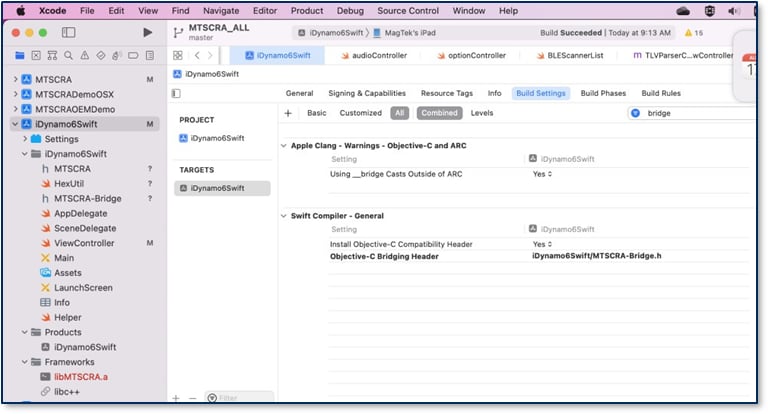
Add the following files to project, and setup the bridge header folder in build settings.
MTSCRA.H
MTSCRA-Bridge.h
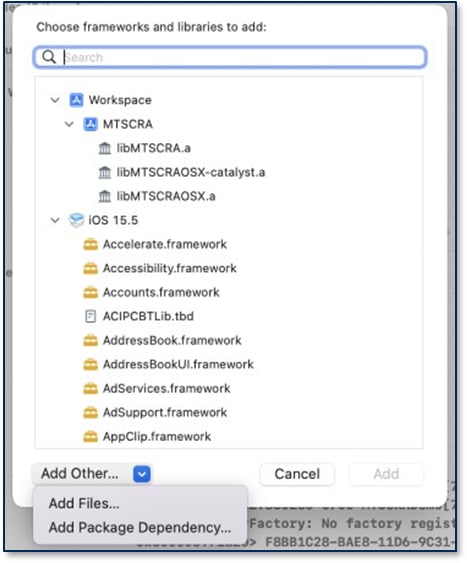
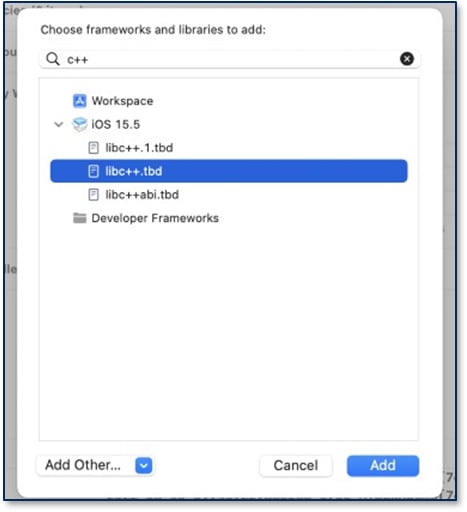
Add libc++.tbd in build phases->Link Binary with libraries, click ‘+’, then type “c++” in the filter area and pick libc++.tbd.
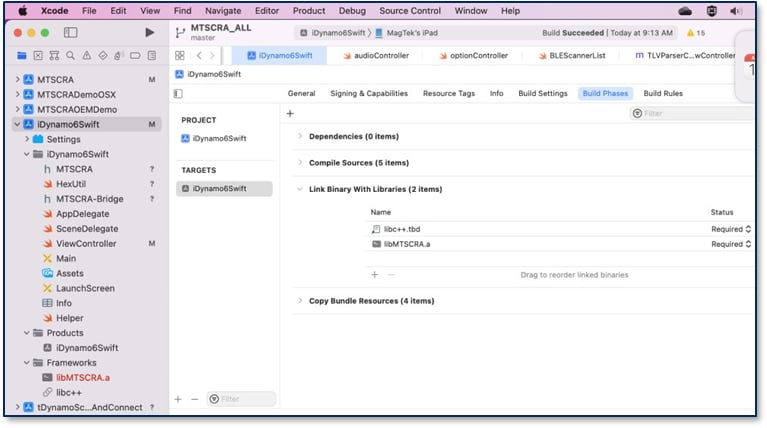
After adding those two libraries, this will be in the project.
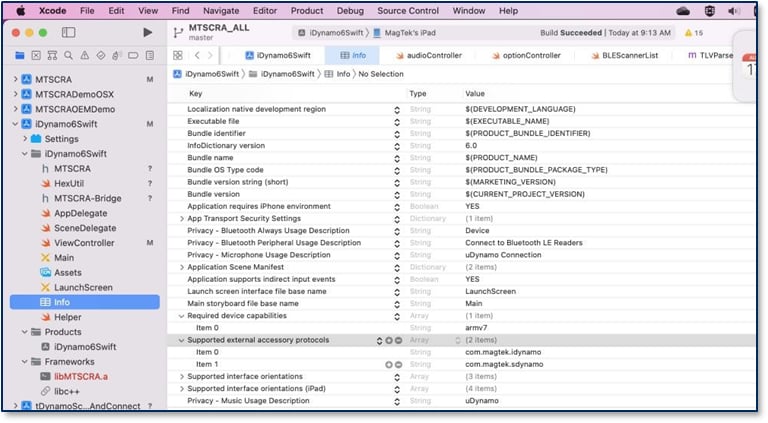
Add the external accessory protocols into info file. In the screen shot, it adds iDynamo5 and iDynamo6 with default protocols. Add your custom protocol if different.
When calling functions startScanningForPeripherals or openDevice, the application should make sure bleReaderStateUpdated has received a device status and that the most recent status was OK , otherwise the device will not be able to connect, and iOS will not throw any error if Bluetooth is not ready.
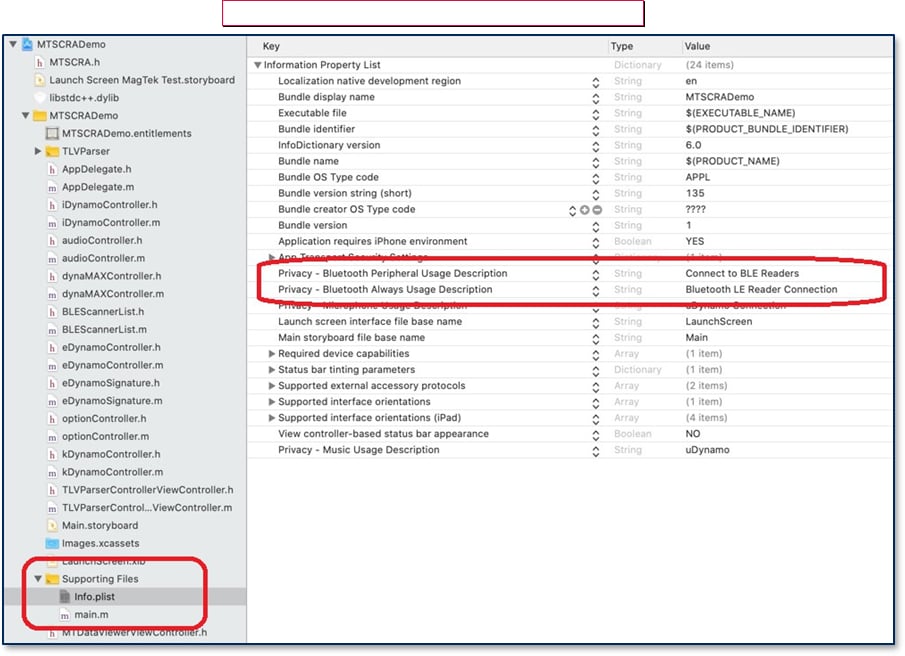
Starting in iOS 13, app projects must specify the Privacy Usage Description for Bluetooth by NSBluetoothAlwaysUsageDescription in the info.plist file. file. Accessing Core Bluetooth without the usage descriptions will cause a runtime crash. For backward compatibility with older versions of iOS, define NSBluetoothAlwaysUsageDescription as well.
Make sure device is in pairing mode. If not, press and hold the button for 3 seconds until the blue light blinks, and then release the button.
Set device type and connection type.
Wait for callback bleReaderStateUpdated(), and then call startScanningForPeripheral().
Wait for onDeviceList() callback. Here you can call getDiscoveredPeripherals().
Select the device in the list.
Open the device you want to connect.
Library will pair the device. After inputting passcode, device is ready to use.
This document provides instructions for software developers who want to create custom software solutions that communicate with DynaMAX, eDynamo, aDynamo, iDynamo, uDynamo, kDynamo, sDynamo, tDynamo, iDynamo 5 Gen II, iDynamo 5 Gen III, or iDynamo 6 connected to an iOS host via audio connector or Bluetooth LE. It is part of a larger library of documents which includes:
MagneSafe V5 Programmer’s Reference (Commands)
DynaMAX Programmer's Manual (Commands)
This function retrieves the SDK revision number.
Parameters: None
Return Value: String containing the SDK revision number.
This function retrieves a list of available Bluetooth LE devices. After calling this function to locate the device you wish to connect to, use setAddress to tell the library which device you want to connect to. Use stopScanningForPeripherals to stop the scan.
Parameters: None
Return Value: An array of peripherals
This function stops the scanning of available Bluetooth LE devices.
This function sets device’s address for Bluetooth LE devices.
Parameters:
Parameter
Description
address
Address of the Bluetooth LE device to communicate with
Return Value: None
This function opens a connection to the device.
To use this function to connect to a Bluetooth LE device, the app should follow these steps:
Call startScanningForPeripherals to find the device you want to connect to.
Call setAddress to tell the library which device you want to connect to.
Make sure your app’s bleReaderStateUpdated function most recent status is was OK .
Call openDevice.
After calling this function, call isDeviceOpened to make sure the device was successfully opened.
Parameters: None
Return Value:
YES = Success
NO = Error
This function closes the connection to the currently opened device. After calling this function, call isDeviceOpened to make sure the device was successfully closed.
Parameters: None
Return Value:
YES = Success
NO = Error
This function reports whether any compatible devices are connected to the host.
Parameters: None
Return Value:
YES = host is connected to a device
NO = host is not connected to a device
This function retrieves device opened status, which changes on successful completion of a call to startScanningForPeripherals or closeDevice.
Parameters: None
Return Value:
YES = Device is opened
NO = Device is not opened
This function sends a direct command to device. See MagneSafe V5 Programmer’s Reference (Commands) for details about available commands and syntax.
Parameter
Description
pData
Command to send to the device. For example, pass command string
“C10206C20503C30100” to call the Discovery command.
Return Value:
0 = Success
9 = Error
15 = Busy
This function retrieves card data from a string separated by ‘|’ after a cardholder swipes a card. The host software should call it in response to the trackDataReadyNotification callback.
Parameters: None
Return Value:
A null terminated hex string for Card Data, Field separated by ‘|’.NULL value for failed.
Fields:
Device ID, Device Serial Number, Card Swipe Status, CardEncode Type, Track 1 Decode Status, Track 2 Decode Status, Track 3 Decode Status, MagnePrint Status, Track 1 Length, Track 2 Length, Track 3 Length, Masked Track 1 Length, Masked Track 2 Length, Masked Track 3 Length, MagnePrint Length, Card Data, Masked Card Data, DUKPT Session ID, DUKPT Key Serial Number, First Name, Last Name, PAN, Month, Year, Track 1 Data, Track 2 Data, Track 3 Data, Masked Track 1 Data, Masked Track 2 Data, Masked Track 3 Data, MagnePrint Data
self.lib.setConnectionType(UInt(BLE_EMV))
self.lib.setDeviceType(UInt32(MAGTEKEDYNAMO))func bleReaderStateUpdated(_ state: MTSCRABLEState) {
print("readerStateUpdated - ", state)
if (state == 0) {
// dispatch in main queue is very important
DispatchQueue.main.asyncAfter(deadline: .now() + 0.1,
execute: {
self.lib.startScanningForPeripherals()
})
}
}
func onDeviceList(_ instance: Any!, connectionType: UInt, deviceList:
[Any]!) {
        let devices = deviceList as! [MTDeviceInfo]
        devList.removeAll()

        let peripherals = self.lib.getDiscoveredPeripherals()
        print(peripherals as Any)
        ...
}
lib.stopScanningForPeripherals()

lib.setAddress(devList[selected].address)
lib.openDevice()(NSString *) getSDKVersion (void)startScanningForPeripherals(void)stopScanningForPeripherals(void)setAddress:(NSString *)address (BOOL) openDevice(BOOL) closeDevice(BOOL) isDeviceConnected(BOOL) isDeviceOpened(int) sendCommandToDevice:(NSString *)pData Parameters:(NSString *) getResponseDataiDynamo 5 (Gen II) Programmer's Manual (Commands)
iDynamo 5 (Gen III) Programmer's Manual (Commands)
kDynamo Programmer's Manual (Commands)
tDynamo Programmer's Manual (Commands)
D998200324 iDynamo 6 Programmer's Manual (Command )
The MTSCRADemo software, available from MagTek, provides demonstration source code and a reusable MTSCRA library that provides developers of custom iOS software solutions with an easy-to-use interface. Developers can include the MTSCRA library in custom branded software which can be distributed to customers or distributed internally as part of an enterprise solution.
The general terms “device” and “host” are used in different, often incompatible ways in a multitude of specifications and contexts. For example, “host” may have different meanings in the context of USB communication than it does in the context of networked financial transaction processing. In this document, “device” and “host” are used strictly as follows:
Device refers to the MSR device that receives and responds to the command set specified in this document; in this case, DynaMAX, eDynamo, aDynamo, iDynamo, uDynamo, kDynamo, sDynamo, tDynamo, or iDynamo 6.
Host refers to the piece of general-purpose electronic equipment the device is connected or paired to, which can send data to and receive data from the device. Host types include PC and Mac computers/laptops, tablets, smartphones, teletype terminals, and even test harnesses. In many cases the host may have custom software installed on it that communicates with the device. When “host” must be used differently, it is qualified as something specific, such as “USB host.”
The word “user” is also often used in different ways in different contexts. In this document, user generally refers to the cardholder.
File Name
Description
MTSCRA.h
Header file for the MTSCRA SDK
libMTSCRA.a
Library binary for the MTSCRA SDK
MTSCRADemo Folder
Sample code and projects
Tested devices:
iPhone 7, 7 Plus, 8, 8 Plus, X, XS, XS Max, 11, 12, 13, 14, 15 series, iPhone 12 and 13 mini
iPad 6th 7th, 8th, 9th, 10th gen, iPad Air, iPad Air 2/3/4/5, iPad Pro, iPad Pro 2nd, 3rd, 4th, and 5th gen
iPad Mini 2, iPad Mini 3, iPad Mini 4, iPad Mini 5, iPad Mini 6 Tested operating systems: iOS 13 and above
Build Platforms: XCode 15.3 and above
The following table matches the device interface to operating system.
Device
Interface
Operating System
eDynamo
Bluetooth LE 4.0
iOS 13 and above
aDynamo
Audio
Document Number: D99875568-133
REGISTERED TO ISO 9001:2015
MagTek I 1710 Apollo Court I Seal Beach, CA 90740 I Phone: (562) 546-6400 I Technical Support: (888) 624-8350
Copyright © 2006 – 2025 MagTek, Inc. Printed in the United States of America
INFORMATION IN THIS PUBLICATION IS SUBJECT TO CHANGE WITHOUT NOTICE AND MAY CONTAIN TECHNICAL INACCURACIES OR GRAPHICAL DISCREPANCIES. CHANGES OR IMPROVEMENTS MADE TO THIS PRODUCT WILL BE UPDATED IN THE NEXT PUBLICATION RELEASE. NO PART OF THIS DOCUMENT MAY BE REPRODUCED OR TRANSMITTED IN ANY FORM OR BY ANY MEANS, ELECTRONIC OR MECHANICAL, FOR ANY PURPOSE, WITHOUT THE EXPRESS WRITTEN PERMISSION OF MAGTEK, INC.
MagTek®, MagnePrint®, and MagneSafe® are registered trademarks of MagTek, Inc. Magensa™ is a trademark of MagTek, Inc.
This function retrieves the track decode status after a cardholder swipes a card.
Parameters: None
Return Value:
Hex string, each 2 digits represent one track’s decode status, where the left most 2 digits are for Track 1.
“00” = Success
iOS 13 and above
iDynamo
30-pin
iOS 13 and above
Lightning
iOS 13 and above
uDynamo
Audio
iOS 13 and above
DynaMAX
Bluetooth LE 4.0
iOS 13 and above
kDynamo
Lightning
iOS 13 and above
sDynamo
Lightning
iOS 13 and above
tDynamo
Bluetooth LE 4.0
iOS 13 and above
iDynamo 5 Gen II
Lightning
iOS 13 and above
iDynamo 5 Gen III
USB-C (iAP2)
iOS 13 and above
iDynamo 6
Lightning
iOS 13 and above
After issuing the methods in section 3 Important Information About Bluetooth LE, the MTSCRA SDK libraries will call these Delegate methods (callback functions) to provide the requested data and / or a detailed response. For details about data received by these functions, see the Programmer's Manual (COMMANDS) for the specific device with which you are communicating.
For details about registering Delegate methods, see the demo application included with the SDK.
“02” = No track present
Examples:
“000000” = Track 1, 2, and 3 success.
“000100” = Track 1 and 3 success. Track 2 had error.
“000002” = Track 1 and 2 success. Track 3 not present.
This function retrieves device’s battery level percentage between 0% and 100%, if the device has a battery and supports battery level monitoring. To retrieve the most up to date percentage, call this function after a transaction.
Parameters: None
Return Value: Long value between 0 and 100
This function returns the currently opened device’s part number.
Parameters: None
Return Value: String containing the device part number.
Retrieves the Card Status
Parameters: None
Return Value: Card Status, which depends on the device.
This function retrieves individual TLV tag values. Only supported on aDynamo/UDynamo.
Parameters:
Tag = An MTSCRATransactionData type (see section D.5 MTSCRATransactionData).
Return Value: String containing the value of the specified tag.
This function gets the status of the currently connected device.
Parameters: None
Return Value: Return device status of swipe count and battery level.
This function gets the status of the current operation.
Parameters: None
Return Value: Operation Status
This function returns the version of the tag-length-value (TLV) format supported by the device.
Parameters: None
Return Value: String containing the firmware TLV version.
This function sets the protocol string the SDK will use to communicate with the device. See example in Open Device code example.
Parameters: Protocol String
Return Value: None
This function gets the response type.
Parameters: None
Return Value: Response Type
(NSString *) getTrackDecodeStatus(long) getBatteryLevel(NSString *) getDevicePartNumber(NSString *) getCardStatus(NSString *) getTagValue:(UInt32)tag(NSString *) getDeviceStatus(NSString *) getOperationStatus(NSString *) getTLVVersion(void) setDeviceProtocolString:(NSString *)pData(NSString *) getResponseTypeAAMVA™ is a trademark of AAMVA.
American Express® and EXPRESSPAY FROM AMERICAN EXPRESS® are registered trademarks of American Express Marketing & Development Corp.
D-PAYMENT APPLICATION SPECIFICATION® is a registered trademark to Discover Financial Services CORPORATION
MasterCard® is a registered trademark and PayPass™ and Tap & Go™ are trademarks of MasterCard International Incorporated.
Visa® and Visa payWave® are registered trademarks of Visa International Service Association.
ANSI®, the ANSI logo, and numerous other identifiers containing “ANSI” are registered trademarks, service marks, and accreditation marks of the American National Standards Institute (ANSI).
ISO® is a registered trademark of the International Organization for Standardization. UL™ and the UL logo are trademarks of UL LLC.
PCI Security Standards Council® is a registered trademark of the PCI Security Standards Council, LLC. EMV® is a registered trademark in the U.S. and other countries and an unregistered trademark elsewhere. The EMV trademark is owned by EMVCo, LLC. The Contactless Indicator mark, consisting of four graduating arcs, is a trademark owned by and used with permission of EMVCo, LLC.
The Bluetooth® word mark and logos are registered trademarks owned by Bluetooth SIG, Inc. and any use of such marks by MagTek is under license.
Apple Pay®, iPhone®, iPod®, Mac®, and OS X® are registered trademarks of Apple Inc., registered in the U.S. and other countries. iPad™ is a trademark of Apple. Inc. App StoreSM is a service mark of Apple Inc., registered in the U.S. and other countries. IOS is a trademark or registered trademark of Cisco in the U.S. and other countries and is used by Apple Inc. under license.
Microsoft®, Windows®, and .NET® are registered trademarks of Microsoft Corporation. All other system names and product names are the property of their respective owners.
Rev Number
Date
Notes
1.01
2011 Dec 22
Initial Release
1.02
2011 Aug 02
Rev Number
Date
Notes
90
2019 Sep 16
Updated events for the delegate onTransactionStatus(), and result codes for the deletgate onEMVCommandResult().
Updated the function startTransaction(): cardType and transactionType.
91
2020 Jul 16
MagTek warrants that the products sold pursuant to this Agreement will perform in accordance with MagTek’s published specifications. This warranty shall be provided only for a period of one year from the date of the shipment of the product from MagTek (the “Warranty Period”). This warranty shall apply only to the “Buyer” (the original purchaser, unless that entity resells the product as authorized by MagTek, in which event this warranty shall apply only to the first repurchaser).
During the Warranty Period, should this product fail to conform to MagTek’s specifications, MagTek will, at its option, repair or replace this product at no additional charge except as set forth below. Repair parts and replacement products will be furnished on an exchange basis and will be either reconditioned or new. All replaced parts and products become the property of MagTek. This limited warranty does not include service to repair damage to the product resulting from accident, disaster, unreasonable use, misuse, abuse, negligence, or modification of the product not authorized by MagTek. MagTek reserves the right to examine the alleged defective goods to determine whether the warranty is applicable.
Without limiting the generality of the foregoing, MagTek specifically disclaims any liability or warranty for goods resold in other than MagTek’s original packages, and for goods modified, altered, or treated without authorization by MagTek.
Service may be obtained by delivering the product during the warranty period to MagTek (1710 Apollo Court, Seal Beach, CA 90740). If this product is delivered by mail or by an equivalent shipping carrier, the customer agrees to insure the product or assume the risk of loss or damage in transit, to prepay shipping charges to the warranty service location, and to use the original shipping container or equivalent. MagTek will return the product, prepaid, via a three (3) day shipping service. A Return Material Authorization (“RMA”) number must accompany all returns. Buyers may obtain an RMA number by contacting MagTek Support Services at (888) 624-8350.
EACH BUYER UNDERSTANDS THAT THIS MAGTEK PRODUCT IS OFFERED AS-IS. MAGTEK MAKES NO OTHER WARRANTY, EXPRESS OR IMPLIED, AND MAGTEK DISCLAIMS ANY WARRANTY OF ANY OTHER KIND, INCLUDING ANY WARRANTY OF MERCHANTABILITY OR FITNESS FOR A PARTICULAR PURPOSE.
IF THIS PRODUCT DOES NOT CONFORM TO MAGTEK’S SPECIFICATIONS, THE SOLE REMEDY SHALL BE REPAIR OR REPLACEMENT AS PROVIDED ABOVE. MAGTEK’S LIABILITY, IF ANY, SHALL IN NO EVENT EXCEED THE TOTAL AMOUNT PAID TO MAGTEK UNDER THIS AGREEMENT. IN NO EVENT WILL MAGTEK BE LIABLE TO THE BUYER FOR ANY DAMAGES, INCLUDING ANY LOST PROFITS, LOST SAVINGS, OR OTHER INCIDENTAL OR CONSEQUENTIAL DAMAGES ARISING OUT OF THE USE OF, OR INABILITY TO USE, SUCH PRODUCT, EVEN IF MAGTEK HAS BEEN ADVISED OF THE POSSIBILITY OF SUCH DAMAGES, OR FOR ANY CLAIM BY ANY OTHER PARTY.
LIMITATION ON LIABILITY
EXCEPT AS PROVIDED IN THE SECTIONS RELATING TO MAGTEK’S LIMITED WARRANTY, MAGTEK’S LIABILITY UNDER THIS AGREEMENT IS LIMITED TO THE CONTRACT PRICE OF THIS PRODUCT.
MAGTEK MAKES NO OTHER WARRANTIES WITH RESPECT TO THE PRODUCT, EXPRESSED OR IMPLIED, EXCEPT AS MAY BE STATED IN THIS AGREEMENT, AND MAGTEK DISCLAIMS ANY IMPLIED WARRANTY, INCLUDING WITHOUT LIMITATION ANY IMPLIED WARRANTY OF MERCHANTABILITY OR FITNESS FOR A PARTICULAR PURPOSE.
MAGTEK SHALL NOT BE LIABLE FOR CONTINGENT, INCIDENTAL, OR CONSEQUENTIAL DAMAGES TO PERSONS OR PROPERTY. MAGTEK FURTHER LIMITS ITS LIABILITY OF ANY KIND WITH RESPECT TO THE PRODUCT, INCLUDING NEGLIGENCE ON ITS PART, TO THE CONTRACT PRICE FOR THE GOODS.
MAGTEK’S SOLE LIABILITY AND BUYER’S EXCLUSIVE REMEDIES ARE STATED IN THIS SECTION AND IN THE SECTION RELATING TO MAGTEK’S LIMITED WARRANTY.
IMPORTANT: YOU SHOULD CAREFULLY READ ALL THE TERMS, CONDITIONS AND RESTRICTIONS OF THIS LICENSE AGREEMENT BEFORE INSTALLING THE SOFTWARE PACKAGE. YOUR INSTALLATION OF THE SOFTWARE PACKAGE PRESUMES YOUR ACCEPTANCE OF THE TERMS, CONDITIONS, AND RESTRICTIONS CONTAINED IN THIS AGREEMENT. IF YOU DO NOT AGREE WITH THESE TERMS, CONDITIONS, AND RESTRICTIONS, PROMPTLY RETURN THE SOFTWARE PACKAGE AND ASSOCIATED DOCUMENTATION TO THE ADDRESS ON THE FRONT PAGE OF THIS DOCUMENT, ATTENTION: CUSTOMER SUPPORT.
TERMS, CONDITIONS, AND RESTRICTIONS
MagTek, Incorporated (the "Licensor") owns and has the right to distribute the described software and documentation, collectively referred to as the "Software."
LICENSE: Licensor grants you (the "Licensee") the right to use the Software in conjunction with MagTek products. LICENSEE MAY NOT COPY, MODIFY, OR TRANSFER THE SOFTWARE IN WHOLE OR IN PART EXCEPT AS EXPRESSLY PROVIDED IN THIS AGREEMENT. Licensee
may not decompile, disassemble, or in any other manner attempt to reverse engineer the Software. Licensee shall not tamper with, bypass, or alter any security features of the software or attempt to do so.
TRANSFER: Licensee may not transfer the Software or license to the Software to another party without the prior written authorization of the Licensor. If Licensee transfers the Software without authorization, all rights granted under this Agreement are automatically terminated.
COPYRIGHT: The Software is copyrighted. Licensee may not copy the Software except for archival purposes or to load for execution purposes. All other copies of the Software are in violation of this Agreement.
TERM: This Agreement is in effect as long as Licensee continues the use of the Software. The Licensor also reserves the right to terminate this Agreement if Licensee fails to comply with any of the terms, conditions, or restrictions contained herein. Should Licensor terminate this Agreement due to Licensee's failure to comply, Licensee agrees to return the Software to Licensor. Receipt of returned Software by the Licensor shall mark the termination.
LIMITED WARRANTY: Licensor warrants to the Licensee that the disk(s) or other media on which the Software is recorded are free from defects in material or workmanship under normal use.
THE SOFTWARE IS PROVIDED AS IS. LICENSOR MAKES NO OTHER WARRANTY OF ANY KIND, EITHER EXPRESS OR IMPLIED, INCLUDING, BUT NOT LIMITED TO, THE IMPLIED WARRANTIES OF MERCHANTABILITY AND FITNESS FOR A PARTICULAR PURPOSE.
Because of the diversity of conditions and PC hardware under which the Software may be used, Licensor does not warrant that the Software will meet Licensee specifications or that the operation of the Software will be uninterrupted or free of errors.
IN NO EVENT WILL LICENSOR BE LIABLE FOR ANY DAMAGES, INCLUDING ANY LOST PROFITS, LOST SAVINGS, OR OTHER INCIDENTAL OR CONSEQUENTIAL DAMAGES ARISING OUT OF THE USE, OR INABILITY TO USE, THE SOFTWARE. Licensee's sole remedy in the event of a defect in material or workmanship is expressly limited to replacement of the Software disk(s) if applicable.
GOVERNING LAW: If any provision of this Agreement is found to be unlawful, void, or unenforceable, that provision shall be removed from consideration under this Agreement and will not affect the enforceability of any of the remaining provisions. This Agreement shall be governed by the laws of the State of California and shall inure to the benefit of MagTek, Incorporated, its successors or assigns.
ACKNOWLEDGMENT: LICENSEE ACKNOWLEDGES THAT HE HAS READ THIS AGREEMENT, UNDERSTANDS ALL OF ITS TERMS, CONDITIONS, AND RESTRICTIONS, AND AGREES TO BE BOUND BY THEM. LICENSEE ALSO AGREES THAT THIS AGREEMENT SUPERSEDES ANY AND ALL VERBAL AND WRITTEN COMMUNICATIONS BETWEEN LICENSOR AND LICENSEE OR THEIR ASSIGNS RELATING TO THE SUBJECT MATTER OF THIS AGREEMENT.
QUESTIONS REGARDING THIS AGREEMENT SHOULD BE ADDRESSED IN WRITING TO MAGTEK, INCORPORATED, ATTENTION: CUSTOMER SUPPORT, AT THE ADDRESS LISTED IN THIS DOCUMENT, OR E-MAILED TO SUPPORT@MAGTEK.COM.
DEMO SOFTWARE / SAMPLE CODE: Unless otherwise stated, all demo software and sample code are to be used by Licensee for demonstration purposes only and MAY NOT BE incorporated into any production or live environment. The PIN Pad sample implementation is for software PIN Pad test purposes only and is not PCI compliant. To meet PCI compliance in production or live environments, a third-party PCI compliant component (hardware or software-based) must be used.
This function gets the MSR capability of the device. For more information, see D99875483 – Track ID Enable Property.
(NSString *) getCapMSRParameters: None Return Value:
Return MSR Capability bit masking.
Bit 7
Bit 6
Bit 5
0 – Decodes standard ISO/ABA cards only
1 – Decodes AAMV and 7-bit cards also
If this flag is set to 0, only tracks that conform to the ISO format allowed for that track will be decoded. If the track cannot be decoded by the ISO method it will be considered to be in error.
00 – Track Disabled
01 – Track Enabled
10 – Track Enabled/Required (Error if blank)
This function gets the device’s capability for encrypting track data.
Return Value:
“1” = Available
“0” = Unavailable.
This function gets information about the device’s tracks capability.
Parameters: None
Return Value: A hex string for the track capability. See Track ID Enable Property in D99875475.
This function retrieves the card expiration date after a cardholder swipes a card.
Parameters: None
Return Value: String containing the card expiration date
This function gets the last 4 digits of the card account number (PAN) after a cardholder swipes a card.
Parameters: None
Return Value: String containing the last 4 digits of the PAN
This function gets the issuer identification number (IIN) of the card number after a cardholder swipes a card.
Parameters: None
Return Value: String containing the IIN
This function gets the cardholder name after a cardholder swipes a card.
Parameters: None
Return Value: String containing the cardholder name, for example, “John Wayne”.
This function gets the length of the PAN after a cardholder swipes a card.
Parameters: None
Return Value: Length of card number or PAN
This function retrieves the card’s service code after a cardholder swipes a card.
Parameters: None
Return Value: String containing the card’s service code
This function retrieves the part number and revision of the device’s firmware.
Parameters: None
Return Value: String containing firmware part number and revision.
Remove Audio reader
1.03
2012 Feb 29
Added Functionality
1.04
2012 Mar 26
Added getBatteryLevel
1.05
2012 Apr 19
Added getSDKVersion & getOperationStatus
1.06
2012 May 01
Made iDynamo-specific
20
2015 Jan 30
Added DynaMAX; reformat; added introduction and how to set up; included aDynamo and uDynamo; general cleanup and clarifying detail.
Updated the MTSCRATransactionData enum. Updated the MTSCRADeviceType enum.
Added delegate methods: onDataReceived, cardSwipeDidStart,
cardSwipeDidGetTransError, onDeviceConnectionDidChange, bleReaderConnected,
bleReaderDidDiscoverPeripheral, bleReaderStateUpdated
30
2015 Nov 19
Added support for eDynamo Added new functions for eDynamo: onTransactionStatus onDisplayMessageRequest onUserSelectionRequest onARQCReceived onTransactionResult onEMVCommandResult
Update return code for EMV function Return Value: 0 = Success
9 = Error
15 = Busy
40
2016 Jul 6
Added DynaPro format for EMV transaction messages. Added getCardPAN function.
Added deviceNotPaired delegate.
50
2017 Feb 9
Updated the tested operating systems.
60
2017 Oct 3
Added support for kDynamo, sDynamo, tDynamo.
70
2018 Aug 6
Added device type kDynamo and tDynamo to setDeviceType().
80
2018 Sep 14
Added onDeviceResponse delegate.
Updated startTransaction to support Quick Chip mode.
Update supported iOS versions; Add Bluetooth permission information for iOS 13 in section 3; Add startScanningForPeripherals and stopScanningForPeripherals and add details about the Bluetooth LE connection sequence; Remove Appendix E, F and in some sections, replaced copy-pasted text from other documents with cross references to command manual for the device; Misc. clarifications and corrections.
92
2020 Aug 27
Added 1 new function getBluetoothRSSI, and 2 callback: bleReaderDidDisconnected and debugInfoCallback under sections: 4.51, 5.18, 5.19
100
2021 Aug 18
Added new functions sendCommandSync() and sendExtendedCommandSync()
110
2021 Dec 13
Added setTimeout(), setTimeFrame(), and enableDebugPrint(). Added enums to current SDK.
120
January 31, 2023
Added information table for extended command set date and time, and for MSR head power.
Added setup for Swift project.
Added more details for setting up Bluetooth LE. Added transaction diagrams.
130
June 20, 2023
Added 0 for transaction timeout of startTransaction() at section 4.55.
131
March 11, 2024
Added support for iDynamo5 Gen III under section Appendix C and Appendix D.2.
Added functions starting at section 4.65: updateFirmware(), sendNFCCommand(),
sendClassicNFCCommand(), sendDESFireNFCCommand(), sendNFCCommandSync(), sendNFCCommandAsync()
132
April 18, 2024
Added support for iPhone 15 and XCode 15.3 at section 1.4. Updated support iOS 13 and above at section 1.5.
133
June 11, 2025
Added SCDE properties to MTCardData (section 6.1).
Bit 4
Bit 3
Bit 2
Bit 1
Bit 0
Id
0
T3
T3
T2
T2
T1
T1
(NSString *) getCapMagStripeEncryption Parameters: None(NSString *) getCapTracks(NSString *) getCardExpDate(NSString *) getCardLast4(NSString *) getCardIIN(NSString *) getCardName(int) getCardPANLength(NSString *) getCardServiceCode(NSString *) getFirmwareERROR_SUCCESS = 0
ERROR_TIMEOUT = 1
ERROR_DEVICE_NOT_OPEN = 5
ERROR_INVALID_PARAMETER = 6
ERROR_DEVICE_COMMUNICATION_ERROR = 7
ERROR_OTHER_ERROR = 9
ERROR_BUSY = 15
ERROR_DATA_IS_NOT_EXIST = 16
ERROR_NOT_SUPPORT = 17
ERROR_UNKNOWN = 255
MAGTEKAUDIOREADER = Audio readers aDynamo, uDynamo.
MAGTEKIDYNAMO = iOS 30-pin and Lightning readers iDynamo.
MAGTEKDYNAMAX = Bluetooth LE reader DynaMAX.
MAGTEKEDYNAMO = Bluetooth LE reader eDynamo
MAGTEKUSBMSR = USB on OSX Only
MAGTEKKDYNAMO = Lightning EMV reader kDynamo
MAGTEKTDYNAMO = Bluetooth LE reader tDynamo
MAGTEKDYNAWAVE= DynaWave
MAGTEKMDYNAMO = mDynamo
MAGTEKIDYNAMO_G3 = USB-C iDynamo 5 Gen III
MAGTEKNONE
TRANS_STATUS_OK = Transaction succeeded.
TRANS_STATUS_START = Reader started sending data.
TRANS_STATUS_ERROR = Reader failed sending data.
TRANS_EVENT_OK = Transaction succeeded.
TRANS_EVENT_ERROR = Reader failed sending data.
TRANS_EVENT_START = Reader started sending data.
TLV_OPSTS = Operation Status
TLV_CARDSTS = Card Information
TLV_TRACKSTS = Card tracks status
TLV_CARDNAME = Cardholder name
TLV_CARDIIN = Card issuer identification number
TLV_CARDLAST4 = Last four digits of PAN number
TLV_CARDEXPDATE = Card Expiration date
TLV_CARDSVCCODE = Card service code
TLV_CARDPANLEN = Length of the PAN
TLV_ENCTK1 = Encrypted track 1
TLV_ENCTK2 = Encrypted track 2
TLV_ENCTK3 = Encrypted track 3
TLV_DEVSN = Device serial number
TLV_DEVSNMAGTEK = Device serial number created by MagTek
TLV_DEVFW = Device firmware version
TLV_DEVNAME = Device model name
TLV_DEVCAPS = Device capabilities
TLV_DEVSTATUS = Device status
TLV_TLVVERSION = Firmware TLV version
TLV_DEVPARTNUMBER = Device part number
TLV_CAPMSR = Magstripe capabilities
TLV_CAPTRACKS = Track capabilities
TLV_CAPMAGSTRIPEENCRYPTION = Magstripe encryption capabilities
TLV_KSN = KSN
TLV_CMAC = CMAC
TLV_SWPCOUNT = Swipe count
TLV_BATTLEVEL = Battery level
TLV_CFGTLVVERSION = TLV version
TLV_CFGDISCOVERY = Discovery
TLV_CFGCARDNAME = Card name
TLV_CFGCARDIIN = Card issuer identification number
TLV_CFGCARDLAST4 = Card last 4 PAN
TLV_CFGCARDEXPDATE = Card expiration date
TLV_CFGCARDSVCCODE = Card service code
TLV_CFGCARDPANLEN = Card PAN length
TLV_MSKTK1 = Masked Track 1
TLV_MSKTK2 = Masked Track 2
TLV_MSKTK3 = Masked Track 3
TLV_HASHCODE = Hash code
TLV_SESSIONID = Session ID
TLV_MAGNEPRINT = MagnePrint
TLV_MAGNEPRINT_STS = MagnePrint status
CAP_MASKING = Masking
CAP_ENCRYPTION = Encryption
CAP_CARD_AUTH = Card authorization
CAP_DEVICE_AUTH = Device authorization
CAP_SESSION_ID = Session ID
CAP_DISCOVERY= Discovery
BLE = Bluetooth LE
BLE_EMV = Bluetooth LE EMV
USB = Universal Serial Bus Lightning = Lightning
NONE = None
Connection
CommandMessageData
CardMessageData
BLERawMessage
DeviceInfo
RawDataMessage
OK
OFF
RESETTING
DISCONNECTED
UNSUPPORTED UNAUTHORIZED UNKNOWN
This function clears the SDK library’s local cache of card swipe data.
(void) clearBuffersParameters: None
Return Value: None
This function sets a callback function to notify when the device has card data to send to the host or when the device state changes. See example in Open Device code example.
(void) listenForEvents:(UInt32)eventParameters: Event
Return Value: None
This function retrieves masked card track data after a cardholder swipes a card. Only available on iDynamo/uDynamo; other devices will return an empty string.
Parameters: None
Return Value:
Return stored masked track data string. Tracks are delimited with start and end sentinels.
This function retrieves masked track 1 data after a cardholder swipes a card.
Parameters: None
Return Value: Return stored masked track1 data string.
This function retrieves masked track 2 data, if any, after a cardholder swipes a card.
Parameters: None
Return Value: Return stored masked track2 data string.
This function retrieves masked track 3 data, if any, after a cardholder swipes a card.
Parameters: None
Return Value: Return stored masked track3 data string.
This function retrieves masked PAN data, if any, after a cardholder swipes a card.
Parameters: None
Return Value: Return stored masked PAN data string.
This function retrieves the card’s track 1 data in encrypted format after a cardholder swipes a card.
Parameters: None
Return Value: String containing encrypted track 1 data.
This function retrieves the card’s track 2 data in encrypted format, if any, after a cardholder swipes a card.
Parameters: None
Return Value: String containing encrypted track 2 data.
This function retrieves the card’s track 3 data in encrypted format, if any, after a cardholder swipes a card.
Parameters: None
Return Value: String containing encrypted track 3 data
To troubleshoot runtime issues with custom software, use standard XCode debugging methods and tools.
This command is used to set the device’s date and time before calling startTransaction().
Devices with a battery-backed real time clock have the date and time set by the manufacturer, so this command may not need to be used after that. Devices that do not have a battery-backed real time clock must use this command frequently because (a) the clock must be set before the device can process EMV transactions, and (b) the host software must use this command every time the device is power cycled or reset.
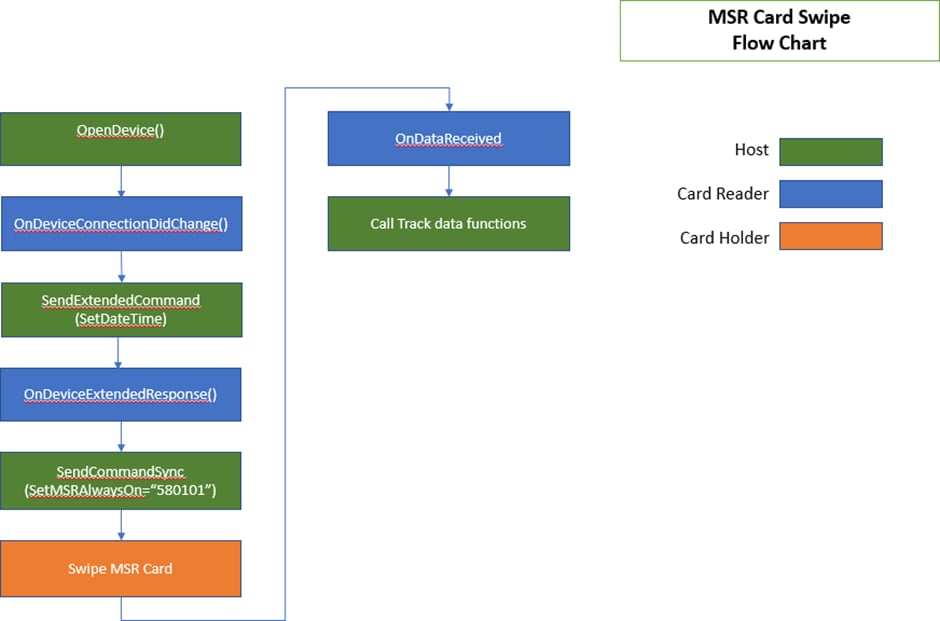
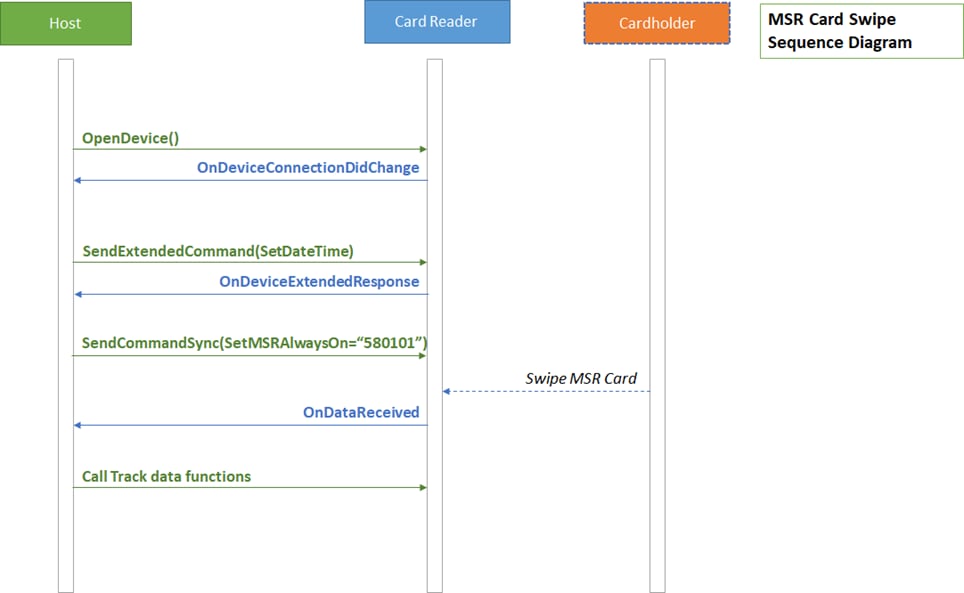
MSR Card Swipe
EMV Transaction (Quick Chip)
EMV Transaction (Full)
Parameter
Description
event
Event type.
· TRANS_EVENT_OK = Transaction succeeded.
· TRANS_EVENT_START = Reader started sending data.
· TRANS_EVENT_ERROR = Reader failed sending data.
Note: This is broad to cover multiple devices. For devices that do not need or support a specific command, (i.e. SetMSRAlwaysOn), that portion may be omitted in the flow.
Note: This is broad to cover multiple devices. For devices that do not need or support a specific command, (i.e. SetMSRAlwaysOn), that portion may be omitted in the flow.
Note: This is broad to cover multiple devices. For devices that do not need or support a specific command, (i.e. SetMSRAlwaysOn), that portion may be omitted in the flow.
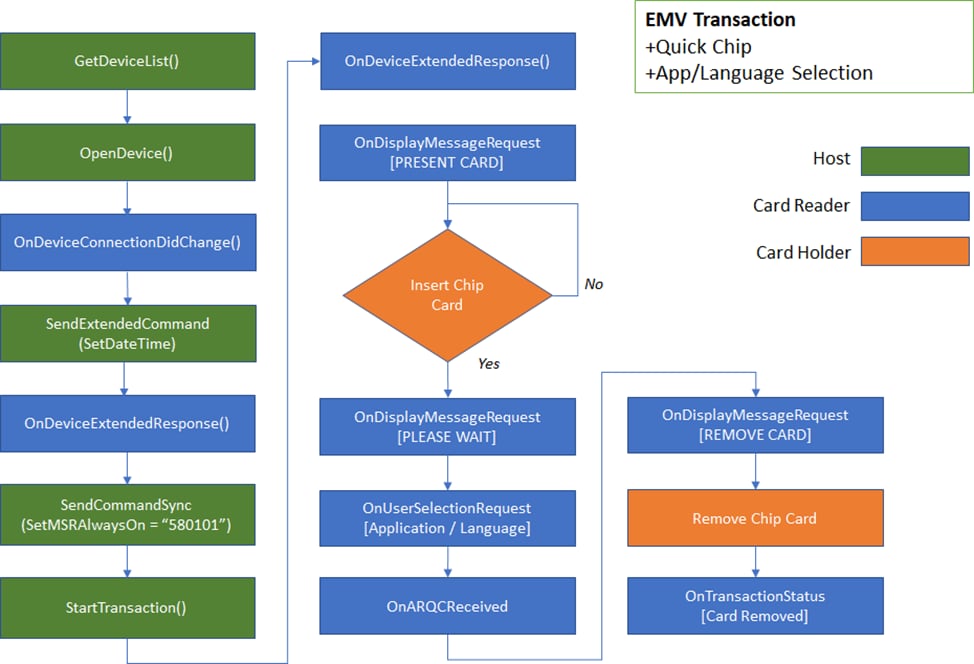
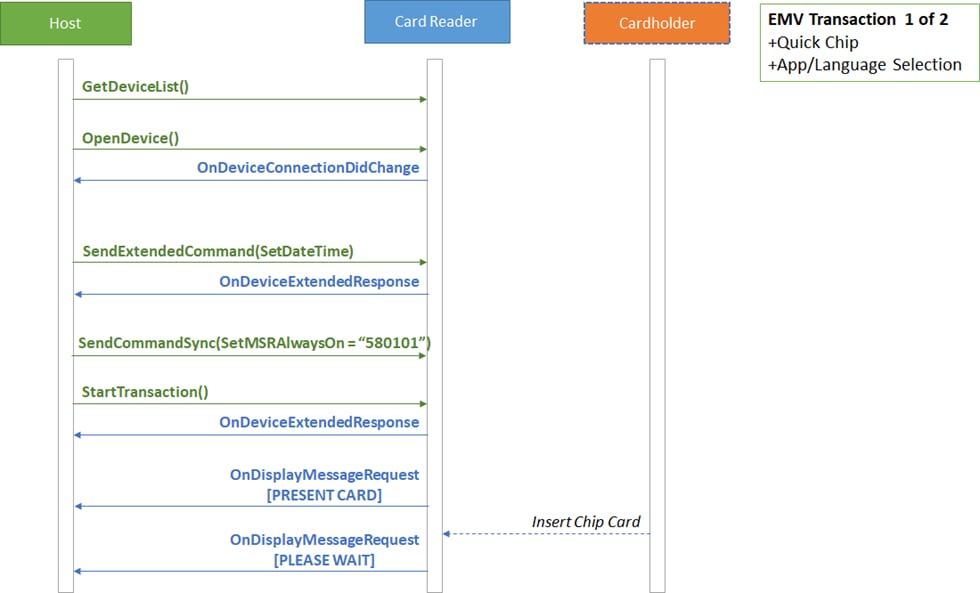
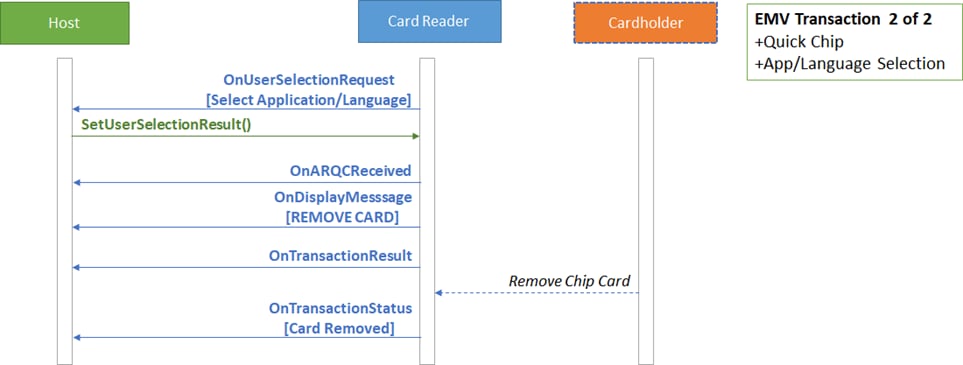
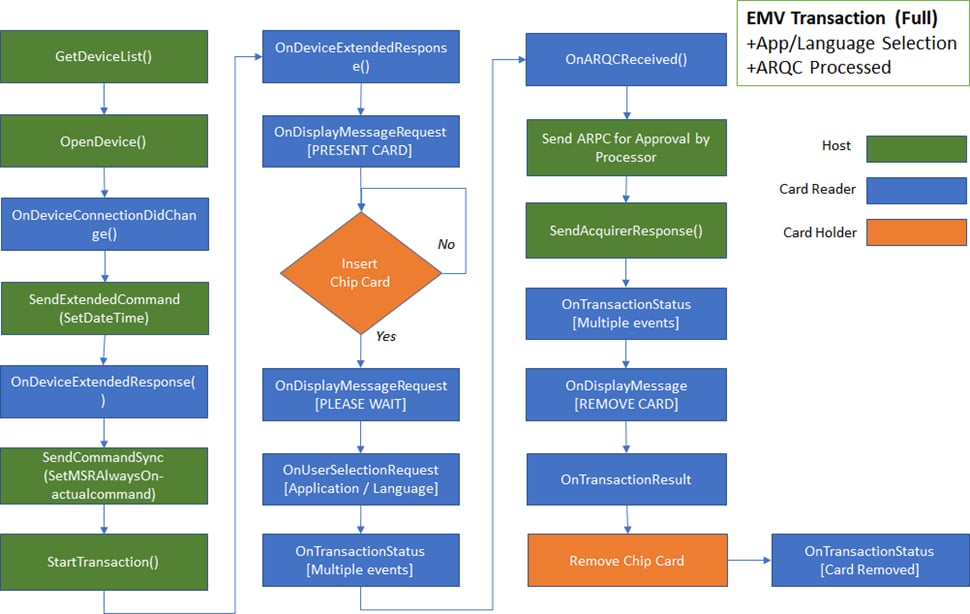
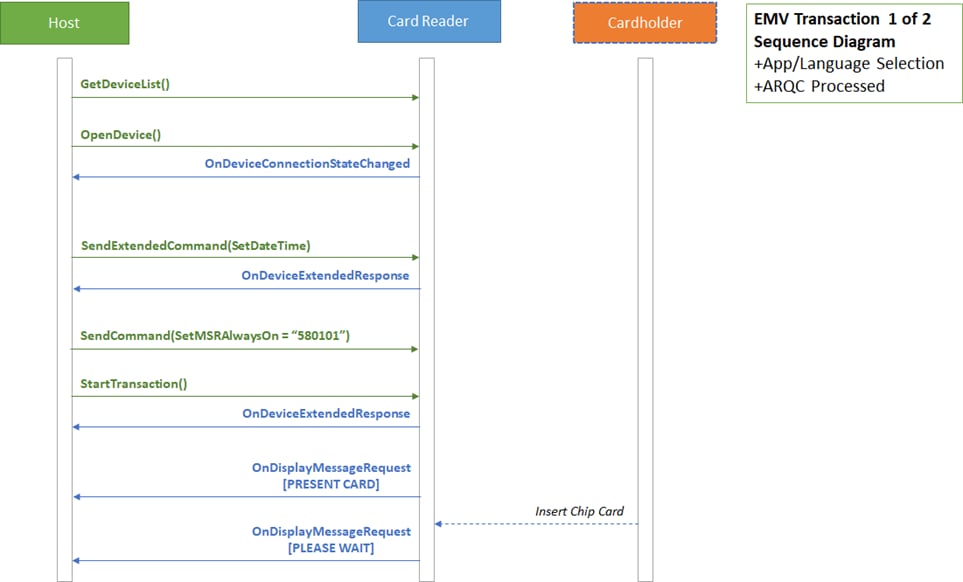
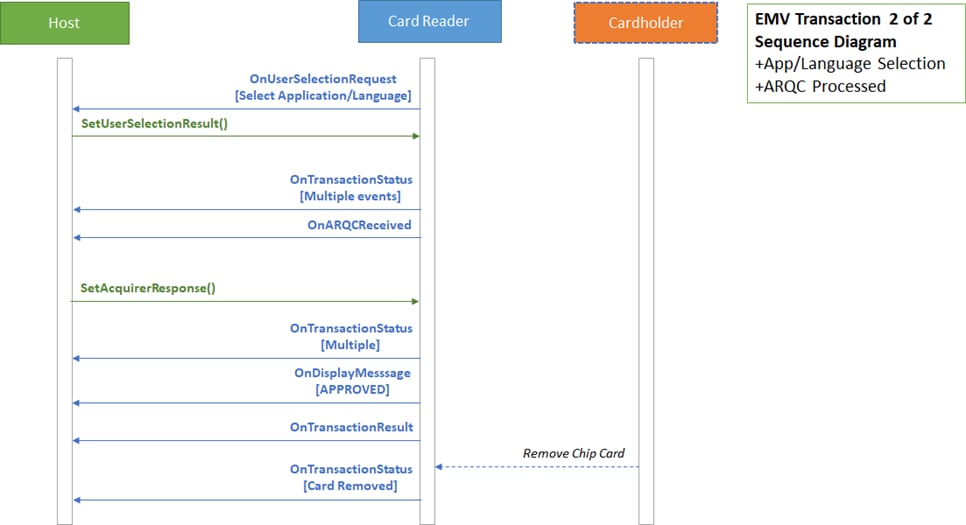
0
Type of MAC
MAC algorithm designator
0x00 = ISO 9797 MAC Algorithm 3, Padding Method 1.
1..16
Device Serial Number
16 Bytes Device Serial Number.
The host can set this field to all zeroes.
17
Month
Value from 0x01..0x0C
18
Day
Value from 0x01..0x1F (less depending on month)
19
Hour
Value from 0x00..0x17
20
Minute
Value from 0x00..0x3B
21
Second
Value from 0x00..0x3B
22
Unused
Value from 0x00..0x06
23
Year
Value from 0x00 (2008)..0x44 (2076) Example:
Year 2023 = 15 (0x0F) = 20023 – 2008
24..27
MAC
MAC computed over all preceding fields except Type of MAC. The host can set this field to all zeroes.
For 5:00 PM January 01, 2023 030C001800000000000000000000000000000000000101110000000F
The host uses this command to directly control power to the magnetic stripe reader head inside the device, to manage device power consumption and battery life. The host must power up the head before a cardholder swipes a magnetic stripe card outside the scope of an EMV transaction.
When the state is set to Always On, the head will always be powered.
When the state is set to Off When Idle, the head will be off when the device is idle. In this state, the device will not be able to read magnetic stripe cards outside the scope of EMV transactions without first turning the head on.
If the host sends startTransaction() the device will automatically power up the head, then power it down when the EMV transaction terminates.
Offset
Field Name
Value
0
State
One byte specifying what the state should be: 0x00 = Off When Idle
0x01 = Always On
Result codes: 0x00 = Success
Example Request (Hex):
Offset
Field Name
Value
(NSString *) getMaskedTracks(NSString *) getTrack1Masked(NSString *) getTrack2Masked(NSString *) getTrack3Masked(NSString *) getCardPAN(NSString *) getTrack1(NSString *) getTrack2(NSString *) getTrack3self.mtSCRALib = [[MTSCRA alloc] init];
[self.mtSCRALib
listenForEvents: TRANS_EVENT_OK|TRANS_EVENT_START|TRANS_EVENT_ERROR)];
//iDynamo
[self.mtSCRALib setDeviceType:(MAGTEKIDYNAMO)];
[self.mtSCRALib setDeviceProtocolString:(“com.magtek.idynamo”)];
//Audio
//[self.mtSCRALib setDeviceType:(MAGTEKAUDIOREADER)];
[self.mtSCRALib openDevice];[self.mtSCRALib closeDevice];[[NSNotificationCenter defaultCenter] addObserver:self
selector:@selector(trackDataReady:) name:@"trackDataReadyNotification"
object:nil];
- (void)trackDataReady:(NSNotification *)notification
{
NSNumber *status = [[notification userInfo]
valueForKey:@"status"];
[self performSelectorOnMainThread:@selector(onDataEvent:)
withObject:status waitUntilDone:YES];
}
- (void)onDataEvent:(id)status
{
//[self clearLabels];
switch ([status intValue]) {
case TRANS_STATUS_OK:
NSLog(@"TRANS_STATUS_OK");
break;
case TRANS_STATUS_ERROR:
NSLog(@"TRANS_STATUS_ERROR");
break;
default:
break;
}
}[[NSNotificationCenter defaultCenter] addObserver:self
selector:@selector(devConnStatusChange)
name:@"devConnectionNotification" object:nil];
- (void)devConnStatusChange
{
BOOL isDeviceConnected = [self.mtSCRALib isDeviceConnected];
if (isDeviceConnected)
{
self.deviceStatus.text = @"Device Connected";
}
else
{
self.deviceStatus.text = @"Device Disconnected";
}
}NSString *DateTime =
@“030C001800000000000000000000000000000000000101110000000F”;
[self.mtSCRALib sendExtendedCommandSync:DateTime];
NSString *SetMSRAlwaysOn = @“580101”;
[self.mtSCRALib sendCommandSync:SetMSRAlwaysOn];NSString *SetMSROffWhenIdle = @“580100”;
[self.mtSCRALib sendCommandSync:SetMSROffWhenIdle];This function retrieves the card’s encrypted MagnePrint, for readers that support MagnePrint.
(NSString *) getMagnePrintParameters: None
Return Value: String containing the card’s encrypted MagnePrint.
This function retrieves the card MagnePrint status. For more information, see D99875475. Only available on iDynamo; it will return an empty string in audio reader.
(NSString *) getMagnePrintStatusParameters: None Return Value:
Return stored MagnePrintStatus string.
This function retrieves the device serial number.
(NSString *) getDeviceSerialParameters: None
Return Value: String containing the device serial number.
This function returns the MagTek serial number of the currently opened device.
Parameters: None
Return Value: Return stored serial number created by MagTek.
This function retrieves the Session ID from the currently opened device, which the host can use to uniquely identify a transaction to prevent replay. Only supported by iDynamo/uDynamo; on other devices this function will return an empty string. For more information, see D99875475
Parameters: None
Return Value: Stored session ID.
This function retrieves the Key Serial Number (KSN) from the device.
Parameters: None
Return Value: String containing the stored key serial number.
This function gets the device’s product name.
Parameters: None
Return Value: String containing the device product name.
This function gets the device type.
Parameters: None
Return Value: Device Type
This function sets the type of device to open. Call this function before calling openDevice.
Parameters:
Device Type:
MAGTEKAUDIOREADER = Audio readers aDynamo, uDynamo.
MAGTEKIDYNAMO = iOS 30-pin and Lightning readers iDynamo.
MAGTEKDYNAMAX = Bluetooth LE reader DynaMAX.
Return Value: None
This function gets the capabilities of the currently opened device.
Parameters: None
Return Value: Return device capabilities.
CAP_MASKING = 1,
CAP_ENCRYPTION=2,
CAP_CARD_AUTH = 4,
CAP_DEVICE_AUTH = 8,
@interface MTCardData : NSObject
- (id)initWithCardData:(NSString*)cardData;
/*!
@attribute cardIIN
@discussion cardIIN is 6 digits of the account, usually can help to identify the issuer
*/
@property(nonatomic, strong) NSString *cardIIN;
/*!
@discussion track1 | track2 | track3
*/
@property(nonatomic, strong) NSString *cardData;
/*!
@attribute cardLast4
@discussion last 4 digits of account, usually can help user to identify him/her self
*/
@property(nonatomic, strong) NSString *cardLast4;
/*!
@attribute cardName @discussion card holder name
*/
@property(nonatomic, strong) NSString *cardName;
@property (strong, nonatomic) NSString *cardLastName;
@property (strong, nonatomic) NSString *cardMiddleName;
@property (strong, nonatomic) NSString *cardFirstName;
@property(nonatomic, strong) NSString *cardExpDate;
@property(nonatomic, strong) NSString *cardServiceCode;
@property(nonatomic, strong) NSString *cardStatus;
@property(nonatomic, strong) NSString *responseData;
@property(nonatomic, strong) NSString *maskedTracks;
@property(nonatomic, strong) NSString *encryptedTrack1;
@property(nonatomic, strong) NSString *encryptedTrack2;
@property(nonatomic, strong) NSString *encryptedTrack3;
@property(nonatomic, strong) NSString *encryptionStatus;
@property(nonatomic, strong) NSString *maskedTrack1;
@property(nonatomic, strong) NSString *maskedTrack2;
@property(nonatomic, strong) NSString *maskedTrack3;
@property(nonatomic, strong) NSString *trackDecodeStatus;
@property(nonatomic, strong) NSString *encryptedMagneprint;
@property(nonatomic, strong) NSString *magneprintStatus;
@property(nonatomic, strong) NSString *deviceSerialNumber;
@property(nonatomic, strong) NSString *deviceSerialNumberMagTek;
@property(nonatomic, strong) NSString *encrypedSessionID;
/*!
@attribute deviceKSN
@discussion Key Serial Number for the card swipe
*/
@property(nonatomic, strong) NSString *deviceKSN;
@property(nonatomic, strong) NSString *deviceFirmware;
@property(nonatomic, strong) NSString *deviceName;
@property(nonatomic, strong) NSString *deviceCaps;
@property(nonatomic, strong) NSString *deviceStatus;
@property(nonatomic, strong) NSString *tlvVersion;
@property(nonatomic, strong) NSString *devicePartNumber;
@property(nonatomic, strong) NSString *capMSR;
@property(nonatomic, strong) NSString *capTracks;
@property(nonatomic, strong) NSString *capMagStripeEncryption;
@property(nonatomic, strong) NSString *maskedPAN;
@property(nonatomic) long cardPANLength;
@property(nonatomic, strong) NSString *additionalInfoTrack1;
@property(nonatomic, strong) NSString *additionalInfoTrack2;
@property(nonatomic, strong) NSString *responseType;
@property(nonatomic) long batteryLevel;
@property(nonatomic) long swipeCount;
@property(nonatomic, strong) NSString *firmware;
@property(nonatomic, strong) NSString *tagValue;
@property(nonatomic) int magnePrintLength;
@property(nonatomic) int cardType;
@property(nonatomic, strong) NSString *cardExpDateMonth;
@property(nonatomic, strong) NSString *cardExpDateYear;
@property(nonatomic, strong) NSString *cardPAN;
@property(nonatomic, strong) NSString *track1DecodeStatus;
@property(nonatomic, strong) NSString *track2DecodeStatus;
@property(nonatomic, strong) NSString *track3DecodeStatus;
@property(nonatomic, strong) NSDate* timeStamp;
@property(nonatomic, strong) NSString* messageID;
@property(nonatomic, strong) NSString* msrDUKPTKeyInfo; // 16 bytes
@property(nonatomic, strong) NSString* mpDUKPTKeySerialNumber; // 0/20/24 @property(nonatomic, strong) NSString* mpDUKPTKeyInfo; // 16 bytes
@property(nonatomic, strong) NSString* macKeyInfo; // 16 bytes
@property(nonatomic, strong) NSString* macMessageLength;
@property(nonatomic, strong) NSString* mac;
@property(nonatomic, strong) NSString* tokenDUKPTKeyInfo;
@property(nonatomic, strong) NSString* tokenDUKPTKeySerialNumber;
@property(nonatomic, strong) NSString* encryptedQwantumDataBuffer;
@property(nonatomic, strong) NSString* qwantumStatus;
@property(nonatomic, strong) NSString* qwantumToken;
@property(nonatomic, strong) NSString* qwantumCardID;
@property(nonatomic, strong) NSString* customerMessageCode;
@property(nonatomic, strong) NSString* customerMessage;
@property(nonatomic) BOOL isQwantumCard;
@property(nonatomic) BOOL isQwantumBuffer;
@property(nonatomic) BOOL isCustomerMessage;
@property(nonatomic, strong) NSString* encryptedSCDE;
@property(nonatomic, strong) NSString* scdeDUKPTKeySerialNumber;
@property(nonatomic, strong) NSString* scdeDUKPTKeyInfo;
@property(nonatomic, strong) NSDictionary* allObjects;
@property(nonatomic, strong) NSArray<NSString*>* objectArray;
@end
MAGTEKKDYNAMO = Lightning reader kDynamo.
MAGTEKTDYNAMO = Bluetooth LE reader tDynamo.
CAP_SESSION_ID = 16,
CAP_DISCOVERY= 32,
(NSString *) getMagTekDeviceSerial(NSString *) getSessionID(NSString *) getKSN(NSString *) getDeviceName (int) getDeviceType (void) setDeviceType:(UInt32 *)deviceType (NSString *) getDeviceCapsThe SDK sends this notification when card data is available from the device.
The SDK sends this notification when the connection status of the device changes.
Return a card object type with card swipe data.
Parameter
Description
cardDataObj
Card swipe has started.
Card swipe got an error during transmission.
Device connection changed whether from close to open or vice versa.
Bluetooth LE Reader was connected.
Bluetooth LE Reader was disconnected.
Bluetooth LE Reader was discovered.
Bluetooth LE state changed. Enumerated possible values that would arrive via this delegate are:
This message occurs when a non EMV command response is returned from the device.
This message occurs when an error occurs.
MTCardData object
instance
Instance ID
Parameter
Description
instance
Instance ID
Parameter
Description
deviceType
MTSCRADeviceType object
connected
Boolean for connection state. True = Connected
False = Not connected
instance
Instance ID
Parameter
Description
peripheral
CBPeripheral object
Parameter
Description
connectionInfo
MTConnectionInfo object
Parameter
Description
state
MTSCRABLEState
Parameter
Description
error
Error object.
The SDK sends this notification when the transaction status has changed.
Parameter
Description
data
Byte array containing the transaction status received from the device. For details about the Transaction Status, see the Programmer's Manual (COMMANDS) for the specific device with which you are communicating.
Device request for displaying information to user.
Parameter
Description
data
Byte array containing the display message received from the device. For details about the Display Message Request, see the Programmer's Manual (COMMANDS) for the specific device with which you are communicating.
Device request for application to display a User Selection Menu.
Parameter
Description
data
Byte array containing the display selection from the device. For details about the Display Message Request, see the Programmer's Manual (COMMANDS) for the specific device with which you are communicating.
This notification is sent from the device for ARQC data.
Offset
Field Name
Value
0
Message Length
Two byte binary, most significant byte first. This gives the total length of the ARQC message that follows.
2
ARQC
Message
This message occurs when the transaction result is received from the EMV device.
Parameter
Description
data
Byte array containing the transaction result from the EMV device. For details about the Display Message Request, see the Programmer's Manual (COMMANDS) for the specific device you are communicating with.
This message occurs when an EMV command result is received from the EMV device.
Parameter
Description
data
Byte array containing the command result from the EMV device. For details about the Display Message Request, see the Programmer's Manual (COMMANDS) for the specific device you are communicating with.
This message occurs when and extended response is received from the device.
Parameter
Description
data
Hexadecimal string containing the extended response data received from the device. The first two bytes represent the result codes for the extended command. The next two bytes (most significant byte first) indicate the total length for the following data in bytes.
This message occurs when a command is sent to an unpaired Bluetooth LE device.
This message occurs when and extended response is received from the device.
Parameter
Description
RSSI
Integer value for the Received Signal Strength Indicator.
error
NSError object
This call back will be raised if host software subscribes to it.
Parameter
Description
data
Byte array containing the data received from the device. For details, see the Programmer's Manual (COMMANDS) for the specific device with which you are communicating.
Send a synchronous extended command to device. Operation waits for the command to return.
(NSString) sendExtendedCommandSync:(NSString *)CommandParameters:
Parameter
Description
Command
Hexadecimal string of the byte array for the extended command. The first two bytes represent the value of the extended command. The next two bytes (most significant byte first) indicate the total length of the following data in bytes.
Return Value: String containing the response data of the command.
Set the timeout in milliseconds for a sync command or sync extended command. Default value is 5000 milleseconds.
Parameters:
Return Value: None.
Set the time frame (delay) for run loop or background thread. Default value is 10 milliseconds.
Parameters:
Return Value: None.
Enable the debug print from SDK. Default value is NO.
Parameters:
Return Value: None.
Updates the device firmware
Parameters:
Return Value:
0 = UPDATE_FIRMWARE_STARTED
1 = UPDATE_FIRMWARE_SUCCESS
9 = UPDATE_FIRMWARE_ERROR
15 = UPDATE_FIRMWARE_NA
This function sends a command to an NFC tag type 2. The NFC tag must first be activated by calling startTransaction() with NFC enabled.
(int) sendNFCCommand: (NSString*) command lastCommand :(BOOL) lastCommand :encrypt : (BOOL) encrypt;
Parameters:
Return Value:
· 0 = Success
· 9 = Error
· 15 = Busy
This function sends a command to a NFC Mifare Classic Tag type 2. The NFC tag must first be activated by calling startTransaction() with NFC enabled.
Parameters:
Return Value:
0 = Success
9 = Error
15 = Busy
This function sends a command to an NFC Mifare DESFire Light Tag Type 4. The NFC tag must first be activated by calling startTransaction() with NFC enabled.
Parameters:
Return Value:
0 = Success
9 = Error
15 = Busy
This function sends a command to an NFC tag type 2. The NFC tag must first be activated by calling startTransaction() with NFC enabled.
Parameters:
Return Value:
· Extended response of the NFC command.
This function sends a command to an NFC tag type 2. The NFC tag must first be activated by calling startTransaction() with NFC enabled.
Parameters:
Return Value:
0 = Success
9 = Error
15 = Busy
This function will return the signal strength of Bluetooth LE devices.
This function sets the UUIDString for the Bluetooth LE connection.
Parameters: UUID String of the device
Return Value: None
This function gets the current connected peripheral (device).
Parameters: None
Return value: Current connected device
This function gets an array of DynaMAX/eDynamo devices connected to the host.
For details about the ARQC format, see the Programmer's Manual (COMMANDS) for the specific device with which you are communicating.
response
Callback to receive the response.
Parameter
Description
timeoutMS
Timeout in milliseconds.
Parameter
Description
ms
Time frame delay in milliseconds.
Parameter
Description
enabled
When set to true, the SDK prints debugging messages in the XCode debug console. Debug messages consist of data sent to and received from the device. This may include iAP2.
Parameter
Description
firmwareType
Type of firmware to update.
· 1 - Main Firmware
firmwareData
Firmware data.
Parameter
Description
command
Command to send to the NFC tag.
· Get Version
· Read
· Fast Read
· Write
· Compatibility Write
· Read_Cnt
· PWD_Auth
· Read_Sig
lastCommand
Determines if this is the last NFC command to complete the operation.
true = This is the last command. Device will provide a single beep after receiving a successful response from the NFC tag. To send subsequent commands, the NFC tag must be activated by calling startTransaction() with NFC enabled.
false = Expect more commands (Default).
Either set to true or false, if the NFC tag command fails, device will provide a double beep.
encrypt
Determines if data returned is to be encrypted.
true = Encrypt data
false = Do not encrypt data (Default)
Parameter
Description
lastCommand
Determines if this is the last NFC command to complete the operation.
true = This is the last command. Device will provide a single beep after receiving a successful response from the NFC tag. To send subsequent commands, the NFC tag must be activated by calling startTransaction() with NFC enabled.
false = Expect more commands (Default).
Either set to true or false, if the NFC tag command fails, device will provide a double beep.
encrypt
Determines if data returned is to be encrypted.
true = Encrypt data
false = Do not encrypt data (Default)
Parameter
Description
command
Command to send to the NFC tag. See DESFire Data Sheet (MF2DLHX0). Should follow ISO 7816-4 APDU format.
lastCommand
Determines if this is the last NFC command to complete the operation.
true = This is the last command. Device will provide a single beep after receiving a successful response from the NFC tag. To send subsequent commands, the NFC tag must be activated by calling startTransaction() with NFC enabled.
false = Expect more commands (Default).
Either set to true or false, if the NFC tag command fails, device will provide a double beep.
encrypt
Determines if data returned is to be encrypted.
true = Encrypt data
false = Do not encrypt data (Default)
Parameter
Description
command
Command to send to the NFC tag.
· Get Version
· Read
· Fast Read
· Write
· Compatibility Write
· Read_Cnt
· PWD_Auth
· Read_Sig
lastCommand
Determines if this is the last NFC command to complete the operation.
true = This is the last command. Device will provide a single beep after receiving a successful response from the NFC tag. To send subsequent commands, the NFC tag must be activated by calling startTransaction() with NFC enabled.
false = Expect more commands (Default).
Either set to true or false, if the NFC tag command fails, device will provide a double beep.
encrypt
Determines if data returned is to be encrypted.
true = Encrypt data
false = Do not encrypt data (Default)
Parameter
Description
command
Command to send to the NFC tag.
· Get Version
· Read
· Fast Read
· Write
· Compatibility Write
· Read_Cnt
· PWD_Auth
· Read_Sig
lastCommand
Determines if this is the last NFC command to complete the operation.
true = This is the last command. Device will provide a single beep after receiving a successful response from the NFC tag. To send subsequent commands, the NFC tag must be activated by calling startTransaction() with NFC enabled.
false = Expect more commands (Default).
Either set to true or false, if the NFC tag command fails, device will provide a double beep.
encrypt
Determines if data returned is to be encrypted.
true = Encrypt data
false = Do not encrypt data (Default)
(void) setTimeout:(NSUInteger)timeoutMS(void) setTimeFrame:(unsigned int)ms.(void) enableDebugPrint:(BOOL)enabled.(int) updateFirmware: (int) firmwareType Data : (NSData*) firmwareData;(int) sendClassicNFCCommand: (NSString*) command lastCommand :(BOOL) lastCommand encrypt : (BOOL) encrypt;(int) sendDESFireNFCCommand: (NSString*) command lastCommand :(BOOL) lastCommand encrypt : (BOOL) encrypt;(NSString*) sendNFCCommandSync: (NSString*) command lastCommand :(BOOL) lastCommand encrypt : (BOOL) encrypt;(int) sendNFCCommandAsync: (NSString*) command lastCommand :(BOOL) lastCommand encrypt : (BOOL) encrypt response : (void (^)(NSString*)) response;Parameters: None
Return Value: Array of DynaMAX/eDynamo devices.
Start EMV Transaction.
The device’s system date and time must be set prior to sending this command. Use sendExentedCommandSync() to set the date and time.
Devices without a battery-backed real time clock require the host to set the date and time using Extended Command 0x030C - Set Date and Time every time the device is power cycled or reset.
Devices that have a battery-backed real time clock (See Supported Devices) would typically have the date and time set at the factory.
(int) startTransaction:
(Byte)timeLimit cardType:
(Byte)cardType option:
(Byte)option amount:
(Byte*)amount transactionType:
(Byte)transactionType cashBack:
(Byte*)cashBack currencyCode:
(Byte*)currencyCode reportingOption:
(Byte)reportingOption
Parameters:
Parameter
Description
Specifies the maximum time, in seconds, allowed to complete the total transaction. This includes time for the user to insert the card, choose a language, choose an application, and online processing. If this time is exceeded, the transaction will be aborted and an appropriate Transaction Status will be available.
Values:
0 = no timeout, infinite. To cancel before a payment method is presented, use cancelTransaction().
(1 to 255) seconds. Use 255 for the longest time limit for devices that do not support 0.
Device Time Limit
========= =========
cardType
Card Type to Read:
0x01 = Magnetic Stripe (as alternative to EMV L2, card swipe causes abort of EMV L2)
0x02 = Contact chip card
0x03 = Magnetic Stripe and Contact chip Card. 0x04 = Contactless chip card
0x05 = Magnetic Stripe and Contactless chip card. 0x06 = Contact chip card and Contactless chip card.
0x07 = Magnetic Stripe, Contact chip card, Contactless chip card.
Refer to Appendix C for supported devices.
Parameter
Description
option
0x00 = Normal 0x01 = Bypass PIN 0x02 = Force Online
0x04 = Acquirer not available (Note: prevents long timeout on waiting for host approval) (causes “decline” to be generated internally if ARQC is generated)
To use Quick Chip mode, set the most significant bit to ‘1’.
0x80 = Quick Chip, Normal 0x81 = Quick Chip, Bypass PIN 0x82 = Quick Chip, Force Online
Refer to Appendix C for supported devices.
amount
Amount Authorized (EMV Tag 9F02, format n12, 6 bytes) in hex string For example: “000000000999”, means 9.99 dollars.
transactionType
Valid values:
0x00 = Purchase (listed as “Payment” on ICS)
0x01 = Cash Advance (not supported for this reader)
0x02 or 0x09 = Cash back (0x09 only supported when using contactless) 0x04 = Goods (Purchase)
0x08 = Services (Purchase)
0x10 = International Goods (Purchase) 0x20 = Refund
0x40 = International Cash Advance or Cash Back 0x80 = Domestic Cash Advance or Cash Back
Return Value:
0 = Success
9 = Error
15 = Busy
This function sets the user selection result. It should be called after receiving the onUserSelectRequest event which is triggered after the user makes a selection.
Parameters:
Parameter
Description
status
Indicates the status of User Selection:
0x00 – User Selection Request completed, see Selection Result 0x01 – User Selection Request aborted, cancelled by user
0x02 – User Selection Request aborted, timeout
selection
Indicates the menu item selected by the user. This is a single byte zero based binary value.
Return Value:
0 = Success
9 = Error
15 = Busy
This function cancels a transaction while waiting for the user to insert a card.
Return Value:
0 = Success
9 = Error
15 = Busy
The library returns the status of this function in the delegate method onEMVCommandResult (EMV Device Only).
Parameters:
Parameter
Description
status
Result codes:
0x0000 = Success, the transaction was cancelled 0x038D = Failure, no transaction currently in progress
0x038F = Failure, transaction in progress, card already inserted
This function informs EMV device to process transaction decision from acquirer.
Parameters:
Parameter
Description
response
Hex string for the response data following TLV response message. For details about the ARQC format, see the Programmer's Manual (COMMANDS) for the specific device with which you are communicating.
length
Two byte binary, most significant byte first. This gives the total length of the Acquirer Response message that follows.
Return Value:
0 = Success
9 = Error
15 = Busy
Send extended command to device. Command response is returned in the event message onDeviceExtendedResponseReceived.
Parameters:
Parameter
Description
Command
Hexadecimal string of the byte array for the extended command. The first two bytes represent the value of the extended command. The next two bytes (most significant byte first) indicate the total length of the following data in bytes.
Return Value:
0 = Success
9 = Error
15 = Busy
Send a synchronous command to device. Operation waits for the command to return.
Parameters:
Parameter
Description
Command
Hexadecimal string of the byte array for the command.
Return Value: String containing the response data of the command.
(int)getBluetoothRSSI;(void) setUUIDString:(NSString *)uuidString (NSString *) getConnectedPeripheral(NSMutableArray *) getDiscoveredPeripherals(int) setUserSelectionResult:(Byte)status selection:(Byte)selection;(int) cancelTransaction(int) setAcquirerResponse:(Byte*)response length:(int)length(int) sendExtendedCommand:(NSString *)Command(NSString) sendCommandSync:(NSString *)Command
timeLimit
aDynamo n/a
cDynamo n/a
iDynamo 5/(GENII) n/a sDynamo n/a
uDynamo n/a
eDynamo 1 to 255
iDynamo 6 0 to 255
kDynamo 1 to 255
tDynamo 0 to 255
cashBack
Cash back Amount (if non-zero, EMV Tag 9F03, format n12, 6 bytes) in hex string.
For example: “000000001000”, means 10.00 dollars.
currencyCode
Transaction Currency Code (EMV Tag 5F2A, format n4, 2 bytes) Sample Valid values:
0x0840 – US Dollar 0x0978 – Euro 0x0826 – UK Pound
reportingOption
This single byte field indicates the level of Transaction Status notifications the host desires to receive during the course of this transaction.
0x00 = Termination Status only (normal termination, card error, timeout, host cancel)
0x01 = Major Status changes (terminations plus card insertions and waiting on user)
0x02 = All Status changes (documents the entire transaction flow)
Feature / Product
cDynamo
DynaMAX
eDynamo
iDynamo 5
iDynamo 5 (Gen II)
iDynamoe 5 (Gen III)
iDynamo 6
kDynamo
sDynamo
tDynamo
uDynamo
MSR Swipe
Y
Y
Y
Y
Y
Y
Y
Y
Y
Y
Y
MSR Insert
N
N
N
N
N
N
N
N
N
N
N
MSR 3 Tracks
Y
Y
Y
Y
Y
Y
Y
Y
Y
Y
N
MSR Disable
Y
N
N
Y
N
N
N
N
N
N
N
MSR Swap Tracks 1/3
N
N
N
N
N
N
N
N
N
N
N
MSR Embedded V5 Head
N
N
N
N
Y
Y
Y
Y
Y
Y
N
MSR Configurabe MSR Variants
Y
Y
Y
Y
Y
Y
Y
Y
Y
Y
N
MSR Configurable MP Variants
N
Y
Y
N
N
Y
Y
Y
N
Y
N
MSR SureSwipe
N
Y
Y
N
N
N
N
N
N
N
N
MSR JIS Capable
Y
N
N
Y
N
N
N
N
Y
N
N
SHA-1
N
Y
Y
N
N
Y
N
N
N
N
N
SHA-256
N
N
N
N
N
Y
N
N
N
N
N
Configurable SHA
N
Y
Y
N
N
N
N
N
N
N
N
Configurable Encryption Algorithm
N
N
N
N
N
Y
Y
N
N
N
N
Set Mask Service Code
N
N
N
N
N
N
N
N
N
N
N
Never Mask Service Code
N
N
Y
Y
Y
Y
Y
Y
Y
Y
N
MagneSafe 2.0
N
N
Y
N
N
N
N
N
N
N
N
EMV Contact
N
N
Y
N
N
N
Y
Y
N
Y
N
EMV Contactless
N
N
N
N
N
N
Y
Y
N
Y
N
EMV Offline ODA
N
N
Y
N
N
N
N
N
N
N
N
EMV MSR Flow
N
N
N
N
N
N
Y
Y
N
Y
N
EMV Contact Quick Chip
N
N
Y
N
N
N
Y
Y
N
Y
N
EMV Contactless Quick Chip
N
N
N
N
N
N
Y
Y
N
Y
N
External PIN Accessory Support
N
N
N
N
N
N
Y
N
N
N
N
Keypad Entry
N
N
N
N
N
N
N
N
N
N
N
Fixed Key
N
N
N
N
N
Y
N
N
N
N
N
Secondary DUKPT Key
N
Y
Y
N
N
Y
N
N
N
N
Y
Power Mgt Scheme (PM#)
N
2
3
N
N
N
7
5
N
5
4
Battery-Backed RTC
N
N
Y
N
N
Y
N
N
N
N
N
OEM Features
N
N
N
N
N
N
N
N
N
N
N
Feature / Product
cDynamo
DynaMAX
eDynamo
iDynamo 5
iDynamo 5 (Gen II)
iDynamoe 5 (Gen III)
iDynamo 6
kDynamo
sDynamo
tDynamo
uDynamo
Transaction Validation
N
N
N
N
N
N
N
N
N
N
N
Display
N
N
N
N
N
N
N
N
N
N
N
Multi-Language
N
N
Y
N
N
N
Y
Y
N
Y
N
Tamper
N
N
Y
N
N
Y
N
N
N
N
N
Extended Commands
N
N
Y
N
N
Y
Y
Y
N
Y
N
Extended Notifications
N
N
Y
N
N
Y
Y
Y
N
Y
N
Dual USB Ports
N
N
N
N
N
Y
Y
N
N
Y
N
Pairing Modes
N
N
Y
N
N
N
N
N
N
Y
N
Custom Advertising
N
N
Y
N
N
N
N
N
N
Y
N
Configurable Lightning FID
Y
N
N
N
Y
Y
Y
Y
N
N
N
Auxiliary Ports
N
N
N
N
N
N
N
N
N
N
N
External LED Control
N
N
N
N
N
Y
N
N
N
N
N
Encrypt Bulk Data (b)
120
24
24
120
N
Y
N
N
N
N
24