All pages
Powered by GitBook
1 of 1

Loading...

Important Information About Bluetooth LE

Important Information About Bluetooth LE

  • When calling functions startScanningForPeripherals or openDevice, the application should make sure bleReaderStateUpdated has received a device status and that the most recent status was OK , otherwise the device will not be able to connect, and iOS will not throw any error if Bluetooth is not ready.

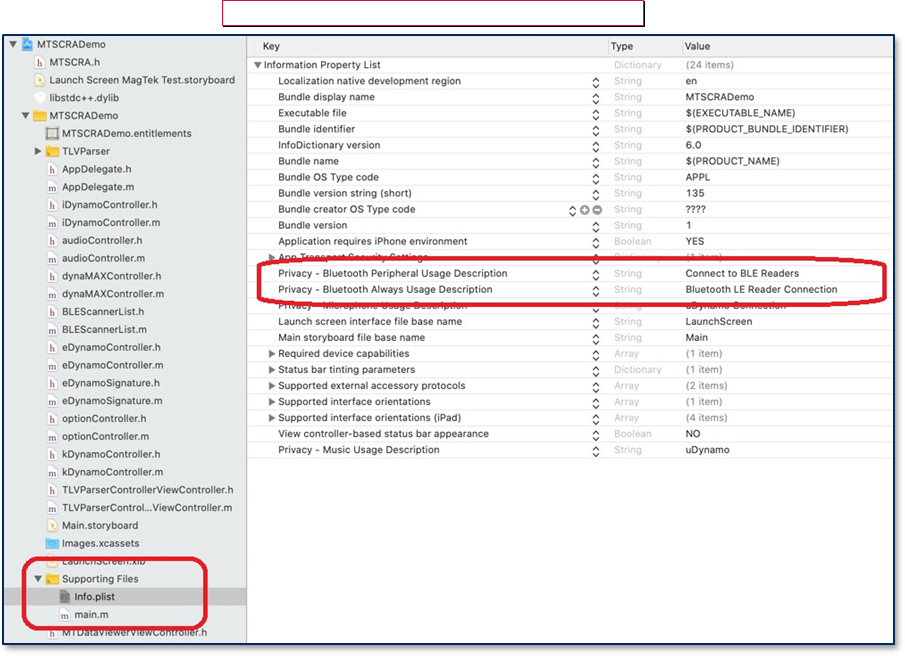
  • Starting in iOS 13, app projects must specify the Privacy Usage Description for Bluetooth by NSBluetoothAlwaysUsageDescription in the info.plist file. file. Accessing Core Bluetooth without the usage descriptions will cause a runtime crash. For backward compatibility with older versions of iOS, define NSBluetoothAlwaysUsageDescription as well.

  • Make sure device is in pairing mode. If not, press and hold the button for 3 seconds until the blue light blinks, and then release the button.

  • Set device type and connection type.

  • Wait for callback bleReaderStateUpdated(), and then call startScanningForPeripheral().

  • Wait for onDeviceList() callback. Here you can call getDiscoveredPeripherals().

  • Select the device in the list.

  • Open the device you want to connect.

  • Library will pair the device. After inputting passcode, device is ready to use.

self.lib.setConnectionType(UInt(BLE_EMV)) 
self.lib.setDeviceType(UInt32(MAGTEKEDYNAMO))
func bleReaderStateUpdated(_ state: MTSCRABLEState) { 
        print("readerStateUpdated - ", state)

        if (state == 0) {
                // dispatch in main queue is very important
                DispatchQueue.main.asyncAfter(deadline: .now() + 0.1,
execute: {
                        self.lib.startScanningForPeripherals()
                })
        }
}
func onDeviceList(_ instance: Any!, connectionType: UInt, deviceList: 
[Any]!) {
        let devices = deviceList as! [MTDeviceInfo] 
        devList.removeAll()

        let peripherals = self.lib.getDiscoveredPeripherals() 
        print(peripherals as Any)
        ...
}
lib.stopScanningForPeripherals()

lib.setAddress(devList[selected].address) 
lib.openDevice()