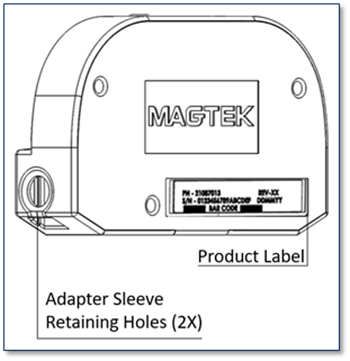
iDynamo 5 (Gen III) is a compact secure card reader authenticator (SCRA) that reads magnetic stripe cards that conform to ISO standards. iDynamo 5 (Gen III) is made for iOS, Android, and Windows devices equipped with a
USB-C interface. When a cardholder swipes a card, the device encrypts card data before they leave the encapsulated magnetic stripe reader head using the Triple Data Encryption Algorithm (TDEA, also known as Triple DES) and DUKPT key management.
During normal operation, iDynamo 5 (Gen III) is powered through its connection to the host. iDynamo 5 (Gen III) does not come equipped with a battery, if it does not receive adequate power from the host the device powers off.
Installing iDynamo 5 (Gen III) is a straightforward process. It is important to thoroughly inspect a new device before deployment, and regularly inspect devices in live usage (including its immediate surroundings) to make sure
malicious individuals have not tampered with it.
Before connecting iDynamo 5 (Gen III) device, be sure it is configured
to use the correct USB configuration (USB HID, USB KB, iAP).
In order to change configuration, you must use the current configured
setting and HOST type to change.
If the device is accidentally configured to use the iAP connection type,
you must use an iAP connection HOST to change the configuration.
Ensure Android HOST supports USB On-The-Go. Ensure connection is set to USB HID. This setting may be specified on a sales order, or configured using sample tools, sample code, or custom software.
Install any mounting brackets or adapters.
Power on the HOST.
On the HOST, install and configure the HOST SOFTWARE.
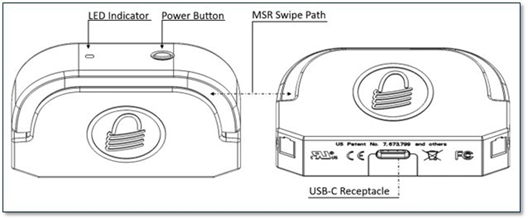
Use the cable shipped with the READER to connect from the USB-C receptacle to the HOST device.
The steps for reading a card may be different depending on READER configuration and on the design of the HOST SOFTWARE. Cardholders should swipe magnetic stripe cards in the MSR swipe path with the magnetic stripe facing away from the cardholder and into the READER. Cardholders may swipe in either direction along the path.
The READER does not have an on-screen configuration interface. The READER is HOST driven by the HOST SOFTWARE.
iDynamo 5 (Gen III) has a single RGB LED acting as the user interface. The LED will be used to indicate various states of the reader. See the installation and operation manual found at
Periodic cleaning of iDynamo 5 (Gen III)’s exterior may be required. To clean the outside of iDynamo 5 (Gen III), wipe it down with a soft, damp, lint-free cloth and then wipe it dry. MagTek’s double-sided cleaning card 96700004 is designed to clean the magnetic read head in the MSR swipe path.
Keeping the head clean is essential to the device’s functioning. MagTek recommends swiping and inserting a cleaning card once per week to avoid card misreads.
FCC INFORMATION
This device complies with Part 15 of the FCC Rules. Operation is subject to the following two conditions: (1) This device may not cause harmful interference, and (2) This device must accept any interference received, including interference that may cause undesired operation.
Note: This equipment has been tested and found to comply with the limits for a Class B digital device, pursuant to part 15 of the FCC Rules. These limits are designed to provide reasonable protection against harmful interference in a residential installation. This equipment generates, uses and can radiate radio frequency energy and, if not installed and used in accordance with the instructions, may cause harmful interference to radio communications. However, there is no guarantee that interference will not occur in a particular installation. If this equipment does cause harmful interference to radio or television reception, which can be determined by turning the equipment off and on, the user is encouraged to try to correct the interference by one or more of the following measures:
Reorient or relocate the receiving antenna.
Increase the separation between the equipment and receiver.
Connect the equipment into an outlet on a circuit different from that to which the receiver is connected.
Testing for compliance with CE requirements was performed by an independent laboratory. The unit under test was found compliant with standards established for Class B devices.
This product is recognized per UL 60950 1, 2nd Edition, 2011 12 19 (Information Technology Equipment - Safety - Part 1: General Requirements), CSA C22.2 No. 60950 1 07, 2nd Edition, 2011 12 (Information Technology Equipment - Safety - Part 1: General Requirements).
When ordered as RoHS compliant, this product meets the Electrical and Electronic Equipment (EEE) Reduction of Hazardous Substances (RoHS) European Directive 2002/95/EC. The marking is clearly recognizable, either as written words like “Pb-free,” “lead-free,” or as another clear symbol (Pb).
Connect READER to the HOST.
To Disconnect
Ensure HOST SOFTWARE is closed.
Carefully disconnect the READER.
Ensure READER is configured to use the correct USB configuration (iAP, USB)
as the primary host interface.
Install any mounting brackets or adapters.
Power on the HOST.
Connect the READER through the USB-C.
After a few seconds, the iOS host will pop up “App Not Installed”
Go to the APP STORE to install the app.
If “App Not Installed” does not appear: On the iOS HOST go to
SETTINGS > GENERAL > ABOUT > select iDynamo 5 (Gen III) to show
reader’s ABOUT page
In the READER ABOUT page select FIND APP FOR ACCESSORY
Install and configure the HOST SOFTWARE.
The HOST SOFTWARE should recognize the READER.
To Disconnect
Ensure HOST SOFTWARE is closed.
Carefully disconnect the READER.
Ensure READER is configured to use the correct USB configuration as the
primary host interface.
Install any mounting brackets or adapters.
Power on the HOST.
On the HOST, install and configure the HOST SOFTWARE.
Connect the READER to the HOST.
Use the HOST SOFTWARE to connect to the READER.
To Disconnect
Ensure HOST SOFTWARE is closed or disconnected.
Turn off HOST display.
Carefully disconnect the READER.
Caution: Changes or modifications not expressly approved by MagTek could void the user’s authority to operate this equipment.