All pages
Powered by GitBook
1 of 19

Loading...

Loading...

Loading...

Loading...

Loading...

Loading...

Loading...

Loading...

Loading...

Loading...

Loading...

Loading...

Loading...

Loading...

Loading...

Loading...

Loading...

Loading...

Loading...

MTSCRA Class Methods

Appendix C ARQC Response Message Format

This section gives the format of the data for the Online Processing Result / Acquirer Response message. This request is sent to the reader in response to an ARQC Message notification from the reader. The output is controlled by Property 0x68 – EMV Message Format. There are currently 2 selectable formats: Original and DynaPro. It is a TLV object with the following contents.

Original format:

F9<len>/* container for ARQC Response data */ 
    DFDF25 (IFD Serial Number)<len><val> 
    FA<len>/* Container for generic data */
        70<len>/* Container for ARQC */ 
                8A<len> approval
                Further objects as needed...

DynaPro format:

F9<len>/* container for MAC structure and generic data */ 
    DFDF54 (MAC KSN)<len><val>
    DFDF55 (Mac Encryption Type><len><val> 
    DFDF25 (IFD Serial Number)<len><val> 
    FA<len>/* Container for generic data */
            70<len>/* Container for ARQC */ 
                    8A<len> approval
Further objects as needed... (ARQC padding, if any, to be a multiple of 8 bytes)
CBC-MAC (4 bytes, use MAC variant of MSR DUKPT key that was used in ARQC request, from 
message length up to and including ARQC padding, if any

Enums/Interfaces

IMTCardData

public interface IMTCardData

{

public byte[] getData();

public String getMaskedTracks(); public String getTrack1();

public String getTrack2(); public String getTrack3();

public String getTrack1Masked(); public String getTrack2Masked(); public String getTrack3Masked(); public String getMagnePrint(); public String getMagnePrintStatus(); public String getDeviceSerial(); public String getSessionID();

public String getKSN();

public String getDeviceName(); public void clearBuffers(); public long getBatteryLevel(); public long getSwipeCount();

public String getCapMagnePrint();

public String getCapMagnePrintEncryption(); public String getCapMagneSafe20Encryption(); public String getCapMagStripeEncryption(); public String getCapMSR();

public String getCapTracks(); public long getCardDataCRC(); public String getCardExpDate(); public String getCardIIN(); public String getCardLast4(); public String getCardName(); public String getCardPAN(); public int getCardPANLength();

public String getCardServiceCode(); public String getCardStatus(); public int getDataFieldCount(); public String getHashCode();

public String getDeviceConfig(String configType); public String getEncryptionStatus();

public String getFirmware();

public String getMagTekDeviceSerial(); public String getResponseType();

public String getTagValue(String tag, String data); public String getTLVVersion();

public String getTrackDecodeStatus();

public String getTLVPayload();

public String getMessageID(); public boolean isQwantumCard(); public boolean isQwantumBuffer();

public boolean isCustomerMessage();

String getMSRDUKPTKeySerialNumber(); String getMSRDUKPTKeyInfo();

String getMPDUKPTKeySerialNumber(); String getMPDUKPTKeyInfo();

public String getTokenDUKPTKeySerialNumber(); public String getTokenDUKPTKeyInfo();

public String getQwantumStatus(); public String getQwantumToken(); public String getQwantumCardID();

public String getEncryptedQwantumDataBuffer(); public String getMACDUKPTKeyInfo();

public String getMACMessageLength(); public String getMAC();

public String getCustomerMessageCode(); public String getCustomerMessageText();

public String getEncryptedSCDE();

public String getSCDEDUKPTKeySerialNumber(); public String getSCDEDUKPTKeyInfo();

Introduction

This document provides instructions for software developers who want to create software solutions that include a MagTek Secure Card Reader / Authenticator (SCRA) device connected to a Windows PC, Windows tablet device or Windows Phone mobile device.

About MTSCRA Library

Custom Windows software installed on a host PC can communicate with MagTek SCRA devices via the Audio/Headset Interface, Bluetooth, Bluetooth LE, or USB using the MTSCRA library.

The supported platforms for .NET projects include Windows 7, Windows 8/8.1, and Windows 10. The

.NET project should contain references to these files: MTSCRANET.dll and MTLIB.dll.

For Universal Windows projects, the supported platforms include all Windows 10 devices. The Universal/Windows Store project should contain references to MTSCRAUWP.dll file.

Appendix B ARQC Message Format

This section gives the format of the ARQC Message delivered in the ARQC Message notification. The output is controlled by Property 0x68 – EMV Message Format. There are currently 2 selectable formats: Original and DynaPro. It is a TLV object with the following contents.

Original Format:

FD<len>/* container for generic data */ 
    DFDF25(IFD Serial Number)<len><val> 
    FA<len>/* container for generic data */
        <tags defined by DFDF02 >
            . Note: Sensitive Data cannot be defined in DFDF02
            .
        DFDF4D(Masked T2 ICC Data) 
        DFDF52 - Card Type Used
        F8<len>/* container tag for encrypted data */ 
                DFDF56(Encrypted Transaction Data KSN)<len><val>
                DFDF57(Encrypted Transaction Data Encryption Type)<val>

                FA<len>/* container for generic data */ 
                    DF30(Encrypted Tag 56 TLV, T1 Data)<len><val> 
                    DF31(Encrypted Tag 57 TLV, T2 Data)<len><val> 
                    DF32(Encrypted Tag 5A TLV, PAN)<len><val> 
                    DF35(Encrypted Tag 9F1F TLV, T1 DD)<len><val> 
                    DF36(Encrypted Tag 9F20 TLV, T2, DD)<len><val>
                    DF37(Encrypted Tag 9F61 TLV, T2 CVC3)<len><val> 
                    DF38(Encrypted Tag 9F62 TLV, T1,PCVC3)<len><val> 
                    DF39(Encrypted Tag DF812A TLV, T1 DD)<len><val> 
                    DF3A(Encrypted Tag DF812B TLV, T2 DD)<len><val> 
                    DF3B(Encrypted Tag DFDF4A TLV, T2 ISO Format)<len><val> 
                    DF40(Encrypted Value only of DFDF4A, T2 ISO Format)<len><val>

DynaPro Format:

The Value inside tag DFDF59 is encrypted and contains the following after decryption:

                FC<len>/* container for encrypted generic data */
                                <tags defined by DFDF02 >
                                .
F9<len>/* container for MAC structure and generic data */ 
    DFDF54(MAC KSN)<len><val>
    DFDF55(MAC Encryption Type)<len><val> 
    DFDF25(IFD Serial Number)<len><val> 
    FA<len>/* container for generic data */
        70<len>/*container for ARQC */ 
            DFDF53<len><value>/*fallback indicator */ 
            5F20<len><value>/*cardholder name */ 
            5F30<len><value>/*service code */ 
            DFDF4D<len><value>/* Mask T2 ICC Data */ 
            DFDF52<len><value>/* card type */ 
            F8<len>/*container tag for encryption */
                DFDF59(Encrypted Data Primitive)<len><Encrypted Data val (Decrypt data to read tags)>
                DFDF56(Encrypted Transaction Data KSN)<len><val> 
                DFDF57(Encrypted Transaction Data Encryption Type)<val> 
                DFDF58(# of bytes of padding in DFDF59)<len><val>
(Buffer if any to be a multiple of 8 bytes) 
CBC-MAC (4 bytes, always set to zeroes)
MTSCRA Class Methods - 21 - 30

getKSN

Get stored key serial number. This 10-byte Binary field contains the DUKPT Key Serial Number used to encrypt the encrypted fields in this message. This 80-bit field includes the Initial Key Serial Number in the leftmost 59 bits and a value for the Encryption Counter in the rightmost 21 bits. If no keys are loaded, all bytes will have the value 0x00.

public string getKSN()

Parameters: None Return Value:

Return stored key serial number.

getDeviceName

Get device model name.

public string getDeviceName()

Parameters: None

Return Value:

Return device model name.

Clears buffered data retrieved from the reader.

public void clearBuffers()

Parameters: None

Return Value: None

Retrieves battery level.

public long getBatteryLevel()

Parameters: None Return Value:

Battery Level (0 to 100)

Retrieves swipe count.

public long getSwipeCount()

Parameters: None

Return Value:

Long value representing swipe count. If the value is less than zero, it indicates the device does not support tracking of the number of card swipes.

Retrieves MagnePrint Capabilities.

public string getCapMagnePrint()

Parameters: None Return Value:

String representing MagnePrint capabilities:

  • 0 = No MagnePrint,

  • 1 = Short MagnePrint,

  • 2 = Long MagnePrint

Retrieves MagnePrint Encryption Capabilities.

public string getCapMagnePrintEncryption()

Parameters: None Return Value:

String representing MagnePrint Encryption capabilities:

  • 0 = No Encryption,

  • 1 = Same as MagStripe (8122), other values TBD.

If absent, the default value is 1.

Retrieves MagneSafe 2.0 Encryption Capabilities.

public string getCapMagneSafe20Encryption ()

Parameters: None

Return Value:

String representing MagneSafe 2.0 Encryption Capabilities. 0 = Not supported, other values TBD.

Retrieves MagneStripe Encryption Capabilities.

public string getCapMagStripeEncryption()

Parameters: None Return Value:

String representing MagStripe Encryption Capabilities. 0 = No Encryption, 1 = TDES DUKPT / PIN Variant, other values TBD

Retrieves MSR Capabilities. public string getCapMSR() Parameters: None

Return Value:

String representing MSR Capabilities. 0 = No MSR, 1 = MSR.

Programmer's Manual (.NET/PCL)

Secure Card Reader Authenticator

Programmer’s Manual ( .NET/Universal Windows )

REGISTERED TO ISO 9001:2015

MagTek I 1710 Apollo Court I Seal Beach, CA 90740 I Phone: (562) 546-6400 I Technical Support: (888) 624-8350 www.magtek.com

Copyright © 2006-2025 MagTek, Inc. Printed in the United States of America

Information in this publication is subject to change without notice and may contain technical inaccuracies or graphical discrepancies. Changes or improvements made to this product will be updated in the next publication release. No part of this document may be reproduced or transmitted in any form or by any means, electronic or mechanical, for any purpose, without the express written permission of MagTek, Inc.

MagTek® is a registered trademark of MagTek, Inc. MagneSafe® is a registered trademark of MagTek, Inc. iDynamo™, and uDynamo are trademarks of MagTek, Inc.

eDynamo™, Dynamag, and DynaMAX are trademarks of MagTek, Inc.

The Bluetooth® word mark and logos are registered trademarks owned by Bluetooth SIG, Inc. and any use of such marks by MagTek is under license.

Microsoft®, Windows® and .NET® are registered trademarks of Microsoft Corporation.

EMV® is a registered trademark in the U.S. and other countries and an unregistered trademark elsewhere. The EMV trademark is owned by EMVCo, LLC. The Contactless Indicator mark, consisting of four graduating arcs, is a trademark owned by and used with permission of EMVCo, LLC.

All other system names and product names are the property of their respective owners.

Table 1.1 Revisions

IMPORTANT: YOU SHOULD CAREFULLY READ ALL THE TERMS, CONDITIONS AND RESTRICTIONS OF THIS LICENSE AGREEMENT BEFORE INSTALLING THE SOFTWARE PACKAGE. YOUR INSTALLATION OF THE SOFTWARE PACKAGE PRESUMES YOUR ACCEPTANCE OF THE TERMS, CONDITIONS, AND RESTRICTIONS CONTAINED IN THIS AGREEMENT. IF YOU DO NOT AGREE WITH THESE TERMS, CONDITIONS, AND RESTRICTIONS, PROMPTLY RETURN THE SOFTWARE PACKAGE AND ASSOCIATED DOCUMENTATION TO THE ADDRESS ON THE FRONT PAGE OF THIS DOCUMENT, ATTENTION: CUSTOMER SUPPORT.

TERMS, CONDITIONS, AND RESTRICTIONS

MagTek, Incorporated (the "Licensor") owns and has the right to distribute the described software and documentation, collectively referred to as the "Software."

LICENSE: Licensor grants you (the "Licensee") the right to use the Software in conjunction with MagTek products. LICENSEE MAY NOT COPY, MODIFY, OR TRANSFER THE SOFTWARE IN WHOLE OR IN PART EXCEPT AS EXPRESSLY PROVIDED IN THIS AGREEMENT. Licensee

may not decompile, disassemble, or in any other manner attempt to reverse engineer the Software. Licensee shall not tamper with, bypass, or alter any security features of the software or attempt to do so.

TRANSFER: Licensee may not transfer the Software or license to the Software to another party without the prior written authorization of the Licensor. If Licensee transfers the Software without authorization, all rights granted under this Agreement are automatically terminated.

COPYRIGHT: The Software is copyrighted. Licensee may not copy the Software except for archival purposes or to load for execution purposes. All other copies of the Software are in violation of this Agreement.

TERM: This Agreement is in effect as long as Licensee continues the use of the Software. The Licensor also reserves the right to terminate this Agreement if Licensee fails to comply with any of the terms, conditions, or restrictions contained herein. Should Licensor terminate this Agreement due to Licensee's failure to comply, Licensee agrees to return the Software to Licensor. Receipt of returned Software by the Licensor shall mark the termination.

LIMITED WARRANTY: Licensor warrants to the Licensee that the disk(s) or other media on which the Software is recorded are free from defects in material or workmanship under normal use.

THE SOFTWARE IS PROVIDED AS IS. LICENSOR MAKES NO OTHER WARRANTY OF ANY KIND, EITHER EXPRESS OR IMPLIED, INCLUDING, BUT NOT LIMITED TO, THE IMPLIED WARRANTIES OF MERCHANTABILITY AND FITNESS FOR A PARTICULAR PURPOSE.

Because of the diversity of conditions and PC hardware under which the Software may be used, Licensor does not warrant that the Software will meet Licensee specifications or that the operation of the Software will be uninterrupted or free of errors.

IN NO EVENT WILL LICENSOR BE LIABLE FOR ANY DAMAGES, INCLUDING ANY LOST PROFITS, LOST SAVINGS, OR OTHER INCIDENTAL OR CONSEQUENTIAL DAMAGES ARISING OUT OF THE USE, OR INABILITY TO USE, THE SOFTWARE. Licensee's sole remedy in the event of a defect in material or workmanship is expressly limited to replacement of the Software disk(s) if applicable.

GOVERNING LAW: If any provision of this Agreement is found to be unlawful, void, or unenforceable, that provision shall be removed from consideration under this Agreement and will not affect the enforceability of any of the remaining provisions. This Agreement shall be governed by the laws of the State of California and shall inure to the benefit of MagTek, Incorporated, its successors or assigns.

ACKNOWLEDGMENT: LICENSEE ACKNOWLEDGES THAT HE HAS READ THIS AGREEMENT, UNDERSTANDS ALL OF ITS TERMS, CONDITIONS, AND RESTRICTIONS, AND AGREES TO BE BOUND BY THEM. LICENSEE ALSO AGREES THAT THIS AGREEMENT SUPERSEDES ANY AND ALL VERBAL AND WRITTEN COMMUNICATIONS BETWEEN LICENSOR AND LICENSEE OR THEIR ASSIGNS RELATING TO THE SUBJECT MATTER OF THIS AGREEMENT.

QUESTIONS REGARDING THIS AGREEMENT SHOULD BE ADDRESSED IN WRITING TO MAGTEK, INCORPORATED, ATTENTION: CUSTOMER SUPPORT, AT THE ADDRESS LISTED IN THIS DOCUMENT, OR E-MAILED TO

Commands

Custom software can use the sendCommandToDevice method to send direct commands to the devices. This section provides information about commonly used commands.

Discovery

To send a Discovery command to device, use:

public void sendCommandToDevice(string command)

Parameters: Use “C10206C20503840900” as command string for audio readers.

Return Value:

The following device information will be retrieved.

Device SN, internal: Device serial number created by chip manufacturer. Use getDeviceSerial method to retrieve data.

Device SN, MagTek: Device serial number created by MagTek. Use getDeviceSerialMagTek method to retrieve data.

Device Firmware Part Number: Device firmware part number. Use getFirmware method to retrieve data.

Device Model Name: Device model name. Use getDeviceName method to retrieve data. Device TLV Version: Device TLV version. Use getTLVVersion method to retrieve data.

Device Part Number: Device part number. Use getDevicePartNumber method to retrieve data. Capability - MSR: 0 = No MSR, 1 = MSR. Use getCapMSR method to retrieve data.

Capability - TRACKS:

  • 0 = Supported tracks: None.

  • 1 = Supported tracks: Track1.

  • 2 = Supported tracks: Track2.

  • 3 = Supported tracks: Track1, Track2.

Use getCapTracks method to retrieve data.

Capability - MagStripe Encryption: 0 = No Encryption, 1 = TripDES DUKPT. Use getCapMagStripeEncryption method to retrieve data.

MTSCRA Class Methods - 31 - 40

Retrieves Track Capabilities.

public string getCapTracks()

Parameters: None Return Value:

String representing Track Capabilities:

  • Bit 0 = 1 / Track 1 supported,

  • 4 = Supported tracks: Track3.

  • 5 = Supported tracks: Track1, Track3.

  • 6 = Supported tracks: Track2, Track3.

  • 7 = Supported tracks: Track1, Track2, Track3.

  • clearBuffers

    getBatteryLevel

    getSwipeCount

    getCapMagnePrint

    getCapMagnePrintEncryption

    getCapMagneSafe20Encryption

    getCapMagStripeEncryption

    1.10 getCapMSR

    30

    05/17/2016

    Added DynaPro format for EMV transaction messages.

    40

    06/20/2016

    Added getCardPAN.

    50

    10/28/2016

    Added support for mDynamo.

    51

    June 9, 2017

    Fix table in section 5.6 listing values for card events; misc. formatting cleanup.

    52

    10/16/2017

    Updates for Universal Windows. Enhanced the code examples.

    53

    05/23/2018

    Added isDeviceOEM

    54

    01/31/2019

    Updated to correctly reference Bluetooth LE. Added getDeviceFeatures() and getPowerManagementValue().

    55

    10/08/2019

    Updated events for the event onTransactionStatus(), and result codes for the event onEMVCommandResult().

    Updated the method startTransaction(): cardType, options. and transactionType.

    Rev Number

    Date

    Notes

    10

    02/25/2015

    Initial Release

    20

    12/03/2015

    Rev Number

    Date

    Notes

    500

    06/03/2024

    Added EMV transaction flow as Appendix F.

    Added support for iDynamo 5 Gen III at sections 4.2, 4.61, and Appendix E.

    501

    07/03/2025

    SOFTWARE LICENSE AGREEMENT

    SUPPORT@MAGTEK.COM.

    Updates for EMV devices

    Updated and included IMTCardData to support SCDE (section 6.1).

    Bit 1 = 1 / Track 2 supported,
  • Bit 2 = 1 / Track 3 supported, All other bits = 0.

  • Retrieves CRC from card data.

    public long getCardDataCRC()

    Parameters: None Return Value:

    Card data CRC

    Retrieves CRC from card data.

    public string getCardExpDate ()

    Parameters: None Return Value:

    String representing card expiration date.

    Retrieves Issuer Identification Number (IIN) from card data.

    public string getCardIIN()

    Parameters: None

    Return Value: String representing card IIN.

    Retrieves Last 4 digits of card number from card data.

    public string getCardLast4()

    Parameters: None

    Return Value:

    String representing card last 4 digits.

    Retrieves card name from card data.

    public string getCardName()

    Parameters: None Return Value:

    String representing card name.

    Retrieves PAN from card data.

    public string getCardPAN()

    Parameters: None

    Return Value: String representing card PAN.

    Retrieves PAN length from card data.

    public int getCardPANLength()

    Parameters: None

    Return Value: PAN length.

    Retrieves Service Code.

    public string getCardServiceCode()

    Parameters: None

    Return Value: String representing service code.

    Retrieves the card status.

    public string getCardStatus()

    Parameters: None Return Value:

    String representing the card status.

    Card Status

    This is a string value which indicates the card status. The following table defines the possible values.

    Value

    Description

    00

    The card was swiped in the withdrawal direction.

    01

    The card was swiped in the insertion direction.

    getCapTracks

    getCardDataCRC

    getCardExpDate

    getCardIIN

    getCardLast4

    getCardName

    getCardPAN

    getCardPANLength

    getCardServiceCode

    getCardStatus

    MTSCRA Class Methods - 1 - 10

    After creating an instance of the MTSCRA class in your custom software project, use the methods described in this section to communicate with SCRA device.

    requestDeviceList

    This method initiates the discovery of devices that are visible to the host using the specified connection interface. The DeviceListReceived() event will provide information regarding the available devices once the discovery process is completed.

    public void requestDeviceList(MTConnectionType connectionType)

    Parameters:

    Parameter

    Return Value: None

    This method sets the connection type of the device.

    public void setConnectionType(MTConnectionType connectionType)

    Parameters:

    The following table shows the connection types supported by the various programming interfaces:

    The following table shows the connection types supported by the various SCRA devices:

    Return Value: None

    This method sets the address of the device.

    public void setAddress(string deviceAddress)

    Parameters:

    Return Value: None

    This method sets the device ID.

    public void setDeviceID(string deviceID)

    Parameters:

    Return Value: None

    This method opens connection to the device. If you use the MagTek Universal Windows SDK and USB Card reader with PID 0011, please refer to section 2.5 How to remove POS HID Magnetic Stripe Reader.

    public void openDevice()

    Parameters: None

    Return Value: None

    This method closes the connection to the device.

    public void closeDevice()

    Parameters: None

    Return Value: None

    This method returns whether the device is connected or not.

    public bool isDeviceConnected()

    Parameters: None Return Value:

    Return true if the device is connected. Otherwise, return false.

    This method returns whether the device supports EMV or not.

    public bool isDeviceEMV()

    Parameters: None Return Value:

    Return true if EMV is supported by the device. Otherwise, return false.

    This method returns whether the device is an OEM device or not.

    public bool isDeviceOEM()

    Parameters: None Return Value:

    Return true if device is OEM. Otherwise, return false.

    Get stored masked tracks data. If decodable track data exists for a given track, it is located in the Masked Track Data field that corresponds to the track number. The length of each Masked Track Data field is fixed at 112 bytes, but the length of valid data in each field is determined by the Masked Track Data Length field that corresponds to the track number. Masked Track Data located in positions greater than indicated in the Masked Track Data Length field are undefined and should be ignored.

    The Masked Track Data is decoded and converted to ASCII and then it is masked. The Masked Track Data includes all data starting with the start sentinel and ending with the end sentinel. Much of the data is masked; a specified mask character is sent instead of the actual character read from the track. Which characters are masked depends on the format of the card. Only ISO/ABA (Financial Cards with Format Code B) and AAMVA cards are selectively masked; all other card types are either entirely masked or sent totally in the clear. There is a separate masking property for ISO/ABA cards and AAMVA cards. See the ISO Track Masking property and the AAMVA Track Masking property for more information. See 99875475 for a description on how ISO/ABA and AAMVA cards are identified.

    Each of these properties allows the application to specify masking details for the Primary Account Number and Driver’s License / ID Number (DL/ID#), the masking character to be used, and whether a correction should be applied to make the Mod 10 9 (Luhn algorithm) digit at the end of the number be correct.

    public string getMaskedTracks()

    Parameters: None Return Value:

    Return stored masked tracks data string.

    MTSCRA Class Methods - 41 - 50

    getCardEncodeType

    Retrieves the card encode type.

    public string getCardEncodeType()

    Parameters: None Return Value:

    String representing the card encode type.

    Card Encode Type

    This is a string value which indicates the type of encoding that was found on the card. The following table defines the possible values.

    Retrieves data field count.

    public int getDataFieldCount()

    Parameters: None

    Return Value:

    Data field count

    Retrieves SHA-x hash code.

    public string getHashCode()

    Parameters: None Return Value:

    String representing SHA-x hash code.

    Retrieves device configuration.

    public string getDeviceConfig(string configType)

    Parameters:

    configType can be one of:

    • 8180: Send TLV Version on Power Up

    • 8181: Send Discovery on Power Up

    • 8280: Send Card name

    • 8281: Send Card IIN

    Return Value:

    String representing device configuration.

    Retrieves encryption status. This two-byte Binary field contains the Encryption Status. The Reader Encryption Status is sent in big endian byte order. Byte 1 is the least significant byte. Byte 1 LSB is status bit 0. Byte 2 MSB is status bit 15.

    public string getEncryptionStatus()

    Parameters: None Return Value:

    String representing decryption status as a 2-byte binary field.

    • Bit 0 = DUKPT Keys exhausted (1=exhausted, 0=keys available)

    • Bit 1 = Initial DUKPT key Injected, always set to One (Primary DUKPT Key)

    • Bit 2 = Encryption Enabled, always set to One

    Retrieves firmware version.

    public string getFirmware()

    Parameters: None

    Return Value:

    String representing firmware version.

    Retrieves MagTek device serial number.

    public string getMagTekDeviceSerial()

    Parameters: None

    Return Value:

    String representing MagTek device serial number.

    Retrieves response data.

    public string getResponseData()

    Parameters: None

    Return Value:

    String representing response data.

    Retrieves response type.

    public string getResponseType()

    Parameters: None

    Return Value:

    String representing response type. For Audio Reader, always “C101”.

    Retrieves the value of the specified tag.

    public string getTagValue(string tag, string data)

    • Parameters: None

      • tag

        • Tag to search for

    Return Value: String representing tag value.

    How to Set Up

    How to Set Up Headset Interface on Windows PC on Windows PC

    To set up the headset interface on Windows PC to communicate with the MagTek SCRA device, follow these steps:

    1. Connect the device to the headset jack of the Windows PC.

    2. Open the Windows Control Panel.

    3. Open Sound

    4. Select the Playback tab.S

    5. Select the playback device that is connected to the SCRA device (for example, Speakers and Headphones).

    6. Press the Properties button to launch the (device name) Properties tab.

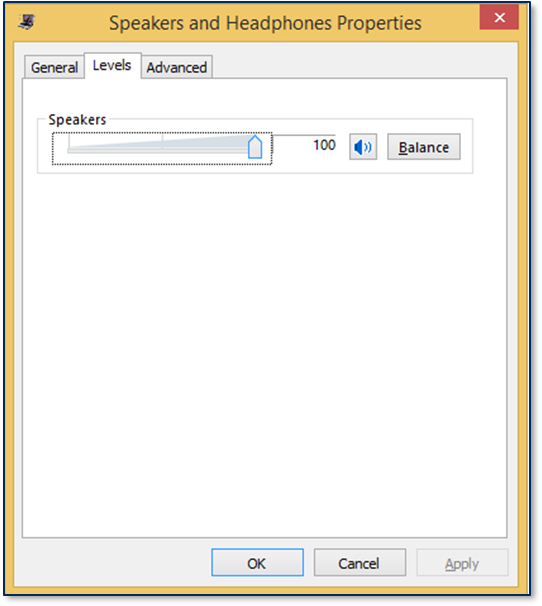
    7. Select the Levels tab

    8. Set the volume to maximum. See Figure 3-1 for an example.

    9. Select the Recording tab.

    10. Select the headset interface that is connected to the SCRA device (for example, Headset Mic).

    11. Press the Properties button to launch the (device name) Properties tab.

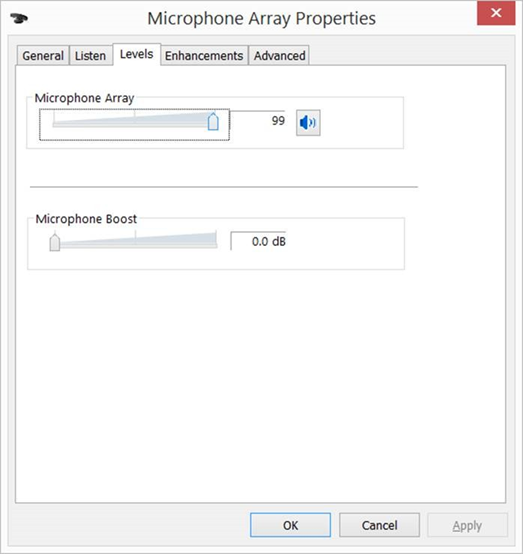
    12. Select the Levels tab.

    13. Turn any boost settings or other special volume settings completely off (for example, set Microphone Boost ) to 0.0dB). See Figure 3-2 for an example.

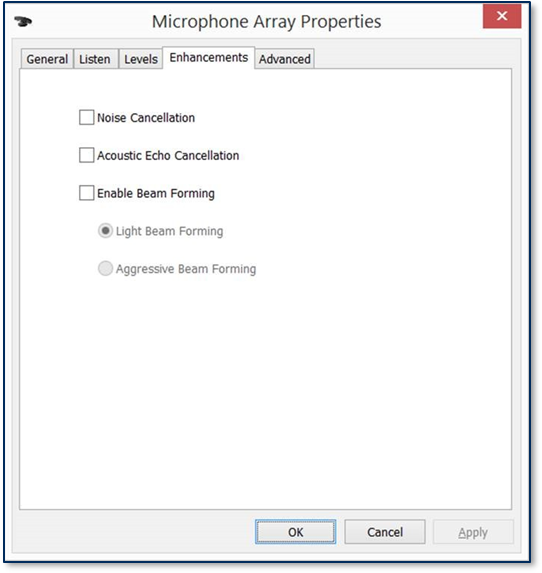
    14. If the (device name) Properties window has and Enhancements tab, select it.

    15. Make sure all checkboxes in the Enhancements tab are turned off. See Figure 3-3 for an example.

    16. If the (device name) Properties window has an Effects tab, select it

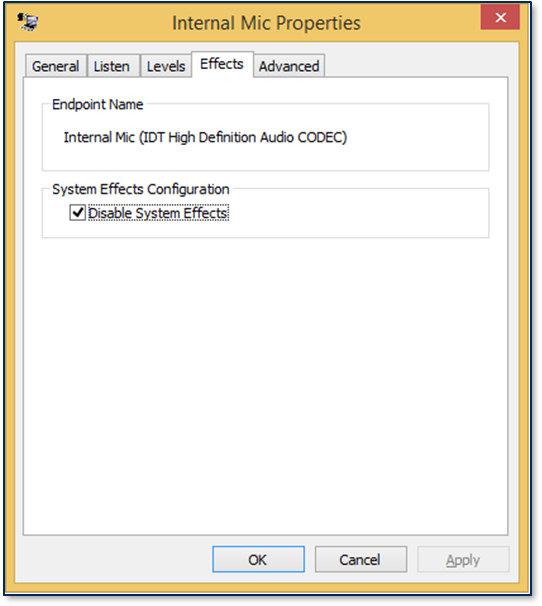
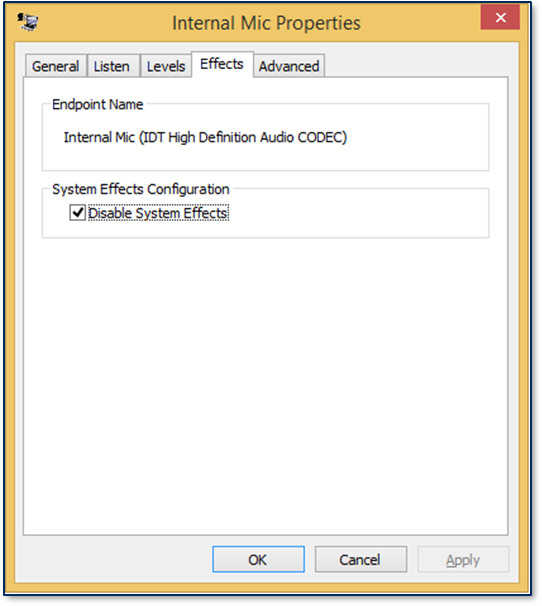
    17. If the Enhancements tab has a Disable System Effects checkbox, turn it ON. Turn all other effects off. See Figure 3-4 for an example.

    Figure 3-1 Device Volume Level Set to 100

    Figure 3-2 Microphone Boost Turned Off

    Figure 3-3 Enhancements Turned Off

    Figure 3-4 Effects Turned Off

    To set up the headset interface on Windows Phone to communicate with the MagTek SCRA device, follow these steps:

    1. Connect the device to the headset jack of the Windows Phone.

    2. Adjust the audio output to the maximum level using the physical volume buttons of the Windows Phone.

    To add the MagTek SCRA libraries to a .NET project in Microsoft Visual Studio, follow these steps:

    1. Create or open your .NET project in Visual Studio.

    2. Copy the following DLL files from the MTNETDemo folders to the library folder of your software project:

      1. MTDevice.dll

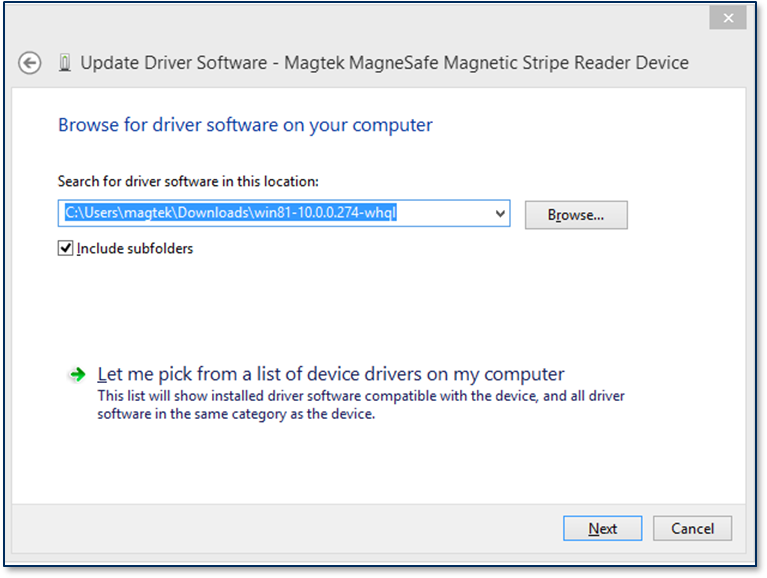
    In order to use the MagTek USB card readers with PID 0011, follow these steps:

    1. Open Device Manager

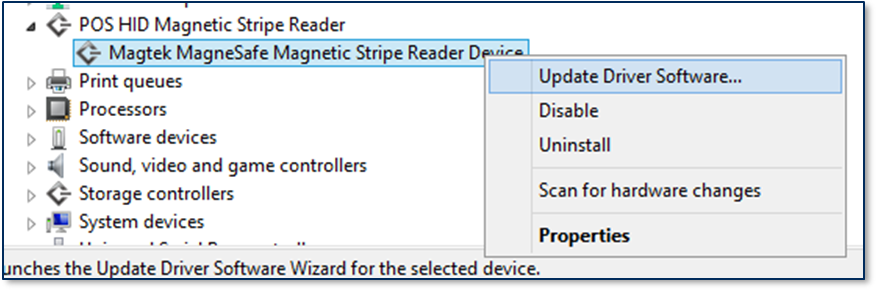
    2. Right Click on MagTek MagneSafe Magnetic Stripe Reader Device

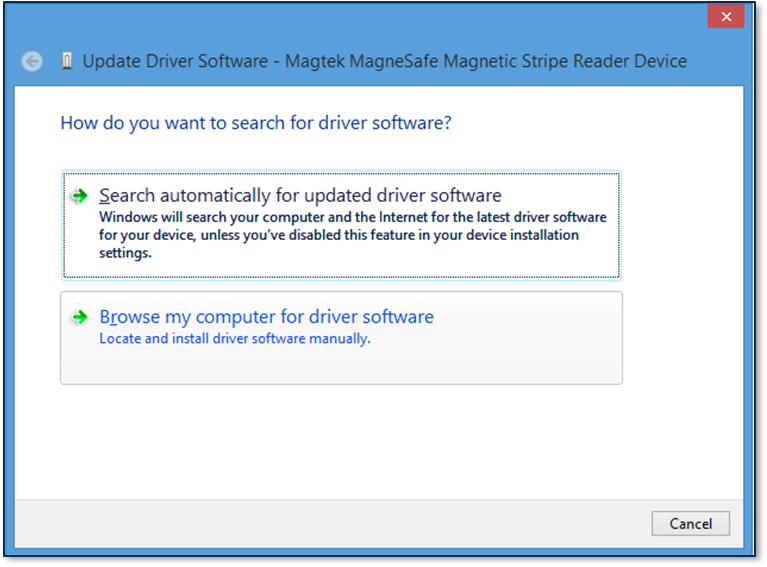
    3. Select Update Driver Software .

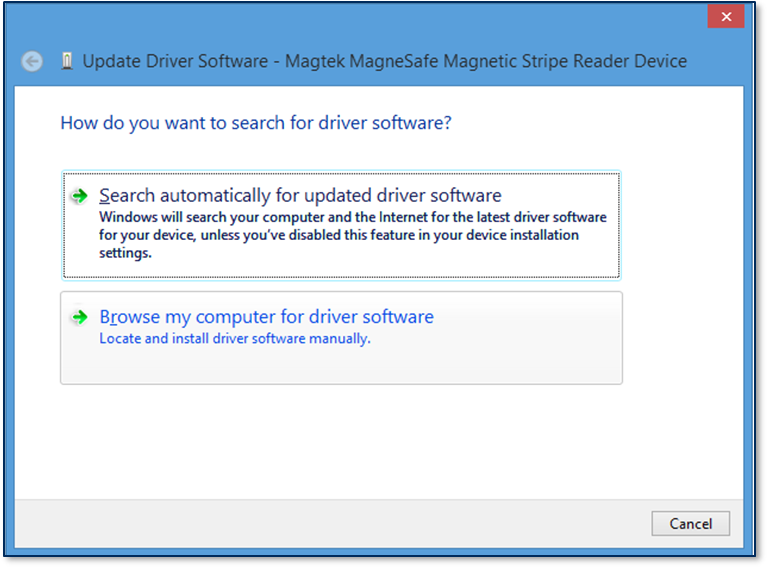
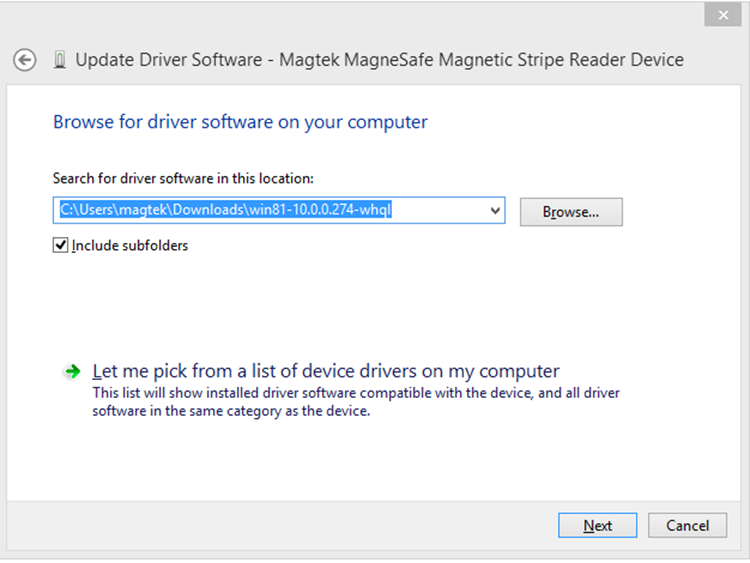
    • Select Browse My Computer for driver software .

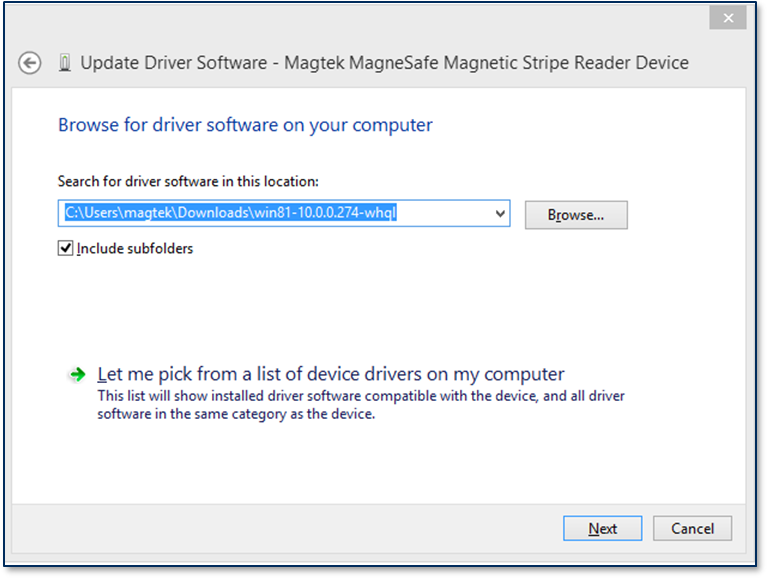
    • Select Let me pick from a list of device drivers on my computer .

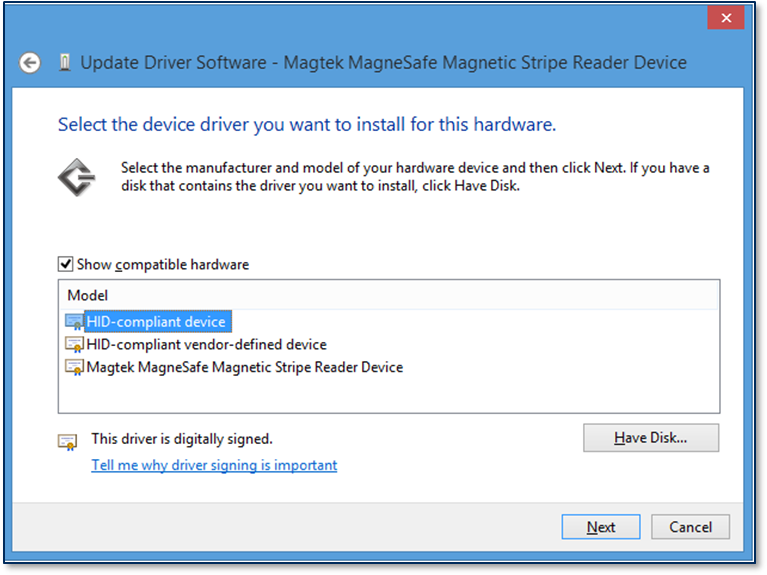
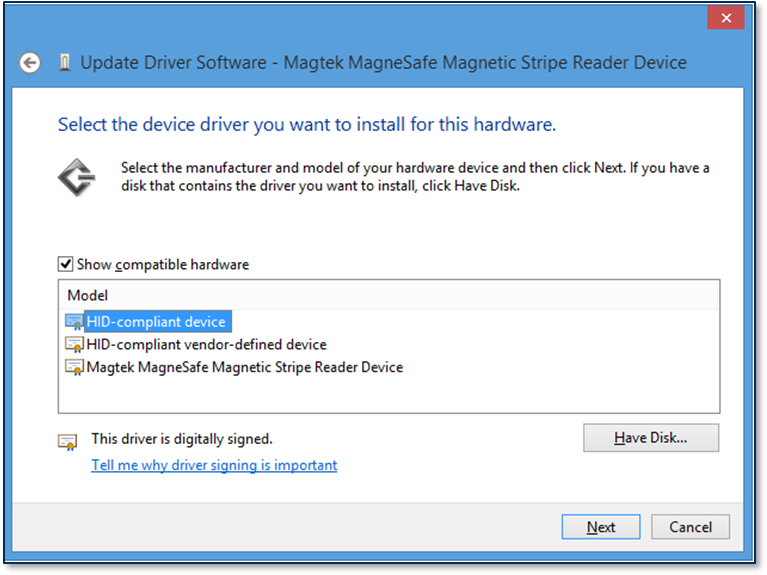
    • Select HiD-Compliant Device then click Next.

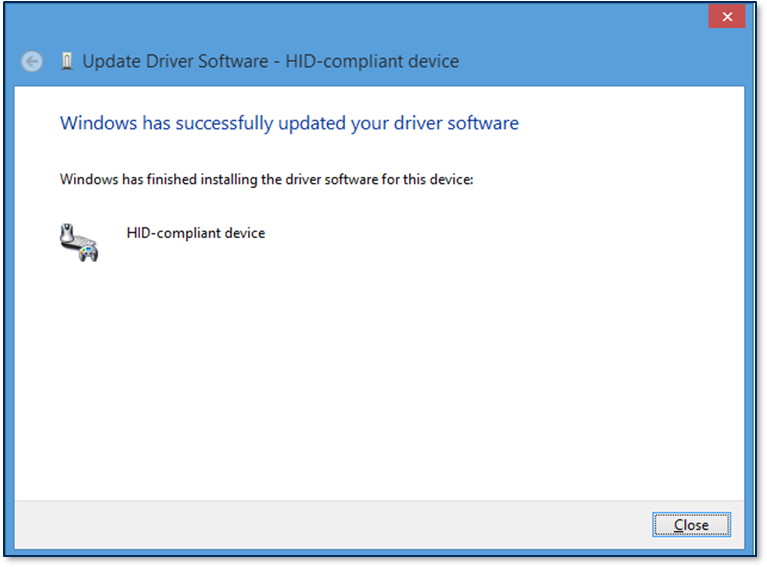
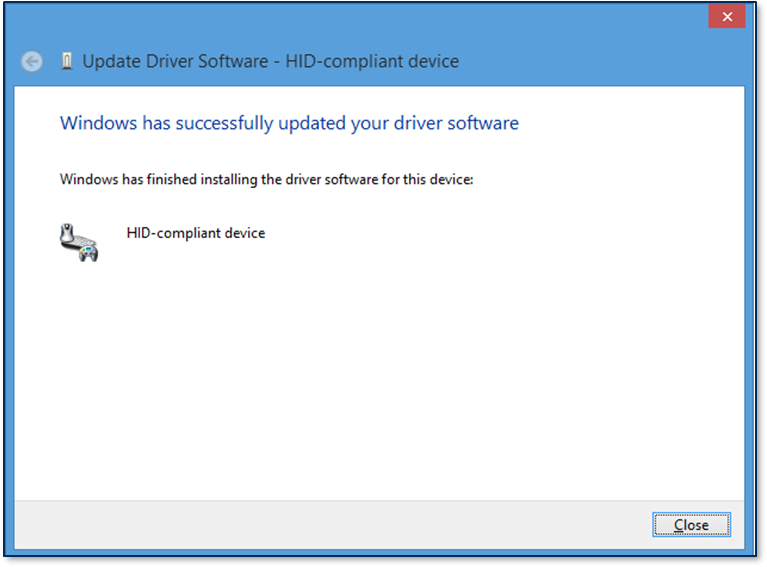
    • Windows will pop up a message saying successfully updated your driver. Click to finish.

    • MTSCRA Class Methods.

    To add the MagTek SCRA libraries to a Universal Windows project in Microsoft Visual Studio, follow these steps:

    1. Create or open your Universal Windows project in Visual Studio.

    2. Copy the following DLL file from the SDK library folder to the library folder of your software project:

      1. MTSCRAUWP.dll

    In order to use the MagTek USB card readers with PID 0011, follow these steps:

    • Open Device Manager

    • Right Click on MagTek MagneSafe Magnetic Stripe Reader Device .

    • Select Update Driver Software .

    • Select Browse My Computer for driver software .

    • Select Let me pick from a list of device drivers on my computer .

    • Select Let me pick from a list of device drivers on my computer.

    • Select HiF-Compliant Device then click Next.

    • Windows will pop up a message saying successfully updated your driver. Click Close to finish.

    Appendix A Code Examples

    A.1 Request List of Devices

    To request a list of devices:

    1. Create an MTSCRANET.MTSCRA object.

    2. Set the connection type with setConnectionType().

    3. Add a handler for OnDeviceList().

    4. Call requestDeviceList().

    To open multiple devices:

    1. Create an MTSCRANET.MTSCRA object.

    2. Set the connection type with setConnectionType().

    3. Add a handler for OnDeviceList().

    4. Call requestDeviceList().

    Appendix D Batch Data Format

    This section gives the format of the data the device uses to do completion processing. The output is controlled by Property 0x68 – EMV Message Format. There are currently 2 selectable formats: Original and DynaPro. It is a TLV object with the following contents.

    Original Format:

    • 0x00 = Approved

    • 0x01 = Declined

    8282: Send Card Last 4 Digits of PAN

  • 8283: Send Card Expiration

  • 8284: Send Card Service Code

  • 8285: Send Card PAN Length

  • Bit 3 = Reserved (always set to zero)
  • Bit 4 = Reserved (always set to zero)

  • Bit 5 = Reserved (always set to zero)

  • Bit 6 = Reserved (always set to zero)

  • Bit 7 = Reserved (always set to zero)

  • Bit 8 = Reserved (always set to zero)

  • Bit 9 = Initial DUKPT key injected (Secondary DUKPT Key)

  • Bit 10 = DUKPT Key used for encryption, 0=Primary, 1=Secondary

  • Bit 11 = DUKPT Key Variant used to encrypt data, 0=PIN Variant, 1=Data Variant/Bidirectional

  • Bits 12–15 = Unassigned (always set to Zero)

  • data
    • Data to search from

    Value

    Encode Type

    Description

    00

    ISO/ABA

    ISO/ABA encode format. At least one track in ISO/ABA format, Track 3 not AAMVA format.

    01

    AAMVA

    AAMVA encode Track 3 is AAMVA format. Tracks 1 and 2 are ISO/ABA if correctly decoded.

    02

    Reserved

    03

    Blank

    The card is blank. Only occurs if all tracks decode without error and without data.

    04

    Other

    The card has a non-standard encode format. For example, ISO/ABA track 1 format on track 2.

    05

    Undetermined

    The card encode type could not be determined because no tracks could be decoded. (Combination of Error tracks and Blank Tracks, at least one Error track).

    06

    None

    No decode has occurred. This type occurs if no magnetic stripe data has been acquired since the data has been cleared or since the reader was powered on. This reader only sends an Input report when a card has been swiped so this value will never occur.

    getDataFieldCount

    getHashCode

    getDeviceConfig

    getEncryptionStatus

    getFirmware

    getMagTekDeviceSerial

    getResponseData

    getResponseType

    getTagValue

    MTLIB.dll
  • MTSCRANET.dll

  • MTService.dll

  • In the Visual Studio Solution Explorer, right-click the project and select Add Reference to show the Add Referenc window.

  • Select the Browse tab and press the Browse... button.

  • Navigate to your library folder, select MTSCRANET.dll and MTLIB.dll, then press the button.

  • In your custom software, create an instance of MTSCRA. For examples, see the source code included with the MTNETDemo project and/or Appendix A Code Examples.

  • Begin using the features provided by the MagTekSCRA library. Details about each method are provided in section How to remove POS HID Magnetic Stripe Reader.

  • In the Visual Studio Solution Explorer, right-click the project and select Add Reference to show the Add Reference window.
  • Select the Browse tab and press the Browse... button.

  • Navigate to your library folder, select MTSCRAUWP.dll, then press the Add button.

  • In your custom software, create an instance of MTSCRA. For examples, see the source code included with the MTSCRAWindowsStoreApp project and/or Appendix A Code Examples.

  • Begin using the features provided by the MagTekSCRA library. Details about each methods are provided in section 4 MTSCRA Class Methods.

  • How to Set Up Headset Interface on Windows Phone

    How to Set Up the MagTek SCRA SDK for .NET Projects

    How to Set Up the MagTek SCRA SDK for Universal Windows Projects

    How to remove POS HID Magnetic Stripe Reader

    X

    X

    X

    Universal Windows Platform

    X

    Bluetooth

    BulleT

    USB

    BulletT DynaMag DynaMAX eDynamo mDynamo DynaWave tDynamo

    iDynamo 5 Gen III

    Serial

    DynaWave

    Description

    connectionType

    MTConnectionType value: MTConnectionType.Audio, MTConnectionType.BLE, MTConnectionType.BLEEMV, MTConnectionType.Bluetooth, MTConnectionType.USB, MTConnectionType.Serial, MTConnectionType.Net, MTConnectionType.Net_TLS12, MTConnectionType.Net_TLS12_Trust_All

    Parameter

    Description

    connectionType

    MTConnectionType value: MTConnectionType.Audio, MTConnectionType.BLE, MTConnectionType.BLEEMV, MTConnectionType.Bluetooth, MTConnectionType.USB, MTConnectionType.Serial, MTConnectionType.Net, MTConnectionType.Net_TLS12, MTConnectionType.Net_TLS12_Trust_All

    Connection Type / Programming Interface

    Audio

    Bluetooth LE

    Bluetooth LE EMV

    Bluetooth

    USB

    UART

    .NET Framework

    X

    Connection Type

    SCRA Device

    Audio

    aDynamo uDynamo

    Bluetooth LE

    DynaMAX

    Bluetooth LE EMV

    eDynamo tDynamo

    Parameter

    Description

    deviceAddress

    String value of the address.

    Parameter

    Description

    deviceID

    String value of the device ID.

    setConnectionType

    setAddress

    setDeviceID

    openDevice

    closeDevice

    isDeviceConnected

    isDeviceEMV

    isDeviceOEM

    getMaskedTracks

    X

    Create an MTSCRANET.MTSCRA object for each reader.

  • Set the connection type with setConnectionType() for each reader.

  • Call openDevice() for each reader.

  • A.2 Open Device(s)

    Close Device

    Get Connection Status of Device

    Receiving Card Data from Device

    A.6 Send Command to Device

    0x02 = Error

  • 0x10 = Cancelled by Host

  • 0x1E = Manual Selection Cancelled by Host

  • 0x1F = Manual Selection Timeout

  • 0x21 = Waiting for Card Cancelled by Host

  • 0x22 = Waiting for Card Timeout

  • 0x23 = Cancelled by Card Swipe

  • 0xFF = Unknown

  • DynaPro Format:

    DFDF1A Transaction Status Return Codes

    MTSCRANET.MTSCRA listMTSCRA = new MTSCRANET.MTSCRA(); 
    listMTSCRA.setConnectionType(MTConnectionType.USB); 
    listMTSCRA.OnDeviceList() += listMTSCRA_OnDeviceList; 
    listMTSCRA.requestDeviceList(MTConnectionType.USB); 
    
    listMTSCRA_OnDeviceList( 
    object sender, 
    MTConnectionType connectionType, 
    List<MTDeviceInformation> deviceList) 
    { 
    //Handle deviceList 
    }
    MTSCRANET.MTSCRA listMTSCRA = new MTSCRANET.MTSCRA();  
    listMTSCRA.setConnectionType(MTConnectionType.USB); 
    listMTSCRA.OnDeviceList() += listMTSCRA_OnDeviceList; 
    MTDeviceInformation listDeviceInfo; 
    listMTSCRA.requestDeviceList(MTConnectionType.USB); 
    
    listMTSCRA_OnDeviceList( 
    object sender, 
    MTConnectionType connectionType, 
    List<MTDeviceInformation> deviceList) 
    { 
        //Handle deviceList 
        For Each (dev in deviceList) 
        { 
        
        } 
        listDeviceInfo.Add(dev) 
    } 
    MTSCRANET.MTSCRA msr1 = new MTSCRANET.MTSCRA(); 
    MTSCRANET.MTSCRA msr2 = new MTSCRANET.MTSCRA(); 
    MTSCRANET.MTSCRA msr3 = new MTSCRANET.MTSCRA(); 
    
    msr1.setConnectionType(MTConnectionType.USB); 
    msr1.setAddress(dev.Address); msr1.openDevice(); 
    if (! msr1.isDeviceConnected()) 
    { 
        msr1.openDevice(); 
    } 
    
    msr2.setConnectionType(MTConnectionType.USB); 
    msr2.setAddress(dev.Address); 
    msr2.openDevice(); 
    if (! msr2.isDeviceConnected()) 
    { 
        msr2.openDevice(); 
        } 
        
    msr3.setConnectionType(MTConnectionType.USB); 
    msr3.setAddress(dev.Address); 
    msr3.openDevice(); 
    if (! msr3.isDeviceConnected()) 
    { 
        msr3.openDevice(); 
    }
    
    if (mMTSCRA != null) 
    { 
        mMTSCRA.closeDevice(); 
    }
    if (! mMTSCRA.isDeviceConnected()) 
    { 
    
    }
    if (! mMTSCRA.isDeviceConnected()) 
    { 
    mMTSCRA.CardDataReceived += OnCardDataReceived; 
    mMTSCRA.openDevice(); 
    } 
    
    public void OnCardDataReceived(Object sender) 
    { // Display last 4 digits of the card 
    CardLast4.Text = mMTSCRA.getCardLast4(); 
    }
    if (mMTSCRA.isDeviceConnected()) 
    { 
        // Send discovery command 
        mMTSCRA.sendCommandToDevice(“C10206C20503840900”, 0); 
    }
    FE<len>/* container for generic data 
        */ DFDF25(IFD Serial Number)<len><val> 
        FA<len>/* container for generic data */
            F0<len>/* Transaction Results */
                F1<len>/* container for Status Data */
                … /* Status Data tags */
                    DFDF1A - Transaction Status (See DFDF1A descriptions) 
                    DFDF1B - Additional Transaction Information (always 0) 
                    DFDF52 - Card Type Used
    
                F2<len>/* container for Batch Data */
                … /* Batch Data tags defined in DFDF17 */
                …/* Note: Sensitive Data cannot be defined in DFDF17*/
    
                F3<len>/* container for Reversal Data, if any */
                … /* Reversal Data tags defined in DFDF05 */
                …/* Note: Sensitive Data cannot be defined in DFDF05*/
    
                F7<len>/* container for Merchant Data */
                … /* < Merchant Data tags */
    
                F8<len>/* container tag for encrypted data */ 
                    DFDF56(Encrypted Transaction Data KSN)<len><val> 
                    DFDF57(Encrypted Transaction Data Encryption Type)<val>
    
                FA<len>/* container for generic data */ 
                    DF30(Encrypted Tag 56 TLV, T1 Data)<len><val> 
                    DF31(Encrypted Tag 57 TLV, T2 Data)<len><val> 
                    DF32(Encrypted Tag 5A TLV, PAN)<len><val> 
                    DF35(Encrypted Tag 9F1F TLV, T1 DD)<len><val> 
                    DF36(Encrypted Tag 9F20 TLV, T2, DD)<len><val> 
                    DF37(Encrypted Tag 9F61 TLV, T2 CVC3)<len><val>
                    DF38(Encrypted Tag 9F62 TLV, T1,PCVC3)<len><val> 
                    DF39(Encrypted Tag DF812A TLV, T1 DD)<len><val> 
                    DF3A(Encrypted Tag DF812B TLV), T2 DD<len><val> 
                    DF3B(Encrypted Tag DFDF4A TLV, T2 ISO Format)<len><val> 
                    DF40(Encrypted Value only of DFDF4A, T2 ISO 
                    Format)<len><val>
    F9<len>/* container for MAC structure and generic data */ 
        DFDF54(MAC KSN)<len><val>
        DFDF55(MAC Encryption Type)<len><val> 
        DFDF25(IFD Serial Number)<len><val> 
        FA<len>/* container for generic data */
            F0<len>/* Transaction Results */
                F1<len>/* container for Status Data */
                    … /* Status Data tags */
                F8<len>/* container tag for encryption */
                    DFDF59(Encrypted Data Primative)<len><Encrypted Data val> 
                        (Decrypt data to read tags)
                    DFDF56(Encrypted Transaction Data KSN)<len><val> 
                    DFDF57(Encrypted Transaction Data Encryption Type)<val> 
                    DFDF58(# of bytes of padding in DFDF59)<len><val>
                F7<len>/* container for Merchant Data */
                    … /* < Merchant Data tags */
    (Buffer if any to be a multiple of 8 bytes) 
    CBC-MAC (4 bytes, always set to zeroes)
    Appendix F EMV Transaction Flow

    // #1
    
    MTSCRA m_SCRA = new MTSCRA();
    
    // Delegate the MTSCRA Events. 
    m_SCRA.OnDisplayMessageRequest += OnDisplayMessageRequest;
    .
    // Assign parameters. 
    byte timeLimit = 0x3C; 
    byte cardType = 0x07; 
    byte option = 0x00;
    byte[] amount = new byte[] { 0x00, 0x00, 0x00, 0x00, 0x15, 0x00 }; 
    byte transactionType = 0x00; // Purchase
    byte[] cashBack = new byte[] { 0x00, 0x00, 0x00, 0x00, 0x00, 0x00 }; 
    byte[] currencyCode = new byte[] { 0x08, 0x40 };
    byte reportingOption = 0x02; // All Status Changes
    
    // Start transaction.
    long result = m_SCRA.startTransaction( 
    timeLimit,
    cardType, 
    option, 
    amount,
    transactionType, 
    cashBack, 
    currentCode, reportingOption);
    
    // #2
    
    protected void OnDisplayMessageRequest(obj sender, byte[] data)
    {
        String message;
    
        // Get the message. 
        if (data != NULL)
        {
            message = System.Text.Encoding.UTF8.GetString(data);
        }
    
    // A data size of 0 is an instruction to clear the display. 
    if (data.Length == 0)
    {
    // Clear the display.
    }
    }
    // #3
    
    protected void OnUserSelectionRequest(object sender, byte[] data)
    {
        /* data[0]	– selection type 
            data[1]	– timeout
            data[2..n] – remainder contains zero-terminated string items */
    
        // display/retrieve user selection.
        .
        // set status and selection result. 
        m_SCRA.setUserSelectionResult(status, selection);
    }
    // #4
    
    protected void OnARQCReceived(object sender, byte[] data)
    {
        /* data[0..1] – ARQC length
            data[2..n] – remainder contains the ARQC TLV object */
    
    
        // #4a Forward ARQC to Processor.
        
        /* An application function to forward the ARQC 
            to a Processor for approval. */
        proccesorResponse = sendARQCToProcesor(data);
    
    
        /* No need to send ARQC Response if transaction option 
            had enabled Quick Chip mode. */
        if (isQuickChipEnabled())
        {
            return;
        }
    
    
        // #4b Set Acquirer Response.
    
        // An application function to build Acquirer Response. 
        buildAcquirerResponse(processorResponse);
    
        // Set Acquirer Response.
        m_SCRA.setAcquirerResponse(response);
    
    }
    // #5
    
    protected void OnDisplayMessageRequest(obj sender, byte[] data)
    {
        String message;
    
        // Get the message. 
        if (data != NULL)
        {
    
            message = System.Text.Encoding.UTF8.GetString(data);
        }
    
        // A data size of 0 is an instruction to clear the display. if (data.Length == 0)
        {
            // Clear the display.
        }
    }
    // #6
    
    protected void OnTransactionResult(obj sender, byte[] data)
    {
        /* data[0]	– Signature Required 
            data[1..2] – Batch Data length
            data[3..n] – remainder contains the Batch Data TLV object */
    
        // Parse the TLV from data[].
        .
        // Abstract Approval status from TLV tag “DFDF1A”.
        .
        // Abstract Signature Required status from TLV tag data[0].
        .
    }
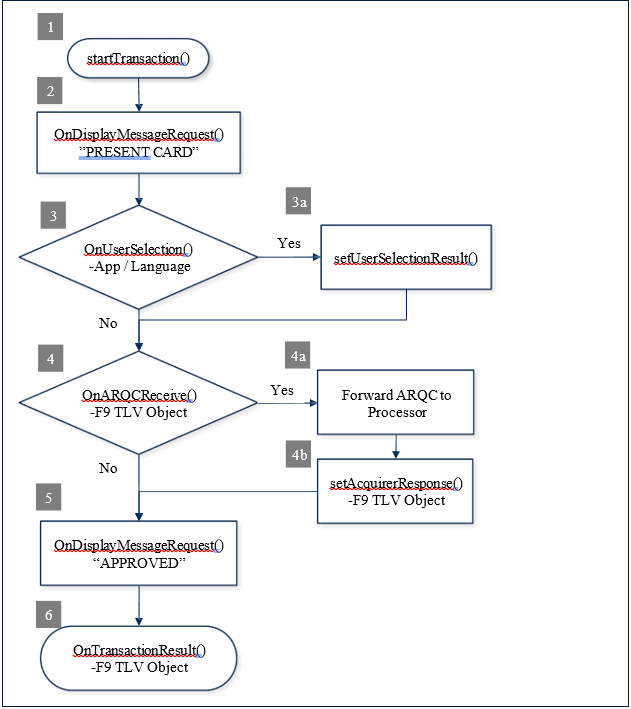
    Flow Chart

    Sample Transaction Flow Code

    MTSCRA Class Methods - 11 - 20

    getTrack1

    Get stored track1 data. This field contains the encrypted track data for track 1.

    public string getTrack1()

    Parameters: None Return Value:

    Return stored track1 data string.

    getTrack2

    Get stored track2 data. This field contains the encrypted track data for track 2.

    public string getTrack2()

    Parameters: None Return Value:

    Return stored track2 data string.

    getTrack3

    Get stored track3 data. This field contains the encrypted track data for track 3.

    public string getTrack3 ()

    Parameters: None Return Value:

    Return stored track3 data string.

    Get stored masked track1 data.

    public string getTrack1Masked()

    Parameters: None Return Value:

    Return stored masked track1 data string.

    For an ISO/ABA card, the PAN is masked as follows:

    • The specified number of initial characters is sent unmasked. The specified number of trailing characters is sent unmasked. If Mod 10 correction is specified, all but one of the intermediate characters of the PAN are set to zero; one of them will be set such that last digit of the PAN calculates an accurate Mod 10 check of the rest of the PAN as transmitted. If the Mod 10 correction is not specified, all of the intermediate characters of the PAN are set to the specified mask character.

    • The Card Holder’s name and the Expiration Date are transmitted unmasked.

    • All Field Separators are sent unmasked.

    For an AAMVA card, the specified mask character is substituted for each of the characters read from the card.

    Get stored masked track2 data.

    public string getTrack2Masked()

    Parameters: None Return Value:

    Return stored masked track2 data string.

    For an ISO/ABA card, the PAN is masked as follows:

    • The specified number of initial characters are sent unmasked. The specified number of trailing characters are sent unmasked. If Mod 10 correction is specified, all but one of the intermediate characters of the PAN are set to zero; one of them will be set such that last digit of the PAN calculates an accurate Mod 10 check of the rest of the PAN as transmitted. If the Mod 10 correction is not specified, all of the intermediate characters of the PAN are set to the specified mask character.

    • The Expiration Date is transmitted unmasked.

    • All Field Separators are sent unmasked.

    For an AAMVA card, the DL/ID# is masked as follows:

    • The specified number of initial characters are sent unmasked. The specified number of trailing characters are sent unmasked. If Mod 10 correction is specified, all but one of the intermediate characters of the DL/ID#PAN are set to zero; one of them will be set such that last digit of the DL/ID# calculates an accurate Mod 10 check of the rest of the DL/ID# as transmitted. If the Mod 10 correction is not specified, all of the intermediate characters of the DL/ID# are set to the specified mask character.

    • The Expiration Date and Birth Date are transmitted unmasked.

    • All other characters are set to the specified mask character.

    Get stored masked track3 data.

    public string getTrack3Masked()

    Parameters: None Return Value:

    Return stored masked track3 data string.

    For an ISO/ABA card, the PAN is masked as follows:

    • The specified number of initial characters are sent unmasked. The specified number of trailing characters are sent unmasked. If Mod 10 correction is specified, all but one of the intermediate characters of the PAN are set to zero; one of them will be set such that last digit of the PAN calculates an accurate Mod 10 check of the rest of the PAN as transmitted. If the Mod 10 correction is not specified, all of the intermediate characters of the PAN are set to the specified mask character.

    • All Field Separators are sent unmasked.

    • All other characters are set to the specified mask character.

    For an AAMVA card, the specified mask character is substituted for each of the characters read from the card.

    Supported on uDynamo only. This 128-byte Binary field contains the MagnePrint data. Only the number of bytes specified in the MagnePrint data length field are valid. The least significant bit of the first byte of data in this field corresponds to the first bit of MagnePrint data. If the Enable/Disable MagnePrint property is set to disable MagnePrint, this field will not be sent.

    public string getMagnePrint()

    Parameters: None

    Return Value:

    Return the MagnePrint data.

    Supported on uDynamo only.

    public string getMagnePrintStatus()

    Parameters: None Return Value:

    Returns the MagnePrint status.

    This Binary field represents 32 bits of MagnePrint status information. Each character represents 4 bits (hexadecimal notation). For example, suppose the characters are: “A1050000”:

    Usage Legend:

    • D = Direction

    • F = Too Fast

    • L = Too Slow

    • M = MagnePrint capable

    This four-byte field contains the MagnePrint status. The MagnePrint status is in little endian byte order. Byte 1 is the least significant byte. Byte 1 LSB is status bit 0. Byte 4 MSB is status bit 31. MagnePrint status is defined as follows:

    • Bit 0 = MagnePrint-capable product (usage M)

    • Bits 1-15 = Product revision & mode (usage R)

    • Bit 16 = STATUS-only state (usage S)

    If the Enable/Disable MagnePrint property is set to disable MagnePrint, this field will not be sent.

    Get stored device serial number. This 16-byte ASCII field contains the device serial number. The device serial number is a NUL (zero) terminated string. So the maximum length of the device serial number, not including the null terminator, is 15 bytes. The device’s serial number can also be retrieved and set with the device serial number property explained in the property section of this document. This field is stored in non-volatile memory, so it will persist when the unit is power cycled.

    public string getDeviceSerial()

    Parameters: None Return Value:

    Return stored device serial number.

    Not suported on Audio Reader. This 8-byte Binary field contains the encrypted version of the current Session ID. Its primary purpose is to prevent replays. After a card is read, this property will be encrypted, along with the card data, and supplied as part of the transaction message. The clear text version of this will never be transmitted. To avoid replay, the application sets the Session ID property before a transaction and verifies that the Encrypted Session ID returned with card data decrypts to the value set.

    public string getSessionID()

    Parameters: None Return Value:

    Return the Session ID

    All other characters are set to the specified mask character.

    All other characters are set to the specified mask character.

    Value

    A

    1

    0

    5

    0

    0

    0

    0

    Bit

    7

    6

    5

    4

    3

    2

    1

    0

    1

    5

    1

    4

    1

    3

    Value

    1

    0

    1

    0

    0

    0

    0

    1

    0

    0

    0

    Usage*

    R

    R

    R

    R

    R

    R

    R

    M

    R

    R

    R

    N = Too Noisy

  • R =Revision

  • Bit 17 = Noise too high or “move me” away from the noise source (used only in STATUS) (usage N)
  • Bit 18 = Swipe too slow (usage L)

  • Bit 19 = Swipe too fast (usage F)

  • Bit 20 = Unassigned (always set to Zero)

  • Bit 21 = Actual Card Swipe Direction (0 = Forward, 1 = Reverse) (usage D)

  • Bits 22-31 = Unassigned (always set to Zero)

  • Nibble

    1

    2

    3

    4

    5

    6

    7

    8

    getTrack1Masked

    getTrack2Masked

    getTrack3Masked

    getMagnePrint

    getMagnePrintStatus

    getDeviceSerial

    getSessionID

    MTSCRA Class Methods - 51 - 61

    getTLVVersion

    Retrieves TLV version.

    public string getTLVVersion()

    Parameters: None

    Return Value:

    String representing TLV version as a two-byte hex string.

    getTrackDecodeStatus

    Retrieves track decode status. This is a one-byte value, which indicates the status of decoding track 1. Bit position zero indicates if there was an error decoding track 1 if the bit is set to one. If it is zero, then no error occurred. If a track has data on it that is not noise, and it is not decodable, then a decode error is indicated. If a decode error is indicated, the corresponding track data length value for the track that has the error will be set to zero and no valid track data will be supplied.

    public string getTrackDecodeStatus()

    Parameters: None Return Value:

    Track Decode Status. Consists of three 2-byte hex values representing the decode status for tracks 1, 2, and 3 (respectively from left to right). Values are:

    • 00 = Track OK

    • 01 = Track read Error

    • 02 = Track is Blank

    Retrieves SDK version.

    public string getSDKVersion()

    Parameters: None Return Value:

    The version information of the SDK.

    Send command to device.

    public int sendCommandToDevice(string command)

    Parameters:

    Return Value:

    • 0 = Success

    • 9 = Error

    • 15 = Busy

    This function starts an EMV L2 transaction for smart card.

    • public int startTransaction(

    • byte timeLimit,

    • byte cardType,

    • byte option,

    Parameters:

    Return Value:

    • 0 = Success

    • 9 = Error1

    • 15 = Busy

    This function sets the user selection result. It should be called after receiving the OnUserSelectRequest event which is triggered after the user makes a selection.

    public int setUserSelectionResult(byte status, byte selection)

    Parameters:

    Return Value:

    • 0 = Success

    • 9 = Error

    • 15 = Busy

    This function sends to the device the transaction decision from acquirer.

    public int setAcquirerResponse(byte[] response)

    Parameters:

    Return Value:

    • 0 = Success

    • 9 = Error

    • 15 = Busy

    This function cancels a transaction while waiting for the user to insert a card.

    public int cancelTransaction ()

    Parameters: None Return Value:

    • 0 = Success

    • 9 = Error

    • 15 = Busy

    Send extended command to device.

    public int sendExtendedCommand(string command)

    Parameters:

    Return Value:

    • 0 = Success

    • 9 = Error

    • 15 = Busy

    Retrieves features for the device.

    public MTDeviceFeatures getDeviceFeatures()

    Parameters: None

    Return Value:

    Retrieves power management value for the device.

    public String getPowerManagementValue()

    Parameters: None

    Return Value: Returns the PM value associated with the device.

    1

    2

    1

    1

    1

    0

    9

    8

    2

    3

    2

    2

    2

    1

    2

    0

    1

    9

    1

    8

    1

    7

    1

    6

    3

    1

    3

    0

    2

    9

    2

    8

    2

    7

    2

    6

    2

    5

    2

    4

    0

    0

    1

    0

    1

    0

    0

    0

    0

    0

    0

    0

    0

    0

    0

    0

    0

    0

    0

    0

    0

    R

    R

    R

    R

    R

    0

    0

    D

    0

    F

    L

    N

    S

    0

    0

    0

    0

    0

    0

    0

    0

    byte[] amount,

  • byte transactionType,

  • byte[] cashBack,

  • byte[] currentCode,

  • byte reportingOption)

  • amount

    Amount Authorized (EMV Tag 9F02, format n12, 6 bytes) in hex string.

    For example: “000000000999”, means 9.99 dollars.

    transactionType

    Valid values:

    0x00 = Purchase (listed as “Payment” on ICS)

    0x01 = Cash Advance (not supported for this reader)

    0x02 or 0x09 = Cash back (0x09 only supported when using contactless) 0x04 = Goods (Purchase)

    0x08 = Services (Purchase)

    0x10 = International Goods (Purchase) 0x20 = Refund

    0x40 = International Cash Advance or Cash Back 0x80 = Domestic Cash Advance or Cash Back

    cashBack

    Cash back Amount (if non-zero, EMV Tag 9F03, format n12, 6 bytes) in hex string.

    For example: “000000001000”, means 10.00 dollars.

    currencyCode

    Transaction Currency Code (EMV Tag 5F2A, format n4, 2 bytes) Sample Valid values:

    0x0840 – US Dollar 0x0978 – Euro 0x0826 – UK Pound

    reportingOption

    This single byte field indicates the level of Transaction Status notifications the host desires to receive during the course of this transaction.

    0x00 = Termination Status only

    (normal termination, card error, timeout, host cancel)

    0x01 = Major Status changes

    (terminations plus card insertions and waiting on user)

    0x02 = All Status changes

    (documents the entire transaction flow)

    Dynasty

    PM3

    DynaMAX

    PM2

    DynaPAD

    DynaWave

    eDynamo

    PM3

    Flash

    PM1

    iDynamo

    iDynamo 5

    IDynamo 5 Gen III

    Home Banking (Dynamo LCD)

    kDynamo

    PM5

    mDynamo

    P-series and I-65 w/V5

    pDynamo

    PM6

    sDynamo

    SPI Encrypting IntelliHead V5

    tDynamo

    PM5

    UART Enc IntelliHead V5

    uDynamo

    PM4

    U-Finity

    PM1

    Parameter

    Description

    command

    Command string to send to the device.

    Parameter

    Description

    Card Type to Read:

    0x01 = Magnetic Stripe (as alternative to EMV L2, card swipe causes abort of EMV L2)

    0x02 = Contact chip card

    0x03 = Magnetic Stripe and Contact chip Card. 0x04 = Contactless chip card

    0x05 = Magnetic Stripe and Contactless chip card. 0x06 = Contact chip card and Contactless chip card.

    0x07 = Magnetic Stripe, Contact chip card, Contactless chip card.

    Refer to Supported Device Features for supported devices.

    Parameter

    Description

    timeLimit

    Specifies the maximum time, in seconds, allowed to complete the total transaction. This includes time for the user to insert the card, choose a language, choose an application, and online processing. If this time is exceeded, the transaction will be aborted, and an appropriate Transaction Status will be available. Value 0 is not allowed.

    cardType

    Card Type to Read:

    0x01 = Magnetic Stripe (as alternative to EMV L2, card swipe causes abort of EMV L2)

    0x02 = Contact chip card

    0x03 = Magnetic Stripe and Contact chip Card. 0x04 = Contactless chip card

    0x05 = Magnetic Stripe and Contactless chip card. 0x06 = Contact chip card and Contactless chip card.

    0x07 = Magnetic Stripe, Contact chip card, Contactless chip card.

    Refer to Supported Device Features for supported devices.

    option

    0x00 = Normal 0x01 = Bypass PIN 0x02 = Force Online

    0x04 = Acquirer not available (Note: prevents long timeout on waiting for host approval) (causes “decline” to be generated internally if ARQC is generated)

    To use Quick Chip mode, set the most significant bit to ‘1’.

    0x80 = Quick Chip, Normal 0x81 = Quick Chip, Bypass PIN 0x82 = Quick Chip, Force Online

    Refer to Supported Device Features for supported devices.

    Parameter

    Description

    Status

    Indicates the status of User Selection:

    0x00 – User Selection Request completed, see Selection Result 0x01 – User Selection Request aborted, cancelled by user

    0x02 – User Selection Request aborted, timeout

    selection

    Indicates the menu item selected by the user. This is a single byte zero based binary value.

    Parameter

    Description

    response

    The first two bytes (most significant byte first) indicate the total length of the following byte array. The byte array contains the ARQC Response message. See Appendix C for ARQC Response Message Format.

    Parameter

    Description

    command

    Hexadecimal string of the byte array for the extended command.

    The first two bytes represent the value of the extended command.

    The next two bytes (most significant byte first) indicate the total length of the following data in bytes.

    Parameter

    Power Management

    BulleT KB BulleT SPP

    PM1

    cDynamo

    Dynamag, Dynamag Duo, USB Enc IntelliHead V5

    getSDKVersion

    sendCommandToDevice

    1.5 startTransaction (EMV Device Only)

    setUserSelectionResult (EMV Device Only)

    setAcquirerResponse (EMV Device Only)

    cancelTransaction (EMV Device Only)

    sendExtendedCommand (EMV Device Only)

    getDeviceFeatures()

    getPowerManagementValue()

    public class MTDeviceFeatures 
        { 
            bool MSR; 
            bool Contact; 
            bool Contactless; 
            bool PINPad; 
            bool MSRPowerSaver; 
            bool BatteryBackedClock; 
            bool SRED; 
            bool SignatureCapture; 
            bool ManualEntry; }

    MTSCRA Events

    OnDeviceList

    This event occurs when device information is available.

    public event DeviceListHandler OnDeviceList

    public delegate void DeviceListHandler(object sender, MTConnectionType connectionType, List<MTDeviceInformation> deviceList)

    Parameter

    Description

    Sender

    This event occurs when the connection state of the device is changed.

    public event DeviceConnectionStateHandler

    OnDeviceConnectionStateChanged

    public delegate void DeviceConnectionStateHandler(object sender, MTConnectionState state)

    This event occurs when the state of the card information is changed.

    public event CardDataStateHandler OnCardDataState

    public delegate void CardDataStateHandler(object sender, MTCardDataState state)

    This event occurs when card information is received from the device.

    public event DataReceivedHandler OnDataReceived

    public delegate void DataReceivedHandler(object sender, IMTCardData cardData)

    This event occurs when a response is received from the device.

    public event DeviceResponseHandler OnDeviceResponse

    public delegate void DeviceResponseHandler(object sender, string data)

    This message occurs when transaction status update is received from the EMV device.

    This message occurs when the EMV device has a display message to present to the user.

    This message occurs when the EMV device has a user selection message to present to the user.

    This message occurs when ARQC is received from the EMV device.

    This message occurs when transaction result is received from the EMV device.

    This message occurs when an EMV command result is received from the EMV device.

    This message occurs when an extended response is received from the device.

    1 Current Transaction Time remaining

    Indicates the remaining time available, in seconds, for the transaction to complete. If the transaction does not complete within this time, it will be aborted.

    2 Current Transaction Progress Indicator

    This one-byte field indicates the current processing stage for the transaction:

    · 0x00 = No transaction in progress

    · 0x01 = Waiting for cardholder to present payment

    · 0x02 = Powering up the card

    · 0x03 = Selecting the application

    · 0x04 = Waiting for user language selection (Contact Only)

    · 0x05 = Waiting for user application selection (Contact Only)

    · 0x06 = Initiating application (Contact Only)

    3-4 Final Status

    TBD

    2

    Menu Items

    This field is variable length and is a collection of “C” style zero terminated strings (maximum 17 strings). The maximum length of each string is 20 characters, not including a Line Feed (0x0A) character that may be in the string. The last string may not have the Line Feed character.

    The first string is a title and should not be considered for selection.

    It is expected that the receiver of the notification will display the menu items and return (in the User Selection Result request) the number of the item the user selects. The minimum value of the Selection Result should be 1 (the first item, #0, was a title line only). The maximum value of the Selection Result is based on the number of items displayed.

    2 ARQC Message

    Byte array containing the ARQC Message. See Appendix B for ARQC Message Format.

    3

    Batch Data

    Byte array containing the Batch Data. See Appendix D for Batch Data Format.

    Object representing the publisher of the event

    connectionType

    MTConnectionType value: MTConnectionType.Audio, MTConnectionType.USB

    deviceList

    A list of MTDeviceInformation objects

    Parameter

    Description

    sender

    Object representing the publisher of the event

    state

    MTDeviceState value indicating the state of the device:

    Disconnected Connecting Error Connected Disconneting

    Parameter

    Description

    sender

    Object representing the publisher of the event

    state

    MTCardDataState value indicating the state of the card data:

    DataNotReady DataReady DataError

    Parameter

    Description

    sender

    Object representing the publisher of the event

    cardData

    IMTCardData object containing the card information received

    Parameter

    Description

    sender

    Object representing the publisher of the event

    data

    String representing data received

    Parameter

    Description

    sender

    Object representing the publisher of the event

    data

    Byte array containing the data received from the device. See table below for descriptions of the data.

    0 Event

    Indicates the event that triggered this notification:

    · 0x00 = No events since start of transaction

    · 0x01 = Card Inserted (Contact Only)

    · 0x02 = Payment method communication or data error

    · 0x03 = Transaction Progress Change

    · 0x04 = Waiting for User Response

    · 0x05 = Timed Out

    · 0x06 = End of Transaction

    · 0x07 = Host Cancelled Transaction

    · 0x08 = Card Removed (Contact Only)

    Parameter

    Description

    sender

    Object representing the publisher of the event

    data

    Byte array containing the display message. If the length is zero, the request to clear the display.

    Parameter

    Description

    sender

    Object representing the publisher of the event

    data

    Byte array containing the data received from the device. See table below for descriptions of the data.

    0

    Selection Type

    This field specifies what kind of selection request this is:

    · 0x00 – Application Selection

    · 0x01 – Language Selection

    1

    Timeout

    Parameter

    Description

    sender

    Object representing the publisher of the event

    data

    Byte array containing the data received from the device. See table below for descriptions of the data.

    0 Message Length

    Two-byte binary, most significant byte first. This gives the total length of the ARQC message that follows.

    Parameter

    Description

    sender

    Object representing the publisher of the event

    data

    Byte array containing the data received from the device. See table below for descriptions of the data.

    0

    Signature Required

    This field indicates whether a card holder signature is required to complete the transaction:

    · 0x00 – No signature required

    · 0x01 – Signature required

    If a signature is required, it is expected that the host will acquire the signature from the card holder as part of the transaction data.

    1

    Batch Data Length

    Parameter

    Description

    sender

    Object representing the publisher of the event

    data

    Byte array containing the result code received from the device. See table below for descriptions of the result code.

    • 0x0000 = Success, the transaction process has been started

    • 0x0381 = Failure, DUKPT scheme is not loaded

    • 0x0382 = Failure, DUKPT scheme is loaded but all of its keys have been used

    • 0x0383 = Failure, DUKPT scheme is not loaded (Security Level not 3 or 4)

    • 0x0384 = Invalid Total Transaction Time field

    • 0x0385 = Invalid Card Type field

    • 0x0386 = Invalid Options field

    • 0x0387 = Invalid Amount Authorized field

    • 0x0388 = Invalid Transaction Type field

    • 0x0389 = Invalid Cash Back field

    • 0x038A = Invalid Transaction Currency Code field

    • 0x038B = Invalid Selection Status

    • 0x038C = Invalid Selection Result

    • 0x038D = Failure, no transaction currently in progress

    • 0x038E = Invalid Reporting Option

    • 0x038F = Failure, transaction in progress, card already inserted

    • 0x0390 = Device Has No Keys

    • 0x0391 = Invalid Device Serial Number

    • 0x0396 = Invalid System Date and Time

    Parameter

    Description

    Obj

    Hexadecimal string containing the extended response data received from the device.

    The first two bytes represent the result codes for the extended command. The next two bytes (most significant byte first) indicate the total length of the following data in bytes.

    OnDeviceConnectionStateChanged

    OnCardDataState

    OnDataReceived

    OnDeviceResponse

    OnTransactionStatus (EMV Device Only)

    OnDisplayMessageRequest (EMV Device Only)

    OnUserSelectionRequest (EMV Device Only)

    OnARQCReceived (EMV Device Only)

    OnTransactionResult (EMV Device Only)

    OnEMVCommandResult (EMV Device Only)

    OnDeviceExtendedResponse (EMV Device Only)

    Specifies the maximum time, in seconds, allowed to complete the selection process. If this time is exceeded, the host should send the User Selection Result command with transaction will be aborted and an appropriate Transaction Status will be available. Value 0 is not allowed.

    Two-byte binary, most significant byte first. This gives the total length of the ARQC message that follows.

    · 0x07 = Reading application data (Contact Only)

    · 0x08 = Offline data authentication (Contact Only)

    · 0x09 = Process restrictions (Contact Only)

    · 0x0A = Cardholder verification (Contact Only)

    · 0x0B = Terminal risk management (Contact Only)

    · 0x0C = Terminal action analysis (Contact Only)

    · 0x0D = Generating first application cryptogram (Contact Only)

    · 0x0E = Card action analysis (Contact Only)

    · 0x0F = Online processing

    · 0x10 = Waiting online processing response

    · 0x11 = Transaction Complete

    · 0x12 = Transaction Error

    · 0x13 = Transaction Approved

    · 0x14 = Transaction Declined

    · 0x15 = Transaction Cancelled by MSR Swipe (MSR Only)

    · 0x16 = EMV error - Conditions Not Satisfied (Contact Only)

    · 0x17 = EMV error - Card Blocked (Contact Only)

    · 0x18 = Application selection failed (Contact Only)

    · 0x19 = EMV error - Card Not Accepted (Contact Only)

    · 0x1A = Empty Candidate List

    · 0x1B = Application Blocked

    Appendix E Supported Device Features

    Feature / Product

    cDynamo

    DynaMAX

    eDynamo

    iDynamo 5

    iDynamo 5 (Gen II)

    iDynamo 5 (Gen III)

    iDynamo 6

    tDynamo

    uDynamo

    Display

    N

    N

    N

    N

    N

    N

    N

    N

    N

    N

    N

    Multi-Language

    N

    N

    Y

    N

    N

    N

    Y

    Y

    N

    Y

    N

    Tamper

    N

    N

    Y

    N

    N

    N

    N

    N

    N

    N

    N

    Extended Commands

    N

    N

    Y

    N

    N

    N

    Y

    Y

    N

    Y

    N

    Extended Notifications

    N

    N

    Y

    N

    N

    N

    Y

    Y

    N

    Y

    N

    Dual USB Ports

    N

    N

    N

    N

    N

    Y

    Y

    N

    N

    Y

    N

    Pairing Modes

    N

    N

    Y

    N

    N

    N

    N

    N

    N

    Y

    N

    Custom Advertising

    N

    N

    Y

    N

    N

    N

    N

    N

    N

    Y

    N

    Configurable Lightning FID

    Y

    N

    N

    N

    Y

    Y

    Y

    Y

    N

    N

    N

    Auxiliary Ports

    N

    N

    N

    N

    N

    N

    N

    N

    N

    N

    N

    External LED Control

    N

    N

    N

    N

    N

    N

    N

    N

    N

    N

    N

    Encrypt Bulk Data (b)

    120

    24

    24

    120

    N

    N

    N

    N

    N

    N

    24

    kDynamo

    sDynamo

    tDynamo

    uDynamo

    MSR Swipe

    Y

    Y

    Y

    Y

    Y

    Y

    Y

    Y

    Y

    Y

    Y

    MSR Insert

    N

    N

    N

    N

    N

    N

    N

    N

    N

    N

    N

    MSR 3 Tracks

    Y

    Y

    Y

    Y

    Y

    Y

    Y

    Y

    Y

    Y

    N

    MSR Disable

    Y

    N

    N

    Y

    N

    N

    N

    N

    N

    N

    N

    MSR Swap Tracks 1/3

    N

    N

    N

    N

    N

    N

    N

    N

    N

    N

    N

    MSR Embedded V5 Head

    N

    N

    N

    N

    Y

    Y

    Y

    Y

    Y

    Y

    N

    MSR Configurable MSR Variants

    Y

    Y

    Y

    Y

    Y

    Y

    Y

    Y

    Y

    Y

    N

    MSR Configurable MP Variants

    N

    Y

    Y

    N

    N

    N

    Y

    Y

    N

    Y

    N

    MSR SureSwipe

    N

    Y

    Y

    N

    N

    Y

    N

    N

    N

    N

    N

    MSR JIS Capable

    Y

    N

    N

    Y

    N

    N

    N

    N

    Y

    N

    N

    SHA-1

    N

    Y

    Y

    N

    N

    N

    N

    N

    N

    N

    N

    SHA-256

    N

    N

    N

    N

    N

    N

    N

    N

    N

    N

    N

    Configurable SHA

    N

    Y

    Y

    N

    N

    N

    N

    N

    N

    N

    N

    Configurable Encryption Algorithm

    N

    N

    N

    N

    N

    Y

    Y

    N

    N

    N

    N

    Set Mask Service Code

    N

    N

    N

    N

    N

    N

    N

    N

    N

    N

    N

    Never Mask Service Code

    N

    N

    Y

    Y

    Y

    Y

    Y

    Y

    Y

    Y

    N

    MagneSafe 2.0

    N

    N

    Y

    N

    N

    N

    N

    N

    N

    N

    N

    EMV Contact

    N

    N

    Y

    N

    N

    N

    Y

    Y

    N

    Y

    N

    EMV Contactless

    N

    N

    N

    N

    N

    N

    Y

    Y

    N

    Y

    N

    EMV Offline ODA

    N

    N

    Y

    N

    N

    N

    N

    N

    N

    N

    N

    EMV MSR Flow

    N

    N

    N

    N

    N

    N

    Y

    Y

    N

    Y

    N

    EMV Contact Quick Chip

    N

    N

    Y

    N

    N

    N

    Y

    Y

    N

    Y

    N

    EMV Contactless Quick Chip

    N

    N

    N

    N

    N

    N

    Y

    Y

    N

    Y

    N

    External PIN Accessory Support

    N

    N

    N

    N

    N

    N

    Y

    N

    N

    N

    N

    Keypad Entry

    N

    N

    N

    N

    N

    N

    N

    N

    N

    N

    N

    Fixed Key

    N

    N

    N

    N

    N

    N

    N

    N

    N

    N

    N

    Secondary DUKPT Key

    N

    Y

    Y

    N

    N

    N

    N

    N

    N

    N

    Y

    Power Mgt Scheme (PM#)

    N

    2

    3

    N

    N

    N

    7

    5

    N

    5

    4

    Battery-Backed RTC

    N

    N

    Y

    N

    N

    N

    N

    N

    N

    N

    N

    OEM Features

    N

    N

    N

    N

    N

    N

    N

    N

    N

    N

    N

    Transaction Validation

    N

    N

    N

    N

    N

    N

    N

    N

    N

    N

    N

    Feature / Product

    cDynamo

    DynaMAX

    eDynamo

    iDynamo 5

    iDynamo 5 (Gen II)

    iDynamo 5 (Gen III)

    iDynamo 6

    kDynamo

    sDynamo