ODynamo SCRA reads magnetic stripe cards and EMV chip cards and is PCI compliant. The packaging has been designed to be tamper resistant and tamper evident. The packaging closure uses security tape. Any attempt to open the package would show signs of tampering. This document reviews how to detect tamper evidence in a single and multi-pack package.
Package inspection upon receipt
If yes, then tampering has occurred
If no, then continue inspection
Cardboard box - Top, Bottom, Sides
Check the overall form factor for signs of attempted entry.
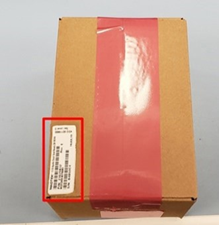
SN label and security tape are applied to top of package.
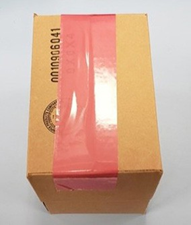
Security tape is applied to bottom of package.
Packing Lot Label is applied to side of package.
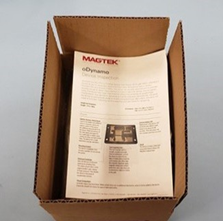
Inside of package holds device inspection document.
Security tape secures the package together. The package itself is a brown box as pictured below with fitted foam.
Check the overall form factor for signs of attempted entry.
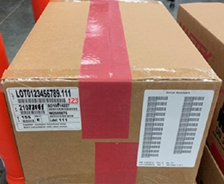
Security tape goes across center package seam. Clear packaging tape is across package ends seams.
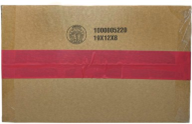
Security tape is applied across the bottom package seam.
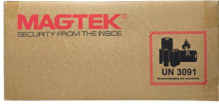
Package front has a MagTek logo and UN 3091 battery warning emblem.
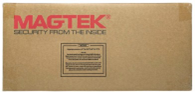
Package back has MagTek logo and storage notice.
Security tape is applied across the top and bottom of the package, to not overlap at the sides.
Security tape is applied across the top and bottom of the package, to not overlap at the sides.
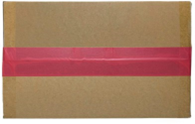
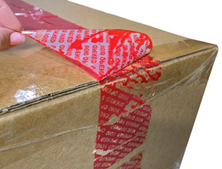
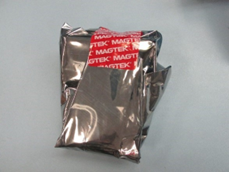
Security tape is red and applied across center seam of package.
When tape is peeled back, “OPENED” warning pulls from tape and adheres to package. There is clear evidence of attempts to remove tape. Check seams have not been cut and re-taped.
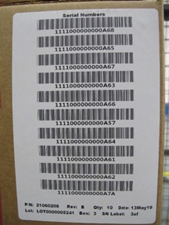
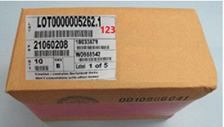
This lists the serial numbers of the devices packed in the shipment.
On one side, the serial number list label and LOT label is applied.
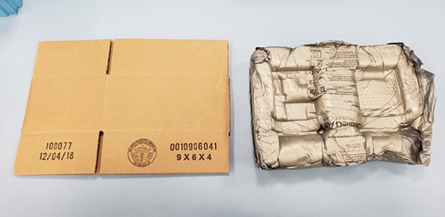
Inside the package is a pad to secure the devices, pictured below.
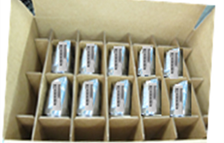
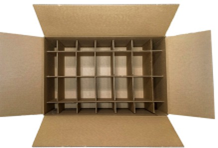
After removing the pad, there are partitions that separate the devices from one another.
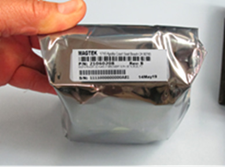
Devices additionally have MAGTEK security tape holding the static shield bag in place.
On the end of the static shield bag is the device serial number. Compare this with the serial list label on the outside of the package.
A view of the partition with no devices. The partitions are designed to hold a maximum of 10 devices.
To check for PCI Validation check the Hardware and Firmware ID. Hardware ID is printed on the label. The Firmware ID is accessible via the device and displayed on the screen. Go to the PCI compliance web page, compare the Hardware ID and Firmware ID: .
Are there any breaks in the sealed plastic enclosure?
Tripped device
If there is forced entry, the security switches built into the electronics will be tripped. If they are tripped the sensitive data such as encryption keys and certificates are cleared as part of security measures mandated by PCI, and the oDynamo will be non-responsive with a blank display. Is the device non-responsive?
Does the box appear to be torn or cut?
Is there any damage to the box?
Are there any changes to the printing or labeling?
Inside the package
Are the components placed in the box as pictured in this document?
Security Tape
Is the tape missing? Devices are always shipped with security tape. Tape is red. The tape should only be located as pictured.
Do you see the words "OPENED" or "VOID" where the tape is supposed to be?
After removal of the security tape, it will leave red ink glued to the box: inverse OPENED and VOID text.
Has the tape been cut? Has it been replaced? Check to make certain the tape has not been cut and that new clear tape has not been placed over the existing security tape.
Is there any evidence of red ink? Does the front edge show any residual red ink, or scratch marks from an attempt to remove the residual security tape ink.
Installation site inspection
If yes, then tampering has occurred
If no, then continue inspection
Sealed plastic enclosure
Does the device appear to have any physical forced entry points?
If the security switches have been tripped, the oDynamo cannot be repaired in the field. It must go back to the factory for repair. Follow RMA procedures. Report all signs of tampering as per standard protocol.