Loading...
Loading...
Loading...
Loading...
Loading...
Loading...
Loading...
Loading...
Loading...
Loading...
Loading...
Loading...
The device does not have an on-screen configuration interface. However, it does have settings the host can change using commands. These settings are documented as Properties in iDynamo 5 Gen III Programmers Manual Commands
Reference Standards and Certifications
Identification Cards Financial Transaction Cards (ISO 7813) AAMVA
Encryption: TDEA (3DES)-CBC using DUKPT FCC Title 47 Part 15 Class B
CE Level B EMC UR/CUR UL Recognized
California Proposition 65 (California)
EU Directive Waste Electrical and Electronic Equipment (WEEE) EU Directive Restriction of Hazardous Substances (RoHS) Universal Serial Bus Specification 2.0, compatible with 1.1
Physical Characteristics
Dimensions (H x W x T)
2.47 in. x 1.50 in. x 0.58 in. (62.7 mm x 38.1 mm x 14.7 mm)
Battery Charge Time
Not Applicable
Battery Time, Powered Off
Not Applicable
Battery Time, Idle
Not Applicable
Battery Time, Sleep Mode
Not Applicable
Battery Time, Transactions
Not Applicable
Voltage Requirements
2.85 to 3.47 VDC from the attached host 5 VDC on USB-C power
Average Current Draw
From USB-C Connector:
270 mA (connected mode with swipe/contact/contactless enabled) Additional draw (~1A, depends on host) when charging host’s battery
From host:
85 mA from the attached host when magnetic read head is on; 0mA otherwise
Data Storage
Not Applicable
Host Connection Characteristics
Wired Connection Types
USB-C
Wireless Connection Types
Not Applicable
Wireless Connection Frequency
Not Applicable
Software Characteristics
Tested Operating System(s)
iOS / Android / Windows
Environmental Tolerance
Operating Temperature
32°F to 95°F (0°C to 35°C)
Operating Relative Humidity
5% to 90% without condensation
Storage Temperature
-4°F to 113°F (-20°C to 45°C)
Storage Relative Humidity
10% to 90% without condensation
Vibration Resistance
Not Applicable
Shock Resistance
No separation of covers or damage to internal components after six surface drops and four corner drops 3 feet onto concrete surface
Maximum operating altitude:
3000 m (10,000 ft.)
Battery Shelf Life
Not Applicable
Battery Cycle Life
Not Applicable
Weight
Approximately 1 oz. (28g)
Supported Mounting Options
Direct to host, adapter sleeves available
Card Read Characteristics
Magnetic Stripe Reader
Bidirectional 3 track encrypting IntelliHead magnetic stripe reader (MSR) with MagnePrint
Magnetic Stripe Decoding
Financial (ISO Type B), AAMVA, or Other ISO 7810, 7811
Acceptable Swipe Speeds
6 in./s to 60 in./s (15 cm/s to 152 cm/s)
Chip Card Reader
Not Applicable
Contactless Reader
Not Applicable
User Interface Characteristics
Status Indicators
Host-driven
Display Type
Not Applicable
Display Size (viewable area)
Not Applicable
Display Resolution
Not Applicable
Keypad
Not Applicable
Security Characteristics
Ingress Protection
Not Applicable
Tamper Protection
Not Applicable
Code Protection
Signed firmware. The device will not allow a host to install firmware that is not properly signed by an authorized source.
Eavesdrop Protection
Not Applicable
Electrical Characteristics
Power Inputs
USB-C connector
Battery Type
Not Applicable
Battery Capacity
Not Applicable
Reliability
Shelf Life
Minimum 4 years
Magnetic Read Head Life
100,000 card swipes
ICC Read Head Life
Not Applicable
iDynamo 5 Gen III is a compact secure card reader (SCR) that reads magnetic stripe cards that conform to ISO standards. iDynamo models are made to work with multiple host operating systems including Windows and Android devices connecting via USB-C. iDynamo can also connect to iOS host devices via a USB-C to Lightning adaptor, see Table 2-2 - iDynamo Accessories.
In addition to reading multiple tracks of data from a card, iDynamo models incorporate MagnePrint technology, so a card’s unique MagnePrint fingerprint is included with the track data in each transaction.
To maximize card security, when a cardholder swipes a card, the device encrypts card data and MagnePrint data before they leave the encapsulated magnetic stripe reader head using the Triple Data Encryption Algorithm (TDEA, also known as Triple DES).
iDynamo models manage encryption keys using DUKPT (Derived Unique Key Per Transaction) key management. DUKPT uses a base derivation key to encrypt a key serial number that produces an initial encryption key which is injected into the device prior to deployment. After each transaction, the encryption key is modified per the DUKPT algorithm, so each transaction uses a unique key. The data is encrypted with a different key for each transaction.
Uses USB-C Receptacle compatible with Android, iOS, and Windows Devices.
Bi-directional card reading.
Reads encoded data that meets ANSI/ISO/AAMVA standards.
Reads up to three tracks of card data.
Non-volatile memory for storage of protected and settable properties (such as unit serial number).
MagnePrint supports Extended MP 198 bytes.
Contains a unique, permanent serial number for tracking.
Encrypts track data MagnePrint values before they leave the magnetic stripe reader head.
Provides no clear text confirmation for cardholder Name, Expiration Date, Service Code, and a portion of the PAN as part of the masked track data.
Supports mutual authentication mode for use with Magensa.net.
Qwantum card supported.
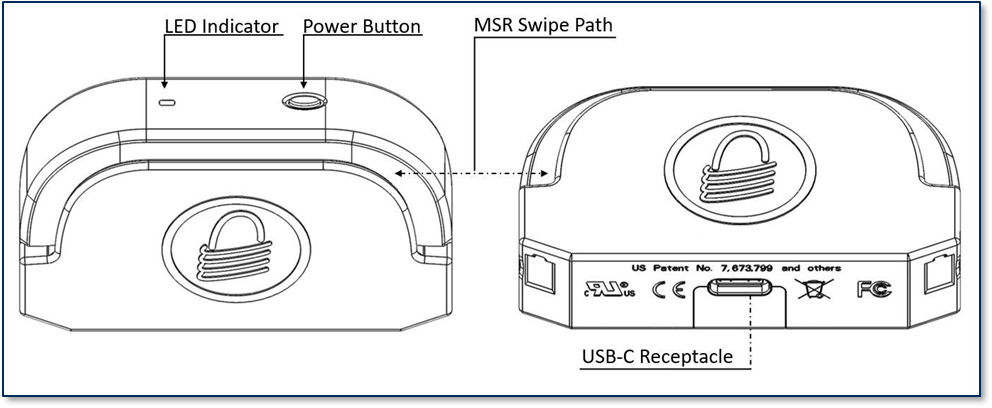
Major components for iDynamo 5 Gen III are shown below.
Figure 1-1 - iDynamo 5 Gen III Major Components (Front)
Figure 1-2 - iDynamo 5 Gen III Major Components (Back)
In this document, iDynamo 5 models are referred to as the device. It is designed to be connected to a host, which is a piece of general-purpose electronic equipment that can send commands and data to, and receive data from, the device. Host types for iDynamo 5 include a variety of Android, Windows, and iOS devices. Generally, the host must have softwareinstalled that communicates with the device and is capable of processing transactions. During a transaction, the host and its software interact with the operator, such as a cashier or bank teller, while the device interacts with the cardholder.
Custom host software uses the same underlying device command set to communicate with all available iDynamo models. This section provides high-level information about communicating with the device and provides pointers to select API references and sample code.
MagTek produces software development kits (SDKs) with API libraries that provide higher-level functions wrapped around USB HID communication protocols. These libraries simplify the development of custom host software that interfaces with iDynamo 5. See:
· SOFTWARE, SDK, DYNAMAG, DYNAMAX, DYNAWAVE, EDYNAMO, IDYNAMO 6, MDYNAMO, TDYNAMO (WINDOWS C++ / JAVA)
· SOFTWARE, SDK, ADYNAMO, DYNAMAG, DYNAMAX, DYNAWAVE, EDYNAMO, IDYNAMO 6, MDYNAMO, TDYNAMO, UDYNAMO (WINDOWS .NET)
· SDK - MAGTEK SCRA - ANDROID, DYNAMAG, DYNAMAX, EDYNAMO, UDYNAMO, ADYNAMO, BULLET, MDYNAMO, TDYNAMO(GEN I, II), DYNAWAVE, IDYNAMO 6, AND DYNAGLASS
In addition to MagTek’s SDKs, custom software on any operating system can communicate directly with the device using the operating system’s native USB libraries and protocols. For details see
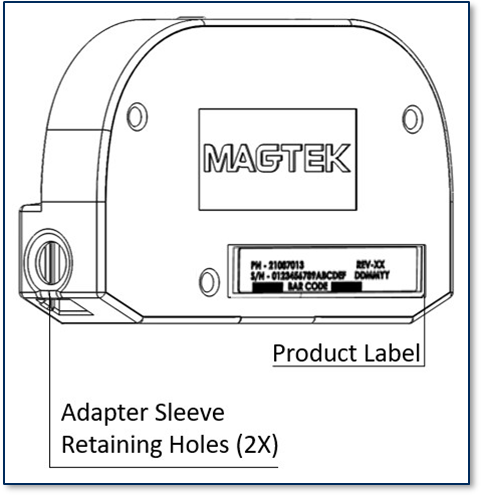
MagTek produces software development kits (SDKs) with API libraries that provide higher-level functions wrapped around Lightning communication protocols. These libraries simplify the development of custom host software that interfaces with iDynamo.
See DYNAMAX / EDYNAMO / UDYNAMO / ADYNAMO / IDYNAMO / KDYNAMO / SDYNAMO / TDYNAMO SDK FOR IOS .
All product software and documentation is available from www.magtek.com.
In addition to MagTek’s SDK API libraries, custom host software can communicate directly with the device using Apple’s ExternalAccessory Framework, with sample code available in the form of Apple’s EADemo app. For details, see:
iDynamo 5 Gen III Programmer’s Manual COMMANDS, available from MagTek.
For more information about developing custom host software that integrates with iDynamo, see the MagTek website or contact your reseller or MagTek Support Services.
Proper handling of the device throughout delivery, assembly, shipping, installation, usage, and maintenance is very important. Not following the guidelines in this document could damage the device, render it inoperable, and/or violate the conditions of the warranty.
Upon receiving the device, inspect it to make sure it originated from an authentic source and has not been tampered with. For details, see iDynamo 5 Gen III SRED, Device Inspection Manual, available from MagTek.
From device delivery through assembly, shipping, installation, usage, and maintenance, the device must not be exposed to conditions outside the ratings in Appendix A Technical Specifications.
If the device is exposed to cold temperatures, adjust it to warmer temperatures gradually to avoid condensation, which can interfere with the operation of the device or cause permanent damage.
Do not drop or shake the device.
For information about ongoing maintenance of the device, such as cleaning, see section 7 Maintenance.
iDynamo 5 products that are PCI certified implement an active tamper detection, which uses a small amount of electricity even when the device is completely powered off. To avoid accidental tamper events follow these precautions:
Store the device at the lowest reasonable temperatures within its specified storage temperature range (see Appendix A Technical Specifications). Storing at temperatures between -4°F to 113°F (-20°C to 45°C).
Do not drop or shake the device.
Do not attempt to disassemble the device.
MagTek warrants that the products sold pursuant to this Agreement will perform in accordance with MagTek’s published specifications. This warranty shall be provided only for a period of one year from the date of the shipment of the product from MagTek (the “Warranty Period”). This warranty shall apply only to the “Buyer” (the original purchaser, unless that entity resells the product as authorized by MagTek, in which event this warranty shall apply only to the first repurchaser).
During the Warranty Period, should this product fail to conform to MagTek’s specifications, MagTek will, at its option, repair or replace this product at no additional charge except as set forth below. Repair parts and replacement products will be furnished on an exchange basis and will be either reconditioned or new. All replaced parts and products become the property of MagTek. This limited warranty does not include service to repair damage to the product resulting from accident, disaster, unreasonable use, misuse, abuse, negligence, or modification of the product not authorized by MagTek. MagTek reserves the right to examine the alleged defective goods to determine whether the warranty is applicable.
Without limiting the generality of the foregoing, MagTek specifically disclaims any liability or warranty for goods resold in other than MagTek’s original packages, and for goods modified, altered, or treated without authorization by MagTek.
Service may be obtained by delivering the product during the warranty period to MagTek (1710 Apollo Court, Seal Beach, CA 90740). If this product is delivered by mail or by an equivalent shipping carrier, the customer agrees to insure the product or assume the risk of loss or damage in transit, to prepay shipping charges to the warranty service location, and to use the original shipping container or equivalent. MagTek will return the product, prepaid, via a three (3) day shipping service. A Return Material Authorization (“RMA”) number must accompany all returns. Buyers may obtain an RMA number by contacting MagTek Support Services at (888) 624-8350.
EACH BUYER UNDERSTANDS THAT THIS MAGTEK PRODUCT IS OFFERED AS-IS. MAGTEK MAKES NO OTHER WARRANTY, EXPRESS OR IMPLIED, AND MAGTEK DISCLAIMS ANY WARRANTY OF ANY OTHER KIND, INCLUDING ANY WARRANTY OF MERCHANTABILITY OR FITNESS FOR A PARTICULAR PURPOSE.
IF THIS PRODUCT DOES NOT CONFORM TO MAGTEK’S SPECIFICATIONS, THE SOLE REMEDY SHALL BE REPAIR OR REPLACEMENT AS PROVIDED ABOVE. MAGTEK’S LIABILITY, IF ANY, SHALL IN NO EVENT EXCEED THE TOTAL AMOUNT PAID TO MAGTEK UNDER THIS AGREEMENT. IN NO EVENT WILL MAGTEK BE LIABLE TO THE BUYER FOR ANY DAMAGES, INCLUDING ANY LOST PROFITS, LOST SAVINGS, OR OTHER INCIDENTAL OR CONSEQUENTIAL DAMAGES ARISING OUT OF THE USE OF, OR INABILITY TO USE, SUCH PRODUCT, EVEN IF MAGTEK HAS BEEN ADVISED OF THE POSSIBILITY OF SUCH DAMAGES, OR FOR ANY CLAIM BY ANY OTHER PARTY.
LIMITATION ON LIABILITY
EXCEPT AS PROVIDED IN THE SECTIONS RELATING TO MAGTEK’S LIMITED WARRANTY, MAGTEK’S LIABILITY UNDER THIS AGREEMENT IS LIMITED TO THE CONTRACT PRICE OF THIS PRODUCT.
MAGTEK MAKES NO OTHER WARRANTIES WITH RESPECT TO THE PRODUCT, EXPRESSED OR IMPLIED, EXCEPT AS MAY BE STATED IN THIS AGREEMENT, AND MAGTEK DISCLAIMS ANY IMPLIED WARRANTY, INCLUDING WITHOUT LIMITATION ANY IMPLIED WARRANTY OF MERCHANTABILITY OR FITNESS FOR A PARTICULAR PURPOSE.
MAGTEK SHALL NOT BE LIABLE FOR CONTINGENT, INCIDENTAL, OR CONSEQUENTIAL DAMAGES TO PERSONS OR PROPERTY. MAGTEK FURTHER LIMITS ITS LIABILITY OF ANY KIND WITH RESPECT TO THE PRODUCT, INCLUDING NEGLIGENCE ON ITS PART, TO THE CONTRACT PRICE FOR THE GOODS.
MAGTEK’S SOLE LIABILITY AND BUYER’S EXCLUSIVE REMEDIES ARE STATED IN THIS SECTION AND IN THE SECTION RELATING TO MAGTEK’S LIMITED WARRANTY.
This device complies with Part 15 of the FCC Rules. Operation is subject to the following two conditions: (1) This device may not cause harmful interference, and (2) This device must accept any interference received, including interference that may cause undesired operation.
Note: This equipment has been tested and found to comply with the limits for a Class B digital device, pursuant to part 15 of the FCC Rules. These limits are designed to provide reasonable protection against harmful interference in a residential installation. This equipment generates, uses and can radiate radio frequency energy and, if not installed and used in accordance with the instructions, may cause harmful interference to radio communications. However, there is no guarantee that interference will not occur in a particular installation. If this equipment does cause harmful interference to radio or television reception, which can be determined by turning the equipment off and on, the user is encouraged to try to correct the interference by one or more of the following measures:
Reorient or relocate the receiving antenna.
Increase the separation between the equipment and receiver.
Connect the equipment into an outlet on a circuit different from that to which the receiver is connected.
Consult the dealer or an experienced radio/TV technician for help.
Testing for compliance with CE requirements was performed by an independent laboratory. The unit under test was found compliant with standards established for Class B devices.
This product is recognized per UL 60950-1, 2nd Edition, 2011-12-19 (Information Technology Equipment - Safety - Part 1: General Requirements), CSA C22.2 No. 60950-1-07, 2nd Edition, 2011-12 (Information Technology Equipment - Safety - Part 1: General Requirements).
When ordered as RoHS compliant, this product meets the Electrical and Electronic Equipment (EEE) Reduction of Hazardous Substances (RoHS) European Directive 2002/95/EC. The marking is clearly recognizable, either as written words like “Pb-free,” “lead-free,” or as another clear symbol ( ).
Caution: Changes or modifications not expressly approved by MagTek could void the user’s authority to operate this equipment.

iDynamo5 Gen III has a single RGB LED acting as the user interface. If the hardware does not support color mixing (e.g., red+green=amber) then a combination of LED states such as color, blinking speed (slow, fast), blink on-off, blink color A-B can be configured. This can be done easily by using a set of bits to represent the LED status over 4 time periods. A timer would rotate through one of the 4 time periods.
Examples: GGGG – Green on, RRGG – red/green blink slow, RGRG – red/green blink fast, GGOO – blink green slow
The LED will be used to indicate various states of the reader.
Tampered
During normal operation, iDynamo is powered either from its connection to the host or from a connection to a USB power source. While the host charges this way, the device consumes more power from the USB connection than when the host’s battery is fully charged.
To save power, iDynamo enters low power mode when an app does not have an active session with it and will remain in low power mode until the app restarts or re-initiates a session. While an app has an open session, a cardholder may swipe a card through the magnetic stripe reader slot. When the device is not connected to USB power, the host would generally open a session with the device to process a transaction, then close the session after the transaction is complete to transition the device to low power mode and conserve power. When the device is powered by the USB-C connector, the host software may choose to always keep a session open with the device.
iDynamo does not come equipped with a battery, if it does not receive adequate power from the host the device powers off.
The device also draws a trickle of power from the connected host to power the magnetic stripe reader head. The host’s operating system manages this power flow when the device is not in use to save power.
The steps for reading a card may be different depending on iDynamo’s configuration and on the design of the host software. Host software developers should see Developing Custom Host Software for implementation references. The solution developer should provide solution-specific instructions for operators to follow. A transaction generally follows this essential flow:
An advanced operator makes sure iDynamo has been installed and configured, appropriate host software has been installed and configured, and the connection between iDynamo and the host is working properly (see Installation). After the host identifies and authenticates iDynamo, apps may open a session with it.
The operator uses the host user interface to finalize a transaction amount, then initiates a transaction.
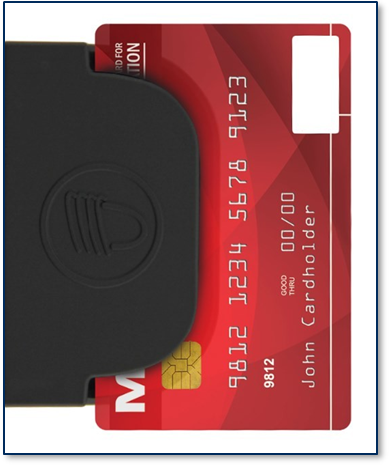
Cardholders should swipe magnetic stripe cards in the MSR swipe path with the magnetic stripe facing away from the cardholder and into the device, as shown in Figure 6-1. Cardholders may swipe in either direction along the path.
Figure 6-1 - Swiping a Card Through iDynamo
REGISTERED TO ISO 9001:2015
Copyright © 2006 - 2024 MagTek, Inc. Printed in the United States of America
Information in this publication is subject to change without notice and may contain technical inaccuracies or graphical discrepancies. Changes or improvements made to this product will be updated in the next publication release. No part of this document may be reproduced or transmitted in any form or by any means, electronic or mechanical, for any purpose, without the express written permission of MagTek, Inc.
MagTek® is a registered trademark of MagTek, Inc. MagnePrint® is a registered trademark of MagTek, Inc. MagneSafe® is a registered trademark of MagTek, Inc. Magensa™ is a trademark of MagTek, Inc.
iDynamo™ is a trademark of MagTek, Inc.
ANSI®, the ANSI logo, and numerous other identifiers containing "ANSI" are registered trademarks, service marks, and accreditation marks of the American National Standards Institute (ANSI).
ISO® is a registered trademark of the International Organization for Standardization. UL™ and the UL logo are trademarks of UL LLC.
PCI Security Standards Council® is a registered trademark of the PCI Security Standards Council, LLC.
Apple Pay®, Apple Wallet®, iPhone®, iPod®, Mac®, and OS X® are registered trademarks of Apple Inc., registered in the U.S. and other countries. iPad™ is a trademark of Apple. Inc. App StoreSM is a service mark of Apple Inc., registered in the U.S. and other countries. Apple and MFi are registered trademarks of Apple Inc. IOS is a trademark or registered trademark of Cisco in the U.S. and other countries and is used by Apple Inc. under license.
Google Play™ store, Google Wallet™ payment service, and Android™ platform are trademarks of Google LLC.
Microsoft®, Windows®, and .NET® are registered trademarks of Microsoft Corporation. All other system names and product names are the property of their respective owners
Because the device does not have its own display, the device may send messages to the host prompting the cardholder to perform certain actions; the host software should process these requests by displaying the requested messages and depending on the placement of the host display(s), the operator may need to relay the messages to the cardholder. For example, if the device cannot read the card, it may prompt the cardholder to swipe again.
Solid Red
Offline
Blinking Red (Maybe split offline into ‘must RMA’ vs ‘Field fix possible’
Bootloader running
Solid Blue
Programming FW update into flash
Blinking Blue
Idle
Green
Card being read
Off
Card read error
Blink Red for 2 seconds
Qwantum Mode, Button enabled
Blinking Green
FW being downloaded
Provided by device or progress provided by host app
Rev Number
Date
Notes
100
January 02, 2024
Initial Release
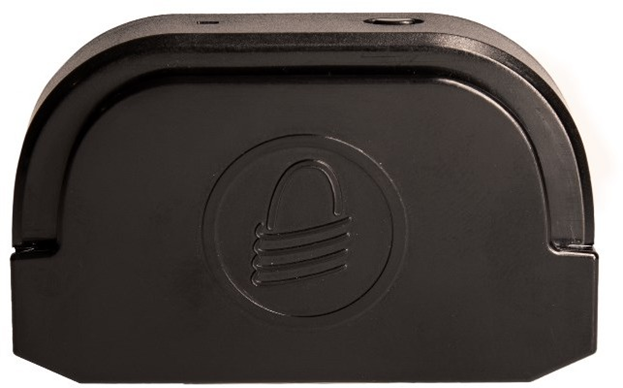
To avoid damaging the read head, only clean the card path with approved cleaning cards. DO NOT use liquid cleaning products or insert any other objects into the device.
Periodic cleaning of iDynamo’s exterior may be required. To clean the outside of iDynamo, wipe it down with a soft, damp, lint-free cloth and then wipe it dry.
MagTek’s double-sided cleaning card 96700004 is designed to clean the magnetic read head in the MSR swipe path. Keeping the head clean is essential to the device’s functioning. MagTek recommends swiping a cleaning card once per week to avoid card misreads.
Installing iDynamo is a straightforward process: The acquirer or manufacturer configures the encryption keys before deployment. Operators need only set up a host with appropriate software, configure the software, and connect the device to the host. This section provides general information about setting up solutions that incorporate iDynamo, including installing host software and connecting the device.
Before unpacking the device, it is important to inspect its secure packaging to make sure it has not been tampered with in storage or in transit. MagTek provides details for inspecting the integrity of the device’s secure packaging in iDynamo 5 Gen III SRED, Package Inspection Manual
It is important to thoroughly inspect a new device before deployment, and regularly inspect devices in live usage (including its immediate surroundings) to make sure malicious individuals have not tampered with it. MagTek recommends conducting inspection training for all device operators, and an inspection schedule with checkpoints in place to make sure operators are performing inspections as specified and as scheduled. MagTek provides an easy-to-follow device inspection reference iDynamo 5 Gen III SRED, Device Inspection Manual.
In any solution, iDynamo is connected to a host, which must have software installed that can communicate with the device, and perform the actions intended to be carried out when a cardholder swipes a card. To set up the host software to work with iDynamo, follow the installation and configuration instructions provided by the vendor of the host or the host software. For details about developing host software, see section 8 Developing Custom Host Software.
Connecting to an Android Host
To connect iDynamo 5 to an Android host that supports USB-C, follow these steps:
If you will be using a mounting sleeve, install it.
Connect iDynamo 5 via USB-C
Power on the host.
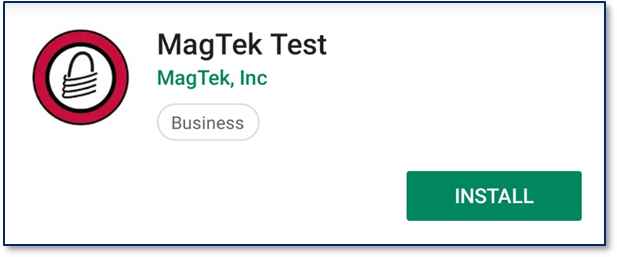
On the host, install and configure the host software you intend to use with iDynamo 5. If you do not yet have that software, you can download a test tool from the Google Play store called MagTek Test, published by MagTek to perform simple tests:
Make sure the host software is configured to look for the device on the right connection.
Make sure the host software knows which device(s) it should interface with.
Make sure the host software is configured to properly interpret incoming data from the device. For direct USB-C connections, iDynamo 5 transmits data as a vendor-defined HID device.
Connect iDynamo 5 to the host. Make sure all components are seated firmly. If you are using the mounting bracket, press the suction cup onto the rear of the host.
Use the host software or the MagTek test app to connect to the device and to test swiping a card.
For details about reading each payment type, see Card Reading.
Open the MagTek test app to connect to the device and to test swiping a card.
Press the MaTek pp on the Android host.
button in the top menu bar. The app should report the USB Connection State is Disconnected.
a) Press the
button in the top menu bar.
should report Connected


If the app you are using won’t detect or connect to the device, check the following:
· Check the electromechanical connection:
o Make sure the host’s case is not interfering with the connection.
o Make sure iDynamo in its adapter sleeve does not shift on the host when gently wiggled.
o Make sure the device’s connector is not damaged or dirty.
o Connect another device to the host’s connector to make sure it is functioning correctly.
· For an app to interface with iDynamo, it must use the same Bundle Identifier as the device. iDynamo can also be configured with a different Bundle Identifier, in which case the app must use that Bundle Identifier instead. For details, see section 8 Developing Custom Host Software.
If card swipes are not being registered correctly, check the following:
Card orientation. Make sure the card is oriented so the magnetic stripe is inside iDynamo and facing toward the thicker side of iDynamo (away from the MagTek lock logo). See section 6.3.2 How to Swipe Magnetic Stripe Cards.
Damaged card. The magnetic stripe on the card may be damaged. Try another card.
Excessive buildup on the read head. Clean the read head by swiping a cleaning card through iDynamo several times in different orientations until the card comes out clean. Cleaning card 96700025 is available from MagTek. If the operating environment is dusty, use compressed air to blow dust or other residue out of iDynamo.
If iDynamo still does not register swipes after following these steps, contact your supplier for assistance.
Swipe mechanics. A good read depends on the magnetic stripe moving straight over the read head and above a certain speed. Try swiping more quickly and straight through the guide path of iDynamo. The range of working swipe speeds is listed in Appendix A Technical Specifications.
Ergonomics. Make sure there are no mechanical hindrances (such as an accessory case or stand for the host) or ergonomic factors (such as awkward mounting angle) that make it difficult to swipe smoothly and straight through the device.
Smooth deployment of an iDynamo 5 solution requires some up-front planning and decision-making:
Determine the overall functional requirements and desired user experience of the solution iDynamo will be integrated into. For example, how iDynamo 5 and its host will be physically presented to the cardholder. This includes whether the solution will be handheld or permanently mounted in a stand or enclosure, and whether the solution is intended to be used in portrait or landscape orientation. When planning placement, be sure to consider:
Make sure there is adequate clearance for operators or cardholders to easily find the critical components of the device, and swipe a card.
Determine what documentation and training will be required from solution design through testing and field deployment. For example, it may be necessary to develop a solution-specific installation procedure for technicians, and training materials for operators.
Determine what type of host iDynamo 5 will connect to. Use Table 2-1 to determine which model of iDynamo is appropriate for your solution, and use Table 2-2 to determine which adapters and accessories you need. When planning, include any additional support or devices required by the host, such as physical locations, mounting, and power connections.
Table 2-1 - iDynamo Models
Table 2-2 - iDynamo Accessories
Determine what software will be installed on the host and how it will be configured. Software can include operating system, transaction processing software, security software, and so on. Include any additional support required by the software, such as network connections.
Determine how iDynamo should be configured and specify when you order devices. MagTek or your reseller can advise. For deep detail about configuration options and how they affect device behavior, see iDynamo 5 Gen III Programmer’s Manual (COMMANDS)
Determine how iDynamo 5 will be branded. In large quantities, MagTek can accommodate custom branding colors and trade dress. Contact a representative for details.
Determine how the solution will be tested and, if appropriate, how it will be certified.
Determine how the solution will be maintained. See Maintenance for guidance on maintaining the iDynamo 5 portion of the solution.
Determine how the solution will be regularly inspected for tampering, unauthorized added components such as eavesdropping or skimming devices, and so on. Proper inspection requires additional solution-specific training, instructions, and visual references.
21087027
USBC, PCI, Reader
21087028
USBC, Non-PCI, Reader
96700025
Cleaning Accessory, Alcohol Cleaning Card (Optional)
1000009531
Cable, USB-C To USB-C, Right Angle 90 Degree
1000009471
Cable, USB-C to Lightning C78, VBUS-23 AWG