

Add Google Smart Tap Pass to Google Wallet
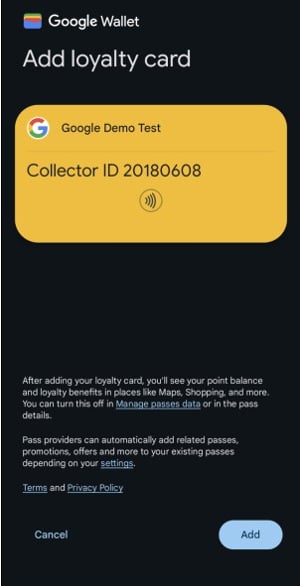
The following instructions is for installing a demo test Google Pass into an Android device. This pass is identified as Collector ID 20180608
Follow the link below. The link can be sent to an Android device by email. https://pay.google.com/gp/v/save/eyJhbGciOiJSUzI1NiIsInR5cCI6IkpXVCJ9.eyJhdWQiOiJnb29nbGUiL CJvcmlnaW5zIjpbImh0dHA6Ly9sb2NhbGhvc3Q6ODA4MCJdLCJpc3MiOiJnb29nbGUtcGF5LWZvci1 wYXNzZXMtZ3RlY2hAcGF5LXBhc3Nlcy1zbWFydC10YXAtc2FtcGxlLmlhbS5nc2VydmljZWFjY29 1bnQuY29tIiwiaWF0IjoxNTI5OTU2MDcwLCJ0eXAiOiJzYXZldG9hbmRyb2lkcGF5IiwicGF5bG9hZC I6eyJsb3lhbHR5T2JqZWN0cyI6W3siY2xhc3NJZCI6IjMyNjUzMjAxMTE2NDE5NTYxODMuMDYxO V9nb29nbGVEZW1vVGVzdCIsInN0YXRlIjoiYWN0aXZlIiwiaWQiOiIzMjY1MzIwMTExNjQxOTU2 MTgzLjA2MTlfZ29vZ2xlRGVtb1Rlc3Qtb2JqMDEifV19fQ.MjUBdBtGyQwcE3xI-q6tVNBiApZppLMp0Op0XvB-c31Ri-JttJCzGXZvURNvKFDGXTNQQDqVBgQziuBMR_ZL0_lp7q8B5nwfSR32I0Kr220n3CezAsikaM5rKV f83UXT9fvqagnRn0QVVuS7fyLLc9nBDxRhRnkqEz2dQPgrNZ1u2AEJBPSoM6sLTeHssOWUMp7dg W6REJg7NUcczXJgLSOpAmD08G14q1qfS5T4Jb4knwPeIMnggNMjHcSBmz0z6W4DGD5Ld16nKOt y4TvoDh4EevEJF7U7UQcOwIpozIXRVKs8rlqEXMObGsrk4hPM-I2p6H4DBrVcpyG8HD6Iug
If not already signed in, sign in with a Google account from the Android device.
After accessing the Google Smart Tap Pass, press on Add.
Last updated