> For the complete documentation index, see [llms.txt](https://developer.magtek.com/llms.txt). Markdown versions of documentation pages are available by appending `.md` to page URLs; this page is available as [Markdown](https://developer.magtek.com/downloads-compliance-and-marketing-materials/compliance-security/product-specific-compliance/dynapad-gen-ii/9-1-2026-draft-version-pci-pts-poi-security-policy/9-1-2026-draft-version-general-description.md).

# (9/1/2026 Draft Version) General Description

The front view of DynaPAD Gen II, is shown in Figure 2-1 below. The back view of DynaPAD Gen II is shown in Figure 2-2. The side views of DynaPAD Gen II can be seen in Figure 2-3 and Figure 2-4. The Top View displaying the pushbutton and LED indicator can be seen in Figure 2-5, and the Bottom View displaying the USB-C receptacle can be seen in Figure 2-6.

<figure><img src="https://2899238900-files.gitbook.io/~/files/v0/b/gitbook-x-prod.appspot.com/o/spaces%2F8D8HmfmyvOUbCM5xaHF8%2Fuploads%2FwP8KCTvIOPOcZxTnnNsv%2Fimage.png?alt=media&amp;token=92d63213-11c6-4c68-8a6f-5ab9a1401dce" alt=""><figcaption></figcaption></figure>

<p align="center"><strong>Figure 2‑1 –Front View</strong></p>

<figure><img src="https://2899238900-files.gitbook.io/~/files/v0/b/gitbook-x-prod.appspot.com/o/spaces%2F8D8HmfmyvOUbCM5xaHF8%2Fuploads%2FATAnE4tDRpr4wiEq2HLo%2Fimage.png?alt=media&amp;token=ad4f4257-a01a-41d2-b7bb-da38e1667aa3" alt=""><figcaption></figcaption></figure>

<p align="center"><strong>Figure 2‑2 – Back View</strong></p>

<figure><img src="https://2899238900-files.gitbook.io/~/files/v0/b/gitbook-x-prod.appspot.com/o/spaces%2F8D8HmfmyvOUbCM5xaHF8%2Fuploads%2FM0gEdoOJXOmpYPUv6RRC%2Fimage.png?alt=media&amp;token=9f99d929-55bd-4af2-b8dc-0b271d3cf2cd" alt=""><figcaption></figcaption></figure>

<p align="center"><strong>Figure 2‑3 - Left Side View</strong></p>

<figure><img src="https://2899238900-files.gitbook.io/~/files/v0/b/gitbook-x-prod.appspot.com/o/spaces%2F8D8HmfmyvOUbCM5xaHF8%2Fuploads%2FdQHhaF9GF9ESgOkmH4md%2Fimage.png?alt=media&amp;token=564ea0bf-adf0-4274-a6b8-da600e9a6579" alt=""><figcaption></figcaption></figure>

<p align="center"><strong>Figure 2‑4 - Right Side View</strong></p>

<figure><img src="https://2899238900-files.gitbook.io/~/files/v0/b/gitbook-x-prod.appspot.com/o/spaces%2F8D8HmfmyvOUbCM5xaHF8%2Fuploads%2FMZ1faNZNyAu0Q5FIUzwj%2Fimage.png?alt=media&amp;token=3ec986de-a85b-487f-acf0-ce910ae23b22" alt=""><figcaption></figcaption></figure>

<p align="center"><strong>Figure 2‑5 - Top View</strong></p>

<figure><img src="https://2899238900-files.gitbook.io/~/files/v0/b/gitbook-x-prod.appspot.com/o/spaces%2F8D8HmfmyvOUbCM5xaHF8%2Fuploads%2F2yVz6LCxlPndU21wtYwx%2Fimage.png?alt=media&amp;token=10f81408-0e9f-4221-a750-23330ba689c0" alt=""><figcaption></figcaption></figure>

<p align="center"><strong>Figure 2‑6 - Bottom View</strong></p>

## Product Type <a href="#ref48308907" id="ref48308907"></a>

DynaPAD Gen II devices come complete with the following:&#x20;

* A USB-C interface for power and communications
* A 10-digit keypad to input a card’s primary account number (PAN).

DynaPAD Gen II is used as a desktop device designed for specific environments.  It is approved as a secure card reader (SCR) under PCI PTS POI v7.0 requirements. Usage in any other environment will invalidate PCI approval.

DynaPAD Gen II models may also be purchased with the following:

* Magnetic stripe reader (MSR)
* MSR and barcode reader (BCR)

## Identification

#### Hardware Identification <a href="#ref69913231" id="ref69913231"></a>

To find important product identification information, look for the printed product label on the bottom of the device as shown in Figure 2‑7 below.

{% hint style="warning" %}
**NOTICE:** Do not remove or alter this label!
{% endhint %}

<figure><img src="https://2899238900-files.gitbook.io/~/files/v0/b/gitbook-x-prod.appspot.com/o/spaces%2F8D8HmfmyvOUbCM5xaHF8%2Fuploads%2FOn6rfY6xL4m3awZzy242%2Fimage.png?alt=media&amp;token=d26298b6-43ae-4379-94fe-8a8cc2062fa9" alt=""><figcaption></figcaption></figure>

<p align="center"><strong>Figure 2‑7 – DynaPAD Gen II Device Label Location</strong></p>

The product label includes the following elements of device identification information, shown by the numbered callouts in Figure 2‑8.

* Product Name
* PCI Hardware Identifier (“HW”)

<figure><img src="https://2899238900-files.gitbook.io/~/files/v0/b/gitbook-x-prod.appspot.com/o/spaces%2F8D8HmfmyvOUbCM5xaHF8%2Fuploads%2F5DLXu06teJOeTdOsDsSF%2Fimage.png?alt=media&amp;token=18e4a919-c2d7-4fbf-91ea-f757f57071c0" alt=""><figcaption></figcaption></figure>

<p align="center"><strong>Figure 2‑8 -DynaPAD Gen II Device Label</strong></p>

The label also contains other supporting information about the device.

&#x20;The hardware version of the device is 12PCI90U0xAx. All DynaPAD Gen II hardware configurations are listed in the PCI Hardware Identifier table below.  The device utilizes one interface type, USB-C.  Use of any interface other than USB-C will invalidate PCI approval.

#### PCI Hardware Identifier

<table data-header-hidden><thead><tr><th width="157"></th><th></th></tr></thead><tbody><tr><td><p> </p><p>PCI ID Tag</p><p> </p></td><td><p> </p><p>Configuration Description</p><p> </p></td></tr><tr><td><p> </p><p>12PCI50U0BA0</p><p> </p></td><td><p> </p><p>DynaPAD Gen II, PCI, BLACK, USB</p><p> </p></td></tr><tr><td><p> </p><p>12PCI70U0BA0</p><p> </p></td><td><p> </p><p>DynaPAD Gen II, PCI, MSR, BLACK, USB</p><p> </p></td></tr><tr><td><p> </p><p>12PCI90U0BA0</p><p> </p></td><td><p> </p><p>DynaPAD Gen II, PCI, MSR, BCR, BLACK, USB</p><p> </p></td></tr></tbody></table>

#### Hardware Versions with Description of Associated Variables

<table data-header-hidden><thead><tr><th width="136"></th><th width="40"></th><th width="40"></th><th width="40"></th><th width="40"></th><th width="40"></th><th width="40"></th><th width="40"></th><th width="40"></th><th width="40"></th><th width="47"></th><th width="40"></th><th width="49"></th></tr></thead><tbody><tr><td>PCI Hardware ID Number</td><td>1</td><td>2</td><td>3</td><td>4</td><td>5</td><td>6</td><td>7</td><td>8</td><td>9</td><td>10</td><td>11</td><td>12</td></tr><tr><td></td><td>1</td><td>2</td><td>P</td><td>C</td><td>I</td><td>5</td><td>0</td><td>U</td><td>0</td><td>B</td><td>A</td><td>x</td></tr><tr><td></td><td>1</td><td>2</td><td>P</td><td>C</td><td>I</td><td>7</td><td>0</td><td>U</td><td>0</td><td>B</td><td>A</td><td>x</td></tr><tr><td></td><td>1</td><td>2</td><td>P</td><td>C</td><td>I</td><td>9</td><td>0</td><td>U</td><td>0</td><td>B</td><td>A</td><td>x</td></tr></tbody></table>

<table data-header-hidden><thead><tr><th width="87"></th><th width="111"></th><th></th></tr></thead><tbody><tr><td>Fixed Position</td><td>Variable “X” Position</td><td>Description of Fixed or Variable “X” in the Selection Position</td></tr><tr><td>1-2</td><td> </td><td>12 = DynaPAD Gen II</td></tr><tr><td>3-5</td><td> </td><td>PCI = PCI Hardware</td></tr><tr><td>6</td><td> </td><td><p>Device Options</p><p>5 = Standard          7 = MSR          9= MSR and Barcode Reader</p></td></tr><tr><td>7</td><td> </td><td><p>Option RFU (Reserved for Future Use)</p><p>RFU 0 = as Certified</p></td></tr><tr><td>8</td><td> </td><td><p>Interface Options</p><p>U = USB only</p></td></tr><tr><td>9</td><td> </td><td><p>Option RFU (Reserved for Future Use)</p><p>RFU 0 = as Certified</p></td></tr><tr><td> </td><td>10</td><td><p>Cover Color:</p><p>B = Black</p></td></tr><tr><td>11</td><td> </td><td><p>Version</p><p>A = as Certified</p></td></tr><tr><td></td><td>12</td><td><p>minor fixes not adding functionality or related to security (e.g., change component value for antenna matching):</p><p>0 = as certified</p></td></tr></tbody></table>

### Firmware Identification <a href="#ref20818897" id="ref20818897"></a>

The most recent firmware versions for DynaPAD Gen II are 1000010028-AAx-PCI for the secure bootloader, and 1000010029-AAx-PCI for the main firmware.  The lowercase x in firmware versions indicates minor non-security related changes, see Table 2‑3 and Table 2‑4.

#### Main Firmware Version and Associated Variables

<table data-header-hidden><thead><tr><th></th><th width="44" valign="top"></th><th width="40" valign="top"></th><th width="40" valign="top"></th><th width="40" valign="top"></th><th width="40" valign="top"></th><th width="40" valign="top"></th><th width="40" valign="top"></th><th width="40" valign="top"></th><th width="40" valign="top"></th><th width="46" valign="top"></th><th width="40" valign="top"></th><th width="45" valign="top"></th><th width="46" valign="top"></th><th width="44" valign="top"></th><th width="47" valign="top"></th><th width="44" valign="top"></th><th width="52" valign="top"></th><th width="48" valign="top"></th></tr></thead><tbody><tr><td>Firmware Number</td><td valign="top"> 1</td><td valign="top">2</td><td valign="top">3</td><td valign="top">4</td><td valign="top">5</td><td valign="top">6</td><td valign="top">7</td><td valign="top">8</td><td valign="top">9</td><td valign="top">10</td><td valign="top">11</td><td valign="top">12</td><td valign="top">13</td><td valign="top">14</td><td valign="top">15</td><td valign="top">16</td><td valign="top">17</td><td valign="top">18</td></tr><tr><td></td><td valign="top">1</td><td valign="top">0</td><td valign="top">0</td><td valign="top">0</td><td valign="top">0</td><td valign="top">1</td><td valign="top">0</td><td valign="top">0</td><td valign="top">2</td><td valign="top">9</td><td valign="top">-</td><td valign="top">A</td><td valign="top">A</td><td valign="top">x</td><td valign="top">-</td><td valign="top">P</td><td valign="top">C</td><td valign="top">I</td></tr></tbody></table>

#### Main FW

<table data-header-hidden><thead><tr><th width="100" valign="top"></th><th width="98" valign="top"></th><th valign="top"></th></tr></thead><tbody><tr><td valign="top">Fixed Position</td><td valign="top"><p>Variable “x”</p><p>Position</p></td><td valign="top">Description of Fixed or Variable “x” in the Selected Position</td></tr><tr><td valign="top">1-10</td><td valign="top"> </td><td valign="top">1000010029 = DynaPAD Gen II Main Firmware Part Number</td></tr><tr><td valign="top">11</td><td valign="top"> </td><td valign="top">Delimiter (-)</td></tr><tr><td valign="top">12-13</td><td valign="top"> </td><td valign="top">AA = Certified Version</td></tr><tr><td valign="top"> </td><td valign="top">14</td><td valign="top">Minor Revisions, Bug Fixes</td></tr><tr><td valign="top">15</td><td valign="top"> </td><td valign="top">Delimiter (-)</td></tr><tr><td valign="top">16-18</td><td valign="top"> </td><td valign="top">PCI = PCI Version of Firmware</td></tr></tbody></table>

#### Boot Firmware Version and Associated Variables

<table data-header-hidden><thead><tr><th width="101"></th><th width="40" valign="top"></th><th width="40" valign="top"></th><th width="40" valign="top"></th><th width="40" valign="top"></th><th width="40" valign="top"></th><th width="40" valign="top"></th><th width="40" valign="top"></th><th width="40" valign="top"></th><th width="40" valign="top"></th><th width="47" valign="top"></th><th width="40" valign="top"></th><th width="47" valign="top"></th><th width="49" valign="top"></th><th width="43" valign="top"></th><th width="41" valign="top"></th><th width="47" valign="top"></th><th width="48" valign="top"></th><th width="47" valign="top"></th></tr></thead><tbody><tr><td>Firmware Number</td><td valign="top">1</td><td valign="top">2</td><td valign="top">3</td><td valign="top">4</td><td valign="top">5</td><td valign="top">6</td><td valign="top">7</td><td valign="top">8</td><td valign="top">9</td><td valign="top">10</td><td valign="top">11</td><td valign="top">12</td><td valign="top">13</td><td valign="top">14</td><td valign="top">15</td><td valign="top">16</td><td valign="top">17</td><td valign="top">18</td></tr><tr><td></td><td valign="top">1</td><td valign="top">0</td><td valign="top">0</td><td valign="top">0</td><td valign="top">0</td><td valign="top">1</td><td valign="top">0</td><td valign="top">0</td><td valign="top">2</td><td valign="top">8</td><td valign="top">-</td><td valign="top">A</td><td valign="top">A</td><td valign="top">x</td><td valign="top">-</td><td valign="top">P</td><td valign="top">C</td><td valign="top">I</td></tr></tbody></table>

#### Boot FW

<table data-header-hidden><thead><tr><th width="86" valign="top"></th><th width="89" valign="top"></th><th valign="top"></th></tr></thead><tbody><tr><td valign="top">Fixed Position</td><td valign="top"><p>Variable</p><p>“x” Position</p></td><td valign="top">Description of Fixed or Variable “x” in the Selected Position</td></tr><tr><td valign="top">1-10</td><td valign="top"> </td><td valign="top">1000010028 = DynaPAD Gen II Bootloader Part Number</td></tr><tr><td valign="top">11</td><td valign="top"> </td><td valign="top">Delimiter (-)</td></tr><tr><td valign="top">12-13</td><td valign="top"> </td><td valign="top">AA = Certified Version</td></tr><tr><td valign="top"> </td><td valign="top">14</td><td valign="top">Minor Revisions, Bug Fixes</td></tr><tr><td valign="top">15</td><td valign="top"> </td><td valign="top">Delimiter (-)</td></tr><tr><td valign="top">16-18</td><td valign="top"> </td><td valign="top">PCI = PCI Version of Firmware</td></tr></tbody></table>

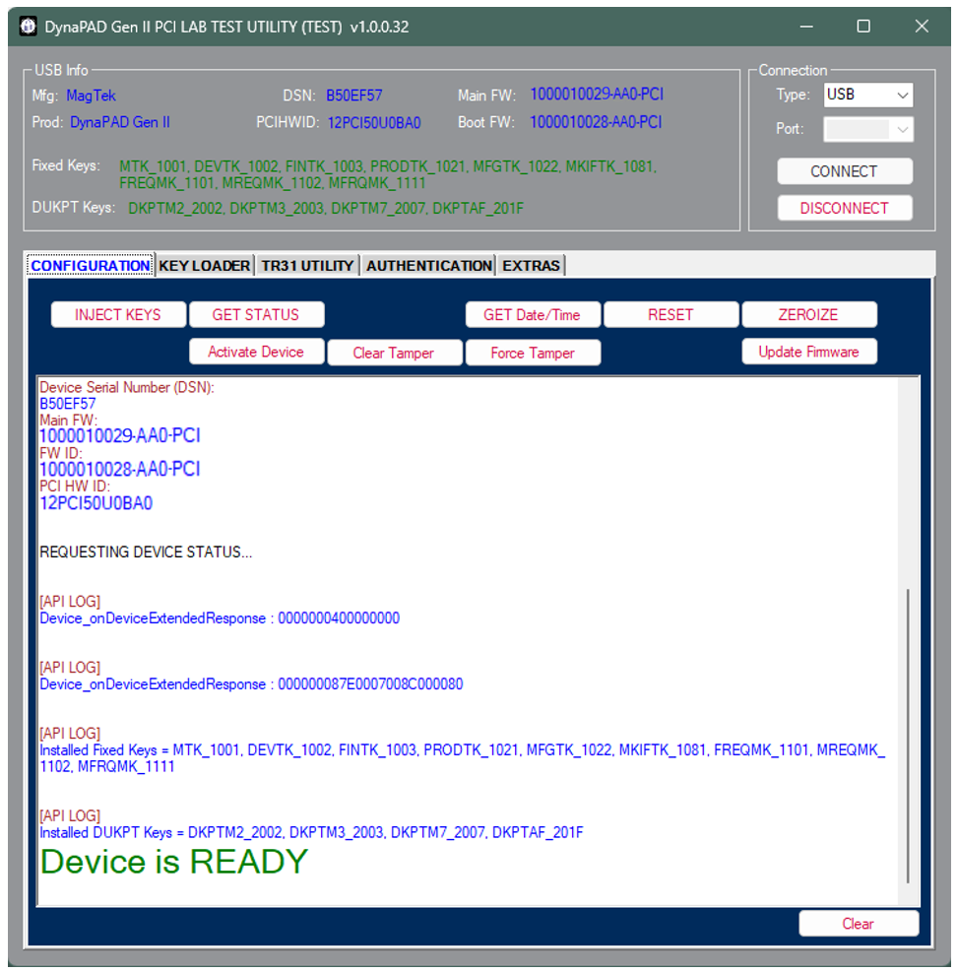
All device identification information, including firmware versions and PCI Hardware ID, is accessible by connecting DynaPAD Gen II to a host device via USB-C using the latest software provided by MagTek, as seen in Figure 2‑9 - Device Information Screen.

The host user can retrieve device information at any time using Command 0x0000 - Get Property as described in \[3]*.*

<figure><img src="https://2899238900-files.gitbook.io/~/files/v0/b/gitbook-x-prod.appspot.com/o/spaces%2F8D8HmfmyvOUbCM5xaHF8%2Fuploads%2F2uwgR2fT8GWHK5hsOYZI%2Fimage.png?alt=media&amp;token=7ac80699-5c33-4ac1-9c41-1db75a4d3c51" alt=""><figcaption></figcaption></figure>

<figure><img src="https://2899238900-files.gitbook.io/~/files/v0/b/gitbook-x-prod.appspot.com/o/spaces%2F8D8HmfmyvOUbCM5xaHF8%2Fuploads%2FASkK2rZJ0fevH2uczIvh%2Fimage.png?alt=media&amp;token=dfe0511e-3d58-49ff-b323-b9511a59c29e" alt=""><figcaption></figcaption></figure>

<p align="center"><strong>Figure 2‑9 -Device Information Screen</strong></p>


---

# Agent Instructions
This documentation is published with GitBook. GitBook is the documentation platform designed so that both humans and AI agents can read, navigate, and reason over technical content effectively. Learn more at gitbook.com.

## Querying This Documentation
If you need additional information that is not directly available in this page, you can query the documentation dynamically by asking a question.

Perform an HTTP GET request on the current page URL with the `ask` query parameter, and the optional `goal` query parameter:

```
GET https://developer.magtek.com/downloads-compliance-and-marketing-materials/compliance-security/product-specific-compliance/dynapad-gen-ii/9-1-2026-draft-version-pci-pts-poi-security-policy/9-1-2026-draft-version-general-description.md?ask=<question>&goal=<endgoal>
```

`ask` is the immediate question: it should be specific, self-contained, and written in natural language.
`goal` is optional and describes the broader end goal you are ultimately trying to accomplish on behalf of the user. GitBook uses it to tailor the answer towards what is most useful for that goal.

The response will contain a direct answer to the question and relevant excerpts and sources from the documentation.

Use this mechanism when the answer is not explicitly present in the current page, you need clarification or additional context, or you want to retrieve related documentation sections.