The host uses this command to request the file information of a file stored on the device. File types include standard files (images and certificates), MagTek custom files (configuration, firmware), and in some cases even large data blob output (such as signature capture data). In many cases, the file information retrieved by this command have been sent by a host previously using Start Send File to Device (Secured) - Command 0xD811 or Start Send File to Device (Unsecured) - Command 0xD812. In other cases, such as retrieving file information of signature capture data, the data may originate with the device and the host uses this command to retrieve the information. Such information is not persistent, in the sense that the device does not retain it through power cycles.
The sequence of events is as follows:
1
Compose and send request
The host composes a command request in the format below, and sends it to the device.
2
The device sends a response in the format below. The response contains the file information.
3
If the file cannot be found, then a response of failure will be sent to the host.
Tag
Len
Value / Description
Typ
Req
Default
Tag
Len
Value / Description
Typ
Req
Default
If the request started successfully, the Request Status in the message wrapper is OK, Started / Running, All good / requested operation was successful.
D825 = Get File Info from Device - Command 0xD825
81
04
File ID from Table XXX
B
R
End of any wrappers, at minimum including Request Message
D825 = Get File Info from Device - Command 0xD825
81
04
File ID from Table XXX
B
R
A2
var
File transfer properties
T
R
/81
var
Length of File — This is the length of the file.
B
R
/82
01
Hash Checksum Type
0x04 = SHA-256
B
R
/83
20
Hash Checksum — Anticipated checksum calculated against the file, according to the standard specified in Hash Checksum Type.
B
R
A3
var
File Description — The values the host populated for convenience when it sent the file to help identify the file. Not all values are required.
T
R
/81
var
File Name — Maximum length 32 bytes. Reserved for future use.
B
O
Null
/82
var
File Label — Maximum length 16 bytes. Reserved for future use.
B
O
Null
/83
var
File Version — Maximum length 7 bytes. Reserved for future use.
B
O
Null
/84
var
File Date — Maximum length 20 bytes. Reserved for future use.
B
O
Null
End of any wrappers, at minimum including Response Message
Beginning of any wrappers, at minimum including Request Message
Beginning of any wrappers, at minimum including Response Message
Device responds
File not found
Table GFID-1 - Get File Info from Device - Request Data for Command 0xD825
Table GFID-2 - Response Data for Get File Info from Device - Command 0xD825
Table GFID-3 - Request Example
Table GFID-4 - Response Example
Note: For additional support, please contact MagTek Support.
AA 00 81 04 82 08 D8 25 82 04 00 00 00 00 84 54 D8 25 81 04 00 00 00 01 A2 2B 81 04 00 00 00
40 82 01 04 83 20 FD EA B9 AC F3 71 03 62 BD 26 58 CD C9 A2 9E 8F 9C 75 7F CF 98 11 60 3A 8C
44 7C D1 D9 15 11 08 A3 1D 81 0B 54 45 53 54 5F 31 4B 2E 62 69 6E 82 05 4C 61 62 65 6C 83 07
31 2E 30 2E 30 2E 31
0xD811 - Start Send File to Device (Secured)
The host uses this command to start sending secured files to the device for storage or processing. It is similar to Start Send File to Device (Unsecured) - Command 0xD812, but is used to send a different subset of file types that impact device security and require some form of authentication from the host. Refer to Table 206 to determine which file type requires a secure command. All files require the command to be authorized via a secure wrapper. In some cases, files include additional signatures within the file structure itself. This command is paired with Start Get File from Device - Command 0xD821, which the host can use to retrieve files. However, some file types are “one way only” and cannot be retrieved using that command after the host sends them to the device.
1
Sequence of Events — Step 1
The host uses Get Challenge - Command 0xE001 to establish a secure session with the device.
2
The host determines which file type it will send to the device (see About Files), and either opens an existing file in its file system for reading, or begins constructing it.
3
The host constructs Start Send File to Device (Secured) - Command 0xD811 per Table XXX.
4
The host constructs Send Secured Command to Device - Command 0xEEEE using the previously constructed command as the payload, and sends that command to the device as a Request Message to start the process of uploading a file.
Sub-steps and notes for building the secured wrapper:
Use Get Key Info - Command 0xEF11 to gather information about the key to use to secure the message payload(s). Because this command requires a MAC, use key slot 1111.
5
The device sends a Response Message so the host knows it can begin sending the file.
6
The host sends a Data File Message to the device. If the device does not receive file data within a reasonable period of time, it times out and stops listening for the data file.
7
The device checks to make sure the File ID and the length and hash of the File Payload match with the values the host specified in this command.
8
The device repeats the same Response Message, this time with the Message Reference Number set to the same value the host used in the Data File Message.
Tag
Len
Value / Description
Typ
Req
Default
Tag
Len
Value / Description
Typ
Req
Default
If the request started successfully, the Request Status in the message wrapper is OK, Started / Running, All good / requested operation was successful.
Example (Hex)
Example (Hex)
Build the Security Parameters Type portion of the wrapper with:
Security Operation Type populated with the following values:
Operation Type = Command Authorization Using MAC
Operation Algorithm = CMAC
Operation Cipher = AES-256
Padding = One and zeros
MAC Block Size with any number
Key Information Type populated with the key information gathered earlier.
Table SFDS-1 - Request Data for Start Send File to Device (Secured) - Command 0xD811
Table SFDS-2 - Response Data for Command 0xD811 - Start Send File to Device (Secured)
For additional support, please contact MagTek Support.
Table SFDS - 3 - Request Example
Table SFDS-5 - Response Example
0xD812 - Start Send File to Device (Unsecured) - Command
The host uses this command to start sending unsecured files to the device for storage or processing. It is similar to Start Send File to Device (Secured) - Command 0xD811 but is used to send a different subset of file types that do not impact device security. Refer to Table XXX to determine which file type can use unsecure command. This command is paired with Start Get File from Device - Command 0xD821, which the host can use to retrieve files. However, some file types are “one way only” and cannot be retrieved using that command after the host sends them to the device.
The sequence of events is as follows:
1
Determine and prepare file
The host determines which file type it will send to the device (see About Files), and either opens an existing file in its file system for reading or begins constructing it.
2
The host constructs Command 0xD812 - per Table XXX.
3
The host sends that command to the device as a Request Message to start the process of uploading a file.
4
The device sends a Response Message so the host knows it can begin sending the file.
5
The host sends a Data File Message to the device. If the device does not receive file data within a reasonable period of time, it times out and stops listening for the data file.
6
The device checks to make sure the File ID and the length and hash of the File Payload match with the values the host specified in this command.
7
The device repeats the same Response Message, this time with the Message Reference Number set to the same value the host used in the Data File Message.
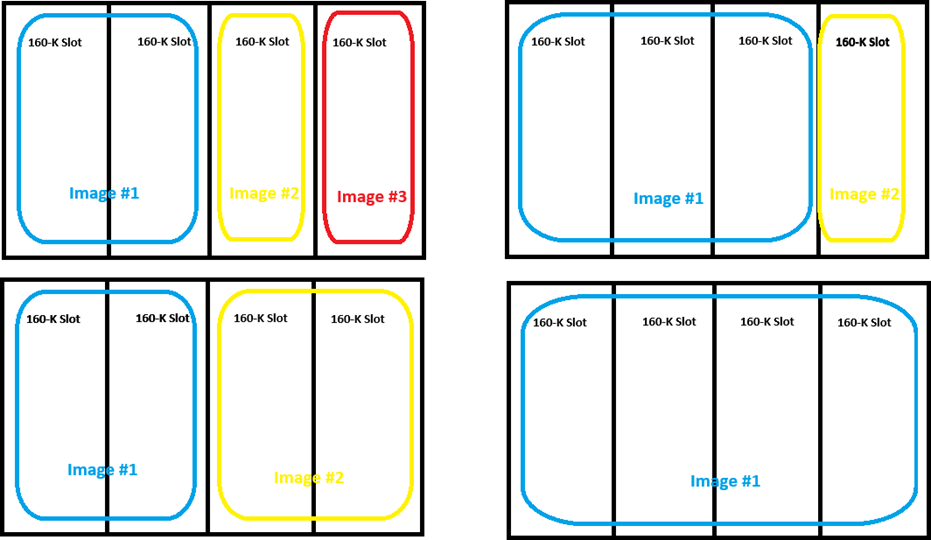
For image data, the file must be either BMP format or Magtek signed image format, maximum 320px by 240px, with color depth 16 color, 256 color, 16-bit color, or 24-bit color. Images smaller than the maximum size are centered on the display. Maximum size is 160KB per slot, but images can span multiple slots as shown below. The maximum sizes for each slot are 640KB for slot 1, 480KB for slot 2, 320KB for slot 3, and 160KB for slot 4. Loading an image that overwrites any portion of an existing image will delete that image.
Tag
Len
Value / Description
Typ
Req
Default
Tag
Len
Value / Description
Typ
Req
Default
If the request started successfully, the Request Status in the message wrapper is OK, Started / Running, All good / requested operation was successful.
Table SFDU-1 - Request Data for Start Send File to Device (Unsecured) - Command 0xD812
Table SFDU-2 - Response Data for Command 0xD812 - Start Send File to Device (Unsecured)
Note: For additional support, please contact MagTek Support.
Table SFDU-3 - Request Example
Table SFDU-4 - Response Example
About Files
Large blobs of data uploaded to / downloaded from the device are referred to as “files” and share a common set of commands documented here, and special message type Data File Message. Some file types can be sent in the File Payload fields in “raw” form (e.g. certificates and images) with metadata coming from the command request and response. Other file types require the addition of MagTek metadata included inside the File Payload blob; these are documented in the “File Type” subsections of section: Data Types and Shared TLV Data Objects.
Files Types that may come from the host include:
EMV configuration
Firmware updates
Public Key Infrastructure (PKI) Certificates
User interface images and prompts
EMV kernels
SRED BIN tables
File Types that may come from the device include:
Read back of the above file types
Signature Capture
Logs
Certificate Requests
The commands in this section share a common list of 4-byte file types, listed in the table below. File types marked as Secured = Yes must be loaded using Command 0xD811 - Start Send File to Device (Secured); file types that are marked as Secured = No can be loaded using Command 0xD812 - Start Send File to Device (Unsecured).
Description
Secured
File Type
File Type Version
File Subtype
File Instance
0x00
0x00
EMV configuration, processing file. See file definition in section 4.9
Get: No Set: No
0x00
0x00
0x01
0x00
EMV configuration, entry point file. See file definition in section 4.10
Get: No Set: No
0x00
0x00
0x02
0x00
EMV configuration, CA keys file. See file definition in section 4.10.6
Get: No Set: No
0x00
0x00
0x03
0x00
EMV configuration, Visa DRL set. Reserved for future use.
Get: No Set: No
0x00
0x00
0x04
0x00
EMV configuration, American Express DRL set. See file definition in section 4.12
Get: No Set: No
0x00
0x00
0x05
0x00
EMV configuration, MasterCard update conditions. Reserved for future use.
Get: No Set: No
0x00
0x00
0x06
0x00
EMV configuration, American Express update conditions. Reserved for future use.
Get: No Set: No
0x00
0x00
0x08
0x00
EMV configuration, Discover update conditions. Reserved for future use.
Get: No Set: No
0x00
0x00
0x09
0x00
EMV configuration, CA revocation list. Reserved for future use.
Get: No Set: No
0x00
0x00
0x0A
0x00
EMV configuration, exception file list. Reserved for future use.
Get: No Set: No
0x00
0x00
0x0B
0x00
EMV configuration, DPAS data storage. Reserved for future use.
Get: No Set: No
0x00
0x00
0x0C
0x00
(Touch Only) Signature capture file. See file definition in section 4.15
Get: No Set: NA
0x01
0x00
0x00
0x00
(Display Only) Custom Idle Page Image 1. For details, see Property 1.2.3.1.1.1 Custom Idle Page Image.
Get: NA Set: No
0x02
0x00
0x00
0x00
(Display Only) Custom Idle Page Image 2. For details, see Property 1.2.3.1.1.1 Custom Idle Page Image.
Get: NA Set: No
0x02
0x00
0x00
0x01
(Display Only) Custom Idle Page Image 3. For details, see Property 1.2.3.1.1.1 Custom Idle Page Image.
Get: NA Set: No
0x02
0x00
0x00
0x02
(Display Only) Custom Idle Page Image 4. For details, see Property 1.2.3.1.1.1 Custom Idle Page Image.
Get: NA Set: No
0x02
0x00
0x00
0x03
(WLAN Only) Apollo root CA certificate See Certificate File Types.
Get: No Set: Yes
0x03
0x00
0x00
0x00
(WLAN Only) Apollo intermediate CA certificate See Certificate File Types.
Get: No Set: Yes
0x03
0x00
0x01
0x00
(WLAN Only) Apollo server certificate See Certificate File Types.
Get: No Set: No
0x03
0x00
0x02
0x00
(WLAN Only) Customer root CA certificate See Certificate File Types.
Get: No Set: Yes
0x03
0x00
0x03
0x00
(WLAN Only) Customer intermediate CA certificate See Certificate File Types.
Get: No Set: Yes
0x03
0x00
0x04
0x00
(WLAN Only) Customer server certificate See Certificate File Types.
Get: No Set: No
0x03
0x00
0x05
0x00
(WLAN Only) Commercial root CA certificate See Certificate File Types.
Get: No Set: Yes
0x03
0x00
0x06
0x00
(WLAN Only) Commercial intermediate CA certificate See Certificate File Types.
Get: No Set: Yes
0x03
0x00
0x07
0x00
(WLAN Only) Commercial server certificate See Certificate File Types.
Get: No Set: No
0x03
0x00
0x08
0x00
(WLAN Only) Apollo trust certificate See Certificate File Types.
Get: No Set: No
0x03
0x00
0x09
0x00
(WLAN Only) Customer trust certificate See Certificate File Types.
Get: No Set: No
0x03
0x00
0x0A
0x00
(WLAN Only) Apollo client certificate See Certificate File Types.
The host uses this command to send a firmware image file, signed by MagTek, to the device as the first step in updating firmware. If the battery charge is five percent or less, a response is returned indicating that the command has not been executed. See Response Example for Command 0xD801.
If the battery charge is 5% or lower, the device will not allow the Load Firmware File command to execute and returns a response indicating the command was not executed.
The sequence of events is as follows:
1
Host obtains firmware image
The host is assumed to have access to a binary file containing a firmware image signed by MagTek, which contains a complete instance of Firmware File Type.
2
The host composes a command request using the binary file as the Payload, and sends it to the device in the format described below.
3
The device sends a response to the host to acknowledge it has received the request. The device will not allow the Load Firmware File command to execute if the battery charge is 5 percent or lower.
4
The device validates the request and authenticates the firmware file with the algorithm specified in the firmware file payload.
5
If the upload was not successful, then go to the next step. If the upload was successful and auto-commit was disabled, then go to the next step. Else, the device will commit the image automatically.
If commit was successful, the device sends Notification 0x0905 - Firmware Update Successful to the host.
If commit was unsuccessful, the device sends Notification 0x0906 - Firmware Update Failed to the host.
Tag
Len
Value / Description
Typ
Req
Default
Tag
Len
Value / Description
Typ
Req
Default
Example (Hex):
Example (Hex):
Example (Hex):
Tag
Len
Value / Description
Typ
Req
Default
Commit Firmware Notification Detail Codes are used for auto-commit mode. In both cases, the device automatically resets.
D801 =Load Firmware File - Command 0xD801
81
01
Progress Indicator Reserved for future use. Populate with 0x03.
B
R
85
02
Image Type
- 0x0000 = Boot Loader 1 image
- 0x0001 = Main App image
- 0x0002 = WiFi Module image
- 0x0003 = BLE Module image
B
R
86
20
Hash Checksum
B
R/O
87
var
Payload
B
R
88
01
Load Options
0x00 = Default mode
0x01 = Auto Commit
B
O
0x00
End of any wrappers, at minimum including Request Message
D801 = Load Firmware File - Command 0xD801
No parameters.
End of any wrappers, at minimum including Response Message
D801 = Load Firmware File - Command 0xD801
81
01
Progress Indicator Reserved for future use. Populate with 0x03.
B
R
85
02
Image Type
- 0x0000 = Boot Loader 1 image
- 0x0001 = Main App image
- 0x0002 = WiFi Module image
- 0x0003 = BLE Module image
B
R
86
20
Hash Checksum This is a SHA-256 hash of the entire object Firmware File Type being uploaded. For backward compatibility, this TLV is required in Default Mode, it is Optional in Auto-Commit Mode.
B
R/O
87
var
Payload This is the binary file or Firmware File Type object being loaded into the device.
B
R
88
01
Load Options 0x00 = Default mode 0x01 = Auto Commit
B
O
0x00
End of any wrappers, at minimum including Request Message
Beginning of any wrappers, at minimum including Request Message
Beginning of any wrappers, at minimum including Response Message
Beginning of any wrappers, at minimum including Request Message
Host composes and sends request
Device acknowledges receipt
Device validates and authenticates
Commit / Notifications
Table LFF-1 - Request Data for Command 0xD801 - Load Firmware File
Table LFF-2 - Response Data for Command 0xD801 - Load Firmware File
Table LFF-2- Response Example for Command 0xD801 Battery Charge State
If the request started successfully, the Request Status in the message wrapper is OK, Started / Running, All good / requested operation was successful.
Table LFF-3 - Request Example
Table LFF-4 - Response Example
Table LFF-5 - Request Data for Command 0xD801 - Load Firmware File
AA 00 81 04 82 01 D8 01 82 04 80 02 03 16
AA 00 81 04 01 01 D8 01 84 83 0C 76 58 D8 01 81 01 03 85 02 00 01 86 20 DF C7 1E 09 A3 CE 8E 86 B0 F5 B6 75 BE B7 7A 0E 82 33 BF F1 8A CD 8F 38 34 B0 DB 20 D9 40 4B 28 87 83 0C 76 28

Plus 0C7628 bytes of firmware Payload, excluded here for brevity.
AA 00 81 04 82 01 D8 01 82 04 00 00 00 00
0xD8nn - File Operations
File Operations
This section of the DynaFamily Programmer's Manual lists commands to move, save, and manipulate files.
Applies to: All Dyna Family products
Information in this group
Section
Information
Large blobs of data uploaded to / downloaded from the device are referred to as “files” and share a common set of commands documented here, and special message type Data File Message.
The host uses this command to send a firmware image file, signed by MagTek, to the device as the first step in updating firmware.
The host uses this command to start sending secured files to the device for storage or processing. It is similar to Start Send File to Device (Unsecured), but is used to send a different subset of file types that impact device security and require some form of authentication from the host.
The host uses this command to start sending unsecured files to the device for storage or processing. It is similar to Start Send File to Device (Secured) but is used to send a different subset of file types that do not impact device security.
The host uses this command to request a file stored on the device. File types include standard files (images and certificates), MagTek custom files (configuration, firmware), and in some cases even large data blob output (such as signature capture data).
The host uses this command to request the file information of a file stored on the device. File types include standard files (images and certificates), MagTek custom files (configuration, firmware), and in some cases even large data blob output (such as signature capture data).
The host uses this command to request a file stored on the device. File types include standard files (images and certificates), MagTek custom files (configuration, firmware), and in some cases even large data blob output (such as signature capture data). In many cases, the files retrieved by this command have been sent by a host previously using Start Send File to Device (Secured) - Command 0xD811 or Start Send File to Device (Unsecured) - Command 0xD812. In other cases, such as retrieving signature capture data, the data may originate with the device and the host uses this command to retrieve it. Such data is not persistent, in the sense that the device does not retain it through power cycles.
The sequence of events is as follows:
1
Host composes and sends request
The host composes a command request in the format below and sends it to the device.
2
The device sends a response in the format below so the host knows it can begin listening for a file message.
3
The device sends a Data File Message to the host. If the host does not receive file data within a reasonable period of time, it should time out and stop listening for the data file.
4
Upon receiving the end of the Data File Message, the host should check to make sure the File ID, length, and hash of the File Payload in the Data File Message match the values the device specified in its response to ensure the file has not been tampered with.
Tag
Len
Value / Description
Typ
Req
Default
Tag
Len
Value / Description
Typ
Req
Default
If the request started successfully, the Request Status in the message wrapper is OK, Done.
Example (Hex):
Example (Hex):
D821 = Start Get File from Device - Command 0xD821
81
04
File ID from Table 206
B
R
87
01
Progress indicator behavior (Reserved for future use / Subject to change)
0x00 = None
0x01 = LED
B
O
Null
End of any wrappers, at minimum including Request Message
D821 = Start Get File from Device - Command 0xD821
81
04
File ID from Table 206
B
R
A2
var
File transfer properties
T
R
/81
var
Length of File Payload — This is the length of the File Payload parameter in the Data File Message the device sends to the host.
B
R
/82
01
Hash Checksum Type
0x04 = SHA-256
B
R
/83
20
Hash Checksum
Anticipated checksum calculated against the File Payload, according to the standard specified in Hash Checksum Type.
B
R
A3
var
File Description
The values the host populated for convenience when it sent the file to help identify the file. Not all values are required.
T
R
/81
var
File Description
The values the host populated for convenience when it sent the file to help identify the file. Not all values are required.
B
O
Null
/82
var
File Label
Maximum length 16 bytes Reserved for future use.
B
O
Null
/83
var
File Version
Maximum length 7 bytes Reserved for future use.
B
O
Null
/84
var
File Date
Maximum length 20 bytes Reserved for future use.
B
O
Null
End of any wrappers, at minimum including Response Message
Beginning of any wrappers, at minimum including Request Message
Beginning of any wrappers, at minimum including Response Message
Device acknowledges readiness
Device sends Data File Message
Host validates received file
Table SFGD-1 - Start Get File from Device - Request Data for Command 0xD821
Table SFGD-2 - Start Get File from Device - Response Data for Command 0xD821