These sections detail information about the device's status.
Applies to: All Dyna Family products
Appendices in this Group
Notification
Information
For modular management of device functions, information, and settings, this standard makes extensive use of Object Identifiers (also known as Object IDs or OIDs) as defined in ITU-T X.660 | ISO/IEC 9834-1.
Barcode symbology refers to the way in which data is encoded in a barcode. It uses either spaced lines, dots or squares.
A Barcode symbology refers to the way in which data is encoded in a barcode. It uses either spaced lines, dots or squares. When read, these symbols are decoded and converted to data. The table below lists all of the supported Symbologies and which are enabled by default.
Barcode Reader Supported Symbologies
Symbology
Default
AIM 128
Disabled
Aztec
Enabled
Codabar
Enabled
Code 11
Disabled
Code128
Enabled
Code 32
Disabled
Code 39
Enabled
Code 93
Disabled
Data Matrix
Enabled
EAN-8
Enabled
EAN-13
Enabled
Febraban
Disabled
GSI-128 (UCC/EAN-128)
Enabled
GS1 Databar (RSS)
Disabled
Industrial 25
Disable
Interleaved 2 of 5,
Enabled
ISSN
Disabled
ISBN
Disabled
ITF-14
Disabled
ITF-6
Disabled
Matrix 2 of 5
Enabled
Micro QR
Disabled
MSI Plessey
Disabled
PDF417
Enabled
Plessey
Disabled
QR Code
Enabled
Standard 25
Disabled
UPC-E
Enabled
UPC-A
Enabled
Appendix A: Object IDs (OIDs) and ITU-T X660
About OIDs
For modular management of device functions, information, and settings, this standard makes extensive use of Object Identifiers (also known as Object IDs or OIDs) as defined in ITU-T X.660 | ISO/IEC 9834-1, which can be found by searching for X.660 in the publications on www.itu.int.
OIDs are identifiers for any generic data element, and are managed by standards bodies to be globally unique (much like web domains, IP addresses, and Media Access Control MAC addresses). They are managed by using a tree structure consisting of nodes, where the tree structure is defined and controlled by a hierarchy of subordinate Registration Authorities, each with their authority delegated by a Registration Authority one level higher in the tree, starting with the root nodes managed by ITU-T and ISO. The X.660 standard for OIDs is harmonized with the data representation standard of ASN.1 via that standard’s OBJECT IDENTIFIER and OID-IRI types. Every node is assigned a primary integer value (or primary value for short) which serves to uniquely identify the node, and may be assigned secondary identifiers (such as strings) for human readability.
MagTek is the Registration Authority for the OID tree beginning at {iso(1) identified-organization(3) dod(6) internet(1) private(4) enterprise(1) MagTek(15113)} (using value notation of the ASN.1 OBJECT IDENTIFIER type). The branch can also be represented in numerical shorthand as 1.3.6.1.4.1.15113, which is the encoding form of the ASN.1 OBJECT IDENTIFIER type.
Per X.660, OIDs can be encoded in constructed form or primitive form. The primitive form is a sequence of octets (bytes) and is summarized in section A.2 Octet Encoding of OIDs. The constructed form is a TLV data object and is summarized in section A.3 TLV Encoding of OIDs.
In many cases, the MagTek implementation of OID-based message elements allows the host to specify an optional Company ID and Tree prefix alongside a Relative OID, where the full OID is a concatenation of the company ID, followed by the tree prefix, followed by the relative OID. If a message does not include the optional company ID or tree prefix, company ID is assumed to be the MagTek arc above, and the tree prefix is assumed to be a reasonable sequence of additional nodes based on the purpose and scope of the message.
In addition to human-readable ASN.1 value notation and encoding forms above, OIDs can be encoded as binary values (octets) as follows (per X.660 section 8.19 Encoding of an object identifier value):
1
Start with the numerical form (for example, MagTek’s arc 1.3.6.1.4.1.15113 from section A.1).
2
Multiply the primary value of the first node in the OID by 40 decimal (e.g., 1*40=40) and add it to the primary value of the second node. The sum is used as the first byte (e.g., 43 decimal = 0x2B) of the octet form. The first two nodes receive this special treatment because their possible value ranges are expected to remain very small indefinitely.
3
The primary method of encoding OIDs, as specified in X.660 section 8 Basic encoding rules, is BER Tag-Length-Value (TLV) format. A TLV-encoded OID is a set of nested TLV data objects, where:
The tag of each TLV data object equals the primary value of the node it represents in the OID sequence, encoded according to the BER TLV tag number rules; the assigned primary values in this standard are all private (11nnnnnn), the bottom level value / leaf of any OID arc is encoded as primitive (nn0nnnnn), and the levels above it are encoded as composed (nn1nnnnn). This information makes it possible to use the bit definitions for Tag in section 3.2.1 Tag-Length-Value (TLV) Encoding as a reference to encode each level of the OID as a tag. Generally the primary values in this standard are selected to be less than 0x1F, and so do not require multi-byte tags.
The length of each TLV data object, like all TLV data objects, is equal to the length of its value.
For example, the process of TLV encoding the OID in a request to retrieve the contents of OID 3.5.7.9 (with 9 being a leaf node) is:
1
First, realize OID 3.5.7.9 is to be interpreted as a nested set of containers. Node 3 contains node 5, which contains node 7, which contains node 9. Although node 9 presumably contains one or more values, the entity making the request for its contents, by definition, does not know the contents when composing the request, so in this example, node 9 is treated like an “empty bucket.” In the corresponding response, node 9 would include its actual contents.
2
Because TLV is built from the inside out (bottom up), start the encoding process with the node at the end which has a primary value equal to 9. Like all OIDs in this standard it is private, and because it is a leaf node at the bottom / end of the OID tree and therefore does not contain any further nested TLV data objects, it is primitive:
The next bytes in the octet encoded form are simply equal to each primary value in the OID sequence, unless the primary value is greater than 128 decimal (0x80). For primary values greater than 0x80, additional encoding rules apply that are not necessary to detail here, because for simplicity MagTek selects OID primary values that are equal to 0x79 or less (and in many cases, 0x30 or less); In addition, TLV encoding places additional restrictions on selection of OID, in that if the OID is to be used directly as a tag in a TLV data object, it must not be greater than 0x1F (see section 3.2.1.1 About TLV Encoding). The only portion of MagTek’s arc that is subject to these additional encoding rules is the primary value 15113 at the end, which encodes to 0xF609 hex (per the rules not detailed here, see X.660 for details). The full arc 1.3.6.1.4.1.15113 therefore encodes to:
The value of each TLV data object is equal to a nested TLV data object containing all subsequent nodes in the OID sequence, so TLV-encoded OIDs must be built from the bottom up. The primitive value in the bottom node of a TLV-encoded OID is the set of actual values contained by that OID (e.g., string, byte[s], and so on), or in the case of requests where the value is (by definition) not known to the requester, the length is 0x00.
0x09 primary value OR 0b11000000 private OR 0b00000000 primitive = C9.
As explained above, in this case it is an empty bucket, so its length is 00. Its TLV encoding is:
3
Step
Up one level to the node with primary value equal to 7, it is also private, but unlike the previous level it contains a nested TLV data object (C9 00 from above) so it is constructed instead of primitive:
0x07 primary value OR 0b11000000 private OR 0b00100000 constructed = E7.
It has contents C9 00 so length is 02. Its TLV encoding is:
4
Step
Up one level to the node with primary value 5, it is private and contains TLV data object E7 02 C9 00 from above, so it is constructed:
0x05 primary value OR 0b11000000 private OR 0b00100000 constructed = E5.
It has contents E7 02 C9 00 so length is 04. Its TLV encoding is:
5
Step
Up to the root with primary value 3, it is private and constructed so tag is E3, value is the TLV data object from above, so length is equal to that object’s length 06. Its encoding is:
This is the final encoding of whole “empty bucket” OID 3.5.7.9
Octet Encoding of OIDs
TLV Encoding of OIDs
Step
Step
E7 02 C9 00
E5 04 E7 02 C9 00
E3 06 E5 04 E7 02 C9 00
0x2B 06 01 04 01 F6 09
C9 00
Appendix D: Tip & Tax Display Limits (Touch Only)
These are the display limits that are supported:
Preset tip ($ buttons): maximum 6 digits — up to $9,999.99
Preset tip (% buttons): range 0% to 100%
Custom tip: maximum 9 digits — up to $9,999,999.99
Sale amount + tip + tax (combined): maximum 12 digits — up to $9,999,999,999.99
Appendix E: Physical Button (DynaFlex Only)
Every DynaFlex device features a single physical button. On the DynaFlex II Go, this button is located on the left side of the device. For all other models, it is located on the bottom of the device near the USB port. Pressing and holding this button can activate additional functions on the device. To active a specific function, press and hold the button until a specific number of beeps are heard. Table G8.7-48 shows which functions can be activated. Beep counts that are not listed are not supported.
Button Functions
2
Power Off
Power the device off, The device will reboot if it is connected to USB.
3
WLAN Setup
WLAN devices only.
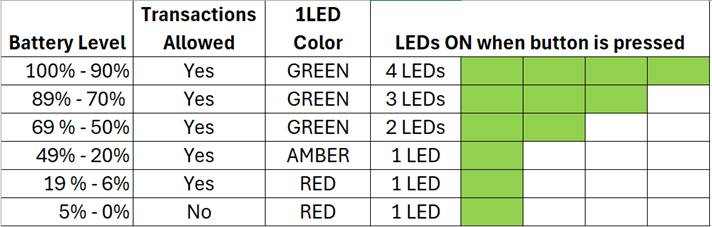
As mentioned in Appendix G Physical Button (DynaFlex Only), there is only one physical button on DynaFlex devices. Pressing and holding this button until the device beeps six times then releasing it causes the LEDs on the front of the device to display the current charge state of the battery. The LEDs will return to their previous state after three seconds.
The DynaFlex II Go has only green LEDs. Instead of lighting the first LED in amber, it will slowly flash the first LED. Instead of Red, the first LED will flash quickly
Yes
Green
2 LEDs
49% - 20%
Yes
Amber
1 LED
19% - 6%
Yes
Red
1 LED
5% - 0%
No
Red
1 LED
4
BLE Pairing
BLE devices only.
5
Demo
See Appendix C for more information.
6
Battery Level
Light the LEDs to indicate the current state of charge of the battery. The LEDs will light for 3 seconds then return to their original state.
The DynaFlex II Go has only green LEDs. Instead of lighting the first LED in amber, it will slowly flash the first LED. Instead of Red, the first LED will flash quickly.