Loading...
Loading...
Loading...
Loading...
Loading...
Loading...
Loading...
Loading...
Loading...
Loading...
Loading...
Loading...
Loading...
Loading...
Loading...
Loading...
Loading...
Loading...
Loading...
Loading...
Loading...
Loading...
Loading...
Loading...
Loading...
Loading...
Loading...
TLV data objects use the following primitive data types:
A = Alphabetic (string, no numbers).
AN = Alphanumeric (string).
B = Binary value, which includes bit combinations (“OR” types).
CN = Compressed numeric.
N = Numeric.
T = TLV Constructed data object (TLV Value contains additional layers of TLV-encoded data the parser should continue to process).
GPO Response
B
R
These file types conform to the Common File Structure format. The File Payload of these files contain a certificate in PEM format.
Certificates must be loaded into the device in the order of trust starting with the root CA, next intermediate CA(s) and ending with the leaf (server or client for example) so that the device can verify the signature of each certificate. If the certificates are not loaded in order, they will be rejected.
When loading a server cert, the associated key pair must already exist in the device as the CSR keys or as the existing server or client cert and will be used to verify that the public key contained in the certificate is correct. If the keys don’t match the certificate will be rejected. If the certificate is associated with the CSR keys, the CSR keys will be associated with the certificate and will no longer be available for other certificates until re-generated.
Initial server or client certificates can not be loaded until the respective CSR keys and CSR is generated. To generate a CSR see Generate CSR (WLAN Only) - Command 0xEF03.
This section defines the primitive and composed data types, TLV (Tag-Length-Value) data objects, file structures, and cryptographic key formats used throughout the device command set, including track data, display strings, EMV configuration file types (ARQC, ARPC, Batch, CA Public Keys), security parameters, TR‑31 key blocks, certificate and CSR file structures, and card emulation.
C1
4
File Type See Table 206
B
R
N/A
CE
var
File Payload See the “File Type” subsections of section - Data Types andShared TLV Data Objects.
B
R
N/A
MGTKAP10= Start Of File Marker
Information about parsing EMV ARQC Type or Merchant Data Container data for each track into individual values embedded in the tracks.
A pre-defined set of messages by string ID that the host and device use for various user interface features.
Information on the key type, variant, and other information the host can use to decrypt encrypted data included in various payloads.
Information on how the device formats ARQC messages.
Information on how the device formats ARPC messages
Information on the device formats EMV batch data, such as merchant data and pre-defined EMV batch data tags.
Information on loading this file type to control the behavior of the device’s EMV contact kernel.
Information on loading this file type to control the behavior of the device’s EMV kernel.
Information on loading this file type to control the behavior of the device’s EMV kernels.
Information on loading this file type to control the behavior of the device’s EMV contact and contactless kernels when the device should support Offline Data Authentication (ODA).
Information on loading this file type to control the behavior of the device’s American Express contactless kernel when the card sends tag 9F70 and one or more DRL is defined. (Not supported on Expresspay 4.x)
The signature capture file type produced when the host invokes Request Cardholder Signature - Command 0x1801 (Touch Only)
This non-TLV data structure consists of four or five bytes that describes a security operation, including the algorithms and methods to be used in that operation.
Information on tags used with security parameters.
Information on tags used to identify key types.
Information on tags used with NFC UID Types. (EMV Contactless Only)
Information on tags used with GPORT-1 Types. (EMV Contactless Only)
Information on tags used with MIFARE Card Data. (EMV Contactless Only).
Information on tags used with TR-31 Key Blocks.
Information on tags used with DUKPT Keys.
Information on tags used with miniature certificates.
Information on file types that conform to the common file structure format.
These file types conform to the Common File Structure format. The File Payload of these files contain a certificate in PEM format.
Information on CSR File Types.
Card emulation enables a DynaFlex/DynaProx device to simulate a Type 4 smart card.
Messages --> The basics on messages, what they are, and how they work.
Commands --> Information on device-level commands
Notifications --> Information on notices your device my send and the circumstances under which they send them.
--> Information of configuring your devices in various ways.
Section
Information available
A list of primitive data types used by TLV data objects.
Applies to: All Dyna Family products
Need Help?
For additional support, please contact MagTek Support:
Technical Support:
📧 Email:
📞 Phone: 1-562-546-6800 (US)
🕐 Hours: Monday-Friday, 5:30 AM - 5:00 PM PST
Online Resources:
🌐 Support Portal: developer.magtek.com
Documentation Feedback:
Help us improve this documentation! feedback@magtek.com
B
O
DFDFDF41
var
MIFARE Card Data in Binary
O
DFDFDF40
var
MIFARE Card Data in ASCII terminated with NULL character
The Encryption Type provides the key type, variant, and other information the host can use to decrypt encrypted data included in various payloads. The possible values are an ORed bitmask using the following elements:
0xxx xxxx = Fixed Key (Not used)
1xxx xxxx = DUKPT Key
xx01 xxxx = AES128
xx10 xxxx = AES256
xxxx 0000 = Data Encrypt/Decrypt Variant
xxxx 0001 = PIN Variant
xxxx 0010 = MAC Variant
xxxx 0011 = Data, Encrypt Variant
xxxx 0100 = MAC Verify Variant
xxxx 0101 = RESERVED
xxxx 0110 = RESERVED
xxxx 0111 = AES PIN Encrypt
xxxx 1000 = AES MAC Generate
xxxx 1001 = AES MAC Verify
xxxx 1010 = AES MAC Generate/Verify
xxxx 1011 = AES Data Encrypt
xxxx 1100 = AES Data Decrypt
xxxx 1101 = AES Data Encrypt/Decrypt
xxxx 1110 = RESERVED
xxxx 1111 = RESERVED
DUKPT – Derived Unique Key Per Transaction
OID – Object Identifier
SRED - Secure Reading and Exchange of Data
There are 7 OIDs defined for these 7 SRED Data IDs.
Each OID value contains a two-byte DUKPT slot ID and a one-byte transformation ID.
DUKPT Slot IDs
The existing TR31 Module supports 32 MagTek DUKPT Slot IDs, from 0x2000 to 0x201F.
The Key Injection Software Tool shall inject DUKPT keys through these DUKPT Slot IDs.
Transformation IDs
This is the list of DUKPT transformations defined in both the Legacy and AES specifications.
During TR31 Key Injection, each DUKPT Slot ID contains a parameter indicates the purpose of a Key Set.
Example 1: The restriction value is 0x3F
This Key Set can be used for all purposes.
Example 2: The restriction value is 0x3E
SRED Data ID map configuration values (Slot ID and Transformation ID) must be checked and rejected if they don’t meet the following conditions.
The DUKPT Slot ID must be loaded. (Table - Settings of Injected DUKPT Slot IDs)
The loaded DUKPT Slot ID must allows this type of SRED Data ID. (Table - The Definition of Restriction Bitmap).
The transformation must be allowed by Table - Allowed Key Mapping Table.
Here is the list of parameters of 4 DUKPT Slot IDs based on the existing Key Injection Tool.
If the Transformation ID of the latest key mapping request is different, then the original OID setting of the other SRED Data ID will be forced to match the latest OID setting. For example, SRED Data ID 2 has been mapped to 0x2007 0x04, user wants to map SRED Data ID 4 to 0x2007 0x05, then the OID setting of SRED Data ID 2 will be forced to 0x2007 0x05.
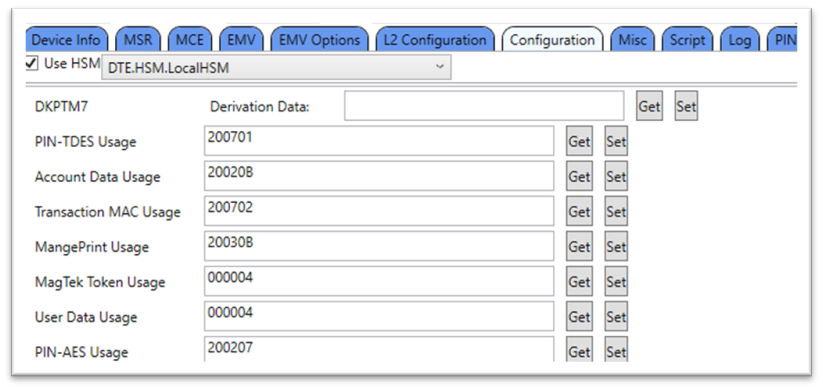
The following OID Values indicate that:
200701: Map PIN-TDES to DKPTM7-2007 PIN Encryption Variant.
20020B: Map Account Data to DKPTM2-2002 Data Encryption Usage.
200702: Map MAC to DKPTM7-2007 MAC Generate/Verify Variant.
Figure 1 - Configuration Usage Values
2: Account Data
0x010102040102
3
3: MAC
0x010102040103
3
4: Magneprint (supported on devices with MSR Only)
0x010102040104
3
5: MagTek Token
0x010102040105
3
6: User Data 1
0x010102040106
3
7: PIN-AES (supported on PED devices Only)
0x010102040107
3
PIN Encryption
Legacy
00 00 00 00 00 00 00 FF
2
MAC Generate/Verify
Legacy
00 00 00 00 00 00 FF 00
3
MAC Verify
Legacy
00 00 00 00 FF 00 00 00
4
Data Enc/Decryption
Legacy
00 00 00 00 00 FF 00 00
5
Data Encryption
Legacy
00 00 00 FF 00 00 00 00
6
Reserved
7
PIN Encryption
AES
0x1000
8
MAC Generate
AES
0x2000
9
MAC Verify
AES
0x2001
A
MAC Generate/Verify
AES
0x2002
B
Data Encryption
AES
0x3000
C
Data Decryption
AES
0x3001
D
Data Enc/Decryption
AES
0x3002
Magneprint
MAC
Account Data
PIN
Example 3: The restriction value is 0x01
This Key Set can be used for PIN Encryption only.
DKPTM3-2003
AES-256
0x3F
DKPTM7-2007
TDES
0x3F
PIN-TDES (supported on PED devices Only)
01
Not allowed
2
Account Data
01, 04, 05
0B, 0D
3
Transaction MAC
02
08, 0A
4
MagnePrint (supported on devices with MSR Only)
01, 04, 05
0B, 0D
5
MagTek Token (RFU)
RFU
RFU
6
User Data #1 (RFU)
RFU
RFU
7
PIN-AES (supported on PED devices Only)
Not allowed
07
…
RFU
-
-
000004: MagTek Token is RFU, 0000 ID does not exist (this is default value).
000004: User Data is RFU, 0000 ID does not exist (this is default value).
200207: Map PIN-AES to DKPTM2-2002 PIN Encryption Usage.
SRED Data ID
OID
OID Size
0: Not assigned
N/A
N/A
1: PIN-TDES (supported on PED devices Only)
0x010102040101
Transformation
ID #
Usage Name
Type
Data for calculation
0
Reserved
Bit #
5
4
3
2
1
0
Data Type
User Data
(RFU)
DUKPT Slot ID
Key Type
Restrictions
DKPTM0-2000
TDES
0x3E
DKPTM2-2002
AES-128
SRED
Data ID
Data Type
(Working Key Purpose)
Allowed Legacy
DUKPT
Transforms
Allowed AES
DUKPT
Transforms
0
Not assigned
-
-
Note: If SRED Data ID 2 and 4 are mapped to the same Key Set, then they must have the same Transformation ID.
3
1
Token
(RFU)
0x3F
1
A TR-31(X9.143) key block consists of three parts:
The Key Block Header(KBH) which contains attribute information about the key and the key block and is not encrypted. It is always treated as ASCII.
The first section is 16 bytes with a fixed format defined below.
The second section is optional within the standard, but required for current products.
The Confidential Data, which is encrypted and always binary.
Two bytes indicating the key length (in bits, AES-128 is 128 bits, so length will be 0080).
The secret key and/or sensitive data.
Padding as required (random bytes 0x00 to 0xFF).
The MAC, which is of varying length as follows:
64 bits if the TDEA key derivation method is used (typically not used for this device).
128 bits if the AES key derivation method is used.
Symmetric keys are padded with Block Padding to the maximum length for the algorithm, 192 bits for TDEA or 256 bits for AES, to hide the true length of short keys.
The data to be encrypted and the MAC are always binary for calculation purposes. The encrypted data and the MAC are converted to ASCII hex as the last step.
Date and time strings specified within the TR-31 block are represented according to the rules described in ISO 8601 and TR-31. Year is 4 digits. Time uses UTC 24 hour clock. Some functions like ‘toISOString()’ will produce a string of format yyyy-mm-ddThh:mm:ss.fffZwhere fff is a decimal fraction of a second, Z is UTC time zone. The device ignores ‘Z’ and ‘.fff’ if they are present. Seconds ‘:ss’ are optional. Date, hours, and minutes are required. For example, March 23, 2020 4:19PM is encoded as 2020-03-23T16:19at minimum, but could also be 2020-03-23T16:19:00.000Z.
DUKPT – Derived Unique Key Per Transaction OID– Object Identifier
SRED- Secure Reading and Exchange of Data
There are 7 new OIDs defined for these 7 SRED Data IDs.
Each OID value contains a two-byte DUKPT slot ID and a one-byte transformation ID.
The existing TR31 Module supports 32 MagTek DUKPT Slot IDs, from 0x2000 to 0x201F. The Key Injection Software Tool shall inject DUKPT keys through these DUKPT Slot IDs.
This is the list of DUKPT transformations defined in both the Legacy and AES specifications.
During TR31 Key Injection, each DUKPT Slot ID contains a parameter indicates the purpose of a Key Set.
Example 1: The restriction value is 0x3F
This Key Set can be used for all purposes.
Example 2: The restriction value is 0x3E
This Key Set can be used for all purposes, except PIN Encryption.
Example 3: The restriction value is 0x01
This Key Set can be used for PIN Encryption only.
SRED Data ID map configuration values (Slot ID and Transformation ID) must be checked and rejected if they don’t meet the following conditions.
The DUKPT Slot ID must be loaded.
The loaded DUKPT Slot ID must allows this type of SRED Data ID.
The transformation must be allowed by .
Here is the list of parameters of 4 DUKPT Slot IDs based on the existing Key Injection Tool.
Note: If SRED Data ID 2 and 4 are mapped to the same Key Set, then they must have the same Transformation ID. If the Transformation ID of the latest key mapping request is different, then the original OID setting of the other SRED Data ID will be forced to match the latest OID setting. For example, SRED Data ID 2 has been mapped to 0x2007 0x04, user wants to map SRED Data ID 4 to 0x2007 0x05, then the OID setting of SRED Data ID 2 will be forced to 0x2007 0x05.
The following OID Values indicate that:
200701: Map PIN-TDES to DKPTM7-2007 PIN Encryption Variant.
20020B: Map Account Data to DKPTM2-2002 Data Encryption Usage.
200702: Map MAC to DKPTM7-2007 MAC Generate/Verify Variant.
Figure 1 - Configuration Usage Values
--------------
------------>
<--------
------------
MAC
--------------
--------------
------------>
Calculated (in decimal, e.g. 138 bytes shown as ‘0138’
5..6
Usage
Look up the desired Key Type in Table TKB-2 below and select this value from the Usage column.
7
Algorithm
Look up the desired Key Type in Table TKB-2 below and select this value from the Algorithm column.
8
Mode of Use
Look up the desired Key Typein Table TKB-2 below and select this value from the Mode of Usecolumn.
9..10
Key Version #
‘00’
Always ‘00’
11
Exportability
‘N’
Always no export allowed
12..13
# option blocks
Calculated
14..15
Reserved
‘00’
‘A’ / ‘T’
‘X’
Fixed MAC (CMAC)
‘M6’
‘A’ / ‘T’
(‘C’, ’G’, ’V’)
Fixed Encrypt
‘D0’
‘A’ / ‘T’
(‘B’, ‘E’, ‘D’)
‘PB’
Padding Field
‘TS’
Current Time Stamp (optional) see description in previous section.
‘KP’
KCV of KBPK that created this Key Block (optional-preferred)
‘21’
MagTek Additional Key Info From
var
ASCII Hex (Length 01-FF from offset 0)
4..7
Owner Tag
‘MGTK’
Avoid collision with others using Block ID ‘21’
8..9
Data Tag
‘10’
Field ID
10..11
Data Len
‘01’
Field Length (ASCII Hex 00-FF)
12
Data
‘T’,’P’, or ‘0’
Field Data for Key Environment
T = Test
P = Production
0 = Erase Key
13…
Added elements
More Fields (Tags, Lengths, and Data)
‘12’
‘04’
Key Slot ID of Transport Key
‘20’
--
Reserved
‘21’
‘04’
DUKPT Data Type Restriction Bitmask This is for Transport Keys and DUKPT keys. Default to 0.
‘31’
‘07’
Device Serial Number
‘32’
‘10’
Challenge Token 10h = 16 characters
‘33’
‘10’ ..‘18’
Expiration Date/Time This is in UTC format, use short form if possible. Reserved.
1000
TMPTK
Temporary KBPK
Key agreement process from Command 0xF017 - Establish Ephemeral KBPK
N/A
1001
MTK
Master Transport Key
TMPTK
K1AD
1002
DEVTK
Device Master Transport Key
MTK
K1AD
1003
FINTK
Financial Master Transport Key
MTK
K1AD
1022
MFGTK
(MAGTEK INTERNAL ONLY) Manufacturing Transport Key
DEVTK
K1AD
1081
MKIFTK
MagTek KIF Financial Transport Keys
FINTK
K1AD
1101
FREQMK
Factory Request MAC Key
PRODTK
M6AV
1102
MREQMK
Manufacturer Device Request MAC Key
MFGTK
M6AV
1111
MFRQMK
Manufacturer Financial Request MAC (Configuration) Key
MKIFTK
M6AV
0x2000 to 0x201F
DKPTM0 to DKPTM1F
DUKPT Initial Keys,
MKIFTK
B1TX
2: Account Data
0x010102040102
3
3: MAC
0x010102040103
3
4: Magneprint (supported on devices with MSR Only)
0x010102040104
3
5: MagTek Token
0x010102040105
3
6: User Data 1
0x010102040106
3
7: PIN-AES (supported on PED devices Only)
0x010102040107
3
PIN Encryption
Legacy
00 00 00 00 00 00 00 FF
2
MAC Generate/Verify
Legacy
00 00 00 00 00 00 FF 00
3
MAC Verify
Legacy
00 00 00 00 FF 00 00 00
4
Data Enc/Decryption
Legacy
00 00 00 00 00 FF 00 00
5
Data Encryption
Legacy
00 00 00 FF 00 00 00 00
6
Reserved
7
PIN Encryption
AES
0x1000
8
MAC Generate
AES
0x2000
9
MAC Verify
AES
0x2001
A
MAC Generate/Verify
AES
0x2002
B
Data Encryption
AES
0x3000
C
Data Decryption
AES
0x3001
D
Data Enc/Decryption
AES
0x3002
Magneprint
MAC
Account Data
PIN
DKPTM3-2003
AES-256
0x3F
DKPTM7-2007
TDES
0x3F
PIN-TDES (supported on PED devices Only)
01
Not allowed
2
Account Data
01, 04, 05
0B, 0D
3
Transaction MAC
02
08, 0A
4
MagnePrint (supported on devices with MSR Only)
01, 04, 05
0B, 0D
5
MagTek Token (RFU)
RFU
RFU
6
User Data #1 (RFU)
RFU
RFU
7
PIN-AES (supported on PED devices Only)
Not allowed
07
…
RFU
-
-
000004: MagTek Token is RFU, 0000 ID does not exist (this is default value).
000004: User Data is RFU, 0000 ID does not exist (this is default value).
200207: Map PIN-AES to DKPTM2-2002 PIN Encryption Usage.
<-----------
0
Key Block V ID
‘D’
1..4
Transport (KBPK)
‘K1’
‘A’ / ‘T’
‘D’
Initial DUKPT Key
‘IK’
DUKPT KSID
‘KS’
Key Set Identifier (e.g. data used by host to find and/or derive this key).
‘KC’
Key Check Value (KCV) (Legacy or CMAC)
0.1
Block ID
'21'
MagTek Added Key Info Block
2..3
‘10’
‘01’
Key Environment
T = Test
P = Production
0 = Erase Key
‘11’
‘04’
Key Slot ID See Table 59 - Key Slot ID.
10xx
Transport Keys (KBPK)
1021
PRODTK
(MAGTEK INTERNAL ONLY) Production Transport Key
DEVTK
K1AD
SRED Data ID
OID
OID Size
0: Not assigned
N/A
N/A
1: PIN-TDES (supported on PED devices Only)
0x010102040101
Transformation ID #
Usage Name
Type
Data for calculation
0
Reserved
Bit #
5
4
3
2
1
0
Data Type
User Data (RFU)
DKPTM0-2000
TDES
0x3E
DKPTM2-2002
AES-128
0x3F
0
Not assigned
-
-
Encrypted
Key Block Length
‘B1’
Block Length
3
1
Token (RFU)
1
The device formats ARQC messages as shown in the EMV ARQC (DynaPro Format) Type table below. The default is an EMV standard list of ARQC message tags. The host may also customize the contents of ARQC messages by setting 1.1.1.1.1.2 - EMV ARQC Message Tag List.
Tag
Len
Value / Description
Typ
Req
Default
The device encrypts the value inside the Encrypted Data Primitive container using the Encrypted Transaction Data Encryption Type parameter and working key associated with the keyset number currently active in the device’s configuration. As a requirement for using DUKPT encryption algorithms, the device pads it so the length of its value is a multiple of 8 bytes for TDES, or 16 bytes for AES. The device uses container DFDF58 to report how many bytes of data object DFDF59 are padding. Data object DFDF59 itself is formatted like the table below after the host decrypts it.
O
////DFDFDF37
var
Selectable Encrypted Data Primitive
Decrypt the value of this TLV data object using the algorithm and variant specified in the Selectable Encrypted Data KSN parameter and the Selectable Encrypted Data Encryption Type parameter. See for the data structure as it should appear after decryption.
(This item will be present if 0xFF42 is enabled)
B
O
////DFDFDF38
0C
Selectable Encrypted Data KSN
(This item will be present if 0xFF42 is enabled)
B
O
////DFDFDF39
01
Selectable Encrypted Data Encryption Type (This item will be present if 0xFF42 is enabled)
B
O
///DF2A
06
Tip Mode Sale Amount Entered
B
O
///DF2B
06
Tip Mode Total Amount
B
O
///DF5D
06
Tip Amount
B
O
///DF5E
06
Tax Amount
B
O
///F8
var
Container for Encrypted Data
T
R
////DFDF59
var
Encrypted Data Primitive
Decrypt the value of this TLV data object using the algorithm and variant specified in the Encrypted Transaction Data KSN parameter and the Encrypted Transaction Data Encryption Type parameter to read its contents. See the for the data structure as it should appear after decryption.
B
R
////DFDF56
var
Encrypted Transaction Data KSN
B
R
////DFDF57
01
Encrypted Transaction Data Encryption Type
See for a list of valid values.
B
R
////DFDF58
01
Number of Padding Bytes
Number of bytes added to DFDF59 value to force its length to a multiple of 8 bytes for TDES, or 16 bytes for AES.
B
R
/FE
Var
VAS Data Container
See
T
O
/FF40
Var
Fleet Data Container (Common Kernel Only)
See
T
O
Four-byte CBC-MAC. The host should calculate the CBC-MAC and verify that it matches. For details about calculating a CBC-MAC, see About Message Authentication Codes (MAC).
R
Only if tag DF29 is included in Property .
Outcome Parameter Set Byte 1 - Outcome
0x10 = Approved
0x20 = Declined
O
//DFDF36
01
Encrypted Track 1 Status (MSR Only)
· 0x00 = OK
· 0x01 = Empty
· 0x02 = Error
· 0x03 = Disabled
B
O
//DFDF37
var
Encrypted Track 1 Data (MSR Only)
B
O
//DFDF38
01
Encrypted Track 2 Status (MSR Only)
· 0x00 = OK
· 0x01 = Empty
· 0x02 = Error
· 0x03 = Disabled
B
O
//DFDF39
var
Encrypted Track 2 Data (MSR Only)
B
O
//DFDF3A
01
Encrypted Track 3 Status (MSR Only)
· 0x00 = OK
· 0x01 = Empty
· 0x02 = Error
· 0x03 = Disabled
B
O
O
//DFDF3C
var
Encrypted MagnePrint Data (MSR Only)
Only included for MSR swipe transactions and when Track Data and Magneprint are using the same KSN.
B
O
MagnePrint Status Data (MSR Only)
Only included for MSR swipe transactions and when Track Data and Magneprint are using the same KSN.
Bit 0 = MagnePrint Capable Flag
//DFDF50
var
MSR KSN Data (MSR Only)
Key Serial Number for the key the host should use to decrypt Encrypted Track 1 Data, Encrypted Track 2 Data, Encrypted Track 3 Data and Encrypted MagnePrint Data.
B
O
//DFDF51
01
MSR Encryption Type (MSR Only)
See for a list of valid values.
B
O
/FF73
var
Container for Encrypted
MagnePrint Data (MSR Only) Only included when Track Data and MagnePrint encryption keys are using different KSN
T
O
//DFDF3C
var
Encrypted MagnePrint Data (MSR Only) Only included for MSR swipe transactions.
B
O
//DFDF43
04
MagnePrint Status Data (MSR Only)
Only included for MSR swipe transactions.
Bit 0 = MagnePrint Capable Flag
0 = Device is not MagnePrint capable
B
O
O
//DFDF51
01
MSR Encryption Type (MSR Only)
See for a list of valid values.
B
O
/F5
var
Container for Encrypted PIN Data (Touch Only) Contains ISO PIN Block formatted data in the nested Encrypted PIN Data object, plus supporting information
to decrypt it. The host should use the current PIN DUKPT working key specified in the supporting information.
T
O
//DF71
01
PIN Block Format (Touch Only)
· 0x00 = ISO Format 0
· 0x01 = ISO Format 1
· 0x03 = ISO Format 3
· 0x04 = ISO Format 4
B
O
//99
08
Encrypted PIN Data (Touch Only)
B
O
//DFDF41
var
PIN KSN Data (Touch Only)
B
O
//DFDF42
01
PIN Encryption Type (Touch Only)
See for a list of valid values.
B
O
Padding to force DFDF59 plus padding to be a multiple of 8 bytes
R
/5F20
var
Only if Byte 0 – Bit 0 is set in .
Cardholder Name
an
O
/5A
var
Only if Byte 0 – Bit 1 is set in .
n15/ n16
O
/5F24
02/
03
Only if Byte 0 – Bit 2 is set in ..
Expiration Date, YYMM or YYMMDD
n4/ n6
O
/5F30
02
Only if Byte 0 – Bit 3 is set in ..
Service Code
n3
O
/9F1F
var
Only if Byte 0 – Bit 4 is set in ..
T1 Discretionary Data
an
O
/9F20
var
Only if Byte 0 – Bit 5 is set in ..
T2 Discretionary Data
cn
O
Padding to force DFDFDF37 plus padding to be a multiple of 16 bytes for AES encryption.
R
/FE
Var
VAS Data Container
See
T
O
Padding to ensure the length of data, starting with the message length at the very beginning, and ending with any additional padding, is a multiple of 8 bytes for TDES, or 16 bytes for AES. This is a requirement of using the CBC-MAC algorithm.
R
/9F41
04
Transaction Counter
B
R
/DFDF36
01
MSR Track 1 Status
· 0x00 = OK
· 0x01 = Empty
· 0x02 = Error
· 0x03 = Disabled
B
O
/DF41
var
MSR Track 1 Clear Text
AN
O
/DFDF38
01
MSR Track 2 Status
· 0x00 = OK
· 0x01 = Empty
· 0x02 = Error
· 0x03 = Disabled
B
O
/DF42
var
MSR Track 2 Clear Text
AN
O
/DFDF3A
01
MSR Track 3 Status
· 0x00 = OK
· 0x01 = Empty
· 0x02 = Error
· 0x03 = Disabled
B
O
/DF43
var
MSR Track 3 Clear Text
AN
O
MagnePrint Status
The device only includes this if MSR and MagnePrint data are both included in the transaction and the device is configured to encrypt them using the same key, to avoid consuming two DUKPT keys encrypting separate containers. If the device is configured to encrypt MSR and MagnePrint data using different keys, it provides MagnePrint data in the Container for Encrypted MagnePrint Data instead.
Bit 0 = MagnePrint Capable Flag
O
/FE
Var
VAS Data Container
See
T
O
R
/DFDF43
var
MagnePrint Status
The device only includes this when MSR and MagnePrint data are included in the transaction, but the device is configured to encrypt them using a different key.
Bit 0 = MagnePrint Capable Flag
0 = Device is not MagnePrint capable
B
R
/DF44
var
MagnePrint Data
The host can use this data in conjunction with Magensa services to determine whether the swiped card is authentic.
B
R
/DF4B
var
MSR PAN
B
R
/FE
Var
VAS Data Container
See
T
O
O
//FF01
var
Apple VAS Container Slot 1 Container
B
O
///9F27
var
VAS Data
Up to 128 bytes.
B
O
///9F2A
var
Mobile Token Up to 36 bytes.
B
O
//FF02
var
Apple VAS Container Slot 2 Container
B
O
///9F27
var
VAS Data
Up to 128 bytes.
B
O
///9F2A
var
Mobile Token Up to 36 bytes.
B
O
//FF03
var
Apple VAS Container Slot 3 Container
B
O
///9F27
var
VAS Data
Up to 128 bytes.
B
O
///9F2A
var
Mobile Token Up to 36 bytes.
B
O
//FF04
var
Apple VAS Container Slot 4 Container
B
O
///9F27
var
VAS Data
Up to 128 bytes.
B
O
///9F2A
var
Mobile Token Up to 36 bytes.
B
O
//FF05
var
Apple VAS Container Slot 5 Container
B
O
///9F27
var
VAS Data
Up to 128 bytes.
B
O
///9F2A
var
Mobile Token Up to 36 bytes.
B
O
//FF06
var
Apple VAS Container Slot 6 Container
B
O
///9F27
var
VAS Data
Up to 128 bytes.
B
O
///9F2A
var
Mobile Token Up to 36 bytes.
B
O
//FF41
var
Google Smart Tap Container
B
O
///FF01
var
Collector ID Slot 1 Container
B
O
////DF7B
var
Service Response NDEF Record
B
O
///FF02
var
Collector ID Slot 2 Container
B
O
////DF7B
var
Service Response NDEF Record
B
O
O
////DF7B
var
Service Response NDEF Record
B
O
///FF04
var
Collector ID Slot 4 Container
B
O
////DF7B
var
Service Response NDEF Record
B
O
///FF05
var
Collector ID Slot 5 Container
B
O
////DF7B
var
Service Response NDEF Record
B
O
///FF06
var
Collector ID Slot 6 Container
B
O
////DF7B
var
Service Response NDEF Record
B
O
Fleet Data Container
T
O
//DF30
var
Prompting
B
O
//DF32
var
Purchase Restrictions
B
O
//DF33
var
B
O
//DF34
var
Chip Offline purchase Restrictions for Fuel
B
O
//DF35
var
Chip Offline purchase Restrictions for Non-fuel
B
O
//DF36
var
Relationship Codes
B
O
//DF37
var
3rd Party Reference Data Generation 2
B
O
//DF38
var
Loyalty ID
B
O
//DF39
var
Purchase Device Sequence Number
B
O
//DF40
var
Generic Tag
B
O
//DF41
var
Vehicle/Trailer Number
B
O
//DF42
var
Vehicle Tag
B
O
//DF43
var
Driver ID
B
O
//DF44
var
Driver’s License Number
B
O
//DF45
var
Driver’s License State/Province Abbreviation
B
O
//DF46
var
Driver’s License Name Abbreviation
B
O
//DF47
var
Date of Birth
B
O
//DF48
var
Zip/Postal Code
B
O
//DF49 –
//DF51
var
IFSR Reserved for Future Use
B
O
//DF52
var
Trailer Number
B
O
Employee Number
B
O
//DF54
var
Work Order / Purchase Order Number
B
O
//DF55
var
Additional Prompted Data 1
B
O
//DF56
var
Additional Prompted Data 2
B
O
//DF57
var
Proprietary Data
B
O
//9F5A
var
B
O
//9F0A
var
ASRPD
B
O
//9F6E
var
M/C Fleet
B
O
//9FD4
var
B
O
//9F50
var
B
O
2-byte MSB message length excluding padding and CBC-MAC
F9
var
Container for MAC structure and generic data
T
R
/DFDF54
var
MAC KSN
B
R
/DFDF55
01
MAC Encryption Type
See Encryption Type for a list of valid values.
B
R
/DFDF25
var
Device Serial Number (IFD Serial Number)
B
R
/FA
var
Container for generic data
T
R
//70
var
Container for ARQC
T
R
///82
02
Application Interchange Profile
Available on:
DynaFlex I FW Ver CA1 or newer DynaProx FW Ver A8 or newer DynaFlex II FW Ver A6 or newer
B
O
///9F6E
var
Third Party Data
Available on:
DynaFlex I FW Ver CA1 or newer DynaProx FW Ver A8 or newer DynaFlex II FW Ver A6 or newer
B
O
///DFDF53
01
Fallback Indicator
0x00 = No Fallback
0x01 = Technical Fallback
0x81 = MSR Fallback
B
R
///DFDF33
var
Masked Track 2 MSR Data
If the payment method presented by the cardholder provides it
AN
O
///DFDF4D
var
Masked Track 2 ICC Data
If the payment method presented by the cardholder provides it
AN
O
///DFDF52
01
Card Type
0x00 = Other
0x01 = Magnetic Stripe ISO/ABA Financial (MSR)
0x02 = Magnetic Stripe AAMVA (MSR)
0x03 = Manual Entry
0x04 = Unknown
0x05 = Contact Chip Card (ICC)
x06 = Contactless Chip Card (PICC), EMV
0x07 = MSR Financial and Contact Chip Card (ICC)
0x08 = Contactless PICC, Magnetic Stripe Data (MSD)
B
R
Tag
Len
Value / Description
Typ
Req
Default
///FF42
var
Container for 1.1.2.6.1.1 - Selectable Encrypted Card Enable Data Set Up OID to enable this container.
Tag
Len
Value / Description
Typ
Req
Default
Padding to ensure the length of data, starting with the message length at the very beginning, and ending with any additional padding, is a multiple of 8 bytes for TDES, or 16 bytes for AES. This is a requirement of using the CBC-MAC algorithm.
Tag
Len
Value / Description
Typ
Req
Default
FC
var
Decrypted Data Container
Inside this container, the device inserts all EMV TLV data objects specified by the setting in Property 1.1.1.1.1.2 - EMV ARQC Message Tag List. The remainder of this table shows the basic structure and content of MagTek custom tags. For definitions of all other standard EMV tags that can be included directly under container FC.
Tag
Len
Value / Description
Typ
Req
Default
/F4
var
Container for encrypted MSR data (MSR Only)
Tag
Len
Value / Description
Typ
Req
Default
//DFDF3B
var
Encrypted Track 3 Data (MSR Only)
Tag
Len
Value / Description
Typ
Req
Default
//DFDF50
var
Key Serial Number for the key the host should use to decrypt Encrypted MagnePrint Data.
Tag
Len
Value / Description
Typ
Req
Default
FC
var
Decrypted Data Container
Inside this container, if the data is not available for a given selected card data, the tag will still get transmitted with a length of ‘1’ and value = ‘*’.
Tag
Len
Value / Description
Typ
Req
Default
Primary Account Number
Tag
Len
Value / Description
Typ
Req
Default
FC
var
Decrypted Data Container
This contains all EMV TLV data objects specified in
Tag
Len
Value / Description
Typ
Req
Default
FC
var
Decrypted Data Container
Inside this container, the device inserts all EMV TLV data objects specified by the setting in 1.1.1.1.1.2 -EMV ARQC Message Tag List . The remainder of this table shows the basic structure and content of MagTek custom tags. For definitions of all other standard EMV tags that can be included directly under container FC, see Financial Settings.
Tag
Len
Value / Description
Typ
Req
Default
Starts at 00000000 each time the device powers up or resets, increments for each transaction.
Tag
Len
Value / Description
Typ
Req
Default
/DF44
var
MagnePrint Data
The device only includes this if MSR and MagnePrint data are both included in the transaction and the device is configured to encrypt them using the same key. The host can use this data in conjunction with Magensa services to determine whether the swiped card is authentic.
Tag
Len
Value / Description
Typ
Req
Default
FC
var
Decrypted Data Container
Tag
Len
Value / Description
Typ
Req
Default
/FE
var
VAS Data Container
Tag
Len
Value / Description
Typ
Req
Default
///FF03
var
Collector ID Slot 3 Container
Tag
Len
Value / Description
Typ
Req
Default
/FF40
Tag
Len
Value / Description
Typ
Req
Default
//DF53
Padding to ensure the length of data, starting with the message length at the very beginning, and ending with any additional padding, is a multiple of 8 bytes for TDES, or 16 bytes for AES. This is a requirement of using the CBC-MAC algorithm.
Padding to ensure the length of data, starting with the message length at the very beginning, and ending with any additional padding, is a multiple of 8 bytes for TDES, or 16 bytes for AES. This is a requirement of using the CBC-MAC algorithm.
T
T
T
B
B
T
T
T
B
T
T
B
var
var
/DF29
08
0x30 = Online Request 0x40 = End Application
0x50 = Select Next Application 0x60 = Try Another Interface 0x70 = Try Again
0xF0 = N/A
Byte 2 – Entry Point Start 0x00 = Start A
0x10 = Start
B 0x20 = Start
C 0x30 = Start
D 0xF0 = N/A
Byte 3 – Entry Point Online Response
0x00 = EMV Data
0x10 = Any
0xF0 = N/A
Byte 4 – CVM
0x00 = No CVM
0x10 = Obtain Signature
0x20 = Online PIN
0x30 = Confirmation Code Verified
0xF0 = N/A
Byte 5 – UI/Data/Receipt
0x80 = UI Request on Outcome Present
0x40 = UI Request on Restart Present
0x20 = Data Record Present
0x10 = Discretionary Data Present
0x08 = Provide Receipt
Byte 6 – Alternate Interface Preference
0x10 = Contact
0x20 = MSR
0xF0 = N/A
Byte 8 – Removal Timeout
B
O
1 = Device is MagnePrint capable
Bits 1 through 3 = Mode
0 = Standard MagnePrint
1 = Extended MagnePrint
Bits 4 through 15 = ASIC Revision
Bit 16 = Reserved
Bit 17 = Reserved
Bit 18 = Swipe too slow
Bit 19 = Swipe too fast
Bit 20 = Reserved
Bit 21 = Card swipe direction
0 = Forward
1 = Reverse Bits 22..31 = Reserved
Bits 1 through 3 = Mode
0 = Standard MagnePrint
1 = Extended MagnePrint
Bits 4 through 15 = ASIC Revision
Bit 16 = Reserved
Bit 17 = Reserved
Bit 18 = Swipe too slow
Bit 19 = Swipe too fast
Bit 20 = Reserved
Bit 21 = Card swipe direction
0 = Forward
1 = Reverse Bits 22..31 = Reserved
/DFDF43
04
1 = Device is MagnePrint capable
Bits 1 through 3 = Mode
0 = Standard MagnePrint
1 = Extended MagnePrint
Bits 4 through 15 = ASIC Revision
Bit 16 = Reserved
Bit 17 = Reserved
Bit 18 = Swipe too slow
Bit 19 = Swipe too fast
Bit 20 = Reserved
Bit 21 = Card swipe direction
0 = Forward
1 = Reverse
Bits 22..31 = Reserved
B
O
1 = Device is MagnePrint capable
Bits 1..15 = Product revision & mode
Bit 16 = Reserved
Bit 17 = Reserved for noise measurement
Bit 18 = Swipe too slow
Bit 19 = Swipe too fast
Bit 20 = Reserved
Bit 21 = Card swipe direction
0 = Forward
1 = Reverse
Bits 22..31 = Reserved
Byte 7 – Field Off Request FF = N/A
These file types conform to the Common File Structure format.
The File Payload of these files contain a certificate signing request in PEM format. To generate a CSR see Generate CSR (WLAN Only) - Command 0xEF03.
The device will erase the CSR file from volatile memory after the host fetches it with Command 0xD821.
- Start Get File from Device. After fetching the CSR, the keys used to generate the CSR will still exist in non-volatile memory associated with a CSR and can be used to generate a new CSR if needed.
After the host receives and decrypts data or data from the device, it may need to parse each track into individual values embedded in the tracks. The device can read multiple card formats, which vary even between different issuers and payment brands using the same underlying standards. Describing all possible formats is beyond the scope of this document, but this section describes how to parse data from tracks 1, 2, and 3 in a generic ISO/ABA compliant format as an example.
The table below shows an example of ISO/ABA track data the device sends to the host, using unmasked placeholder numbers to make it easier to see the relative positions of the values embedded in the track data. It is important to note that some cards do not include Track 3 data. Manually entered data does not include Track 3.
Operation This contains an instance of a - Encrypted Signature Capture FileType structure specifying the operation to be performed.
B
R
84
var
Data Reserved for future use. Do not include this parameter. It is reserved for Initialization Vector or nonce, if needed.
B
O
85
var
Extra Data Item Reserved for future use. Do not include.
B
O
A8
var
Key Information This specifies the key used in the operation. Populate with a Key Information Type TLV data object. For ECDSA operations, do not include this parameter.
T
O
A9
var
Second Key Information (Reserved, do not include) This specifies a second key used in the operation. If needed, populate with a Key Information Type TLV data object.
T
O
NFC UID
B
R
Track 1 Data %75555555555555555^CARDHOLDER NAME/^33338880004444000006?
Track 2 Data ;5555555555555555=33338880004444006?
Track 3 Data ;5555555555555555=333388800044440000006?
The example track data in the above table can be interpreted as follows:
The %, ?, and ; are sentinels / delimiters, and are taken directly from the data on the card.
The first character at the beginning of Track 1 data is the card format code. For swiped credit / debit cards, this comes from the card and is generally B. Manually entered data uses M.
The string of 5s is the Account Number / License Number / PAN.
The carets (^) are standard ISO track 1 delimiters surrounding the Cardholder Name.
The string labeled CARDHOLDER NAME/ is the Cardholder Name. Manually entered data uses string literal MANUAL.
The string of 3s is the Expiration Date (YYMM).
The string of 8s is the Service Code. For swiped credit / debit cards, this comes from the card. Manually entered data uses 000.
The remaining characters ( 0s, 4s, and 6) are Discretionary Data. For swiped debit / credit cards this data is of varying length and content and comes from the card, and must be interpreted according to the standards established by issuers, payment brands, and so on. Manually entered track data uses a MagTek standard for Discretionary Data as follows:
The string of 4s is the CVV2 a cardholder or operator entered on the keypad. This may be 3 or 4 characters long and is not padded, so the host software must find it by using the fixed-length padding and sentinels that surround it.
The host can load this file type to control the behavior of the device’s American Express contactless kernel when the card sends tag 9F70 and one or more DRL is defined.
The host can load it using Start Send File to Device (Unsecured) - Command 0xD812. See the Expresspay 4.0.2 specification for functional details.
MagTek provides tools that allow these settings to be loaded using a Microsoft Excel spreadsheet in xlsx format for more convenient authoring, review, and change tracking. For a reference sample spreadsheet, contact MagTek Support Services. The MagTek tools expect the spreadsheet to be formatted as shown in Table 43. Each DRL to be supported is defined in a tab of the Excel file.
The host can load this file type to control the behavior of the device’s EMV contact and contactless kernels when the device should support Offline Data Authentication (ODA). Populate all values from information provided by each payment brand that should be supported by the device. The host can load this file using Start Send File to Device (Unsecured) - Command 0xD812.
MagTek provides tools that allow these settings to be loaded using a Microsoft Excel spreadsheet in xlsx format for more convenient authoring, review, and change tracking. For a reference sample spreadsheet,
contact MagTek Support Services. The MagTek tools expect the spreadsheet to be formatted format as shown in Table XX. Each CA Key to be supported is defined in a tab of the Excel file.
The field option contains either a 0 or a 1. This Field Option tells what data is included in the track data, where:
0 = Acct, Date, CVV
1 = Name on Card, Acct, Date, CVV
81
08
Miniature Certificate Info and ID
B
R
81 08 50 01 01 00 C2 C2 C2 C2
83
02
Public Key Info
B
R
83 02 10 04
84
40
Public Key, 64 bytes for ECDSA Curve P-256
B
R
84 40 then 64 bytes
86
00
Reserved for RSA cipher
B
O
86 00
90
04
Signing Miniature Certificate ID Signed by Base Miniature Certificate
B
R
90 04 CA CA CA CA
91
01
Signing Algorithm SHA-256, ECDSA Curve P-256
B
R
91 01 01
9E
40
Signature (64 bytes for ECDSA P-256)
B
R
9E 40 then 64 bytes
Padding Pad with 0xCA to make the total length of the data object 512 bytes.
FF01= Start Of Miniature Certificate Marker
DF23
06
Reader Contactless Floor Limit
B
R
00 00 00 00 15 00
DF24
06
Reader Contactless Transaction Limit
B
R
The MagTek tool converts the spreadsheet data into the raw format shown in Table 44:
File Type Version One byte indicating the version of the file type format being used.
0xAA
DFDF79
05
Registered Application ID (RID)
B
R
A0 00 00 00 04
DFDF7A
01
CA Public Key Index
B
R
The MagTek tool converts the spreadsheet data into the format shown in CA Keys Raw Format.
RID (5 Bytes) As defined by the payment brand.
Index (1 Byte) As defined by the payment brand.
Exponent Length (1 Byte)
0x01
0x03
Key Length (1 Byte), Max of 248 bytes per EMVCo specifications
Exponent (1 or 3 Bytes)
0x03
0x010001
T
R
/DFDF25
var
Device Serial Number (IFD Serial Number)
B
R
/FA
var
Container for generic data
T
R
//70
var
Container for ARPC
T
R
///8A
02
Authorization Response Code
‘00’ = Approved
‘01’ = Issuer Referral
‘05’ = Declined
AN
R
///91
var
Issuer Authentication Data As defined in
B
O
///71
var
Issuer Script Template 1 As defined in The host may include as many instances of this parameter as needed, up to a maximum length of 128 bytes including Tags and Lengths.
B
O
///72
var
Issuer Script Template 2 As defined in The host may include as many instances of this parameter as needed, up to a maximum length of 128 bytes including Tags and Lengths.
B
O
FF74
var
Container for non-MAC ARPC
This non-TLV data structure consists of four or five bytes that describes a security operation, including the algorithms and methods to be used in that operation.
00 00 00 00 05 00
DF26
06
Reader CVM Required Limit
B
R
00 00 00 00 10 00
SHA-1 Hash 20 byte hash of all values that follow
FF37
var
DRL Configuration Container
T
R
/FF36
var
DRL Set Container
T
R
//DF23
06
Reader Contactless Floor Limit
B
R
00 00 00 00 15 00
//DF24
06
Reader Contactless Transaction Limit
B
R
00 00 00 00 05 00
//DF26
06
Reader CVM Required Limit
B
R
00 00 00 00 10 00
Additional instances of DRL Set Container as needed
05
DFDF7B
var
CA Public key Modulus
B
R
B8 04 8A … D5 97
DFDF7C
01 or 03
CA Public Key Exponent
B
R
03
DFDF7D
14
CA Public Key Checksum
B
R
EB FA 0D 5D 06 D8 CE 70 2D A3 EA E8 90 70 1D 45 E2 74 C8 45
Modulus As defined by the payment brand.
Additional CA Keys, repeating from RID through Modulus, as needed.
SHA-1 hash of all data in the file
‘12’ = Switch Interface
‘13’ = Request Online PIN
B
R
1
Operation Algorithm If Operation Type is Key Agreement type:
0x01 = ECDHE
If Operation Type is a Signature type:
0x01 = ECDSA (indeterministic)
B
R
2
Operation Curve/Mode/Hash/Cipher If Operation Type is a Key Agreement type, this specifies the Curve:
0x01 = P192
0x02 = P224
0x03 = P256
B
R
3
KDF/Curve/Padding If Operation Type is a Key Agreement type, this specifies the KDF:
0x01 = SP800-56A / X9.63
If Operation Type is a Signature type, this specifies the Curve:
0x01 = P192
B
R
4
MAC Block Size If Operation Type is a MAC type, this specifies the data to be MACed must be padded to a multiple of this many bytes. For all other Operation Types, do not include this byte.
B
O
0
Operation Type
0x01 = Key Agreement
0x02 = Command Authorization Using Signature
0x03 = Command Authorization Using MAC
The Display Strings type provides a pre-defined set of messages by string ID that the host and device use for various user interface features.
Card emulation enables a DynaFlex/DynaProx device to simulate a Type 4 smart card. The emulated card has the following characteristics:
Compliance: Card emulation conforms to ISO/IEC 14443 Type-A and NFC Forum Type 4 standards.
Passive Operation: The emulated card functions in passive mode. The phone is responsible for generating the magnetic field required to activate the simulated card.
0x05 = Data Authentication Using MAC
0x07 = Data Encryption
0x10 = Data Signature
0x01 = HMAC
0x02 = CBC-MAC
0x03 = CMAC
If Operation Type is an Encryption type:
0x01 = DEA
0x02 = 2TDEA
0x03 = 3TDEA
0x04 = AES-128
0x05 = AES-192
0x06 = AES-256
0x04 = P384
0x05 = P521
If Operation Type is a Signature type, this specifies the Hash:
0x01 = MD5
0x02 = SHA-1
0x03 = SHA-224
0x04 = SHA-256
0x05 = SHA-384
0x06 = SHA-512
0x07 = SHA-512/224
0x08 = SHA-512/256
0x09 = SHA3-224
0x0A = SHA3-256
0x0B = SHA3-384
0x0C = SHA3-512
If Operation Type is a MAC type, this specifies the Encryption Algorithm:
0x01 = DEA
0x02 = 2TDEA
0x03 = 3TDEA
0x04 = AES-128
0x05 = AES-192
0x06 = AES-256
If Operation Type is an Encryption type, this specifies the Mode:
0x01 = ECB (Block)
0x02 = CBC (Block)
0x03 = CFB (Stream)
0x04 = OFB (Stream)
0x05 = CTR (Stream)
0x02 = P224
0x03 = P256
0x04 = P384
0x05 = P521
If Operation Type is a MAC type, this specifies the Padding:
0x00 = None (for streaming modes)
0x01 = Zeros (ISO 9797 Padding Method 1)
0x02 = One and zeros (ISO 9797 Method 2)
0x03 = Length + zeros (ISO 9797 Method 3)
0x10 = PKCS7 (pad # = pad length)
0x11 = X9.23 (random + pad length)
0x20 = Random (when length is known)
If Operation Type is an Encryption type, this specifies the Padding:
0x00 = None (for streaming modes)
0x01 = Zeros (ISO 9797 Padding Method 1)
0x02 = One and zeros (ISO 9797 Method 2)
0x03 = Length + zeros (ISO 9797 Method 3)
0x10 = PKCS7 (pad # = pad length)
0x11 = X9.23 (random + pad length)
0x20 = Random (when length is known)
0x02
“AMOUNT OK?”
0x03
“APPROVED”
0x04
“CALL YOUR BANK”
0x05
“CANCEL OR ENTER”
0x06
“CARD ERROR”
0x07
“DECLINED”
0x08
“ENTER AMOUNT”
0x09
Reserved, do not use.
0x0A
Reserved, do not use.
0x0B
“INSERT CARD”
0x0C
“NOT ACCEPTED”
0x0D
Reserved, do not use.
0x0E
“PLEASE WAIT”
0x0F
“PROCESSING ERROR”
0x10
“REMOVE CARD”
0x11
“USE CHIP READER”
0x12
“USE MAGSTRIPE”
0x13
“TRY AGAIN”
0x14
“WELCOME”
0x15
“PRESENT CARD”
0x16
“PROCESSING”
0x17
“CARD READ OK - REMOVE CARD”
0x18
“INSERT OR SWIPE CARD”
0x19
“PRESENT ONE CARD ONLY”
0x1A
“APPROVED PLEASE SIGN”
0x1B
“AUTHORIZING PLEASE WAIT”
0x1C
“INSERT, SWIPE, OR TRY ANOTHER CARD”
0x1D
“PLEASE INSERT CARD”
0x1E
Null prompt (empty screen)
0x1F
Reserved, do not use.
0x20
“SEE PHONE”
0x21
“PRESENT CARD AGAIN”
0x22
“INSERT/SWIPE/TRY OTHER CARD”
0x23
“TAP or SWIPE CARD”
0x24
“TAP or INSERT CARD”
0x25
“TAP, INSERT or SWIPE CARD”
0x26
“TAP CARD”
0x27
“TIMEOUT”
0x28
“TRANSACTION TERMINATED”
0x29
“USE CHIP READER or MAGSTRIPE”
0x2A
“SCAN BARCODE”
0x2B
“BARCODE READ SUCCESSFULLY”
0x2C
“CANCELED”
0x2D
“SWIPE CARD or SCAN BARCODE”
0x2E
“INSERT CARD or SCAN BARCODE”
0x2F
“INSERT, SWIPE or SCAN BARCODE”
0x30
“TAP CARD or SCAN BARCODE”
0x31
“TAP, SWIPE or SCAN BARCODE”
0x32
“TAP, INSERT or SCAN BARCODE”
0x33
“TAP, INSERT, SWIPE or SCAN BARCODE”
0x34
“TRY ANOTHER INTERFACE”
0x35
“NFC TAG DETECTED”
0x36
“ERROR REMOVE CARD”
0x37
“MIFARE CLASSIC 1K DETECTED”
0x38
“MIFARE CLASSIC 4K DETECTED”
0x39
“MIFARE DESFIRE DETECTED”
0x00
Reserved, do not use.
0x01
“AMOUNT”
Supported Data Type: Supports the URI (URL) data type.
iPhone Support: NFC card reading was introduced on Apple iPhones starting with the iPhone 7.
Android Support: Android added NFC support in 2012; however, compatibility depends on the specific phone model and hardware capabilities. Most Android phones released since 2016 support NFC. Verify with the phone’s manufacturer to confirm compatibility.
Google Pay Indicator: If a phone supports Google Pay, it is likely capable of reading NFC tags.
The host uses Start Send File to Device (Unsecured) - Command 0xD812 to load this file type to control the behavior of the device’s EMV contact kernel. The configuration loaded using this file type must be designed to work together with all instances of EMV Processing Configuration File Type and EMV Entry Point Configuration File Type the host loads into the device.
MagTek provides tools that allow these settings to be loaded using a Microsoft Excel spreadsheet for more convenient authoring, review, and change tracking. For a reference sample spreadsheet that contains EMVCo approved configurations, contact MagTek Support Services.
This document shows one example of the available Contact Level 2 certified configurations (DynaFlex C01, Merchant, Attended, ODA). To see which configurations are supported on the devices you are using, see the list of Vendor Config IDs in the device’s Letter of Approval for Contact Level 2 posted in the list of Approved / Evaluated products on the EMVCo web site. For detailed descriptions of the tags included in this file type, including possible valid values and their effects on device behavior, see EMV Integrated Circuit Card Specifications for Payment Systems v4.3.
0xAA
SHA-1 Hash
20-byte hash of all values that follow.
9F1A
02
Terminal Country Code
B
R
08 40
DF79
01
Cardholder Confirmation
B
R
01
9F35
01
Terminal Type
B
R
21
DF0A
01
EMV Contact Supported
B
R
01
9F33
03
Terminal Capabilities
B
R
E0 28 C8
9F40
05
Additional Terminal Capabilities
B
R
EF 80 F0 A0 01
DF55
01
EMV Contactless Supported
B
R
01
DF0B
01
Magnetic Stripe Supported
B
R
01
DF27
01
Time allocated to enter a PIN
B
R
0A
DF06
01
Batch / Online Data Capture managed
B
R
01
DF08
00
Advice Managed
B
R
00
DF7A
01
PSE Supported
B
R
01
DF0D
00
AutoRun Mode
B
R
00
DF10
03
Predefined amount for AutoRun mode
B
R
00 00 00
DF7B
01
PIN Bypass Supported
B
R
00
DF07
01
Referral Managed
B
R
01
DF09
01
Default TAC supported when regular TACs are not present
B
R
01
DF73
05
Default TAC default
B
R
00 00 00 00 00
DF74
05
Default TAC denial
B
R
00 00 00 00 00
DF75
05
Default TAC online
B
R
00 00 00 00 00
DF53
01
Random Transaction Selection not supported
B
R
00
DF54
01
Velocity Checking not supported
B
R
00
DF7C
01
CDA Mode
B
R
01
File Type Version
One byte indicating the version of the file type format being used.
Key Slot ID Identifies the key being used for operation. See Table 59 -Key Slot IDs.
B
R
82
var
Key Label The label that indicates the key type. For example, DEVTK.
AN
O
86
var
Key Derivation Details Use Key Serial Number (KSN) in requests, Key Derivation Information in responses.
B
O
88
var
Additional Information Reserved for future use. Do not include.
B
O
The signature capture file type produced when the host invokes Command 0x1801 - Request Cardholder Signature (Touch Only) is a TLV data object in the format below. If the encryption is enabled in Command 0x1801, please refer to Encrypted Signature Capture File Type below.
/DFDF54
var
MAC KSN
B
R
/DFDF55
var
MAC Encryption Type
B
R
/F8
var
Container for Encrypted Data
T
R
//DFDF59
var
Encrypted Data Primitive ( length includes padding) Decrypt the value of this TLV data object using the algorithm and variant specified in the Encrypted Data KSN parameter and the Encryption Type parameter below to read its contents.
B
R
//DFDF56
var
Encrypted Data KSN
B
R
//DFDF57
01
Encrypted Data Encryption Type See Encryption Type for a list of valid values.
B
R
PKCS7 padding for MAC calculation, maximum 16 bytes, minimum 1 byte
Four-byte MAC checksum. The host should calculate the MAC and verify that it matches.
/DFDF55
var
MAC Encryption Type
B
R
/F8
var
Container for Encrypted Data
T
R
//DFDF59
var
Encrypted Data Primitive, length includes padding
T
R
///FC
var
Decrypted Data Container, length excludes padding
T
R
////A1
var
Signature file container, maximum 4,000 bytes
T
R
/////81
08
Signature Window Width and Height, refer to Table SCF-1 - Signature Capture File Type.
B
R
/////82
var
Signature Coordinate Values List, refer to Table SCF-1 - Signature Capture File Type.
B
R
////81
04
Real Time Clock, Epoch Time in seconds, unsigned 32 bits. The date and time shall be Universal Time Coordinated (UTC).
B
R
////82
04
Device Serial Number
B
R
////A3
var
User data parameters for item #0 to item #3. The maximum total size of 0xA3 TLV is 4,000 bytes.
T
O
/////81
var
User data item #0, optional
B
O
/////82
var
User data item #1, optional
B
O
/////83
var
User data item #2, optional
B
O
/////84
var
User data item #3, optional
B
O
PKCS7 padding for encryption, maximum 16 bytes, minimum 1 byte
//DFDF56
var
Encrypted Data KSN
B
R
//DFDF57
01
Encrypted Data Encryption Type See Encryption Type for a list of valid values.
B
R
PKCS7 padding for MAC calculation, maximum 16 bytes, minimum 1 byte
Four-byte MAC checksum. The host should calculate the MAC and verify that it matches.
81
08
Signature Window Width and Height Bytes 0..1 = Left edge (minimum value of all X coordinates) Bytes 2..3 = Right edge (maximum value of all X coordinates) Bytes 4..5 = Top edge (minimum value of all Y coordinates) Bytes 6..7 = Bottom edge (maximum value of all Y coordinates)
B
R
0000 00FD 0000 0078 (landscape) 0000 00C8 0000 00B9 (portrait)
82
var
Signature Coordinate Values List This is a blob that consists of a raw list of point coordinates representing the signature. Each coordinate is 4 bytes long, where the first 2 bytes are the X coordinate of that point and the second 2 bytes are the Y coordinate of that point.
B
O
F9
var
Container for MAC structure and generic data, length excludes MAC padding and MAC checksum
T
F9
var
Container for MAC structure and generic data, length excludes MAC padding and MAC checksum
T
R
R
The host uses Start Send File to Device (Unsecured) - Command 0xD812 to load this file type to control the behavior of the device’s EMV kernels. The host must compile a single instance of this file type containing multiple instances of the AID Delimiter Container, one for each contact or contactless AID the device should support. For each instance of the AID Delimiter Container where tag 9F01 is set to a contactless AID, the host must load a corresponding instance of an Entry Point Table when it loads the EMV Entry Point Configuration File Type.
File Type Version
One byte indicating the version of the file type format being used. 0xAA
SHA-1 Hash
F2 00 00 00 00 00
/4F
0..16
Application Identifier (AID)
B
R
A0 00 00 00 04 10 10
/DF7E
01
ASI
B
R
01
/9F09
02
Application Version Only applies when Payment Brand Identifier indicates Contact.
B
R
00 00
/DF11
01
Skip TAC/IAC default supported Only applies when Payment Brand Identifier indicates Contact.
B
R
00
/DF12
01
Random transaction selection supported Only applies when Payment Brand Identifier indicates Contact.
B
R
00
/DF13
01
Velocity checking supported Only applies when Payment Brand Identifier indicates Contact.
B
R
00
/DF14
01
Floor limit checking supported Only applies when Payment Brand Identifier indicates Contact.
B
R
00
/DF15
01
TAC supported Only applies when Payment Brand Identifier indicates Contact.
B
R
00
/DF20
05
TAC default Only applies when Payment Brand Identifier indicates Contact.
B
R
00 00 00 00 00
/DF21
05
TAC denial Only applies when Payment Brand Identifier indicates Contact.
B
R
00 00 00 00 00
/DF22
05
TAC online Only applies when Payment Brand Identifier indicates Contact.
B
R
00 00 00 00 00
/9F1B
04
Floor limit Only applies when Payment Brand Identifier indicates Contact.
B
R
00 00 00 00
/DF70
01
Target percentage Only applies when Payment Brand Identifier indicates Contact.
B
R
00
/DF6E
03
Threshold value Only applies when Payment Brand Identifier indicates Contact.
B
R
00 00 00
/DF6F
01
Maximum target percentage Only applies when Payment Brand Identifier indicates Contact.
B
R
00
/DF01
01
Default DDOL supported Only applies when Payment Brand Identifier indicates Contact.
B
R
00
/DF71
0..FC
DDOL Only applies when Payment Brand Identifier indicates Contact.
B
R
/DF02
01
Default TDOL supported Only applies when Payment Brand Identifier indicates Contact.
B
R
00
/DF72
0..252
TDOL Only applies when Payment Brand Identifier indicates Contact.
B
R
/5F2A
02
Currency Code Only applies when Payment Brand Identifier indicates Contact.
B
R
00 00
/5F36
01
Transaction currency exponent Only applies when Payment Brand Identifier indicates Contact.
B
R
00
Additional instances of the AID Delimiter Container parameter, one per Application Identifier (AID) the device should support.
20-byte hash of all values that follow.
FF33
var
/9F01
06
Payment Brand Identifier This serves as supporting information to clarify whether this instance of the AID Delimiter Container is for Contact or Contactless. Byte 1 upper nibble must be set to a value flagging that it corresponds to a Contactless AID, generally by using 0xC0 or 0xF0. For Contact AID, the value of Byte 1 is 00. Byte 1 lower nibble:
0 = Contact
1 = Interac (Common Kernel Only)
2 = Mastercard Contactless
3 = Visa payWave
4 = Expresspay
5 = JCB (Common Kernel Only)
6 = Discover D-PAS
7 = China UnionPay (Common Kernel Only)
Bytes 2..5 Reserved for future use
B
R
The device formats EMV batch data, such as merchant data and pre-defined EMV batch data tags, using the format shown in Table . The default is an EMV standard list of batch data message tags. The host may also customize the contents of batch data messages by setting EMV Batch Data Tag List - Property 1.1.1.1.1.3.
(EMV Contact Only) For unsuccessful transactions, this data object can contain additional pre-defined reversal data. It is normally used by the host for data capture. The default is an EMV standard list of reversal data message tags. The host may also customize the contents of reversal data messages by setting EMV Reversal Data Tag List - Property 1.1.1.1.1.4.
As part of successful completion of Start Transaction - Command 0x1001, this data structure contains the results of the transaction. The set of tags used during a given EMV transaction is a combination of the tags defined in the EMV specification and the tags that are specific to the kernel being used for the transaction.
Merchant Data is normally used by the host for receipt printing. The contents of this container are not customizable.
F9
var
Container for MAC structure and generic data
T
R
/DFDF54
var
MAC KSN
B
R
/DFDF55
01
MAC Encryption Type See for a list of valid values.
B
R
/DFDF25
var
Device Serial Number (IFD Serial Number)
B
R
/FA
var
Container for Generic Data
T
R
//F0
var
Transaction Results
T
R
///F1
var
Container for Status Data
T
R
////DFDF1A
01
Transaction Status
0x00 = Accept
0x01 = Decline
0x02 = Error
B
R
////DFDF1B
01
Additional Transaction Information 0x00
B
R
///F8
var
Container for Encrypted Data
T
R
////DFDF59
var
Encrypted Data Primitive Decrypt the value of this TLV data object according to the parameter and the parameter to read its contents. See for the data structure as it should appear after decryption. Use the data variant of the current MSR DUKPT working key used in the relevant transaction.
B
R
////DFDF56
var
Encrypted Transaction Data KSN
B
R
////DFDF57
01
Encrypted Transaction Data Encryption Type See for a list of valid values.
B
R
////DFDF58
01
Number of padding bytes added to DFDF59 value to force length to a multiple of 8 bytes
B
R
///F7
var
Merchant Data This contains an instance of
T
R
/FE
Var
VAS Data Container See
T
O
Padding to ensure the length of data, starting with the message length at the very beginning, and ending with any additional padding, is a multiple of 8 bytes for TDES, or 16 bytes for AES. This is a requirement of using the CBC-MAC algorithm.
Four-byte CBC-MAC. The host should calculate the CBC-MAC and verify that it matches. For details about calculating a CBC-MAC, see
/F2
var
Container for Batch Data This data object contains the set of EMV TLV data objects specified in EMV Batch Data Tag List - Property 1.1.1.1.1.3.
T
//DF29
08
Only if tag DF29 is included in EMV Batch Data Tag List - Property 1.1.1.1.1.3
Outcome Parameter Set Byte 1 -
Outcome 0x10 = Approved
B
O
/F3
var
(EMV Contact Only) Container for Reversal Data, if any This data object contains the set of EMV TLV data objects specified in EMV Reversal Data Tag List - Property 1.1.1.1.1.4 .
T
O
null
/F4
var
Container for encrypted MSR data (MSR Only)
T
O
//DFDF36
01
Encrypted Track 1 Status (MSR Only)
0x00 = OK
0x01 = Empty
0x02 = Error
B
O
//DFDF37
var
Encrypted Track 1 Data (MSR Only)
B
O
//DFDF38
01
Encrypted Track 2 Status (MSR Only)
0x00 = OK
0x01 = Empty
0x02 = Error
B
O
//DFDF39
var
Encrypted Track 2 Data (MSR Only)
B
O
//DFDF3A
01
Encrypted Track 3 Status (MSR Only)
0x00 = OK
0x01 = Empty
0x02 = Error
B
O
//DFDF3B
var
Encrypted Track 3 Data (MSR Only)
B
O
//DFDF3C
var
Encrypted MagnePrint Data (MSR Only) Only included for MSR swipe transactions and when Track Data and Magneprint are using the same KSN.
B
O
//DFDF43
04
MagnePrint Status Data (MSR Only) Only included for MSR swipe transactions and when Track Data and Magneprint are using the same KSN.
B
O
//DFDF50
var
MSR KSN Data (MSR Only)
B
O
//DFDF51
01
MSR Encryption Type (MSR Only) See for a list of valid values.
B
O
/FF73
var
Container for Encrypted MagnePrint Data (MSR Only) Only included when Track Data and MagnePrint encryption keys are using different KSN
T
O
//DFDF3C
var
Encrypted MagnePrint Data (MSR Only) Only included for MSR swipe transactions.
B
O
//DFDF43
04
MagnePrint Status Data (MSR Only) Only included for MSR swipe transactions.
B
O
//DFDF50
var
MSR KSN Data (MSR Only) Key Serial Number for the key the host should use to decrypt Encrypted MagnePrint Data.
B
O
//DFDF51
01
MSR Encryption Type (MSR Only) See for a list of valid values.
B
O
/F5
00
Container for Encrypted PIN Data (Touch Only)
T
O
//DF71
00
PIN Block Format (Touch Only)
0x00 = ISO Format 0
0x01 = ISO Format 1
0x03 = ISO Format 3
B
O
//99
00
Encrypted PIN Data (Touch Only)
B
O
//DFDF41
00
PIN KSN Data (Touch Only)
B
O
//DFDF42
00
PIN Encryption Type (Touch Only) See for a list of valid values.
B
O
null
(var)
Padding to force DFDF59 plus padding to be a multiple of 8 bytes
B
/F2
var
Container for Batch Data This data object contains the set of EMV TLV data objects specified in EMV Batch Data Tag List - Property 1.1.1.1.1.3.
T
/F3
var
Container for Reversal Data, if any This data object contains the set of EMV TLV data objects specified in EMV Reversal Data Tag List - Property 1.1.1.1.1.4 .
T
O
null
null
(var)
Padding to force DFDF59 plus padding to be a multiple of 8 bytes or 16 bytes depending on the cipher block size of the algorithm being used.
B
/FE
Var
VAS Data Container See Table –
T
O
/FE
F9
var
Container for MAC structure and generic data
T
R
/DFDF54
var
MAC KSN
B
R
/DFDF55
01
MAC Encryption Type See for a list of valid values.
B
R
/DFDF25
var
Device Serial Number (IFD Serial Number)
B
R
/FA
var
Container for Generic Data
T
R
//F0
var
Transaction Results
T
R
///F1
var
Container for Status Data
T
R
////DFDF1A
01
Transaction Status
0x00 = Accept
0x01 = Decline
0x02 = Error
B
R
///F8
var
Container for Encrypted Data
T
R
////DFDF59
var
Encrypted Data Primitive Decrypt the value of this TLV data object according to the Encrypted Transaction Data KSN parameter and the Encrypted Transaction Data Encryption Type parameter to read its contents. See Table XX for the data structure as it should appear after decryption. Use the data variant of the current MSR DUKPT working key used in the relevant transaction.
B
R
////DFDF56
var
Encrypted Transaction Data KSN
B
R
////DFDF57
01
Encrypted Transaction Data Encryption Type See Encryption Type for a list of valid values.
B
R
////DFDF58
01
Number of padding bytes added to DFDF59 value to force length to a multiple of 8 bytes
B
R
///F7
var
Merchant Data This contains an instance of Merchant Data Container.
T
R
/FE
Var
VAS Data Container See Table XX – VAS Data Container Payload
T
O
Padding to ensure the length of data, starting with the message length at the very beginning, and ending with any additional padding, is a multiple of 8 bytes for TDES, or 16 bytes for AES. This is a requirement of using the CBC-MAC algorithm.
Four-byte CBC-MAC. The host should calculate the CBC-MAC and verify that it matches. For details about calculating a CBC-MAC, see About Message Authentication Codes (MAC).
2-byte MSB message length excluding padding and CBC-MAC
FC
var
Decrypted Data Container
T
FC
var
Decrypted Data Container
T
2-byte MSB message length excluding padding and CBC-MAC
0x20 = Declined
0x30 = Online Request
0x40 = End Application
0x50 = Select Next Application
0x60 = Try Another Interface
0x70 = Try Again
0xF0 = N/A
Byte 2 – Entry Point Start
0x00 = Start A
0x10 = Start B
0x20 = Start C
0x30 = Start D
0xF0 = N/A
Byte 3 – Entry Point Online Response
0x00 = EMV Data
0x10 = Any
0xF0 = N/A
Byte 4 – CVM
0x00 = No CVM
0x10 = Obtain Signature
0x20 = Online PIN
0x30 = Confirmation Code Verified
0xF0 = N/A
Byte 5 – UI/Data/Receipt
0x80 = UI Request on Outcome Present
0x40 = UI Request on Restart Present
0x20 = Data Record Present
0x10 = Discretionary Data Present
0x08 = Provide Receipt
Byte 6 – Alternate Interface Preference
0x10 = Contact
0x20 = MSR
0xF0 = N/A
Byte 7 – Field Off Request
FF = N/A
Byte 8 – Removal Timeout
0x03 = Disabled [Track 1 Enable (MSR Only) - Property 1.1.2.5.1.2 set to Disabled]
0x03 = Disabled [Track 2 Enable (MSR Only) - Property 1.1.2.5.1.3 set to Disabled]
0x03 = Disabled [Track 3 Enable (MSR Only) - Property 1.1.2.5.1.4 set to Disabled]
0x04 = ISO Format 4
The host uses Start Send File to Device (Unsecured) - Command 0xD812 to load this file type to control the behavior of the device’s EMV kernels.
File Type Version
One byte indicating the version of the file type format being used.
0xAA
/DF0E
03
Kernel ID, Processing Slot, Transaction Type Byte 1 Kernel ID
0x02 = MasterCard Contactless (MCL)
Byte 2 Processing Slot to Use See the AID Delimiter Container parameter in EMV Processing Configuration File Type for information about how to identify slots. Byte 3 Transaction Type
0x00 = Purchase
B
R
02 01 00
/DF0F
var
Payload Delimiter Container Include only one of these containers inside each AID Delimiter Container.
T
R
//9F1A
02
Terminal Country Code
B
R
08 40
//9F35
01
Terminal Type
B
R
21
//9F40
05
Additional Terminal Capabilities
B
R
00 00 00 00 00
//9F7E
01
Mobile Support Indicator
B
R
01
//DF0C
01
Kernel ID
B
R
02
//DF1B
01
Kernel Configuration
Bit 8 = MSD Mode Not Supported
Bit 7 = EMV Mode contactless transaction not supported
Bit 6 = On-Device-CVM Supported
B
R
20
//DF2D
03
Message Hold Time (100 of ms)
B
R
00 00 0D
//9F6D
02
Magnetic Stripe Application Version Number This value only applies when the Kernel Configuration parameter is set to support MSD. The device ignores this value.
B
R
00 01
//DF1A
03
Magnetic Stripe Default UDOL This value only applies when the Kernel Configuration parameter is set to support MSD. The device ignores this value.
B
R
9F 6A 04
//DF1E
01
CVM Capability - CVM Required This value only applies when the Kernel Configuration parameter is set to support MSD. The device ignores this value.
B
R
00
//DF2C
01
CVM Capability - No CVM Required This value only applies when the Kernel Configuration parameter is set to support MSD. The device ignores this value.
B
R
00
//9F09
02
EMV Application Version Number
B
R
00 02
//DF03
01
Security Capabilities
Bit 8 = SDA
Bit 7 = DDA
Bit 6 = Card Capture
B
R
08
//DF17
01
Card Data Input Capabilities
Bit 8 = Manual Key Entry
Bit 7 = MSR
Bit 6 = ICC
B
R
60
//DF18
01
CVM Capability - CVM Required
Bit 8 = Offline Plaintext PIN
Bit 7 = Enciphered Online PIN
Bit 6 = Signature
B
R
28
//DF19
01
CVM Capability - No CVM Required
Bit 8 = Offline Plaintext PIN
Bit 7 = Enciphered Online PIN
Bit 6 = Signature
B
R
08
//DF1C
02
Max Lifetime Torn Transaction(s)
B
R
01 2C
//DF1D
01
Max Number Torn Transaction
B
R
00
//DF20
05
Terminal Action Code - Default
B
R
00 00 00 00 00
//DF21
05
Terminal Action Code - Denial
B
R
00 00 00 00 00
//DF22
05
Terminal Action Code - Online
B
R
00 00 00 00 00
//DF04
0
Balance Read Before GenAC
B
R
//DF05
0
Balance Read After GenAC
B
R
//DF23
06
Reader Contactless Floor Limit
B
R
00 00 00 01 00 00
//DF24
06
Reader Contactless Transaction Limit (No On-Device CVM)
B
R
00 00 00 03 00 00
//DF25
06
Reader Contactless Transaction Limit (On-Device CVM)
B
R
00 00 00 05 00 00
//DF26
06
Reader CVM Required Limit
B
R
00 00 00 00 10 00
//DF27
02
Timeout Value (ms)
B
R
13 88
//DF30
01
Hold time value before field off (100 of ms)
B
R
0D
//DF32
02
Minimum Relay Resistance Grace Period (100 of micro sec)
B
R
00 14
//DF33
02
Maximum Relay Resistance Grace Period (100 of micro seconds)
B
R
00 32
//DF34
02
Terminal Expected Transmission Time for Relay Resistance C-APDU (100 of micro seconds)
B
R
00 12
//DF35
02
Terminal Expected Transmission Time for Relay Resistance R-APDU (100 of micro seconds)
B
R
00 18
//DF36
02
Relay Resistance Accuracy Threshold (100 of micro seconds)
B
R
01 2C
//DF37
01
Relay Resistance Transmission Time Mismatch Threshold (%)
B
R
32
/DF0E
03
Kernel ID, Processing Slot, Transaction Type Byte 1 Kernel ID
0x03 = Visa payWave
Byte 2 Processing Slot to Use See the AID Delimiter Container parameter in EMV Processing Configuration File Type for information about how to identify slots. Byte 3 Transaction Type
0x00 = Purchase
B
R
03 05 00
/DF0F
var
Payload Delimiter Container Include only one of these containers inside each AID Delimiter Container.
T
R
//9F35
01
Terminal Type
B
R
21
//9F1A
02
Terminal Country Code
B
R
08 40
//9F33
03
Terminal Capabilities
B
R
00 00 00
//9F40
05
Additional Terminal Capabilities
B
R
00 00 00 00 00
//9F66
04
Terminal Transaction Qualifier
B
R
22 00 40 00
//DF1B
03
Kernel Configuration Byte 1 and further bytes as documented.
B
R
00 00 06
//DF2D
03
Message Hold Time (100 of ms)
B
R
00 00 0F
//9F09
02
EMV Application Version Number
B
R
00 01
//DF30
01
Bitmap Entry Point
Bit 8 = Status Check Support Flag
Bit 7 = Zero Amount Allowed Flag
Bit 6 = Reader Contactless Transaction Limit
B
R
F8
//DF32
01
Status Zero Amount Allowed Flag
0x01 = Option 1, Online Cryptogram Request
0x02 = Option 2, Not Allowed
B
R
02
//9F1B
04
Terminal Floor Limit
B
R
00 00 00 00
//DF23
06
Reader Contactless Floor Limit
B
R
00 00 00 00 20 00
//DF24
06
Reader Contactless Transaction Limit
B
R
00 00 00 00 50 00
//DF26
06
Reader CVM Required Limit
B
R
00 00 00 00 10 00
/DF0E
03
Kernel ID, Processing Slot, Transaction Type Byte 1 Kernel ID
0x04 = Expresspay
Byte 2 Processing Slot to Use See the AID Delimiter Container parameter in EMV Processing Configuration File Type for information about how to identify slots. Byte 3 Transaction Type
0x00 = Purchase
B
R
04 04 00
/DF0F
var
Payload Delimiter Container Include only one of these containers inside each AID Delimiter Container.
T
R
//9F09
02
EMV Application Version Number
B
R
00 01
//9F1A
02
Terminal Country Code
B
R
08 40
//9F33
03
Terminal Capabilities
B
R
60 28 00
//9F35
01
Terminal Type
B
R
21
//9F40
05
Additional Terminal Capabilities
B
R
00 00 00 00 00
//9F6D
01
Contactless Reader Capability Bits 8..7
00 = Expresspay 1.0
01 = Expresspay 2.0 and Expresspay >= 3.x (MSD)
11 = Expresspay >= 3.x(MSD)
B
R
C0
//DF1B
06
Kernel Configuration (detailed bit definitions)
B
R
31 01 00 00 00 00
//DF27
01
Timeout, Field off request (100 of ms)
B
R
20
//DF2D
03
Message Hold Time (100 of ms)
B
R
00 00 0F
//DF30
01
Bitmap Entry Point
B
R
F8
//DF32
01
Status Zero Amount Allowed
B
R
01
//DF20
05
Terminal Action Code - Default
B
R
00 00 00 00 00
//DF21
05
Terminal Action Code - Denial
B
R
00 00 00 00 00
//DF22
05
Terminal Action Code - Online
B
R
00 00 00 00 00
//DF23
06
Reader Contactless Floor Limit
B
R
00 00 00 00 20 00
//DF24
06
Reader Contactless Transaction Limit
B
R
00 00 00 01 00 00
//DF26
06
Reader CVM Required Limit
B
R
00 00 00 01 00 00
/DF0E
03
Kernel ID, Processing Slot, Transaction Type Byte 1 Kernel ID
0x06 = Discover D-PAS
Byte 2 Processing Slot to Use See the AID Delimiter Container parameter in EMV Processing Configuration File Type for information about how to identify slots. Byte 3 Transaction Type
0x00 = Purchase
B
R
06 06 00
/DF0F
var
Payload Delimiter Container Include only one of these containers inside each AID Delimiter Container.
T
R
//9F09
02
EMV Application Version Number
B
R
00 01
//9F1A
02
Terminal Country Code
B
R
08 40
//9F33
03
Terminal Capabilities
B
R
00 00 00
//9F35
01
Terminal Type
B
R
21
//9F66
04
Terminal Transaction Qualifier
B
R
B6 00 C0 00
//DF1B
01
Kernel Configuration (bit definitions)
B
R
60
//DF1B
02
Kernel Configuration (Common Kernel Only)
B
R
60 00
//DF30
02
Bitmap Entry Point
B
R
F8
//DF32
01
Status Zero Amount Allowed Flag
B
R
01
//9F1B
06
Terminal Floor Limit
B
R
00 00 00 00
//DF23
06
Reader Contactless Floor Limit
B
R
00 00 00 01 50 00
//DF24
06
Reader Contactless Transaction Limit
B
R
00 00 00 03 00 00
//DF26
06
Reader CVM Required Limit
B
R
00 00 00 00 20 00
/DF0E
03
Kernel ID, Processing Slot, Transaction Type Byte 1 Kernel ID
0x07 = China Unionpay
Byte 2 Processing Slot to Use See the AID Delimiter Container parameter in EMV Processing Configuration File Type for information about how to identify slots. Byte 3 Transaction Type
0x00 = Purchase
B
R
07 05 00
/DF0F
var
Payload Delimiter Container Include only one of these containers inside each AID Delimiter Container.
T
R
//9F09
02
EMV Application Version Number
B
R
00 30
//9F1A
02
Terminal Country Code
B
R
01 56
//9F33
03
Terminal Capabilities
B
R
60 08 00
//9F35
01
Terminal Type
B
R
21
//9F66
04
Terminal Transaction Qualifier
B
R
36 00 00 80
//DF1B
02
Kernel Configuration Byte1 and Byte2 (bit definitions)
B
R
00 00
//DF20
05
Terminal Action Code - Default
B
R
00 00 00 00 00
//DF21
05
Terminal Action Code - Denial
B
R
00 00 00 00 00
//DF22
05
Terminal Action Code - Online
B
R
00 00 00 00 00
//DF23
06
Reader Contactless Floor Limit
B
R
00 00 00 01 50 00
//DF24
06
Reader Contactless Transaction Limit
B
R
00 00 00 03 00 00
//DF26
06
Reader CVM Required Limit
B
R
00 00 00 01 20 00
//DF30
01
Bitmap Entry Point
B
R
78
9F1B
04
Terminal Floor Limit
B
R
00 00 3a 98
/DF0E
03
Kernel ID, Processing Slot, Transaction Type Byte 1 Kernel ID
0x05 = JCB
Byte 2 Processing Slot to Use See the AID Delimiter Container parameter in EMV Processing Configuration File Type for information about how to identify slots. Byte 3 Transaction Type
0x00 = Purchase
B
R
05 06 00
/DF0F
var
Payload Delimiter Container Include only one of these containers inside each AID Delimiter Container.
T
R
//9F01
06
Acquirer Identifier
B
R
00 00 00 00 00 01
//9F15
02
Merchant Category Code
B
R
70 32
//9F09
02
EMV Application Version Number
B
R
00 01
//9F1A
02
Terminal Country Code
B
R
03 92
//9F33
03
Terminal Capability
B
R
60 68 08
//9F35
01
Terminal Type
B
R
21
//9F4E
var
Merchant Name and Location
B
R
(example hex provided)
//DF1B
03
Kernel Configuration Byte1..Byte3 (bit definitions)
B
R
7B 00 80
//DF20
05
Terminal Action Code - Default
B
R
90 40 20 80 20
//DF21
05
Terminal Action Code - Denial
B
R
04 10 20 20 20
//DF22
05
Terminal Action Code - Online
B
R
90 60 20 90 20
//DF23
06
Reader Contactless Floor Limit
B
R
00 00 00 01 50 00
//DF24
06
Reader Contactless Transaction Limit
B
R
00 00 00 03 00 00
//DF25
06
On Device CVM Contactless Transaction Limit
B
R
00 00 00 02 50 00
//DF26
06
Reader CVM Required Limit
B
R
00 00 00 01 20 00
//9F1B
04
Terminal Floor Limit
B
R
00 00 3a 98
/DF0E
03
Kernel ID, Processing Slot, Transaction Type Byte 1 Kernel ID
0x41 = Interac Flash
Byte 2 Processing Slot to Use See the AID Delimiter Container parameter in EMV Processing Configuration File Type for information about how to identify slots. Byte 3 Transaction Type
0x00 = Purchase
B
R
41 05 00
/DF0F
var
Payload Delimiter Container Include only one of these containers inside each AID Delimiter Container.
T
R
//9F09
02
EMV Application Version Number
B
R
00 02
//9F1A
02
Terminal Country Code
B
R
01 24
//9F33
03
Terminal Capabilities
B
R
60 68 08
//9F35
01
Terminal Type
B
R
21
//9F40
05
Additional Terminal Capabilities
B
R
E0 00 E0 F0 01
//9F58
01
Merchant Type Indicator
B
R
03
//9F5D
06
Receipt Limit
B
R
00 00 00 00 50 00
//9F5E
02
Terminal Option Status Byte1/Byte2 (bit definitions)
B
R
E0 00
//9F5F
06
Reader Contactless Floor Limit
B
R
00 00 00 01 00 00
//DF1B
02
Kernel Configuration Byte1/Byte2 (bit definitions)
B
R
02 34
//DF20
05
Terminal Action Code - Default
B
R
00 00 00 00 00
//DF21
05
Terminal Action Code - Denial
B
R
00 00 00 00 00
//DF22
05
Terminal Action Code - Online
B
R
00 00 00 00 00
//9F1B
04
Terminal Floor Limit
B
R
00 00 1F 40
SHA-1 Hash
20-byte hash of all values that follow
One or more instances of the following entry point tables for supported contactless payment brands. The host should include an Entry Point Table for each transaction type to be supported by each contactless payment brand AID listed in the loaded EMV Processing Configuration File Type.
FF35
var
AID Delimiter Container There can be multiple instances of this in sequence. The contents of the first instance are loaded into Entry Point Table Slot 1, the contents of the second are loaded into Entry Point Table Slot 2, etc.
T
FF35
var
AID Delimiter Container There can be multiple instances of this in sequence. The contents of the first instance are loaded into Entry Point Table Slot 1, the contents of the second are loaded into Entry Point Table Slot 2, etc.
T
FF35
var
AID Delimiter Container There can be multiple instances of this in sequence. The contents of the first instance are loaded into Entry Point Table Slot 1, the contents of the second are loaded into Entry Point Table Slot 2, etc.
T
FF35
var
AID Delimiter Container There can be multiple instances of this in sequence. The contents of the first instance are loaded into Entry Point Table Slot 1, the contents of the second are loaded into Entry Point Table Slot 2, etc.
T
FF35
var
AID Delimiter Container There can be multiple instances of this in sequence. The contents of the first instance are loaded into Entry Point Table Slot 1, the contents of the second are loaded into Entry Point Table Slot 2, etc.
T
FF35
var
AID Delimiter Container There can be multiple instances of this in sequence. The contents of the first instance are loaded into Entry Point Table Slot 1, the contents of the second are loaded into Entry Point Table Slot 2, etc.
T
FF35
var
AID Delimiter Container There can be multiple instances of this in sequence. The contents of the first instance are loaded into Entry Point Table Slot 1, the contents of the second are loaded into Entry Point Table Slot 2, etc.
T
R
R
R
R
R
R
R
0x02 = Purchase with cashback
0x03 = Refund
Bit 5 = Relay Resistance Protocol Supported
Bit 4..1 = Reserved for future use
Bit 5 = Reserved for future use
Bit 4 = CDA
Bits 3..1 = Reserved for future use
Bits 5..1 = Reserved for future use
Bit 5 = Enciphered Offline PIN
Bit 4 = No CVM
Bits 3..1 = Reserved for future use
Bit 5 = Enciphered Offline PIN
Bit 4 = No CVM
Bits 3..1 = Reserved for future use
0x02 = Purchase with cashback
0x03 = Refund
Bit 5 = Reader Contactless Floor Limit
Bit 4 = Reader CVM Required Limit
0x02 = Purchase with cashback
0x03 = Refund
0x02 = Purchase with cashback
0x03 = Refund
0x02 = Purchase with cashback
0x03 = Refund
0x02 = Purchase with cashback
0x03 = Refund
0x02 = Purchase with cashback
0x03 = Refund