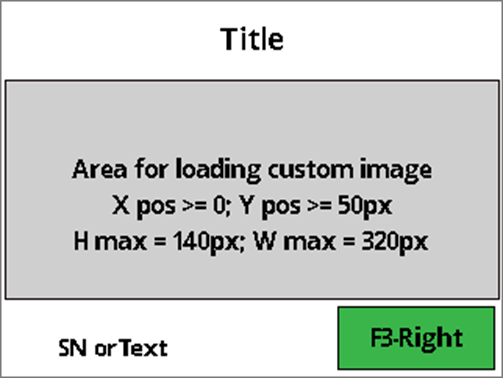
The host uses this option to display a page with the following elements: a title, a section for uploading a custom image, an option at the bottom-left corner to display either the Device Serial Number or host-provided text, and a maximum of one functional green button positioned on the right.
The title and functional button are labeled with String IDs associated with configured String messages. See Table – Default User Interface String IDs and Strings.
When the user presses this button, the device sends a notification to the host to indicate the corresponding button is pressed. See User Interface Host Action Request - Notification 0x1803. After that, the host will decide what to do next.
Recommend maximum number of characters and bitmap image setting for this page:
Title text can fit about:
18 Upper case wide size characters like “WM”
23 Upper case regular size characters like “ABC”
21 lower case wide size characters like “wm”
Bottom left corner text can fit about:
8 Upper case wide size characters like “WM”
12 Upper case regular size characters like “ABC”
Functional button text can fit about:
5 Upper case wide size characters like “WM”
8 Upper case regular size characters like “ABC”
Bitmap image
Maximum width: 320px
Maximum height: 140px
Color depth: 24-bit (True Color, RGB), 16-bit (5:5:5:1, RGB Hi Color), 8-bit (256 Color), 4-bit (16 Color), or 1-bit (monochrome)
Title text can fit about:
13 Upper case wide size characters like “WM”
If the request started successfully, the Request Status in the message wrapper is All good / requested operation was successful.
30 lower case regular size characters like “abc”
15 lower case regular size characters like “abc”
9 lower case regular size characters like “abc”
14 lower case wide size characters like “wm”
20 lower case regular size characters like “abc”
Bottom left corner text can fit about:
8 Upper case wide size characters like “WM”
12 Upper case regular size characters like “ABC”
9 lower case wide size characters like “wm”
15 lower case regular size characters like “abc”
Functional button text can fit about:
4 Upper case wide size characters like “WM”
6 Upper case regular size characters like “ABC”
5 lower case wide size characters like “wm”
7 lower case regular size characters like “abc”
Bitmap image
Maximum width: 240px
Maximum height: 220px
Color depth: 24-bit (True Color, RGB), 16-bit (5:5:5:1, RGB Hi Color), 8-bit (256 Color), 4-bit (16 Color), or 1-bit (monochrome)
1830 = Display Flexible UI Pages (Display Only) - Command 0x1830
81
01
Display Time
0x00 – Infinitive. Device leaves the requested page on the display until the host initiates a change.
0x01 to 0xFF = RFU
B
R
82
01
UI page option
0x00 – Page with up to 5 lines of text and up to 1 functional button Middle. See Tag A1.
0x01 – Page with a title, up to 6 buttons with text, and up to 3 functional buttons. See Tag 83, A2 and A4.
0x02 – Page with a title, up to 6 buttons with $Amount, and up to 3 functional buttons. See Tag 83, A3 and A4.
B
R
83
02
Text String ID for a tile of UI page option: 0x01, 0x02, 0x03 See Table 361 – Default User Interface String IDs and Strings If host wants to disable this title, do not include this tag.
B
O
/81
var
Text string (<= 30 characters) for line 1, end with NULL char. If host wants to disable this line, do not include this tag.
B
O
/82
var
Text string (<= 30 characters) for line 2, end with NULL char. If host wants to disable this line, do not include this tag.
B
O
/83
var
Text string (<= 30 characters) for line 3, end with NULL char. If host wants to disable this line, do not include this tag.
B
O
/84
var
Text string (<= 30 characters) for line 4, end with NULL char. If host wants to disable this line, do not include this tag.
B
O
/85
var
Text string (<= 30 characters) for line 5, end with NULL char. If host wants to disable this line, do not include this tag.
B
O
/86
02
Function button Middle option. String ID = Enable functional button Middle with a String ID associated with a configured String message. See Table XXX – Default User Interface String IDs and Strings When user presses this button, device sends notification to the host to indicate the functional button Middle is pressed. See User Interface Host Action Request - Notification 0x1803 If host wants to disable this button, do not include this tag
B
O
A2
var
Button text String ID parameters for UI page option: 0x01 and 0x02. The parameter in this TLV data object allows the host to enable and disable the data base. When user presses any button, device sends notification to the host to indicate which button is pressed. See User Interface Host Action Request - Notification 0x1803
B
O
/81
02
Text String ID for button 1. See Table XXX – Default User Interface String IDs and Strings. If host wants to disable this button, don’t include this tag.
B
O
/82
02
Text String ID for button 2. See Table XXX – Default User Interface String IDs and Strings. If host wants to disable this button, don’t include this tag.
B
O
/83
02
Text String ID for button 3. See Table XXX – Default User Interface String IDs and Strings. If host wants to disable this button, don’t include this tag.
B
O
/84
02
Text String ID for button 4. See Table XXX – Default User Interface String IDs and Strings. If host wants to disable this button, don’t include this tag.
B
O
/85
02
Text String ID for button 5. See Table XXX – Default User Interface String IDs and Strings. If host wants to disable this button, don’t include this tag.
B
O
/86
02
Text String ID for button 6. See Table XXX – Default User Interface String IDs and Strings. If host wants to disable this button, don’t include this tag.
B
O
A3
var
Button $Amount parameters for UI page option: 0x01, 0x02 The parameter in this TLV data object allows the host to enable and disable the data base for UI page option 0x01 and 0x02 When user presses any button, device sends notification to the host to indicate which amount button is pressed. See User Interface Host Action Request - Notification 0x1803
B
O
/81
04
Value $Amount for button 1. If host wants to disable this button, don’t include this tag.
B
O
/82
04
Value $Amount for button 2. If host wants to disable this button, don’t include this tag.
B
O
/83
04
Value $Amount for button 3. If host wants to disable this button, don’t include this tag.
B
O
/84
04
Value $Amount for button 4. If host wants to disable this button, don’t include this tag.
B
O
/85
04
Value $Amount for button 5. If host wants to disable this button, don’t include this tag.
B
O
/86
04
Value $Amount for button 6. If host wants to disable this button, don’t include this tag.
B
O
A4
var
Functional buttons parameters for UI page option: 0x01 and 0x02. The parameter in this TLV data object allows the host to enable and disable the data base. When user presses any button, the device sends notification to the host to indicate which functional button is pressed. See User Interface Host Action Request - Notification 0x1803
B
O
/81
03
Text String ID and color option for functional button Left. See Table XXX – Default User Interface String IDs and Strings. Byte 0-1: String ID Byte 2: color option 0x00 = red 0x01 = green 0x02 = yellow If host wants to disable this button, don’t include this tag.
B
O
/82
03
Text String ID and color option for functional button Middle. See Table XXX – Default User Interface String IDs and Strings. Byte 0-1: String ID Byte 2: color option 0x00 = red 0x01 = green 0x02 = yellow If host wants to disable this button, don’t include this tag.
B
O
/83
03
Text String ID and color option for functional button Right. See Table XXX – Default User Interface String IDs and Strings. Byte 0-1: String ID Byte 2: color option 0x00 = red 0x01 = green 0x02 = yellow If host wants to disable this button, don’t include this tag.
B
O
A5
var
Parameters for UI page option 0x03 The parameter in this TLV data object allow the host to enable and disable the data base
B
O
/81
02
Text String ID for green functional button Right. See Table XXX – Default User Interface String IDs and Strings. When user presses this button, device sends notification to the host to indicate the functional button Right is pressed. See User Interface Host Action Request - Notification 0x1803 If host wants to disable this button, don’t include this tag.
B
O
/82
02
X Position. If host wants device to display the image in the center of the loading image area, don’t include this tag.
B
O
/83
02
Y Position. If host want device to display the image in the center of the loading image area, don’t include this tag Note: Y pos >= 50px Y pos + Image Height <= 190px Landscape Screen Orientation Y pos + Image Height <= 270px Portrait Screen Orientation
B
O
/84
var
Bitmap Image encoded in full BMP file format as defined by Microsoft (e.g, starting with “BM”) Image Width Max = 320px Landscape Screen Orientation Image Height Max = 140px Landscape Screen Orientation Image Width Max = 240px Portrait Screen Orientation Image Height Max = 220px Portrait Screen Orientation
B
O
/85
var
Bottom left corner option Byte 0 = option
0x00 = Disable
0x01 = show Device Serial Number
0x02 = show text
B
0
A8
Var
Parameters for UI page option 0x06
B
O
/81
2
Image X position (omit for default centered position)
B
O
/82
2
Image Y position (omit for default centered position)
B
O
/83
1
Image ID (for image stored on device). Value is 0-3 for the 4 available image ‘slots’. Must be signed image for touch notifications to be sent. Cannot be used in the same command as /84.
B
O
/84
var
Image data. Image encoded in full BMP file format as defined by Microsoft (e.g, starting with “BM”) OR contents of .bin file for Magtek signed image file. Must be signed .bin data for touch notifications to be sent. Cannot be used in the same command as /83.
B
O
End of any wrappers, at minimum Response Message
1830 = Display Flexible UI Pages (Display Only) - Command 0x1830
No parameters
End of any wrappers, at minimum including Response Message
Beginning of any wrappers, at minimum including Response Message
A1
var
Text string parameters for UI page option: 0x00 The parameter in this TLV data object allow the host to enable and disable the data base for UI page option 0x00
B
Beginning of any wrappers, at minimum including Response Message
AA 00 81 04 01 2C 18 30 84 1A 18 30 81 01 00 82 01 00 83 02 00 05 A1 0C 83 0A 54 48 41
4E 4B 20 59 4F 55 00AA008104822C1830820400000000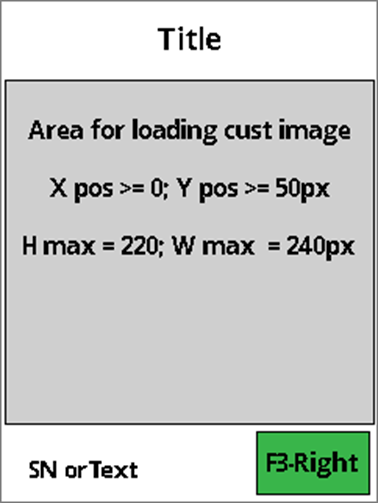
O
0x03 – Page with a title, a custom image, an optional bottom left corner with SN or Text, and up to 1 functional button Right. See Tag 83 and A5.
0x06 – Flexible UI Gen. 2 page. Displays an image and sends touch notifications. See tag 83, A8.
0x03..0x0F = invalid
Byte 1 = length of the text, should be less than 16 characters. Byte 2..N = text string value.