The host uses this command to start sending unsecured files to the device for storage or processing. It is similar to Command 0xD811 - Start Send File to Device (Secured) but is used to send a different subset of file types that do not impact device security. Refer to the About Files to determine which file type can use unsecure command. This command is paired with Start Get File from Device - Command 0xD821, which the host can use to retrieve files. However, some file types are “one way only” and cannot be retrieved using that command after the host sends them to the device.
The sequence of events is as follows:
The host constructs Command 0xD812 - per .
The host sends that command to the device as a Request Message to start the process of uploading a file.
The device sends a Response Message so the host knows it can begin sending the file.
The host sends a Data File Message to the device. If the device does not receive file data within a reasonable period of time, it times out and stops listening for the data file.
The device checks to make sure the File ID and the length and hash of the File Payload match with the values the host specified in this command.
The device repeats the same Response Message, this time with the Message Reference Number set to the same value the host used in the Data File Message.
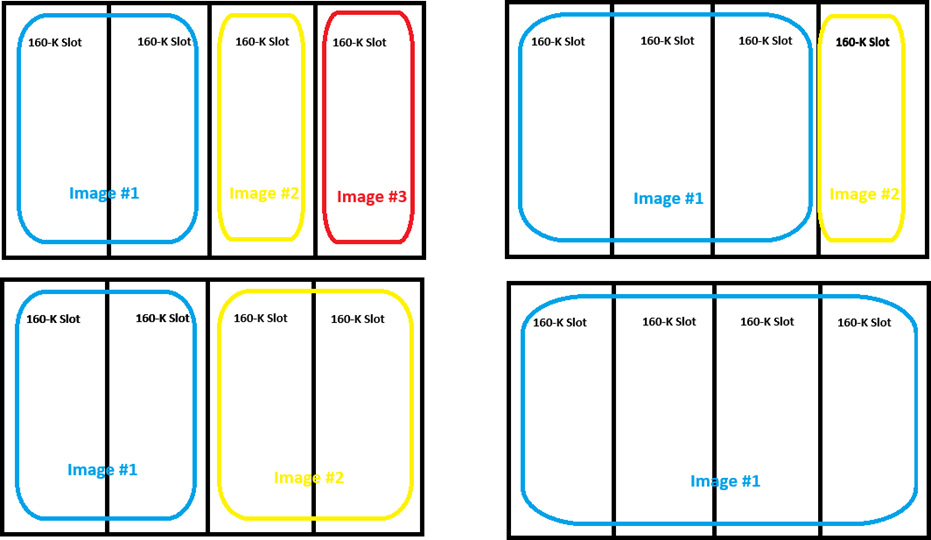
For image data, the file must be either BMP format or Magtek signed image format, maximum 320px by 240px, with color depth 16 color, 256 color, 16-bit color, or 24-bit color. Images smaller than the maximum size are centered on the display. Maximum size is 160KB per slot, but images can span multiple slots as shown below. The maximum sizes for each slot are 640KB for slot 1, 480KB for slot 2, 320KB for slot 3, and 160KB for slot 4. Loading an image that overwrites any portion of an existing image will delete that image.
If the request started successfully, the Request Status in the message wrapper is OK, Started / Running, All good / requested operation was successful.
Beginning of any wrappers, at minimum including Request Message
Beginning of any wrappers, at minimum including Response Message
AA 00 81 04 01 07 D8 12 84 44 D8 12 81 04 02 00 00 00 A2 2B 81 04 00 02 58 38 82 01 04 83 20 D5 B8 BF 2F 3A 15 D9 EE 1D 0D E5 8E DD 68 37 73 18 51 C7 3C 3D 79 58 2B A6 07 90 5C 2B 86 3C E5 A3 0A 81 08 30 32 30 30 30 30 30 30 87 01 01
AA 00 81 04 82 07 D8 12 82 04 00 00 00 00
D812 = Start Send File to Device (Unsecured) - Command 0xD812
81
04
File ID from
B
R
A2
var
File transfer properties
T
R
/81
var
Length of File Payload. This is the length of the File Payload parameter in the Data File Message the host sends to the device.
B
R
/82
01
Hash Checksum Type
0x04 = SHA-256
B
R
/83
20
Hash Checksum
Anticipated checksum calculated against the File Payload, according to the standard specified in Hash Checksum Type.
B
R
A3
var
File Description
The host should populate this value to help identify the file using .
T
R
/81
var
File Name
Maximum length 32 bytes
Reserved for future use. Leave empty.
B
O
Null
/83
var
File Version
Maximum length 7 bytes
Reserved for future use. Leave empty.
B
O
Null
/84
var
File Date
Maximum length 20 bytes
Reserved for future use. Leave empty.
B
O
Null
87
01
Reserved for future use. Leave empty.
B
O
Null
End of any wrappers, at minimum including Request Message
D812 = Start Send File to Device (Unsecured)- Command 0xD812
No parameters.
End of any wrappers, at minimum including Response Message #