> For the complete documentation index, see [llms.txt](https://developer.magtek.com/llms.txt). Markdown versions of documentation pages are available by appending `.md` to page URLs; this page is available as [Markdown](https://developer.magtek.com/api-and-command-reference/dynafamily-programmers-manual/data-types-and-shared-tlv-data-objects/dukpt-key-mapping.md).
# DUKPT Key Mapping
## **Terms and Definitions**
* DUKPT – Derived Unique Key Per Transaction
* OID – Object Identifier
* SRED - Secure Reading and Exchange of Data
There are 7 OIDs defined for these 7 SRED Data IDs.
Each OID value contains a two-byte DUKPT slot ID and a one-byte transformation ID.
## SRED Data IDs and OIDs
| | |
|---|
| SRED Data ID | OID | OID Size |
| 0: Not assigned | N/A | N/A |
| 1: PIN-TDES (supported on PED devices Only) | 0x010102040101 | 3 |
| 2: Account Data | 0x010102040102 | 3 |
| 3: MAC | 0x010102040103 | 3 |
| 4: Magneprint (supported on devices with MSR Only) | 0x010102040104 | 3 |
| 5: MagTek Token | 0x010102040105 | 3 |
| 6: User Data 1 | 0x010102040106 | 3 |
| 7: PIN-AES (supported on PED devices Only) | 0x010102040107 | 3 |
**DUKPT Slot IDs**
The existing TR31 Module supports 32 MagTek DUKPT Slot IDs, from 0x2000 to 0x201F.
The Key Injection Software Tool shall inject DUKPT keys through these DUKPT Slot IDs.
**Transformation IDs**
This is the list of DUKPT transformations defined in both the Legacy and AES specifications.
## Restrictions of a DUKPT Slot ID
#### Transformation IDs for DUKPT Legacy and AES
| | | |
|---|
Transformation ID # | Usage Name | Type | Data for calculation |
| 0 | Reserved | | |
| 1 | PIN Encryption | Legacy | 00 00 00 00 00 00 00 FF |
| 2 | MAC Generate/Verify | Legacy | 00 00 00 00 00 00 FF 00 |
| 3 | MAC Verify | Legacy | 00 00 00 00 FF 00 00 00 |
| 4 | Data Enc/Decryption | Legacy | 00 00 00 00 00 FF 00 00 |
| 5 | Data Encryption | Legacy | 00 00 00 FF 00 00 00 00 |
| 6 | Reserved | | |
| 7 | PIN Encryption | AES | 0x1000 |
| 8 | MAC Generate | AES | 0x2000 |
| 9 | MAC Verify | AES | 0x2001 |
| A | MAC Generate/Verify | AES | 0x2002 |
| B | Data Encryption | AES | 0x3000 |
| C | Data Decryption | AES | 0x3001 |
| D | Data Enc/Decryption | AES | 0x3002 |
## The Definition of Restriction Bitmap
| | | | | | |
|---|
| Bit # | 5 | 4 | 3 | 2 | 1 | 0 |
| Data Type | User Data (RFU) | Token (RFU) | Magneprint | MAC | Account Data | PIN |
During TR31 Key Injection, each DUKPT Slot ID contains a parameter indicates the purpose of a Key Set.
* Example 1: The restriction value is 0x3F
* This Key Set can be used for all purposes.
* Example 2: The restriction value is 0x3E
* This Key Set can be used for all purposes, except PIN Encryption.
* Example 3: The restriction value is 0x01
* This Key Set can be used for PIN Encryption only.
## The Rules of Key Mapping
SRED Data ID map configuration values (Slot ID and Transformation ID) must be checked and rejected if they don’t meet the following conditions.
* The DUKPT Slot ID must be loaded. (Table - Settings of Injected DUKPT Slot IDs)
* The loaded DUKPT Slot ID must allows this type of SRED Data ID. (Table - The Definition of Restriction Bitmap).
* The transformation must be allowed by Table - Allowed Key Mapping Table.
## The settings of DUKPT Slot IDs injected through TR31
Here is the list of parameters of 4 DUKPT Slot IDs based on the existing Key Injection Tool.
## Settings of Injected DUKPT Slot IDs
| | |
|---|
| DUKPT Slot ID | Key Type | Restrictions |
| DKPTM0-2000 | TDES | 0x3E |
| DKPTM2-2002 | AES-128 | 0x3F |
| DKPTM3-2003 | AES-256 | 0x3F |
| DKPTM7-2007 | TDES | 0x3F |
## Allowed Key Mapping Table
| | | |
|---|
SRED Data ID | Data Type (Working Key Purpose) | Allowed Legacy DUKPT Transforms | Allowed AES DUKPT Transforms |
| 0 | Not assigned | - | - |
| 1 | PIN-TDES (supported on PED devices Only) | 01 | Not allowed |
| 2 | Account Data | 01, 04, 05 | 0B, 0D |
| 3 | Transaction MAC | 02 | 08, 0A |
| 4 | MagnePrint (supported on devices with MSR Only) | 01, 04, 05 | 0B, 0D |
| 5 | MagTek Token (RFU) | RFU | RFU |
| 6 | User Data #1 (RFU) | RFU | RFU |
| 7 | PIN-AES (supported on PED devices Only) | Not allowed | 07 |
| … | RFU | - | - |
{% hint style="info" %}
**Note**: If SRED Data ID 2 and 4 are mapped to the same Key Set, then they must have the same Transformation ID.
{% endhint %}
If the Transformation ID of the latest key mapping request is different, then the original OID setting of the other SRED Data ID will be forced to match the latest OID setting. For example, SRED Data ID 2 has been mapped to 0x2007 0x04, user wants to map SRED Data ID 4 to 0x2007 0x05, then the OID setting of SRED Data ID 2 will be forced to 0x2007 0x05.
## **Examples of Key Mapping**
The following OID Values indicate that:
* 200701: Map PIN-TDES to DKPTM7-2007 PIN Encryption Variant.
* 20020B: Map Account Data to DKPTM2-2002 Data Encryption Usage.
* 200702: Map MAC to DKPTM7-2007 MAC Generate/Verify Variant.
* 20030B: Map MangePrint to DKPTM3-2003 Data Encryption Usage.
* 000004: MagTek Token is RFU, 0000 ID does not exist (this is default value).
* 000004: User Data is RFU, 0000 ID does not exist (this is default value).
* 200207: Map PIN-AES to DKPTM2-2002 PIN Encryption Usage.
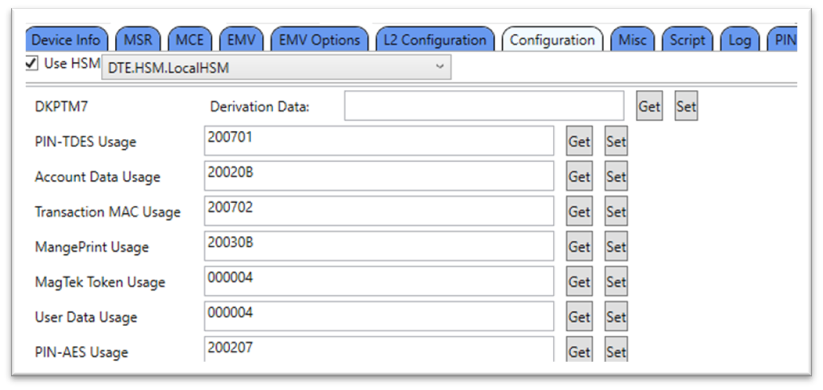
Figure 1 - Configuration Usage Values
---
# Agent Instructions
This documentation is published with GitBook. GitBook is the documentation platform designed so that both humans and AI agents can read, navigate, and reason over technical content effectively. Learn more at gitbook.com.
## Querying This Documentation
If you need additional information that is not directly available in this page, you can query the documentation by asking a question.
Perform an HTTP GET request on the following URL with the `ask` and `goal` query parameters:
```
GET https://developer.magtek.com/api-and-command-reference/dynafamily-programmers-manual/data-types-and-shared-tlv-data-objects/dukpt-key-mapping.md?ask=&goal=
```
`ask` is the immediate question: it should be specific, self-contained, and written in natural language.
`goal` is what the user is ultimately trying to achieve, the reason they need the answer. Sharing it helps GitBook give you a better, more relevant answer. A goal is most helpful when it describes the outcome the user wants rather than restating the question. For example, with `ask=how do I create an API token`, a goal like `automate deployments from our CI pipeline` lets GitBook tailor the answer to that use case.
The response will contain a direct answer to the question and relevant excerpts and sources from the documentation.
Use this mechanism when the answer is not explicitly present in the current page, you need clarification or additional context, or you want to retrieve related documentation sections.