For the complete documentation index, see llms.txt. This page is also available as Markdown.

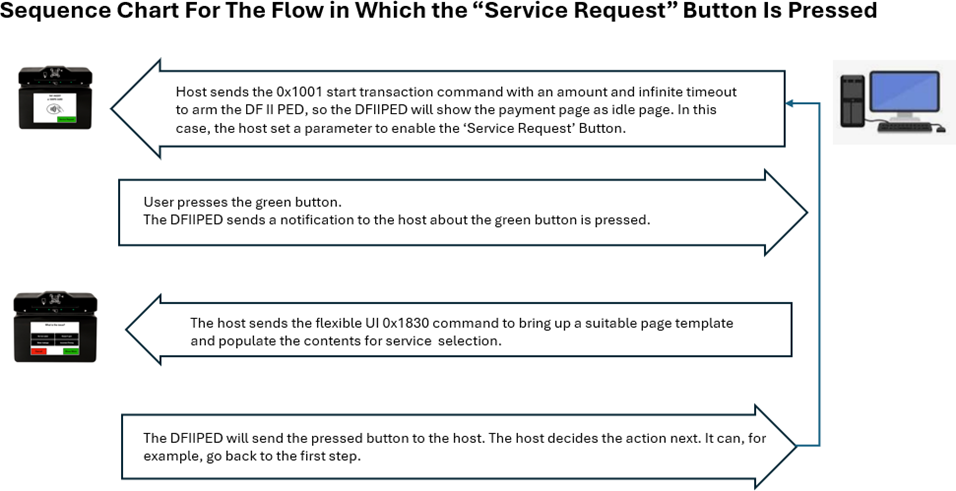
Display Flexible UI Pages (Display Only) - Command 0x1830

This command allows the host to bring up standalone pages. A page is considered standalone if it’s stateless, meaning it will be:

  • Shown on the display.

  • Can allow user input.

  • Returns user input result to the host.

  • Operation ends.

Request Data for Command 0x1831

Tag
Len
Value / Description
Typ
Req
Default

1830 = Display Flexible UI Pages (Display Only) - Command 0x1830

81

01

Display Time

  • 0x00 – Infinite. Device leaves the requested page on the display until the host initiates a change.

B

R

82

01

UI page option

  • 0x00 – Enter Sale Amount page. Device responds with User Interface Host Action Request with ‘Touchscreen, $Amount button selected’ content - Notification 0x1803.

B

R

Request Example – (Display Enter Sale Amount Page)

Example (Hex)

AA 00 81 04 01 2C 18 31 84 08 18 31 81 01 00 82 01 00

Response Example

Example (Hex)

AA 00 81 04 82 2C 18 31 82 04 00 00 00 00

A diagram of a device Description automatically generated
A screenshot of a diagram Description automatically generated

Sequence for Flexible UI Gen. 2 mode

The host sends the 0x1830 command with UI Page Option set to 0x06 (Flexible UI Gen. 2 page), which displays a bitmap. The device sends User Event Notifications for each tap on the touchscreen (requires signed image).

The host uses this command to display Flexible UI pages in the following layout:

Last updated